How to Find Company Information in 2026: A Practical Guide
Registries, databases, enrichment APIs, and plain web research all claim to tell you who a company is. Here's what each source actually gets right, what it quietly gets wrong, and the workflow that gets you a usable company profile in under ten minutes.
TL;DR
- The fastest way to find company information is to match the question to the source. Free public registries (SEC EDGAR, Companies House, OpenCorporates) are the only authoritative record for legal entity data. They tell you almost nothing about headcount, tech stack, or who to contact.
- Paid B2B databases are fast and broad. But roughly 25–30% of B2B contact records go stale every year, so freshness beats raw record count.
- For private companies, the highest-signal free sources are the careers page, the terms of service, and the LinkedIn employee count. Not the "About us" page.
- A repeatable workflow beats a single magic tool: identify the legal entity → confirm the domain → pull firmographics → enrich contacts → verify before you send.
- Budget under $100/month? Pair free registries with a per-lookup enrichment API. A full seat-based data platform is overkill at that size.
You need to find company information for one of three reasons: you're prospecting, you're doing due diligence, or you want to check that the entity on an invoice is real. Each reason needs a different source. Most articles on this topic dump 40 tool logos on you and never say which one answers which question.
This guide splits them up. We'll cover what "company information" is actually made of. We'll show which sources are authoritative for each slice. We'll compare the free and paid options honestly. And we'll give you an order of operations, so you stop paying for data you could have read off a public filing in 30 seconds.
What counts as "company information" anyway?#
The phrase hides at least five distinct data types. No single source covers all of them well. Sort your question into the right bucket first — it's the biggest time-saver in company research.
- Legal identity — registered name, company number, jurisdiction, incorporation date, registered address, officers, filing status. Authoritative source: the national registry. Nothing else is a substitute.
- Firmographics — industry code, employee count, revenue band, HQ and office locations, founding year. Best source: a paid B2B database, cross-checked against LinkedIn.
- Financial signals — funding rounds, investors, valuation, filed accounts, credit rating. Use Crunchbase or PitchBook for venture-backed firms, the registry for filed accounts, and credit bureaus for risk.
- Technographics — what the company runs: CRM, cloud provider, analytics, payment processor, e-commerce platform. Best source: a tech-detection scan of the live site.
- Contact data — the people, their roles, work emails, direct dials. Best source: an email finder or enrichment API, then a verification step.
Most company research fails on a category error. Someone tries to confirm a legal entity from a sales database. That's wrong: databases inherit registry errors and add their own. Or someone pulls headcount from a registry. Also wrong: filings lag by up to 18 months.

Where can you find company information for free?#
Free sources are stronger than most people assume for legal and financial data. They are weaker than most people assume for anything human-scale.
Government registries. In the US, SEC EDGAR full-text search covers every public filer. You get 10-Ks, 8-Ks, S-1s, and the exhibits. The exhibits are where customer concentration, segment revenue, and named executives hide.
In the UK, Companies House publishes officers, shareholdings, charges, and filed accounts for every registered company. It is free, and you don't need an account.
For cross-border work, OpenCorporates folds 200+ registries into one searchable index. It is the fastest way to find company information about subsidiaries across jurisdictions.
The company's own site, read adversarially. The About page is marketing. These pages are not:
- /careers or the job board — open roles reveal team structure, tooling ("experience with HubSpot and Segment"), and expansion plans. They beat any press release.
- /terms and /privacy — the legal entity name, registered address, and jurisdiction live here. So does the sub-processor list, which is really their vendor stack.
- /security or /trust — SOC 2 status, hosting provider, data residency.
- Status page and docs subdomain — a quick read on whether they have a real product org.
LinkedIn. The employee count on a company page is self-reported, but it tracks reality closely. The 12-month headcount trend is a better growth signal than any funding announcement. Filter employees by function and you get a rough org chart for free.
Press and directories. Crunchbase's free tier covers funding basics. G2 and Capterra show customer counts, review velocity, and who the company is compared against. Check G2's category grids before you take a vendor's own copy at face value.
The catch: none of this scales. It takes 10–20 minutes to find company information this way, per company. That's fine for 5 accounts. It's impossible for 500.
Which paid company data sources are actually worth paying for?#
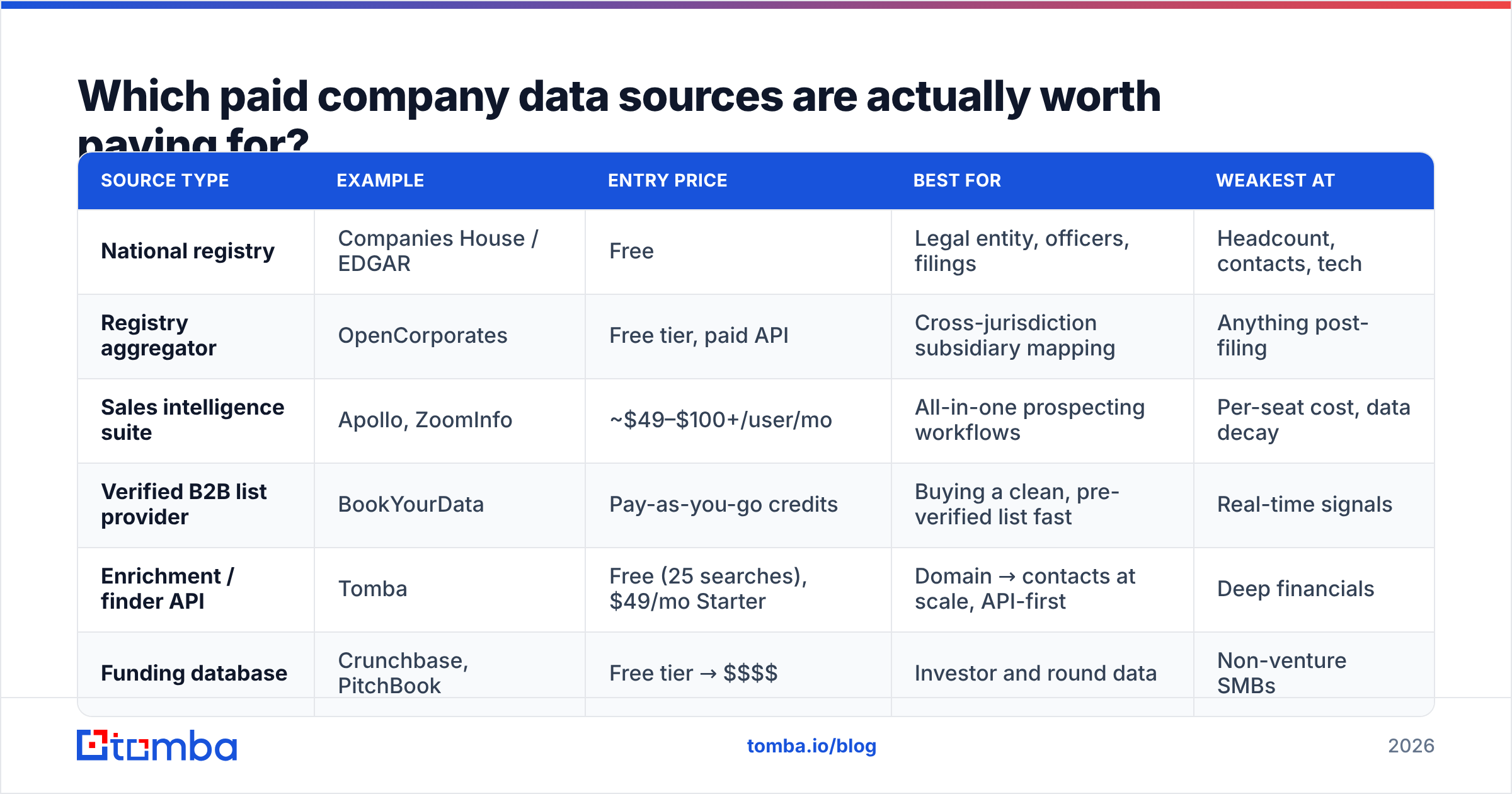
Here's the honest comparison. Prices are entry-level list prices at the time of writing. All of these vendors negotiate at volume.
| Source type | Example | Entry price | Best for | Weakest at |
|---|---|---|---|---|
| National registry | Companies House / EDGAR | Free | Legal entity, officers, filings | Headcount, contacts, tech |
| Registry aggregator | OpenCorporates | Free tier, paid API | Cross-jurisdiction subsidiary mapping | Anything post-filing |
| Sales intelligence suite | Apollo, ZoomInfo | ~$49–$100+/user/mo | All-in-one prospecting workflows | Per-seat cost, data decay |
| Verified B2B list provider | BookYourData | Pay-as-you-go credits | Buying a clean, pre-verified list fast | Real-time signals |
| Enrichment / finder API | Tomba | Free (25 searches), $49/mo Starter | Domain → contacts at scale, API-first | Deep financials |
| Funding database | Crunchbase, PitchBook | Free tier → $$$$ | Investor and round data | Non-venture SMBs |
One structural difference matters most: seat-based platforms bill per user, credit-based tools bill per lookup. Say three people each need 200 lookups a month. A $99/user platform costs $297. 600 credits on a per-lookup tool cost a fraction of that. If twelve reps live in the tool all day, the platform wins.
Check the Tomba pricing tiers against your real monthly volume before you assume you need a suite. Free covers 25 searches a month, Starter is $49/mo, Growth $99/mo, and Pro $249/mo.
How do you find information on a private company?#
Private companies don't file the good stuff, so you triangulate. To find company information on a private business, work through five signals, ordered by reliability:
- Headcount trend — LinkedIn employee count now versus 12 months ago. A 40% jump means budget exists. A 15% drop means a hiring freeze, and probably a buying freeze too.
- Job postings — count open roles against headcount, and note which functions. Six open SDR roles means an outbound motion is being built. Two open compliance roles point to an audit or an enterprise push.
- Filed accounts, where the jurisdiction requires them — the UK, Ireland, and much of the EU make even small private companies file short accounts. You get a real balance sheet, roughly 9–18 months late.
- Tech stack — what they run tells you what they spend. A company on Salesforce, Marketo, and Snowflake has a different budget than one on free HubSpot and Google Sheets. A website tech stack check answers this in seconds.
- Domain and entity linkage — the trading name is rarely the registered name. Resolve one to the other with a website-to-company lookup before you search a registry. Skip it and you'll get zero results for a company that clearly exists.
The order matters. Headcount and hiring beat press coverage every time, because press coverage is bought and headcount isn't.
Why is most company data wrong, and how wrong is it?#
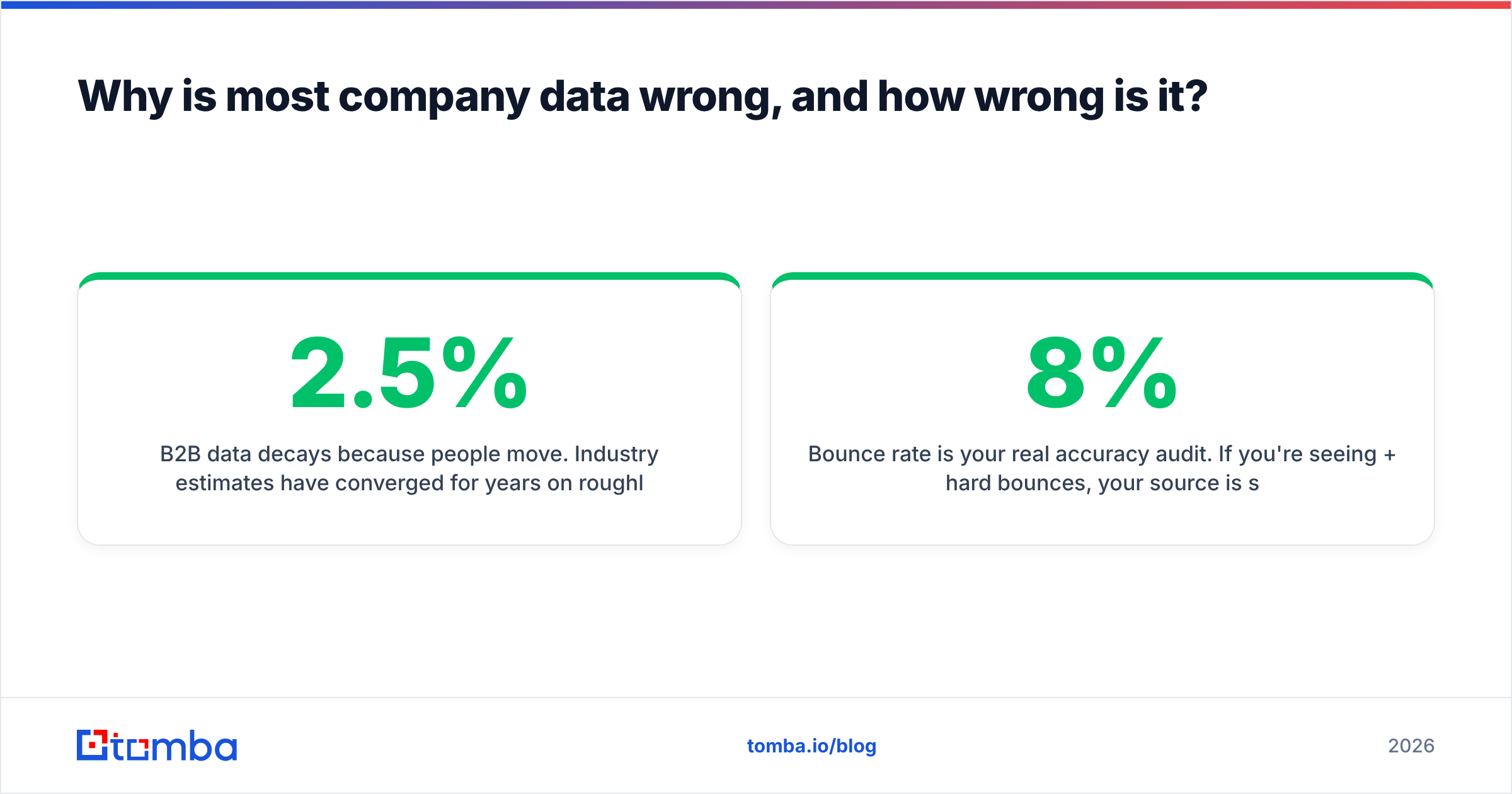
B2B data decays because people move jobs. Industry estimates have agreed for years on a rough figure: 2–2.5% of B2B contact records go stale every month. That compounds to 25–30% a year. Job changes, restructures, domain moves after an acquisition, and new email formats all break records that were accurate when collected.
That has three practical consequences:
- Record count is a vanity metric. "200 million contacts" says nothing about whether the 40 you need are current. Ask about refresh cadence instead.
- A database's age is invisible in the UI. Every record looks equally confident. The only defence is to verify at the point of use, not at the point of purchase.
- Bounce rate is your real accuracy audit. Hard bounces above 8% mean your source is stale, whatever its marketing page claims. A verified list should come in under 2%.

So the last step in any workflow to find company information is a verification pass. Run the addresses you found through an email verifier before you send. It catches records that decayed between collection and use. It also catches catch-all domains, which return "valid" from naive SMTP checks and then bounce anyway.
What's the fastest repeatable workflow?#
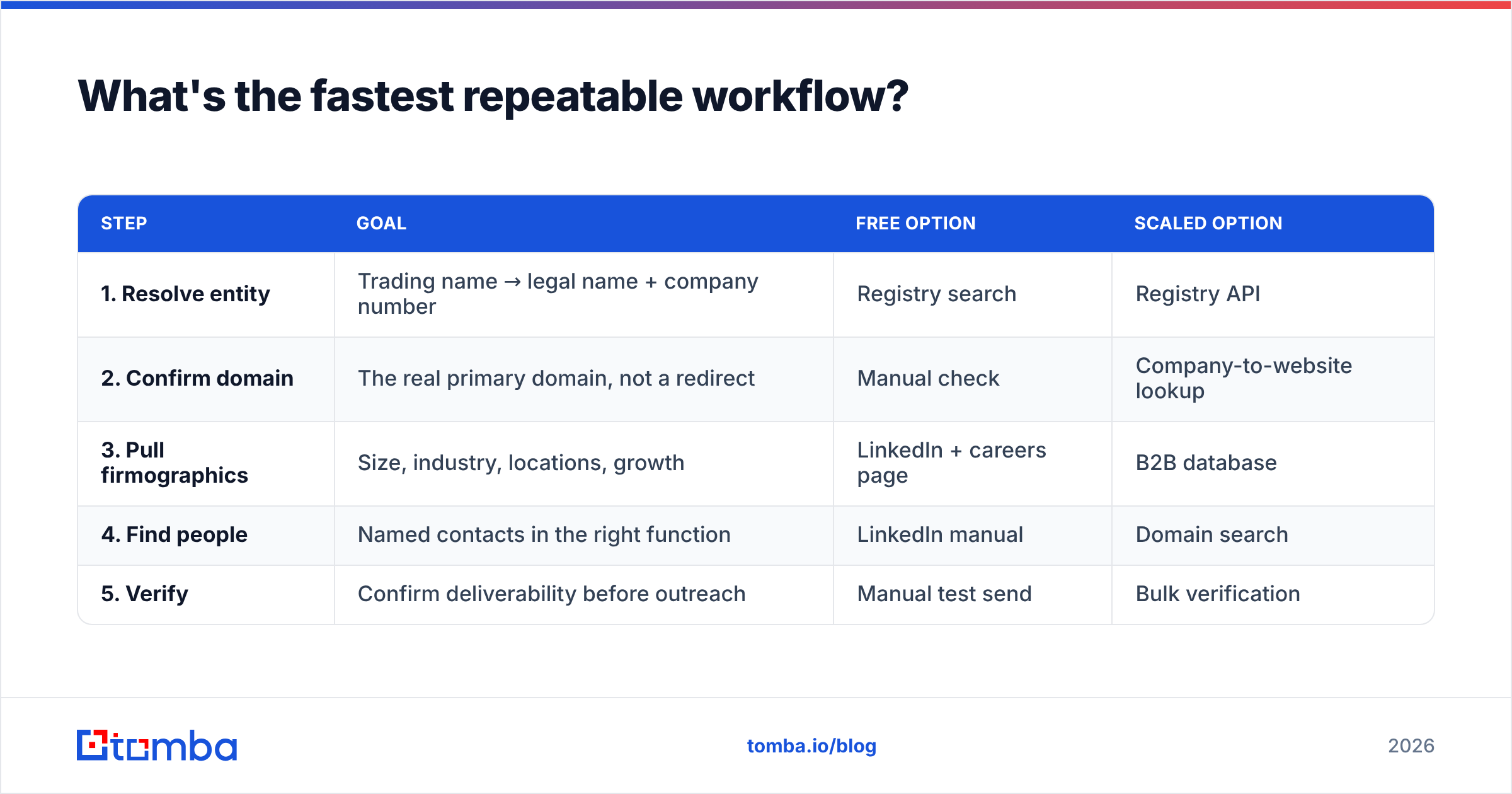
Five steps. Roughly eight minutes per company by hand, and near-instant through an API. This is the loop we use to find company information end to end.
| Step | Goal | Free option | Scaled option |
|---|---|---|---|
| 1. Resolve entity | Trading name → legal name + company number | Registry search | Registry API |
| 2. Confirm domain | The real primary domain, not a redirect | Manual check | Company-to-website lookup |
| 3. Pull firmographics | Size, industry, locations, growth | LinkedIn + careers page | B2B database |
| 4. Find people | Named contacts in the right function | LinkedIn manual | Domain search |
| 5. Verify | Confirm deliverability before outreach | Manual test send | Bulk verification |
Two notes on execution.
Step 2 is the one everyone skips and everyone regrets. Acquisitions leave old domains redirecting for years. Enrich against oldbrand.com when the mail now flows through newparent.com, and every address you find is well-formed and dead.
Step 4 should return patterns, not guesses. A good domain search hands you more than addresses. It tells you the company's email format (first.last@, flast@, first@) and how confident it is. Once you know the pattern and have a verified name, you can build addresses for people no database has seen yet. That's how you reach the VP who started three weeks ago.
The manual loop breaks down across hundreds of accounts. At that point a data enrichment step in your CRM, or an API call in your ingestion pipeline, replaces the browser tabs. The Tomba API exposes domain search, email finding, and verification as separate endpoints. You slot in the piece you're missing instead of replacing your stack.
Free vs paid: which should you actually choose?#
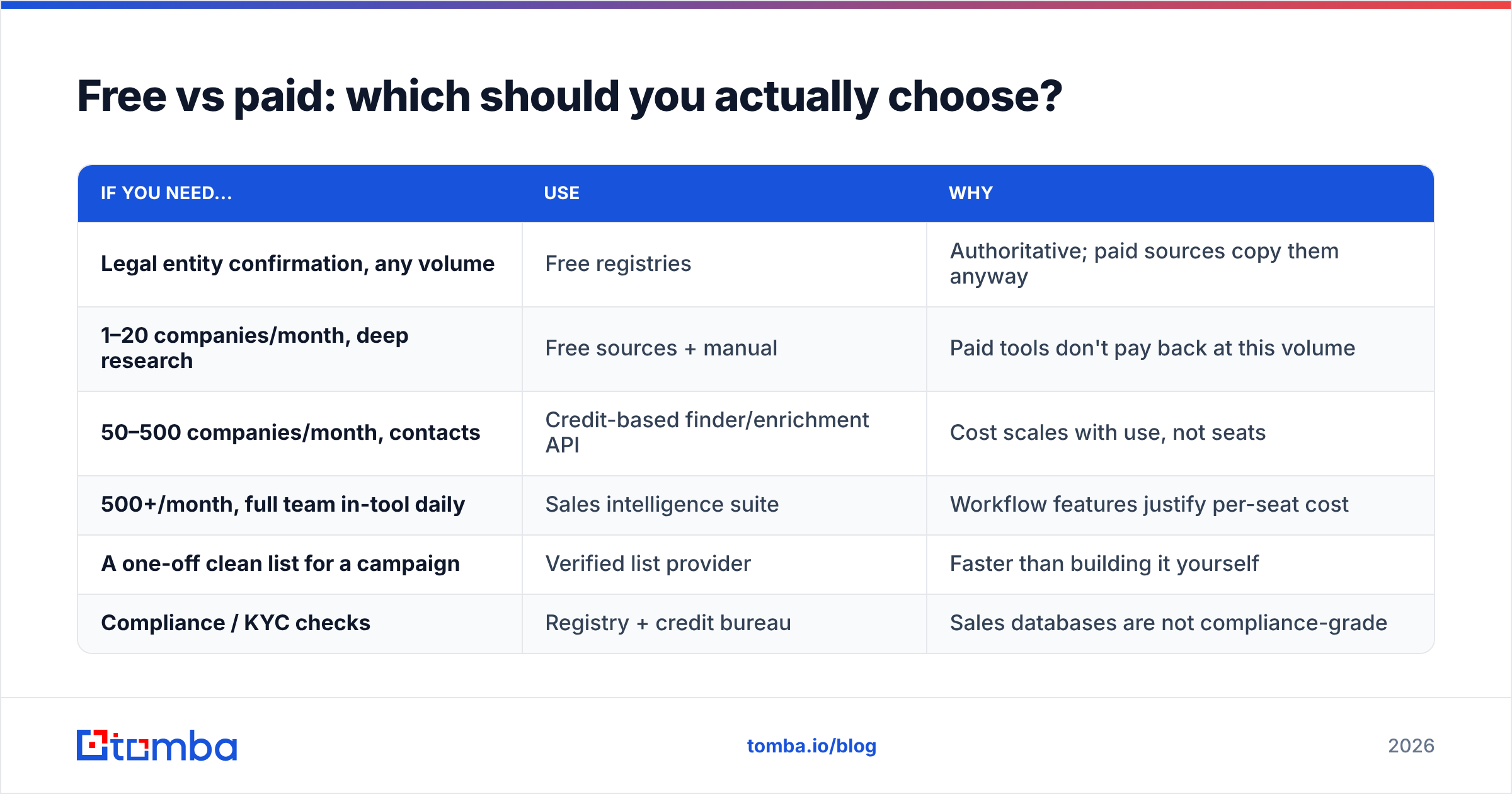
Decide on volume and question type, not budget. If you only need to find company information for a handful of accounts a month, the free layer is enough.
| If you need... | Use | Why |
|---|---|---|
| Legal entity confirmation, any volume | Free registries | Authoritative; paid sources copy them anyway |
| 1–20 companies/month, deep research | Free sources + manual | Paid tools don't pay back at this volume |
| 50–500 companies/month, contacts | Credit-based finder/enrichment API | Cost scales with use, not seats |
| 500+/month, full team in-tool daily | Sales intelligence suite | Workflow features justify per-seat cost |
| A one-off clean list for a campaign | Verified list provider | Faster than building it yourself |
| Compliance / KYC checks | Registry + credit bureau | Sales databases are not compliance-grade |
The mistake is buying tier four while you operate at tier two. A $12,000-a-year contract to research 30 accounts a month is a rounding error of value. A $49/month tool plus twenty minutes of registry searching does the same job.
What should you never trust without a second source?#
Four fields are wrong often enough to cross-check every time:
- Employee count. Databases mix legal-entity headcount, global headcount, and LinkedIn self-reports. Gaps of 3–5x on the same company are common.
- Revenue. For private companies this is nearly always modelled, not reported. Treat it as a band, never a number.
- Industry classification. SIC and NAICS codes are set at incorporation and rarely updated. A company that moved from agency to SaaS five years ago still reads as "advertising services."
- HQ location. The registered address is not the operational HQ. Neither is the place the person you're emailing actually sits. Registered addresses are often an accountant's office.
If a decision rests on one of these four, get it from two independent sources — or get it from the company.
Bringing it together#
Learning to find company information is a sequencing problem more than a tooling problem. Registries own legal truth. The careers page and the terms of service own operational truth. Databases own scale. Verification tells you whether any of it is still true today. Skip a layer and one of two things happens. You pay for data you could have read for free. Or you send 400 emails to a domain that stopped accepting mail in 2024.
Start with the free layer for the handful of accounts that matter most. Add a credit-based enrichment step once your volume passes about 50 companies a month. And put verification at the end of every path. It is the only step that tests whether the rest of the work survived contact with reality.
Ready to turn a list of company domains into named, verified contacts? Start with the Tomba Email Finder. Drop in a domain and a name. You get the address, a confidence score, and the company's email pattern, verified in the same pass. The free tier gives you 25 searches a month, no credit card, so you can test it on companies where you already know the answer.
Related guides#
Ready to find emails that actually work?
Join 150,000+ professionals who stopped guessing and started sending. Free credits on signup — no credit card required.
Get the Tomba newsletter
Practical outbound tactics and product updates — once every two weeks.
About the author