How to Find Ecommerce Leads in 2026: A Practical Guide
Most ecommerce lead lists are 40% dead on arrival. Here is the source stack, the filters, and the verification order that produce a list you can actually email in 2026.
TL;DR
- Ecommerce prospecting fails at the targeting layer, not the outreach layer. A list of "Shopify stores" is not an ICP — revenue band, tech stack, category, and hiring signals are.
- Tech-stack detection (Shopify, Klaviyo, Gorgias, Recharge) is the single highest-signal filter available for ecommerce, because it tells you what a brand already pays for.
- Buying a prebuilt list and building your own are not competing strategies. Prebuilt gets you volume fast; self-built gets you signal-matched accounts you can defend in a first call.
- Contact discovery inside DTC brands is harder than in SaaS: teams are small, titles are fuzzy, and the decision maker is often the founder. Domain-level search beats title-based search here.
- Verify before you send, not after. Ecommerce domains are heavy on catch-all and role addresses, and a 6% bounce rate will cost you the mailbox faster than a bad subject line.
What actually counts as an ecommerce lead?#
An ecommerce lead is a brand that sells physical or digital goods online and shows evidence it can buy what you sell. The second half is where most lists collapse.
Think of it like fishing. "Shopify store" tells you there are fish in the lake. It doesn't tell you the fish are hungry, big enough to keep, or legal to catch. A store doing $12k/month in revenue and a store doing $4M/year both show up as "Shopify" in every scraper on the market, but only one of them will pay $2,000/month for a retention agency.
So a usable ecommerce lead record has four layers:
- Firmographics — domain, brand name, country, category (apparel, supplements, home, beauty), estimated revenue band, headcount.
- Technographics — platform (Shopify, WooCommerce, BigCommerce, Magento, custom), plus the apps bolted on: email service provider, helpdesk, subscription, reviews, page builder, 3PL.
- Behavioral signals — recent funding, new job posts, a fresh rebrand, a new market launch, ad spend appearing on the Meta Ad Library, a store migrating platforms.
- Contact data — a named human, their role, a verified email address, and ideally a phone number.
Miss layer 2 and 3, and you are cold emailing a lake. Include them, and your first line writes itself: "Saw you're running Klaviyo but still on Gorgias free tier at ~40 tickets/day..."
Where do ecommerce leads actually live in 2026?#
There is no single database of ecommerce brands, and anyone selling you one is selling you a scrape. What exists instead is a set of overlapping sources, each with a different bias.
Platform-native directories. Shopify's app store and partner directories, BigCommerce's, and WooCommerce showcase pages leak thousands of live store domains. Bias: skews toward brands that opt into visibility.
Technology detection crawlers. Services that fingerprint what runs on a domain. This is where you get "stores running Recharge but not Loop." Bias: crawl freshness varies wildly; a store that churned off Klaviyo three months ago may still show as a customer.
Marketplace and aggregator surfaces. Amazon brand registry names, Etsy top sellers, Faire wholesale listings, TikTok Shop sellers. Bias: heavy on small operators.
Ad libraries. If a brand is spending on Meta or Google, it has budget and a growth mandate. This is the strongest "they have money right now" signal in the entire category, and it's free to query.
Review and software marketplaces. G2 and Capterra reviewer profiles tell you which ecommerce brands adopted which tools and how they felt about them. A one-star review of a competitor is the warmest cold lead in existence.
Job boards. A DTC brand hiring a "Retention Marketing Manager" has just admitted, in public, that retention is broken and funded.
Prebuilt B2B lists. Vendors like BookYourData sell pay-as-you-go ecommerce contact lists with filters for industry, geography, and seniority. Useful when you need coverage this week rather than precision next month.

Which data source should you use to find ecommerce leads?#
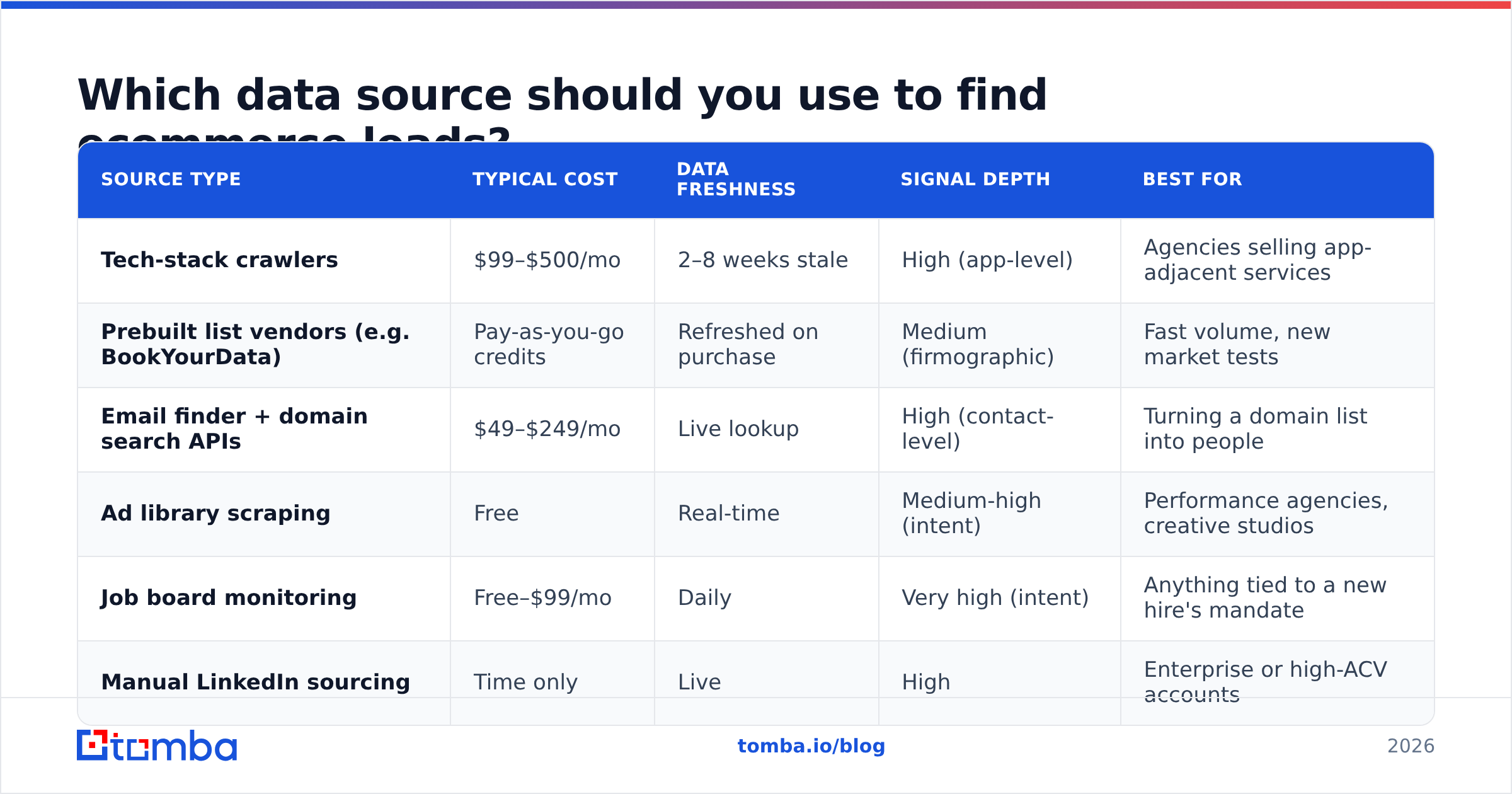
Here is how the main approaches compare on the dimensions that actually affect pipeline.
| Source type | Typical cost | Data freshness | Signal depth | Best for |
|---|---|---|---|---|
| Tech-stack crawlers | $99–$500/mo | 2–8 weeks stale | High (app-level) | Agencies selling app-adjacent services |
| Prebuilt list vendors (e.g. BookYourData) | Pay-as-you-go credits | Refreshed on purchase | Medium (firmographic) | Fast volume, new market tests |
| Email finder + domain search APIs | $49–$249/mo | Live lookup | High (contact-level) | Turning a domain list into people |
| Ad library scraping | Free | Real-time | Medium-high (intent) | Performance agencies, creative studios |
| Job board monitoring | Free–$99/mo | Daily | Very high (intent) | Anything tied to a new hire's mandate |
| Manual LinkedIn sourcing | Time only | Live | High | Enterprise or high-ACV accounts |
The practical answer for most teams is a two-layer stack: one source that produces domains at volume (crawler, ad library, or prebuilt list), and one source that turns those domains into verified humans. Nobody sells both well. Trying to buy a single tool that does both is how you end up paying $800/month for a database that's 30% wrong in both directions.
How do you build an ecommerce lead list step by step?#
This is the workflow that survives contact with a real quarter. Five steps, in order — skipping any of them shifts cost downstream.
- Define the disqualifiers before the qualifiers. Write down what makes a store not a fit: under $500k/year revenue, no email tool installed, dropshipping catalog, no ads running, based outside your service region. Disqualifiers are faster to apply and cut list size by 60–80% before you spend a credit.
- Collect domains, not contacts. Pull 500–2,000 store domains from your volume source. At this stage you want a single column: the root domain. Everything else is enrichment.
- Enrich the domain layer. Attach platform, apps, estimated revenue, category, and country. Now apply your disqualifiers. A 2,000-domain raw pull typically survives down to 300–600 real targets.
- Find the people. Run the surviving domains through a domain search to get every public address pattern and named contact on that domain, then narrow to the roles that matter. For a 12-person DTC brand this is usually founder, head of ecommerce, and head of marketing — that's it.
- Verify and segment. Run email verification on the full set, drop anything that isn't deliverable, and split the survivors into 2–3 segments by signal so your copy can differ. One message for "hiring a retention manager," another for "running ads but no post-purchase flow."
The whole loop is roughly 90 minutes of work for a 500-account list once you've done it twice. The temptation is to skip step 1 and 3 because they feel like overhead. They are the steps that make step 5 cheap.
How do you find the right contact inside an ecommerce brand?#
Ecommerce org charts do not look like SaaS org charts. A $6M/year DTC brand might have nine employees, three of whom are contractors, and the person who decides on your $3k/month contract is the co-founder answering support tickets at 11pm.
That breaks title-based prospecting. Searching for "VP of Marketing at ecommerce companies" returns a population that mostly works at large retailers, not the mid-market brands where deals close in two calls.
Three tactics work better:
Go domain-first. Instead of searching people and filtering to companies, search the company and enumerate the people. A domain search on tomba.io returns the addresses associated with a domain plus the detected email pattern — {first}@brand.com versus {first}.{last}@brand.com — which lets you construct addresses for people you found on LinkedIn but couldn't get an email for.
Use the pattern, then verify. Once you know a brand uses first@, you can generate candidate addresses for any named employee and verify them in bulk. This is dramatically cheaper than paying per-contact database lookups on small companies that databases cover poorly.
Treat founders as the default. For brands under roughly 25 employees, the founder is the correct first touch. For 25–150, go to the functional head. Above that, you're in retail enterprise and should be running a normal multi-threaded motion.
An email finder that takes a first name, last name, and domain covers the second and third cases; domain search covers the first. Between them you rarely need a per-seat contact database at all for this segment.
Why does verification matter more in ecommerce than elsewhere?#
Because ecommerce domains are unusually messy.
Small brands use Google Workspace with aggressive catch-all configurations, which means the mail server accepts everything and tells you nothing. Founders spin up hello@, support@, wholesale@, and press@ on day one and abandon half of them. Agencies and freelancers churn through brand addresses. Store domains get parked, migrated, or rebranded, and old addresses die silently.
The practical consequences:
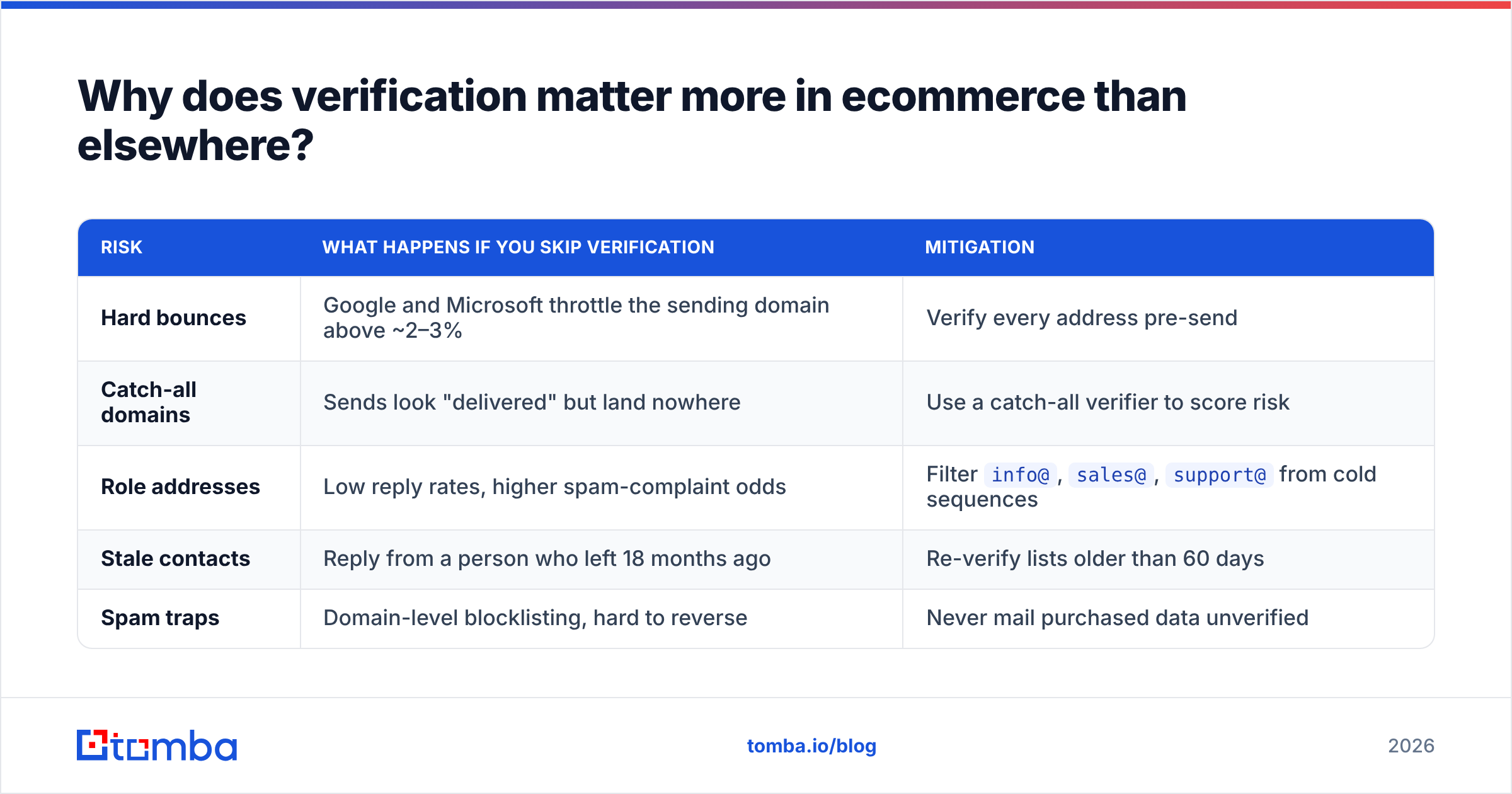
| Risk | What happens if you skip verification | Mitigation |
|---|---|---|
| Hard bounces | Google and Microsoft throttle the sending domain above ~2–3% | Verify every address pre-send |
| Catch-all domains | Sends look "delivered" but land nowhere | Use a catch-all verifier to score risk |
| Role addresses | Low reply rates, higher spam-complaint odds | Filter info@, sales@, support@ from cold sequences |
| Stale contacts | Reply from a person who left 18 months ago | Re-verify lists older than 60 days |
| Spam traps | Domain-level blocklisting, hard to reverse | Never mail purchased data unverified |
The rule that keeps mailboxes alive: no address enters a sequence without a fresh deliverability check. If you're mailing more than a few hundred contacts at a time, run them through a bulk verify pass in one batch rather than trusting whatever the source vendor claimed. Vendor-claimed accuracy and independently measured accuracy are different numbers, always.
Google's and Microsoft's 2024 bulk-sender requirements made this non-negotiable — HubSpot's deliverability documentation and every major ESP now treat list hygiene as a prerequisite rather than an optimization.

What does an ecommerce lead list actually cost?#
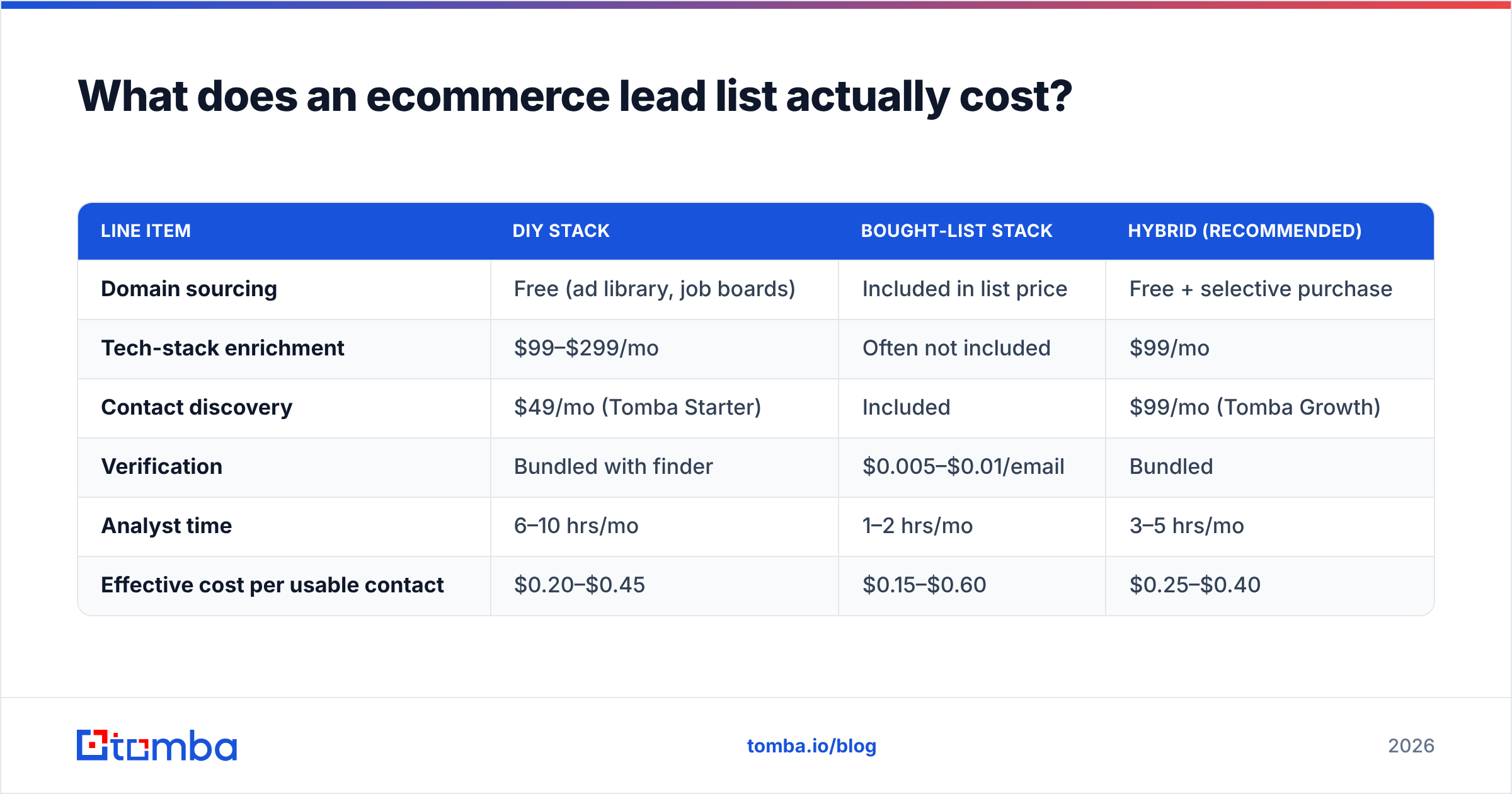
Budget math, for a team building 500 verified contacts per month:
| Line item | DIY stack | Bought-list stack | Hybrid (recommended) |
|---|---|---|---|
| Domain sourcing | Free (ad library, job boards) | Included in list price | Free + selective purchase |
| Tech-stack enrichment | $99–$299/mo | Often not included | $99/mo |
| Contact discovery | $49/mo (Tomba Starter) | Included | $99/mo (Tomba Growth) |
| Verification | Bundled with finder | $0.005–$0.01/email | Bundled |
| Analyst time | 6–10 hrs/mo | 1–2 hrs/mo | 3–5 hrs/mo |
| Effective cost per usable contact | $0.20–$0.45 | $0.15–$0.60 | $0.25–$0.40 |
Two things stand out. First, the sticker price differences between approaches are smaller than they look once you price analyst hours. Second, the variable that moves cost-per-usable-contact most is not the tool — it's your disqualifier discipline. A team that filters hard pays less per usable contact on any stack. A team that doesn't pays for enrichment on accounts it will never sell.
For reference on the contact-discovery line, Tomba pricing runs a free tier at 25 searches/month, Starter at $49/mo, Growth at $99/mo, and Pro at $249/mo, with verification included rather than metered separately — which matters when your workflow verifies everything by default.
What mistakes kill ecommerce prospecting?#
Treating "uses Shopify" as an ICP. Roughly five million stores run on Shopify. Platform is a starting filter, never a targeting strategy.
Buying 50,000 contacts because the per-record price was low. You cannot personalize 50,000 records, and you cannot send to them without burning domains. Cost per contact is the wrong metric; cost per booked meeting is the right one.
Ignoring the seasonal calendar. Ecommerce operators go dark from late October through December. A campaign launched November 1 to DTC founders is a campaign launched into a wall. Q1 and late Q2 are the windows.
Emailing info@. It routes to a shared inbox monitored by a customer-service contractor. Find the named human.
Never re-verifying. Ecommerce staff turnover is fast and brand pivots are common. A list built in January is measurably worse by April. Re-run verification quarterly.
Skipping the phone. DTC founders answer their phones more often than SaaS VPs do. Pairing verified email with a phone finder lift on your top 50 accounts routinely doubles connect rates versus email alone.
How do you know the list is working?#
Track four numbers, weekly:
- Bounce rate — target under 2%. Above 3%, stop sending and re-verify.
- Reply rate — 4–8% is healthy for a well-signaled ecommerce list; under 2% means targeting, not copy, is broken.
- Positive reply share — of replies, what fraction are interested rather than "not now"? Under 25% means your disqualifiers are too loose.
- Meetings per 100 contacts — the only number that pays rent. Two to four is a working motion.
If bounce rate is clean but reply rate is low, fix targeting. If reply rate is fine but positive share is low, fix qualification. If everything is fine but meetings don't book, fix the offer. The list is rarely the last problem, but it's always the first one.
Where to start#
Pick one signal you can defend — brands hiring for retention, brands running ads without a subscription app, brands that reviewed a competitor badly — and build a 200-account list around it this week. One sharp signal beats five thousand generic domains, every quarter.
When you're ready to turn those domains into people you can actually reach, the Tomba Email Finder handles the contact layer: name-plus-domain lookups, full domain enumeration with pattern detection, and verification built into the same credit pool so you're not paying twice to find and confirm the same address. Start on the free tier at 25 searches to sanity-check coverage against a handful of stores you already know, then scale once the numbers hold.
Related guides#
Ready to find emails that actually work?
Join 150,000+ professionals who stopped guessing and started sending. Free credits on signup — no credit card required.
Get the Tomba newsletter
Practical outbound tactics and product updates — once every two weeks.
About the author