How to Find Email Address by Name: 2026 Method Guide
Guessing name@company.com works about half the time. Here are the seven methods that actually find an email address by name in 2026, ranked by hit rate, cost, and how fast they break.
TL;DR
- Permutation guessing (
first.last@domain.com) lands somewhere around 40-60% of the time on mid-size companies, and every miss is a hard bounce charged against your sender reputation. - The reliable sequence is: confirm the company's email pattern → apply the name → verify the result via SMTP before it enters a sequence. Skipping step three is what kills domains.
- Free manual methods (Google operators, GitHub commit logs, WHOIS, Twitter/X bios) still work for one-off VIP research but collapse past ~20 contacts.
- A dedicated email finder collapses all three steps into one API call. Tomba's free tier gives you 25 searches/month, and paid plans start at $49/mo.
- Catch-all domains are the real failure mode in 2026 — roughly a fifth of B2B domains accept everything, so "valid" from a cheap verifier means nothing without catch-all-specific handling.
What does "find email address by name" actually mean?#
You have a person's first name, last name, and the company they work for. You do not have their inbox. Everything else is inference.
Think of it like finding an apartment number when you know the person's name and the building address. There's a numbering scheme — you just have to figure out which one this building uses, then confirm someone actually lives there before you post the letter.
Corporate email works the same way. Almost every company picks one pattern and applies it to the whole org:
first.last@company.com— the dominant pattern in B2B, roughly 40-45% of domains. Default assumption if you have nothing else.first@company.com— common at startups and companies under ~50 people, until name collisions force a change.flast@company.com— heavy in finance, legacy enterprise, and anything running on-prem Exchange.firstl@company.com— less common, but a standard fallback when the primary pattern collides.first_last@company.com— underscores show up in older domains and some APAC-headquartered firms.f.last@company.com— the rarest of the common six, but frequent enough to be worth testing.
So finding an email by name is really two questions stacked: which pattern does this domain use, and does this specific mailbox exist. Most people answer the first and skip the second, which is exactly how a cold campaign hits a 12% bounce rate and gets throttled by Google.
What are the free ways to find an email address by name?#
These cost nothing but your time. Use them for a handful of high-value targets, not for list building.
Google search operators. Search "firstname lastname" + "@company.com" or site:company.com "firstname lastname" email. Press releases, conference speaker pages, PDF whitepapers, and academic listings leak real addresses constantly. Add filetype:pdf to surface investor decks and event programs.
GitHub commit history. If your target is technical, this is the highest-hit-rate free method in existence. Every git commit embeds the author's email. Go to their GitHub profile, open any repo they've contributed to, and append .patch to a commit URL — the raw patch header shows the address. Many developers use a work email for work repos without thinking about it.
Company team and about pages. Obvious, but skipped. Even when a company hides individual addresses, the press@, careers@, or hello@ alias often reveals the domain's format in the reply headers.
Twitter/X and LinkedIn bios. People write firstname [at] company [dot] com to dodge scrapers. Search advanced Twitter for from:@handle email or from:@handle "at".
WHOIS records. For smaller companies that didn't buy privacy protection, the domain registration record still lists a real human's email. Diminishing returns since GDPR, but free to check.
Newsletter reply-to headers. Subscribe to the company newsletter, then inspect the raw message headers. The reply-to often points at a real person rather than a no-reply alias.
Author bylines. If your target writes content, the byline page or the article's structured data frequently carries a contact. Tomba's author finder automates exactly this pass across a URL.
The honest limitation: free methods have wildly uneven coverage. You'll find the CTO of a 40-person dev shop in ninety seconds and spend forty minutes failing to find a VP of Procurement at a 5,000-person manufacturer. There is no free method that scales to a 500-row prospect list without a headcount.
How do the methods compare on hit rate and cost?#
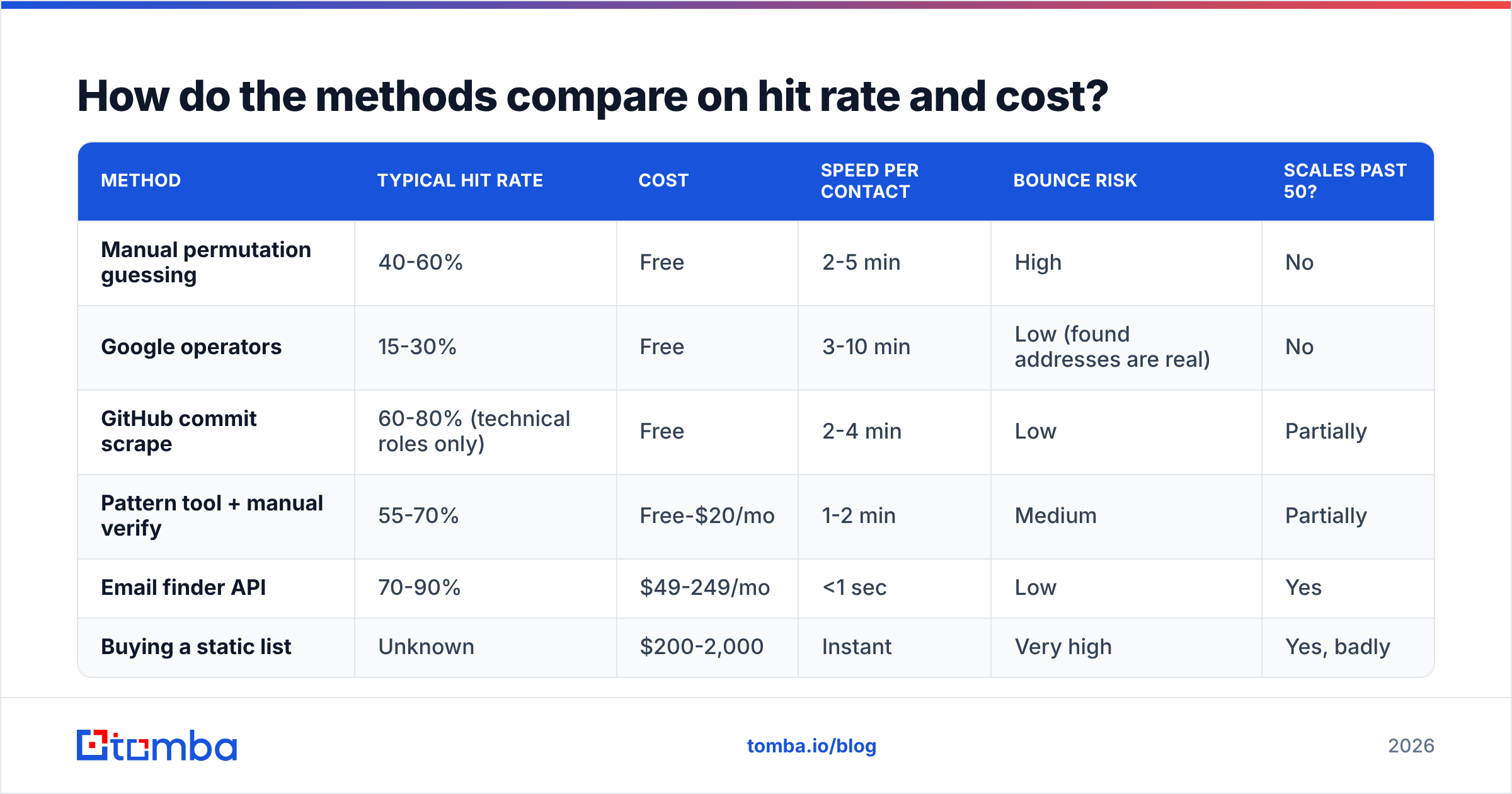
Here's the tradeoff laid out. "Hit rate" here means the percentage of attempted lookups that return a genuinely deliverable address, not just a plausible-looking string.
| Method | Typical hit rate | Cost | Speed per contact | Bounce risk | Scales past 50? |
|---|---|---|---|---|---|
| Manual permutation guessing | 40-60% | Free | 2-5 min | High | No |
| Google operators | 15-30% | Free | 3-10 min | Low (found addresses are real) | No |
| GitHub commit scrape | 60-80% (technical roles only) | Free | 2-4 min | Low | Partially |
| Pattern tool + manual verify | 55-70% | Free-$20/mo | 1-2 min | Medium | Partially |
| Email finder API | 70-90% | $49-249/mo | <1 sec | Low | Yes |
| Buying a static list | Unknown | $200-2,000 | Instant | Very high | Yes, badly |
Two things stand out. First, GitHub beats every other free method — but only for engineers, and only for people who commit publicly. Second, the gap between "guess it" and "look it up" isn't just accuracy; it's a 100x difference in time per contact. At 200 prospects, manual guessing is a full work week. An API call is under a minute total.
The list-buying row deserves a warning. Static purchased lists decay at roughly 22-30% per year as people change jobs, and you inherit whatever consent problems the seller had. G2's category data consistently shows list vendors scoring lowest on data accuracy among lead intelligence tools. If you buy, verify every row before sending — which puts you back at needing a verifier anyway.
Why does guessing the email pattern fail so often?#
Because "the company's pattern" is a fiction at any org above about 200 people.
Real domains accumulate exceptions:
- Name collisions. Two Sarah Chens means one of them becomes
sarah.chen2@orschen@orsarah.m.chen@. Your permutation set doesn't include those. - Acquisitions. The acquired team keeps
@oldcompany.comforwarding for years, or gets a different pattern than the parent org. - Legacy staff. Employee #4 has
sarah@from 2011 while everyone hired after the rebrand hassarah.chen@. - Nicknames in the directory. The pattern is
first.last, but IT provisionedbob.smith@for Robert Smith. Yourrobert.smith@bounces. - Regional subdomains.
@uk.company.comor@company.co.ukfor the EMEA team, invisible from the main site. - Non-ASCII names. Diacritics get stripped, transliterated, or preserved inconsistently.
josé.garcíamight bejose.garcia,j.garcia, orjosegarcia.
This is why a company email pattern check should be your first move, not your only move. Knowing the dominant pattern gets you a strong first guess. Confirming the specific mailbox exists is a separate operation.
And the cost of getting it wrong compounds. Mailbox providers weigh hard bounces heavily in reputation scoring — Google's Postmaster Tools documentation makes clear that sending to non-existent addresses is one of the strongest negative signals available. Three percent bounce is tolerable. Ten percent starts moving your mail to spam folders, including mail to people who do want to hear from you.
How does an email finder actually work under the hood?#
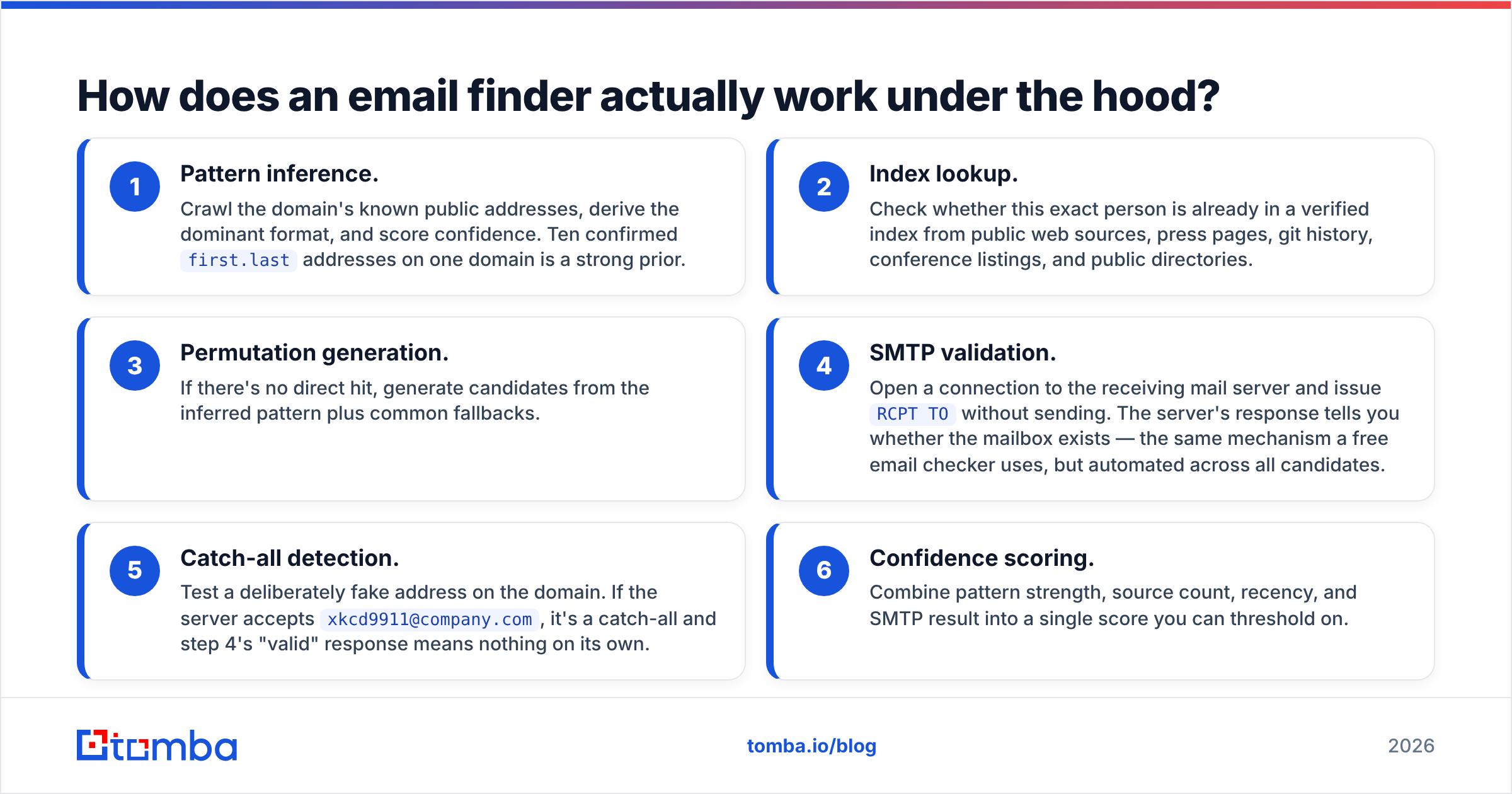
Not magic, and not a single database lookup. A modern finder runs a layered pipeline:
- Pattern inference. Crawl the domain's known public addresses, derive the dominant format, and score confidence. Ten confirmed
first.lastaddresses on one domain is a strong prior. - Index lookup. Check whether this exact person is already in a verified index from public web sources, press pages, git history, conference listings, and public directories.
- Permutation generation. If there's no direct hit, generate candidates from the inferred pattern plus common fallbacks.
- SMTP validation. Open a connection to the receiving mail server and issue
RCPT TOwithout sending. The server's response tells you whether the mailbox exists — the same mechanism a free email checker uses, but automated across all candidates. - Catch-all detection. Test a deliberately fake address on the domain. If the server accepts
xkcd9911@company.com, it's a catch-all and step 4's "valid" response means nothing on its own. - Confidence scoring. Combine pattern strength, source count, recency, and SMTP result into a single score you can threshold on.
Step five is where most cheap tools quietly fail. A catch-all domain accepts every address at the SMTP layer, so a naive verifier returns "valid" for garbage. Roughly one in five B2B domains runs catch-all, and it skews toward enterprise — exactly the accounts you care most about. A dedicated catch-all verifier uses secondary signals rather than trusting the SMTP handshake.
If you want to see how the sourcing side is built, Tomba documents its data sources publicly, which is a reasonable thing to demand from any vendor before you trust their output.
Which approach should you use for your situation?#
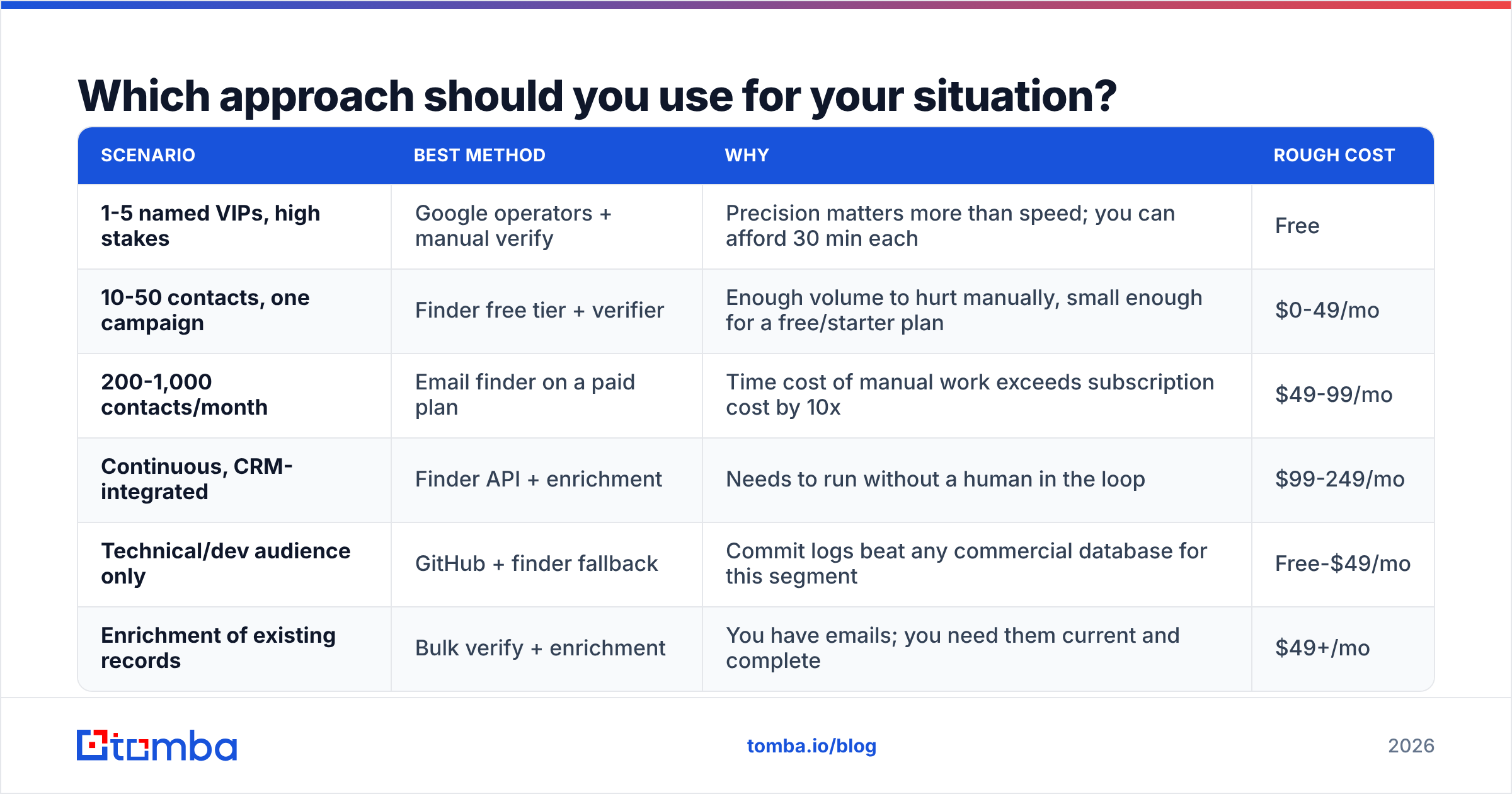
Match the method to the job. Over-tooling a five-contact research task wastes money; under-tooling a 2,000-row list wastes a domain.
| Scenario | Best method | Why | Rough cost |
|---|---|---|---|
| 1-5 named VIPs, high stakes | Google operators + manual verify | Precision matters more than speed; you can afford 30 min each | Free |
| 10-50 contacts, one campaign | Finder free tier + verifier | Enough volume to hurt manually, small enough for a free/starter plan | $0-49/mo |
| 200-1,000 contacts/month | Email finder on a paid plan | Time cost of manual work exceeds subscription cost by 10x | $49-99/mo |
| Continuous, CRM-integrated | Finder API + enrichment | Needs to run without a human in the loop | $99-249/mo |
| Technical/dev audience only | GitHub + finder fallback | Commit logs beat any commercial database for this segment | Free-$49/mo |
| Enrichment of existing records | Bulk verify + enrichment | You have emails; you need them current and complete | $49+/mo |
For anything past the first row, the workflow is the same three steps: resolve the domain, apply the pattern, verify the mailbox. A domain search handles the first two in one request by returning every known address on a company domain, which is often faster than searching person-by-person when you're targeting a whole department.
For bulk work, upload the roster and let a bulk email finder process it rather than looping through single lookups. And if you're pulling names off LinkedIn profiles, a dedicated LinkedIn finder skips the manual copy-paste stage entirely.

What should you never do?#
A short list of things that look like shortcuts and are not.
Never send to unverified permutations. Sending eight guesses and seeing which one doesn't bounce is a real tactic people use. It also generates seven hard bounces per contact. At 100 contacts that's 700 bounces, and your domain will be in trouble long before you finish.
Never trust a verifier that returns only valid/invalid. Any tool without a distinct "catch-all" or "accept-all" state is hiding uncertainty from you. Demand the third category.
Never scrape without checking the terms. Automated scraping of LinkedIn profile pages violates their user agreement, and enforcement has gotten sharper. Use official data sources or vendors who source from public web and permissioned partners.
Never skip suppression and consent. If you're emailing EU or UK contacts, B2B cold email is permitted under legitimate interest in most member states but still requires a clear opt-out and a lawful basis record. The ICO's direct marketing guidance is the plain-English reference.
Never re-use a list older than about six months without re-verifying. People change jobs. At typical B2B churn, a year-old list is a quarter dead.
Never confuse "found" with "correct person." Two people share a name more often than you'd expect. Cross-check against the title and company before you write a personalized line that lands on the wrong Sarah Chen.
How do you build a repeatable workflow?#
Here's the sequence that holds up at volume.
Step 1 — Normalize the input. First name, last name, company domain. Not company name — resolve it to a domain first, because "Acme" could be six different companies. Strip diacritics into a secondary candidate but keep the original.
Step 2 — Check the pattern. One lookup per domain, not per person. If you're targeting eight people at the same company, you pay for the pattern once.
Step 3 — Run the finder. Feed name plus domain. Keep the confidence score attached to the row — you'll use it for routing.
Step 4 — Verify separately. Even when the finder returns a score, run an email verifier pass before the address touches a sequence. Finders optimize for coverage; verifiers optimize for deliverability. They're different objectives.
Step 5 — Route by confidence. Score above ~90 and non-catch-all goes straight to the sequence. Catch-all or mid-confidence goes to a low-volume warm sending pool or a LinkedIn-first touch. Below ~60, don't send — route to manual research or drop.
Step 6 — Feed bounces back. Every bounce is a data point about that domain's pattern. Log it, and stop re-guessing the same broken format across the account.
Sync all of it into your CRM via the HubSpot integration or a direct API call so nobody is pasting addresses between tabs. Manual copy-paste is where good data goes to rot.
If your volume justifies automation, the Tomba API exposes finder, verifier, and enrichment as separate endpoints so you can build exactly this pipeline rather than accepting someone else's opinion about the order of operations.
What does this cost in practice?#
Rough math for a team doing 500 lookups a month.
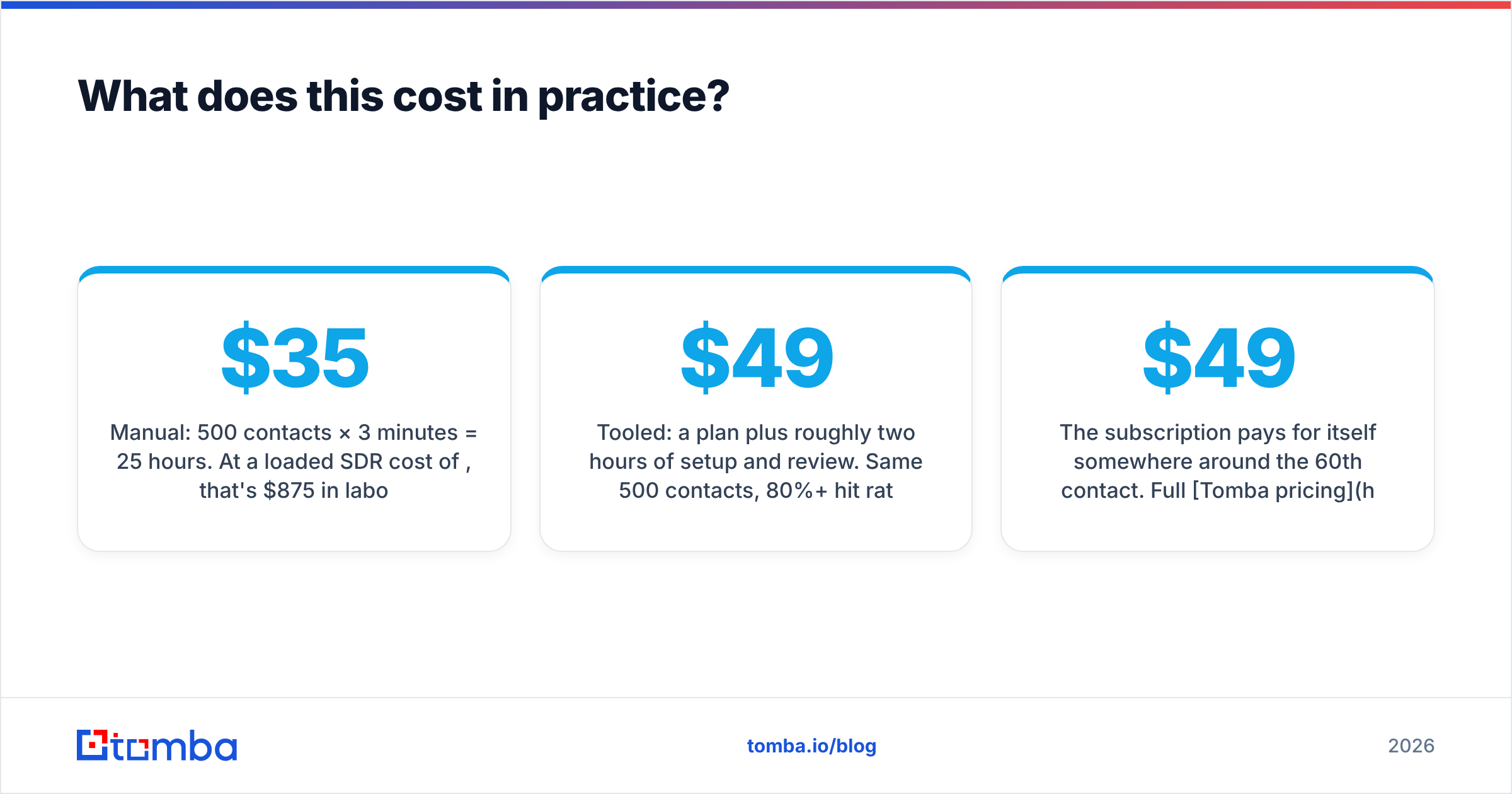
Manual: 500 contacts × 3 minutes = 25 hours. At a loaded SDR cost of $35/hour, that's $875/month in labor to produce a list with a 50% hit rate and a bounce problem.
Tooled: a $49/mo plan plus roughly two hours of setup and review. Same 500 contacts, 80%+ hit rate, bounces under 3%.
The subscription pays for itself somewhere around the 60th contact. Full Tomba pricing runs Free (25 searches/month), Starter at $49/mo, Growth at $99/mo, Pro at $249/mo, and custom Enterprise. The free tier is genuinely enough to test whether the hit rate holds on your target accounts, which is the only benchmark that matters — aggregate accuracy numbers from any vendor, including Tomba, are averages across a universe that may look nothing like your ICP.
Worth noting that different vendors are strong in different segments. If your targets skew toward verified direct-dial-heavy enterprise lists, a database-first provider like BookYourData covers ground that pattern-inference tools handle differently. Test two on the same 50 accounts and compare — it takes an afternoon and settles the argument better than any review site.
Get started#
Pick fifty target contacts you already tried to reach and failed. Run them through the Tomba Email Finder on the free tier — 25 searches costs nothing, and the second 25 will tell you whether the paid plan earns its keep on your specific accounts. Then verify the results before a single message goes out. That order — find, verify, send — is the whole discipline, and it's the difference between a channel that compounds and a domain you have to replace.
Related guides#
Ready to find emails that actually work?
Join 150,000+ professionals who stopped guessing and started sending. Free credits on signup — no credit card required.
Get the Tomba newsletter
Practical outbound tactics and product updates — once every two weeks.
About the author