How to Find Email Address From Contact Form: 5 Ways
A web form is not a dead end. Here is the exact sequence to find email address from contact form pages — form inspection, DNS records, pattern logic, and verification — that turns "Contact Us" into an inbox you can actually reach.
You found the company. You found the page. And there is no email — just a form. This guide shows how to find email address from contact form pages: what to check first, which patterns to test, and how to verify the result before you hit send.
TL;DR
- A contact form is a routing layer, not a wall. The messages still land in a real mailbox. Your job is to work out which one.
- The fastest reliable sequence: inspect the form's markup and network calls, check DNS and public records, work out the company email pattern, then verify before you send.
- Manual sleuthing works on one prospect. It falls apart at fifty. Pattern inference plus SMTP verification is what scales.
- Never send to a guessed address without verifying it. One bad guess in twenty sends is enough to push your bounce rate into filter territory.
- If the form is the only supported channel for a regulated or high-intent request, use the form. The skill is knowing when not to bypass it.
Why do companies hide behind a contact form?#
Because a public mailbox on a company website is a magnet. Post sales@company.com in plain text and it gets scraped within a month. Then come the forty newsletters and the stack of offshore dev agency pitches. A form is a filter. It forces structure, adds a captcha, and routes each message into a helpdesk or CRM queue where it gets tagged and assigned.
That part is useful to understand. The form is plumbing. Behind it, some human's inbox gets a notification, and that inbox has an address. Sometimes it is a shared alias. Sometimes it is a named person. Either way it exists. The same company also leaves breadcrumbs elsewhere: job posts, press releases, GitHub commits, PDF whitepapers, DNS records. Putting the address back together is usually a ten-minute job.
The mistake people make is treating "no email on the site" as a verdict. It is not a verdict. It is one page that does not have what you want.

What actually happens when you submit a contact form?#
Three setups cover almost every B2B site, and each one leaks a different amount of information.
- Direct SMTP / mail script. The form posts to a backend endpoint on the same domain, which sends mail through the company's own mail server. The destination address lives in server code and is rarely exposed. But the domain's MX records tell you who handles the mail, and that tells you a lot about the format.
- Third-party form service. Formspree, Typeform, HubSpot Forms, Netlify Forms. The page markup often holds a form ID, an account ID, or a hidden field with a routing address. Now and then the destination sits right there in an
actionattribute or a JSON payload. - Helpdesk or CRM intake. Zendesk, Intercom, Freshdesk, HubSpot. These almost always have a public support alias behind them:
support@company.com,help@company.com,hello@company.com. You can usually spot the alias in an old support thread, a status page, or the reply-to header of any automated email the company sends.
None of this is secret. Right-click, View Source, and search the HTML for @, mailto, action=, and email. It takes fifteen seconds and solves maybe one case in five outright.
How do you find email address from contact form pages, step by step?#
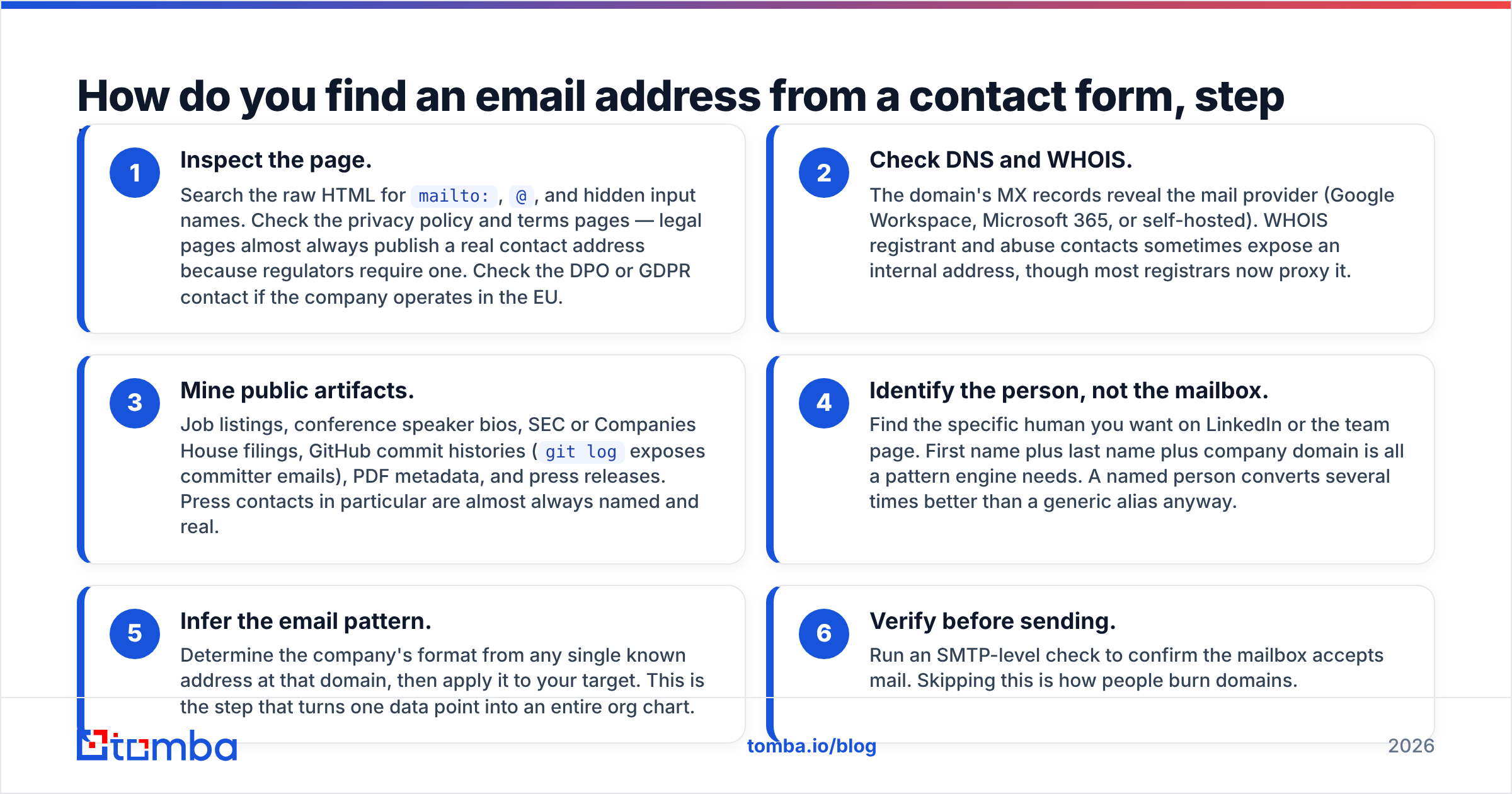
This is the sequence that works, ordered cheapest first. Stop as soon as you have a verified address.
Start with what is already public.
- Inspect the page. Search the raw HTML for
mailto:,@, and hidden input names. Then check the privacy policy and terms pages. Legal pages almost always list a real contact address, because regulators require one. Check the DPO or GDPR contact too if the company operates in the EU. - Check DNS and WHOIS. The domain's MX records reveal the mail provider: Google Workspace, Microsoft 365, or self-hosted. WHOIS registrant and abuse contacts sometimes expose an internal address, though most registrars now hide it behind a proxy.
- Mine public artifacts. Job listings, conference speaker bios, SEC or Companies House filings, GitHub commit histories (
git logexposes committer emails), PDF metadata, and press releases. Press contacts in particular are almost always named and real.
Then move to the person and the pattern.
- Identify the person, not the mailbox. Find the specific human you want on LinkedIn or the team page. First name, last name, and company domain are all a pattern engine needs. A named person converts several times better than a generic alias anyway.
- Infer the email pattern. Work out the company's format from any single known address at that domain, then apply it to your target. This step turns one data point into a whole org chart.
- Verify before sending. Run an SMTP-level check to confirm the mailbox accepts mail. Skipping this is how people burn domains.
Steps 4 through 6 are where tooling stops being optional. A domain search returns every known address at a company plus the detected pattern in one call, which folds steps 3 to 5 into a single lookup.
Which email patterns should you test first?#
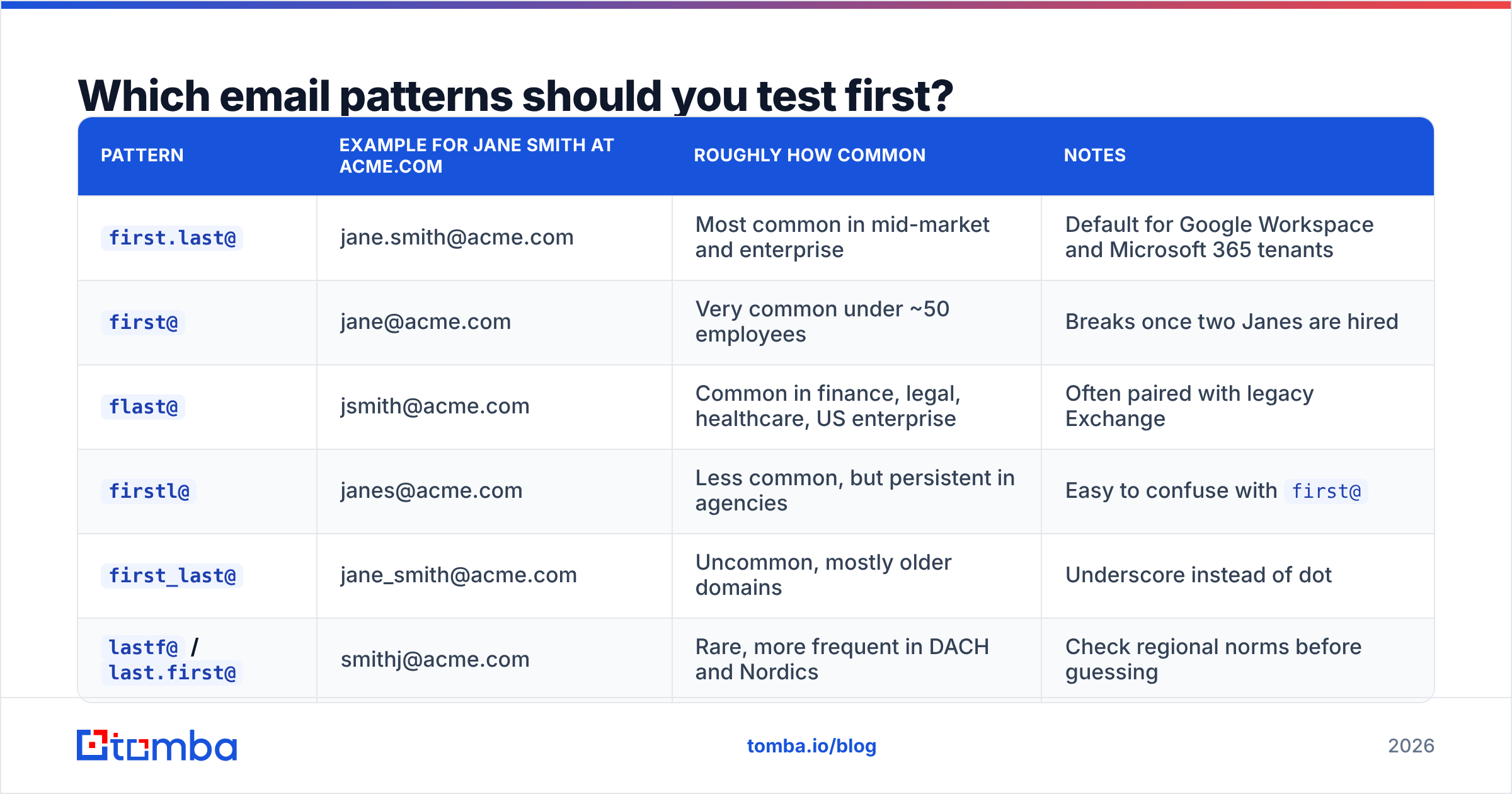
Most B2B domains use one of six formats. Know the spread, and your first guess lands far more often than chance.
| Pattern | Example for Jane Smith at acme.com | Roughly how common | Notes |
|---|---|---|---|
first.last@ |
jane.smith@acme.com | Most common in mid-market and enterprise | Default for Google Workspace and Microsoft 365 tenants |
first@ |
jane@acme.com | Very common under ~50 employees | Breaks once two Janes are hired |
flast@ |
jsmith@acme.com | Common in finance, legal, healthcare, US enterprise | Often paired with legacy Exchange |
firstl@ |
janes@acme.com | Less common, but persistent in agencies | Easy to confuse with first@ |
first_last@ |
jane_smith@acme.com | Uncommon, mostly older domains | Underscore instead of dot |
lastf@ / last.first@ |
smithj@acme.com | Rare, more frequent in DACH and Nordics | Check regional norms before guessing |
Two practical rules. First, patterns belong to a domain, not a company. A firm that bought another one often runs two formats side by side on two domains. Second, executives often sit outside the pattern. Founders keep the first@ address they made on day one, while everyone hired since is first.last@.
If you have one confirmed address at the domain, a company email pattern check locks the format in seconds. If you have none, an email finder that queries an indexed corpus will usually return both the address and the confidence score behind it.
Which method actually wins on time and accuracy?#
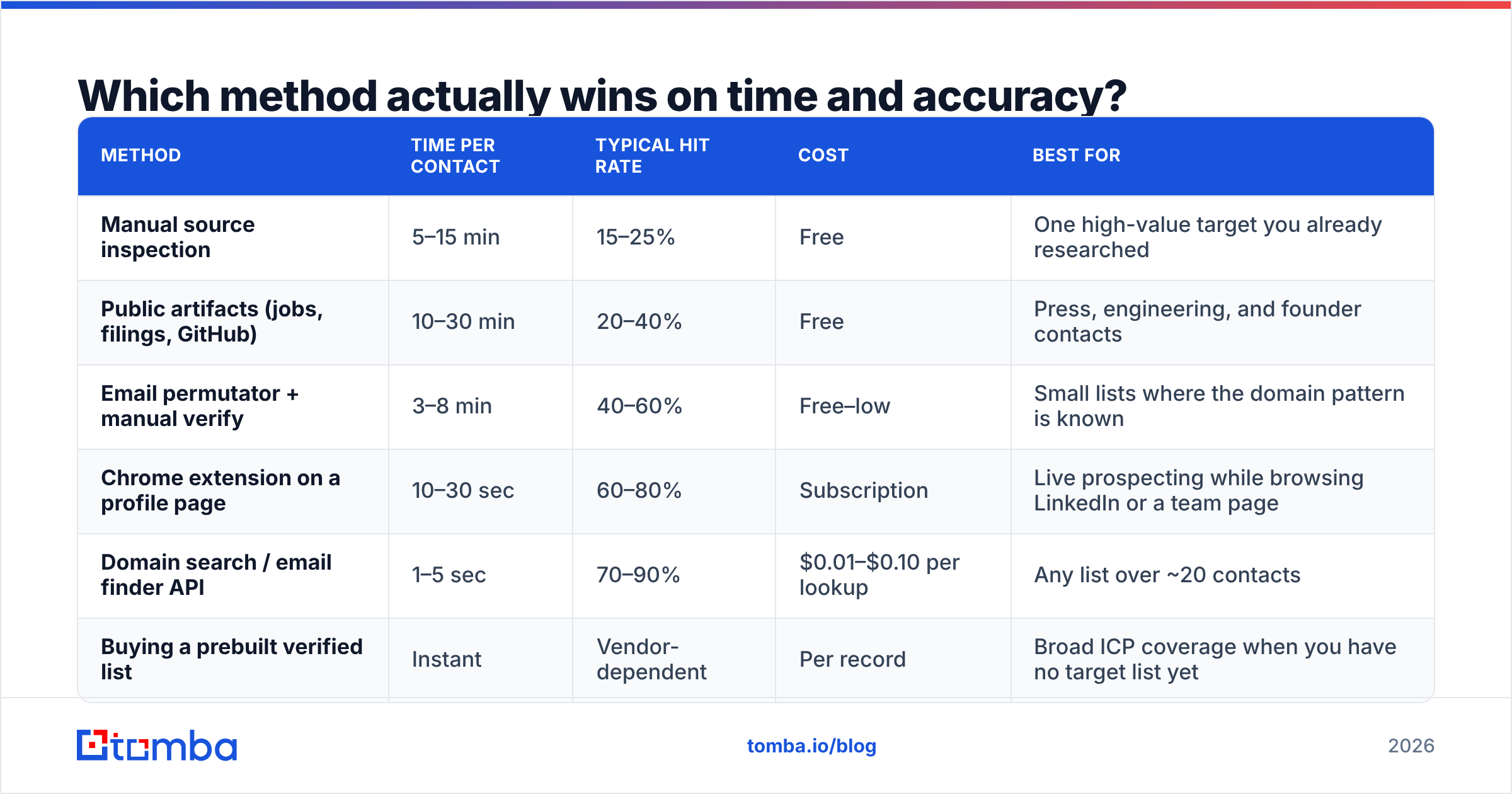
Every method below finds addresses. They differ hugely in cost per contact once you leave the single-prospect case.
| Method | Time per contact | Typical hit rate | Cost | Best for |
|---|---|---|---|---|
| Manual source inspection | 5–15 min | 15–25% | Free | One high-value target you already researched |
| Public artifacts (jobs, filings, GitHub) | 10–30 min | 20–40% | Free | Press, engineering, and founder contacts |
| Email permutator + manual verify | 3–8 min | 40–60% | Free–low | Small lists where the domain pattern is known |
| Chrome extension on a profile page | 10–30 sec | 60–80% | Subscription | Live prospecting while browsing LinkedIn or a team page |
| Domain search / email finder API | 1–5 sec | 70–90% | $0.01–$0.10 per lookup | Any list over ~20 contacts |
| Buying a prebuilt verified list | Instant | Vendor-dependent | Per record | Broad ICP coverage when you have no target list yet |
The crossover sits at about twenty contacts. Below that, manual work is fine and costs nothing but your attention. Above it, the math is brutal. Fifty prospects at eight minutes each is over six hours of work. A lookup API returns the same list in under a minute, with a better hit rate and verification attached.
The free permutator route also carries a hidden cost. Generating twelve candidate addresses per person and firing test emails at all of them is the fastest way to torch your sending reputation. Build candidates with an email permutator by all means. Just resolve them with verification, not with live sends.

How do you verify an address you inferred rather than found?#
Verification is non-negotiable, and it has layers. A serious verifier walks all of them:
- Syntax check. RFC-valid formatting. Catches typos and malformed guesses before anything hits the network.
- Domain and MX check. Does the domain resolve, and does it publish MX records? No MX, no mail. This alone kills a surprising share of guessed domains.
- Disposable and role detection. Flags
info@,admin@,noreply@, and throwaway providers. Role addresses are not always useless. They behave differently, so segment them rather than blending them into a personal-outreach sequence. - SMTP handshake. Opens a conversation with the receiving server and asks whether the mailbox exists, without delivering a message. This is the check that separates a real inference from a hopeful one.
- Catch-all handling. Some domains accept mail to every possible address, so the SMTP check returns "valid" for
asdfgh@company.comtoo. That is a false positive waiting to happen.
Catch-all domains are the biggest trap in contact-form prospecting. Privacy-conscious companies — exactly the ones that hide behind forms — run catch-all setups far more often than average. So treat any "valid" result on a catch-all domain as unconfirmed until a dedicated catch-all verifier applies pattern confidence and secondary signals. Standard email verification covers the rest.
Hold yourself to one benchmark: keep hard bounces under 2%. Most inbox providers start throttling well before 5%. Once your domain reputation slides, no amount of clever copywriting brings it back quickly.
Which tools are worth paying for?#
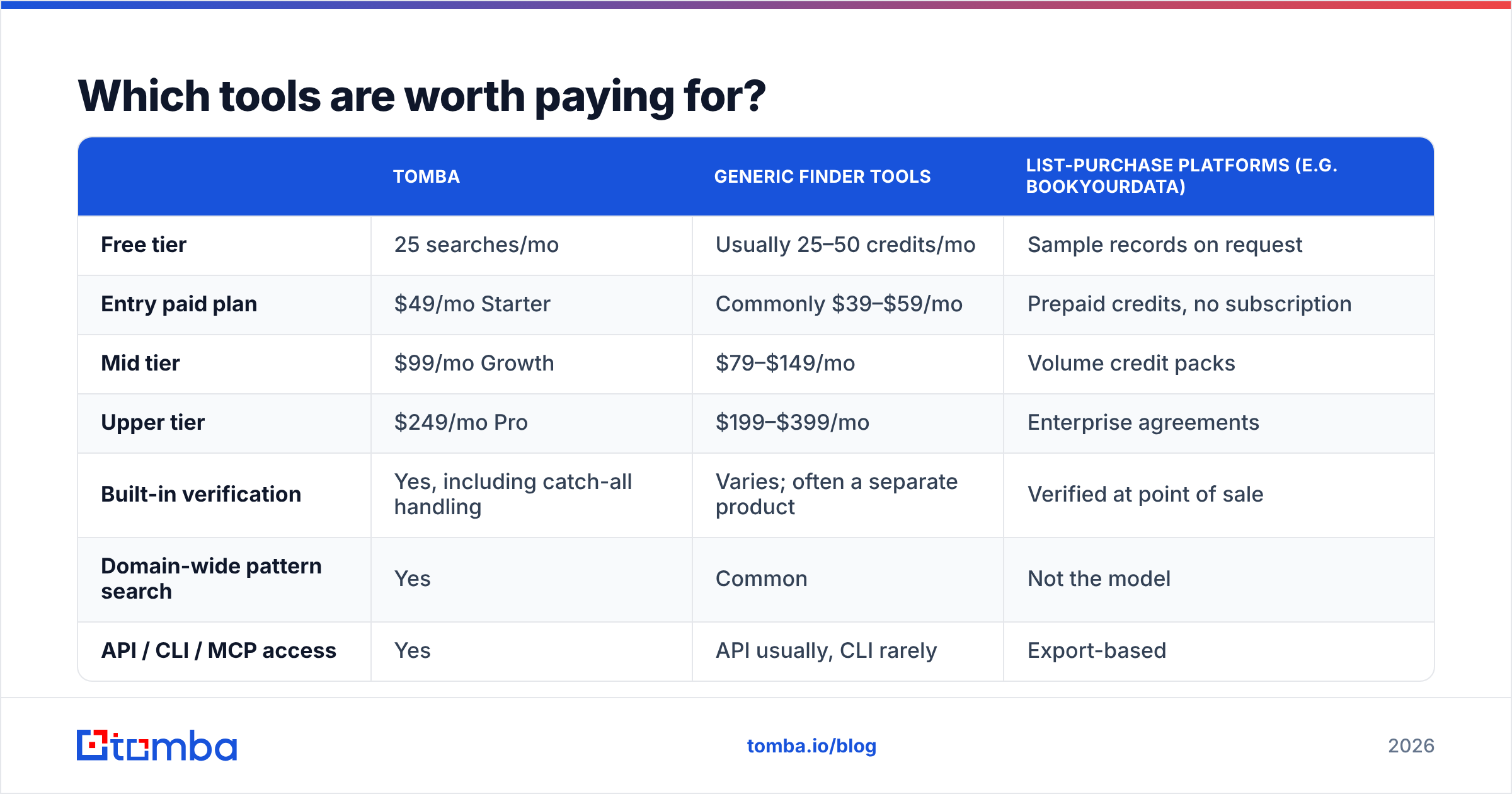
The category is crowded, and most vendors do the same three things with a different UI. What sets them apart is data freshness, verification depth, and how the pricing behaves when your volume changes.
| Tomba | Generic finder tools | List-purchase platforms (e.g. BookYourData) | |
|---|---|---|---|
| Free tier | 25 searches/mo | Usually 25–50 credits/mo | Sample records on request |
| Entry paid plan | $49/mo Starter | Commonly $39–$59/mo | Prepaid credits, no subscription |
| Mid tier | $99/mo Growth | $79–$149/mo | Volume credit packs |
| Upper tier | $249/mo Pro | $199–$399/mo | Enterprise agreements |
| Built-in verification | Yes, including catch-all handling | Varies; often a separate product | Verified at point of sale |
| Domain-wide pattern search | Yes | Common | Not the model |
| API / CLI / MCP access | Yes | API usually, CLI rarely | Export-based |
| Best fit | Targeted prospecting where you already know the company | Ad-hoc lookups | Buying broad ICP coverage upfront |
Two honest observations. First, list-purchase platforms like BookYourData solve a different problem. If you do not yet have a target account list, buying verified records by filter beats researching companies one at a time, and the per-record math can beat subscription tooling at low volume. They are complements to a finder, not competitors.
Second, do not choose on headline price. Choose on cost per verified, deliverable address. A cheap plan that returns unverified guesses costs more once you count the bounces, the reputation damage, and the rep hours spent on dead contacts. Independent reviews in G2's lead intelligence category help you spot which accuracy claims survive contact with real customers. Compare current Tomba pricing against your monthly lookup volume, not against another vendor's sticker.
Is it legal to email someone instead of using their form?#
Mostly yes, with real conditions that vary by country.
In the US, CAN-SPAM does not require prior consent for B2B email. It requires accurate headers, an honest subject line, a physical postal address, a working opt-out, and prompt handling of that opt-out. The FTC's compliance guide is the primary source, and it is short enough to read in full.
In the EU and UK, GDPR and PECR are stricter. Cold B2B email to a corporate address is usually defensible under legitimate interest. But you have to document that assessment, honor objections at once, and say where you got the data if asked. Some member states read the rules more tightly, and role addresses are treated differently from named people.
Canada's CASL is the strictest of the three. It is consent-based, with implied consent for published business addresses under set conditions, and the penalties have teeth.
None of that changes because you worked out an address instead of reading it off a page. What matters is whether your message is honest, relevant, and easy to opt out of. Guidance from vendors like HubSpot on permission-based outreach is worth reading next to the statutes.
When should you just use the contact form?#
Some of the time. Skip the workaround when:
- The form is the documented intake for the thing you want — RFPs, vendor onboarding, security questionnaires, or press inquiries with a named contact already listed.
- The company is small enough that the form and the founder's inbox are the same thing.
- You are contacting a regulated function such as legal, privacy, or compliance, where the audit trail matters more than the response speed.
- The form has required fields that route you to the right team faster than a cold email to a generic alias ever would.
Bypass it when you need a specific person, when the request is genuinely commercial, or when you already submitted the form and heard nothing. In that last case, the honest play is a short follow-up to the named person that mentions your form submission. It is a warmer opening than a cold email, and it is true.
What does a working process look like end to end?#
Here it is on a realistic list of forty accounts where none publish an email address:
- Enrich the domain list with a domain search to pull known addresses and detected patterns. Expect a usable pattern on roughly three-quarters of them.
- For the rest, check legal pages, job posts, and GitHub for a single seed address that reveals the format.
- Identify the specific target person per account. Title plus first and last name.
- Apply the pattern to build the candidate address.
- Verify every candidate, catch-all resolution included, before anything enters your sequencer.
- Segment the output. Verified personal addresses get personalized outreach, role addresses get a shorter message, and unresolved accounts get a contact-form submission as the fallback rather than being dropped.
That is the whole loop to find email address from contact form pages at scale, and the last point matters most. The form is not the enemy of your process. It is the fallback tier of it.
Start with the domain, not the form. If you are staring at a "Contact Us" page and a company you actually want to talk to, run the domain through the Tomba Email Finder before you spend twenty minutes reading page source. It is the fastest way to find email address from contact form pages: you get the address, the pattern behind it, and a verification result in one step. Free for your first 25 searches a month, $49/mo on Starter when you outgrow that. Find the person, verify the mailbox, then write something worth reading.
Related guides#
Ready to find emails that actually work?
Join 150,000+ professionals who stopped guessing and started sending. Free credits on signup — no credit card required.
Get the Tomba newsletter
Practical outbound tactics and product updates — once every two weeks.
About the author