How to Find Email Addresses in 2026: 9 Methods That Work
Nine tested ways to find email addresses — from free manual tricks to bulk API lookups — plus the accuracy numbers, costs, and the verification step most people skip.
TL;DR
- The fastest reliable way to find email addresses at scale is a domain-based lookup: give a tool the company domain plus a first and last name, and let it return the pattern-matched address with a confidence score.
- Manual methods (Google operators, WHOIS, GitHub commits, LinkedIn scraping) still work, but they cost roughly 3–6 minutes per contact — fine for 20 prospects, hopeless for 2,000.
- Accuracy claims from vendors are marketing until you test them on your own list. Run a 100-contact sample through 2–3 tools before you buy annual.
- Finding an address is only half the job. Unverified lists burn sender reputation fast — verify before you send, every time.
- Free tiers exist and are genuinely useful for low volume: Tomba gives 25 searches/month free, which is enough to sanity-check a tool before paying $49/mo.
Why is it still hard to find email addresses in 2026?#
Because the supply side got worse while the demand side got bigger.
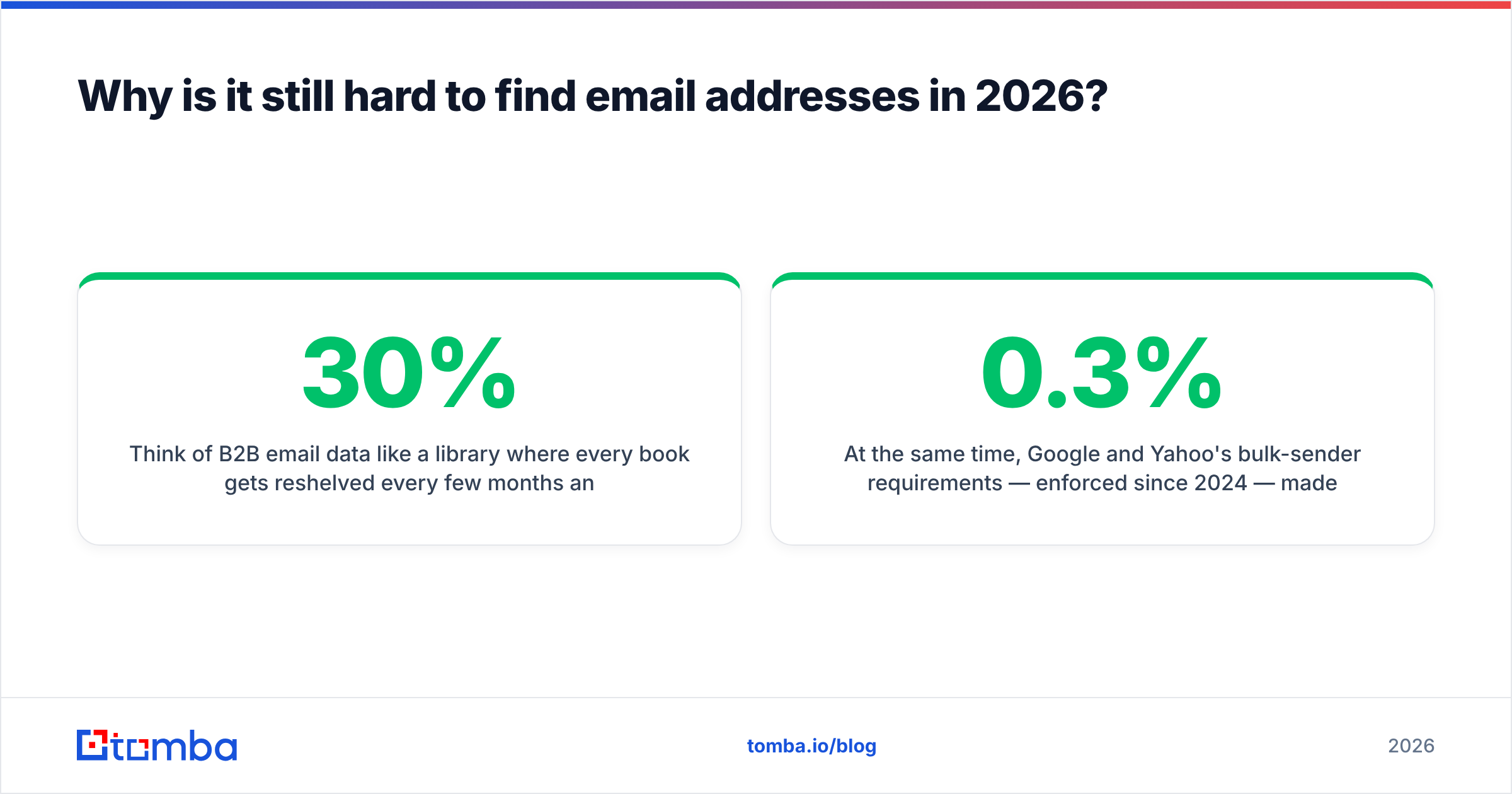
Think of B2B email data like a library where every book gets reshelved every few months and about 30% get thrown out entirely. People change jobs (US median tenure is under four years), companies rebrand domains, mail servers move behind catch-all configurations that accept everything and reveal nothing. A database that was 95% accurate in January is meaningfully worse by June if nobody re-crawls it.
At the same time, Google and Yahoo's bulk-sender requirements — enforced since 2024 — made bad data actively expensive. Spam complaint rates above 0.3% now get your domain throttled. Bouncing 12% of a send is no longer a rounding error; it's a deliverability incident.
So the modern question isn't "how do I find an email address." It's "how do I find an address I can safely send to, at the volume I need, without burning my domain."
What are the actual methods to find email addresses?#
There are nine that reliably produce results. They fall into three buckets: manual, semi-automated, and API/bulk.
Manual methods (free, slow, high-effort):
- Google search operators —
site:company.com "@company.com"or"firstname lastname" email @company.com. Surfaces addresses published in press releases, PDFs, conference agendas, and staff pages. Works maybe 20% of the time on mid-market companies, better on universities and agencies. - The company website itself — /about, /team, /contact, /press. Underrated. Many B2B companies still list department addresses, and a single confirmed address reveals the whole company's format.
- WHOIS records — increasingly redacted post-GDPR, but still useful for small businesses and self-hosted domains where the registrant didn't opt into privacy.
- GitHub commit history —
https://api.github.com/users/<username>/events/publicoften exposes the commit author email. Excellent for engineering and DevRel targets, useless elsewhere. - Twitter/X and personal sites — people who write newsletters or run side projects publish contact addresses. Check the bio link chain.
Semi-automated methods:
- Pattern inference — once you know one address at a company, you know the format. If
sarah.chen@acme.comexists,mike.torres@acme.comalmost certainly does. An email permutator generates every plausible variant for you. - Browser extensions — sit on top of LinkedIn or a company site and surface the address while you browse. Fastest per-contact workflow when you're already doing manual research.
API and bulk methods:
- Domain search — feed a domain, get back every known address at that company plus the detected pattern and departmental breakdown. This is the workhorse for account-based outbound.
- Bulk enrichment via CSV or API — upload 5,000 names and domains, get addresses back with confidence scores. This is the only method that scales past a few hundred contacts.

Which method should you use for your volume?#
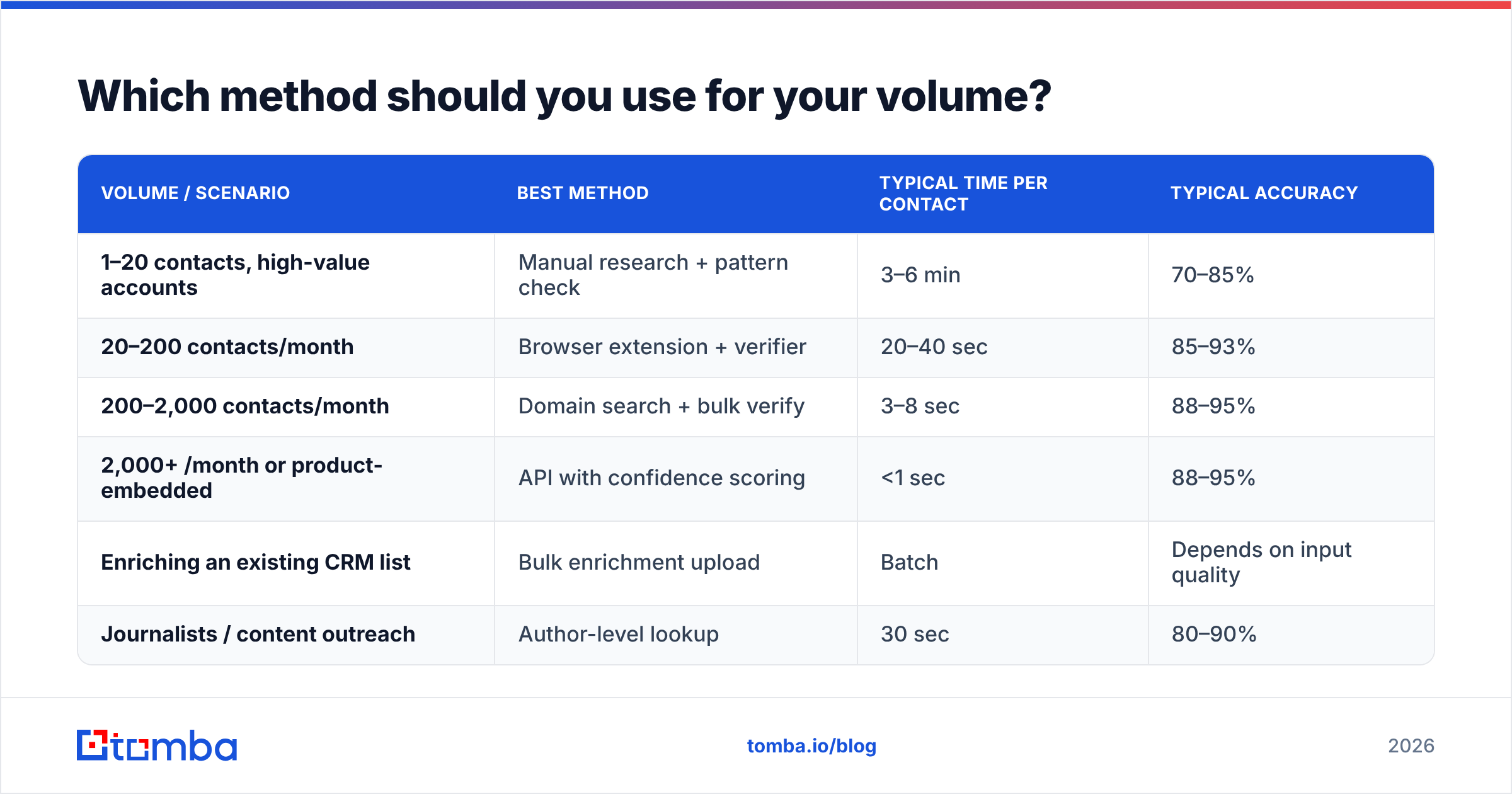
Match the tool to the job. Using an API for 12 contacts is overkill; using Google operators for 1,200 is self-harm.
| Volume / scenario | Best method | Typical time per contact | Typical accuracy |
|---|---|---|---|
| 1–20 contacts, high-value accounts | Manual research + pattern check | 3–6 min | 70–85% |
| 20–200 contacts/month | Browser extension + verifier | 20–40 sec | 85–93% |
| 200–2,000 contacts/month | Domain search + bulk verify | 3–8 sec | 88–95% |
| 2,000+ /month or product-embedded | API with confidence scoring | <1 sec | 88–95% |
| Enriching an existing CRM list | Bulk enrichment upload | Batch | Depends on input quality |
| Journalists / content outreach | Author-level lookup | 30 sec | 80–90% |
The accuracy column is deliberately a range, not a single number. Accuracy varies enormously by segment: a 5,000-person US SaaS company is close to a solved problem; a 20-person German Mittelstand manufacturer with a catch-all server is not.

How do email finder tools actually work?#
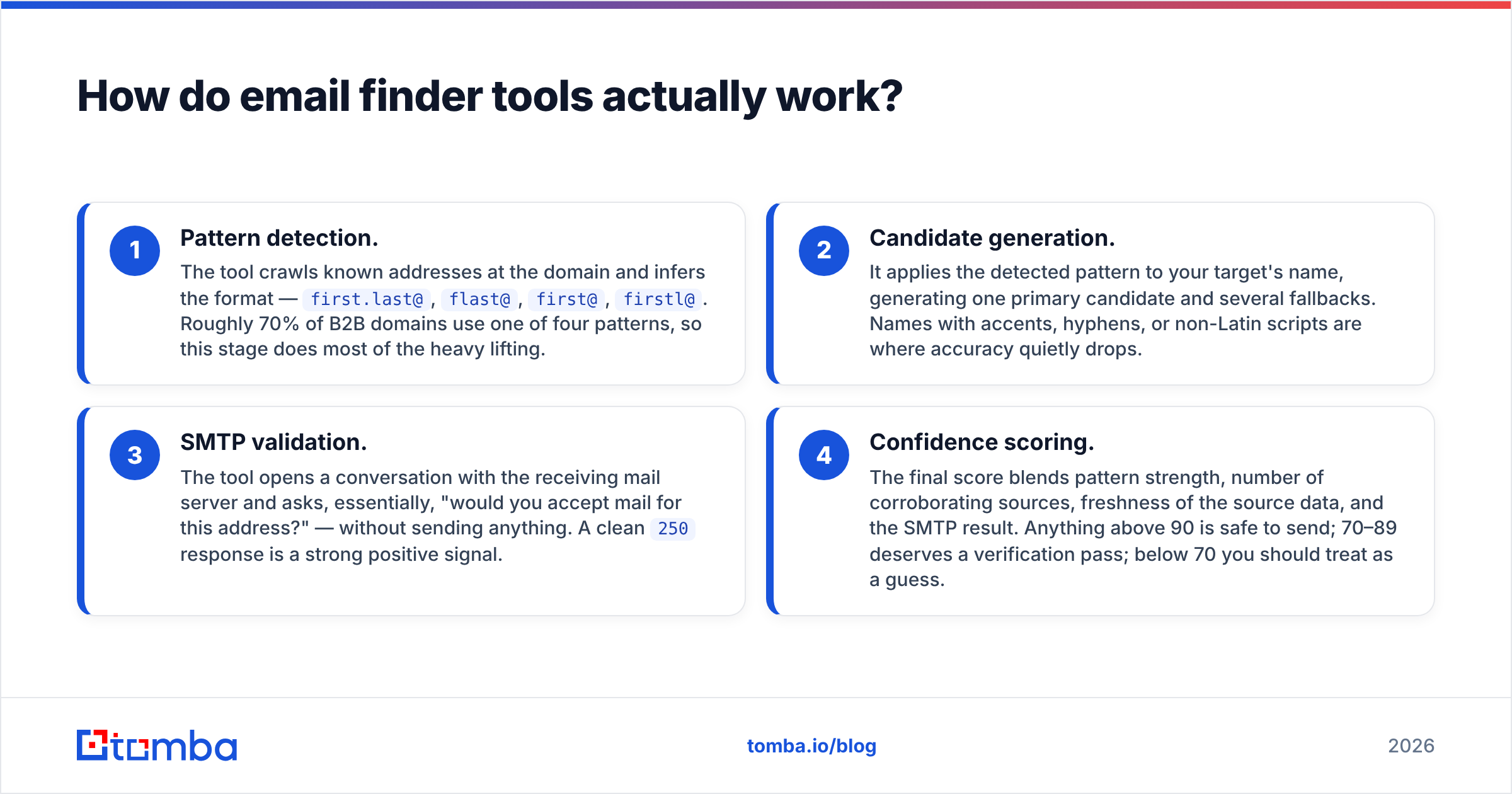
Under the hood, most tools run the same four-stage pipeline. Understanding it tells you exactly where and why a lookup fails.
- Pattern detection. The tool crawls known addresses at the domain and infers the format —
first.last@,flast@,first@,firstl@. Roughly 70% of B2B domains use one of four patterns, so this stage does most of the heavy lifting. - Candidate generation. It applies the detected pattern to your target's name, generating one primary candidate and several fallbacks. Names with accents, hyphens, or non-Latin scripts are where accuracy quietly drops.
- SMTP validation. The tool opens a conversation with the receiving mail server and asks, essentially, "would you accept mail for this address?" — without sending anything. A clean
250response is a strong positive signal. - Confidence scoring. The final score blends pattern strength, number of corroborating sources, freshness of the source data, and the SMTP result. Anything above 90 is safe to send; 70–89 deserves a verification pass; below 70 you should treat as a guess.
Stage 3 is where catch-all domains break everything. A catch-all server says yes to every address, including asdfgh@company.com. That's why a dedicated catch-all verifier matters — it uses secondary signals (engagement history, pattern corroboration, MX behavior) rather than trusting the SMTP handshake alone. Ignore catch-alls and you'll happily add addresses that route straight to a black hole.
How do the main tools compare?#
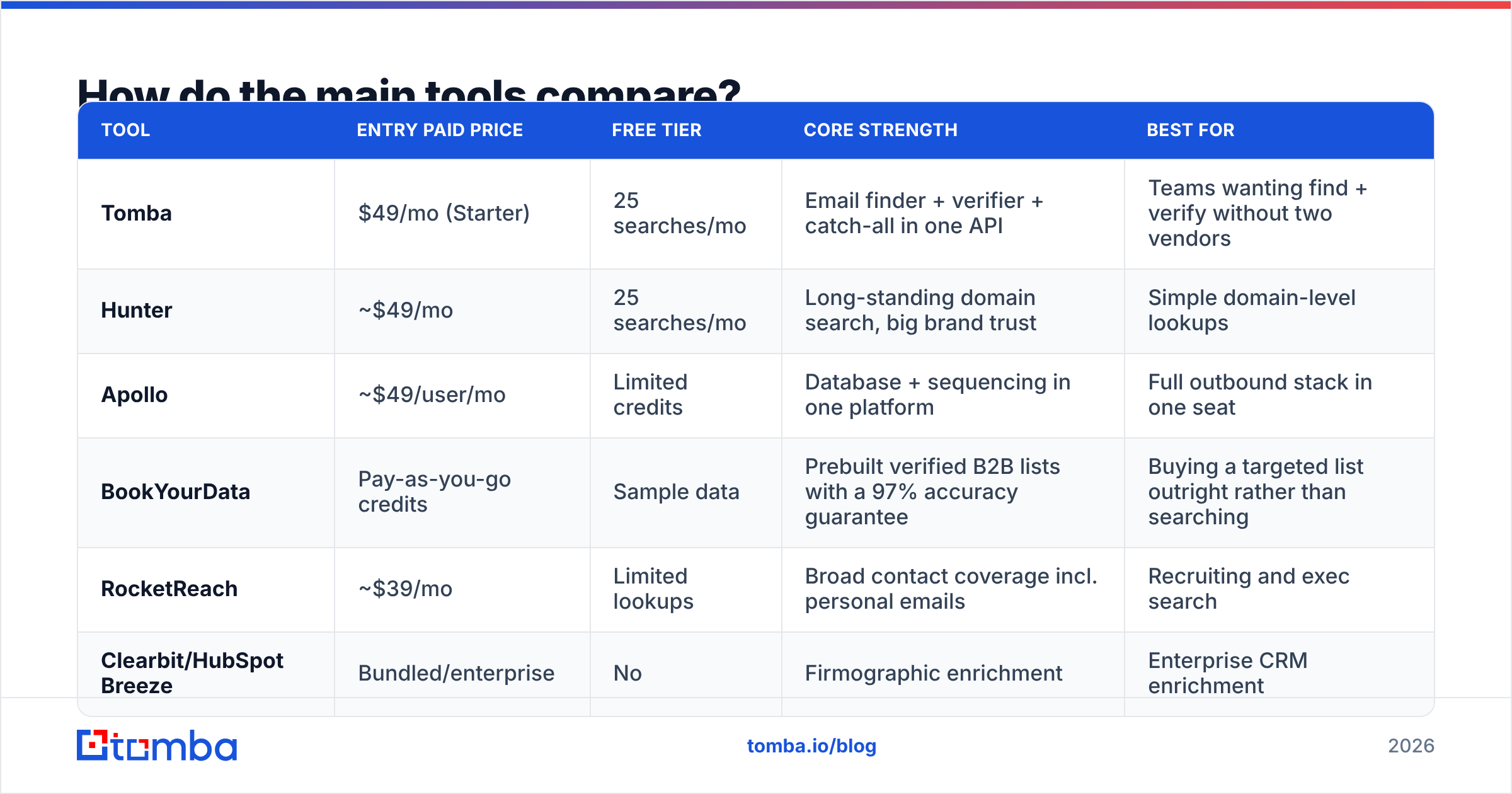
Here's the honest landscape. Prices are entry paid tiers as of early 2026; check each vendor's page before committing, since pricing moves.
| Tool | Entry paid price | Free tier | Core strength | Best for |
|---|---|---|---|---|
| Tomba | $49/mo (Starter) | 25 searches/mo | Email finder + verifier + catch-all in one API | Teams wanting find + verify without two vendors |
| Hunter | ~$49/mo | 25 searches/mo | Long-standing domain search, big brand trust | Simple domain-level lookups |
| Apollo | ~$49/user/mo | Limited credits | Database + sequencing in one platform | Full outbound stack in one seat |
| BookYourData | Pay-as-you-go credits | Sample data | Prebuilt verified B2B lists with a 97% accuracy guarantee | Buying a targeted list outright rather than searching |
| RocketReach | ~$39/mo | Limited lookups | Broad contact coverage incl. personal emails | Recruiting and exec search |
| Clearbit/HubSpot Breeze | Bundled/enterprise | No | Firmographic enrichment | Enterprise CRM enrichment |
Two honest notes. First, BookYourData solves a genuinely different problem than the finders above — it sells you a pre-built, pre-verified list, which is the right shape when you know your ICP precisely and don't want to run lookups at all. Compare it against per-lookup pricing on your actual volume before deciding. Second, "credits" mean different things at every vendor: some charge for failed lookups, some don't. Read the fine print before you compare headline prices — see Tomba pricing for a per-credit breakdown you can benchmark against.

How do you find email addresses from LinkedIn?#
LinkedIn is where your ICP lives, but it deliberately hides email addresses. Three legitimate routes:
- Export your 1st-degree connections. Settings → Data Privacy → Get a copy of your data → Connections. LinkedIn includes email addresses for connections who allow it. Free, legal, and usually a few hundred contacts of surprisingly good quality.
- Name + company → lookup. Pull the person's name and employer from their profile, then run it through a LinkedIn finder or a standard find-by-domain call. This is the standard workflow and it's what most extensions automate.
- Sales Navigator lists → bulk enrichment. Build a filtered lead list, export the names and companies, then run bulk email finder on the whole file. This is the highest-throughput path for ABM.
What to avoid: aggressive scrapers that automate logged-in session actions at volume. LinkedIn has gotten materially better at detecting them, and an account restriction costs more than the data was worth. Read LinkedIn's own guidance on prohibited software before you deploy anything that automates the site.
Is it legal to find email addresses this way?#
Mostly yes for B2B, with real conditions. This is not legal advice — talk to counsel for your jurisdiction.
United States (CAN-SPAM): commercial email to business addresses is legal without prior consent, provided you identify yourself honestly, don't use deceptive subject lines, include a physical postal address, and honor opt-outs within 10 business days.
EU/UK (GDPR + PECR): a business email address tied to a named person is personal data. Most B2B outreach relies on "legitimate interest" as the lawful basis, which requires a documented balancing test, a relevance-to-role argument, and a clear opt-out in every message. Corporate role addresses (info@, sales@) sit on softer ground than named individual addresses.
Canada (CASL): strictest of the three. You need express or implied consent — implied consent typically comes from a conspicuously published business address that isn't accompanied by a "no unsolicited email" statement, and it must be relevant to the person's role.
Practical rules that keep you safe almost everywhere: only contact people whose job makes your message relevant, never buy scraped consumer data, keep suppression lists permanently, and honor every opt-out immediately. The ICO's direct marketing guidance is the clearest free reference on the EU/UK side.
Why does verification matter more than finding?#
Because a found address is a hypothesis, and a verified address is a fact.
Here's the arithmetic that convinces most people. Send 5,000 unverified emails with a typical 12% invalid rate: 600 hard bounces. Mailbox providers read a bounce rate above roughly 2% as a signal that you don't manage your list. Cross it repeatedly and your inbox placement degrades for every campaign, including the ones to good addresses. Recovering sender reputation takes weeks of reduced volume — vastly more expensive than the verification credits would have been.
A sane pre-send checklist:
- Verify every address through an email verifier — not just the ones that look suspicious.
- Segment by result. Send to valid. Drop invalid. Route catch-alls to a separate low-volume test send and watch the engagement.
- Deduplicate across your lists so one person doesn't receive three touches in a week.
- Suppress unsubscribes, past bounces, and existing customers before every send.
- Warm gradually. New domain or new volume tier means ramping over 3–4 weeks, not switching on 2,000/day.
Steps 1 and 2 are where most teams lose money by skipping. Verification typically costs a fraction of a cent per address. A throttled sending domain costs you a quarter of pipeline.
What's the fastest workflow end to end?#
For a typical 500-contact ABM campaign, this takes about 40 minutes:
- Build the target account list — 50–100 domains from your ICP filters.
- Run domain search on each to pull known contacts and detect the email pattern. Use domain search rather than one-off name lookups; you'll surface people you didn't know existed.
- Layer in named targets from LinkedIn or your CRM where domain search didn't reach the right title.
- Bulk verify the whole file and split into valid / catch-all / invalid.
- Enrich the valid segment with title, seniority, and company size via data enrichment so your personalization has something to work with.
- Push to your sequencer and send at a ramped volume.
If you're doing this repeatedly, wire steps 2–5 into your stack via the Tomba API or a spreadsheet add-on so the whole thing runs on a schedule instead of a Tuesday afternoon.
What should you actually do next?#
Start small and measure. Take 100 contacts you already know are valid — current customers, people who've replied to you — strip the emails out, and run just the names and domains through two or three tools. Compare the hit rate and the accuracy of what comes back. That 20-minute test tells you more than any vendor benchmark chart, including the ones in this post.
Then pick on total cost, not headline price: lookups + verification + failed-lookup charges + the seat count you actually need.
If you want to run that test right now, the Tomba Email Finder gives you 25 free searches a month with no card, and the same account covers verification and catch-all checks, so you can measure find-rate and deliverability in one place instead of stitching two vendors together. Paid plans start at $49/mo when you outgrow it.
Related guides#
Ready to find emails that actually work?
Join 150,000+ professionals who stopped guessing and started sending. Free credits on signup — no credit card required.
Get the Tomba newsletter
Practical outbound tactics and product updates — once every two weeks.
About the author