How to Find Email by Name: 7 Methods That Actually Work
Guessing firstname.lastname@ works about a third of the time. Here are the seven methods that actually find an email by name in 2026 — ranked by accuracy, cost, and how well they hold up at scale.
TL;DR: To find email by name, you need one more thing — the company domain. Here is the short version.
- Name alone is never enough. To find email by name, you need the name plus a company domain. Every method below rests on that pair.
- Pattern guessing (
first.last@domain.com) works 30-45% of the time at mid-market firms. At large firms with legacy formats, it works far worse. - The best stack has four steps: spot the domain's pattern, build the candidate, verify it over SMTP, then flag catch-all results.
- Email finders run all four steps for you and return a confidence score. Expect 85-95% deliverable rates on well-covered domains, and much less on tiny or privacy-hardened ones.
- Free methods are fine for 5 contacts. For 500, you need bulk lookup, an API, or a spreadsheet add-on. Manual time costs more than any tool.
What does "find email by name" actually mean?#
It means turning two known facts — a person's name and their company — into a mailbox that accepts mail.
That framing matters. People type "find email by name" into Google and expect a magic box. You enter "Sarah Chen" and out comes an address. That box does not exist, and it cannot exist. There are tens of thousands of Sarah Chens.
The second variable is what makes a lookup solvable: the domain. Once you know Sarah Chen works at acme.com, the search space shrinks fast. You are no longer searching every human. You are picking from about a dozen local-part formats.
Think of it like finding an apartment. The name is the resident. The domain is the building. Without the building address, you search a whole city. With it, you scan one lobby directory.
So every method below assumes you know the company. If you only have a name, start with identification: LinkedIn, a conference speaker page, a GitHub profile, a byline. Then you can find email by name and domain together.
Why do guessing and permutators fail so often?#
Because companies do not share one format. And the format they use often predates the person you want to email.
An email permutator will hand you 20 combinations for "Sarah Chen" at acme.com. Exactly one is right. Mailing all 20 is the fastest way to trash your sender reputation and get your domain blocked.
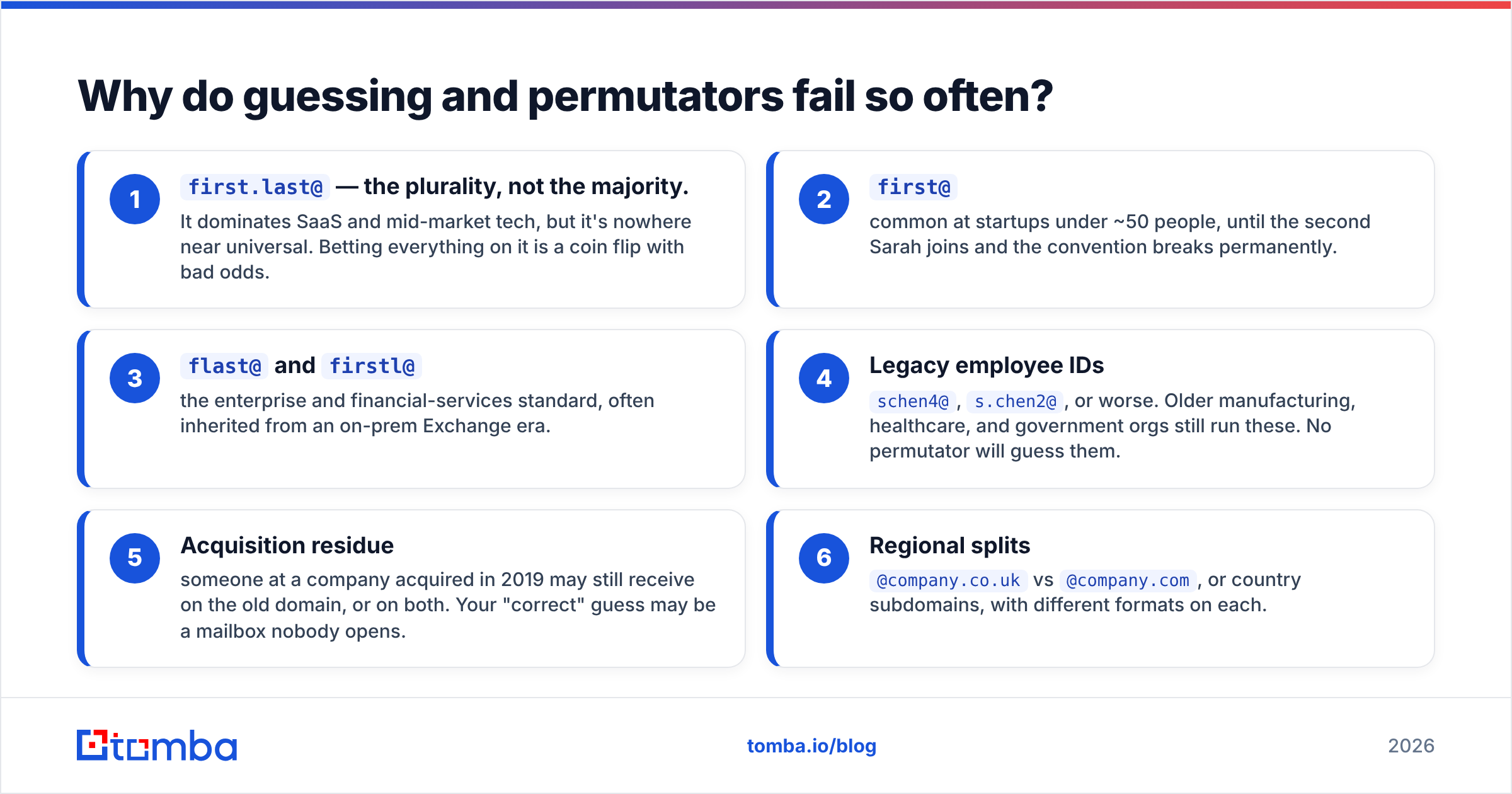
Here is the spread you are up against on real B2B domains:
first.last@— the plurality, not the majority. It rules SaaS and mid-market tech. It is nowhere near universal. Betting on it alone is a coin flip with bad odds.first@— common at startups under 50 people. It breaks for good the day a second Sarah joins.flast@andfirstl@— the standard in enterprise and finance, often inherited from an old on-prem Exchange server.- Legacy employee IDs —
schen4@,s.chen2@, or worse. Older manufacturing, health, and government orgs still run them. No permutator will guess them. - Acquisition residue — someone from a 2019 acquisition may still get mail on the old domain, or on both. Your "correct" guess may be a mailbox nobody opens.
- Regional splits —
@company.co.ukvs@company.com, or country subdomains, with a different format on each.
Now add role catch-alls like sales@ and info@. They accept everything and route nowhere useful. That is the core problem with guesswork. The address looks right, then fails in silence. A bounce is honest feedback. A black hole is not.

What are the 7 methods to find email by name?#
They run from most manual to most automated. Most teams use three or four together to find email by name at scale.
1. Check the company website first. Team pages, press kits, /contact, and PDF case studies still leak addresses all the time. Search site:acme.com "@acme.com" in Google. It costs nothing and is very precise when it works. Coverage is low.
2. Search the person's own public footprint. Many developers expose real work emails in Git commit metadata. Speaker bios, academic papers, SEC filings, podcast show notes, and Substack bylines help too. It is slow. It is also the only method that finds odd legacy addresses no pattern engine would ever build.
3. Derive the pattern from a known colleague. Find one verified address at the domain and you have the format for most of the staff. A company email pattern checker does this for you. It reads every address already known for that domain and reports the dominant format with a frequency count.
4. Use domain search to list everyone at the company. Instead of guessing one person, pull the known mailboxes for the whole domain. Then find your target in the list. Domain search is the fastest route when you prospect a named account rather than a named person.
5. Use a name + domain email finder. This is the core method. You submit "Sarah Chen" plus "acme.com". The tool checks its index, applies the domain's pattern, verifies the result, and returns an address with a confidence score. It is what most people mean when they search "find email by name".
6. Reverse-engineer from LinkedIn. If a LinkedIn profile is your only anchor, a LinkedIn finder maps that profile to a work email through the employer field. It helps when the display name differs from the mailbox name, as with nicknames, married names, or transliterations.
7. Ask. This one is underrated. A connection request, a form fill, a mutual intro, or a reply to their newsletter costs nothing. You get a permission-based address. It is slower per contact, and reply rates are far better.
How accurate is each method, really?#
Accuracy here means the address exists and accepts mail. It does not mean the address looks plausible. Those are very different numbers.
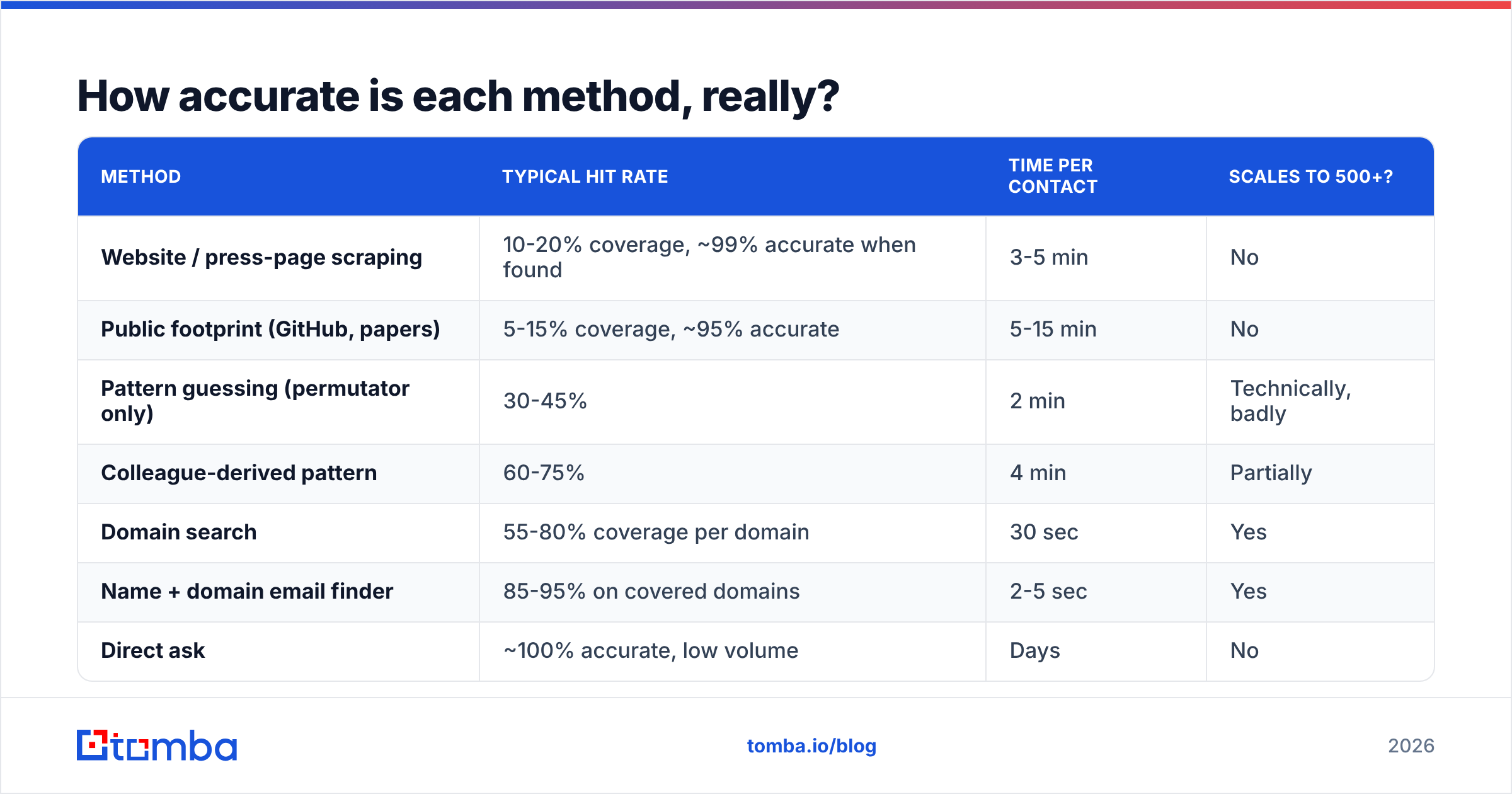
| Method | Typical hit rate | Time per contact | Scales to 500+? |
|---|---|---|---|
| Website / press-page scraping | 10-20% coverage, ~99% accurate when found | 3-5 min | No |
| Public footprint (GitHub, papers) | 5-15% coverage, ~95% accurate | 5-15 min | No |
| Pattern guessing (permutator only) | 30-45% | 2 min | Technically, badly |
| Colleague-derived pattern | 60-75% | 4 min | Partially |
| Domain search | 55-80% coverage per domain | 30 sec | Yes |
| Name + domain email finder | 85-95% on covered domains | 2-5 sec | Yes |
| Direct ask | ~100% accurate, low volume | Days | No |

Vendors rarely lead with two caveats.
First, accuracy and coverage are separate metrics, and tools trade one for the other. A vendor can claim 98% accuracy by returning nothing it is unsure about. That quietly tanks your hit rate. So measure both: accepted results ÷ names submitted, and bounces ÷ accepted results.
Second, hit rates fall hard on companies under 10 people. They also fall on domains with anti-harvesting setups, and in regions with strict privacy defaults. If your buyers are 5-person agencies in Germany, no tool on the market will give you 90%.
Which tools find email by name best in 2026?#
Every serious tool does the same four things: index, pattern-match, verify, score. They differ on database depth, on how strict verification is, and on what you pay per usable address.

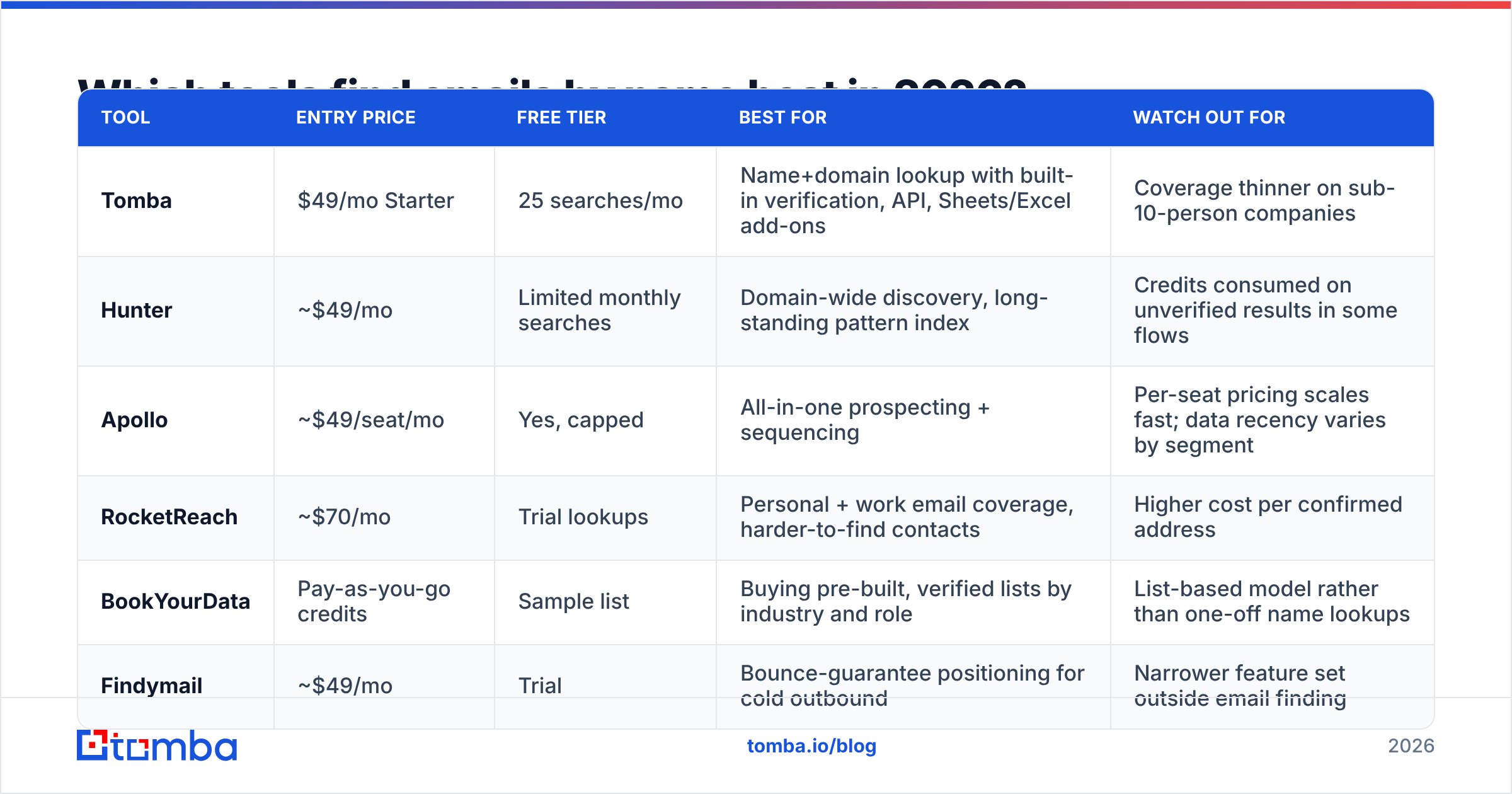
| Tool | Entry price | Free tier | Best for | Watch out for |
|---|---|---|---|---|
| Tomba | $49/mo Starter | 25 searches/mo | Name+domain lookup with built-in verification, API, Sheets/Excel add-ons | Coverage thinner on sub-10-person companies |
| Hunter | ~$49/mo | Limited monthly searches | Domain-wide discovery, long-standing pattern index | Credits consumed on unverified results in some flows |
| Apollo | ~$49/seat/mo | Yes, capped | All-in-one prospecting + sequencing | Per-seat pricing scales fast; data recency varies by segment |
| RocketReach | ~$70/mo | Trial lookups | Personal + work email coverage, harder-to-find contacts | Higher cost per confirmed address |
| BookYourData | Pay-as-you-go credits | Sample list | Buying pre-built, verified lists by industry and role | List-based model rather than one-off name lookups |
| Findymail | ~$49/mo | Trial | Bounce-guarantee positioning for cold outbound | Narrower feature set outside email finding |
Pricing shifts constantly. Check each vendor's page before you commit. Read the credit definition with care. "1 credit per search" and "1 credit per result" produce very different bills on a 5,000-name list.
Tomba's tiers are Free (25 searches/mo), Starter $49/mo, Growth $99/mo, Pro $249/mo, and Enterprise custom. The Tomba pricing page lists the exact credit allocations. User reviews in G2's lead intelligence category are the fastest way to sanity-check vendor accuracy claims.
How do you verify an address once you've found it?#
You run it through SMTP-level checks before it ever touches a campaign.
Verification is the gap between "this address matches the pattern" and "this mailbox exists". A verifier opens a short exchange with the receiving mail server over the SMTP protocol. It asks whether the recipient is accepted, then closes without sending a thing. On top of that, it runs:
- Syntax check — broken local parts, illegal characters, missing TLD.
- Domain and MX check — does the domain resolve and publish mail records? A domain with no MX record cannot receive mail at all.
- Disposable detection — throwaway inboxes, which are worthless for B2B.
- Role-account flagging —
info@,support@,careers@. These deliver, but they rarely convert, and spam complaints hit them hard. - Catch-all detection — the hard one, covered next.
Run every address you find through an email verifier before import. This is not optional. Mailbox providers weigh bounce rate heavily. Bounces above roughly 2-3% will hurt your email deliverability across the whole sending domain. Even clean campaigns then suffer.

What about catch-all domains?#
A catch-all domain accepts mail to every possible address. So SMTP checks return "valid" for asdkjh@acme.com just as fast as for the real person. About one in five B2B domains works this way. The share is higher at big firms on Microsoft 365 defaults.
This is where many "verified" lists quietly rot. The tool said valid. The address bounced softly or landed in a void nobody reads. Then the campaign stats blamed the copy.
Three ways to handle it:
- Segment, don't delete. Catch-all addresses are not wrong. They are unconfirmed. Put them in a separate, low-volume campaign so a bad batch cannot drag down your main domain.
- Use dedicated catch-all logic. A catch-all verifier scores these addresses using pattern confidence, past engagement, and second sources.
- Cross-confirm with a second signal. If the same address shows up in a public directory, a Git commit, or a press release, the doubt is resolved.
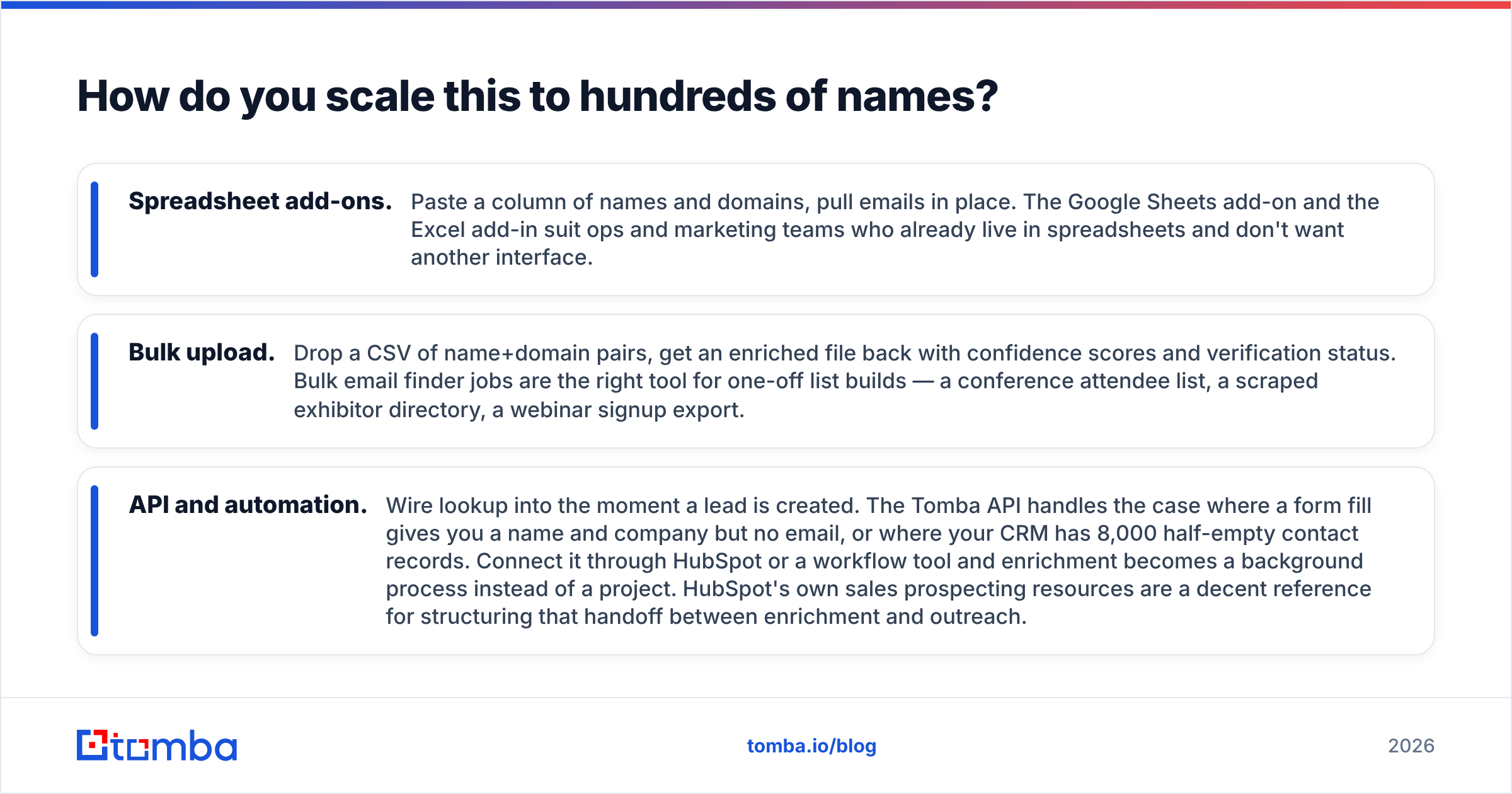
How do you scale this to hundreds of names?#
Past about 30 contacts, manual lookup stops paying off. At four minutes each, 500 names eats 33 hours of someone's week.
Three practical paths, in rising order of technical lift:
- Spreadsheet add-ons. Paste a column of names and domains, then pull emails in place. The Google Sheets add-on and the Excel add-in suit teams who already live in spreadsheets.
- Bulk upload. Drop a CSV of name and domain pairs. You get a file back with confidence scores and verification status. Bulk email finder jobs fit one-off list builds, such as an event attendee list or a webinar export.
- API and automation. Wire the lookup into the moment a lead is created. The Tomba API covers the form fill that gives you a name and company but no email. It also covers the CRM with 8,000 half-empty records. Connect it through HubSpot or a workflow tool and enrichment runs in the background. HubSpot's sales prospecting resources are a decent guide for the handoff to outreach.
Whichever path you pick, hold one rule. Nothing enters the sending tool without a verification status attached. Find email by name and verify it in the same pipeline step, not in two teams' backlogs.
Is it legal to find email by name?#
Usually yes for B2B work addresses, with real conditions. This is not legal advice.
Under GDPR, a work email tied to a named person is personal data. You may process it under legitimate interest for B2B outreach. But you need real business relevance, a clear statement of who you are, an easy opt-out in every message, and a record of the source. Blasting 50,000 scraped addresses is not legitimate interest.
Under CAN-SPAM in the US, the bar is lower. You need accurate headers, an honest subject line, a physical address, and a working unsubscribe honored within 10 business days.
Guardrails that keep you clean in any jurisdiction:
- Target business addresses at companies plausibly in your market. Personal Gmail addresses are a different legal and reputational matter.
- Keep provenance. Know which source gave you each address. Good providers document their data sources, so you can answer a deletion request.
- Honor opt-outs at once, forever, across every tool you own.
- Suppress anyone who never engages after a full sequence. Mailing non-responders is how complaint rates climb.
Where should you start?#
With fewer than 20 names, go manual. Search the website, derive the pattern from a colleague, then verify. You will spend an hour and pay nothing.
Past 20 names, or if you do this weekly, the math flips. One hour of a rep's time costs more than a month of a lookup tool. And the tool's hit rate is roughly double what manual guessing gives you.
Start with the Tomba Email Finder. Enter a first name, last name, and company domain. You get a verified address with a confidence score in a couple of seconds.
The free tier gives you 25 searches a month. That is enough to find email by name for contacts whose addresses you already know, and measure the real hit rate yourself. Your names, your industry, your domains. That test beats every accuracy claim in every comparison table, including this one.
Related guides#
Ready to find emails that actually work?
Join 150,000+ professionals who stopped guessing and started sending. Free credits on signup — no credit card required.
Get the Tomba newsletter
Practical outbound tactics and product updates — once every two weeks.
About the author