How to Find Gmail Email Address by Name: 2026 Guide
Most guides tell you to guess firstname.lastname@gmail.com and hope. Here is what actually works in 2026 — the free search tricks, the permutation math, the verification step everyone skips, and the tools worth paying for.
Trying to find Gmail email address by name? There is no directory to look it up in. You either find where the person already posted the address, or you guess it and verify it before you send. This guide covers both routes and the real hit rate of each.
TL;DR
- No directory lists Gmail addresses, so nobody truly "looks them up." Every method is either a search for where the person posted it, or a guess you then verify.
- Free methods (Google operators, GitHub commit history, WHOIS, social bios) work maybe 20-35% of the time on consumer Gmail, and they cost you 5-15 minutes per person.
- Permutators generate the candidate list; they do not find anything. The value is in the verification step that kills the 40+ wrong guesses.
- Gmail blocks most SMTP probing. That is why free email checkers return
unknownon@gmail.comfar more often than on work domains. Accept that ceiling and pick tools that admit it. - If your target has any professional footprint, finding their work email is 3-5x more reliable than chasing their personal Gmail. Start there.
What does "find Gmail email address by name" actually mean?#
It means one of two very different jobs, and mixing them up is why most people fail.
Job one: retrieval. The person has already published their Gmail somewhere — a GitHub commit, a conference speaker page, a WHOIS record, a Substack footer, an old forum post. The address exists in a crawlable corner of the internet and you just have to find it. This is a search problem.
Job two: inference. The person has never published it. You know her name is Maria Chen and you believe she uses Gmail. Now you have to work out whether she is mariachen@, maria.chen@, mchen@, mariachen91@, or one of roughly 40 other options. This is a guess-and-verify problem.
Nearly every "find any Gmail in 30 seconds" article conflates the two, which is how you end up with advice that sounds magical and converts at 12%. Google publishes no public directory of Gmail users. Gmail's own product documentation has never offered a name-to-address lookup. Google also removed the last traces of profile-based email discovery years ago. There is no API, no export, no legitimate reverse index. Anyone claiming to "search the Gmail database" is selling you a scraped, stale list.
Why is finding a personal Gmail harder than a work email?#
Because work emails follow patterns and personal ones follow moods.
A company with 200 employees almost always uses one dominant format — first.last@, flast@, or first@. Once you know the format for acme.com, every employee is one substitution away. That is why domain search works so well: you solve the pattern once and inherit hundreds of addresses.
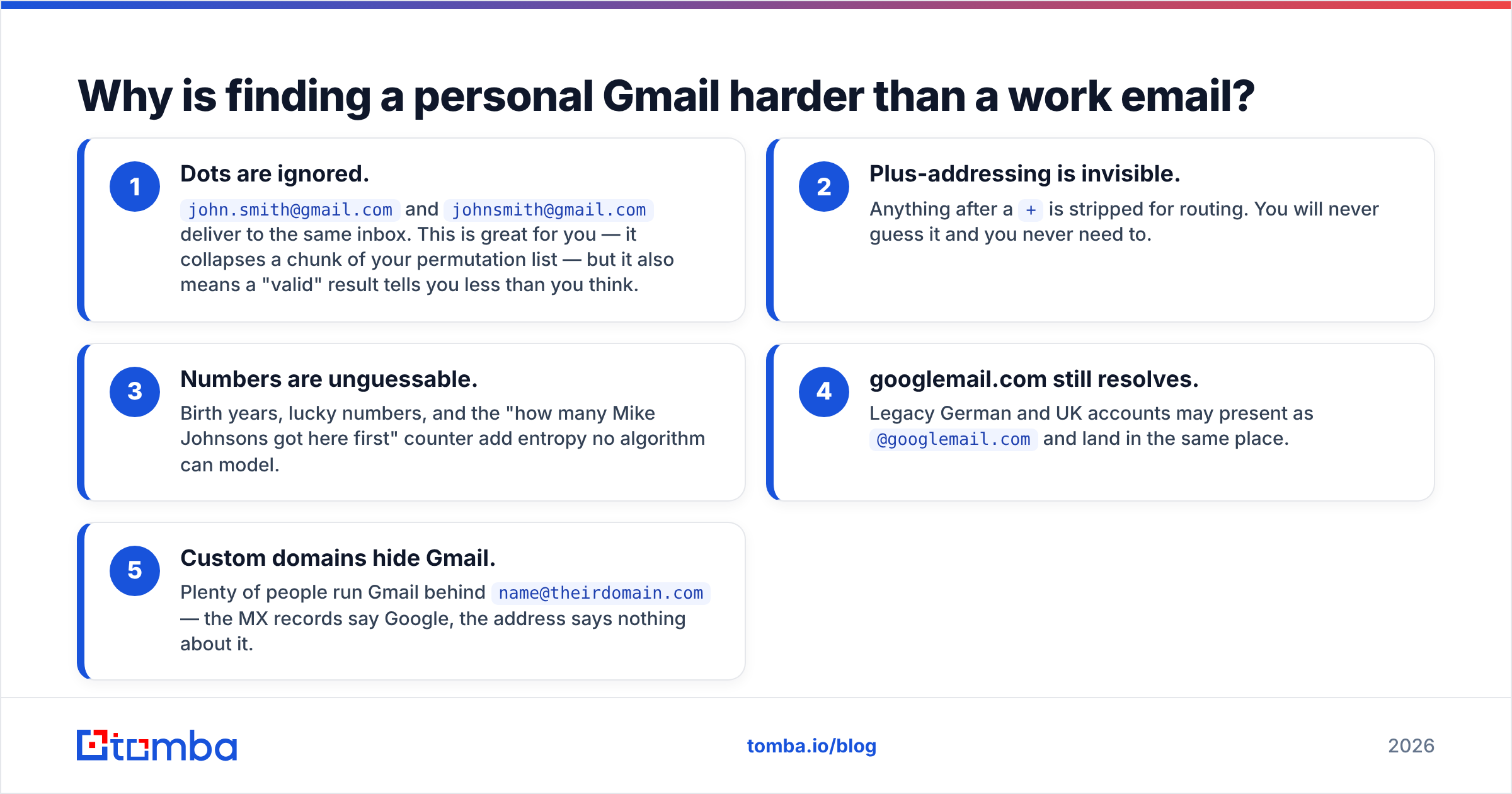
Gmail has no pattern. sarah.k.designs@gmail.com was chosen in 2011 because sarahk@ was taken, and there is nothing in the person's name that predicts the .designs suffix. Add these complications:
- Dots are ignored.
john.smith@gmail.comandjohnsmith@gmail.comdeliver to the same inbox. This is great for you — it collapses a chunk of your permutation list — but it also means a "valid" result tells you less than you think. - Plus-addressing is invisible. Anything after a
+is stripped for routing. You will never guess it and you never need to. - Numbers are unguessable. Birth years, lucky numbers, and the "how many Mike Johnsons got here first" counter add entropy no algorithm can model.
- googlemail.com still resolves. Legacy German and UK accounts may present as
@googlemail.comand land in the same place. - Custom domains hide Gmail. Plenty of people run Gmail behind
name@theirdomain.com— the MX records say Google, the address says nothing about it.
So, honest expectations. Is the person a developer, writer, indie founder, or anyone who ships work in public? Then search works well. Is the person private, with no public trail? Then guessing is your only path, and it tops out below 50%.

What are the fastest free ways to find a Gmail address by name?#
These are the fastest free ways to find Gmail email address by name. Run them in order. Stop the moment one hits.
1. Quoted search operators. In Google, search "maria chen" "@gmail.com" and then narrow: "maria chen" "gmail.com" site:github.com. Add a discriminator you already know — city, company, university, project name — or you will drown in namesakes. The operator intext:"@gmail.com" combined with site: on a domain the person is associated with is the single highest-yield free move.
2. GitHub commit history. For anyone technical, this is close to a cheat code. Open any repository they contributed to, append .patch to a commit URL, and the author line contains the email used for that commit. Many developers configured Git with a personal Gmail years before privacy settings existed.
3. WHOIS on domains they own. Registration records were largely redacted after GDPR, but historical WHOIS snapshots and small-registrar records still leak. If they have ever run a side project domain, check it.
4. Social bios and link-in-bio pages. X, Instagram, Threads, Linktree, Beacons, personal Notion pages, Gumroad storefronts, and Substack "about" pages. Creators publish contact addresses because they want inbound — this is retrieval at its easiest.
5. PDFs, slide decks, and academic papers. "maria chen" filetype:pdf gmail finds conference submissions, resumes, and grant applications. Academics list personal Gmail on papers constantly.
6. Newsletter archives and mailing lists. Public archives of Google Groups, Apache lists, and older dev mailing lists still index sender addresses.
Free methods are legitimate, they cost nothing but time, and they should always be your first ten minutes. What they are not is scalable. Twelve minutes per contact times 300 contacts is a full work week.
Do Gmail email permutators still work in 2026?#
They work exactly as well as the verification behind them — which is the part nobody talks about.
A permutator takes "Maria Chen" and outputs the standard candidate set. The math is simple and worth internalizing:
- First + last combinations:
mariachen,maria.chen,chenmaria,chen.maria— 4 core variants (dots are equivalent in Gmail, so this really collapses to 2 deliverable identities). - Initial combinations:
mchen,mariac,m.chen,chenm— 4 more. - Nickname expansion:
mari,mia,riacrossed with the above — roughly 12 more. - Numeric suffixes: append
1,01, birth year,123to the top 4 — 16 more. - Middle initial:
mkchen,maria.k.chen— 4 more.
That is around 40 candidates for one person, of which exactly one (or zero) is real. A free email permutator will hand you the list in a second. The list is worthless until something tells you which line is live. Send forty test emails to find out and you torch your sending domain and your sender reputation in one afternoon.

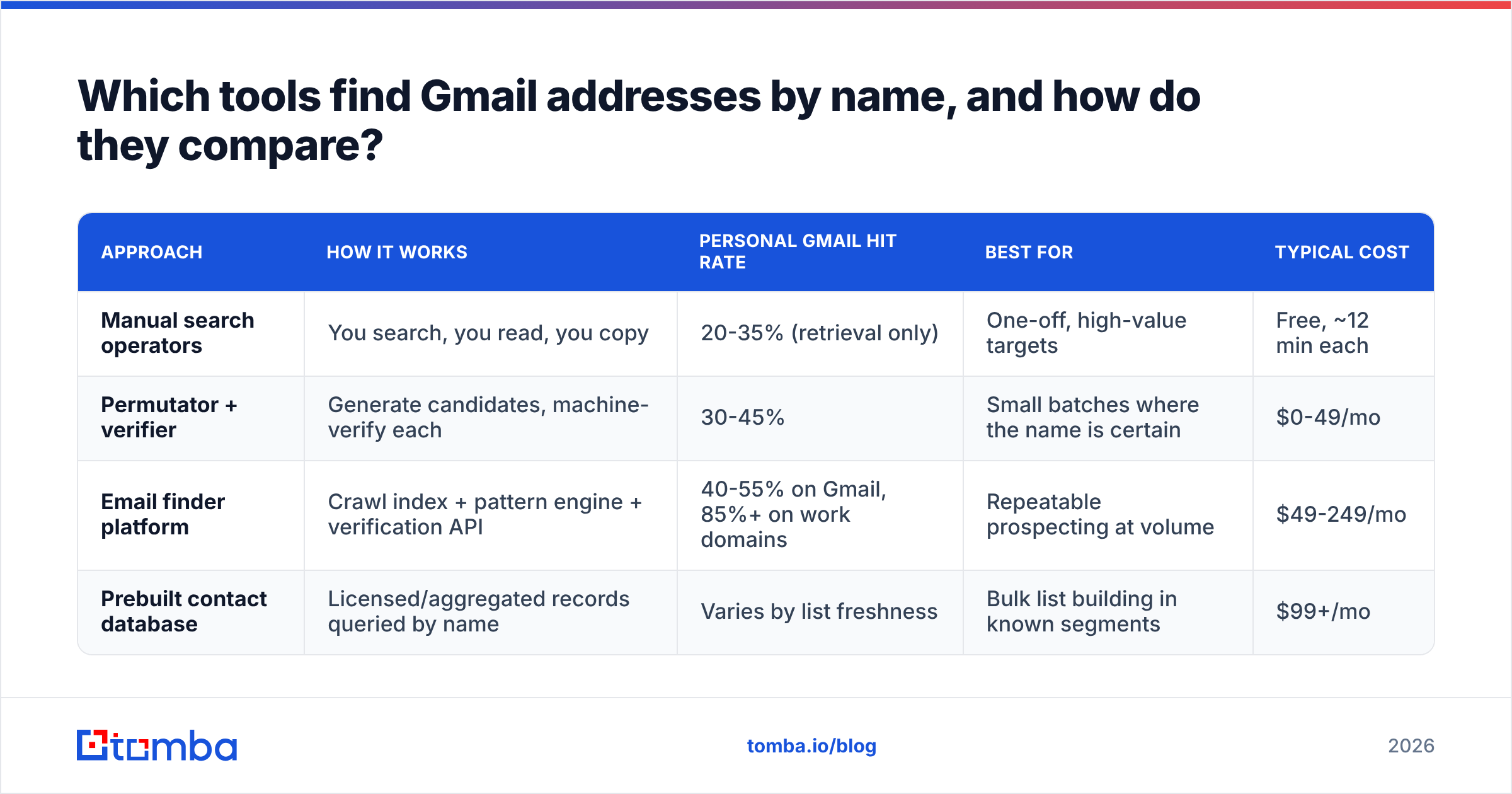
Which tools find Gmail addresses by name, and how do they compare?#
Categorically, there are four kinds of product sold against this problem, and they behave very differently on consumer Gmail versus corporate domains.
| Approach | How it works | Personal Gmail hit rate | Best for | Typical cost |
|---|---|---|---|---|
| Manual search operators | You search, you read, you copy | 20-35% (retrieval only) | One-off, high-value targets | Free, ~12 min each |
| Permutator + verifier | Generate candidates, machine-verify each | 30-45% | Small batches where the name is certain | $0-49/mo |
| Email finder platform | Crawl index + pattern engine + verification API | 40-55% on Gmail, 85%+ on work domains | Repeatable prospecting at volume | $49-249/mo |
| Prebuilt contact database | Licensed/aggregated records queried by name | Varies by list freshness | Bulk list building in known segments | $99+/mo |
A few honest notes on the vendors here. Tomba sits in the third row. Its email finder is strongest on business domains, and it treats personal Gmail as a lower-confidence branch. You get a score, not a false yes. Hunter and Snov.io work the same way: work domains first, Gmail as a side effect. ContactOut and RocketReach lean on personal-email fields pulled from LinkedIn, which is where much of the consumer Gmail data comes from.
BookYourData takes the database route. It is a solid option when you want a pre-built, filterable list rather than a per-lookup API. That is a different shape of solution, not a worse one: pick database-first if you know your targets by segment, lookup-first if you know them by name.

The trap to avoid: any tool that returns firstname.lastname@gmail.com with a green "valid" badge and no confidence score. At the SMTP layer, Gmail accepts mail for a huge range of addresses, whether or not they were ever registered. It also slows down or blocks tools that probe it. So a tool that never says unknown on Gmail is not more accurate. It is just less honest about what it does not know. Check independent review corpora like G2's lead intelligence category and read the one-star reviews specifically; that is where bounce complaints live.
How accurate is Gmail lookup compared to business email finding?#
Set expectations by domain type, not by vendor marketing.

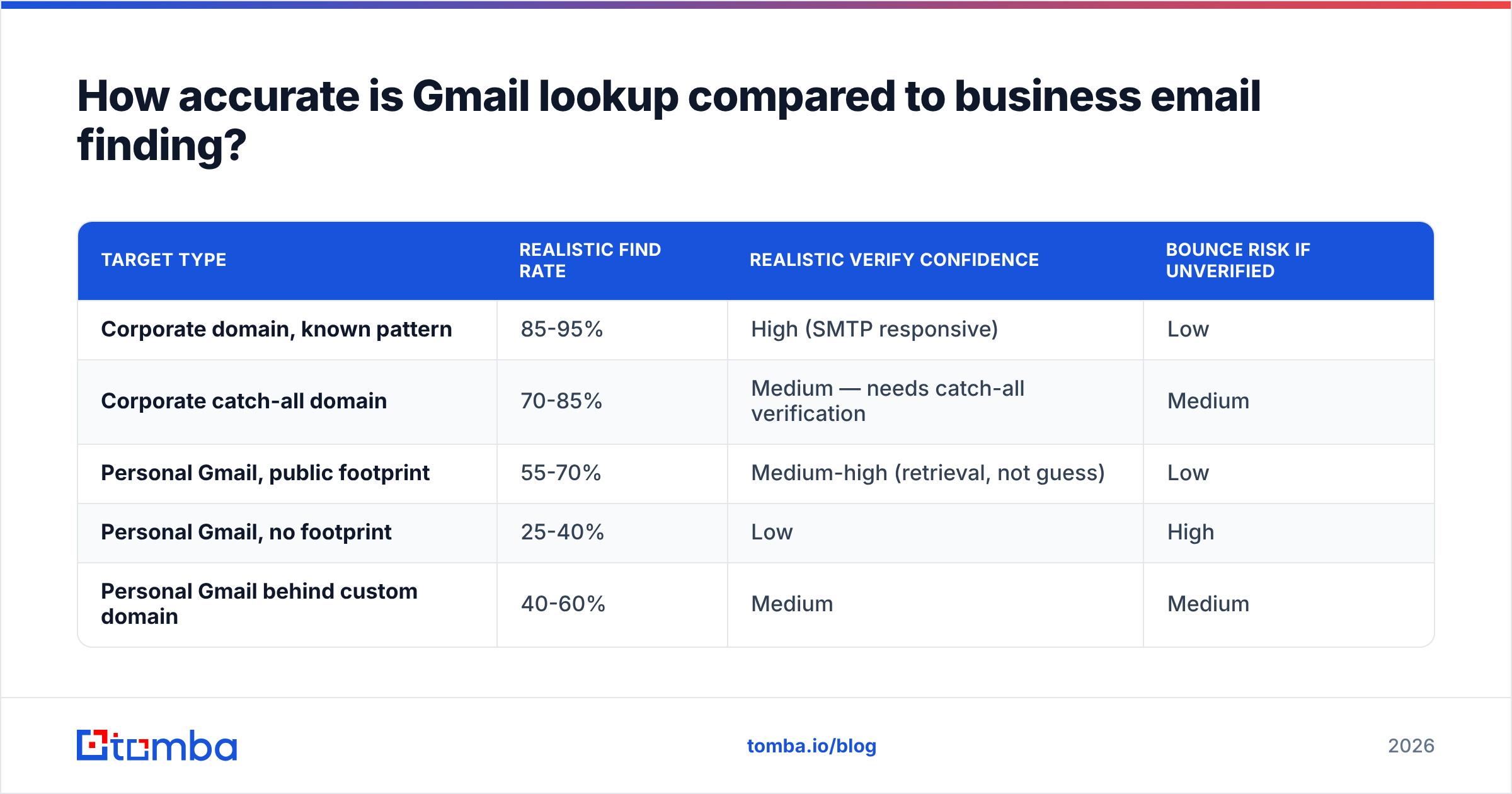
The pattern holds across published benchmarks and vendor-reported figures. The same engine that hits 85-95% on @company.com drops to roughly 40-55% on @gmail.com. That is not a bug. Work email follows a pattern and is half public. Personal email is random and private.
| Target type | Realistic find rate | Realistic verify confidence | Bounce risk if unverified |
|---|---|---|---|
| Corporate domain, known pattern | 85-95% | High (SMTP responsive) | Low |
| Corporate catch-all domain | 70-85% | Medium — needs catch-all verification | Medium |
| Personal Gmail, public footprint | 55-70% | Medium-high (retrieval, not guess) | Low |
| Personal Gmail, no footprint | 25-40% | Low | High |
| Personal Gmail behind custom domain | 40-60% | Medium | Medium |
Practical implication: if the person has a job title and an employer, spend your credits on the work address. The find rate is double and the verification is real. B2B outreach to a work inbox also beats cold-mailing a personal account, where you compete with family, receipts, and a Promotions tab that eats anything that smells like sales.
How do you verify a Gmail address without sending an email?#
You use a verifier that layers signals instead of relying on SMTP alone, because Gmail's SMTP layer will not cooperate.
A serious email verifier checks, roughly in order:
- Syntax and clean-up — strip plus-tags, collapse dots, catch
gmial.comtypos, fixgooglemail.com. - MX and domain status — always true for Gmail, but it catches the custom domain on Google case.
- Disposable and role check — flag
info@,admin@, and throwaway hosts that should never enter a sequence. - Gmail-tuned logic — not a plain SMTP handshake, since Google answers probes with noise.
- Public sightings — has this exact address shown up in a crawled public source? One real sighting beats any guess made at the protocol layer.
- Confidence score — a number you can set a cut-off on, not a yes or no.
Then set a policy and stick to it. A workable one: send only to results scoring 85+, route 60-84 into a manual review queue, and discard anything below 60 outright. If you are running volume, do this in batch — a bulk verify pass over a list before it ever touches your sending tool is cheaper than one deliverability incident. You can pressure-test a single address for free with a free email checker before committing credits to a whole list.
The rule that matters more than any tool choice: never send to an unverified guess. A 4% bounce rate is the threshold where Google and Microsoft start throttling you, and forty guessed Gmail addresses will blow through it instantly.
Is it legal to look up someone's Gmail address?#
Short answer: finding a publicly posted address is legal in most jurisdictions; what you do next is where the rules bite.
Under GDPR, an email address tied to a named person is personal data. Using it for direct marketing needs a lawful basis, usually legitimate interest. That means you document the balancing test, name your source and yourself in the first message, and honour opt-outs at once. Personal Gmail is treated more strictly than a role-based business address, because it is a private context.
In the US, CAN-SPAM sets a lower bar: true headers, a real postal address, a working unsubscribe link. But if you scrape sites to harvest addresses, the fines go up. That part is written into the law. The Gmail entry on Wikipedia is a useful primer on how the service's privacy posture has evolved, and it is worth understanding before you build a workflow on top of it.
Three practical guardrails:
- Prefer the business address when a business relationship is what you are proposing. It is both more effective and more defensible.
- Log your source for every contact. "Found on their public GitHub profile" is a defence; "bought a list" is not.
- Honour deletion requests on first contact, without argument or a retention clause.
What is the workflow that actually works?#
Here is the sequence that maximises hit rate per minute spent.
Start with the free steps:
- Disambiguate the person first. Confirm the spelling, employer, city, and one unique marker (a project, a handle, a school). Namesake confusion is the biggest source of "verified but wrong" contacts.
- Try the work email before the personal one. Run a domain search on their employer, get the pattern, apply it. If it lands, stop. Your deliverability is safer that way.
- Run retrieval searches. Ten minutes of quoted operators, GitHub patch files, and link-in-bio checks. Anything you find here is already verified, because a human published it.
Then spend credits:
- Only then permute. Generate the candidate set, feed it to a verifier, keep the high-confidence survivor. If nothing survives, mark the contact unfindable and move on. Do not "just try the most likely one."
- Enrich what you found. Attach a title, company, and social profile via data enrichment, so the address is usable in a sequence instead of an orphan string in a spreadsheet.
- Batch the whole thing. Doing more than twenty of these? Use the Tomba API or a spreadsheet add-on instead of a browser tab. Manual lookup does not survive volume.
Steps 1-3 are free. Step 4 is where credits get spent, and spending them on verification rather than on guessing is the difference between a 3% bounce rate and a blocked sending domain.
Where should you start?#
Start from one assumption: the address is already public, or it cannot be found at all. Let a tool prove which one, instead of your outbox.
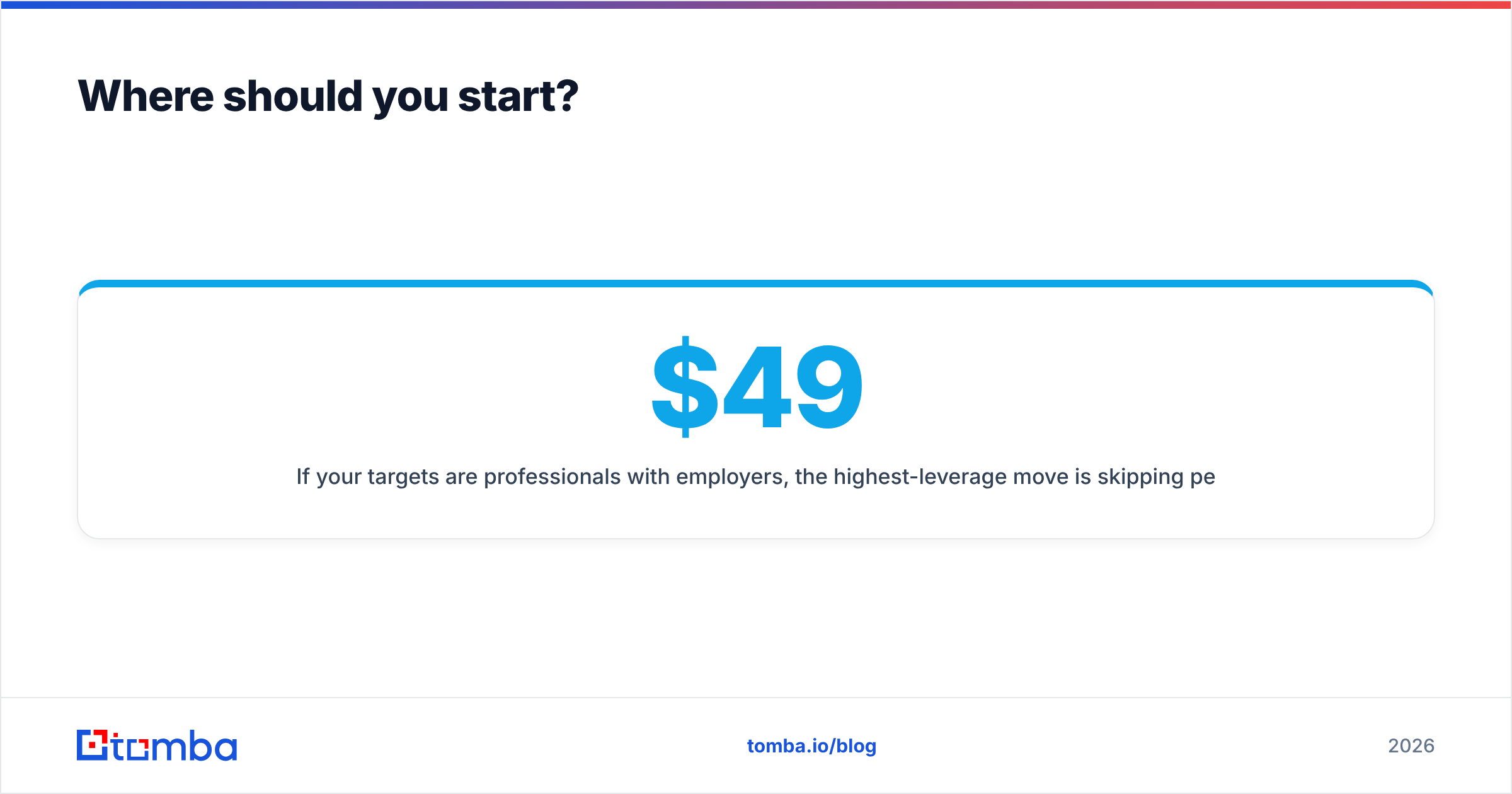
If your targets are professionals with employers, the best move is to skip the attempt to find Gmail email address by name. Run the company through Tomba Email Finder instead. You get the verified work address with a confidence score, and you send to an inbox someone actually watches for business mail. The free tier gives you 25 searches a month, so you can test the hit rate on your own list first. Paid plans start at $49/mo for Starter, $99/mo for Growth, and $249/mo for Pro if you need volume and API access. Check the current Tomba pricing for credit allocations per tier.
Run twenty of your hardest names through it and compare against the twelve-minutes-each manual method. The math usually settles the argument.
Related guides#
Ready to find emails that actually work?
Join 150,000+ professionals who stopped guessing and started sending. Free credits on signup — no credit card required.
Get the Tomba newsletter
Practical outbound tactics and product updates — once every two weeks.
About the author