How to Find Out If an Email Address Exists (2026 Guide)
Sending to a dead inbox costs more than a wasted email — it damages your sender reputation. Here are the five reliable ways to check whether an address is real before you hit send.
TL;DR
- You cannot prove an email address exists with 100% certainty from the outside — but a layered check gets you to roughly 95-98% confidence without sending anything.
- Syntax and DNS/MX checks are free and instant. They eliminate maybe 10-15% of a bad list before you spend a credit.
- SMTP handshake verification is the real test, but Microsoft 365 and catch-all domains break it. That's where most free checkers silently guess.
- Sending a "test email" to see if it bounces is the worst option available. Hard bounces are recorded by mailbox providers and follow your domain.
- Budget rule: verify anything older than 90 days, anything scraped, and 100% of any purchased list — no exceptions.
Why does it matter whether an email address exists?#
Because Gmail and Microsoft treat bounce rate as a trust signal, and they do it at the domain level.
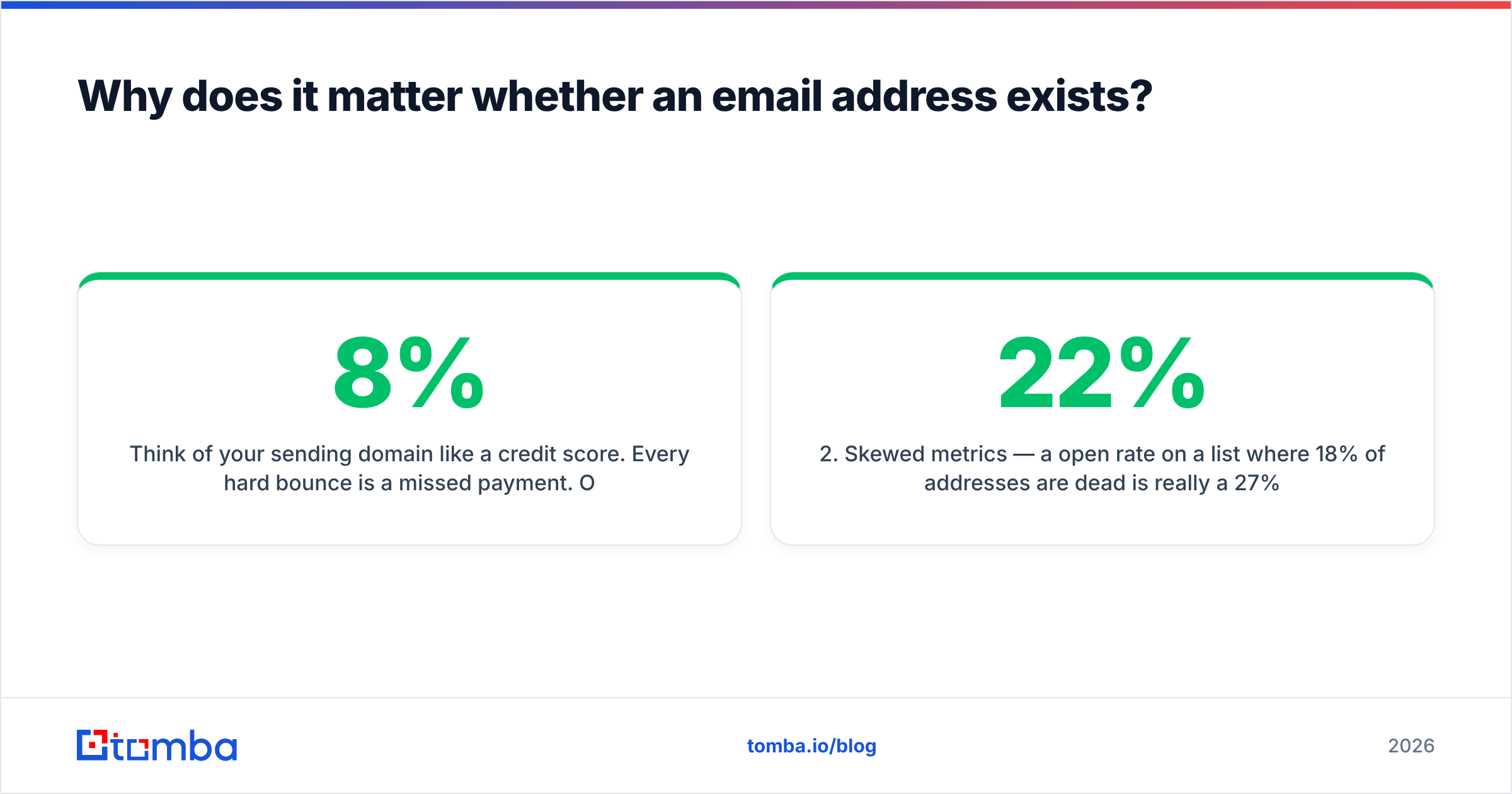
Think of your sending domain like a credit score. Every hard bounce is a missed payment. One or two won't matter. A campaign that hits 8% invalid addresses gets logged, throttled, and eventually filed under "this sender doesn't know who they're emailing." Google's bulk sender guidelines put the spam complaint threshold at 0.3%, and while they don't publish a hard bounce number, deliverability practitioners generally treat 2% as the line where things start to degrade.
The practical costs stack up fast:
- Wasted sending credits — most cold email platforms charge per send, not per delivery.
- Skewed metrics — a 22% open rate on a list where 18% of addresses are dead is really a 27% open rate, and you'll optimise against the wrong number.
- Reputation damage — the expensive one, because it also hurts the emails going to valid addresses.
- Spam trap hits — recycled addresses that mailbox providers reactivate specifically to catch senders who never clean their lists.

What actually happens when you check if an email exists?#
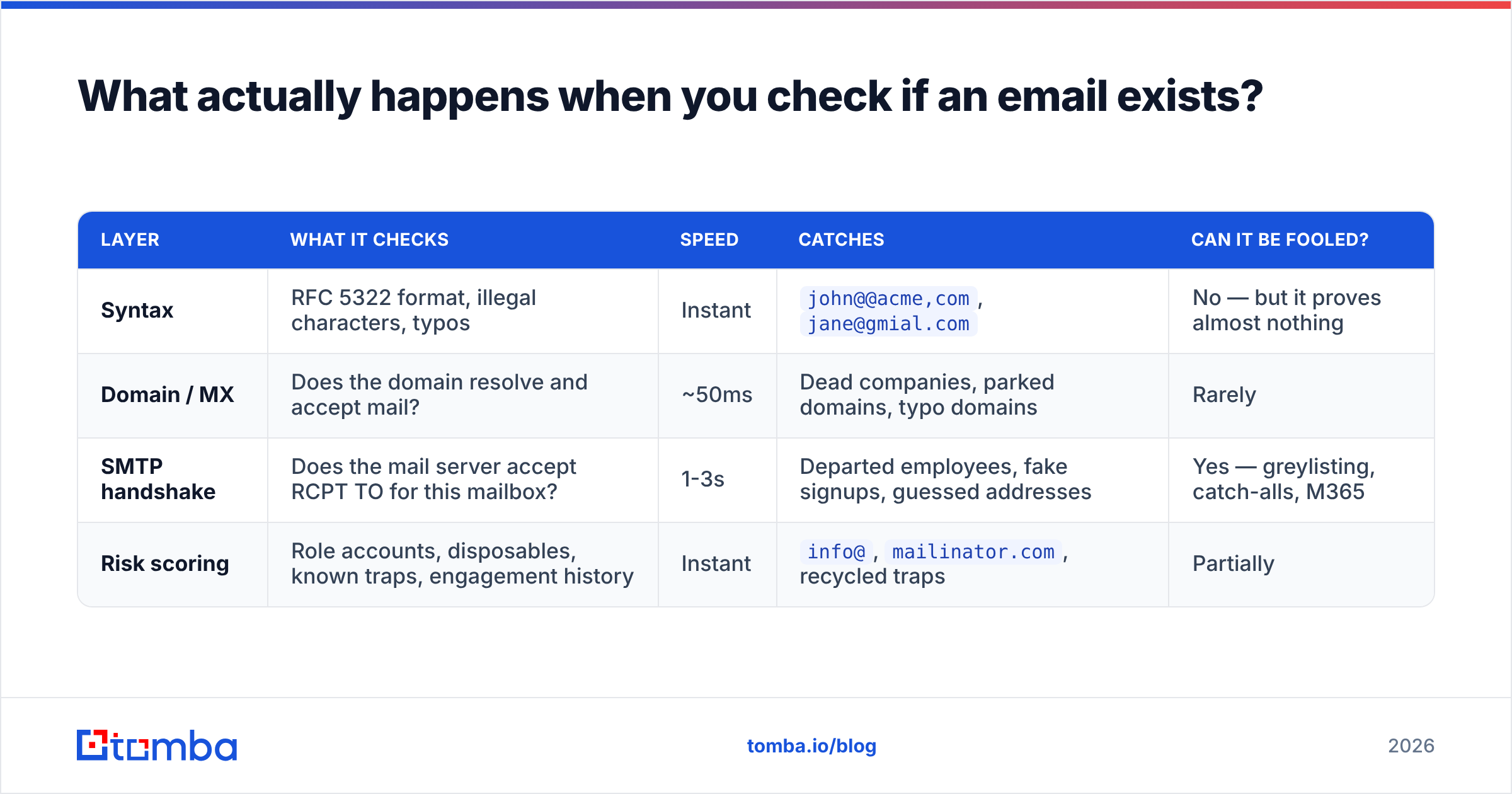
Verification is not one check. It's a chain of four, each one narrowing the field.
| Layer | What it checks | Speed | Catches | Can it be fooled? |
|---|---|---|---|---|
| Syntax | RFC 5322 format, illegal characters, typos | Instant | john@@acme,com, jane@gmial.com |
No — but it proves almost nothing |
| Domain / MX | Does the domain resolve and accept mail? | ~50ms | Dead companies, parked domains, typo domains | Rarely |
| SMTP handshake | Does the mail server accept RCPT TO for this mailbox? | 1-3s | Departed employees, fake signups, guessed addresses | Yes — greylisting, catch-alls, M365 |
| Risk scoring | Role accounts, disposables, known traps, engagement history | Instant | info@, mailinator.com, recycled traps |
Partially |
The SMTP handshake is the interesting one. Your verifier opens a connection to the recipient's mail server, identifies itself, and asks — without sending a message — whether it would accept mail for that specific mailbox. A 250 OK means yes. A 550 means the mailbox doesn't exist.
That was reliable ten years ago. It isn't anymore. Microsoft 365 returns 250 for essentially everything and rejects later, Google greylists unfamiliar connecting IPs, and a growing share of domains run catch-all configurations that accept every address at the domain regardless of whether a human reads it.
How do you find out if an email address exists — the five methods ranked#
Here they are, ordered by how much I'd trust the result.
1. Dedicated verification API (most reliable)#
A real verifier runs all four layers and, critically, has historical data to fall back on when the SMTP layer is ambiguous. When a domain is catch-all, a good service checks whether that specific address has been seen in its corpus, whether the local part matches the company's known email pattern, and whether the mailbox has shown engagement signals.
This is where a dedicated email verifier earns its keep over a regex script. Tools that only run syntax and MX checks will happily mark noreply@stripe.com as valid — it is valid, and it will also never reply.
2. Verify at the point of discovery#
The cleanest workflow doesn't verify a list later. It never builds a bad list in the first place. When you use an email finder that returns a confidence score with each result, you're getting discovery and verification in a single step, and you can drop anything below your threshold before it enters your CRM.
3. Manual pattern confirmation#
For a handful of high-value targets, cross-reference. Find the company's dominant email format (first.last@, flast@, first@), confirm the person's name from LinkedIn or a company page, generate the candidate with an email permutator, then verify the single most likely candidate. Slow. Accurate for enterprise deals.
4. Free single-address checkers#
Fine for a one-off sanity check. A free email checker will tell you instantly whether an address is syntactically valid, whether the domain has MX records, and whether the mailbox responds. Don't build a 5,000-contact campaign on one.
5. Sending a test email (don't)#
Yes, a bounce tells you the address is dead. It also tells the mailbox provider that you sent to a dead address. You've traded reputation for information you could have gotten for a fraction of a cent. The only time this is acceptable is on a domain you don't care about.
What is a catch-all domain and why does it break verification?#
A catch-all domain accepts mail addressed to anything@thedomain.com — valid mailbox or not.
The analogy: imagine an office building where the front desk signs for every package regardless of whether the recipient works there. From outside, you can't tell who's real. Inside, most of those packages go straight to a bin.
This is not an edge case. Depending on the industry, 15-25% of B2B domains are configured this way, and it's more common at smaller companies using Google Workspace defaults or at enterprises that route everything through a security gateway.
Three ways verifiers handle it:
- Mark everything "risky" — honest, useless. You still have to decide.
- Guess valid — inflates the vendor's accuracy stats and your bounce rate simultaneously.
- Resolve with secondary data — pattern matching, historical sightings, engagement records.
The third is the only approach that produces an actionable answer, and it's why a catch-all verifier is a separate product category rather than a checkbox. If a vendor's marketing page doesn't mention catch-alls at all, assume they're doing option two.
How do the main verification tools compare in 2026?#
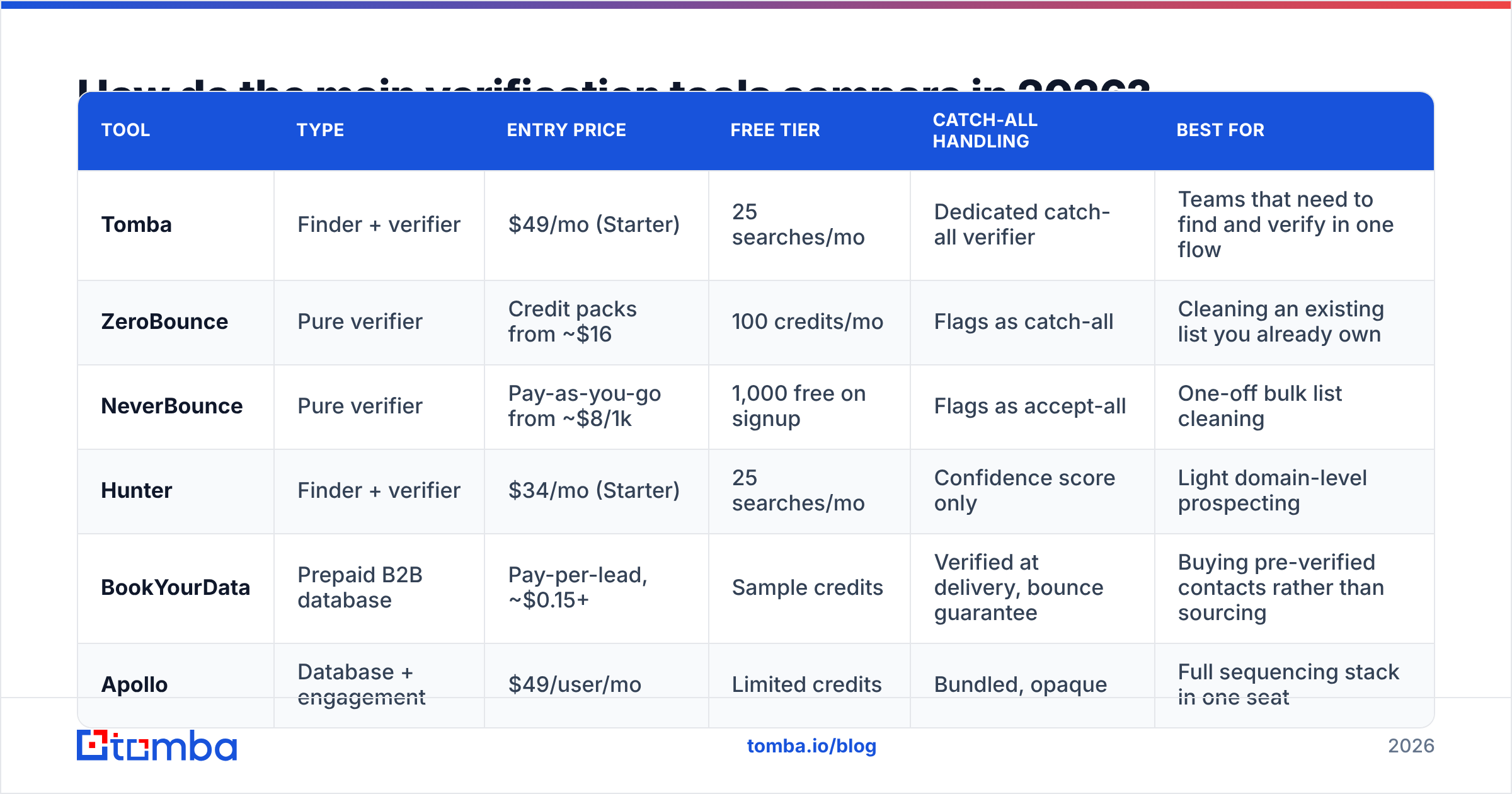
The market splits into three shapes: pure verifiers, finder-plus-verifier platforms, and databases that bundle verification. Pick based on whether you already have a list.
| Tool | Type | Entry price | Free tier | Catch-all handling | Best for |
|---|---|---|---|---|---|
| Tomba | Finder + verifier | $49/mo (Starter) | 25 searches/mo | Dedicated catch-all verifier | Teams that need to find and verify in one flow |
| ZeroBounce | Pure verifier | Credit packs from ~$16 | 100 credits/mo | Flags as catch-all | Cleaning an existing list you already own |
| NeverBounce | Pure verifier | Pay-as-you-go from ~$8/1k | 1,000 free on signup | Flags as accept-all | One-off bulk list cleaning |
| Hunter | Finder + verifier | $34/mo (Starter) | 25 searches/mo | Confidence score only | Light domain-level prospecting |
| BookYourData | Prepaid B2B database | Pay-per-lead, ~$0.15+ | Sample credits | Verified at delivery, bounce guarantee | Buying pre-verified contacts rather than sourcing |
| Apollo | Database + engagement | $49/user/mo | Limited credits | Bundled, opaque | Full sequencing stack in one seat |
Two notes on reading that table honestly. First, pure verifiers are usually cheaper per address than platforms — if you already own a clean-ish list and just need it scrubbed, a credit pack beats a subscription. Second, "free tier" numbers are not comparable: 1,000 one-time credits and 25 recurring monthly searches serve completely different needs.
For the finder-plus-verifier shape, the differentiator is what happens after verification. Tomba pricing runs Free (25 searches/mo), Starter $49/mo, Growth $99/mo, Pro $249/mo, and Enterprise custom, with the same credits covering finding, verifying, domain search, and enrichment rather than metering each separately. Compare that structure against per-feature credit systems before you assume the headline price is the real price.
If you want third-party sentiment rather than vendor claims, the G2 email verification category has enough reviews per product to be useful for spotting consistent complaints.

Can you find out if an email address exists for free?#
Partially, and it's worth knowing exactly where the free path stops.
What you can do for free, reliably:
- Syntax validation — pure logic, no network calls, no cost, ever.
- MX record lookup —
dig MX acme.comin a terminal tells you if the domain accepts mail at all. - Disposable domain check — public blocklists cover the well-known throwaway providers.
- Role account detection — anything starting
info@,sales@,admin@,support@is a shared inbox, valid but low-value. - A handful of single lookups — most vendors, including Tomba's free tier at 25 searches/mo, let you spot-check.
What free tools cannot do:
Resolve catch-alls, maintain a spam-trap database, run SMTP checks from IPs that aren't already rate-limited into uselessness, or give you the historical sighting data that makes an ambiguous result decidable. Those all require infrastructure someone has to pay for.
The honest framing: free checks are a filter, not a verdict. Run them first to strip out the obvious garbage, then spend paid credits only on what survives. On a scraped list, that sequencing alone can cut your verification bill by a third.
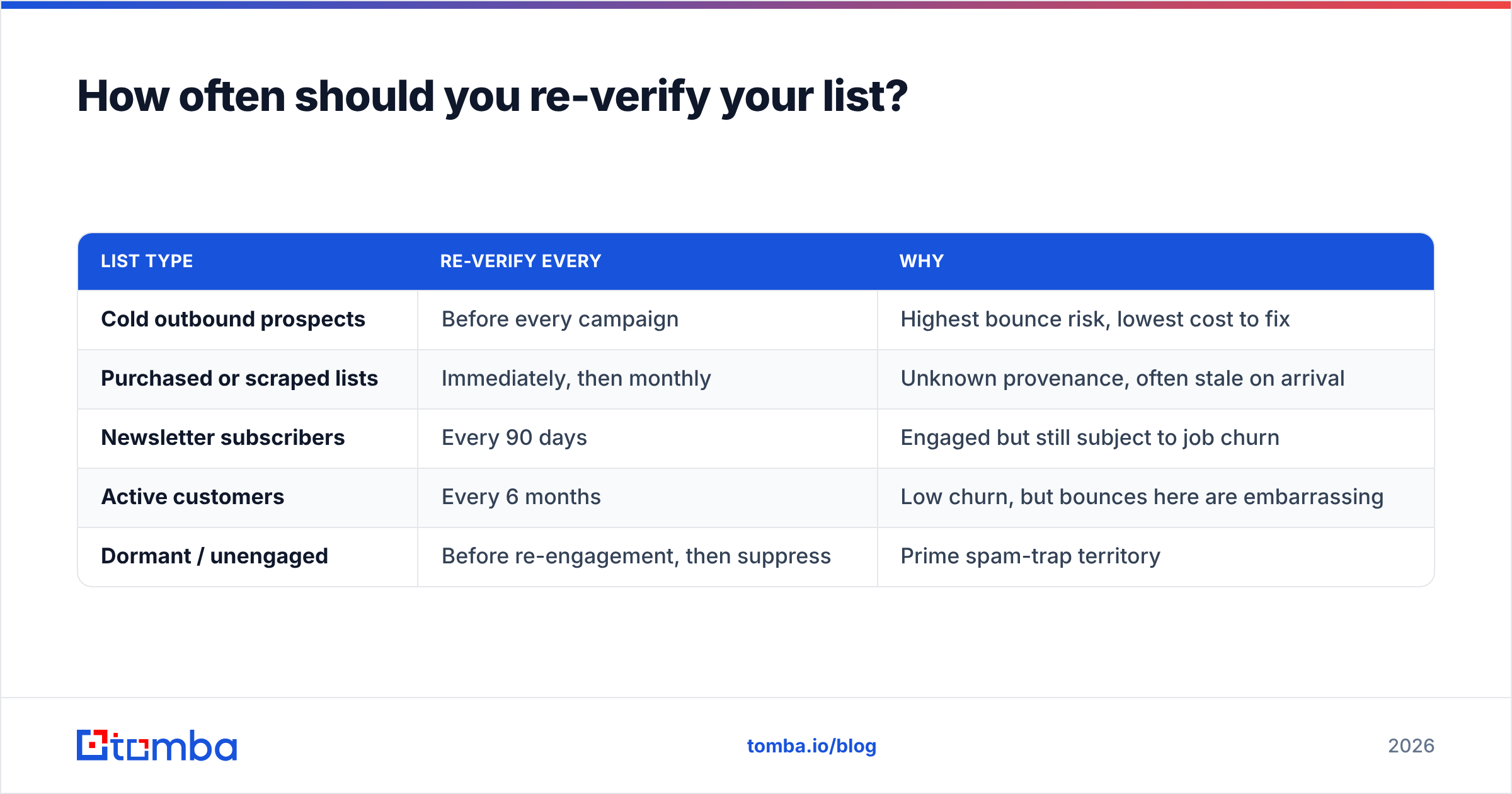
How often should you re-verify your list?#
B2B email data decays at roughly 22-30% per year, driven mostly by job changes. HubSpot's research on database decay has put the figure around 22.5% annually for years, and the 2023-2025 layoff cycles pushed it higher in tech specifically.
A workable schedule:
| List type | Re-verify every | Why |
|---|---|---|
| Cold outbound prospects | Before every campaign | Highest bounce risk, lowest cost to fix |
| Purchased or scraped lists | Immediately, then monthly | Unknown provenance, often stale on arrival |
| Newsletter subscribers | Every 90 days | Engaged but still subject to job churn |
| Active customers | Every 6 months | Low churn, but bounces here are embarrassing |
| Dormant / unengaged | Before re-engagement, then suppress | Prime spam-trap territory |
For anything over a few hundred addresses, run it through bulk verify rather than one at a time — it's the same credits, but you get a downloadable result file with per-address status codes instead of clicking through a UI.
What should you do with each verification result?#
The status codes are only useful if you have a rule attached to each one.
- Valid — send. Nothing further needed.
- Invalid — suppress permanently. Don't "try it once anyway." That's the whole point.
- Catch-all / accept-all — send only if a secondary signal supports it (pattern match, recent sighting, enrichment hit). Otherwise park it in a low-priority segment and never include it in a warmup or reputation-sensitive send.
- Role account — usable for support or partnership outreach, useless for personalised sales. Segment separately so it doesn't drag your reply rate down.
- Disposable — suppress. Someone gave you a burner on purpose.
- Unknown / greylisted — retry once after 24 hours. Mail servers that greylist often accept the second attempt from the same IP.
The mistake I see most often is treating "catch-all" as a synonym for "valid" because the campaign needs volume. It doesn't cost you anything on day one. It costs you three months later when a domain that used to hit the inbox starts landing in Promotions and nobody can explain why.
Getting started#
Start with what you already have. Export your current prospect list, run the free layers first — syntax, MX, role detection — and see how much falls out before you've spent anything. On most lists that were built more than six months ago, it's a meaningful chunk, and it reframes the conversation from "verification is an expense" to "we've been paying to email nobody."
Then verify what's left. Tomba's Email Finder handles discovery and verification in the same workflow, so new contacts arrive with a confidence score attached rather than needing a separate cleaning pass later. The free tier gives you 25 searches a month to test the accuracy against addresses you already know are good — which is exactly how you should evaluate any verification vendor before committing a budget to it.
Related guides#
Ready to find emails that actually work?
Join 150,000+ professionals who stopped guessing and started sending. Free credits on signup — no credit card required.
Get the Tomba newsletter
Practical outbound tactics and product updates — once every two weeks.
About the author