Finder.io vs FindEmails.com (Toofr): Which Email Finder Wins
Finder.io bundles email lookup into a 50-app suite. FindEmails.com is the rebranded Toofr, built around bulk CSV guessing. Here is how they actually compare on accuracy, credits, and cost per verified email in 2026.
TL;DR
- Finder.io is one module inside 500apps' bundled suite. You get an email finder, verifier, and enrichment for a low per-seat price — but you are buying a 50-app platform to use one tool, and support and roadmap attention are split accordingly.
- FindEmails.com is the rebranded Toofr, one of the oldest email-guessing tools on the market. It is cheap, credit-based, and CSV-first. The interface still feels like 2015, and the API surface is thin.
- Neither tool wins on raw accuracy. Both lean heavily on pattern guessing plus SMTP checks, which breaks on catch-all domains — and catch-alls are now roughly a third of B2B domains.
- If you send fewer than 500 emails a month and cost is the only variable, FindEmails.com is the cheaper entry. If you want one login for CRM, forms, and email lookup, Finder.io makes more sense.
- If accuracy and API depth matter more than bundling, neither is the right long-term pick. Test all three against your own list before you commit a year of budget.
What are Finder.io and FindEmails.com (Toofr)?#
They solve the same problem from opposite directions.
Finder.io is the email-lookup module of 500apps, a bundled suite that sells dozens of business tools under one subscription. You get single email lookup, bulk lookup, verification, and a Chrome extension. The pitch is not "we have the best data" — it is "you already pay us for CRM, help desk, and analytics, so use ours for email too."
FindEmails.com is what Toofr became. Toofr launched in the early 2010s as a scrappy indie tool that guessed email patterns from a name and a domain, scored the guess with a confidence number, and let you download the results. FindEmails.com kept that core intact: paste a list, get emails back with confidence scores, export CSV. It is credit-based, cheap, and unapologetically simple.
The practical difference: Finder.io is a suite play, FindEmails.com is a utility. Neither is a data company in the way that ZoomInfo or Clearbit are data companies. Both are, at their core, permutation engines with a verification layer bolted on.
That matters more than any feature checklist, because it determines what happens when the guess fails.

How do the core features compare?#
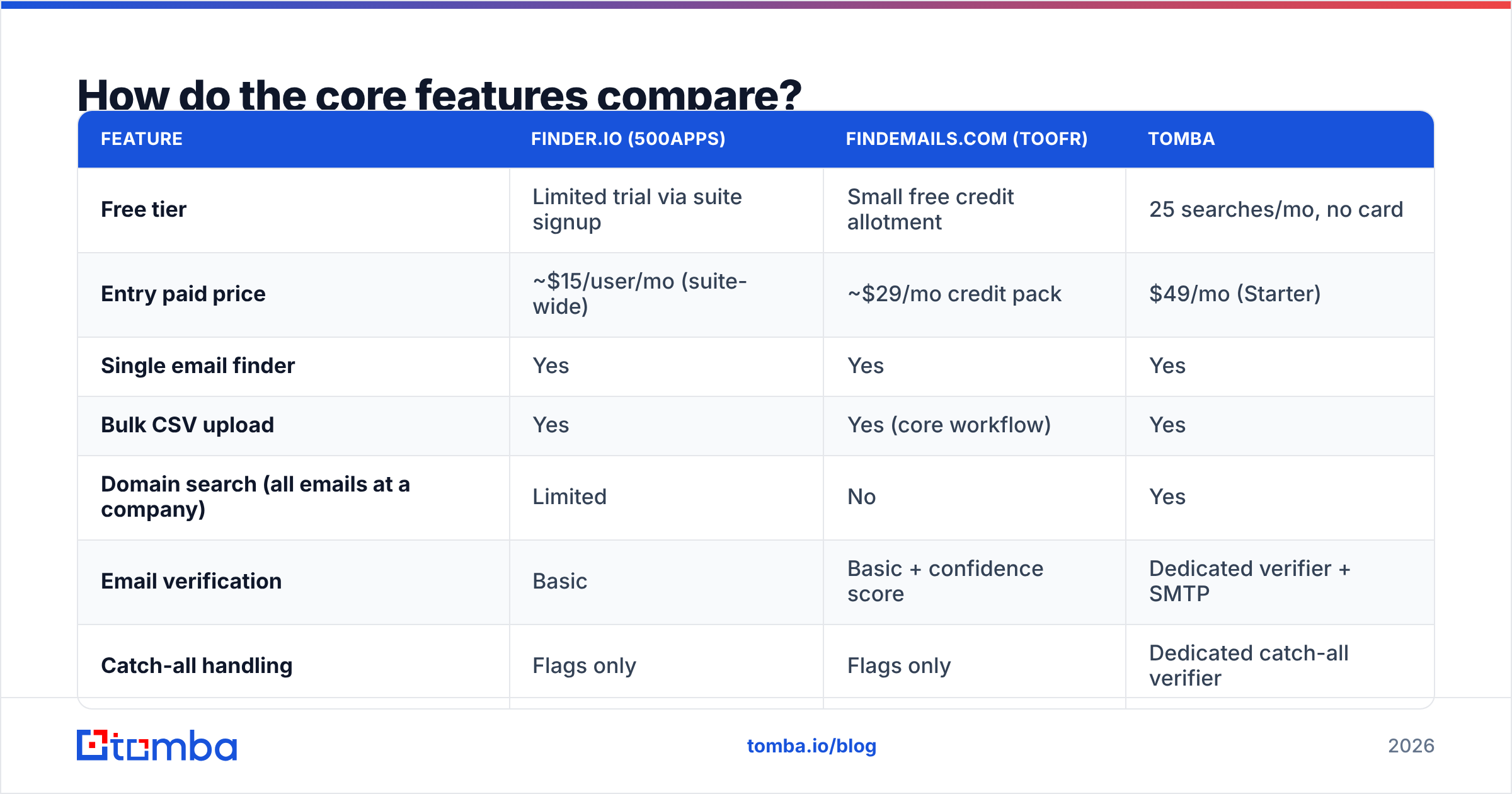
Here is the head-to-head on the attributes that actually change your workflow.
| Feature | Finder.io (500apps) | FindEmails.com (Toofr) | Tomba |
|---|---|---|---|
| Free tier | Limited trial via suite signup | Small free credit allotment | 25 searches/mo, no card |
| Entry paid price | ~$15/user/mo (suite-wide) | ~$29/mo credit pack | $49/mo (Starter) |
| Single email finder | Yes | Yes | Yes |
| Bulk CSV upload | Yes | Yes (core workflow) | Yes |
| Domain search (all emails at a company) | Limited | No | Yes |
| Email verification | Basic | Basic + confidence score | Dedicated verifier + SMTP |
| Catch-all handling | Flags only | Flags only | Dedicated catch-all verifier |
| Phone numbers | No | No | Yes |
| Public REST API | Thin | Thin | Full REST API + CLI + MCP |
| Chrome extension | Yes | Limited | Yes |
| Native CRM integrations | Within 500apps only | Zapier-dependent | HubSpot, Salesforce, Pipedrive, Zapier, Make |
| Standalone purchase | No — bundled | Yes | Yes |
Prices move. Check each vendor's page before you buy — the ones above reflect publicly listed rates at the time of writing, and 500apps in particular prices per user across the whole suite rather than per module.
Two rows deserve a second look.
"Standalone purchase: No" is the single biggest strike against Finder.io. You cannot buy the email finder on its own. If your team is already on HubSpot or Pipedrive, you are paying for 49 apps you will never open in order to use one. That is fine if you were shopping for a suite anyway. It is expensive if you were not.
"Domain search: No" is the biggest gap in FindEmails.com. Domain search — give me every email pattern and contact at acme.com — is how most prospecting actually starts. Without it, you need a name before you can find an address, which means you need a separate source of names first. If you want to see what that workflow looks like when it is native, look at how domain search is structured as a first-class entry point rather than an afterthought.
Which one actually finds more valid emails?#
Neither publishes an independently audited accuracy number, and you should treat any vendor's self-reported "98% accurate" claim as marketing until you test it yourself.
What you can reason about is method, because method predicts failure mode.
Both tools follow the same three-step chain:
- Pattern inference — look up the company's known format (first.last@, f.last@, firstl@) from prior data.
- Permutation — generate candidate addresses from the person's name and that pattern.
- SMTP validation — open a connection to the mail server and ask whether the mailbox exists.
Step 3 is where the chain breaks in 2026. Microsoft 365 and Google Workspace both aggressively rate-limit and obfuscate SMTP responses, and catch-all configurations accept every address at the domain regardless of whether a mailbox exists. A permutation engine hitting a catch-all domain gets a "yes" for every guess it makes. It reports high confidence. The email bounces or lands in a spam trap.
FindEmails.com's confidence score is genuinely useful here — it tells you when the tool is guessing rather than confirming, which is more honesty than many competitors offer. But a score is a warning label, not a solution. Finder.io flags catch-alls too, and stops at the same wall.

The tools that pull ahead on accuracy are the ones that treat catch-all domains as a separate problem with a separate engine — cross-referencing multiple data sources, checking historical send signals, and returning a real verdict instead of "probably." That is the entire reason a catch-all verifier exists as a distinct product rather than a checkbox inside a generic verifier.
Run this test before you buy either tool:
- Build a 100-contact control list where you already know the correct addresses — past customers, current colleagues at other companies, people who have replied to you.
- Run it through each tool with names and domains only.
- Count three buckets: correct, wrong, and not-found.
- Weight wrong 3x worse than not-found. A missing contact costs you nothing. A wrong contact costs you a bounce, and bounces compound into sender-reputation damage.
- Divide total spend by correct results to get true cost per verified email — the only pricing number that means anything.
Most teams discover the cheap tool is the expensive one once they run step 5.

What do they really cost per verified email?#
Headline pricing is misleading for both, in opposite ways.
Finder.io's ~$15/user/month looks unbeatable until you notice it is a per-seat charge across the whole 500apps bundle, with credit limits on the finder module itself. A five-person sales team is paying roughly $75/month, and the email-finding credits inside that are modest.
FindEmails.com's ~$29 credit pack looks cheap until you count how credits are consumed. Guessed-but-unconfirmed results still burn credits at most permutation-based vendors, and a failed lookup that returns three candidate addresses can cost you three times. Read the credit-consumption terms carefully — that is where the actual price hides.
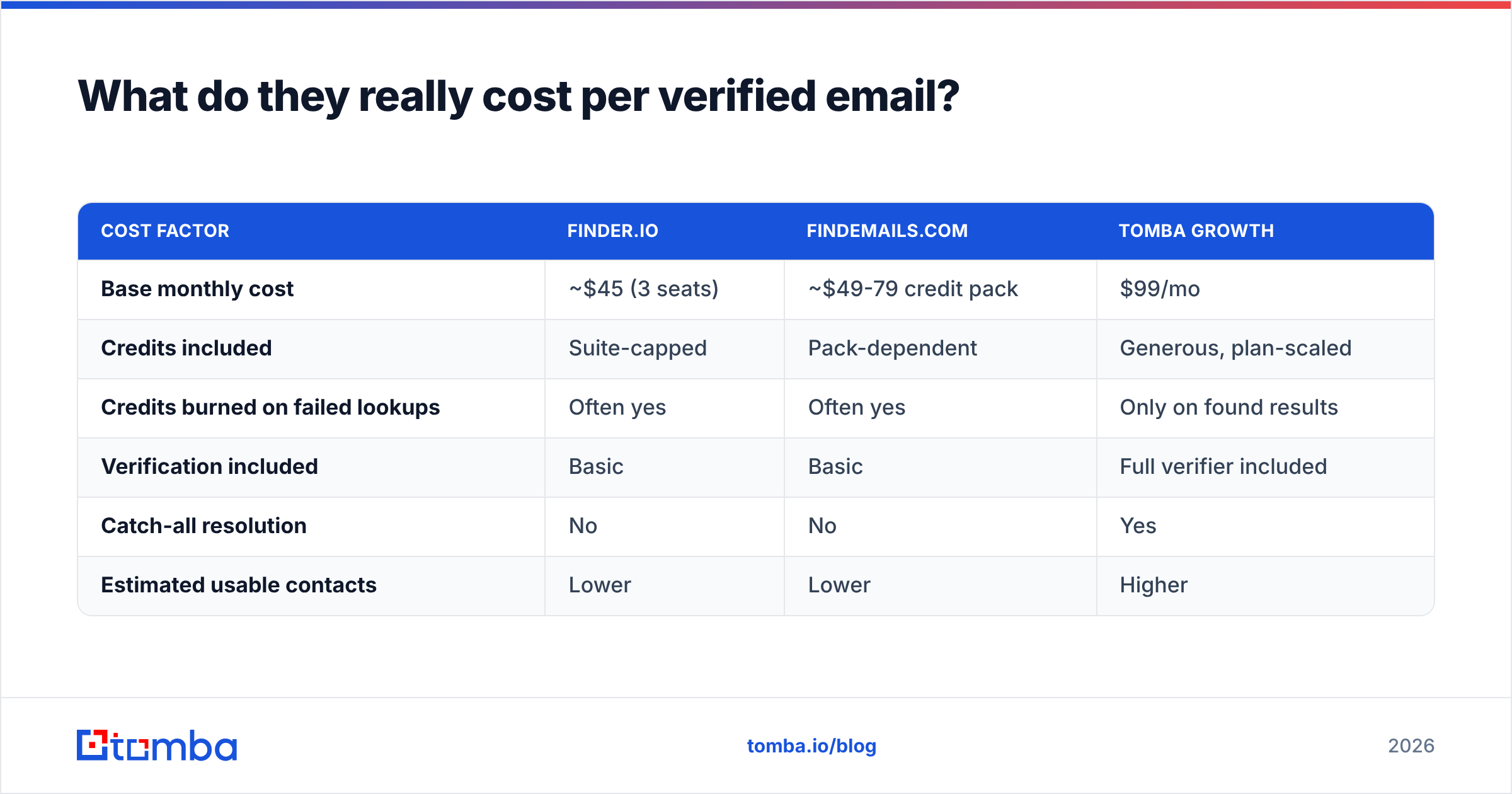
Here is a rough comparison at 2,000 lookups per month for a three-person team:
| Cost factor | Finder.io | FindEmails.com | Tomba Growth |
|---|---|---|---|
| Base monthly cost | ~$45 (3 seats) | ~$49-79 credit pack | $99/mo |
| Credits included | Suite-capped | Pack-dependent | Generous, plan-scaled |
| Credits burned on failed lookups | Often yes | Often yes | Only on found results |
| Verification included | Basic | Basic | Full verifier included |
| Catch-all resolution | No | No | Yes |
| Estimated usable contacts | Lower | Lower | Higher |
If a $45/month tool returns 1,200 usable addresses and a $99/month tool returns 1,750, the "expensive" tool costs $0.057 per contact and the "cheap" one costs $0.037 — but the cheap one also hands you a higher bounce rate, and bounces above 2% start throttling your entire domain's deliverability. Factor that in and the math flips again. Compare that against published Tomba pricing with your own volume plugged in rather than trusting anyone's example numbers, including mine.

Which one fits your stack better?#
Integration depth is where these two diverge most sharply, and it is the criterion most buyers underweight.
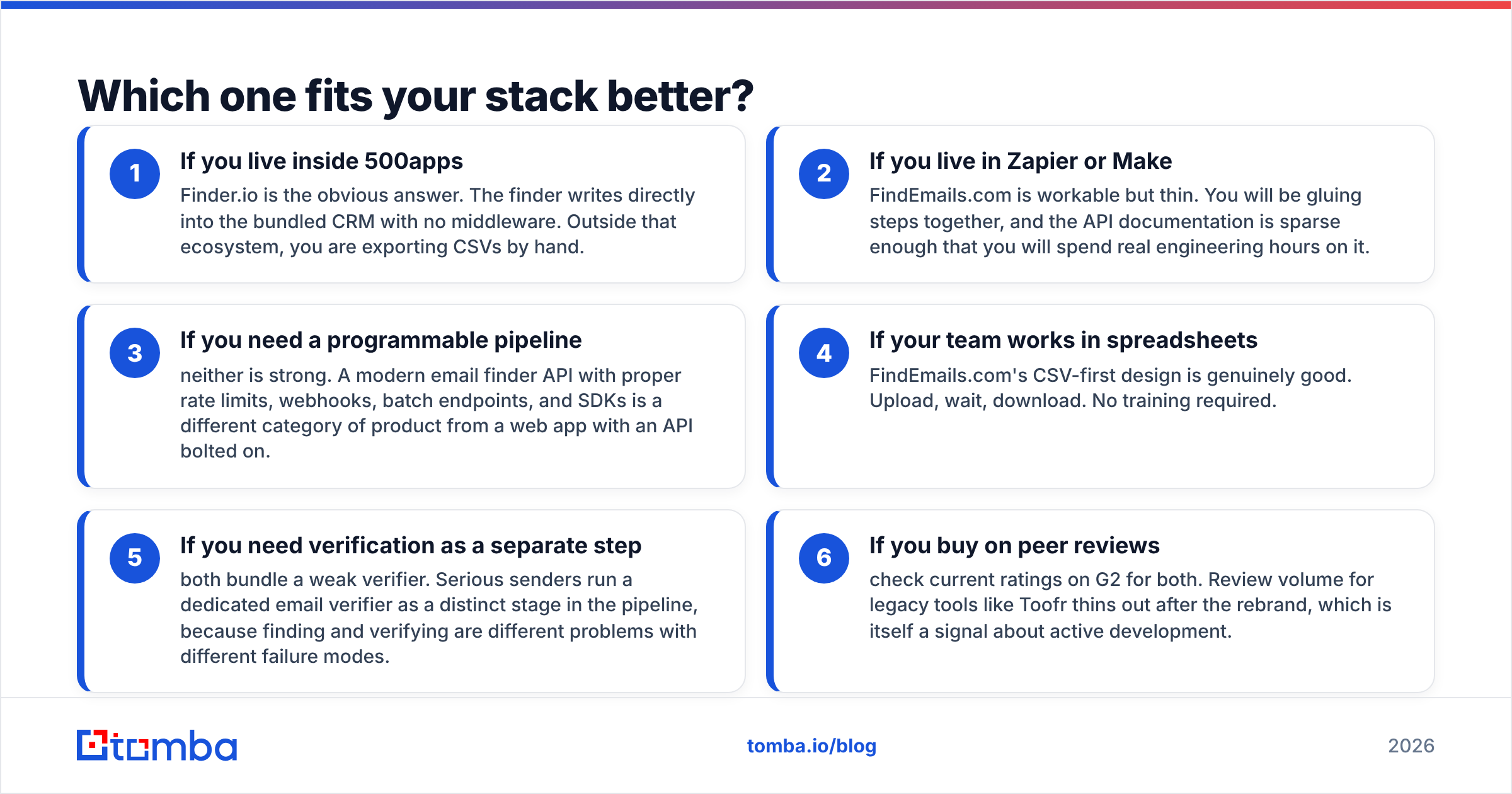
- If you live inside 500apps — Finder.io is the obvious answer. The finder writes directly into the bundled CRM with no middleware. Outside that ecosystem, you are exporting CSVs by hand.
- If you live in Zapier or Make — FindEmails.com is workable but thin. You will be gluing steps together, and the API documentation is sparse enough that you will spend real engineering hours on it.
- If you need a programmable pipeline — neither is strong. A modern email finder API with proper rate limits, webhooks, batch endpoints, and SDKs is a different category of product from a web app with an API bolted on.
- If your team works in spreadsheets — FindEmails.com's CSV-first design is genuinely good. Upload, wait, download. No training required.
- If you need verification as a separate step — both bundle a weak verifier. Serious senders run a dedicated email verifier as a distinct stage in the pipeline, because finding and verifying are different problems with different failure modes.
- If you buy on peer reviews — check current ratings on G2 for both. Review volume for legacy tools like Toofr thins out after the rebrand, which is itself a signal about active development.
Is either tool a safe long-term bet?#
Be honest about the risk profile of both.
Finder.io's risk is strategic dilution. When one company ships 50 applications, none of them gets the engineering focus a standalone product would. Email data decays at roughly 22-30% per year — people change jobs, companies get acquired, domains migrate. Keeping a database fresh against that decay is a full-time data-engineering effort. It is fair to ask whether a module inside a 50-app bundle receives that level of investment.
FindEmails.com's risk is stagnation. Toofr was excellent for its era. The era involved fewer catch-all domains, laxer SMTP defenses, and lower deliverability stakes. A permutation engine designed against 2015 infrastructure fights uphill against 2026 infrastructure. The tool still works — it just works less often than its confidence scores suggest.
Both risks point in the same direction: verify everything, regardless of which tool sourced it. If you take one operational habit from this comparison, make it that. Route every finder output through a real verification step before it touches your sending domain, and run large lists through a proper bulk email finder workflow rather than piecemeal lookups that burn credits inefficiently.
Which should you choose?#
Choose Finder.io if you are already a 500apps customer, or you are genuinely shopping for a low-cost bundled suite and email lookup is a secondary need. The per-seat economics only make sense when you use the other apps.
Choose FindEmails.com if you need a dead-simple CSV in / CSV out utility, your volume is low, and you have a separate source of contact names. Its confidence scoring is more transparent than most, and simple tools have real virtue.
Choose neither if accuracy per dollar is your primary metric, you need domain search as an entry point, you send at volume where bounce rates threaten deliverability, or you are building an automated pipeline that needs a real API.
The one thing you should not do is pick based on headline price. Run the 100-contact control test described above against all your candidates. It takes an afternoon and it is the only evidence that matters.
Ready to benchmark against your own list?#
If you want a third data point in this comparison, start with the Tomba Email Finder. The free tier gives you 25 searches per month with no card required — enough to run a meaningful control test against the same names you feed Finder.io and FindEmails.com. Paid plans start at $49/month for Starter, $99/month for Growth, and $249/month for Pro, and every plan includes the verifier, domain search, and catch-all resolution rather than selling them as separate line items.
Run the same 100 contacts through all three. Count correct, wrong, and not-found. Then decide with numbers instead of pricing pages.
Related guides#
Ready to find emails that actually work?
Join 150,000+ professionals who stopped guessing and started sending. Free credits on signup — no credit card required.
Get the Tomba newsletter
Practical outbound tactics and product updates — once every two weeks.
About the author