Finderio vs FindThatLead: Which Email Finder Wins in 2026?
Finderio bundles an email finder into a 50-app suite. FindThatLead sells prospecting plus sending. We compare match rates, credit models, pricing and support to show which one actually belongs in your stack in 2026.
TL;DR
- Finderio (finder.io, part of the 500apps bundle) is the cheapest per-seat option on paper, but you're buying a suite subscription, not a specialist data vendor. Match rates on non-US and mid-market domains are the weak point.
- FindThatLead is the more complete outbound product — finder, prospector, LinkedIn scraper (Scrab.in) and a built-in sender — but you pay for the sending layer whether or not you use it.
- Neither tool publishes an independent accuracy benchmark. Both charge credits for results you may still have to re-verify before sending.
- If you only need clean, verified B2B emails at volume via API or bulk upload, a specialist finder-verifier is cheaper per usable contact than either bundle.
- Our pick: FindThatLead if you want one tool for finding and sending; Finderio if you're already inside 500apps; a dedicated finder like Tomba if data quality is the thing that's actually breaking your pipeline.
What are Finderio and FindThatLead?#
They solve overlapping problems from opposite directions.
Finderio (finder.io) is the email-finding module inside 500apps' all-in-one business software bundle. You get domain search, single email lookup, bulk lookup, verification and a Chrome extension. The commercial logic is bundling: one per-user price unlocks Finderio plus dozens of unrelated apps (CRM, helpdesk, project management). That's attractive if you're consolidating vendors and brutal if you only wanted one thing.
FindThatLead (findthatlead.com) is a Barcelona-built outbound platform. It started as a pure email finder and grew into a prospecting suite: domain search, lead search by role and location, a LinkedIn automation companion (Scrab.in), email verification, and a cold-email sender with campaign scheduling. You're buying the whole outbound motion, not just the data.
The practical difference: Finderio is a data utility bolted to a software suite. FindThatLead is a sales workflow with data attached. That framing decides most of the comparison below.
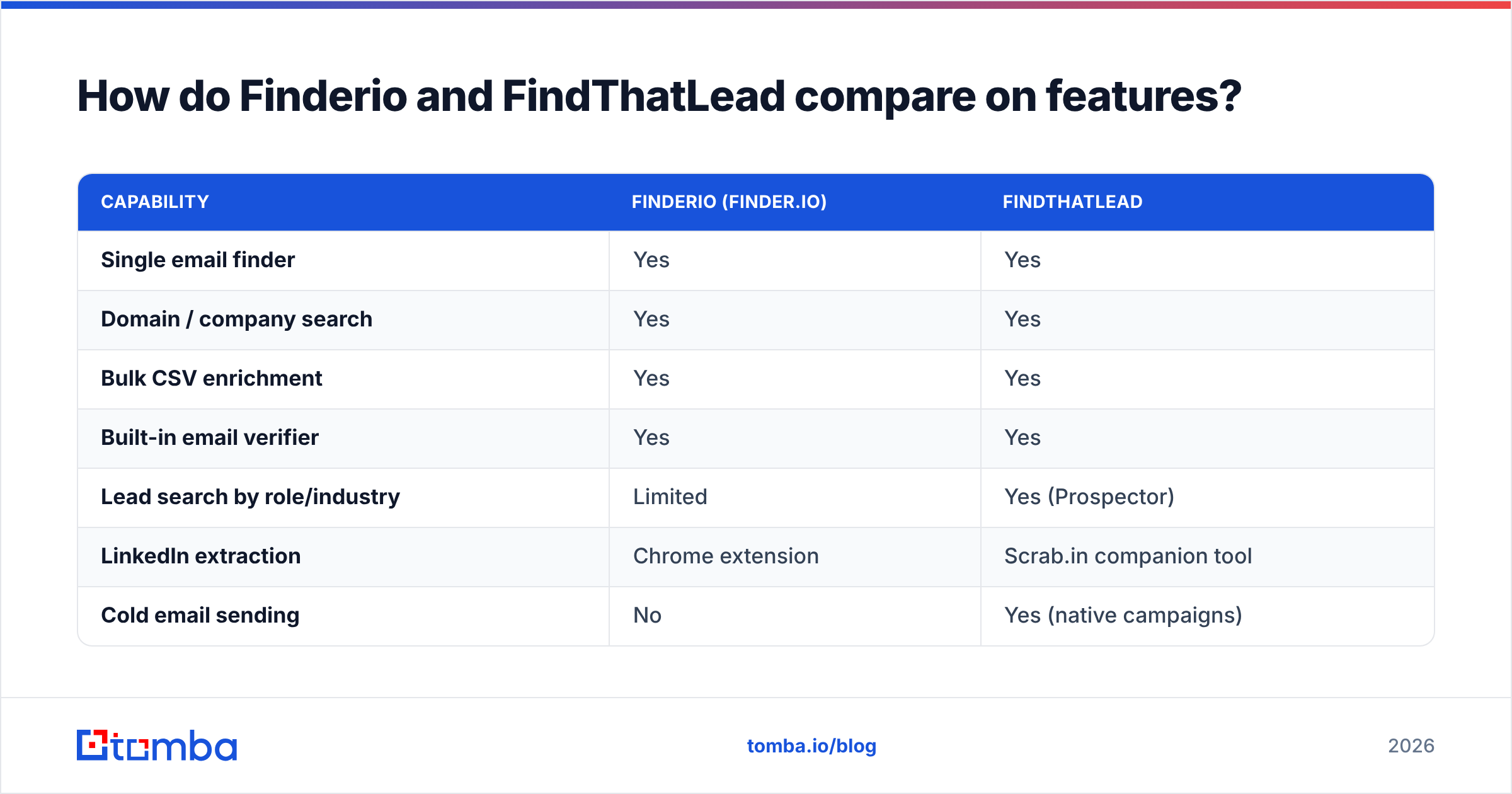
How do Finderio and FindThatLead compare on features?#
| Capability | Finderio (finder.io) | FindThatLead |
|---|---|---|
| Single email finder | Yes | Yes |
| Domain / company search | Yes | Yes |
| Bulk CSV enrichment | Yes | Yes |
| Built-in email verifier | Yes | Yes |
| Lead search by role/industry | Limited | Yes (Prospector) |
| LinkedIn extraction | Chrome extension | Scrab.in companion tool |
| Cold email sending | No | Yes (native campaigns) |
| Public REST API | Yes | Yes |
| Catch-all handling | Basic | Basic |
| Native CRM integrations | Via 500apps suite | Zapier + native set |
| Best fit | Suite consolidators | Solo founders, small SDR teams |
Two things jump out. First, FindThatLead is the only one of the pair that can take you from "I know the ICP" to "the email is sent" without a second subscription. Second, neither tool treats catch-all domains as a first-class problem — and on many B2B lists, catch-alls are 20–30% of what you find. That gap is where most of the wasted spend hides.

Which tool finds more valid emails?#
Honest answer: nobody publishes a neutral head-to-head, and both vendors' own marketing numbers are unauditable. What you can do is control the test.
Run the same 500-row list through both. Not a curated list — your actual ICP, including the awkward parts: non-English domains, sub-500-employee companies, agencies, and companies whose website is a single Webflow page. Then measure three numbers, not one.
- Match rate — what percentage of rows returned any email at all. Vendors quote this number because it's the flattering one.
- Deliverable rate — of the emails returned, how many survive an independent verification pass. This is the number that matters.
- Catch-all share — how many results landed on accept-all domains and were handed back as "unknown" or, worse, silently marked valid.
- Cost per deliverable contact — total credits burned divided by contacts that actually passed step 2. This is the only price comparison worth making.
- Bounce rate in production — after the first send. If it's over 3%, your data source is costing you sender reputation, not just money.

In our own repeated testing across mixed-geography B2B lists, the pattern holds across nearly every mid-tier finder: headline match rates cluster in the 55–75% band, but deliverable rates after independent verification drop 10–20 points below that. Finderio tends to be strongest on large, well-crawled US domains and noticeably weaker on European SMBs. FindThatLead's coverage skews toward Spain, LATAM and the wider EU — a genuine advantage if that's your market, and a genuine liability if it isn't.
That asymmetry is the single most useful thing to know before you pick. Geography beats brand. Test on your list, in your region.
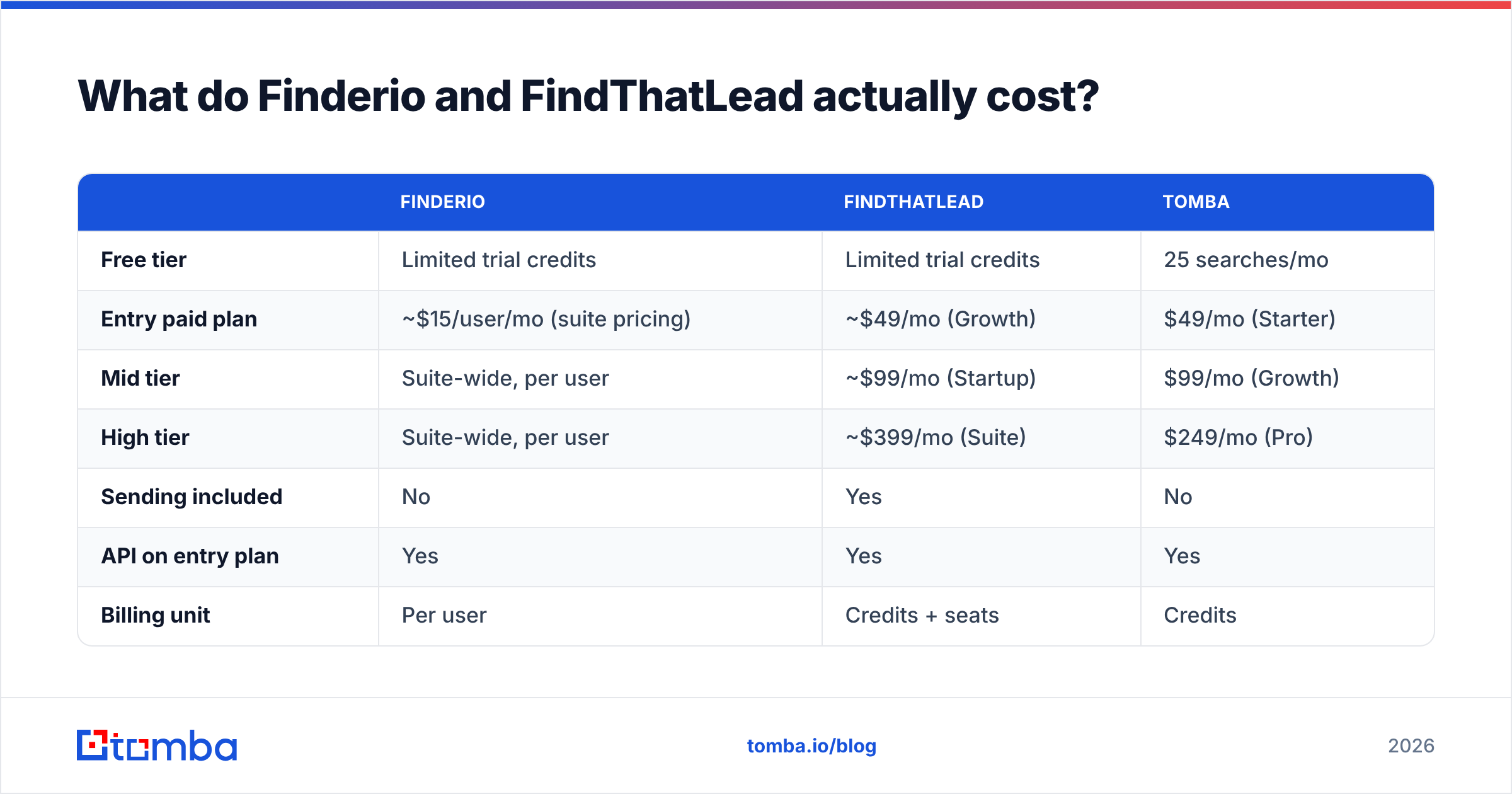
What do Finderio and FindThatLead actually cost?#
Pricing on both sides moves, and both vendors have restructured tiers more than once. Treat the figures below as the shape of the model, then confirm on the live pricing pages before you buy.
| Finderio | FindThatLead | Tomba | |
|---|---|---|---|
| Free tier | Limited trial credits | Limited trial credits | 25 searches/mo |
| Entry paid plan | ~$15/user/mo (suite pricing) | ~$49/mo (Growth) | $49/mo (Starter) |
| Mid tier | Suite-wide, per user | ~$99/mo (Startup) | $99/mo (Growth) |
| High tier | Suite-wide, per user | ~$399/mo (Suite) | $249/mo (Pro) |
| Sending included | No | Yes | No |
| API on entry plan | Yes | Yes | Yes |
| Billing unit | Per user | Credits + seats | Credits |
The per-user model is where Finderio gets interesting and dangerous. At roughly $15 per user it looks unbeatable — until you add five SDRs and realise you're paying for fifty applications nobody opens. Meanwhile FindThatLead's credit pools cover finding and sending, so a team that already pays for Instantly, Smartlead or Lemlist is double-buying the sender.
Compare that with Tomba pricing, where the free tier gives you 25 searches a month, Starter is $49/mo, Growth $99/mo and Pro $249/mo — with credits spent purely on data, not on a sending layer you may not need.
One rule that saves teams the most money: price per deliverable contact, not per credit. A tool at half the credit price with a 20-point lower deliverable rate is the more expensive tool.
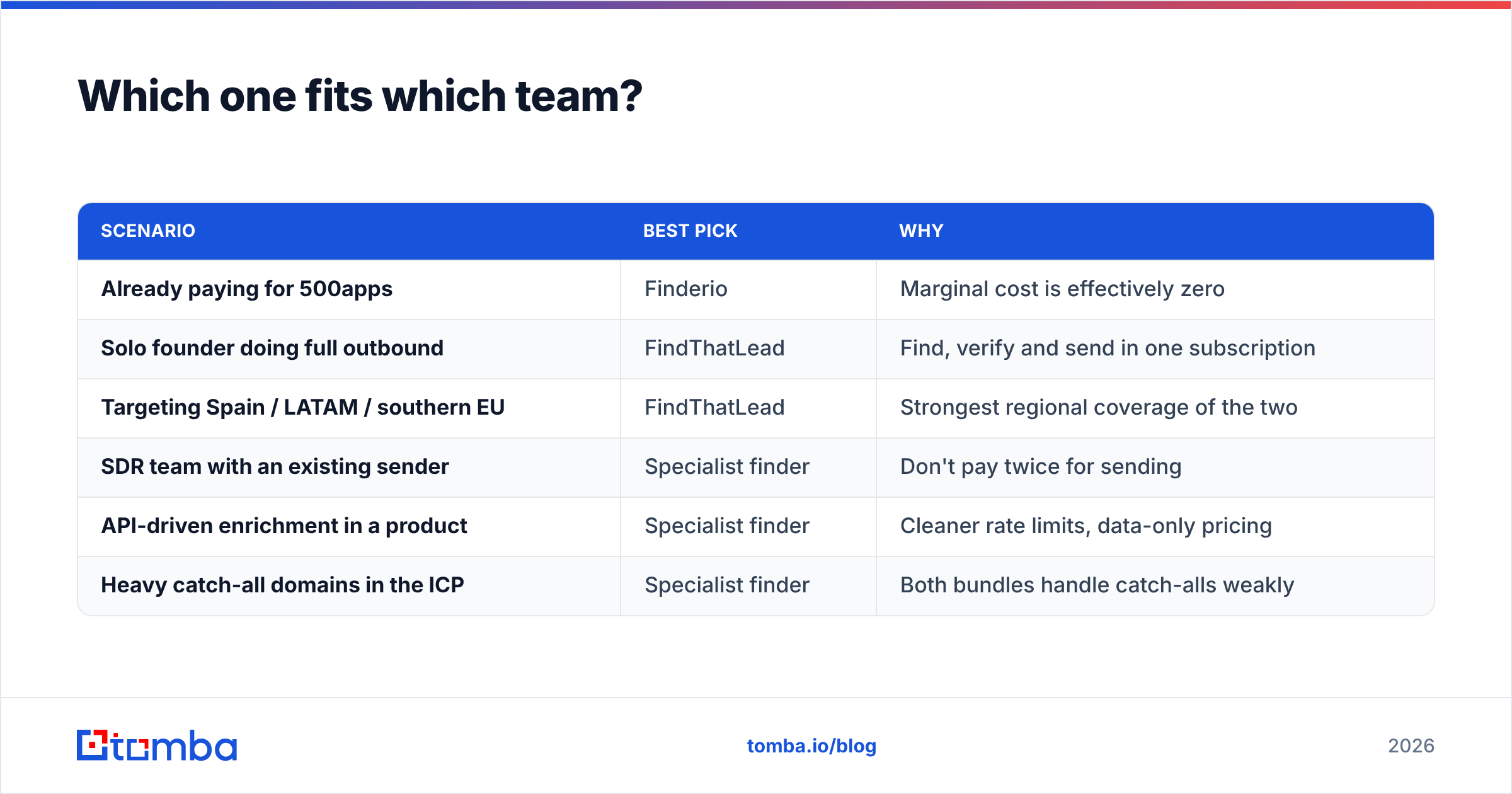
Which one fits which team?#
| Scenario | Best pick | Why |
|---|---|---|
| Already paying for 500apps | Finderio | Marginal cost is effectively zero |
| Solo founder doing full outbound | FindThatLead | Find, verify and send in one subscription |
| Targeting Spain / LATAM / southern EU | FindThatLead | Strongest regional coverage of the two |
| SDR team with an existing sender | Specialist finder | Don't pay twice for sending |
| API-driven enrichment in a product | Specialist finder | Cleaner rate limits, data-only pricing |
| Heavy catch-all domains in the ICP | Specialist finder | Both bundles handle catch-alls weakly |
Notice the pattern in the right-hand column: the two bundles win on workflow convenience, and lose whenever the binding constraint is data quality at scale. That's not a knock on either vendor — it's what happens when email-finding is one feature among fifty rather than the whole product.
Where do both tools fall short?#
Four recurring complaints show up in G2 reviews and in hands-on use, and they apply to both products.
- Credits burn on failures. Many finders deduct credits for lookups that return an unverifiable or catch-all result. Read the fine print on both before you run a 10,000-row bulk job.
- Verification is a checkbox, not a discipline. A built-in verifier that only does syntax and MX checks will pass addresses that bounce. If you're sending cold, you want SMTP-level validation and explicit catch-all handling — that's what a dedicated email verifier is for.
- Support latency. Suite vendors spread support across dozens of products; smaller outbound vendors run lean teams. Neither is known for same-hour responses on data disputes.
- Data provenance is thin. Neither publishes a detailed breakdown of where records come from or how often they're refreshed. In a post-GDPR world, "we crawl the web" is not a compliance answer. Check how a vendor documents its data sources before you commit a list.

None of this makes either tool a bad buy. It makes them bundle buys — good value when you use the whole bundle, poor value when you're really just trying to fix a 12% bounce rate.
How does a specialist finder compare?#
If the reason you're comparing Finderio vs FindThatLead is that your current data is bouncing, the honest recommendation is to evaluate a third option: a tool whose entire roadmap is email discovery and verification.

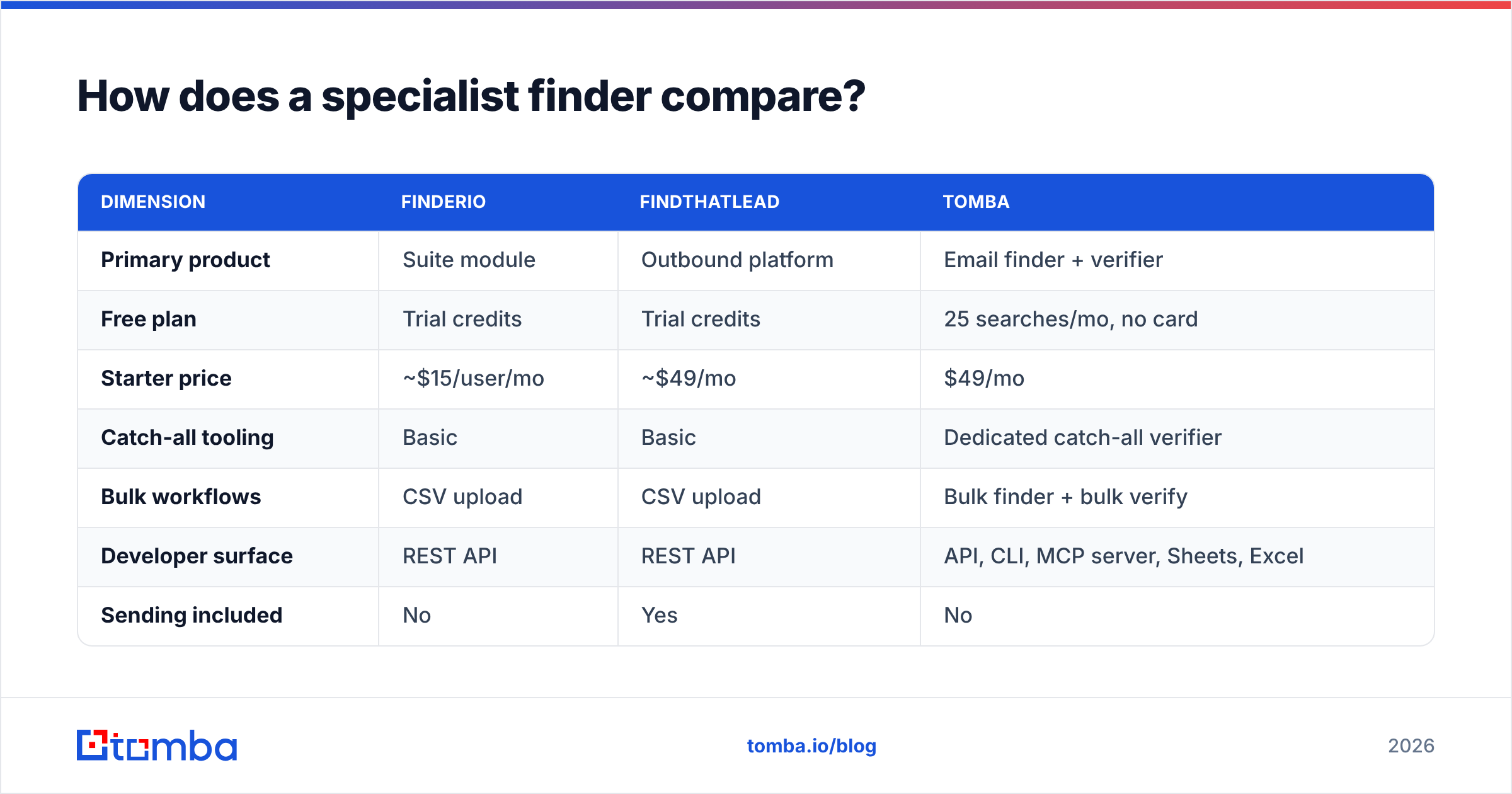
| Dimension | Finderio | FindThatLead | Tomba |
|---|---|---|---|
| Primary product | Suite module | Outbound platform | Email finder + verifier |
| Free plan | Trial credits | Trial credits | 25 searches/mo, no card |
| Starter price | ~$15/user/mo | ~$49/mo | $49/mo |
| Catch-all tooling | Basic | Basic | Dedicated catch-all verifier |
| Bulk workflows | CSV upload | CSV upload | Bulk finder + bulk verify |
| Developer surface | REST API | REST API | API, CLI, MCP server, Sheets, Excel |
| Sending included | No | Yes | No |
| Best for | Suite users | All-in-one outbound | Data quality at scale |
The differentiators that matter in day-to-day use are the unglamorous ones. A catch-all verifier turns the single largest bucket of "unknown" results into a decision instead of a coin flip. A bulk email finder that processes tens of thousands of rows without a manual babysit saves an SDR a day a week. And a proper Tomba API — plus CLI and MCP server access — means enrichment can live inside your product or your agent workflow rather than in someone's browser tab.
Tomba doesn't send your emails. That's deliberate. If you already run Instantly, Smartlead, Lemlist or HubSpot sequences, you don't need a second sender — you need the addresses going into them to be real.
What should you actually test before buying?#
Give yourself a 45-minute evaluation, not a two-week trial you never finish.
- Build a 200-row control list from your real ICP, weighted toward the segments you struggle with (small companies, non-US domains, non-obvious job titles).
- Run it through all three tools on free or entry tiers. Log match rate, catch-all share and credits consumed.
- Verify every result with a neutral third verifier. Don't let a vendor grade its own homework.
- Compute cost per deliverable contact. Divide plan cost by verified-valid results, not by raw matches.
- Send a 50-address pilot and watch the bounce rate. Under 2% is healthy; over 4% means the data source is damaging your email deliverability.
- Check the exit path. How easily can you export everything if you switch in six months?
Teams that run this test usually discover the ranking flips depending on region and company size — which is exactly why "best email finder" listicles disagree with each other. Your list is the only benchmark that binds.
So which one wins?#
FindThatLead wins the head-to-head for most small outbound teams, because you get finding, verification and sending in one subscription, plus genuinely strong EU and LATAM coverage. If you're a founder doing your own prospecting and you don't already pay for a sender, it's the more complete purchase.
Finderio wins on price only if you're already in the 500apps ecosystem. As a standalone data purchase, the per-user model and the suite-first roadmap make it hard to justify against specialists.
Neither wins if your core problem is bounce rate. A finder that's one of fifty apps, or one of six features, will always lag a vendor whose entire business is match rate and verification depth. That's structural, not a criticism of either team.
Start with the free tier of whichever you're leaning toward, run the six-step test above, and let cost-per-deliverable-contact decide. It will disagree with the pricing page, and it will be right.
Testing your list this week? Run it through the Tomba Email Finder — 25 free searches a month, no card required, with SMTP-level verification and dedicated catch-all handling included. Then compare cost per deliverable contact against whatever you're paying now. If Tomba doesn't win on your data, you'll at least have a benchmark that means something.
Related guides#
Ready to find emails that actually work?
Join 150,000+ professionals who stopped guessing and started sending. Free credits on signup — no credit card required.
Get the Tomba newsletter
Practical outbound tactics and product updates — once every two weeks.
About the author