Finderio vs Generect (2026): Which Lead Data Tool Wins?
Finderio bundles an email finder into a 50-app suite. Generect builds lead lists from LinkedIn. They solve different halves of the same problem — here's which one actually fits your outbound stack in 2026.
TL;DR
- Finderio (finder.io, part of the 500apps bundle) is a low-cost email finder and verifier sold inside a 50-app suite. Cheap per seat, thin as a standalone data product.
- Generect is a LinkedIn-first lead engine: it builds targeted lists from LinkedIn/Sales Navigator-style filters and returns enriched contacts via UI or API.
- They are not really the same product. Finderio answers "what's this person's email?". Generect answers "who should I email in the first place?".
- If you need both — list-building and high-confidence email data — you'll end up stacking tools or paying for a platform that does both credibly.
- Budget reality: Finderio wins on headline price, Generect wins on list quality, and neither publishes the kind of transparent per-credit accuracy data that lets you audit the bill.
What are Finderio and Generect?#
Finderio is 500apps' email-finding module. The pitch is bundling: you don't buy an email finder, you buy a suite of ~50 business apps for a flat per-user price and Finderio comes along for the ride. It does domain search, single email lookup, bulk uploads, and verification. The interface is functional rather than polished, and the data is best described as "good enough for well-known company domains."
Generect (generect.com) starts one step earlier in the funnel. You describe an ICP — industry, headcount, geography, job titles, tech signals — and Generect returns a list of matching people with enriched contact data. Its differentiator is LinkedIn-native sourcing: search logic that mirrors Sales Navigator filters, plus an API so RevOps teams can pipe lists straight into a CRM or sequencer without a CSV round-trip.
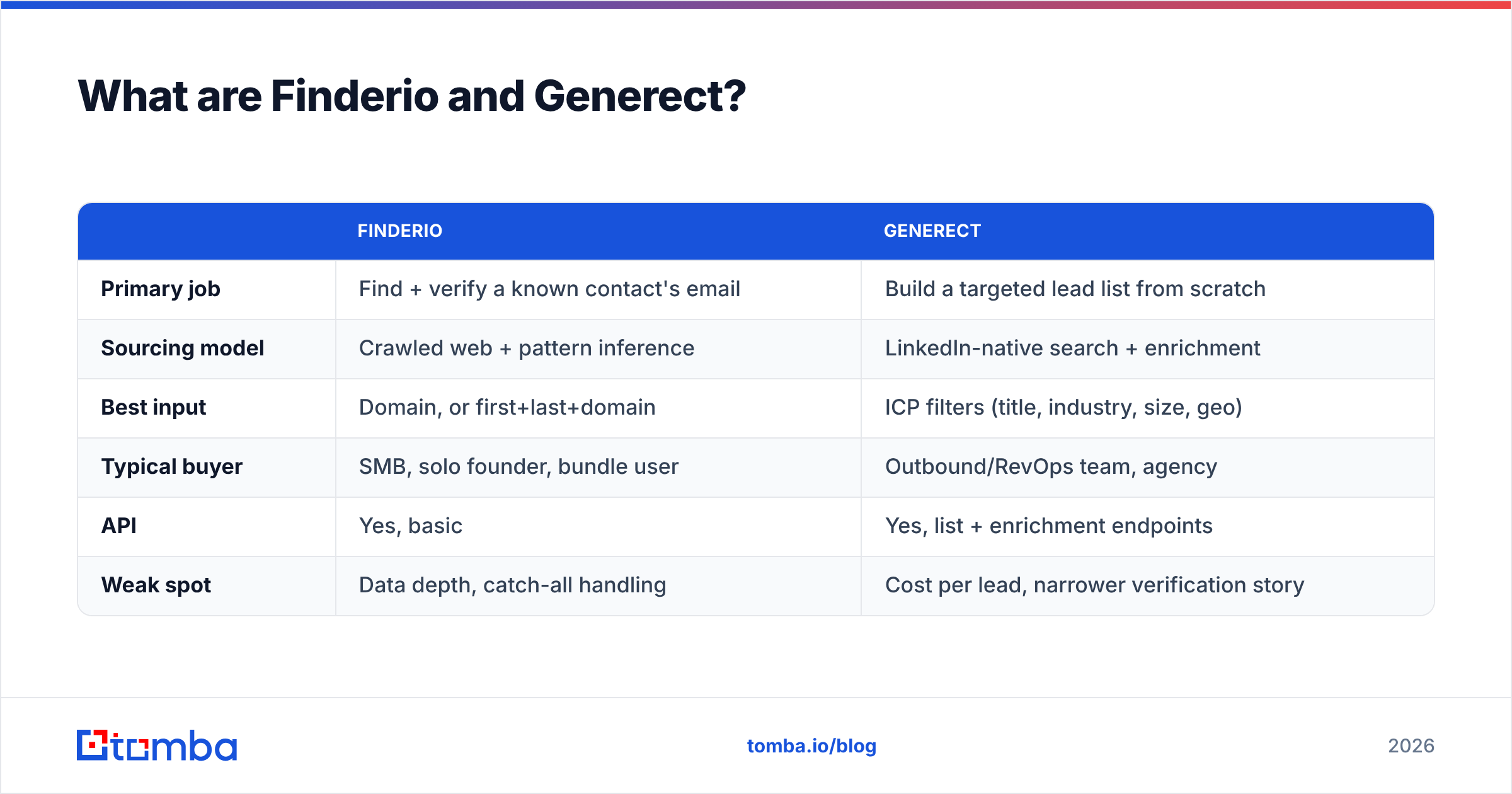
That difference in starting point explains almost every other difference between them. Finderio is a lookup tool. Generect is a list-building engine with lookup attached.
| Finderio | Generect | |
|---|---|---|
| Primary job | Find + verify a known contact's email | Build a targeted lead list from scratch |
| Sourcing model | Crawled web + pattern inference | LinkedIn-native search + enrichment |
| Best input | Domain, or first+last+domain | ICP filters (title, industry, size, geo) |
| Typical buyer | SMB, solo founder, bundle user | Outbound/RevOps team, agency |
| API | Yes, basic | Yes, list + enrichment endpoints |
| Weak spot | Data depth, catch-all handling | Cost per lead, narrower verification story |
How do Finderio and Generect actually find data?#
This is where most comparison posts hand-wave. The mechanics matter, because they predict exactly where each tool fails.
- Pattern inference — Finderio leans heavily on this. It learns that a domain uses
first.last@and generates candidates for any name you supply. Fast and cheap, but it produces confident-looking emails for people who may not exist at the company anymore. Every finder does this; the honest ones tell you when a result is inferred rather than observed. - Web crawling — Public pages, press releases, GitHub commits, conference bios. This is where observed addresses come from. Coverage skews heavily toward tech, marketing, and anyone who has ever written a blog post. Coverage for field ops, manufacturing, or non-English markets drops off a cliff.
- LinkedIn-graph sourcing — Generect's core. Instead of starting from a domain, it starts from a person profile and works outward to the company, then resolves the email. This is why its lists feel more "current": job changes surface on LinkedIn before they surface on a company's about page.
- SMTP verification — Both tools ping the receiving mail server to check whether a mailbox accepts mail. This is the single biggest determinant of bounce rate, and it's where catch-all domains (which accept everything) quietly ruin your stats. A tool that reports catch-alls as "valid" is lying to you by omission.
- Enrichment joins — Attaching firmographics (headcount, revenue, tech stack) and sometimes phone numbers to a resolved contact. Generect does more here by default; Finderio treats it as a separate 500apps module.
If you want to see how those layers stack in practice, our breakdown of where Tomba gets data walks through the same five mechanics with the tradeoffs made explicit.

Which one has better data accuracy?#
Short answer: Generect returns fewer, better contacts; Finderio returns more, shakier ones.
That's the honest framing, and it follows from the sourcing. When you ask Finderio for marketing@ roles at a 40-person company, it will often hand you pattern-generated guesses that pass a syntax check and fail an SMTP check. When Generect returns a lead, it usually started from a real, dated LinkedIn profile — so the person almost certainly works there. Whether the email is deliverable is a separate question, and Generect's verification layer is less battle-tested than a dedicated verifier.

Three caveats before you treat any accuracy number — ours, theirs, or a G2 reviewer's — as gospel:
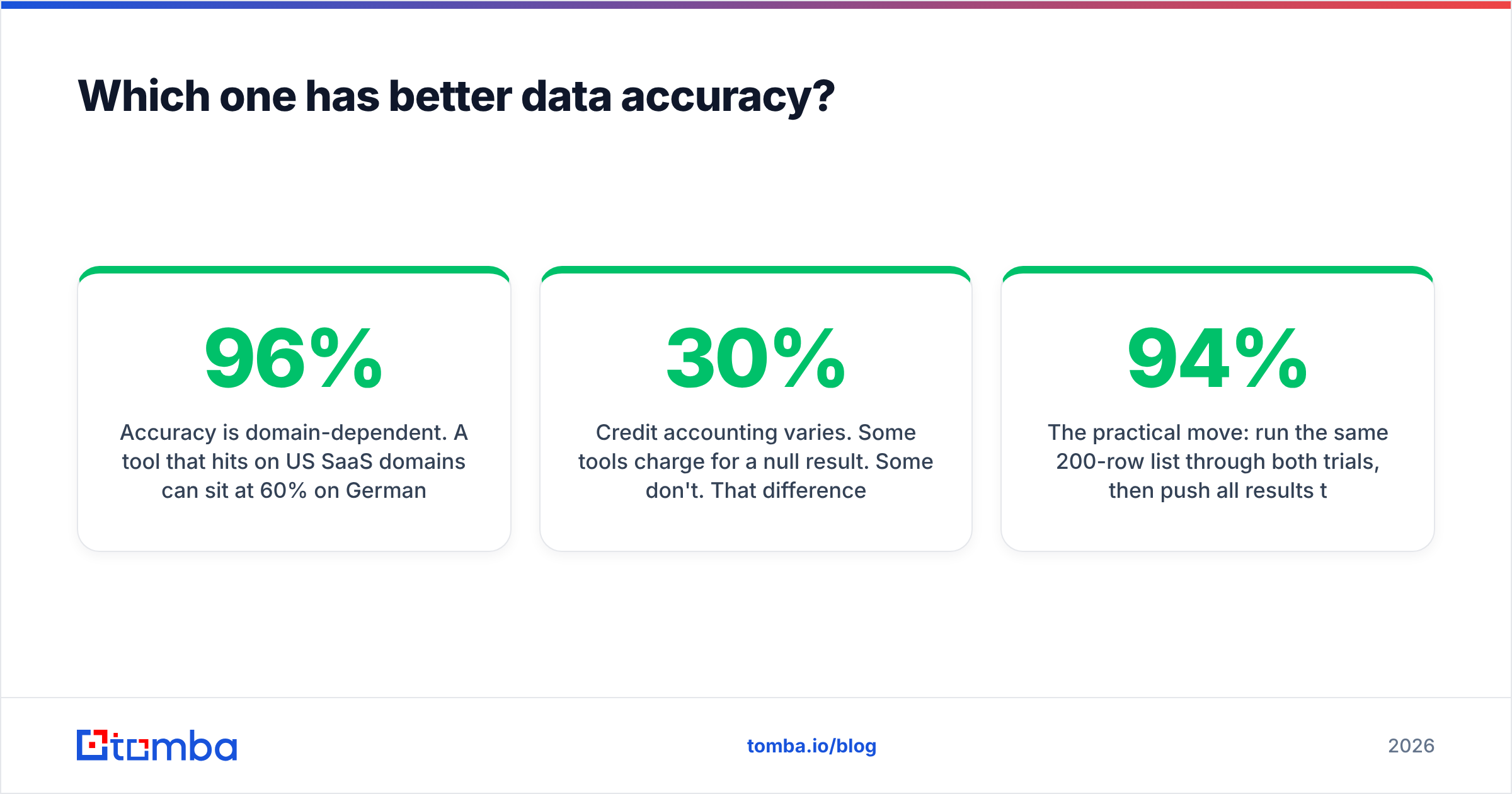
- Accuracy is domain-dependent. A tool that hits 96% on US SaaS domains can sit at 60% on German Mittelstand or Japanese enterprise. Always test on your ICP, not a vendor's sample list.
- "Valid" is not one thing. Deliverable, catch-all, role-based, disposable, and unknown are five different outcomes. Vendors that collapse them into a binary inflate their own scores.
- Credit accounting varies. Some tools charge for a null result. Some don't. That difference alone can swing your real cost per usable contact by 30%.
The practical move: run the same 200-row list through both trials, then push all results through an independent email verifier before you count anything. If a finder's own verification says 94% and a neutral verifier says 71%, you've learned more from that gap than from any feature matrix.
How do Finderio and Generect compare on features and pricing?#
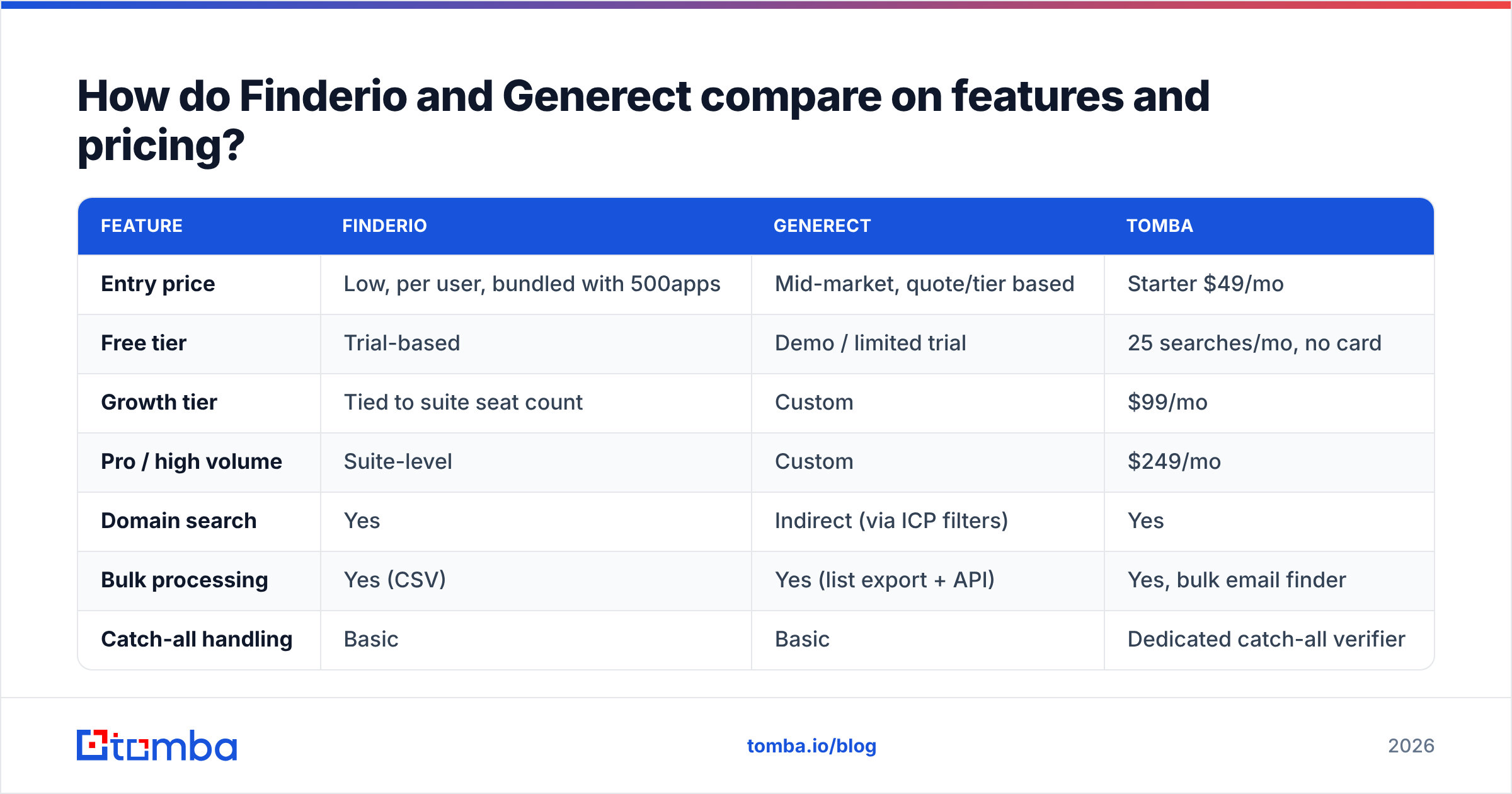
Pricing for both moves, and both use per-seat or per-credit models that are hard to compare directly. Check the vendor pages before you commit — the table below reflects published positioning at the time of writing, plus Tomba as a transparent reference point.

| Feature | Finderio | Generect | Tomba |
|---|---|---|---|
| Entry price | Low, per user, bundled with 500apps | Mid-market, quote/tier based | Starter $49/mo |
| Free tier | Trial-based | Demo / limited trial | 25 searches/mo, no card |
| Growth tier | Tied to suite seat count | Custom | $99/mo |
| Pro / high volume | Suite-level | Custom | $249/mo |
| Domain search | Yes | Indirect (via ICP filters) | Yes |
| Bulk processing | Yes (CSV) | Yes (list export + API) | Yes, bulk email finder |
| Catch-all handling | Basic | Basic | Dedicated catch-all verifier |
| Phone numbers | Separate 500apps module | Included on some plans | Yes, phone finder |
| Native API | Basic REST | List + enrichment endpoints | Full REST + CLI + MCP |
| Chrome extension | Yes | Yes | Yes |
| Spreadsheet add-ons | Limited | Limited | Sheets, Excel, Airtable |
| Credit refund on no-result | Unclear | Unclear | Yes — no charge for null results |
The pattern you should notice: Finderio competes on price, Generect competes on list quality, and neither competes on verification depth. That's the gap most outbound teams fall into. You buy a finder, you assume the emails are clean, your bounce rate hits 6%, and three weeks later you're troubleshooting sender reputation instead of booking meetings.
Is Generect worth it for LinkedIn-first teams?#
Yes, if your motion genuinely starts on LinkedIn and you're building lists continuously rather than looking up known contacts.
Generect earns its price when:
- Your ICP is filter-shaped. "Series B fintechs in DACH, 50–200 headcount, hiring for RevOps" is a Generect query. It is not a Finderio query.
- You run agency-style volume. Multiple client ICPs, refreshed monthly, exported via API into separate sequencers.
- Job-change recency matters. LinkedIn-sourced data reflects role changes faster than crawled company sites, which cuts your "no longer with the company" bounces.
- You want lists without a scraper. Running your own LinkedIn automation risks account restrictions. Generect moves that risk off your team.
It's the wrong buy when your target accounts are already in your CRM and you just need addresses. Paying list-building prices for lookup work is the most common way teams overspend on B2B data.
Is Finderio worth it if you already use 500apps?#
If you're already paying for the 500apps suite, Finderio is close to free at the margin — use it. As a standalone purchase, it's harder to justify in 2026.
The bundle logic cuts both ways. You get an email finder, a CRM, a helpdesk, and 47 other apps for roughly the price of one mid-tier SaaS tool. The tradeoff is that no single app in the bundle is the best version of itself. Finderio's UI, support responsiveness, and data refresh cadence all reflect that. Read the G2 category reviews for lead intelligence tools and the pattern is consistent: bundled finders score well on price, poorly on data freshness.
A fair summary: Finderio is a reasonable utility and a weak platform. If email data is a side quest for your team, that's fine. If it's the input to your entire revenue motion, you'll outgrow it inside a quarter.

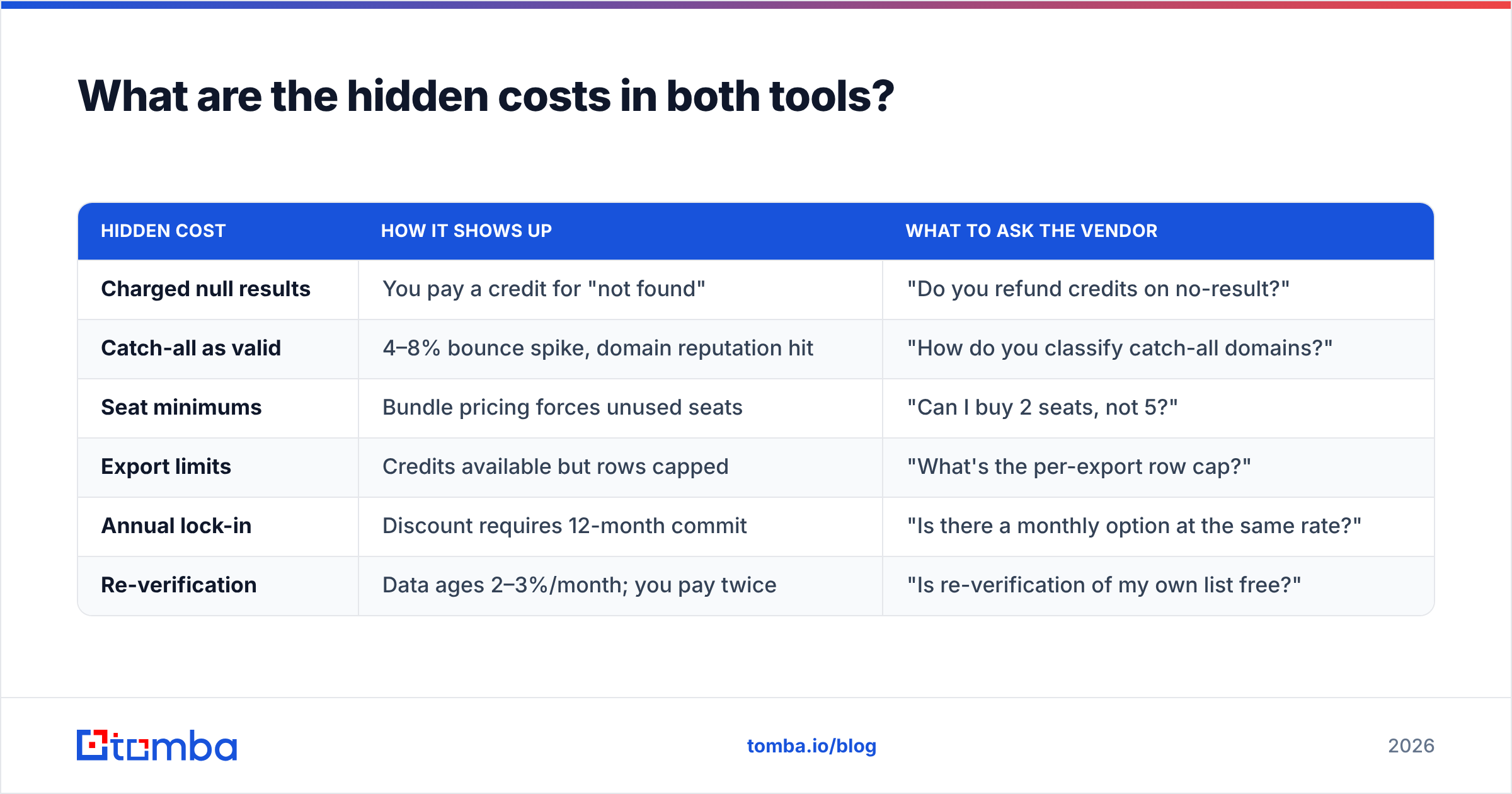
What are the hidden costs in both tools?#
Sticker price is the smallest line item. Here's what actually moves your cost per booked meeting:
| Hidden cost | How it shows up | What to ask the vendor |
|---|---|---|
| Charged null results | You pay a credit for "not found" | "Do you refund credits on no-result?" |
| Catch-all as valid | 4–8% bounce spike, domain reputation hit | "How do you classify catch-all domains?" |
| Seat minimums | Bundle pricing forces unused seats | "Can I buy 2 seats, not 5?" |
| Export limits | Credits available but rows capped | "What's the per-export row cap?" |
| Annual lock-in | Discount requires 12-month commit | "Is there a monthly option at the same rate?" |
| Re-verification | Data ages 2–3%/month; you pay twice | "Is re-verification of my own list free?" |
That third-from-last one is where deals go sideways. A tool quoting $0.02/credit that charges for nulls and reports catch-alls as valid can easily cost more per usable contact than a tool quoting $0.05/credit with clean accounting. Model it on 500 real rows from your ICP before you sign anything.
If you're specifically worried about catch-all domains — and on most B2B lists 15–25% of domains are catch-all — a dedicated catch-all verifier is the difference between a 2% bounce rate and a 7% one.
Finderio vs Generect: which should you pick in 2026?#
Match the tool to the job, not to the review score:
- Pick Generect if you build fresh lists from an ICP definition every month, your motion is LinkedIn-native, and you have budget for a specialist tool. It replaces a scraper plus a VA.
- Pick Finderio if you already pay for 500apps, your volume is modest, and email lookup is an occasional task rather than a daily pipeline input.
- Pick neither if your bottleneck is data quality on contacts you already have. That's a verification and enrichment problem, and both tools treat verification as a checkbox rather than a product.
- Consider adjacent options — BookYourData is a solid choice if you'd rather buy a pre-built, pay-as-you-go list than run searches yourself, and it prices transparently per record.
- Stack deliberately. Plenty of teams run a list-builder for sourcing and a separate finder/verifier for accuracy. That's not redundancy; it's the same reason you don't use one wrench for every bolt.
Whatever you choose, insist on three things: transparent per-credit accounting, an explicit catch-all classification, and a real free tier so you can test on your own ICP before a card is involved. Any vendor that resists all three is telling you something about its data.
Frequently asked questions#
Is Generect a LinkedIn scraper? Generect sources data using LinkedIn-native search logic and returns enriched contacts, but the point of using it is that you're not running automation from your own account — which is where restriction risk lives.
Can Finderio verify emails, or just find them? It does both, but its verification is basic. Run anything critical through an independent verifier before you send.
Which is cheaper, Finderio or Generect? Finderio, on headline price, by a wide margin — it's subsidised by the 500apps bundle. On cost per usable, deliverable contact for a well-defined ICP, the gap narrows sharply and can invert.
Do I need both? Only if you both build lists from scratch and need high-confidence deliverability. Most teams get further with one strong list source plus one strong verifier.
What about API access? Both offer APIs. Generect's is oriented around list retrieval; Finderio's around single lookups. If you're building automation, check rate limits and whether failed lookups consume quota — that detail is usually buried in the docs.
Try a finder that shows its work#
If what you actually need is accurate, auditable contact data — not another dashboard — start with the Tomba Email Finder. You get 25 free searches a month with no card, credits are never charged for null results, catch-all domains are classified explicitly instead of quietly marked valid, and every result carries a confidence score you can filter on. Paid plans start at $49/mo and scale to $99 and $249 tiers as your volume grows; full Tomba pricing is public, per-credit, and free of seat minimums.
Run 200 rows of your own ICP through it alongside your Finderio or Generect trial. Compare deliverable-rate, not feature counts. The list that bounces least wins.
Related guides#
Ready to find emails that actually work?
Join 150,000+ professionals who stopped guessing and started sending. Free credits on signup — no credit card required.
Get the Tomba newsletter
Practical outbound tactics and product updates — once every two weeks.
About the author