Finderio vs GetProspect (2026): Which Email Finder Wins?
Finderio bundles an email finder into a 50-app suite. GetProspect builds around LinkedIn. We compare credits, accuracy, catch-all handling and real cost per verified email.
Finderio vs GetProspect is a choice between a bundled tool and a focused one. Finderio ships inside a 50-app suite. GetProspect is built for LinkedIn prospecting. This guide compares both on data quality, credits, catch-all domains, and the real cost of one verified email.
TL;DR
- Finderio (finder.io, part of the 500apps suite) is cheap because it ships with dozens of other apps. You buy a suite, not the best email finder.
- GetProspect is the stronger standalone pick for LinkedIn-first prospecting. You get a Chrome extension, list building, a B2B database, and a free tier that returns usable emails.
- Neither tool leads on accuracy. Both slip on catch-all domains, non-US data, and bulk work.
- Cost per verified email beats cost per credit. A $19 plan that burns credits on bounces costs more than a $49 plan that returns valid addresses.
- Pick Finderio for the bundle. Pick GetProspect for LinkedIn. Pick a finder-plus-verifier stack if your team is judged on deliverability.
What are Finderio and GetProspect?#
Finderio is the email-finder module inside 500apps, a suite of 50+ business tools on one plan. You get domain search, single lookups, bulk finding, and basic verification. The pitch is bundle math. For about the price of one mid-tier seat you also get a CRM, a helpdesk, an email marketing tool, and 47 other apps you may never open.
GetProspect is a standalone prospecting platform built around LinkedIn. The loop is simple. You browse LinkedIn or Sales Navigator, run the Chrome extension, and pull profiles into a list. GetProspect then resolves work emails. It also adds a searchable B2B database (filter by job title, industry, headcount, tech stack, and location), list management, and export to CSV or your sales tools. Check the current feature set on getprospect.com before you commit, since they ship changes often.
The core split in Finderio vs GetProspect is easy to state. Finderio is a feature inside a suite. GetProspect is a product with a team behind it that does one job. That gap shows up in data freshness, support speed, and how fast the matching logic gets updated.
Finderio vs GetProspect at a glance#
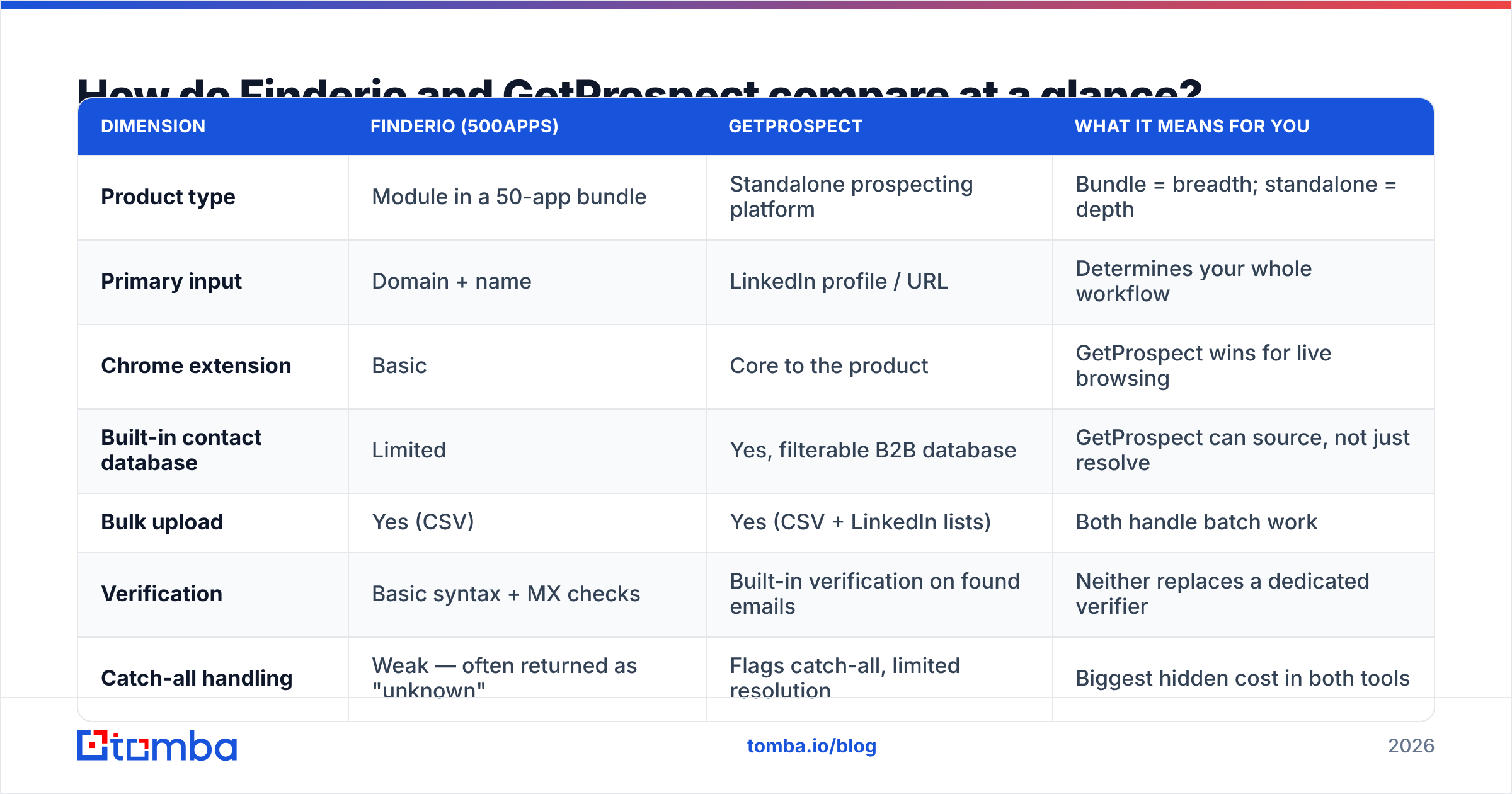
| Dimension | Finderio (500apps) | GetProspect | What it means for you |
|---|---|---|---|
| Product type | Module in a 50-app bundle | Standalone prospecting platform | Bundle = breadth; standalone = depth |
| Primary input | Domain + name | LinkedIn profile / URL | Determines your whole workflow |
| Chrome extension | Basic | Core to the product | GetProspect wins for live browsing |
| Built-in contact database | Limited | Yes, filterable B2B database | GetProspect can source, not just resolve |
| Bulk upload | Yes (CSV) | Yes (CSV + LinkedIn lists) | Both handle batch work |
| Verification | Basic syntax + MX checks | Built-in verification on found emails | Neither replaces a dedicated verifier |
| Catch-all handling | Weak — often returned as "unknown" | Flags catch-all, limited resolution | Biggest hidden cost in both tools |
| API | Available | Available | Check rate limits before you build on it |
| Free tier | Tied to suite trial | Yes — ~50 valid emails/month | GetProspect is easier to test |
Read the table as a workflow choice, not a feature list. If your day starts in a Sales Navigator search, GetProspect fits the shape of it. If it starts with a sheet of company domains from a conference, a domain search workflow beats both LinkedIn-native tools.
How accurate is each one in practice?#
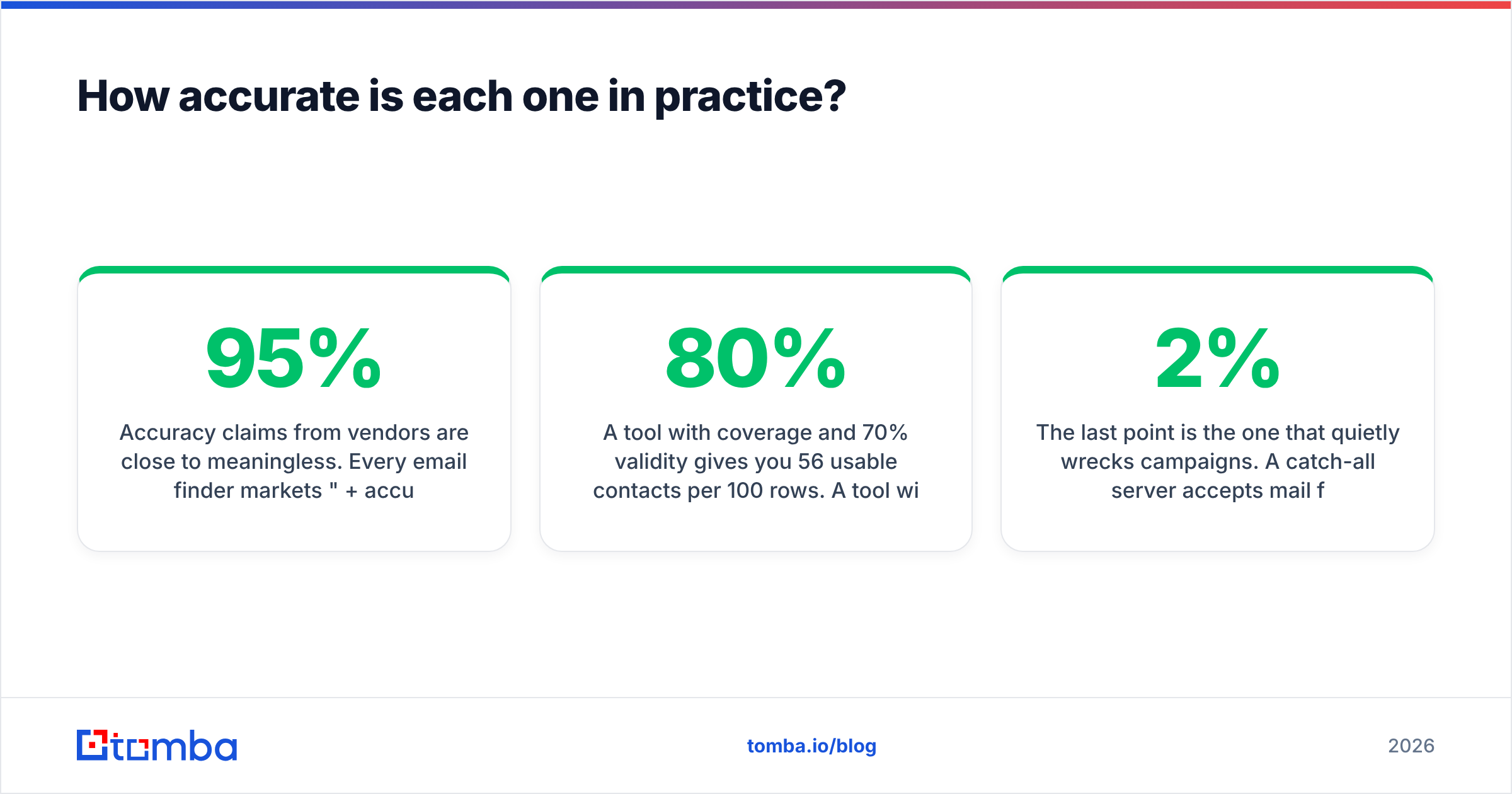
Vendor accuracy claims mean little. Every email finder markets "95%+ accuracy." Each one measures it in a different way. Some count only the emails they chose to return. Some drop catch-all domains from the math. Some check syntax rather than delivery.
The number that matters is coverage × validity on your own list.
- Coverage = how many of your input rows return any email.
- Validity = how many of those emails actually accept mail.
A tool with 80% coverage and 70% validity gives you 56 usable contacts per 100 rows. A tool with 55% coverage and 95% validity gives you 52. The counts are close, but the bounce rates are not. The second tool keeps your domain out of the spam folder.

In the Finderio vs GetProspect matchup, the honest read is short:
- GetProspect covers LinkedIn-sourced contacts better. Its pipeline is built to turn a profile into an email, so a Sales Navigator list fills in at a higher rate.
- Finderio holds up on plain domain search. It does well on well-indexed companies with public team pages, where pattern matching does most of the work.
- Both drop off outside North America and Western Europe. APAC, LATAM, and small-market domains return more unknowns.
- Both struggle with catch-all domains. Most mid-market and enterprise mail servers are catch-all now. On an enterprise list, that is the norm, not an edge case.
That last point quietly wrecks campaigns. A catch-all server accepts mail for every address at the domain. So a standard SMTP check cannot tell you whether jane.doe@ exists or whether you invented it. Tools that pass catch-all guesses off as "valid" inflate their stats and hurt your sender score. Run results through a catch-all verifier before you send. That step is the gap between a 2% bounce rate and a 12% one.
Before you sign, run the same 100-row list through both tools. Export both sets of results. Verify them with a third-party email verifier. Buy the tool that wins on your list, not the one that wins on a landing page.
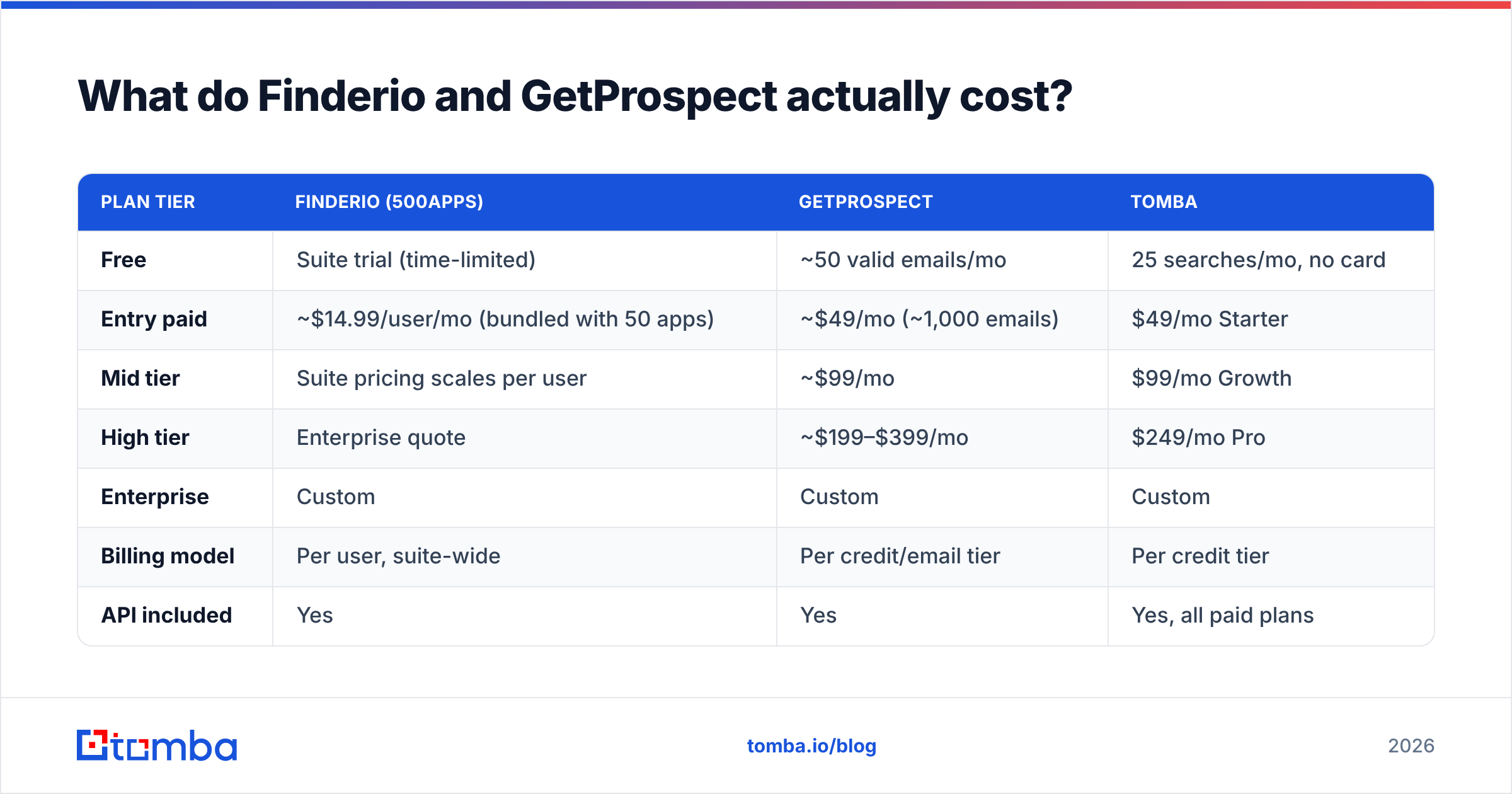
Finderio vs GetProspect pricing: what does each one cost?#
Both vendors change prices, so treat these numbers as directional and confirm them on each site.
| Plan tier | Finderio (500apps) | GetProspect | Tomba |
|---|---|---|---|
| Free | Suite trial (time-limited) | ~50 valid emails/mo | 25 searches/mo, no card |
| Entry paid | ~$14.99/user/mo (bundled with 50 apps) | ~$49/mo (~1,000 emails) | $49/mo Starter |
| Mid tier | Suite pricing scales per user | ~$99/mo | $99/mo Growth |
| High tier | Enterprise quote | ~$199–$399/mo | $249/mo Pro |
| Enterprise | Custom | Custom | Custom |
| Billing model | Per user, suite-wide | Per credit/email tier | Per credit tier |
| API included | Yes | Yes | Yes, all paid plans |
Three things stand out.
Finderio's price is a bundle price. $14.99 per user for 50 apps looks great next to $49 for one tool. It is great, if you use the bundle. If you only want the email finder, you pay a low price for a module that gets a small share of the engineering budget. Bundles compete on breadth. Finders compete on data.
GetProspect charges per valid email, not per attempt, on most tiers. That model is the more honest one. Still, ask how catch-alls and "unknown" results are billed. Credit rules get slippery there.
Per-user billing punishes teams. Finderio's suite bills per seat. Five SDRs means five seats, even if one person builds the lists. Pooled credit models, like GetProspect's and Tomba's pricing, let one ops person build lists for the whole team on a single plan.


Is GetProspect better than Finderio for LinkedIn prospecting?#
Yes. On LinkedIn work, Finderio vs GetProspect has the clearest verdict in this comparison.
GetProspect's extension sits on top of LinkedIn search results and Sales Navigator lists. You run a search and capture the page. The platform resolves emails in the background while you keep browsing. Lists persist, dedupe, and export cleanly. That is a real workflow, not a bolt-on.
Finderio's extension exists, but it is thinner. It works as a "look up this company's team" tool. It does not handle "capture 500 profiles from this saved search" well.
If LinkedIn is where you build every list, GetProspect fits your shape. If you want the same capture pattern on a different data backend, a dedicated LinkedIn finder plus bulk enrichment covers the same ground. You can also swap providers later without rebuilding your process.
One warning applies to both tools. LinkedIn's terms restrict automated scraping, and enforcement has tightened. Extensions that act on pages you are viewing sit in a safer spot than headless scrapers. Even so, no vendor can protect you from an account block. Read LinkedIn's user agreement yourself.
What do the reviews say?#
Reviews rarely settle Finderio vs GetProspect on their own, but they show the pattern. Check both tools on G2 and Capterra, and weight recent reviews. Data quality in this category shifts every few quarters.
Themes worth knowing:
- Finderio reviews praise value for money. Depth per app gets mixed marks. The suite is the story, and single modules read as "good enough."
- GetProspect reviews skew positive on ease of use and the LinkedIn workflow. The common gripes are credit burn on failed lookups and export limits on low tiers.
- Support speed cuts both ways. Suite vendors spread support across 50 products. Standalone vendors cover fewer surfaces.
Where does Tomba fit in this comparison?#
Honest positioning. Tomba is not a 50-app suite, and it is not a LinkedIn-first list builder. It is an email data layer: finder, verifier, and enrichment, with an API you can build on.
It fits better than either tool when:
- You need programmatic access. The Tomba API is a core product, not a checkbox. If enrichment runs inside a workflow, a CRM sync, or a data pipeline, the API matters more than any UI.
- Catch-all domains fill your list. Catch-all resolution is the biggest lever on enterprise bounce rates.
- You want one credit pool for the team. No per-seat math.
- You want to find and verify in one place. Two vendors means paying twice and matching two definitions of "valid."
Tomba is not the answer if you want a bundled CRM, helpdesk, and marketing suite for $15 per user. Finderio's parent suite delivers that, and Tomba does not. If your motion is manual Sales Navigator browsing and you want the tightest extension for it, GetProspect is built for that job.
Finderio vs GetProspect: which one should you choose?#
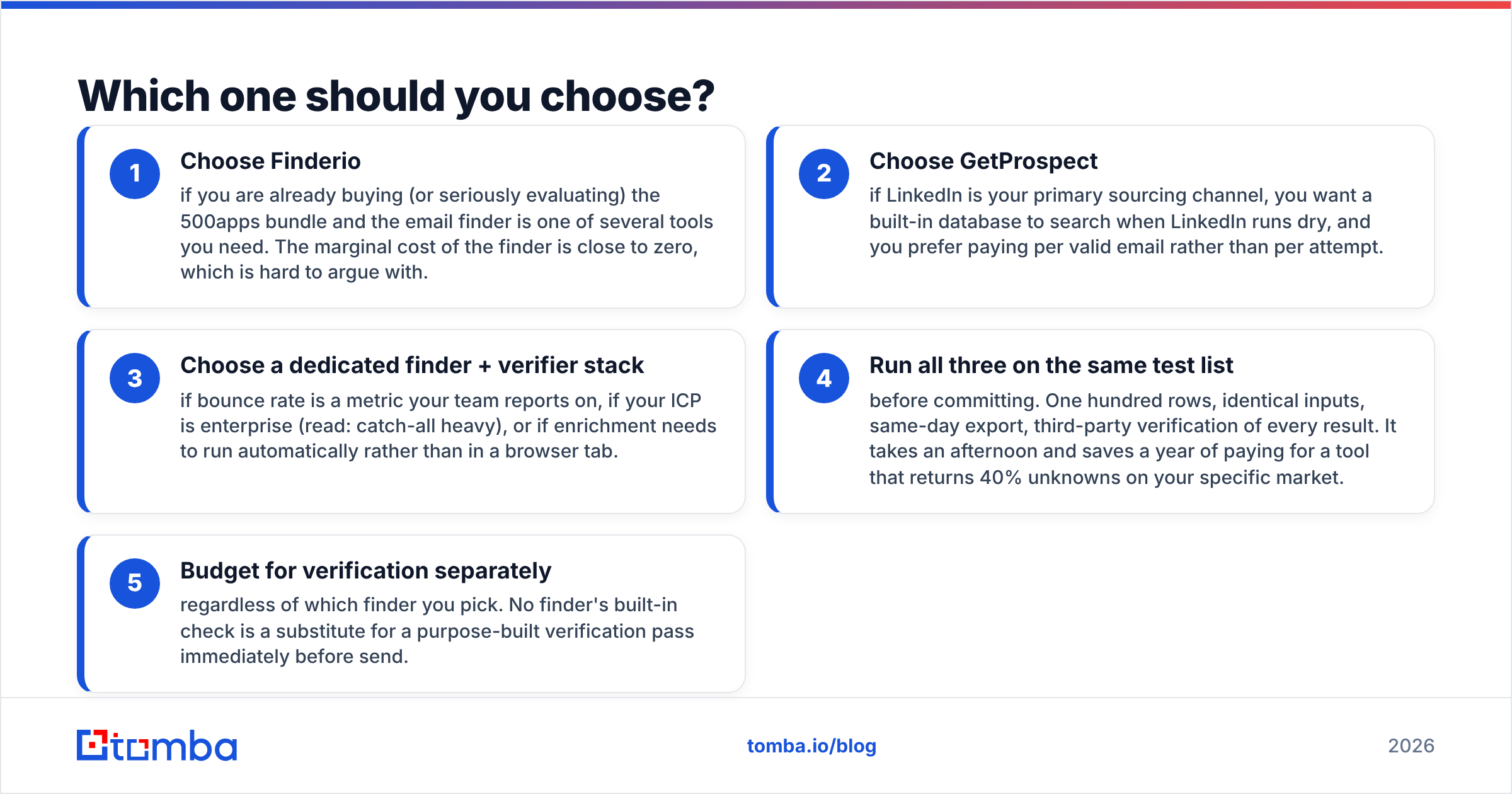
Pick by constraint, not by feature count.
- Choose Finderio if you already want the 500apps bundle. The marginal cost of the finder is then close to zero.
- Choose GetProspect if LinkedIn is your main sourcing channel. You also get a database to search when LinkedIn runs dry, and you pay per valid email.
- Choose a finder plus verifier stack if bounce rate is a metric you report on, or if your ICP is enterprise and catch-all heavy.
Then test before you buy.
- Run all three on one list. One hundred rows, same inputs, same-day export, third-party verification of every result.
- Budget for verification on its own. No built-in check replaces a real verification pass right before send.
How do you test both tools fairly?#
Use this protocol so the answer is decidable, not a vibe:
- Build one list of 100 real prospects from your ICP. Skip famous companies, since every tool has them indexed.
- Feed identical inputs to each tool: same names, same domains, same LinkedIn URLs.
- Export raw results with status labels (valid, catch-all, unknown, not found). Do not let a tool hide unknowns.
- Verify every returned address in a neutral third-party verifier. Then score coverage and validity apart.
- Divide plan cost by usable contacts, not by credits. That one number ranks the tools honestly.
- Send a 50-contact pilot from a warmed domain. Record the real bounce rate. That is the only ground truth.
The bottom line#
Finderio wins on price per app. GetProspect wins on LinkedIn workflow and product focus. Neither wins on data quality. Both leave catch-all domains half-solved, and those domains cover most enterprise mail servers in 2026.
So the Finderio vs GetProspect answer depends on how your team is graded. If reply rate and sender reputation drive your outbound, start with the data layer and build the workflow on top of it. Run your next list through the Tomba Email Finder next to whichever tool you are testing. Verify both outputs, then let the bounce rate pick the winner. The free tier gives you 25 searches to run that test before you spend a cent.
Related guides#
Ready to find emails that actually work?
Join 150,000+ professionals who stopped guessing and started sending. Free credits on signup — no credit card required.
Get the Tomba newsletter
Practical outbound tactics and product updates — once every two weeks.
About the author