Finderio vs Heybounce (2026): Which Email Tool Wins?
Finderio finds email addresses. Heybounce verifies them. Comparing them head-to-head only makes sense once you know which half of the pipeline you're actually short on — here's the honest breakdown, with pricing, accuracy and a test protocol you can run yourself.
TL;DR
- Finderio and Heybounce solve different halves of the same problem: Finderio (finder.io, part of the 500apps suite) is primarily an email finder and enrichment tool, while Heybounce is primarily an email verification and bounce-prevention service.
- If your list is empty, a verifier can't help you. If your bounce rate is 12%, a finder alone won't save your domain. Pick based on which failure you're currently living with.
- Finderio's biggest draw is bundling — it ships inside a wider all-in-one suite, which is great if you'll use the other apps and wasteful if you won't.
- Heybounce's biggest draw is focus — pay-as-you-go verification credits, no seat math, no suite lock-in.
- Running two vendors means two logins, two credit pools, and two support queues. A combined email finder and email verifier on one API is usually cheaper per usable contact than either tool alone.
What are Finderio and Heybounce?#
Finderio (finder.io) is an email finder and lead-enrichment tool. You give it a name and a company domain, or just a domain, and it returns likely professional email addresses along with basic company and contact data. It's distributed as part of a bundled software suite, which shapes almost everything about how it's priced and sold — you're rarely buying just the finder.
Heybounce (heybounce.io) is an email verification service. You upload a list you already have, or call the API per-address, and it tells you whether each address is deliverable, undeliverable, risky, or a catch-all. It does not source new contacts. Its job is to stop bad addresses from reaching your sending infrastructure.
So the honest framing of "Finderio vs Heybounce" is less which is better and more which gap are you filling. Sourcing and validation are sequential steps in the same pipeline, not competing products. A team that treats them as either/or usually ends up with one of two symptoms: a tiny list of very clean addresses, or a huge list that torches sender reputation on the first send.
How do Finderio and Heybounce compare head-to-head?#
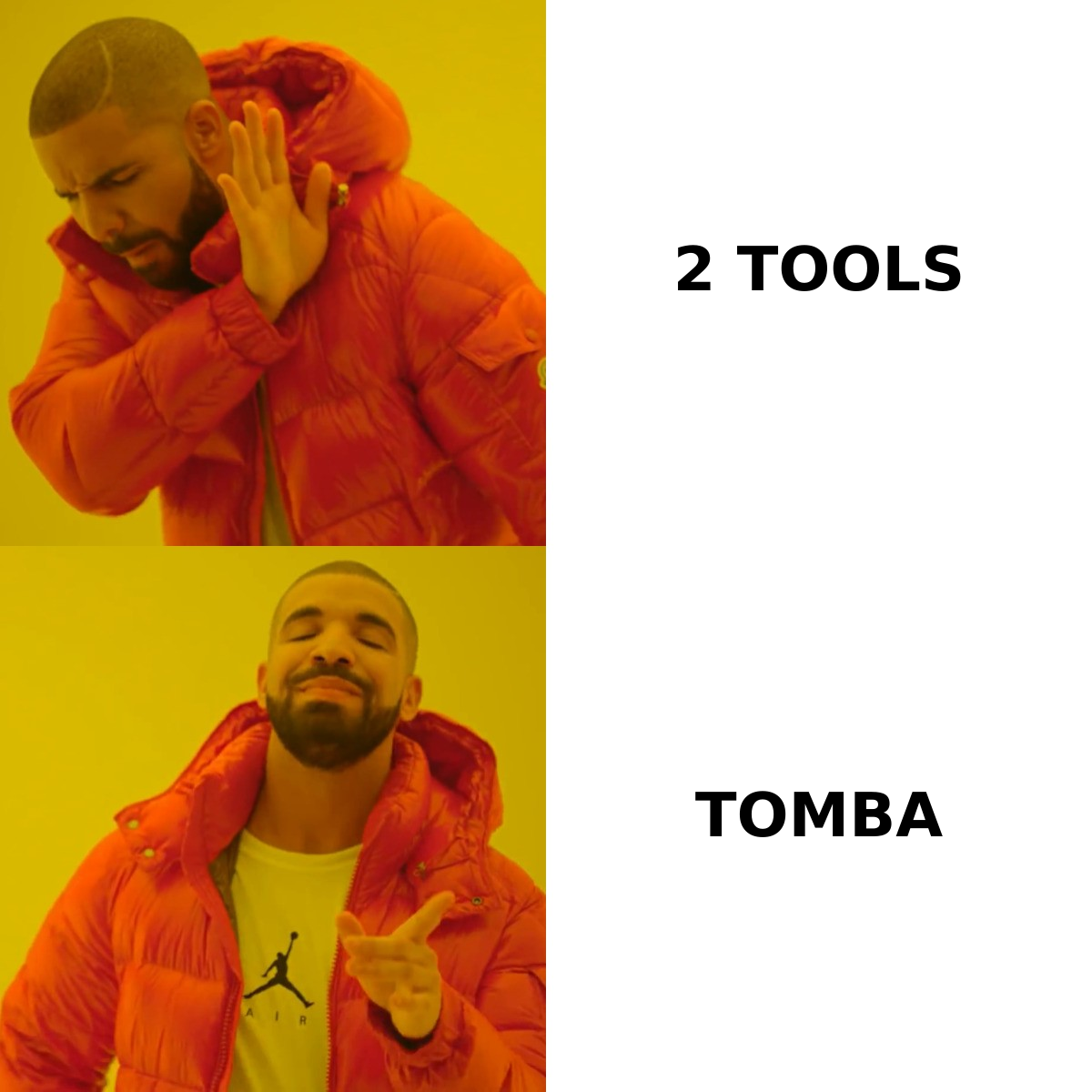
Here's the practical comparison. Pricing on both vendors changes without notice and Finderio's is bundled into a suite plan, so treat these as directional and confirm on the vendor pages before you buy.
| Attribute | Finderio | Heybounce | Tomba |
|---|---|---|---|
| Primary job | Find emails by name/domain | Verify existing emails | Find and verify |
| Sources new contacts | Yes | No | Yes |
| Bulk list verification | Limited | Core feature | Yes |
| Catch-all handling | Basic flag | Detected + risk-scored | Dedicated catch-all verifier |
| Pricing model | Bundled suite subscription | Pay-as-you-go credits | Free tier + $49/mo Starter |
| Free tier | Trial only | Small trial credit pack | 25 searches/mo, no card |
| Public API | Yes | Yes | Yes, plus CLI and MCP |
| Native spreadsheet add-ons | Limited | No | Sheets, Excel, Airtable |
| Best for | Teams already in the 500apps suite | Cleaning a list before a big send | End-to-end prospecting pipeline |
The row that matters most is the first one. If you already have 40,000 addresses sitting in a CRM and your last campaign bounced at 9%, Finderio does not solve your problem — you need verification. If you have a perfect ICP definition and zero contacts, Heybounce does not solve your problem either.
What does each tool actually do well?#
Rather than scoring them on a made-up 100-point scale, here's what each one is genuinely good at, and where it stops.
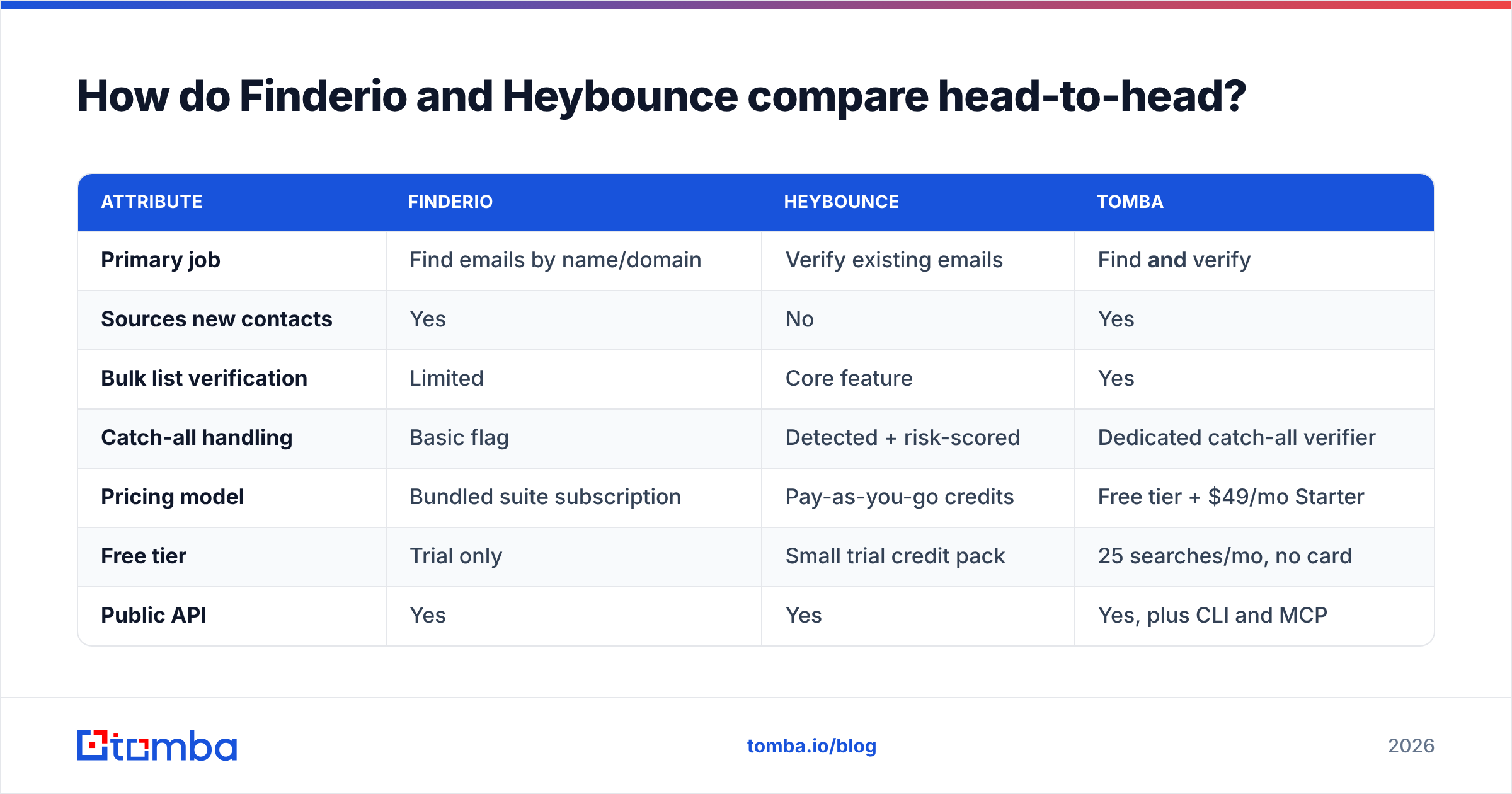
Finderio — pattern-based discovery at company scale. Give it a domain and it will return the company's dominant email pattern plus a list of matching contacts. This is the fastest way to go from a target-account list to a contact list.
Finderio — suite economics. If your team genuinely uses the other apps in the bundle (CRM, helpdesk, project tools), the marginal cost of the finder is low. If you're buying the suite for the finder, you're paying for shelf-ware.
Heybounce — bounce prevention before a big send. Its whole value is measured in one number: the bounce rate you avoided. Under a 2% bounce rate, mailbox providers largely leave you alone. Above 5%, you start seeing throttling and spam-folder placement.
Heybounce — risk categorisation, not just yes/no. Good verifiers separate "invalid" from "risky" from "catch-all." That distinction is what lets you send confidently to the safe segment and route the ambiguous ones to a low-volume warm domain.
Both — API access. Neither forces you into a UI-only workflow, which matters once you're wiring enrichment into a CRM or a RevOps pipeline.
Neither — the full loop. Finderio's verification is a side feature; Heybounce has no sourcing at all. Running both means reconciling two credit systems against one contact record.
How accurate is each one, really?#
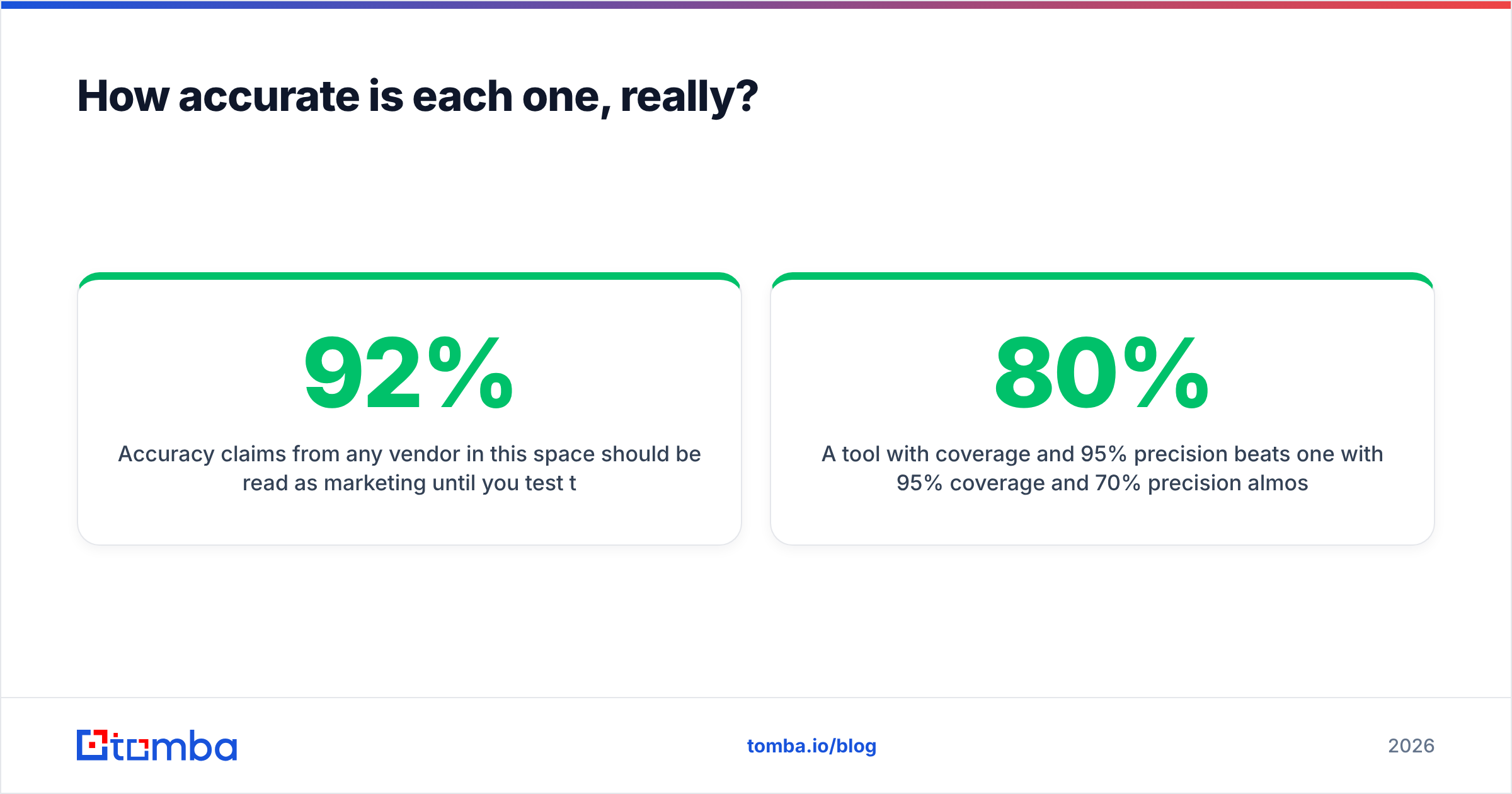
Accuracy claims from any vendor in this space should be read as marketing until you test them on your own ICP. The reason is structural: an email finder's hit rate is a function of how well its data covers your target segment. A tool that's 92% accurate on US SaaS companies with 200+ employees can drop to 40% on European manufacturing firms with no web presence.

Here's a test protocol that takes about 90 minutes and produces a number you can actually trust:
- Build a 100-row control set from your own closed-won accounts. You already know these emails are valid because you've corresponded with them.
- Strip the email column and feed name + domain into each tool.
- Measure two things separately: coverage (what percentage came back with any address) and precision (of those returned, what percentage matched the known-good address).
- Repeat with 50 accounts you've never touched to check whether the tool is just regurgitating common patterns.
A tool with 80% coverage and 95% precision beats one with 95% coverage and 70% precision almost every time, because the second one is quietly feeding your sequencer addresses that bounce.
For verification specifically, the honest ceiling is lower than most vendors imply. SMTP-level checks are unreliable against providers that accept everything at the gateway — the catch-all problem. Microsoft 365 tenants in particular are configured this way by default at many organisations, so any verifier that returns a confident "valid" on every address at a catch-all domain is guessing. A good verifier says "catch-all, unknown" and lets you decide. Read the mechanics of bounce messages if you want to understand why the SMTP handshake gives you less certainty than it appears to.
What do Finderio and Heybounce cost?#
Cost comparison here is genuinely awkward because the two vendors price on different units. Finderio bills as part of a per-user suite subscription; Heybounce bills per verification credit. Comparing "$X/user/month" to "$Y per 1,000 credits" requires you to model your own volume.

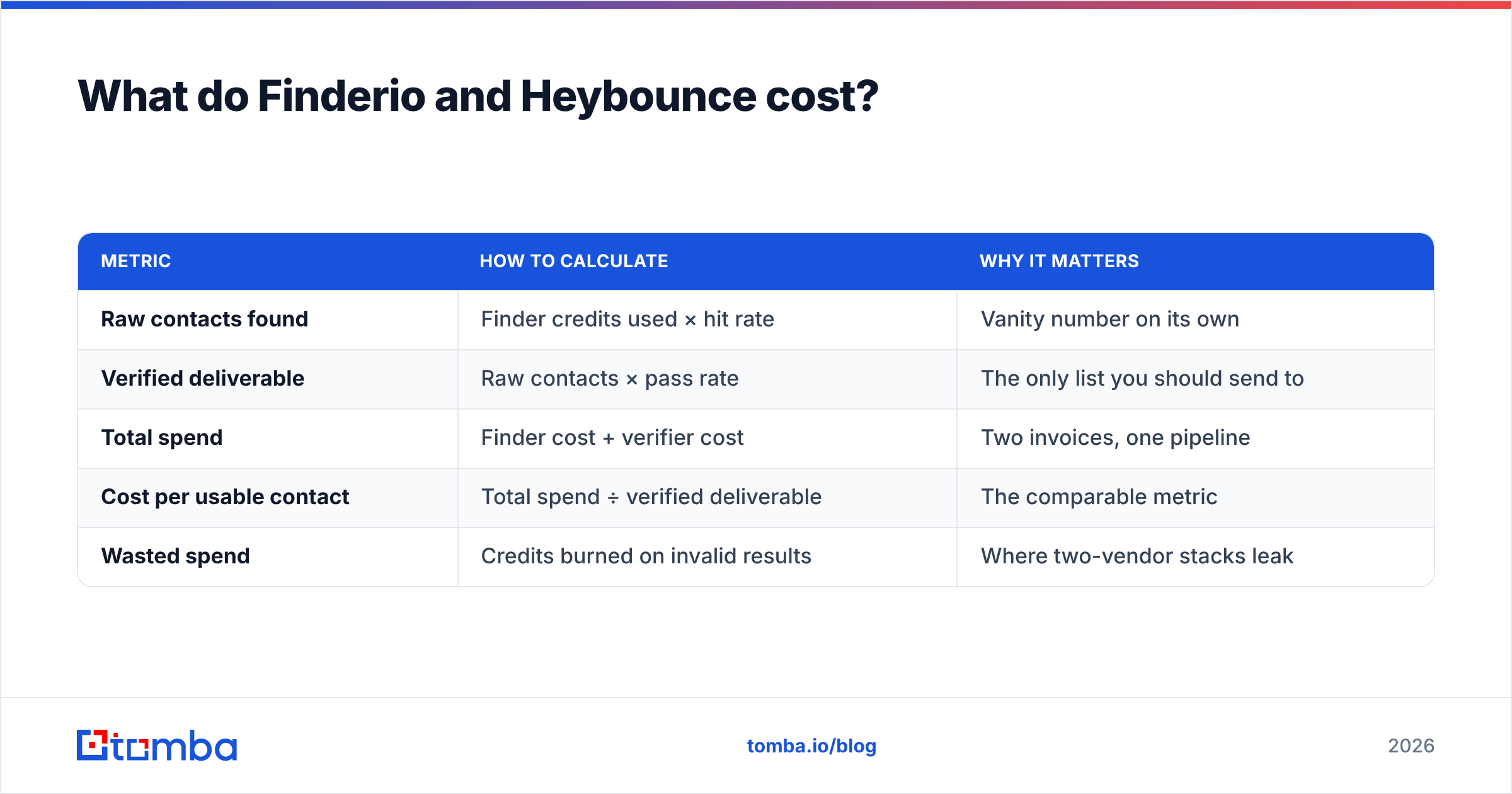
The number that actually matters is cost per usable contact — a contact that was both found and confirmed deliverable. Work it out like this:
| Metric | How to calculate | Why it matters |
|---|---|---|
| Raw contacts found | Finder credits used × hit rate | Vanity number on its own |
| Verified deliverable | Raw contacts × pass rate | The only list you should send to |
| Total spend | Finder cost + verifier cost | Two invoices, one pipeline |
| Cost per usable contact | Total spend ÷ verified deliverable | The comparable metric |
| Wasted spend | Credits burned on invalid results | Where two-vendor stacks leak |
That last row is where split stacks lose. When your finder and verifier are separate vendors, you pay full price for every address the finder returns — including the ones the verifier then rejects. A platform that verifies before it charges you removes that double-billing entirely.
For reference, Tomba pricing runs a free tier at 25 searches per month, Starter at $49/mo, Growth at $99/mo, Pro at $249/mo, and custom Enterprise pricing — with finding and verification drawing from the same pool rather than two separate meters.

Is one tool enough, or do you need both?#
You need both capabilities. You don't necessarily need both vendors.
Consider what a two-vendor stack actually costs beyond the invoices:
- Reconciliation work. Every contact record needs a status from tool A and a status from tool B, joined on email address. That's a sync job someone has to own.
- Latency. Real-time enrichment on form fill means two sequential API calls to two providers with two rate limits.
- Credit fragmentation. You run out of verification credits mid-month with finder credits to spare, or the reverse. Neither pool is transferable.
- Two support relationships. When a batch fails, you get to find out which vendor's fault it was.
None of these are dealbreakers at small volume. At 5,000+ contacts a month, they become a recurring tax on someone's calendar.
The alternative is a single platform where the finder verifies as it goes. Tomba's email finder runs a verification pass on every result before returning it, so what lands in your CRM is already screened. Same for domain search, which pulls every discoverable address at a company along with confidence scoring, and the bulk email finder for list-scale work.
Which should you choose for your use case?#
Choose Finderio if: you're already invested in the 500apps ecosystem and the finder is a marginal add-on. The bundle economics only work if the bundle is being used.
Choose Heybounce if: you have an inherited list of unknown quality and a send scheduled this week. Point-solution verifiers are cheap, fast, and genuinely good at the one thing they do. Buy a small credit pack, run the list, and make a decision based on the pass rate.
Choose neither — get a combined platform if: you're building a repeatable outbound motion rather than fixing a one-off problem. Sourcing and verification are the same job repeated weekly; splitting them across vendors adds friction every single cycle.
Layer in a phone channel if: email reply rates in your segment have flattened. A phone finder alongside email gives your SDRs a second touch on the same record without a third vendor.
One more practical note: whichever tools you pick, the tooling is only half the deliverability equation. Authentication records, warmup, and sending volume ramp matter at least as much as list hygiene. A perfectly verified list sent from a domain with no SPF alignment will still land in spam. Check the fundamentals on email deliverability before you blame your data vendor. Vendor-neutral reviews on G2 are also worth twenty minutes before you commit to an annual contract — filter to reviewers in your company-size band, since coverage complaints cluster hard by segment.
What's the verdict on Finderio vs Heybounce?#
Finderio wins on sourcing. Heybounce wins on verification. Neither wins outright, because they're not really competing — and any comparison that declares a single winner is comparing a hammer to a saw.
The real decision is architectural: do you want a stack of point tools, or one platform that covers the pipeline? Point tools are defensible when each one is best-in-class and your volume is low enough that integration overhead doesn't compound. Once you're running weekly list builds, the combined approach wins on cost per usable contact, on engineering time, and on the simple fact that one credit pool is easier to forecast than two.
Test before you commit. Build the 100-row control set described above, run it through Finderio, Heybounce, and one combined platform, and compare cost per verified deliverable contact rather than headline pricing. The results usually surprise people who bought on sticker price.
Start with the finder that verifies as it goes. Tomba Email Finder returns professional email addresses by name, domain, or company — each one already run through verification before it hits your list, so you're not paying twice to find out an address was dead. The free tier gives you 25 searches a month with no card required, which is enough to run the control-set test on your own accounts and see the numbers for yourself. If it holds up, Starter is $49/mo and covers finding, verification, catch-all checks, and API access from one balance.
Related guides#
Ready to find emails that actually work?
Join 150,000+ professionals who stopped guessing and started sending. Free credits on signup — no credit card required.
Get the Tomba newsletter
Practical outbound tactics and product updates — once every two weeks.
About the author