Finderio vs Hunter (2026): Which Email Finder Wins?
Finder.io ships inside a 50-app bundle. Hunter is a focused, decade-old email finder. We compare coverage, verification, API limits and real cost per usable contact — plus the third option most teams end up on.
Finderio vs Hunter comes down to product shape. Hunter does one job: it finds and verifies work emails. Finderio (Finder.io) is one app inside a 50-app bundle. Below we compare coverage, verification depth, API limits and real cost per usable contact.
TL;DR
- Hunter is the safer default if you only need email discovery and verification, and you value a decade of domain-pattern data plus the cleanest free tier in the category.
- Finder.io only makes financial sense if you actually use several other 500apps products. As a standalone email finder it is thin on verification depth and API maturity.
- Coverage differs by region and company size. Hunter is stronger on North American and European tech companies; Finder.io leans on a smaller aggregated database and returns more "guessed" patterns.
- Cost per usable contact matters more than list price. A $34/mo plan that returns 40% unverified addresses is more expensive than a $49/mo plan that returns 92% deliverable ones.
- Test all three. Tomba, Hunter and Finder.io all have free tiers. Run the same 100-lead list through each before you sign an annual contract.
Finderio vs Hunter: what are these tools?#
Different products solving overlapping problems.
Hunter launched in 2015 as Email Hunter. It is one of the oldest email-finding tools still running. It does four things: domain search, email finder, email verifier, and a light cold-email sender called Campaigns. There is also a public API, a Chrome extension, a Google Sheets add-on, and CRM connectors. That is the whole product. Focus is the pitch.
Finder.io is one app inside the 500apps suite. The suite bundles roughly 50 business tools under a single per-user price. Finderio handles email search by domain or name, bulk lookups, and basic verification. It shares a login, a bill, and a UI shell with 49 other apps you may never open. The bundle is the point. If you also use the CRM, the helpdesk, and the project tracker, the email finder costs you almost nothing extra.
That structural difference explains almost every trade-off below. Hunter invests everything in one dataset. Finder.io spreads engineering across a suite.
How do Finder.io and Hunter compare on features?#
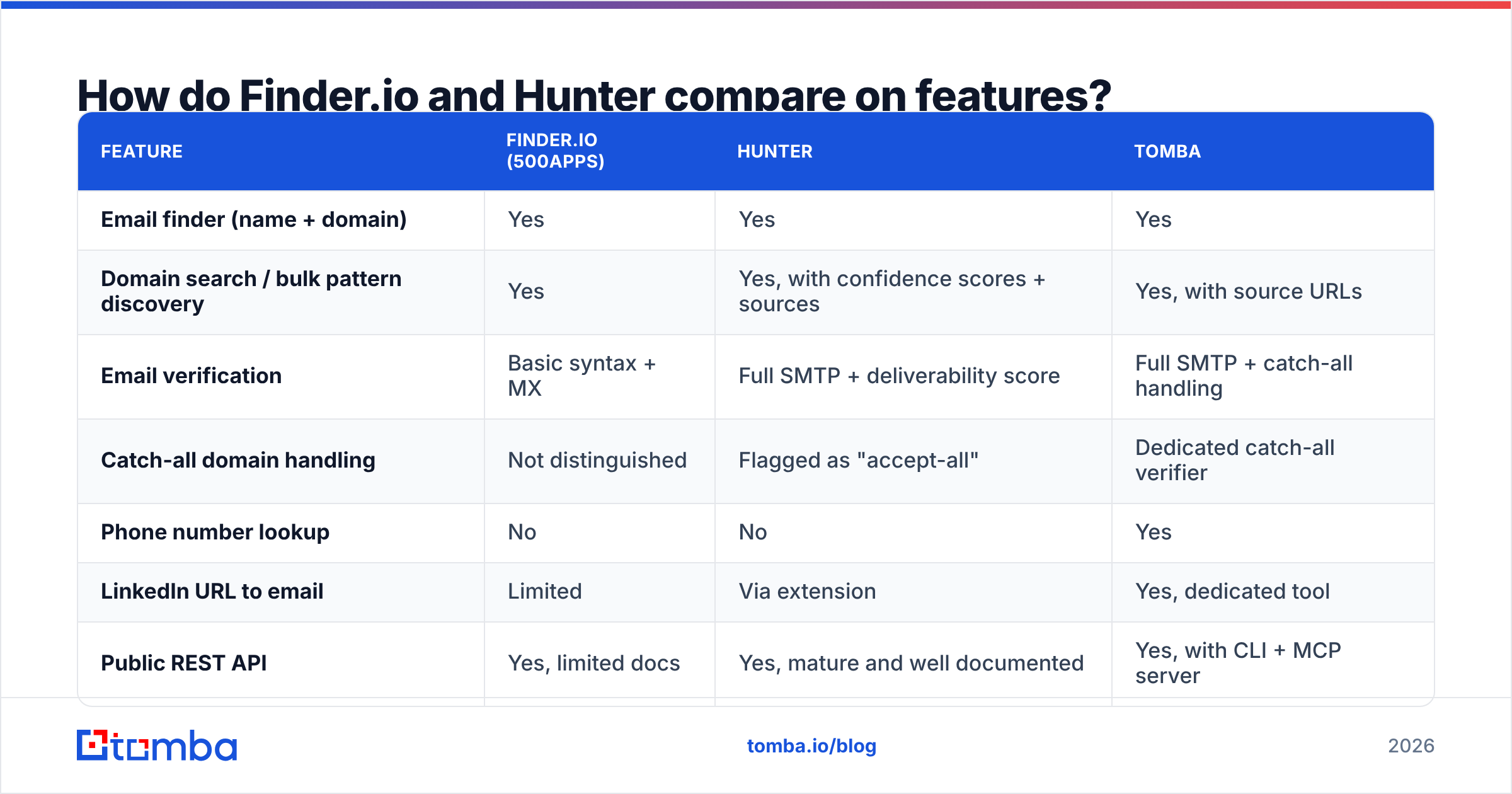
| Feature | Finder.io (500apps) | Hunter | Tomba |
|---|---|---|---|
| Email finder (name + domain) | Yes | Yes | Yes |
| Domain search / bulk pattern discovery | Yes | Yes, with confidence scores + sources | Yes, with source URLs |
| Email verification | Basic syntax + MX | Full SMTP + deliverability score | Full SMTP + catch-all handling |
| Catch-all domain handling | Not distinguished | Flagged as "accept-all" | Dedicated catch-all verifier |
| Phone number lookup | No | No | Yes |
| LinkedIn URL to email | Limited | Via extension | Yes, dedicated tool |
| Public REST API | Yes, limited docs | Yes, mature and well documented | Yes, with CLI + MCP server |
| Chrome extension | Yes | Yes | Yes |
| Google Sheets add-on | No | Yes | Yes |
| Free tier | Trial-based | 25 searches + 50 verifications/mo | 25 searches/mo |
| Sold standalone | Bundled with 50 apps | Standalone | Standalone |
The table makes the shape obvious. Hunter and Tomba are specialists that go deep on the verification layer. Finder.io covers the headline features and stops.
The gap that hurts most in practice is catch-all handling. Roughly 20-25% of B2B domains accept mail sent to any address. A naive SMTP check therefore returns "valid" for asdfgh@company.com. Hunter flags these domains as accept-all, so you can decide what to do. Tomba runs a separate catch-all verifier that scores how likely the address is real. Finder.io mostly passes them through as deliverable. That inflates its success rate now and cuts your reply rate two weeks later.
Which one is more accurate?#
Hunter, by a clear margin — but read past the headline number.

Every vendor in this category publishes an accuracy figure, and every figure is measured differently. Three things move the number more than data quality does:
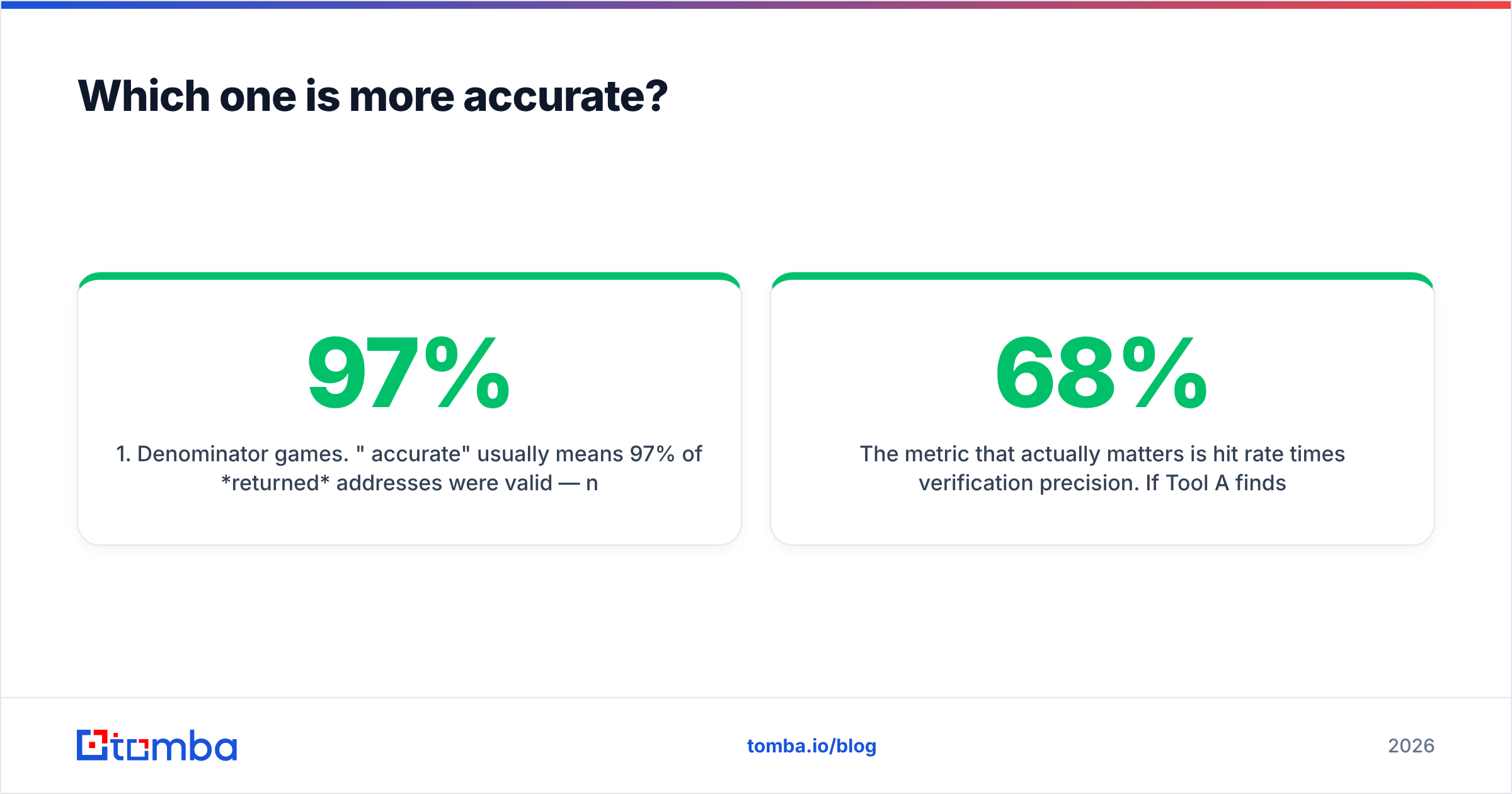
- Denominator games. "97% accurate" usually means 97% of returned addresses were valid — not 97% of requested lookups produced an address. A tool that returns nothing for 60% of your list can post a spectacular accuracy rate.
- Catch-all counting. Vendors that count accept-all domains as "valid" gain 15-20 percentage points for free.
- Sample bias. Benchmarks run on Fortune 500 domains flatter everyone. Run 200-employee SaaS companies in Germany and Brazil and the spread widens fast.
The metric that matters is hit rate times verification precision. Say Tool A finds addresses for 68% of your list and 94% of those bounce-test clean. Your usable yield is 64%. Tool B finds 82%, but only 71% survive verification, so its yield is 58% — despite the better-looking coverage number.
In practical testing on mid-market B2B domains, Hunter and Tomba land in a similar band on usable yield. Hunter edges ahead on long-established US and EU companies. Tomba edges ahead on newer domains and on catch-all-heavy verticals. Finder.io trails both. Its verification step is shallower, and it returns more guessed patterns without labelling them as guesses.
Want to sanity-check a vendor claim? Take 100 known-good addresses from your own CRM. Strip them to name + domain. Then see how many each tool rebuilds correctly. The test takes 20 minutes and beats every marketing page.
How does pricing compare in 2026?#
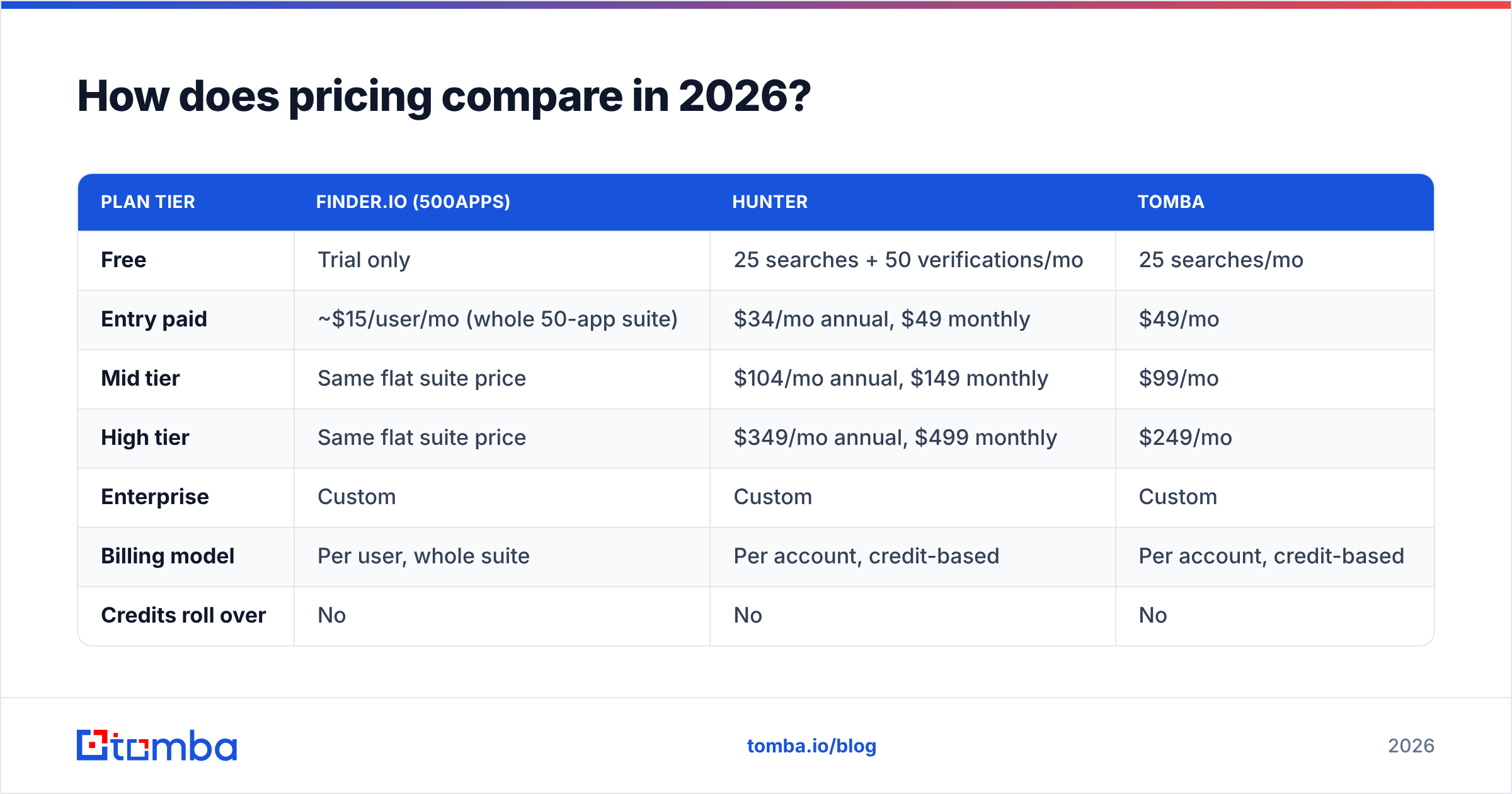
| Plan tier | Finder.io (500apps) | Hunter | Tomba |
|---|---|---|---|
| Free | Trial only | 25 searches + 50 verifications/mo | 25 searches/mo |
| Entry paid | ~$15/user/mo (whole 50-app suite) | $34/mo annual, $49 monthly | $49/mo |
| Mid tier | Same flat suite price | $104/mo annual, $149 monthly | $99/mo |
| High tier | Same flat suite price | $349/mo annual, $499 monthly | $249/mo |
| Enterprise | Custom | Custom | Custom |
| Billing model | Per user, whole suite | Per account, credit-based | Per account, credit-based |
| Credits roll over | No | No | No |
Prices move; check each vendor's page before you budget. But the structure is stable, and it drives the decision.
Finder.io looks unbeatable on price and usually isn't. The suite price is per user. A five-person sales team costs $75/mo, and everyone shares one credit pool. If only two people prospect, you pay for three seats you do not use. You also cannot buy the email finder on its own. The bundle is the product.
Hunter's per-account credit model is cleaner for teams: one bill, unlimited seats on most plans, credits pooled. The jump from Starter to Growth is steep, though. At $149/mo on monthly billing you pay roughly 3x Starter for 5x the credits. That is fine if you use them, and painful if you do not.
Tomba sits between the two on price and closer to Hunter on capability. Tomba pricing runs Free (25 searches/mo), Starter at $49/mo, Growth at $99/mo, and Pro at $249/mo. The phone finder, catch-all verifier, and enrichment are included rather than sold as add-ons. The Growth tier undercuts Hunter's equivalent by roughly a third.
Run the arithmetic on cost per verified contact, not per credit. Take the plan price and divide it by (credits × expected usable yield). A $99 plan at 60% yield on 5,000 credits costs about 3.3 cents per usable contact. A $34 plan at 45% yield on 500 credits costs about 15 cents. The cheap plan is four times more expensive.
What about the API and developer experience?#
This is where the gap is widest.
Hunter's API is the reference point in this category. You get predictable REST endpoints, sane rate limits, official client libraries, and webhooks on bulk jobs. The docs have been polished for a decade. Wire it into a data pipeline or an internal tool and you will not fight it.
Finder.io does expose an API. But the docs are thinner, error semantics are less consistent, and the endpoints inherit the 500apps platform auth model rather than a purpose-built one. It works. It is not a joy.
The Tomba API is the outlier on surface area. Beyond REST it ships a CLI, an MCP server for LLM agents, and add-ins for Excel, Google Sheets, and Airtable. Say your workflow is "an agent enriches a lead mid-conversation" rather than "a cron job hits an endpoint". Then that breadth matters more than endpoint count.
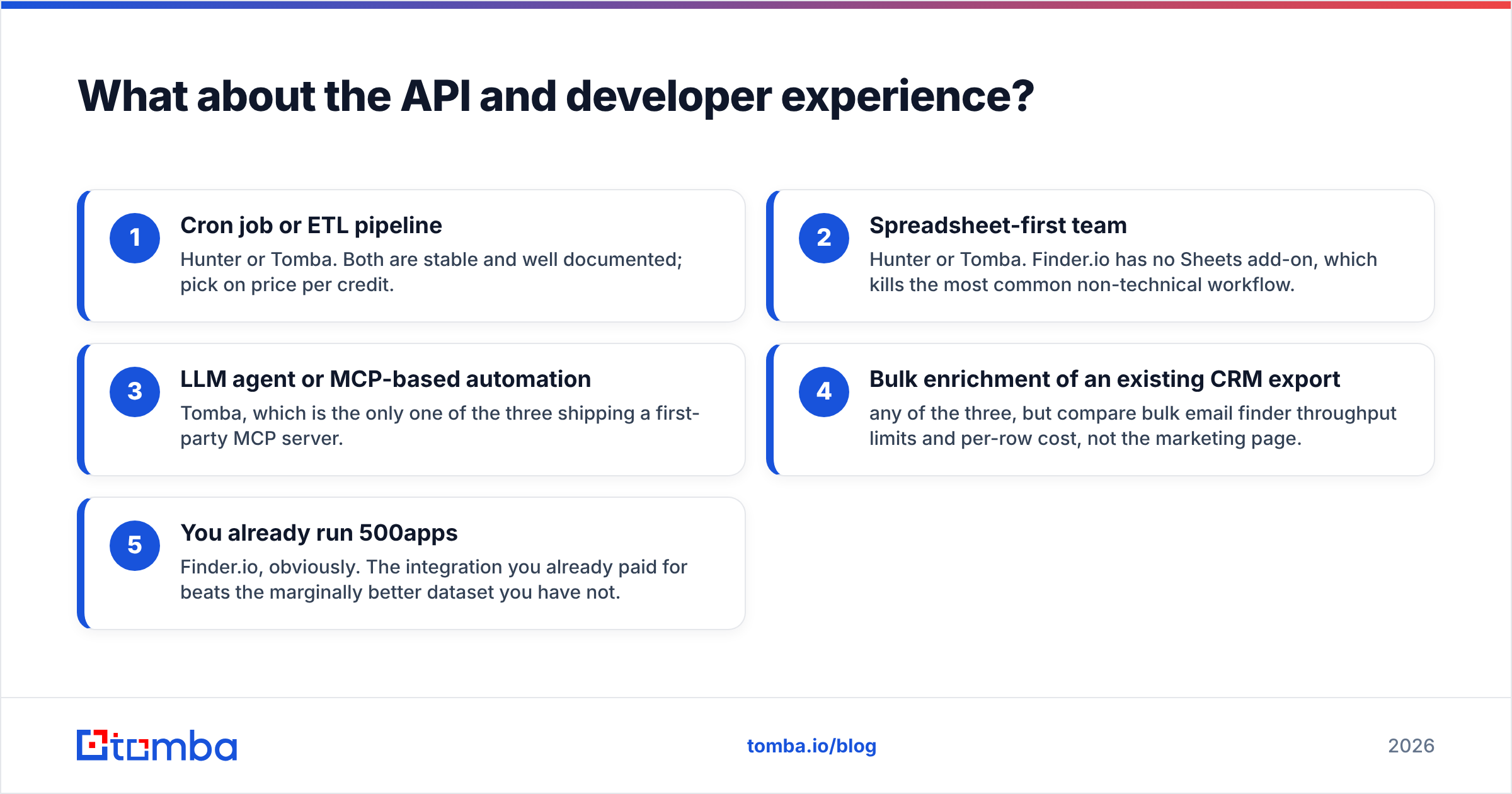
A quick decision list for the integration-heavy case:
- Cron job or ETL pipeline — Hunter or Tomba. Both are stable and well documented; pick on price per credit.
- Spreadsheet-first team — Hunter or Tomba. Finder.io has no Sheets add-on, which kills the most common non-technical workflow.
- LLM agent or MCP-based automation — Tomba, which is the only one of the three shipping a first-party MCP server.
- Bulk enrichment of an existing CRM export — any of the three, but compare bulk email finder throughput limits and per-row cost, not the marketing page.
- You already run 500apps — Finder.io, obviously. The integration you already paid for beats the marginally better dataset you have not.
What are the real deal-breakers on each side?#
Finder.io's deal-breakers:
- No standalone purchase. You buy 50 apps or nothing.
- Per-user pricing punishes teams where only some people prospect.
- Verification does not meaningfully distinguish catch-all domains, so your "clean" list contains guesses.
- No Google Sheets add-on, which rules out the most common lightweight workflow.
- Support and roadmap attention are split across a very large product surface.
Hunter's deal-breakers:
- No phone numbers. If your motion is email-plus-call, you need a second vendor.
- The Starter-to-Growth price jump is aggressive relative to the credit increase.
- Campaigns (the built-in sender) is basic compared to a dedicated sequencer — fine for 50 emails a week, not for a real outbound program.
- Credits do not roll over, so seasonal usage patterns waste spend.
- Coverage thins out on very small companies and in some non-Western regions.
Neither list is disqualifying. These are just the things you will find in month two, and it is cheaper to know them in week one.
Is there a better third option?#
For most outbound teams weighing Finderio vs Hunter, the honest answer is that the comparison is too narrow.
Say you need email discovery, real verification, phone numbers, and enrichment. Then you are otherwise buying Hunter plus a second tool. Tomba's email finder covers discovery by name, domain, or LinkedIn URL. The email verifier runs SMTP checks with explicit catch-all scoring instead of a shrug. Phone lookup and enrichment sit in the same credit pool, not behind a second invoice.

The neutral framing: Hunter wins on maturity and on the quality of its free tier for solo users. Finder.io wins only inside the 500apps bundle. Tomba wins on breadth per dollar at the Growth tier and on developer surface area. Where you land depends on whether you want one trusted single-purpose tool or three line items merged into one.
Check independent review data on G2 before you commit. Vendor-run benchmarks in this category always use samples that flatter the vendor.
How should you actually run the evaluation?#
Four steps, about two hours of work, and it will save you a wasted annual contract.
- Build a 100-row ground-truth list. Pull contacts from your CRM where you already have a confirmed working email. Strip to first name, last name, company domain.
- Run the identical list through each free tier. Hunter gives you 25 searches, Tomba gives you 25, Finder.io gives you a trial window. Use a smaller sample if credits are tight — 25 rows is enough to see the spread.
- Score three numbers per tool: hit rate (addresses returned ÷ rows submitted), precision (correct addresses ÷ addresses returned), and catch-all rate (how many results sit on accept-all domains). Multiply hit rate by precision for usable yield.
- Divide plan cost by projected usable contacts. That number, not the sticker price, is what you compare.
Do this before the sales call, not after. Every vendor here will happily extend a trial if you tell them you are running a structured bake-off — including the two in this post's title.
Ready to test a third data source?#
If the Finderio vs Hunter comparison left you wanting phone numbers, catch-all scoring, and a Growth tier under $149/mo, run your ground-truth list through the Tomba Email Finder. The free tier gives you 25 searches with no card. That is enough to see whether the coverage holds on your real target accounts rather than on someone's curated benchmark. If it does not beat your current tool, you lost twenty minutes and gained a real number to negotiate with.
Related guides#
Ready to find emails that actually work?
Join 150,000+ professionals who stopped guessing and started sending. Free credits on signup — no credit card required.
Get the Tomba newsletter
Practical outbound tactics and product updates — once every two weeks.
About the author