Finderio vs RemoveBounce 2026: Email Finder vs Verifier
One tool finds addresses, the other cleans them. Here's an honest breakdown of Finderio vs RemoveBounce on accuracy, pricing model, and workflow fit, plus what happens if you try to run outbound with only one of them.
TL;DR
- Finderio and RemoveBounce are not really competitors. Finderio (part of the 500apps suite) is a lead discovery and email finding tool. RemoveBounce is a bulk email verification service. Comparing them head-to-head is like comparing a well digger to a water filter.
- If you already have a list and just need it cleaned before sending, RemoveBounce is the closer fit. If you have company domains but no contacts, RemoveBounce cannot help you at all.
- Buying both means two vendors, two credit systems, two API keys, and two support queues, for a job most modern platforms do in one pass.
- Neither publishes independently audited accuracy numbers. Run your own 200-contact test against known-good data before you commit budget.
- If your workflow is find → verify → export → send, a combined platform like Tomba usually costs less than stacking a finder and a verifier at $49/mo for the entry tier.
What are Finderio and RemoveBounce?#
Finderio (finder.io) is the lead generation module inside the 500apps bundle. Its pitch is discovery: search a company domain, get back the contacts and email addresses associated with it, enrich them with job title and social profile, and push the result into your CRM. It also ships basic verification so the addresses it returns are not obviously dead.
RemoveBounce (removebounce.com) does one thing: it takes an existing list of email addresses and tells you which ones are safe to send to. Upload a CSV, and it runs syntax checks, MX record lookups, disposable-domain detection, role-account flagging, spam-trap screening, and SMTP-level mailbox pings. You get back a file with each address labeled valid, invalid, catch-all, or unknown.
That difference is the whole comparison. One creates data. The other grades it. So the honest framing of "finderio vs removebounce" is not which tool is better but which half of the problem are you actually trying to solve, and do you need both halves?
How do Finderio and RemoveBounce actually differ?#
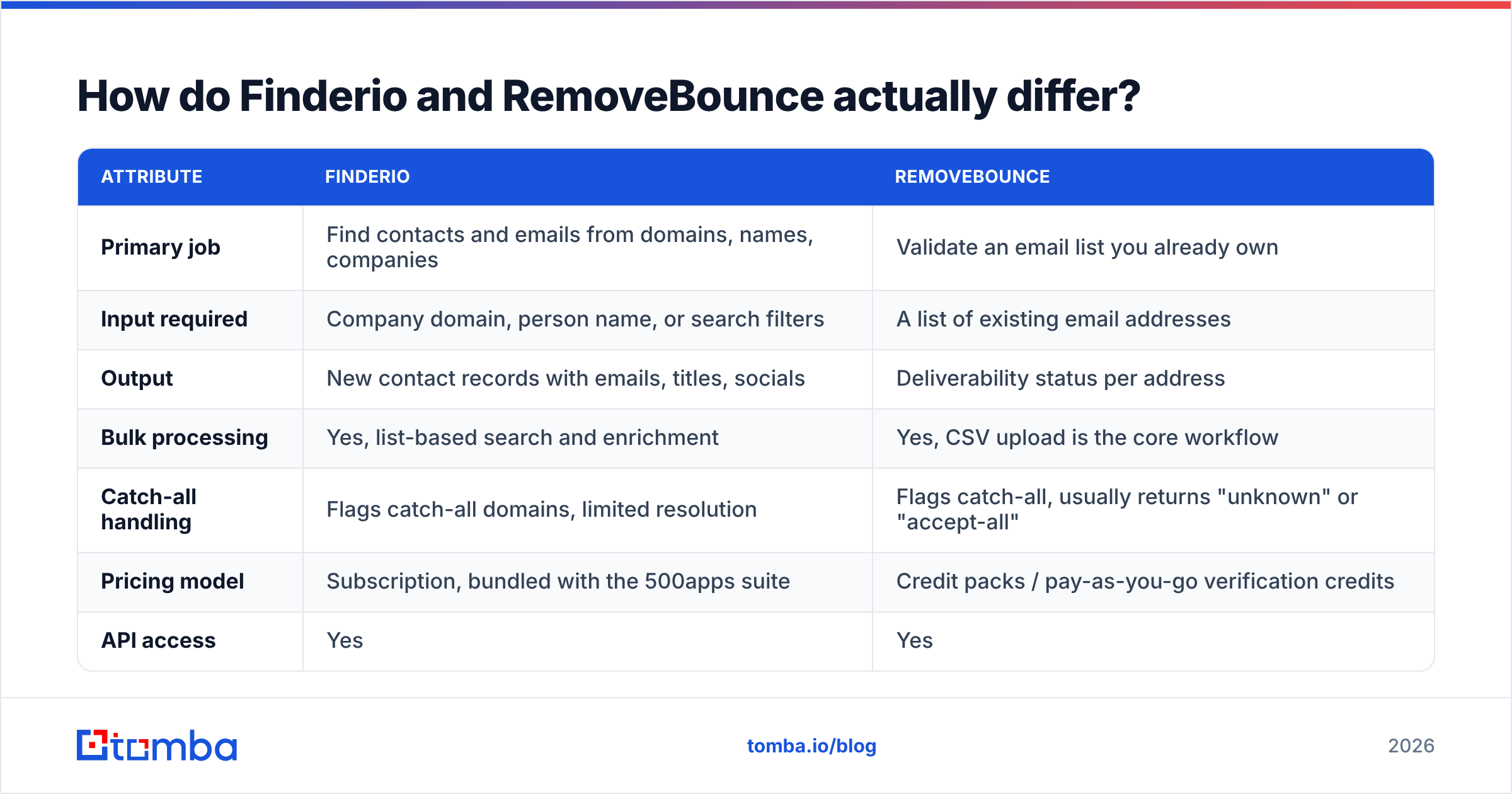
Here's the side-by-side on the attributes that change your buying decision.
| Attribute | Finderio | RemoveBounce |
|---|---|---|
| Primary job | Find contacts and emails from domains, names, companies | Validate an email list you already own |
| Input required | Company domain, person name, or search filters | A list of existing email addresses |
| Output | New contact records with emails, titles, socials | Deliverability status per address |
| Bulk processing | Yes, list-based search and enrichment | Yes, CSV upload is the core workflow |
| Catch-all handling | Flags catch-all domains, limited resolution | Flags catch-all, usually returns "unknown" or "accept-all" |
| Pricing model | Subscription, bundled with the 500apps suite | Credit packs / pay-as-you-go verification credits |
| API access | Yes | Yes |
| Solves "I have zero contacts" | Yes | No |
| Solves "my bounce rate is 9%" | Partially | Yes |
| Best for | SDRs building lists from scratch | Marketers cleaning an aging database |
Read that table honestly and the "versus" collapses. If your CRM is empty, RemoveBounce has nothing to do. If you inherited a 60,000-row list from a departed marketer, Finderio is not the tool that saves your sender reputation.
Which one is more accurate?#
Neither vendor publishes a third-party audit, so treat every advertised percentage as marketing until you test it. Accuracy also means two different things here:
- Finder accuracy — of the emails a tool returns, what share actually reach a human inbox? This is where email finders diverge wildly. A tool that guesses
first.last@domain.comfrom a pattern and never confirms it will report a high "found" rate and a terrible delivery rate. - Verifier accuracy — of the addresses a tool marks valid, what share actually bounce? And critically, how many good addresses does it wrongly discard? Over-aggressive verifiers quietly delete deliverable contacts and nobody notices, because a false negative never bounces.

The practical test that settles it costs you an afternoon:
- Build a 200-row control set. Use contacts you have already emailed successfully in the last 90 days, plus 20 addresses you know are dead.
- Run the control set through the verifier. Count how many known-good addresses come back as invalid or risky. That is your false-negative rate, and it is the number vendors never advertise.
- Blank out the emails and re-find them. Feed name and domain into the finder. Count matches against the originals.
- Send a small real campaign. 200 addresses to a warmed domain. The bounce rate you observe is the only accuracy number that matters.
- Repeat on a second industry. Coverage on US SaaS companies tells you nothing about coverage on German manufacturers or UK agencies.
Most teams skip step 2 and 5, then wonder why a "98% accurate" tool produced a 6% bounce rate.
How does pricing compare in 2026?#
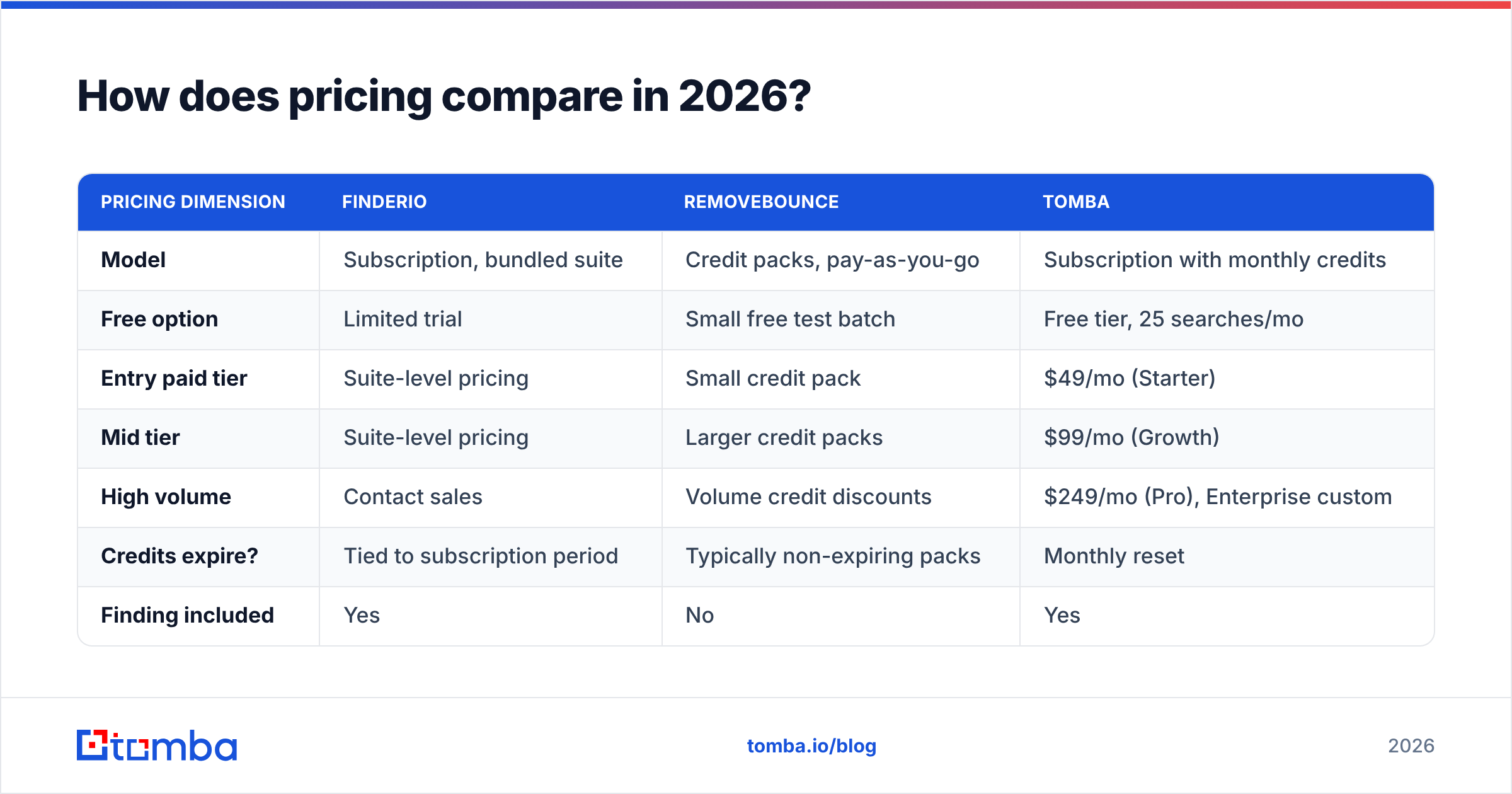
This is where the two products are hardest to line up, because they charge for different units. Finderio sells subscription seats inside a bundle; RemoveBounce sells verification credits you consume as you clean.
| Pricing dimension | Finderio | RemoveBounce | Tomba |
|---|---|---|---|
| Model | Subscription, bundled suite | Credit packs, pay-as-you-go | Subscription with monthly credits |
| Free option | Limited trial | Small free test batch | Free tier, 25 searches/mo |
| Entry paid tier | Suite-level pricing | Small credit pack | $49/mo (Starter) |
| Mid tier | Suite-level pricing | Larger credit packs | $99/mo (Growth) |
| High volume | Contact sales | Volume credit discounts | $249/mo (Pro), Enterprise custom |
| Credits expire? | Tied to subscription period | Typically non-expiring packs | Monthly reset |
| Finding included | Yes | No | Yes |
| Verification included | Basic | Yes, it is the product | Yes |
Two things to watch:
- Bundle pricing is a trap if you only want one module. Finderio's economics improve if you genuinely use the rest of the 500apps suite. If you want an email finder and nothing else, you are paying for shelfware.
- Pay-as-you-go looks cheap until it isn't. Non-expiring credits are genuinely good for occasional list hygiene. But if you clean weekly, per-credit rates usually land above a flat subscription that bundles verification with finding. Compare against published Tomba pricing before you assume PAYG is the frugal choice.

Who should use Finderio?#
Finderio makes sense in a narrow set of situations:
- You already run 500apps. If your team pays for the suite for CRM, helpdesk, or project tools, the marginal cost of the lead module is low and integration is native. That's a real advantage.
- You need breadth over depth. Suite tools optimise for "good enough at many things." If your outbound volume is modest, that trade is fine.
- You want one vendor relationship. Procurement teams at mid-market companies genuinely value a single MSA over five point solutions.
Where it struggles: teams with high-volume outbound who need best-in-class match rates on hard-to-find contacts, and anyone who needs deep catch-all resolution. Suite products rarely lead on any single benchmark, and email finding is a specialist discipline where data source quality decides everything.
Who should use RemoveBounce?#
RemoveBounce earns its slot when the problem is squarely hygiene:
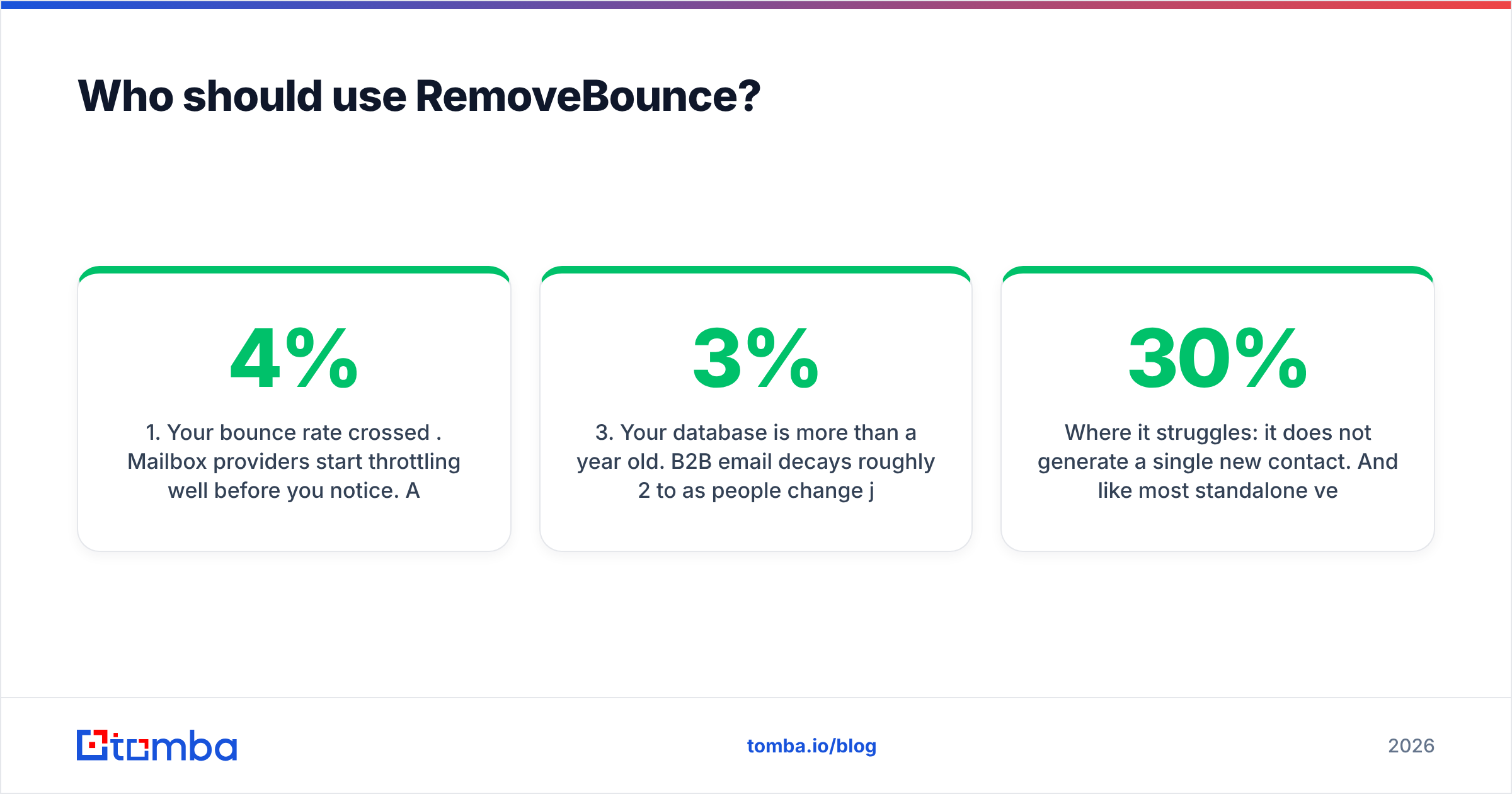
- Your bounce rate crossed 4%. Mailbox providers start throttling well before you notice. A one-off clean is the fastest fix.
- You imported a purchased or inherited list. Never send to a list you did not build without verifying it first. This is the single highest-ROI verification use case.
- Your database is more than a year old. B2B email decays roughly 2 to 3% per month as people change jobs. A 12-month-old list can be a third dead.
- You need non-expiring credits. If you clean quarterly, not weekly, a credit pack that sits on the shelf is better than a subscription you underuse.
Where it struggles: it does not generate a single new contact. And like most standalone verifiers, catch-all domains come back as "accept-all" with no further resolution, which on some lists is 20 to 30% of your addresses stuck in limbo. That's where a dedicated catch-all verifier changes the maths, because those contacts are often at exactly the enterprise domains you most want to reach.
Do you need both, or is one enough?#
The honest answer for most outbound teams: you need both functions, but you probably don't need both vendors.
Think of it like buying a camera. You could buy a body from one brand and lenses from another, and specialists do exactly that. But if you just want good photos without managing an adapter, one system that does both well saves you real friction. In tooling terms, that friction is concrete:
- Two credit balances to monitor, top up, and forecast.
- Two API keys and two rate limits to handle in any automation.
- A CSV round trip between finding and verifying, which is where lists get truncated, columns get mangled, and duplicates creep in.
- Two support queues when a batch fails at 2am before a Monday send.
- No shared status logic. A finder's "found" and a verifier's "valid" are different claims with different confidence, and reconciling them is manual work.

That's why the market has consolidated. The workflow that wins is: find the address, verify it in the same pass, and export a single clean file. A tool that gives you an email finder and an email verifier under one credit balance removes an entire step from your process, not just a line item from your invoice.
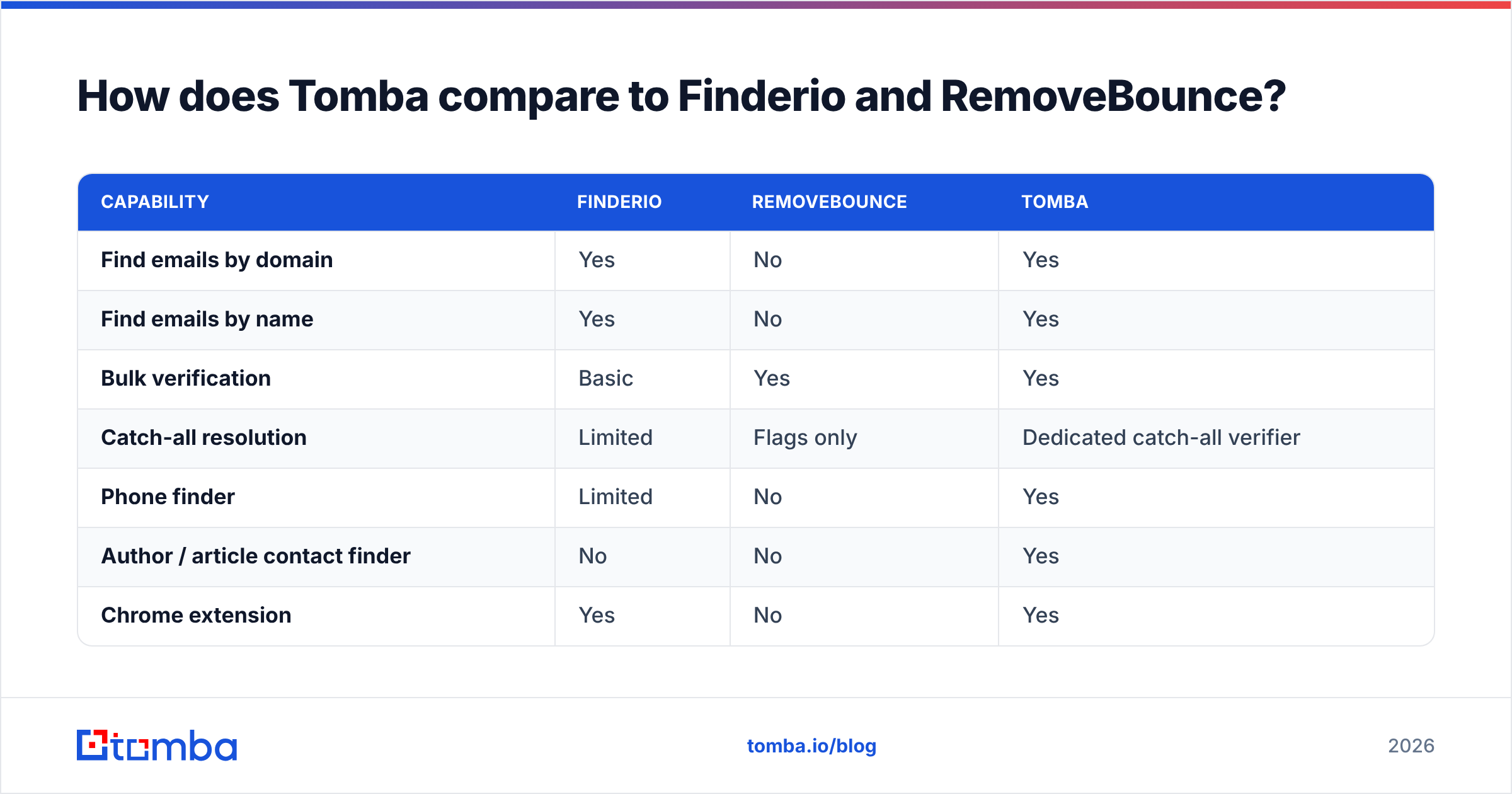
How does Tomba compare to Finderio and RemoveBounce?#
Being direct about the bias here: this is the Tomba blog. Judge the comparison on the attributes, not the source.

| Capability | Finderio | RemoveBounce | Tomba |
|---|---|---|---|
| Find emails by domain | Yes | No | Yes |
| Find emails by name | Yes | No | Yes |
| Bulk verification | Basic | Yes | Yes |
| Catch-all resolution | Limited | Flags only | Dedicated catch-all verifier |
| Phone finder | Limited | No | Yes |
| Author / article contact finder | No | No | Yes |
| Chrome extension | Yes | No | Yes |
| Sheets / Excel add-ons | Partial | No | Yes |
| Public API | Yes | Yes | Yes |
| Free tier | Trial | Test batch | 25 searches/mo, ongoing |
| Entry price | Suite pricing | Credit pack | $49/mo |
The structural difference is that finding and verifying draw on the same data layer. When an address is found, it is already checked against MX records, catch-all status, and pattern confidence before it reaches your export. You are not moving a CSV between two systems and hoping the statuses agree.
Where Tomba is not the answer: if you need a full sales engagement platform with sequences, dialers, and a built-in CRM, this is a data layer, not a sending platform. Pair it with your existing sequencer. And if you have zero interest in finding new contacts and only ever clean lists, a pure PAYG verifier with non-expiring credits may genuinely cost you less.
What should you actually do next?#
Skip the feature-matrix paralysis and run a 30-minute decision:
- Empty database? You need a finder. RemoveBounce is out of scope. Compare Finderio against dedicated finders on match rate for your target industry, not on the vendor's global average.
- Full but stale database? You need verification first. Clean before you send anything, then decide about finding.
- Both problems at once? Test a combined platform before you buy two subscriptions. The integration tax is real and it compounds every week.
- Under 500 lookups a month? Start on a free tier and prove the data quality on your own accounts before spending anything.
- Over 10,000 a month? Ask every vendor for API rate limits in writing, and test bulk processing at your real volume, not on a 100-row sample.
Cross-check the shortlist against real user reviews on G2 rather than vendor landing pages, and always run the 200-contact control test described earlier. It is the only evidence that survives a QBR.
Ready to stop stitching two tools together? Start with the Tomba Email Finder. Search a domain, get verified contacts back in the same request, and export a file that is ready to send, with 25 free searches a month to test on your own target accounts before you pay anything. If it does not beat your current stack on match rate, you have lost an afternoon and learned something useful.
Related guides#
Ready to find emails that actually work?
Join 150,000+ professionals who stopped guessing and started sending. Free credits on signup — no credit card required.
Get the Tomba newsletter
Practical outbound tactics and product updates — once every two weeks.
About the author