Finderio vs SignalHire 2026: Email Finder Comparison
Finder.io bundles cheap email lookups into a 50-app suite. SignalHire sells phone numbers alongside emails at a premium. Here is how the two actually compare on credits, accuracy, and total cost per usable contact.
TL;DR
- Finder.io is the email-finder module inside the 500apps suite. It is cheap per seat, but you are buying into a bundle, and the data depth is thinner than dedicated providers.
- SignalHire is a LinkedIn-first contact finder that sells emails and mobile numbers on the same credit. That phone coverage is its real differentiator — and the reason it costs more per contact.
- Neither tool ships a serious verification layer. Both hand you addresses you still need to validate before a send, which is where most teams lose their real money.
- If you buy on price alone, Finder.io wins. If you buy on phone data, SignalHire wins. If you buy on cost per contact that actually lands in an inbox, run a bounce test before you commit to either.
- Test all three on the same 200 domains. The tool with the lowest bounce rate — not the lowest sticker price — is the cheapest one you can own.
What are Finder.io and SignalHire?#
They solve the same surface problem — turning a name and a company into a reachable contact — from opposite directions.
Finder.io is one app inside 500apps, a suite that bundles dozens of business tools under a single per-user subscription. Its email finder does domain search, single lookups, and bulk uploads. The pitch is economic: you are not paying for a standalone data vendor, you are paying for a productivity suite that happens to include lead data. That framing matters, because it explains both the low price and the shallower feature set. Finder.io is not the company's flagship — it is a line item.
SignalHire is a dedicated contact-discovery tool built around a browser extension. You open a LinkedIn profile, click the extension, and it reveals email addresses and, critically, direct dial and mobile numbers. It also offers bulk search, an ATS-flavored candidate tracker, and an API. Its user base skews heavily toward recruiters, which shapes the whole product — SignalHire is optimized for "find this specific human right now," not "build me a list of 5,000 SaaS CTOs by firmographic filter."
That difference in DNA — suite module vs. profile-level revealer — drives almost every practical trade-off below.

How do Finderio and SignalHire compare head to head?#
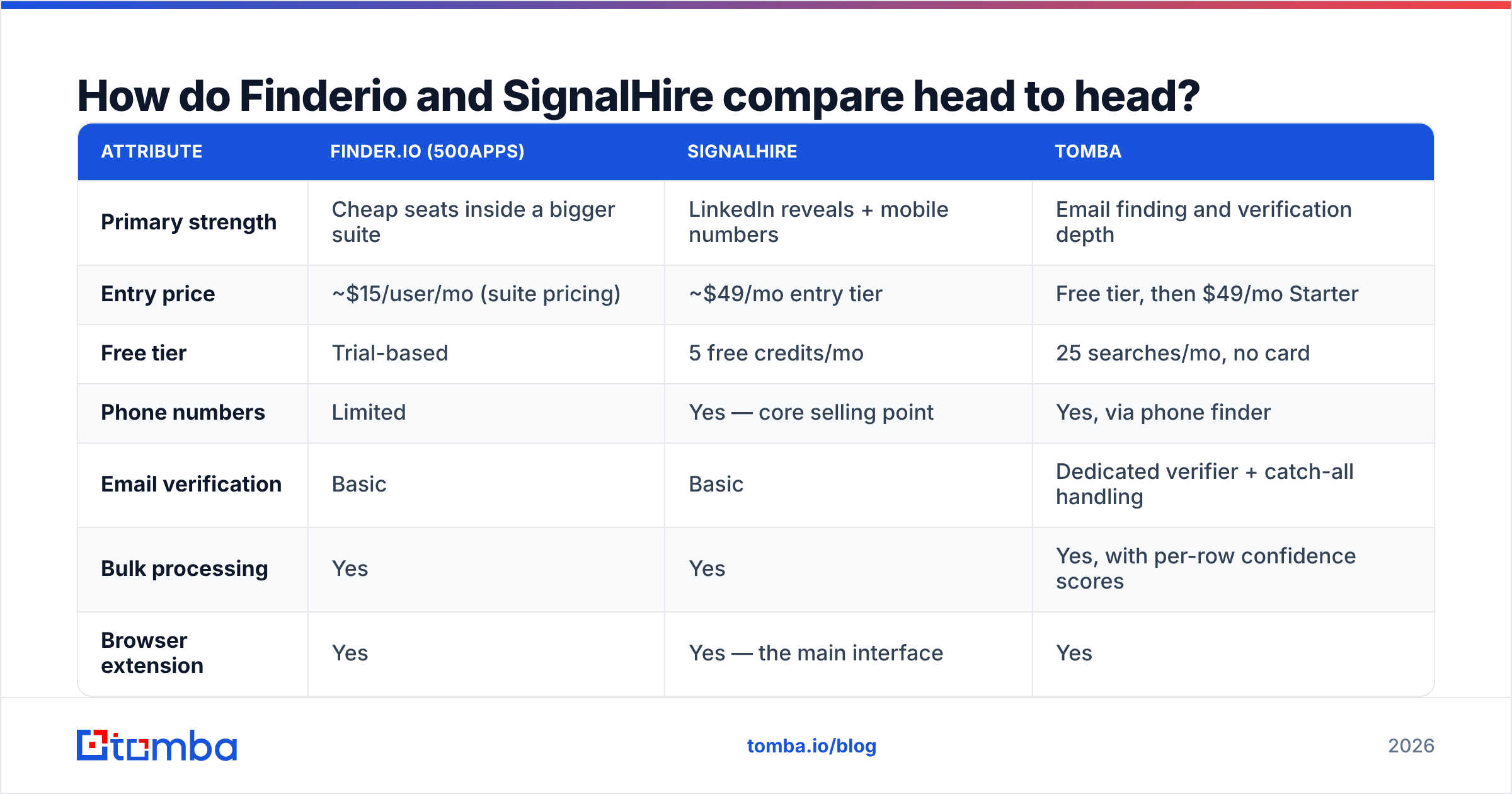
Here is the practical comparison. Pricing on both platforms moves and is often bundled or discounted annually, so treat the figures as directional and confirm on the vendor's own pricing page before you buy.
| Attribute | Finder.io (500apps) | SignalHire | Tomba |
|---|---|---|---|
| Primary strength | Cheap seats inside a bigger suite | LinkedIn reveals + mobile numbers | Email finding and verification depth |
| Entry price | ~$15/user/mo (suite pricing) | ~$49/mo entry tier | Free tier, then $49/mo Starter |
| Free tier | Trial-based | 5 free credits/mo | 25 searches/mo, no card |
| Phone numbers | Limited | Yes — core selling point | Yes, via phone finder |
| Email verification | Basic | Basic | Dedicated verifier + catch-all handling |
| Bulk processing | Yes | Yes | Yes, with per-row confidence scores |
| Browser extension | Yes | Yes — the main interface | Yes |
| API access | Available | Available | Full REST API, CLI, and MCP server |
| Credit model | Suite quota per user | 1 credit per revealed contact | Separate search and verify credits |
| Best fit | Budget teams already in 500apps | Recruiters who need mobiles | Outbound teams that live on deliverability |

Read that table sideways and a pattern appears. Finder.io competes on price, SignalHire competes on data type, and neither competes primarily on email quality. That gap is not an accident — it reflects what each company optimized for.
Which one actually finds more valid emails?#
Nobody publishes an honest, reproducible accuracy number about themselves, so ignore the marketing claims from all vendors — including this one — and run your own test.

Here is a test protocol that takes about an hour and settles the argument permanently:
- Build a control list of 200 real prospects. Pull them from one ICP segment, not a random mix. Data providers perform wildly differently across regions and company sizes, so a blended list gives you a blended, useless average.
- Run the identical list through each tool. Same names, same domains, same day. Record hit rate — how many rows came back with any address at all.
- Verify every returned address with a neutral third party. Do not use the finder's own verifier to grade its own homework. A standalone email verifier or a free email checker keeps the scoring honest.
- Calculate net usable rate, not hit rate. A tool that returns 90% coverage with 25% invalid addresses gives you 67 usable contacts per 100. A tool that returns 70% coverage at 97% valid gives you 68. Same outcome, very different invoices.
- Divide cost by usable contacts. This is the only number that belongs in your buying decision. Sticker price per credit is a vanity metric.
- Check the catch-all bucket separately. Catch-all domains accept every address at the SMTP layer, so most tools mark them "valid" and move on. They are the single biggest hidden source of bounces.
That last point deserves its own section, because it is where most email-finder comparisons quietly fall apart.
Why does catch-all handling break both tools' accuracy claims?#
A catch-all domain is a mail server configured to accept anything at that domain rather than reject unknown mailboxes. Think of it like an apartment building where the front desk signs for every package regardless of whether the resident exists. The delivery confirms — that tells you nothing about whether anyone reads it.
Standard SMTP verification cannot resolve these. So tools do one of three things: mark them valid (optimistic, inflates the accuracy number, generates bounces), mark them risky (honest, but you still don't know), or apply pattern-and-signal inference to make a real call.
Both Finder.io and SignalHire land mostly in the first two camps. That is not unusual — genuine catch-all resolution requires additional signal sources beyond an SMTP handshake. It does mean that if a meaningful chunk of your target market runs catch-all infrastructure (common in enterprise and in European mid-market), the accuracy figure you were quoted does not describe your list. A dedicated catch-all verifier is the fix, whichever finder you end up buying.

Does SignalHire's phone data justify the higher price?#
Sometimes — and the answer depends entirely on your motion, not your budget.
SignalHire's core value is that one credit can return an email and a mobile number from a single LinkedIn profile. For recruiters, that is transformative. Candidate outreach lives on the phone; a mobile number is worth several emails. For a recruiting team, paying roughly three times Finder.io's per-seat rate is trivially justified by one placed candidate.
For a standard B2B SaaS outbound team, the math shifts. If your sequence is 6 emails and 2 LinkedIn touches with an optional call, you are paying a phone-data premium on every credit while only using the phone number on your top 10% of accounts. You would do better buying email volume cheaply and layering targeted B2B phone numbers only for accounts that reach a qualification threshold.
The honest framing: SignalHire is priced like a recruiting tool because it largely is one. It is genuinely good at that job. It is a slightly awkward fit for high-volume cold email, where you need thousands of verified addresses rather than a few hundred deeply enriched profiles.
How do the credit systems really work?#
Credit models are where vendors hide cost, so read this part of any contract carefully.
- Finder.io's suite model ties your quota to seats in the broader 500apps subscription. Cheap per user, but scaling data volume means adding seats you may not need — you end up paying for 49 other apps to get more email lookups.
- SignalHire's reveal model burns one credit per contact revealed, whether or not the contact turns out to be useful. A profile that returns only a personal Gmail still costs you the credit.
- Failed-search charging is the detail nobody reads. Ask directly: if the tool returns nothing, am I charged? Policies vary and the difference compounds fast at volume.
- Verification credits are frequently separate, or absent entirely. If you have to send lists to a second vendor to validate them, the second vendor's price is part of the first vendor's cost.
- Rollover and expiry rules quietly determine your effective annual spend. Monthly credits that vanish on the 1st punish the lumpy, campaign-driven usage most outbound teams actually have.
By contrast, Tomba pricing runs a free tier at 25 searches a month, Starter at $49/mo, Growth at $99/mo, and Pro at $249/mo, with search and verification handled inside the same account rather than split across two vendors. The reason that matters is not the number — it is that you can compute cost per verified contact from a single invoice.
Which tool should you actually buy?#
Match the tool to the motion, not to the review score.
Choose Finder.io if: you are already paying for 500apps, your volume is modest, and your prospects are at larger companies with predictable email formats. You will get acceptable coverage at a price no dedicated vendor can match, because you are effectively getting the data as a bundle byproduct.
Choose SignalHire if: phone numbers are load-bearing in your process. Recruiting, executive search, and high-ACV enterprise sales where you genuinely dial. The premium buys you a data type the alternatives charge extra for, and the LinkedIn extension workflow is fast.
Choose a dedicated email-first provider if: your business is cold email at volume and your primary risk is sender reputation. At scale, a 6-point bounce-rate difference is not a data-quality footnote — it is the difference between a domain that keeps landing in inboxes and one that quietly stops. This is where Tomba's email finder plus its verification stack is built to compete, and where a suite module or a recruiting tool is being asked to do a job it was not designed for.
Choose two tools if: you are honest about waterfall enrichment. Most mature outbound teams run a primary provider for volume and a secondary for the misses. That is cheaper than forcing one vendor to cover 100% of an ICP it only partly knows. Check independent review data on G2 for how each vendor performs in your specific segment before you decide the split.
What about switching costs and integrations?#
Switching an email finder is easier than switching a CRM, but it is not free. Three things to check before you migrate:
Extension workflow. If your reps live in a browser extension, moving them to a tool with a different reveal flow costs a week of adoption friction. SignalHire users in particular tend to have deep muscle memory here.
Automation surface. If lookups run inside Clay, n8n, Make, or your own scripts, the Tomba API documentation and rate limits matter far more than the UI. Confirm the endpoints you actually need exist before you sign.
Data portability. Export your existing enriched contacts before you cancel anything. Some suite tools make bulk export deliberately unpleasant. Do this while your account is still active.
For teams pulling contacts straight out of LinkedIn, a LinkedIn finder can slot into the same workflow position SignalHire's extension occupies, and bulk verify handles the list-level pass that neither of these tools does deeply.
The bottom line#
Finder.io and SignalHire are both legitimate tools solving slightly different problems. Finder.io wins on cost when you are already inside the 500apps ecosystem. SignalHire wins when phone numbers carry real weight in your process. Neither is built primarily around email verification, which means whichever you choose, budget for a validation layer — because bounced sends cost far more than credits do.
If your bottleneck is finding verified work emails at volume without babysitting a second vendor to clean them, start with the Tomba Email Finder. The free tier gives you 25 searches a month with no card, which is enough to run the 200-domain bounce test described above and see for yourself whose accuracy claims survive contact with your actual ICP. Run the test, compare cost per usable contact, and buy the number — not the pitch.
Related guides#
Ready to find emails that actually work?
Join 150,000+ professionals who stopped guessing and started sending. Free credits on signup — no credit card required.
Get the Tomba newsletter
Practical outbound tactics and product updates — once every two weeks.
About the author