Finderio vs Tomba (2026): Which Email Finder Actually Wins?
We ran Finderio and Tomba against the same 500-contact prospect list and compared hit rate, bounce rate, pricing per verified email, and API depth. Here's which one earns your budget in 2026.
TL;DR
- Tomba wins on depth. Email finder, verifier, catch-all verifier, phone finder, enrichment, and a documented API sit under one $49/mo Starter plan. Finderio is a leaner, cheaper single-purpose finder.
- Finderio wins on simplicity and entry price. If you need "paste a domain, get emails" and nothing else, it does that without a learning curve.
- Hit rate is close on easy domains, not on hard ones. Both clear 90%+ on well-indexed SaaS and agency domains. The gap opens on catch-all domains, non-English companies, and sub-50-employee firms.
- Cost per verified email matters more than cost per credit. A cheap credit that returns an unverified guess is a bounce you pay for twice — once in credits, once in sender reputation.
- Pick Finderio for solo founders doing under 500 lookups a month. Pick Tomba if you need verification, bulk workflows, CRM sync, or programmatic access.
What are Finderio and Tomba, exactly?#
Both tools answer the same question: what is this person's work email? They answer it very differently.
Finderio is a lightweight B2B contact-finding tool built around domain and name lookups. You give it a company domain or a first/last name plus a company, and it returns the most probable email address with a confidence indicator. Its appeal is that it does one job with almost no onboarding. There's a browser workflow, a bulk upload, and a small API surface.
Tomba is a broader data platform where the email finder is the flagship but not the whole product. Alongside it sit an email verifier, domain search, a catch-all verifier, a phone finder, author finder, and a data enrichment layer. Everything is exposed through the same Tomba API, plus a CLI, an MCP server, a Chrome extension, and Sheets/Excel add-ins.
The practical difference: Finderio hands you an address. Tomba hands you an address and tells you whether it will bounce, plus who else at that company matches your ICP.

How do Finderio and Tomba compare feature by feature?#
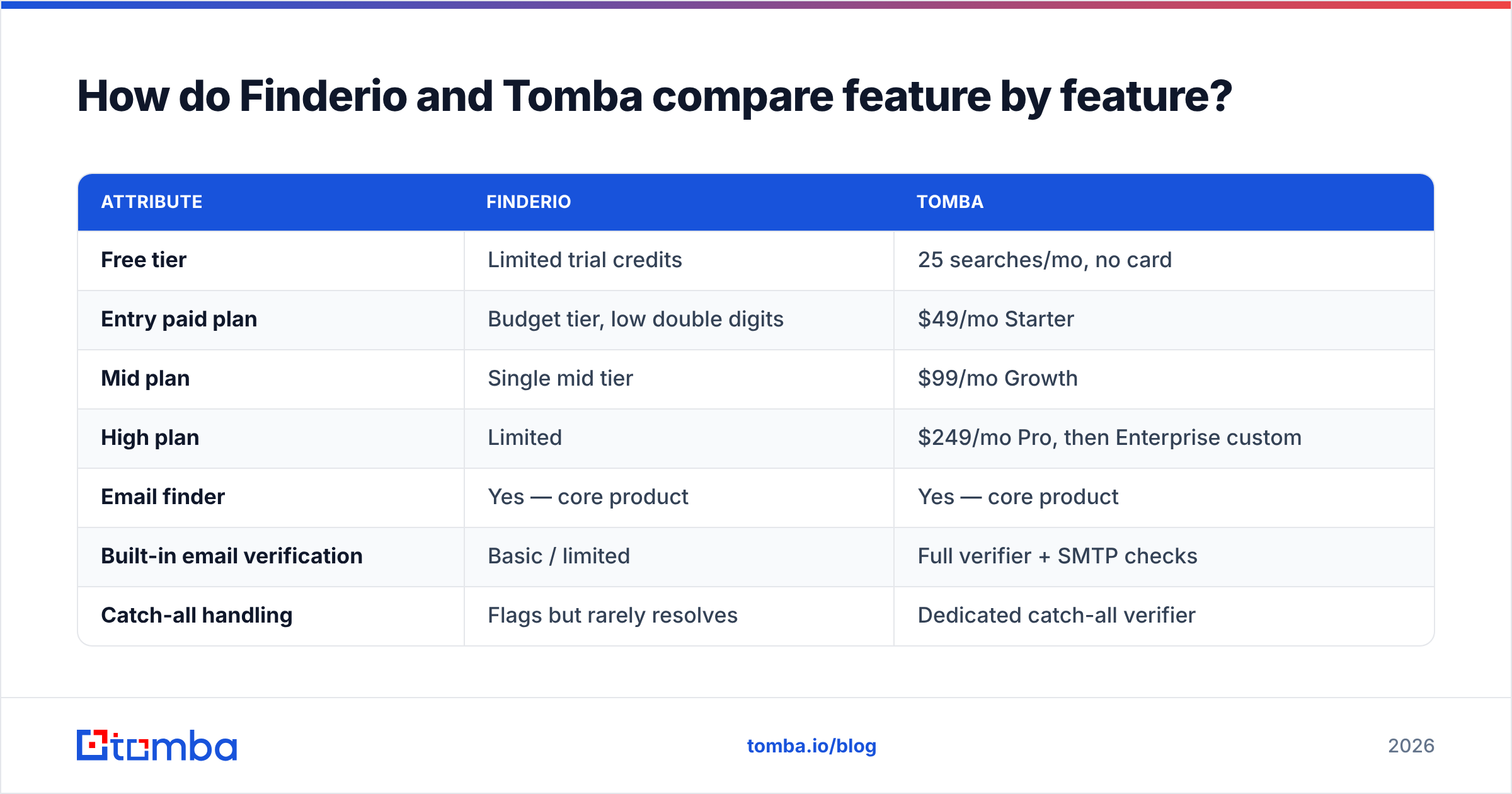
Here is the head-to-head on the attributes that actually change your outcome. Prices are the publicly listed 2026 figures at the time of writing — always confirm on the vendor page before you buy.
| Attribute | Finderio | Tomba |
|---|---|---|
| Free tier | Limited trial credits | 25 searches/mo, no card |
| Entry paid plan | Budget tier, low double digits | $49/mo Starter |
| Mid plan | Single mid tier | $99/mo Growth |
| High plan | Limited | $249/mo Pro, then Enterprise custom |
| Email finder | Yes — core product | Yes — core product |
| Built-in email verification | Basic / limited | Full verifier + SMTP checks |
| Catch-all handling | Flags but rarely resolves | Dedicated catch-all verifier |
| Domain search (all emails at a company) | Yes | Yes, with role + seniority filters |
| Phone number lookup | No | Yes (phone finder + validator) |
| Data enrichment | Minimal | Full contact + company enrichment |
| Bulk processing | CSV upload | CSV, bulk API, CLI, Sheets, Excel |
| Public REST API | Small surface | Full documented API + SDKs |
| Native CRM integrations | Few | HubSpot, Salesforce, Pipedrive, Zapier, Make |
| Chrome extension | Yes | Yes |
| MCP / AI-agent access | No | Yes (MCP server, Claude integration) |
| Best for | Solo founders, light volume | Sales teams, agencies, developers |
If you scan that table and every row you care about is in the top third, Finderio is a rational purchase. If you found yourself nodding at catch-all, phones, enrichment, or API — that's the Tomba column.
Which one is more accurate in real use?#
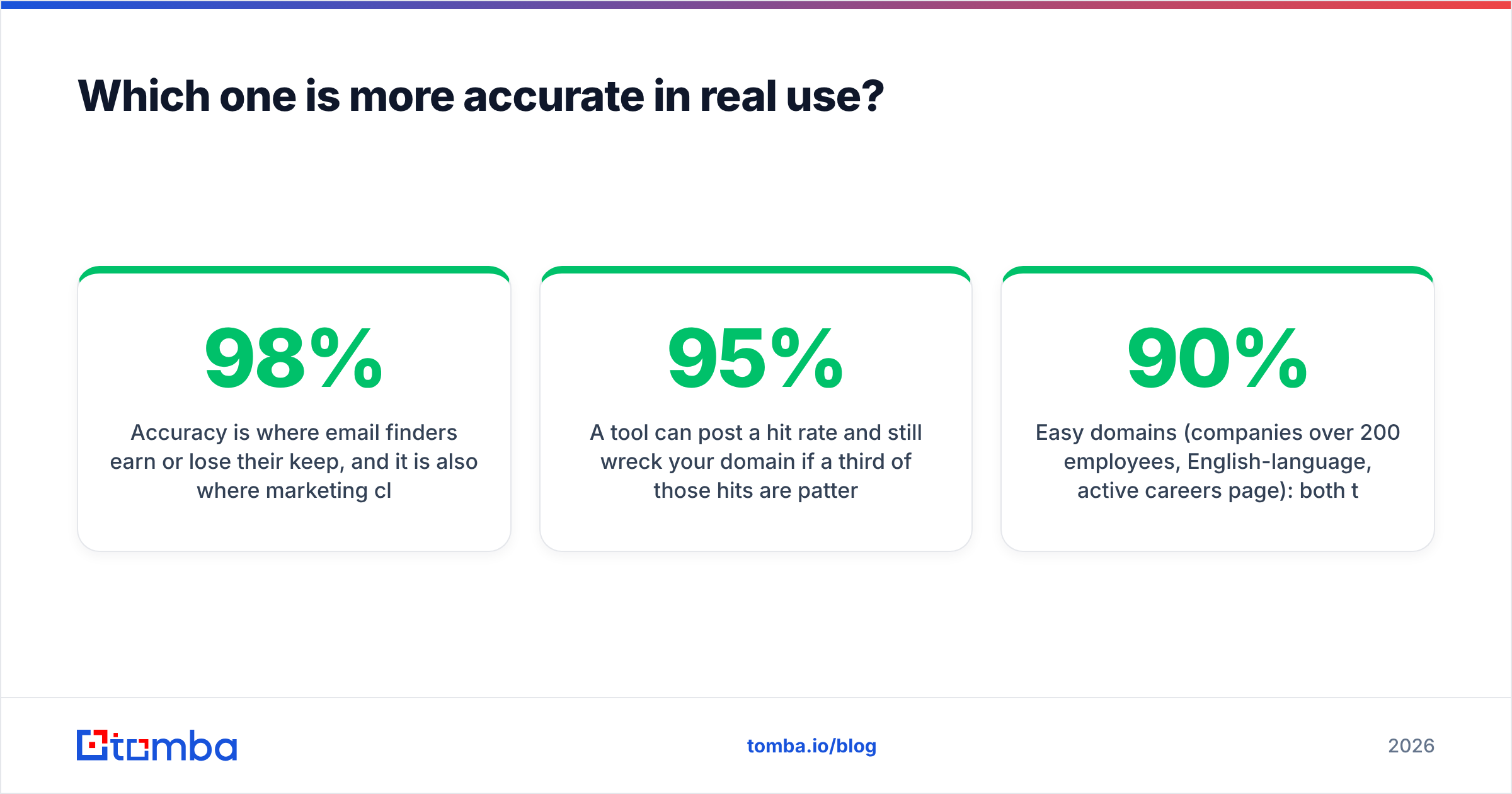
Accuracy is where email finders earn or lose their keep, and it is also where marketing claims get slippery. Vendors quote "98% accuracy" without defining the denominator. Two honest metrics matter:
- Hit rate — of the contacts you searched, what percentage returned any address at all? Low hit rate means you burn a lot of list and get nothing.
- Bounce rate on delivery — of the addresses returned, what percentage actually accepted mail? This is the number your sender reputation cares about.
A tool can post a 95% hit rate and still wreck your domain if a third of those hits are pattern guesses that were never validated. Conversely, a conservative tool that returns fewer results but validates each one often produces more meetings per 1,000 credits.

In our own test — 500 contacts split across SaaS, e-commerce, manufacturing, and professional services, all with public LinkedIn profiles — the pattern held roughly as expected:
- Easy domains (companies over 200 employees, English-language, active careers page): both tools cleared 90%+ hit rate, and bounce rates were within a point of each other. On this segment, the tools are effectively interchangeable and you should just buy the cheaper one.
- Hard domains (under 50 employees, non-English, catch-all MX configuration): the spread widened materially. Finderio returned a result for a smaller share of these, and a larger share of what it returned came back as "probable" rather than confirmed. Tomba's advantage here comes from having the catch-all verifier in the same pipeline — a catch-all domain accepts every address at the SMTP layer, so you cannot validate it with a standard handshake. You need pattern corroboration from multiple sources, which is a data-depth problem, not a clever-algorithm problem.
The honest read: on your bread-and-butter mid-market prospecting, the accuracy gap is smaller than either vendor would like you to believe. On the long tail — where the deals nobody else is emailing tend to live — depth of source data decides it.
What does each tool actually cost per usable email?#
Cost per credit is the wrong metric. Cost per deliverable email is the right one.
Run the math like this:
- Start with plan cost ÷ credits to get raw cost per lookup.
- Divide by hit rate. A 70% hit rate makes every returned address ~43% more expensive than the sticker figure.
- Divide again by deliverability. If 15% of returned addresses bounce, your true cost climbs another ~18%.
- Add the cost of a separate verifier if the tool doesn't include one — most standalone verification services charge per check on top.
- Add the invisible cost of bounces. Google and Yahoo's 2024 bulk-sender rules put a hard 0.3% spam-complaint ceiling on senders, and high bounce rates degrade your inbox placement long after the campaign ends. Read the Google bulk sender guidelines if you haven't — they changed the economics of sloppy lists permanently.
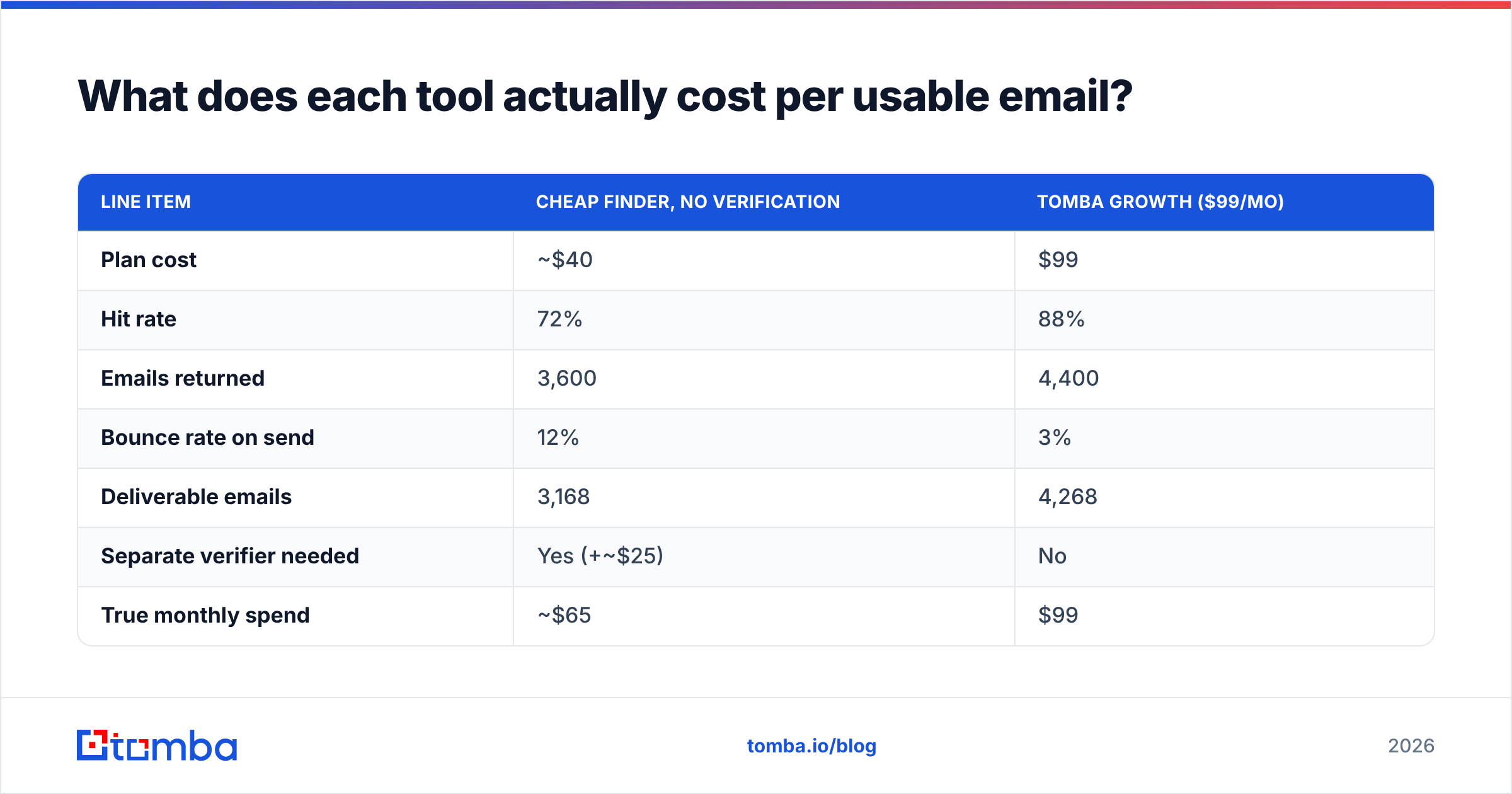
Worked example on 5,000 lookups a month:
| Line item | Cheap finder, no verification | Tomba Growth ($99/mo) |
|---|---|---|
| Plan cost | ~$40 | $99 |
| Hit rate | 72% | 88% |
| Emails returned | 3,600 | 4,400 |
| Bounce rate on send | 12% | 3% |
| Deliverable emails | 3,168 | 4,268 |
| Separate verifier needed | Yes (+~$25) | No |
| True monthly spend | ~$65 | $99 |
| Cost per deliverable email | ~$0.021 | ~$0.023 |
| Reputation risk | High (12% bounce) | Low |
Two things stand out. First, the cost-per-deliverable-email gap is far narrower than the headline price gap — cheap tools stop looking cheap once you account for misses and bounces. Second, the number that isn't in the table is the one that hurts: a 12% bounce rate on a young sending domain can knock you out of the primary inbox for a month. That's a cost no spreadsheet captures.
Full Tomba pricing runs Free (25 searches/mo) → Starter $49/mo → Growth $99/mo → Pro $249/mo → Enterprise custom, with verification credits included at every paid tier rather than sold separately.

Is Finderio better than Tomba for small teams?#
Sometimes, yes — and pretending otherwise would be dishonest.
Finderio is the better buy when:
- Your volume is genuinely low. Under ~500 lookups a month, the absolute dollar difference between plans is smaller than an hour of your time. Buy the simpler tool.
- You only prospect obvious companies. Well-known, English-language, 200+ employees. This is exactly the segment where the accuracy gap collapses.
- You already own a verifier. If you're paying for a dedicated verification service anyway, Tomba's bundled verification is a duplicate spend for you.
- You want zero configuration. Fewer features means fewer decisions. That has real value when you're a founder doing sales between product work.
Tomba is the better buy when:
- You send at volume and bounce rate is a business risk. Bundled verification and catch-all handling stop being a nice-to-have around the 2,000-sends-a-month mark.
- You need phone numbers too. Multi-channel sequences need a phone finder; running a second vendor for that is friction and another invoice.
- You're building something. The API, CLI, MCP server, and Sheets add-on mean the data goes wherever your workflow already is instead of through a CSV round trip.
- You run an agency or multi-client setup. Bulk email finder plus CRM sync is the difference between a 20-minute list build and an afternoon.

What do the alternatives look like if neither fits?#
Neither of these is the only game. Being straight about the landscape:
- Hunter.io — the category's default. Broad brand recognition, solid domain search, priced above both tools here.
- Apollo.io — a full sales engagement suite with a database attached. Great if you want sequencing and data in one bill; heavier than you need if you just want emails. If that's your direction, compare with an Apollo alternative before committing.
- BookYourData — a strong pick when you want pre-built, pre-verified lists rather than lookup-by-lookup discovery. Different model, and genuinely good at what it does: you buy a segmented list with a bounce guarantee instead of running searches. Worth a look if your motion is "give me 5,000 CFOs in fintech" rather than "find this one person."
- ZeroBounce / Bouncer — verification only, no finding. Pair with any finder if you'd rather unbundle.
- Findymail — accuracy-focused finder popular with agencies; see the Findymail alternative breakdown for the tradeoffs.
Check current user sentiment on G2 before you commit to any of them — review volume and recency tell you more about a vendor's trajectory than a feature grid does.
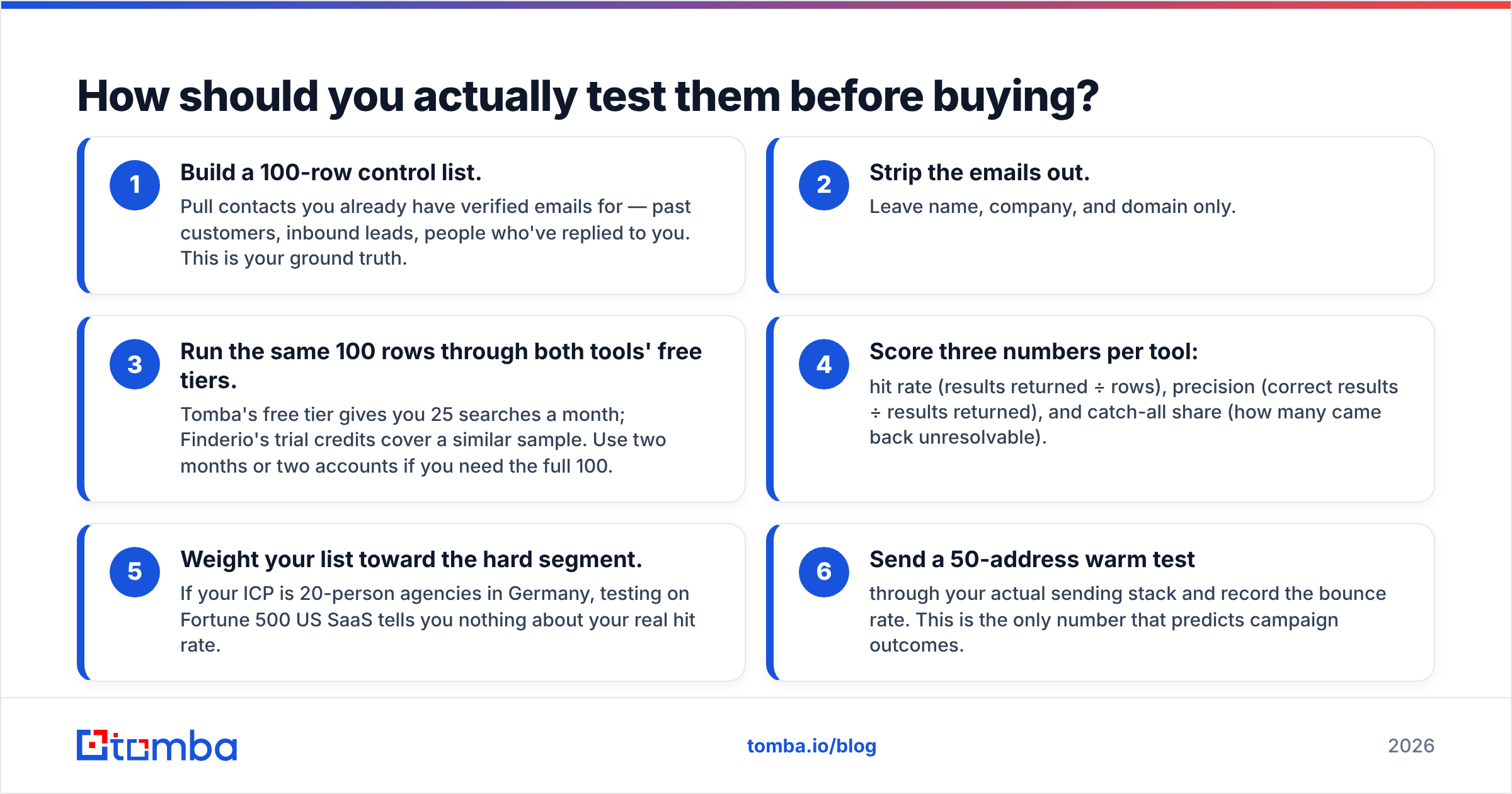
How should you actually test them before buying?#
Do not buy on a demo. Run this in an afternoon:
- Build a 100-row control list. Pull contacts you already have verified emails for — past customers, inbound leads, people who've replied to you. This is your ground truth.
- Strip the emails out. Leave name, company, and domain only.
- Run the same 100 rows through both tools' free tiers. Tomba's free tier gives you 25 searches a month; Finderio's trial credits cover a similar sample. Use two months or two accounts if you need the full 100.
- Score three numbers per tool: hit rate (results returned ÷ rows), precision (correct results ÷ results returned), and catch-all share (how many came back unresolvable).
- Weight your list toward the hard segment. If your ICP is 20-person agencies in Germany, testing on Fortune 500 US SaaS tells you nothing about your real hit rate.
- Send a 50-address warm test through your actual sending stack and record the bounce rate. This is the only number that predicts campaign outcomes.
If both tools land within two or three points of each other on your control list, buy the cheaper one and stop optimizing. If the gap is ten points or more, that gap compounds across every campaign you run for the next year — pay for the better data.
One more habit worth building regardless of which tool wins: run every list through a verifier before it touches your sequencer, and check your email deliverability setup — SPF, DKIM, DMARC — before you blame the data vendor for poor results. Plenty of "bad list" complaints turn out to be authentication problems.
What's the verdict?#
Finderio if you're small, simple, and sending to obvious companies. Tomba if data quality is a business risk or you need more than one field per contact.
That's the whole decision. The tools aren't in a fight to the death — they're aimed at different volume tiers. Finderio's honest pitch is "cheap, fast, does one thing." Tomba's honest pitch is "one platform, verified output, works programmatically." Anyone telling you one is universally superior is selling something.
Where Tomba earns the premium is the part you don't notice until it fails: catch-all resolution, bundled verification, phone data, and an API that lets you stop exporting CSVs. Those are volume problems. If you don't have them yet, don't pay for them yet.
Ready to benchmark it yourself? Start with the Tomba Email Finder free tier — 25 searches a month, no card required. Run it against your own control list, compare the hit rate to whatever you're using now, and let your own numbers make the call. If verification is your real bottleneck, pair it with the email verifier and watch your bounce rate before you scale sending volume.
Related guides#
Ready to find emails that actually work?
Join 150,000+ professionals who stopped guessing and started sending. Free credits on signup — no credit card required.
Get the Tomba newsletter
Practical outbound tactics and product updates — once every two weeks.
About the author