FindThatLead vs GetEmail.io: Which Email Finder Wins?
FindThatLead bundles prospecting and sending. GetEmail.io does one job with an AI lookup. Here is how they compare on accuracy, credits, bulk limits, and real cost per usable contact in 2026.
FindThatLead vs GetEmail.io comes down to one call: buy a full prospecting suite, or buy a fast, single-purpose lookup. Both find work emails. They charge, guess, and verify in very different ways. Here is how they compare on accuracy, credits, bulk limits, and real cost per usable contact in 2026.
TL;DR
- FindThatLead is a prospecting suite: email finder, lead search by role and location, a Chrome extension, and a built-in cold-email sender. Good if you want one login for finding and sending.
- GetEmail.io is a focused lookup tool. You give it a first name, last name, and company domain; it returns a best-guess address with a confidence score. Fast, narrow, no sending layer.
- Accuracy is the real cost driver. A tool that returns 60% valid addresses at $0.03/credit is more expensive per usable contact than one returning 92% at $0.05.
- Neither ships a serious standalone verifier. Both hand you addresses you should re-check before loading them into a sequencer.
- Bottom line: FindThatLead for solo founders who want an all-in-one; GetEmail.io for one-off lookups inside a CRM; a dedicated finder + verifier stack (Tomba, Hunter, Findymail) when volume and deliverability actually matter.
FindThatLead vs GetEmail.io: what does each tool do?#
Both tools solve the same problem. You know who you want to reach. You don't know their work email. They just solve it from opposite ends.
FindThatLead launched out of Barcelona and grew into a light GTM suite. Beyond the single-contact lookup, it offers a Prospector that filters people by job title, industry, and country. There is also a domain search that dumps every address it has for a company. Add a Chrome extension for LinkedIn, Scrab.in-style automation, and an email-sending module. The pitch is "prospect and send without leaving the tab."
GetEmail.io is the opposite: a single-purpose lookup engine. Its marketing leans on "big data and machine learning." The tool predicts the most probable pattern for a person at a domain, then scores its own confidence. It plugs into Gmail, Outlook, Salesforce, HubSpot, and LinkedIn through extensions, and offers an API. There is no sequencer, no lead database to browse, no campaign reporting.
That difference explains almost every other difference between them. FindThatLead is trying to be a workflow. GetEmail.io is trying to be a function call.

FindThatLead vs GetEmail.io: feature-by-feature comparison#
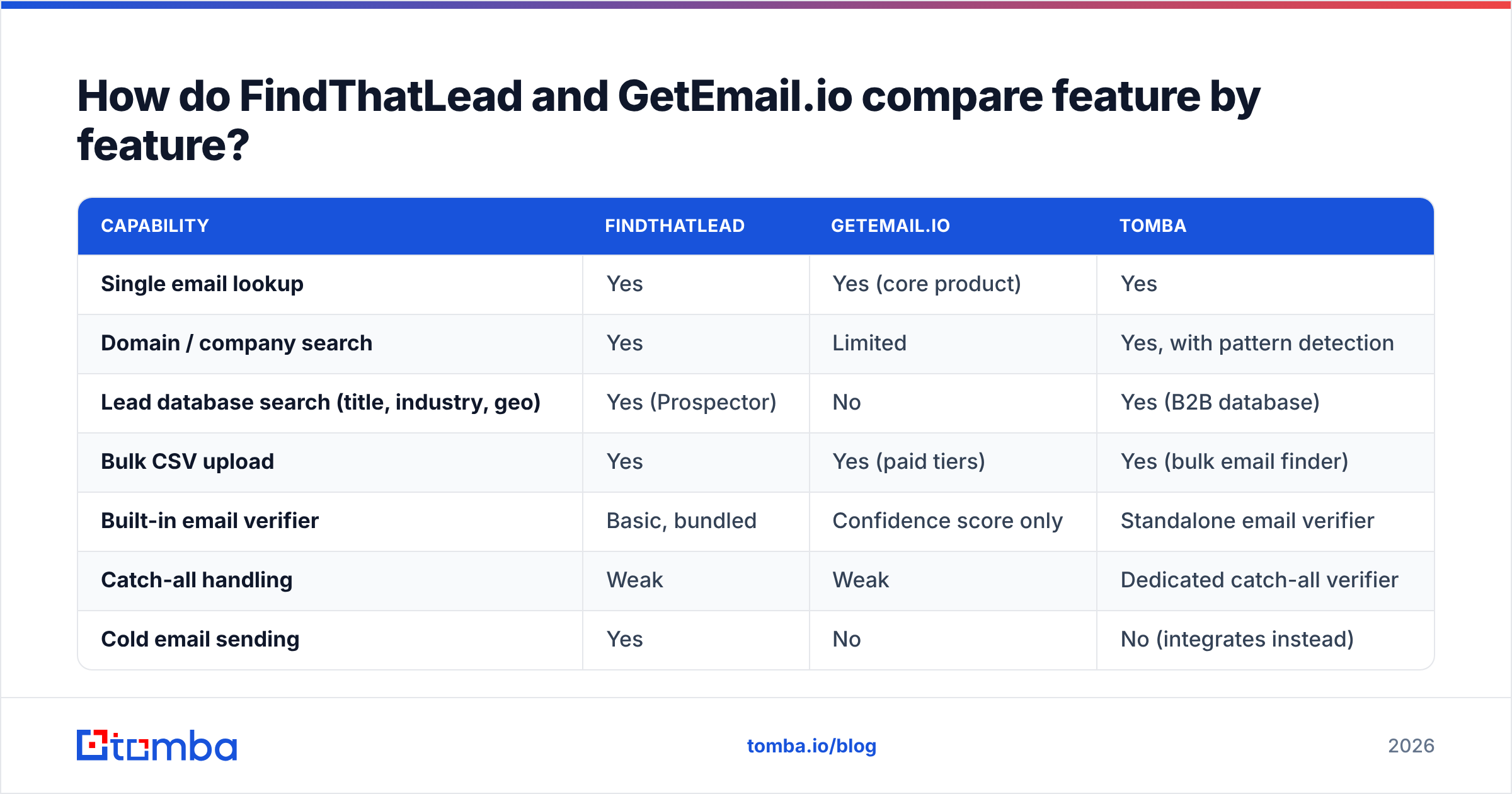
Here is the head-to-head on the capabilities that actually change your day.
| Capability | FindThatLead | GetEmail.io | Tomba |
|---|---|---|---|
| Single email lookup | Yes | Yes (core product) | Yes |
| Domain / company search | Yes | Limited | Yes, with pattern detection |
| Lead database search (title, industry, geo) | Yes (Prospector) | No | Yes (B2B database) |
| Bulk CSV upload | Yes | Yes (paid tiers) | Yes (bulk email finder) |
| Built-in email verifier | Basic, bundled | Confidence score only | Standalone email verifier |
| Catch-all handling | Weak | Weak | Dedicated catch-all verifier |
| Cold email sending | Yes | No | No (integrates instead) |
| Chrome extension | Yes | Yes | Yes |
| Public API | Yes | Yes | Yes, documented + CLI/MCP |
| Free tier | Limited monthly credits | ~10 credits/mo | 25 searches/mo |
Two takeaways. First, FindThatLead wins on breadth — it is the only one of the two that will also send your campaign. Second, neither of them treats verification as a first-class product, which is where most cold-email programs quietly bleed deliverability.
Which one actually finds more valid emails?#
This is the only question that matters, and it is the one both vendors answer vaguely.
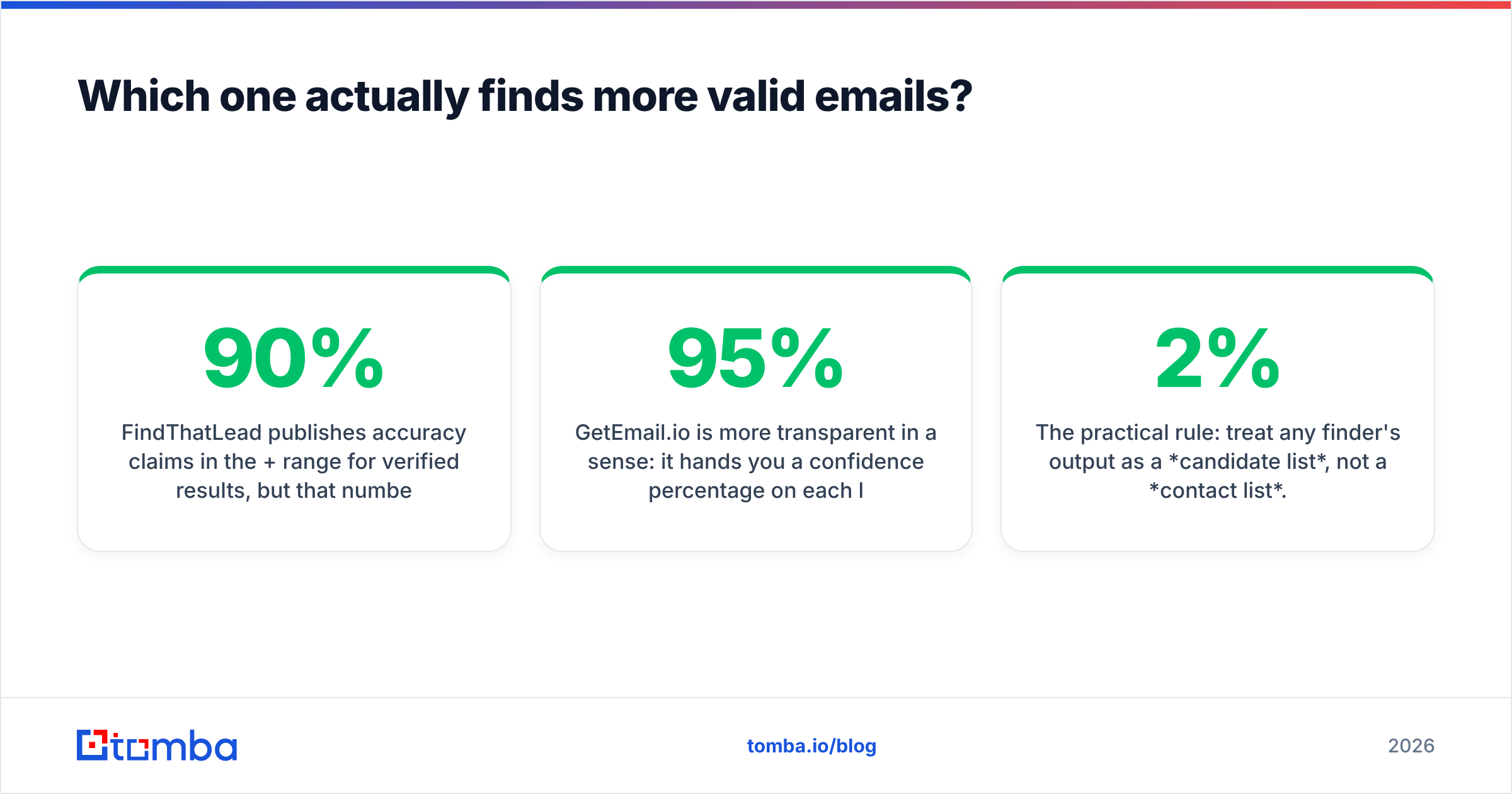
FindThatLead publishes accuracy claims in the 90%+ range for verified results. But that number applies to addresses it labels "verified" — not to the full list it returns. Run a mixed list of SMB and enterprise domains and you will get a meaningful slice of "guessed" or "risky" results padding the count. Every one of those still burns a credit.
GetEmail.io is more transparent in a sense: it hands you a confidence percentage on each lookup. But a confidence score is a prediction, not an SMTP check. A 95% confidence on a catch-all domain means the pattern is probably right and the mailbox may still not exist. The tool is essentially a very good email permutator with a probability layer.

Three patterns hold up across most independent tests and user reviews on G2:
- Both perform well on mid-market and enterprise domains where the email pattern is public and repeated across thousands of employees. This is the easy case; every tool looks good here.
- Both degrade on small companies — agencies, local businesses, sub-20-person startups — where there is no crawlable pattern to learn from. GetEmail.io degrades more sharply because prediction is its only mechanism.
- Neither resolves catch-all domains properly. If a domain accepts all mail, an SMTP ping returns "valid" for anything. You need a provider that does behavioural catch-all testing. Otherwise you accept a bounce rate you can't see coming. Run those through a catch-all verifier before they touch your sequencer.
The practical rule: treat any finder's output as a candidate list, not a contact list. The teams that keep bounce rates under 2% all do the same thing — find with one tool, verify with another, and drop anything that comes back risky.
How does pricing compare in 2026?#
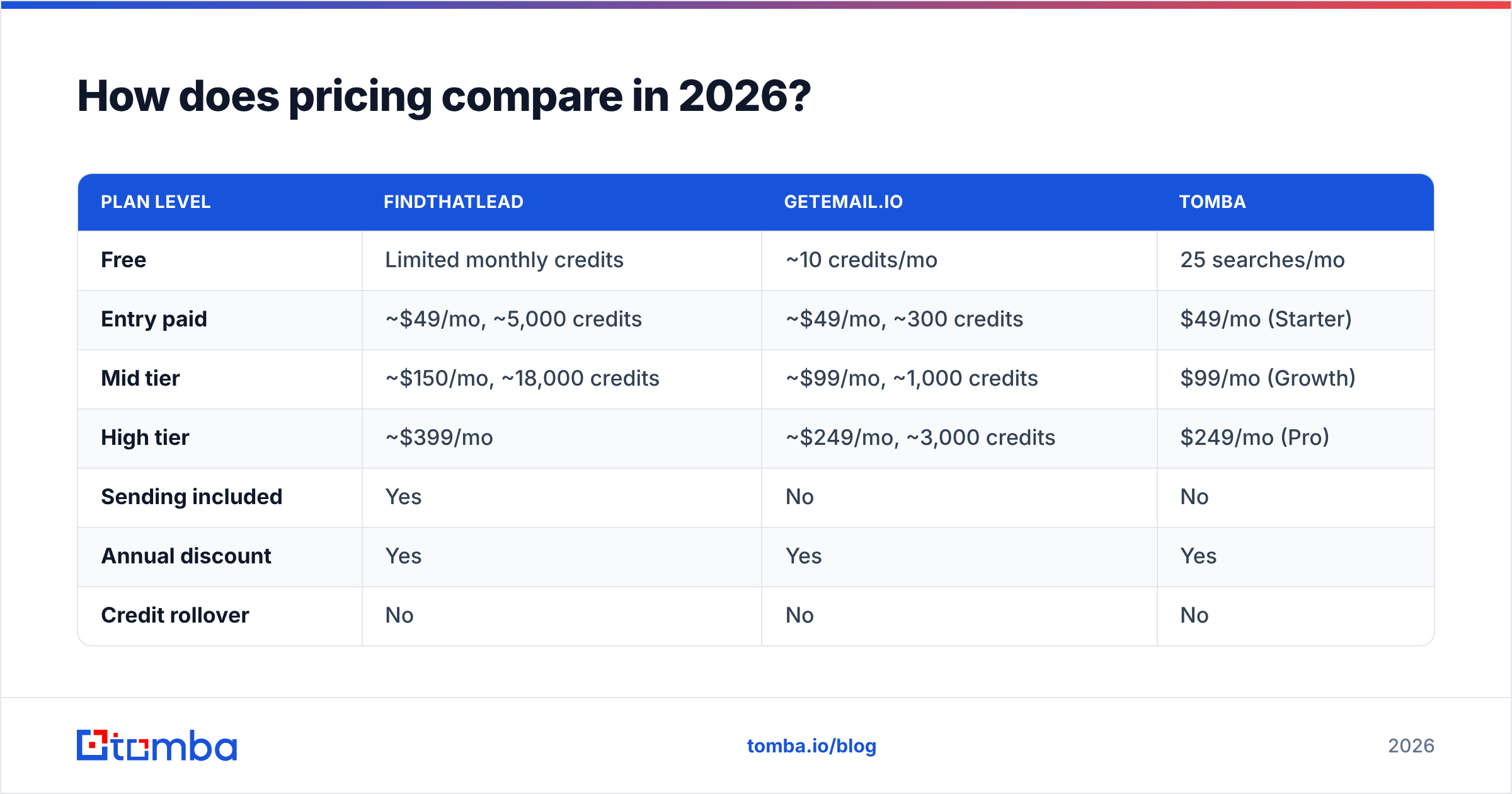
Both use credit models. Both also make the same comparison-unfriendly choice: a credit is consumed on attempt, not on success (with partial exceptions for explicit "not found" responses).
| Plan level | FindThatLead | GetEmail.io | Tomba |
|---|---|---|---|
| Free | Limited monthly credits | ~10 credits/mo | 25 searches/mo |
| Entry paid | ~$49/mo, ~5,000 credits | ~$49/mo, ~300 credits | $49/mo (Starter) |
| Mid tier | ~$150/mo, ~18,000 credits | ~$99/mo, ~1,000 credits | $99/mo (Growth) |
| High tier | ~$399/mo | ~$249/mo, ~3,000 credits | $249/mo (Pro) |
| Sending included | Yes | No | No |
| Annual discount | Yes | Yes | Yes |
| Credit rollover | No | No | No |
Prices reflect publicly listed rates as of early 2026 and change often — check the vendor pages before you buy. Compare against current Tomba pricing directly rather than trusting any comparison post, including this one, six months from now.

The headline numbers are misleading in an important way. FindThatLead's ~5,000 credits at $49 looks like it crushes GetEmail.io's ~300 credits at the same price — roughly $0.01 vs $0.16 per credit. But FindThatLead credits are consumed across the whole suite. Lead search results, domain search rows, verification checks, and sends all draw from the same pool. A single Prospector query returning 100 leads can eat 100 credits before you have contacted anyone.
Do the math on cost per usable, verified contact instead:
- 5,000 credits → maybe 3,000 unique deliverable addresses after dedupe and verification → about $0.016 each.
- 300 credits → maybe 240 deliverable addresses → about $0.20 each.
FindThatLead still wins on raw volume economics. GetEmail.io's pricing only makes sense if you are doing low-volume, high-value lookups — enterprise ABM, recruiting for senior roles, partnership outreach — where 200 correct addresses a month is genuinely the job.
Which tool fits which team?#
Pick based on your workflow, not the feature grid.
- Solo founder doing 200–500 touches a month — FindThatLead. The bundled sender means one subscription instead of three, and the credit pool is generous enough that waste doesn't hurt.
- SDR working inside a CRM all day — GetEmail.io. The Salesforce and HubSpot extensions surface an address without a context switch, and 300 lookups a month covers a normal named-account territory.
- Agency running outbound for multiple clients — Neither, alone. You need separate finding and verification vendors so a bad list on one client account doesn't torch a shared sending domain. Pair a high-recall finder with a real email verification step.
Higher volume changes the answer. The next three cases need a stack, not a suite.
- RevOps enriching an existing CRM database — Neither's UI matters; the API does. Compare rate limits, batch endpoint support, and per-call pricing. FindThatLead's API is thinner than its UI suggests; GetEmail.io's is solid but capped by its credit tiers.
- Recruiter sourcing from LinkedIn — GetEmail.io for accuracy on named individuals, or a dedicated LinkedIn email extractor if profile-based lookup is your primary motion.
- Anyone sending more than 5,000 cold emails a month — Build the stack properly: finder → verifier → sequencer, three specialists. All-in-one tools cap out precisely when your volume starts to matter.

What are the biggest limitations of each?#
FindThatLead's weak points:
- Credit consumption is opaque. Users regularly report burning through a monthly allowance faster than expected because search results and verification both draw from the same bucket.
- The bundled sender is functional but basic next to dedicated platforms — limited warmup, thin inbox rotation, simpler reporting.
- Verification is a checkbox feature, not a product. It will not save you from catch-alls or role-based addresses at scale.
- Data freshness on the Prospector database varies by region; European coverage is stronger than APAC.
GetEmail.io's weak points:
- Credit allowances are small relative to price. 300 credits at $49/mo is one of the tighter ratios in the category.
- No lead discovery. You must already know the person's name and company — it will not tell you who to contact.
- Confidence scores can read as false comfort. A high score on a catch-all domain still bounces.
- Support and product velocity are quiet compared to better-funded competitors; the roadmap has moved slowly.
What they share: neither gives you a defensible answer on data sourcing and GDPR posture without digging, and neither is designed for the "enrich 50,000 rows overnight" job.
Where does Tomba fit in this comparison?#
Honestly: Tomba overlaps more with GetEmail.io's job than FindThatLead's, but with the credit economics of the volume tier.
The email finder is the core product. Verification sits next to it as a separate, first-class tool rather than a bundled afterthought. That includes a catch-all verifier for the domains that break everyone else's accuracy numbers. Pricing runs Free (25 searches/mo), Starter $49/mo, Growth $99/mo, Pro $249/mo, and Enterprise custom. So the entry point matches FindThatLead's and the mid-tier matches GetEmail.io's — but you also get a real verification layer instead of a confidence percentage.
What Tomba does not do is send your campaigns. If a single-login all-in-one is the deciding factor, FindThatLead genuinely wins that criterion and you should buy it. If you already run Instantly, Smartlead, Lemlist, or Salesloft for sending, adding a suite's mediocre sender is a downgrade dressed as consolidation.
It is also worth naming the honest alternatives outside this matchup. Hunter is the incumbent with the best-known brand. Findymail has strong recall on hard domains. BookYourData takes a different route entirely — a pay-as-you-go verified database rather than a lookup engine — which suits teams who want a list delivered rather than assembled. Different shapes of the same problem, and the right one depends on whether you are buying data, finding it, or checking it.
How should you actually test them before buying?#
Do not trust anyone's published accuracy figure, including the numbers in this post. Run this in an afternoon:
- Build a 100-row control list you can verify independently — people whose addresses you already know from replies, signatures, or existing CRM data. Mix 40 enterprise, 40 mid-market, 20 sub-20-person companies.
- Run the same list through each free tier. FindThatLead, GetEmail.io, and a third option so you have a baseline.
- Score three metrics, not one: hit rate (returned an address at all), precision (address matches the known-good one), and credit burn (how many credits the run actually consumed).
- Send a 20-address test batch through a throwaway domain and measure real bounces. This is the only number that predicts your deliverability.
- Check the catch-all subset separately. If a third of your ICP sits on catch-all domains, a tool that flags them honestly beats one that returns a confident guess.
Teams that skip step 4 end up optimising for hit rate — the metric vendors report — and then wonder why their sender reputation collapses in week three.
Final verdict: FindThatLead vs GetEmail.io#
Buy FindThatLead if you are a solo operator or small team who wants prospecting, finding, and sending under one subscription, and you accept that each of those three modules is good-not-great. The credit volume at the $49 tier is the strongest argument in its favour.
Buy GetEmail.io if your job is a small number of precise lookups inside Gmail, Outlook, or your CRM, you already have a sending stack, and 300 credits genuinely covers your month. Paying $0.16 a credit for convenience is defensible at low volume; it is indefensible at high volume.
Buy neither if you are running real outbound volume. At 3,000+ contacts a month the arithmetic flips: every point of accuracy you gain is worth more than the subscription you saved by bundling, and a dedicated find-then-verify pipeline pays for itself in avoided bounces alone.
If that last case describes you, start with the Tomba Email Finder — find addresses by domain, name, or company, push them straight into the verifier before they reach your sequencer, and run the whole thing through the Tomba API once the manual version proves out. The free tier gives you 25 searches a month, which is exactly enough to run the 100-row control test above against whatever you are using today.
Related guides#
Ready to find emails that actually work?
Join 150,000+ professionals who stopped guessing and started sending. Free credits on signup — no credit card required.
Get the Tomba newsletter
Practical outbound tactics and product updates — once every two weeks.
About the author