FindThatLead vs GMass (2026): Which Tool Should You Pick?
FindThatLead finds the leads. GMass sends the email. Comparing them head to head only makes sense once you know which half of your cold outreach stack is actually missing — here's the honest breakdown.
TL;DR
- FindThatLead is a prospecting tool: it finds and verifies B2B email addresses, scrapes lists, and bolts a light sender on top. GMass is a sending tool: it turns Gmail into a mail-merge and cold-email engine and finds nothing.
- If you compare them on "which is better," you'll get the wrong answer. The real question is which half of your stack is broken — sourcing or sending.
- GMass is cheaper on paper (roughly $25–$65/mo per Gmail account at list price) but caps you at Gmail's sending limits, which means ~500 recipients/day on Workspace before Google throttles you.
- FindThatLead's finder is decent for SMB and mid-market European data, but its verification is where most complaints land — bounce rates north of 5% will kill any GMass campaign regardless of copy.
- Best-performing setup for most teams: a dedicated finder + verifier (Tomba, Findymail, FindThatLead) feeding a dedicated sender (GMass, Instantly, Smartlead). One tool doing both usually does one of them badly.
What are FindThatLead and GMass, actually?#
They solve opposite problems, and half the confusion in this comparison comes from vendor marketing blurring the line.
FindThatLead is a Barcelona-built prospecting platform. Its core is an email finder: give it a name and a domain, or just a domain, and it returns likely business email addresses with a confidence score. Around that core it stacks a Chrome extension, a LinkedIn "Prospector" that pulls contacts from search results, a Scrapper for bulk domain lists, and — added later — a basic email sender so you can push what you found into a sequence without exporting.
GMass is the mirror image. It's a Chrome extension and Gmail add-on that sits inside your inbox and turns the Gmail compose window into a mail-merge machine: connect a Google Sheet, write one draft with {FirstName} merge tags, hit the GMass button instead of Send, and it fires personalized copies to everyone on the list. It handles follow-up sequences, auto-detects replies, tracks opens and clicks, and gives you unsubscribe handling. It does not have a contact database. You bring the emails.
So: one fills the top of your list, the other pushes it out the door.
Is FindThatLead vs GMass even a fair comparison?#
Only in one narrow scenario — when you have budget for exactly one tool and you're trying to figure out which gap hurts more.
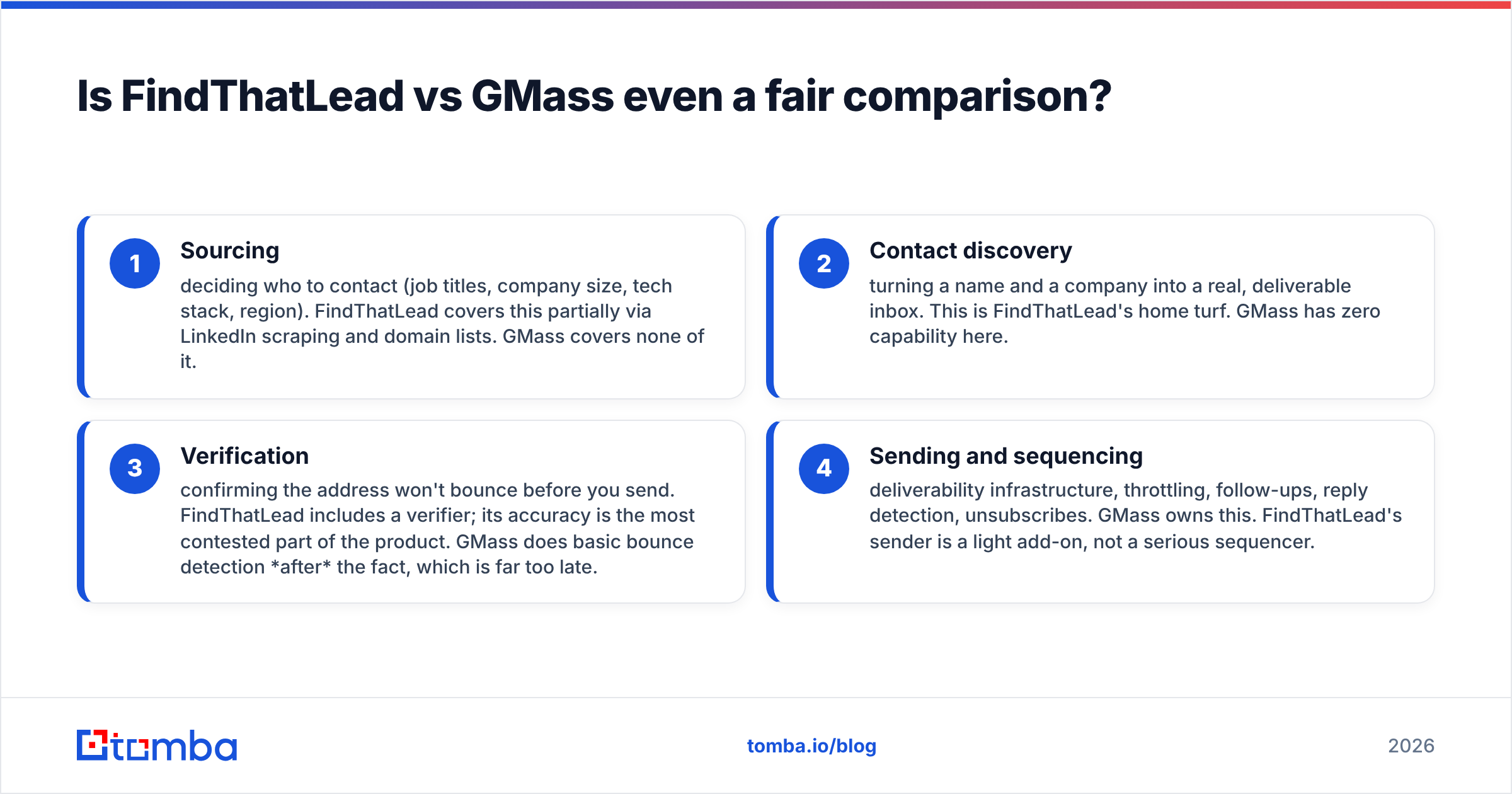
Here's the honest framing. Cold outreach has four stages, and each tool covers different ones:
- Sourcing — deciding who to contact (job titles, company size, tech stack, region). FindThatLead covers this partially via LinkedIn scraping and domain lists. GMass covers none of it.
- Contact discovery — turning a name and a company into a real, deliverable inbox. This is FindThatLead's home turf. GMass has zero capability here.
- Verification — confirming the address won't bounce before you send. FindThatLead includes a verifier; its accuracy is the most contested part of the product. GMass does basic bounce detection after the fact, which is far too late.
- Sending and sequencing — deliverability infrastructure, throttling, follow-ups, reply detection, unsubscribes. GMass owns this. FindThatLead's sender is a light add-on, not a serious sequencer.
If you already export leads from Apollo, Sales Navigator, or a data partner and just need to email them from your real Gmail address, GMass wins by default — FindThatLead has nothing you need. If you have a warm sending setup already (or you send from your CRM) and your problem is that you don't know who to email, FindThatLead wins by default.

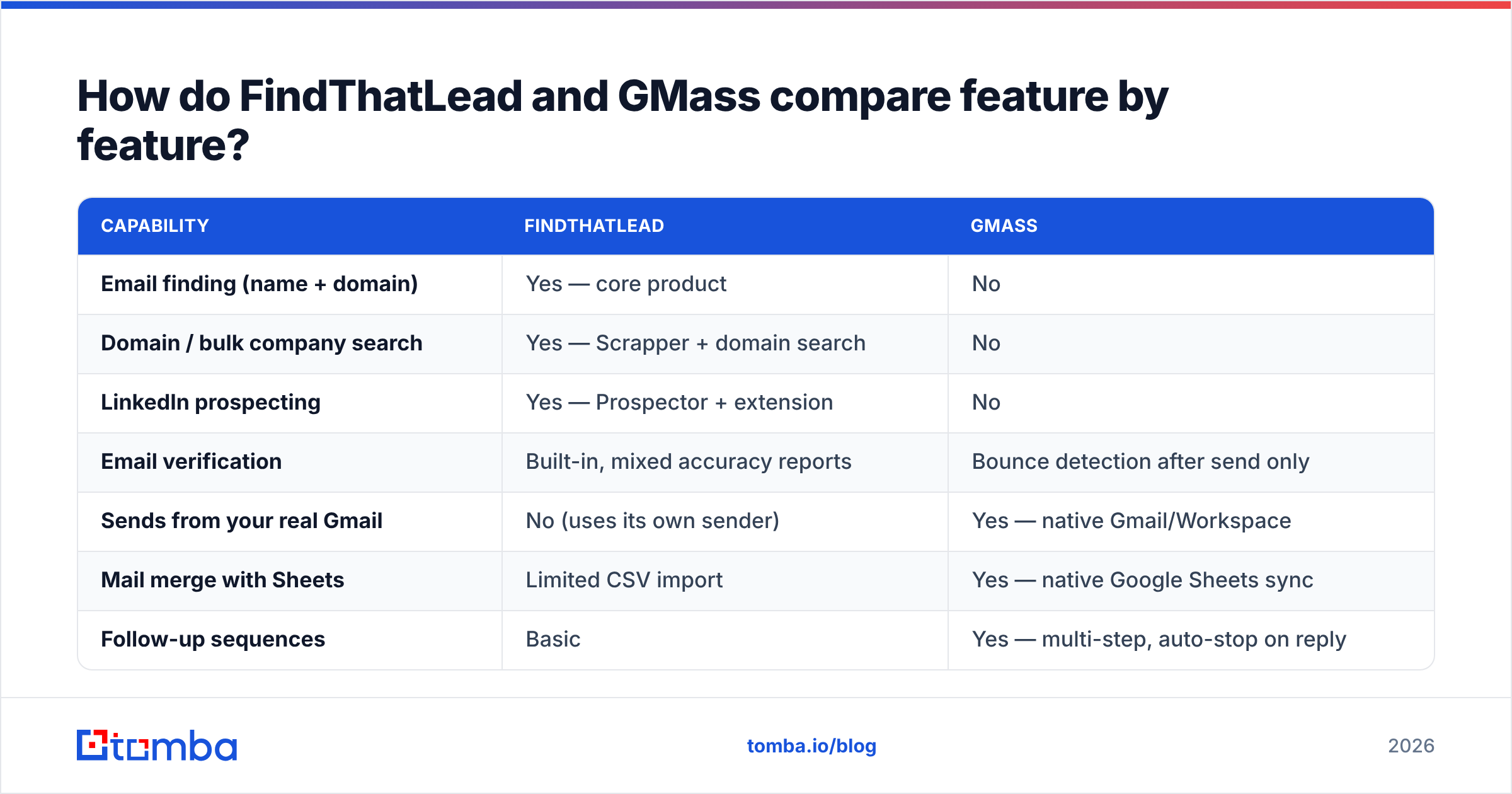
How do FindThatLead and GMass compare feature by feature?#
| Capability | FindThatLead | GMass |
|---|---|---|
| Email finding (name + domain) | Yes — core product | No |
| Domain / bulk company search | Yes — Scrapper + domain search | No |
| LinkedIn prospecting | Yes — Prospector + extension | No |
| Email verification | Built-in, mixed accuracy reports | Bounce detection after send only |
| Sends from your real Gmail | No (uses its own sender) | Yes — native Gmail/Workspace |
| Mail merge with Sheets | Limited CSV import | Yes — native Google Sheets sync |
| Follow-up sequences | Basic | Yes — multi-step, auto-stop on reply |
| Reply / open / click tracking | Basic | Yes, mature |
| Unsubscribe management | Basic | Yes, one-click + list hygiene |
| Sending volume ceiling | Platform limits | Gmail limits (~500/day Workspace) |
| API access | Yes | Yes |
| Best for | Building the list | Mailing the list |
The table makes the split obvious: there is almost no overlap. The only genuinely contested row is verification, and that matters more than it looks.
Why does verification decide the whole outcome?#
Because GMass sends through your Gmail account, and Google punishes bad lists faster than any third-party ESP.
When you send a cold campaign through Instantly or Smartlead, you're usually on burner domains with a warmup pool absorbing the damage. When you send through GMass, the bounces hit your primary Workspace domain — the same domain your invoices, calendar invites, and customer threads go out on. Google's bulk sender requirements put a hard spam-complaint threshold on senders, and repeated hard bounces are a direct signal that you're mailing scraped junk.
That means the quality of whatever finder you feed GMass isn't a nice-to-have — it's the risk control on your company domain. A 92%-accurate list at 1,000 sends means roughly 80 bounces. That's enough to visibly move your sender reputation in the wrong direction within a week.
Practical rules before you push a list into GMass:
- Never send an unverified list from a primary domain. Run every address through a dedicated email verifier first, no matter which finder produced it.
- Treat catch-all domains as a separate bucket. A catch-all accepts everything at SMTP level, so "valid" means nothing. Use a catch-all verifier and send to those addresses in small, monitored batches.
- Cap daily volume well under the Gmail ceiling. GMass will happily queue 500/day; 100–150 is a saner starting point on a domain you care about.
- Segment by confidence score. Send to 95%+ confidence addresses first, watch the bounce rate, then release the rest.
- Purge role accounts.
info@,sales@, andsupport@inflate your list size and your complaint rate at the same time.
That's also why plenty of teams use FindThatLead or another finder for discovery, then run a second, independent verification pass before anything touches GMass. Two vendors disagreeing on an address is useful information; one vendor grading its own homework is not.
What do FindThatLead and GMass cost in 2026?#
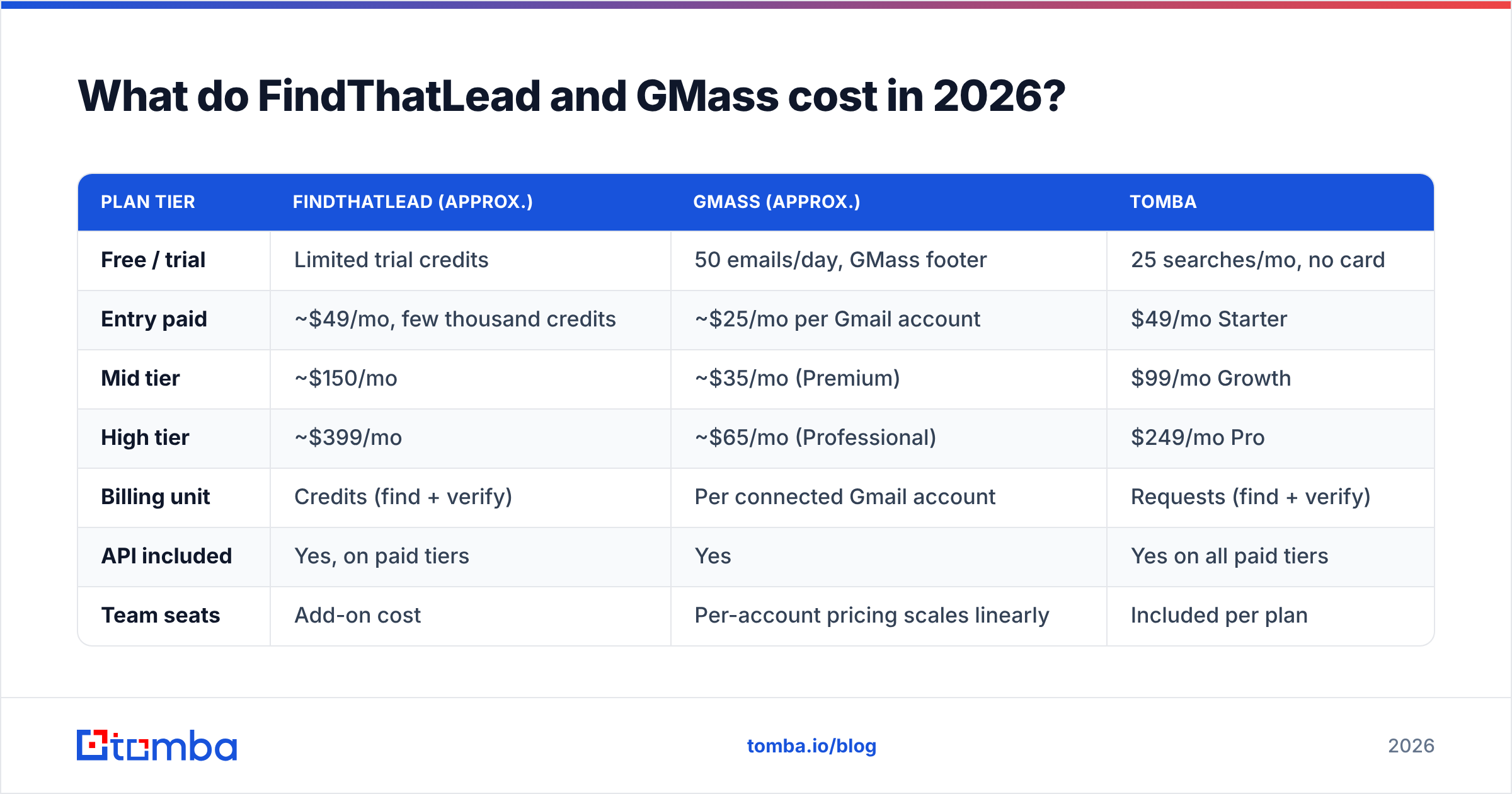
Pricing on both moves, so treat these as list-price reference points and confirm on the vendor pages before you buy.
| Plan tier | FindThatLead (approx.) | GMass (approx.) | Tomba |
|---|---|---|---|
| Free / trial | Limited trial credits | 50 emails/day, GMass footer | 25 searches/mo, no card |
| Entry paid | ~$49/mo, few thousand credits | ~$25/mo per Gmail account | $49/mo Starter |
| Mid tier | ~$150/mo | ~$35/mo (Premium) | $99/mo Growth |
| High tier | ~$399/mo | ~$65/mo (Professional) | $249/mo Pro |
| Billing unit | Credits (find + verify) | Per connected Gmail account | Requests (find + verify) |
| API included | Yes, on paid tiers | Yes | Yes on all paid tiers |
| Team seats | Add-on cost | Per-account pricing scales linearly | Included per plan |
Two cost traps worth flagging:
GMass looks cheap until you scale sending accounts. Because it's priced per connected Gmail account, a team running five inboxes to spread volume pays five times. At 10 inboxes, that "$25/mo tool" is $250/mo and you still have zero contact data.
Finder credits are consumed by failures too. Most finders — FindThatLead included — burn a credit on searches that return nothing or return a low-confidence guess. When you compare per-credit pricing, what you actually care about is cost per deliverable address, which can be double the sticker price on a hard vertical. Compare Tomba pricing or any competitor on that basis, not on raw credit counts.
Which one should you choose for your situation?#
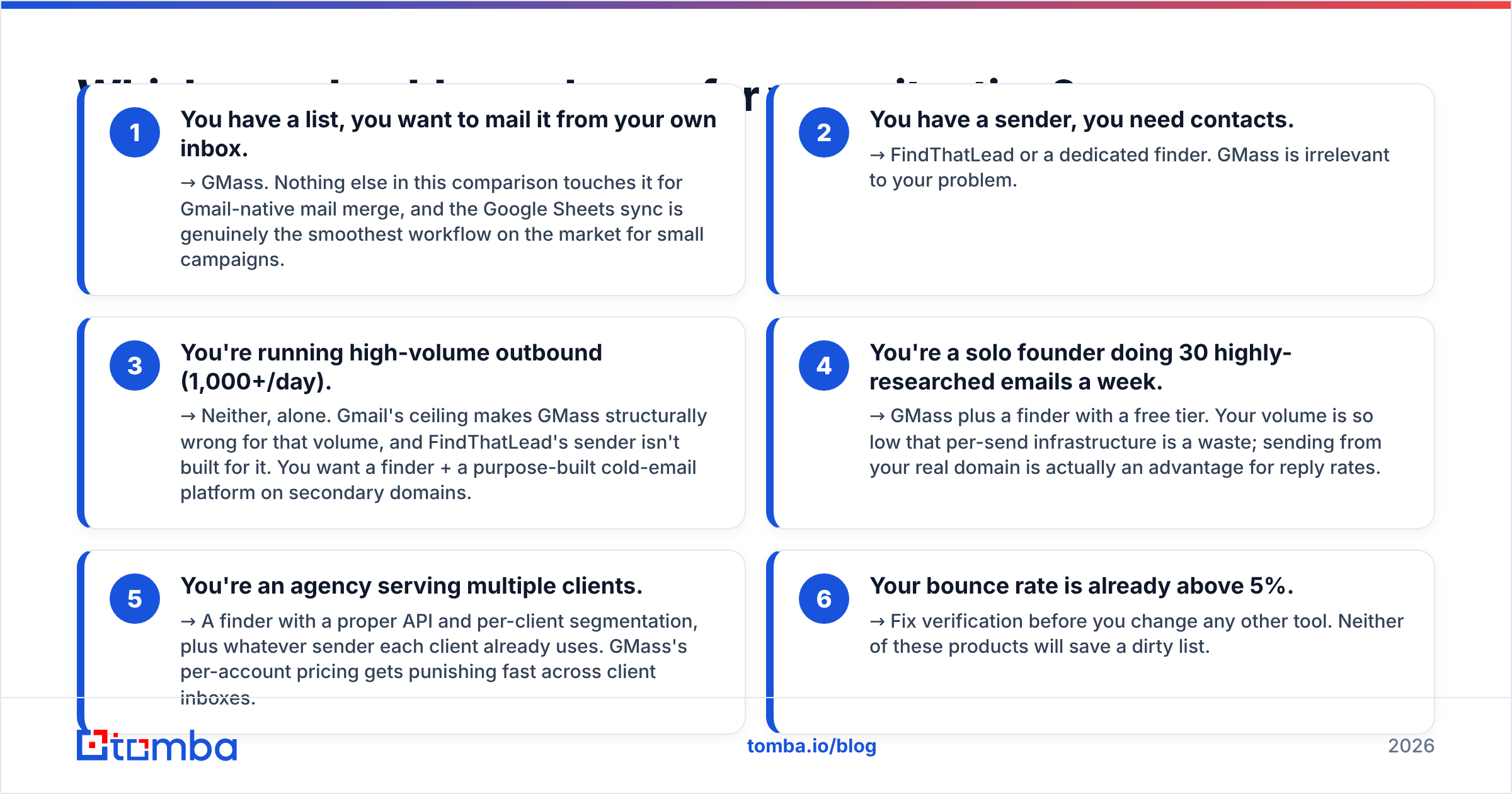
Pick by the gap in your stack, not by the review score:
- You have a list, you want to mail it from your own inbox. → GMass. Nothing else in this comparison touches it for Gmail-native mail merge, and the Google Sheets sync is genuinely the smoothest workflow on the market for small campaigns.
- You have a sender, you need contacts. → FindThatLead or a dedicated finder. GMass is irrelevant to your problem.
- You're running high-volume outbound (1,000+/day). → Neither, alone. Gmail's ceiling makes GMass structurally wrong for that volume, and FindThatLead's sender isn't built for it. You want a finder + a purpose-built cold-email platform on secondary domains.
- You're a solo founder doing 30 highly-researched emails a week. → GMass plus a finder with a free tier. Your volume is so low that per-send infrastructure is a waste; sending from your real domain is actually an advantage for reply rates.
- You're an agency serving multiple clients. → A finder with a proper API and per-client segmentation, plus whatever sender each client already uses. GMass's per-account pricing gets punishing fast across client inboxes.
- Your bounce rate is already above 5%. → Fix verification before you change any other tool. Neither of these products will save a dirty list.

What does a sane combined stack look like?#
The setup most teams converge on after burning a domain once:
Layer 1 — sourcing. LinkedIn Sales Navigator, a B2B database, or a scraper produces a list of companies and names. FindThatLead's Prospector can do this; so can dozens of alternatives.
Layer 2 — contact discovery. Names and domains go into an email finder via CSV, API, or a spreadsheet add-on. For company-wide sweeps, domain search returns every known address at a company plus the detected email pattern, which is faster than resolving people one at a time.
Layer 3 — verification. A separate verification pass on everything, including addresses your finder already marked "valid." Route catch-alls to their own list. Use bulk verify for anything over a few hundred rows rather than clicking through the UI.
Layer 4 — sending. GMass if you're mailing from your real Gmail at modest volume; a dedicated cold-email platform on secondary domains if you're not. Run your templates through a spam checker before the first batch — GMass gives you great deliverability plumbing, but it can't rescue copy that trips content filters.
Layer 5 — measurement. Track reply rate and bounce rate per source, not per campaign. If one finder's addresses bounce at 3x the rate of another's, you've just found the actual bottleneck in your outbound — and it usually isn't the subject line.
If you want an independent read on either vendor before committing, both have substantial review volume on G2, and the pattern in the low-star reviews is instructive: FindThatLead complaints cluster around data accuracy and credit consumption; GMass complaints cluster around Gmail limits and support responsiveness. Those are exactly the constraints each product's architecture implies.
What's the verdict on FindThatLead vs GMass?#
GMass wins if your problem is sending. It's the best Gmail-native mail-merge tool available, it's inexpensive at one or two accounts, and the Sheets workflow means non-technical teammates can actually run campaigns. Its ceiling is Gmail's ceiling, and that's a real constraint, not a footnote.
FindThatLead wins if your problem is finding. It's a competent finder with useful LinkedIn tooling and reasonable European coverage, and its bundled sender is enough for light sequences. Its weak point is verification confidence, which matters disproportionately if GMass is your sender.
Neither wins the whole stack, and any comparison that declares an outright victor is comparing a hammer to a screwdriver. Budget for one of each.
The one thing you shouldn't compromise on is the address quality feeding the whole machine. Start with Tomba's Email Finder — the free tier gives you 25 searches a month with no card, enough to benchmark accuracy against whatever you're using now on your own target accounts. Run 50 known-good contacts through it, check the hit rate and the bounce rate, and let the numbers decide before you commit a cent to either tool in this comparison.
Related guides#
Ready to find emails that actually work?
Join 150,000+ professionals who stopped guessing and started sending. Free credits on signup — no credit card required.
Get the Tomba newsletter
Practical outbound tactics and product updates — once every two weeks.
About the author