FindThatLead vs Interseller (2026): Which One Should You Pick?
One is a self-serve email finder built for sales teams. The other is a recruiter-first sequencer owned by Greenhouse. Here is how FindThatLead and Interseller actually compare on data, pricing, and workflow in 2026.
FindThatLead vs Interseller looks like a fair fight, but only on the surface. One tool finds B2B emails at scale. The other runs recruiting outreach inside your ATS. Here is how the two differ on data, pricing, and daily workflow.
TL;DR
- FindThatLead is a self-serve prospecting suite. You get an email finder, domain search, a lead database, a Chrome scraper, and a light cold-email sender. The price suits solo users and small sales teams.
- Interseller is a recruiter-first sourcing and sequencing tool. Greenhouse bought it in 2021. Its value is the ATS sync (Greenhouse, Lever, Bullhorn) plus multi-step outreach — not raw email-finding volume.
- They only look like rivals. If you sell B2B, FindThatLead is closer to what you need. If you hire, Interseller wins on workflow and loses on cost per seat.
- Both bundle finding and sending, so you pay for a so-so version of each. Splitting the stack is usually cheaper and more accurate: a dedicated finder plus the sequencer you already use.
- Neither one verifies well. Budget for a separate email verifier step before any list touches your sending domain.
What are FindThatLead and Interseller?#
FindThatLead is a prospecting platform based in Barcelona. Give it a domain, a name, or a LinkedIn profile, and it returns a business email. Around that core it adds a Prospector, so you can search by role, industry, and location. It also ships a Chrome extension that scrapes lists and a module for basic drip campaigns. The buyers are founders, agencies, and small outbound teams who want one login instead of four. You can see the current feature set on findthatlead.com.
Interseller began as a recruiter's tool. It turns a LinkedIn or GitHub profile into a contactable person, then drops that person into a sequence. Greenhouse acquired it in 2021, and it now sits inside Greenhouse's sourcing story. Contacts flow into your ATS. Sequences stop on their own when someone replies. Duplicate checks stop two recruiters emailing the same engineer. Its native home is interseller.io.
That split in origin explains almost every trade-off below. FindThatLead aims for volume of new contacts. Interseller aims to protect a candidate pipeline you already own.

FindThatLead vs Interseller: how do they compare head-to-head?#
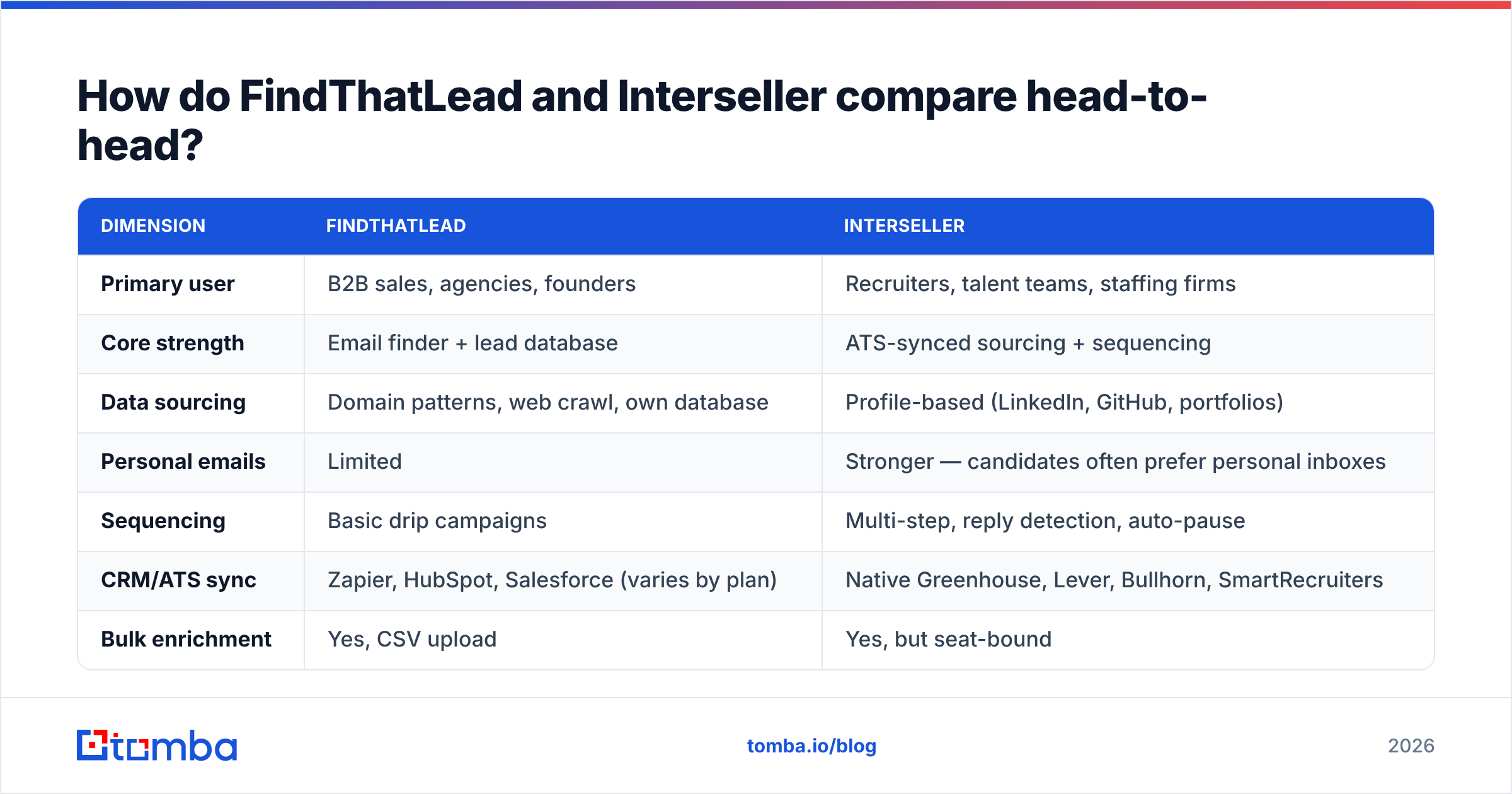
| Dimension | FindThatLead | Interseller |
|---|---|---|
| Primary user | B2B sales, agencies, founders | Recruiters, talent teams, staffing firms |
| Core strength | Email finder + lead database | ATS-synced sourcing + sequencing |
| Data sourcing | Domain patterns, web crawl, own database | Profile-based (LinkedIn, GitHub, portfolios) |
| Personal emails | Limited | Stronger — candidates often prefer personal inboxes |
| Sequencing | Basic drip campaigns | Multi-step, reply detection, auto-pause |
| CRM/ATS sync | Zapier, HubSpot, Salesforce (varies by plan) | Native Greenhouse, Lever, Bullhorn, SmartRecruiters |
| Bulk enrichment | Yes, CSV upload | Yes, but seat-bound |
| API | Available on higher tiers | Limited; not the product's selling point |
| Verification | Basic validity check | Basic validity check |
| Pricing model | Monthly credits, self-serve | Per-seat, quote-heavy |
| Free option | Limited free credits | Trial/demo only |
Read that table twice before you shortlist. The pricing row decides most deals. Credit tools scale with your list size. Seat tools scale with headcount. A three-person recruiting team pulling 400 contacts a month pays very differently from a solo founder pulling 4,000.
Which one finds more valid emails?#
Neither vendor publishes an audited match rate. Treat any number on a pricing page as marketing. Test two things on your own list before you buy: match rate and bounce rate.
The pattern most teams report follows from how each tool is built:
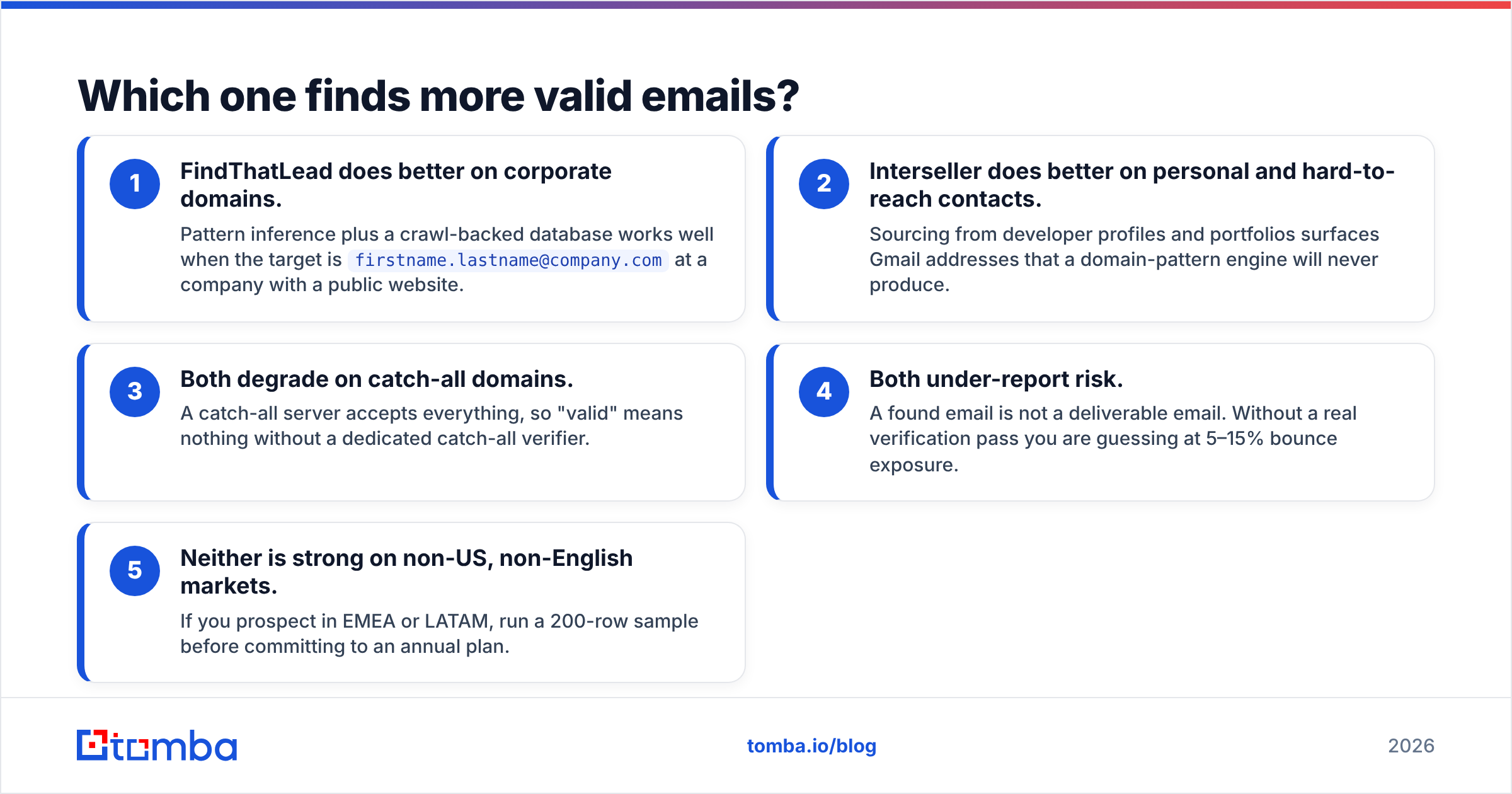
- FindThatLead does better on company domains. Pattern guessing plus a crawled database works well when the target is
firstname.lastname@company.comat a firm with a public website. - Interseller does better on personal, hard-to-reach contacts. It sources from developer profiles and portfolios. That surfaces Gmail addresses a domain-pattern engine will never guess.
- Both slip on catch-all domains. A catch-all server accepts every address, so "valid" means nothing without a catch-all verifier.
- Both under-report risk. A found email is not a deliverable email. Skip the verify pass and you are guessing at 5–15% bounce exposure.
- Neither is strong outside the US. If you prospect in EMEA or LATAM, run a 200-row sample first. Do it before you sign an annual plan.

The practical takeaway: run the same 100 target companies through both trials. Export both results. Push both files through a neutral verifier. Compare verified matches, not raw matches. Teams often find that the tool with the higher headline match rate gives fewer usable contacts. It guesses patterns and calls them found.
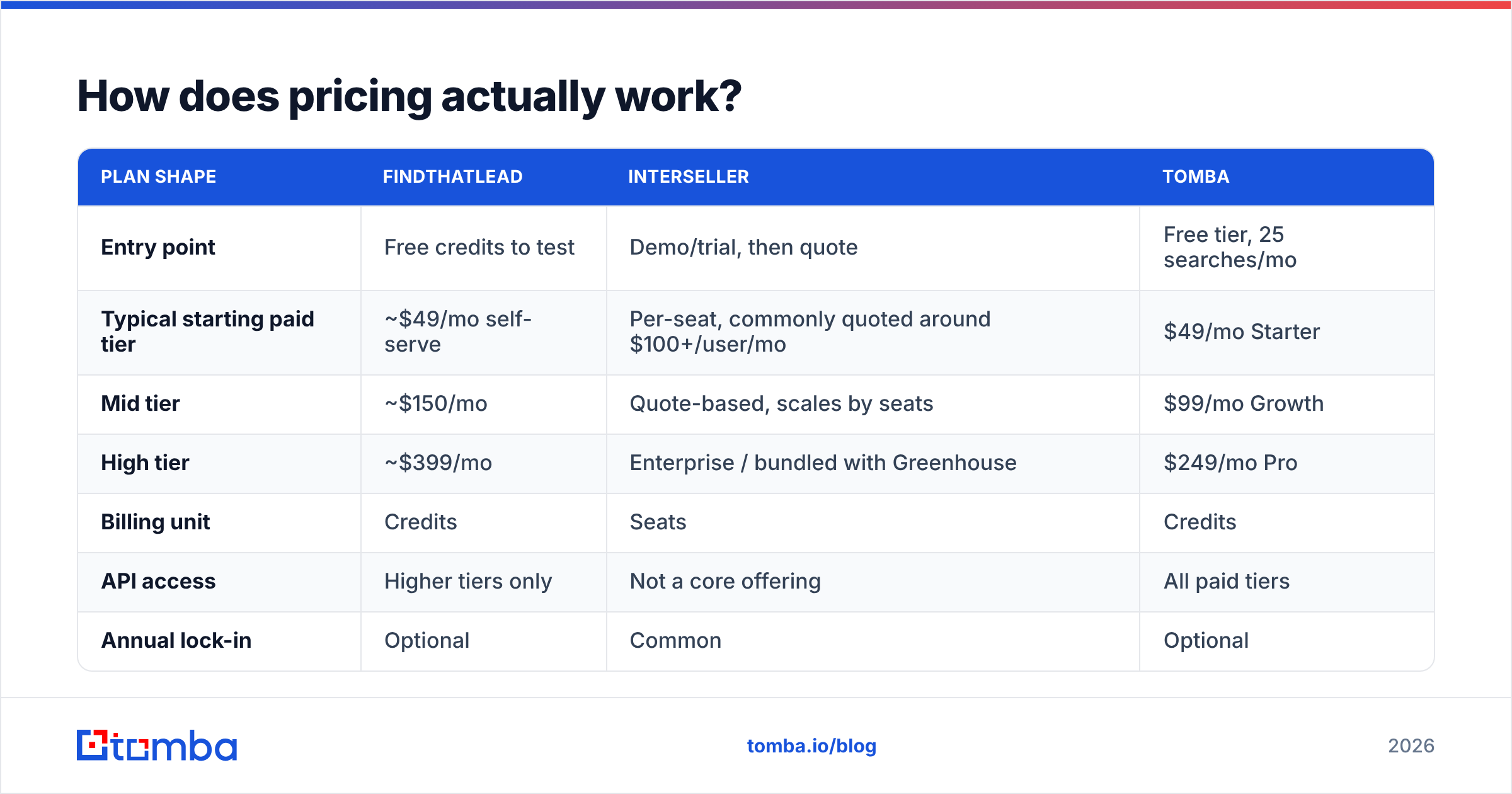
How does pricing actually work?#
| Plan shape | FindThatLead | Interseller | Tomba |
|---|---|---|---|
| Entry point | Free credits to test | Demo/trial, then quote | Free tier, 25 searches/mo |
| Typical starting paid tier | ~$49/mo self-serve | Per-seat, commonly quoted around $100+/user/mo | $49/mo Starter |
| Mid tier | ~$150/mo | Quote-based, scales by seats | $99/mo Growth |
| High tier | ~$399/mo | Enterprise / bundled with Greenhouse | $249/mo Pro |
| Billing unit | Credits | Seats | Credits |
| API access | Higher tiers only | Not a core offering | All paid tiers |
| Annual lock-in | Optional | Common | Optional |
Prices change at both vendors, and Interseller quotes rather than publishes. Check the vendor page before you budget. The structure holds either way: credits punish volume, seats punish headcount.
Run the math on your own shape. A four-recruiter team on a seat tool pays four times for a workflow one person may use daily. A two-person sales team pulling 10,000 contacts a quarter burns through credit tiers fast. Neither model is wrong. They just fit different teams. For a like-for-like reference on credit pricing, Tomba pricing lists every tier without a sales call.
Is Interseller better for recruiters?#
Yes, and it is not close — if you already run Greenhouse, Lever, or Bullhorn.
The reason is not the email finder. It is the plumbing around it:
- Duplicate checks across the team. Two sourcers cannot cold-email the same candidate. In a small talent market, that matters.
- Auto-pause on reply. A sequence stops the moment a candidate answers. Nobody gets a "just following up" note after they said yes.
- ATS write-back. Contacts, sequence status, and reply history land in the system of record. No CSV round trip.
- Cleaner compliance. Candidate data stays inside the ATS instead of a second, unmanaged database.
Run high-volume outreach outside a supported ATS and that edge disappears. Then you pay seat prices for a sequencer. Any cold-email tool plus a dedicated finder would do the same job.
Is FindThatLead better for B2B sales?#
For most sales teams, yes — with one caveat about depth.
The Prospector builds a list from filters: role, industry, geography. You do not need a name to start. That fits sales, which starts with an ICP. Recruiting starts with a person you found on a profile. Tool design follows that split.
Where FindThatLead runs thin:
- Sending is basic. It is fine for a 200-contact test. It is not Instantly, Smartlead, or Salesloft. Run real volume and you will outgrow it, then pay twice.
- Verification is shallow. You still need a real verify step before you hit send.
- API depth. Automation-heavy teams hit ceilings here. A finder-first platform with a documented email finder API does not have them.
- Enrichment breadth. Company data, tech stack, and phone numbers are thinner than a dedicated enrichment layer.
That last point is why many teams pair a finder with a separate data enrichment step. One suite rarely does everything well.
What do both tools get wrong?#
Both bundle find and send into one subscription. That bundle is where the money leaks.
The pitch is convenience: one login, one bill, one vendor. But finding and sending are different problems with different economics. Finding is a data problem — coverage, freshness, verification. Sending is an infrastructure problem — warmup, inbox rotation, sender reputation, and spam placement. Vendors that do both usually do one well and ship the other as a checkbox.
The failure looks like this. You buy the suite. The sending module cannot rotate inboxes or warm them up. Your domain reputation slips, and you blame the data. Meanwhile the unverified 12% of your list keeps bouncing and drags email deliverability down further.
The cheaper, more durable stack has three layers:
- Find — a dedicated finder with a real API and published accuracy practices.
- Verify — an independent check, catch-all handling included, before anything enters a sequence.
- Send — a purpose-built sequencer with warmup, rotation, and deliverability monitoring.
Priced apart, that stack often costs less than one bundled seat plan. It also performs better on reply rate, because your list is clean and your domain is healthy.
How should you choose between them?#
Use these five questions in order. The first "yes" is your answer.
- Do you recruit inside Greenhouse, Lever, or Bullhorn? Take Interseller. The ATS sync and duplicate checks are worth the seat price alone.
- Do you sell B2B and want one self-serve login under $100 a month? FindThatLead fits better. Plan to bolt on verification.
- Do you need volume — thousands of contacts a month across many domains? Neither bundle scales well. Use a credit-based finder with bulk email finder support and keep sending separate.
- Is your workflow automated — CRM triggers, enrichment on signup, scripts? Go API-first. Interseller is the wrong shape, and FindThatLead gates its API behind higher tiers.
- Is deliverability already a problem? Fix verification first. A new finder will not repair a domain that has bounced at 9% for two months.
One more filter people skip: check whether the vendor says where its data comes from. Open sourcing predicts long-term accuracy far better than a match-rate badge on a landing page. G2's sales intelligence category is a decent sanity check. Read the two-star reviews, not the five-star ones.
FindThatLead vs Interseller: the verdict in one line#
Interseller is a recruiting workflow product with an email finder attached. FindThatLead is an email finder with a workflow attached. Pick the half you actually need, not the longer feature list.
Say the honest answer is "I mostly need accurate, verified emails, and I already like my sequencer." Then neither bundle is the smart buy. That is the most common outcome in the FindThatLead vs Interseller debate. It is also the one both pricing pages are built to talk you out of.
Where does Tomba fit?#
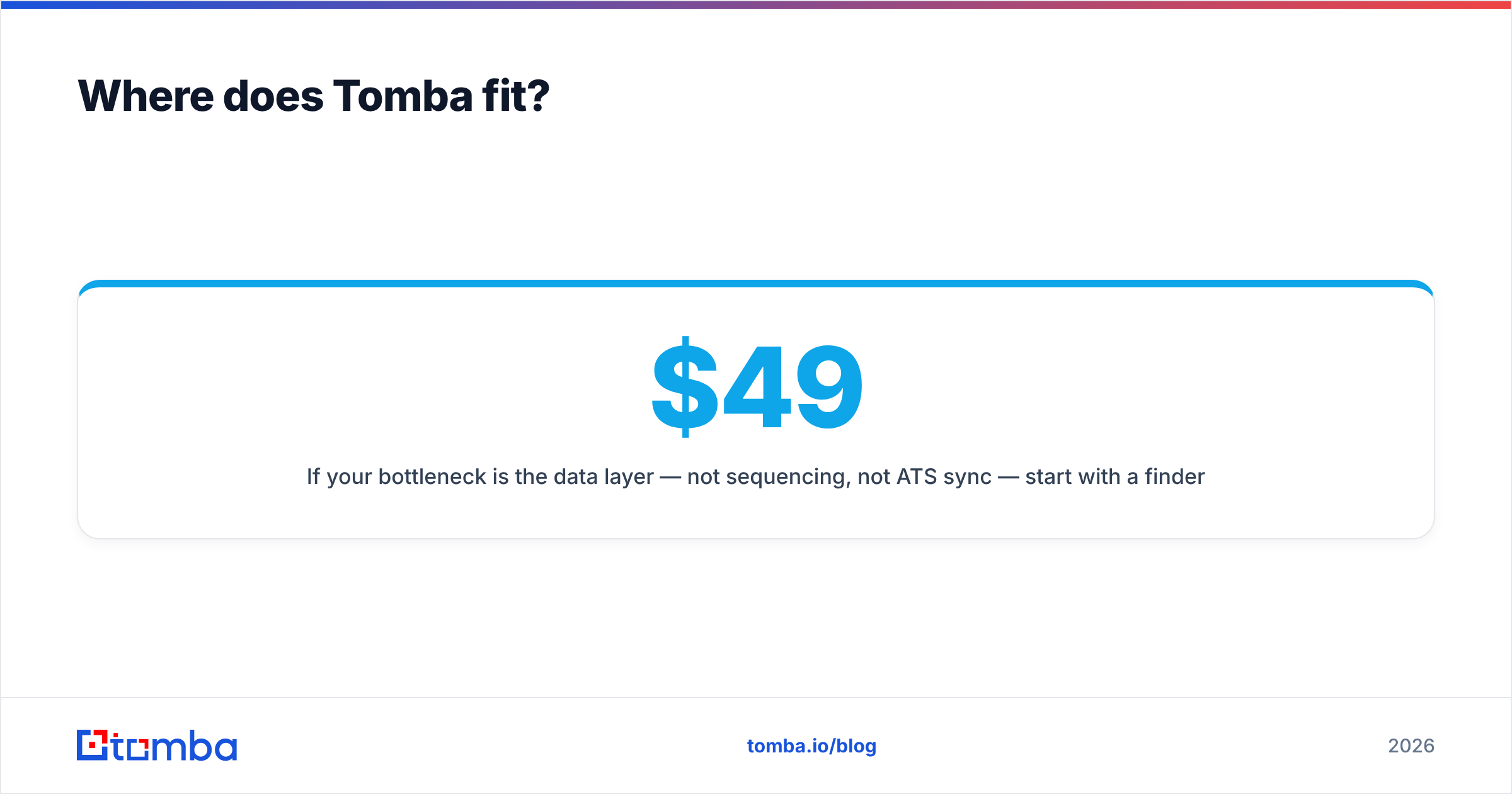
If your bottleneck is the data layer — not sequencing, not ATS sync — start with a finder that does one job well. Tomba Email Finder returns work emails by domain, name, or company. Its verification layer flags catch-all domains instead of passing them through as valid. Every paid tier includes API access. You can wire it into your CRM, your enrichment job, or your outbound script without an enterprise plan. Pricing is public: a free tier at 25 searches a month, Starter at $49, Growth at $99, Pro at $249.
Test it against FindThatLead and Interseller on the same 100 companies. Verify all three files. Compare usable contacts. That one experiment will tell you more than any comparison post — this one included.
Related guides#
Ready to find emails that actually work?
Join 150,000+ professionals who stopped guessing and started sending. Free credits on signup — no credit card required.
Get the Tomba newsletter
Practical outbound tactics and product updates — once every two weeks.
About the author