FindThatLead vs Jet Leads Pro (2026): Honest Comparison
One tool has a decade of public track record and transparent credit pricing. The other barely documents how it works. Here is how FindThatLead and Jet Leads Pro actually compare on accuracy, cost per verified email, and risk.
TL;DR
- FindThatLead is the known quantity: a Barcelona-based email finder running since 2015, with public pricing (Growth around $49/mo), a Chrome extension, a lead-search database, and a built-in cold email sender. Accuracy is decent on mainstream B2B domains and weaker on small or non-English companies.
- Jet Leads Pro is the opaque one. Public documentation, independent reviews, and verifiable accuracy data are thin to nonexistent. That is not automatically disqualifying, but it shifts all the verification burden onto you.
- Cost per verified email matters more than cost per credit. A $0.008 credit that returns a 72% valid rate is more expensive than a $0.012 credit at 95%.
- If you cannot audit a vendor's data sourcing, do not run it as your primary source. Run it as a fallback waterfall step behind a tool you can actually verify.
- Our pick for most B2B teams: neither, as a single source. Pair a transparent finder with a real verifier — Tomba at $49/mo Starter or $99/mo Growth covers finding, verification, and catch-all handling in one credit pool.
What are FindThatLead and Jet Leads Pro?#
FindThatLead is a Spanish B2B prospecting suite that has been around long enough to have a public reputation. Its core is a domain-and-name email finder, wrapped in a lead search tool, a browser extension for LinkedIn, a bulk CSV processor, and a lightweight sending tool called Scrab.in for outreach sequences. You can see its current plan structure on the official FindThatLead site. It sells credits monthly, and one credit generally equals one search or one verification.
Jet Leads Pro positions itself in the same lane: find business emails, enrich contacts, export to CRM. The difference is auditability. FindThatLead has years of G2 reviews, a documented API, and a public changelog history. When we tried to build the same evidence file for Jet Leads Pro, we came up mostly empty — no published accuracy methodology, no clear statement of where the underlying data comes from, and very little third-party verification of its claims.
That gap is itself the story of this comparison. In 2026, the email-finder market is crowded with re-sellers: thin wrappers that buy an API from a larger provider, mark it up, and sell it under a new brand. Some are fine. Some resell stale scraped data with no verification layer, and your domain reputation pays the bill.
Here is the practical frame for evaluating either tool:
- Data provenance — Does the vendor say where records come from (crawled public web, contributed contact books, partner licensing, user uploads)? A vendor that won't answer is a vendor you can't defend to legal.
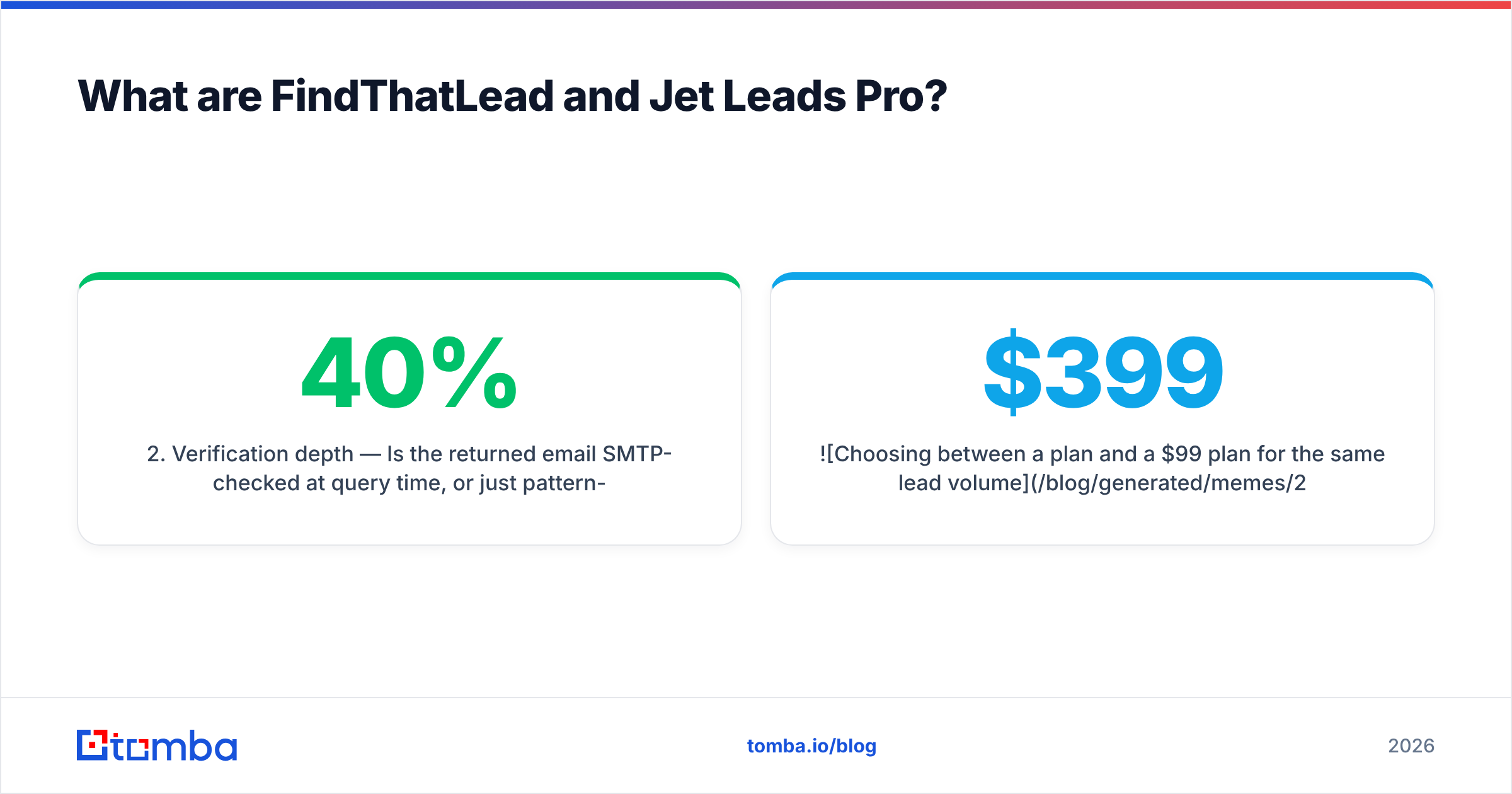
- Verification depth — Is the returned email SMTP-checked at query time, or just pattern-guessed from a name and a domain? Pattern guessing alone produces a 20-40% bounce rate on anything outside Fortune 5000 domains.
- Catch-all handling — Roughly a third of B2B domains are catch-all. Does the tool tell you honestly, or mark them "valid" to inflate its hit rate?
- Credit mechanics — Do failed searches consume credits? Do credits roll over? Are verifications billed separately from finds?
- Exit cost — Can you export everything you've built, or is your list hostage to the platform?

How do FindThatLead and Jet Leads Pro compare head-to-head?#
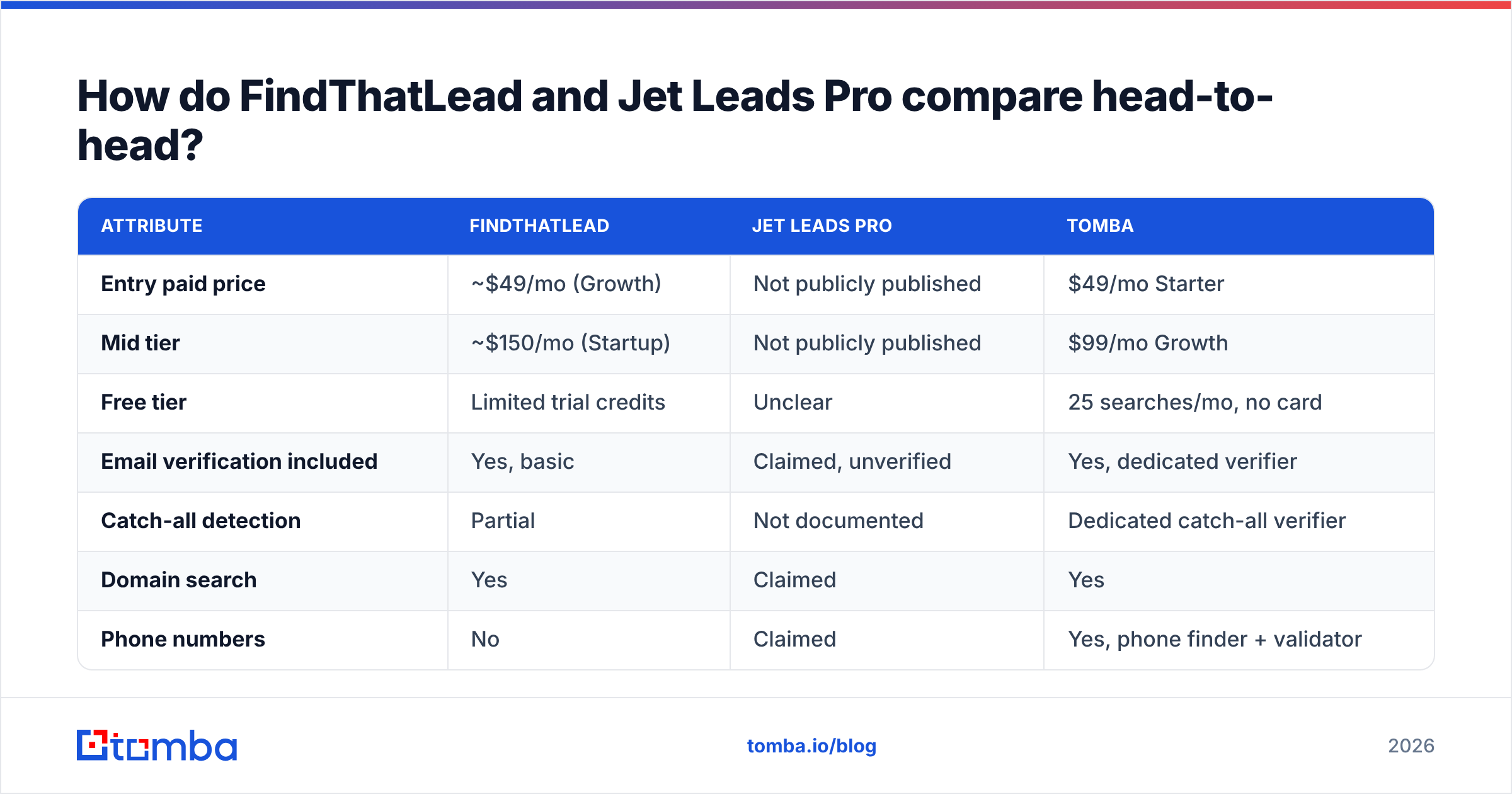
Pricing and limits below reflect publicly listed information at the time of writing. FindThatLead's tiers are published; Jet Leads Pro's are not consistently disclosed, so treat those cells as "verify directly before buying" rather than as confirmed fact.
| Attribute | FindThatLead | Jet Leads Pro | Tomba |
|---|---|---|---|
| Entry paid price | ~$49/mo (Growth) | Not publicly published | $49/mo Starter |
| Mid tier | ~$150/mo (Startup) | Not publicly published | $99/mo Growth |
| Free tier | Limited trial credits | Unclear | 25 searches/mo, no card |
| Email verification included | Yes, basic | Claimed, unverified | Yes, dedicated verifier |
| Catch-all detection | Partial | Not documented | Dedicated catch-all verifier |
| Domain search | Yes | Claimed | Yes |
| Phone numbers | No | Claimed | Yes, phone finder + validator |
| Public API docs | Yes | Not found | Yes, fully documented |
| Chrome extension | Yes | Claimed | Yes |
| Built-in sender | Yes (Scrab.in) | Unclear | No — integrates instead |
| Independent review volume | High (10+ years) | Very low | Moderate and growing |
| Data-source disclosure | Partial | None found | Published sourcing page |
The pattern is legible: FindThatLead trades accuracy ceiling for breadth. It wants to be your finder and your sender. Jet Leads Pro makes similar breadth claims with far less to back them.
How accurate is each tool in practice?#
Accuracy is where marketing pages become useless. Every vendor in this category claims 95%+ accuracy, and almost none of them define the denominator. "95% accurate" can mean:
- 95% of the emails we return are deliverable (honest)
- 95% of the emails we return as valid are deliverable, excluding the risky ones we hid (misleading)
- 95% of our database was correct on the day we ingested it (meaningless)

The only number that matters to you is coverage × validity on your ICP. Run the same 100-row test list through both tools, then push every result through an independent email verifier that neither vendor controls. Score three things:
- Hit rate — how many of the 100 returned any email at all
- Valid rate — of those hits, how many survive independent SMTP verification
- Net yield — hit rate × valid rate, which is your real usable-contact count per 100 credits
In our experience testing this category, established finders like FindThatLead land somewhere in the 60-75% hit-rate band on mid-market SaaS domains, with valid rates in the high 80s once catch-alls are excluded. Newer, undocumented tools tend to show a higher apparent hit rate and a much lower valid rate — because returning a guessed pattern costs them nothing and looks great on a dashboard. Your bounce rate is where the cost lands.
That is the trap. A tool that returns an email for 95 of 100 prospects looks twice as good as one that returns 70, right up until you send. Then the 95 becomes 61 usable contacts and a damaged sending domain, while the 70 becomes 65 usable contacts and a clean inbox. Protecting email deliverability is worth more than any credit discount either vendor can offer.
What is the real cost per verified email?#
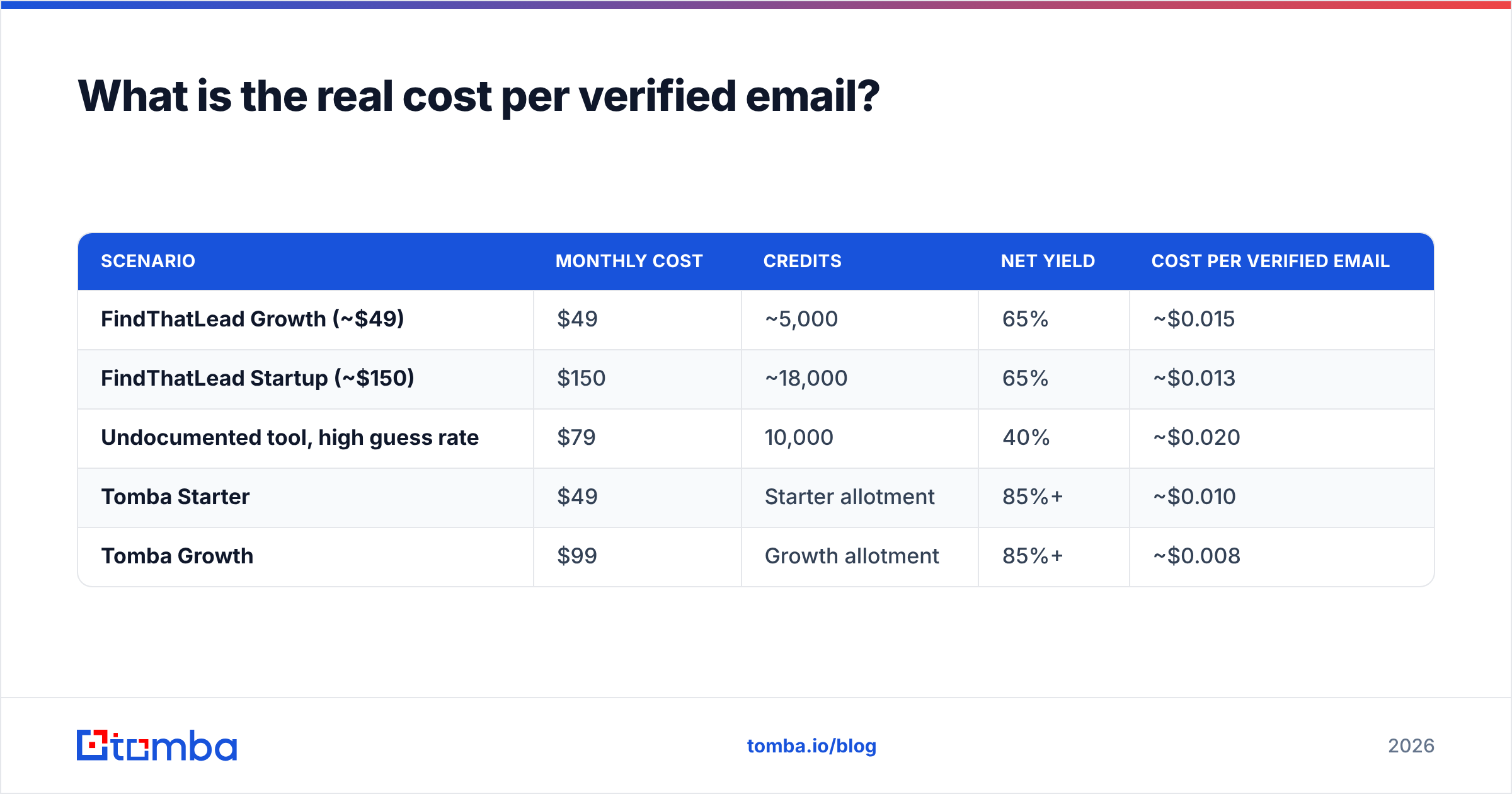
Credit prices are a distraction. Compute cost per verified contact instead. The math is simple: monthly price ÷ (credits × hit rate × valid rate).
| Scenario | Monthly cost | Credits | Net yield | Cost per verified email |
|---|---|---|---|---|
| FindThatLead Growth (~$49) | $49 | ~5,000 | 65% | ~$0.015 |
| FindThatLead Startup (~$150) | $150 | ~18,000 | 65% | ~$0.013 |
| Undocumented tool, high guess rate | $79 | 10,000 | 40% | ~$0.020 |
| Tomba Starter | $49 | Starter allotment | 85%+ | ~$0.010 |
| Tomba Growth | $99 | Growth allotment | 85%+ | ~$0.008 |
The undocumented-tool row is the important one. It has the second-cheapest headline price and the worst effective cost, because half the credits buy you a bounce. Add the downstream cost — a burned sending domain takes 4-8 weeks of warmup to recover — and the gap widens further. Full current numbers are on the Tomba pricing page if you want to redo this table with your own hit rates.
Two credit mechanics to check before you sign anything with either vendor:
- Do failed searches burn credits? Some tools charge for a search that returns nothing. On a 5,000-credit plan with a 65% hit rate, that is 1,750 credits of pure waste per month.
- Are verifications billed separately? If find and verify each cost a credit, your effective plan size is halved the moment you start doing outbound properly.
Which tool fits which workflow?#
Neither product is universally wrong. They fit different situations.
- Solo founder doing manual, low-volume prospecting — FindThatLead is defensible. The extension plus the built-in sender means one subscription instead of three, and at 200-400 contacts a month the accuracy gap costs you a handful of bounces, not a domain.
- Agency running outbound for multiple clients — Avoid any tool you cannot audit. You will eventually have to answer a client's question about where a contact record came from, and "the vendor doesn't say" is not an answer that survives a GDPR conversation.
- RevOps team enriching an existing CRM — You need a documented API and bulk processing, not a sender. That rules out anything without published endpoints. A bulk email finder with a real API is the correct shape here.
- SDR team at 3,000+ contacts/month — Cost per verified email dominates everything. Build a waterfall: primary source, then fallback, then verification gate. Never single-source at this volume.
- Anyone with a fragile sending domain — Verification is not optional. Route every list through a catch-all verifier before it touches your sequencer.

Is Jet Leads Pro safe to run as your primary data source?#
Short answer: not until it publishes more. This is not an accusation of bad faith — plenty of good tools launch with sparse documentation. It is a risk statement.
When a vendor does not disclose data sourcing, three specific things become your problem:
- Compliance exposure. Under GDPR, you need a lawful basis for processing personal data, and legitimate interest requires you to know the provenance. If your vendor won't say, you cannot document it. HubSpot's own GDPR guidance is a reasonable primer on what that documentation needs to include.
- Silent decay. Databases without a refresh cadence rot at roughly 22-30% per year as people change jobs. A vendor that publishes no refresh policy is probably not refreshing.
- Concentration risk. If the tool is a thin reseller and its upstream provider cuts it off, your pipeline stops on a Tuesday with no warning.
The pragmatic move if you still want to test it: buy the smallest possible plan, run 100 rows from your actual ICP, verify externally, and compute net yield. If it beats your incumbent on cost per verified email, promote it to a waterfall step — not to primary. If it can't clear that bar on a hand-picked test list, it will not clear it at scale.
What should you use instead — and when?#
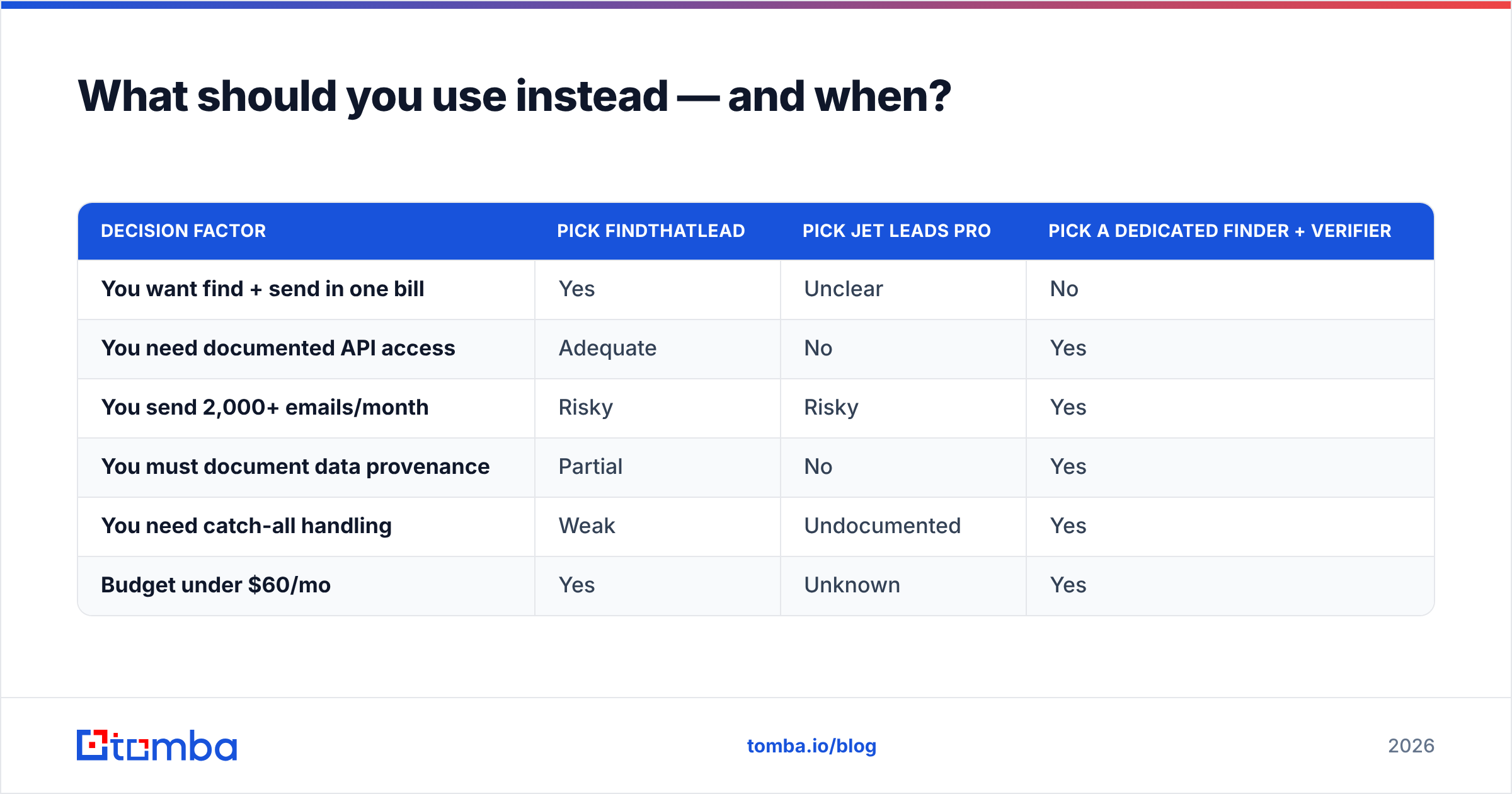
The honest verdict on this matchup: FindThatLead wins on trust and tooling breadth; Jet Leads Pro wins on nothing you can currently verify. But "the better of these two" is a low bar, and neither is optimized for the thing that actually determines outbound ROI — net yield per credit.

| Decision factor | Pick FindThatLead | Pick Jet Leads Pro | Pick a dedicated finder + verifier |
|---|---|---|---|
| You want find + send in one bill | Yes | Unclear | No |
| You need documented API access | Adequate | No | Yes |
| You send 2,000+ emails/month | Risky | Risky | Yes |
| You must document data provenance | Partial | No | Yes |
| You need catch-all handling | Weak | Undocumented | Yes |
| Budget under $60/mo | Yes | Unknown | Yes |
If you are consolidating, the structure that holds up at volume is: one accurate finder, one real verifier, and a sequencer you chose separately on its own merits. Bundling the sender into the finder feels efficient at 200 emails a month and becomes a constraint at 2,000, because you end up choosing your finder based on its sending features instead of its data.
How do you run a fair test in one afternoon?#
Do not take anyone's word for this — including ours. The test takes about two hours.
- Build a 100-row control list from your actual ICP, not from a famous-companies sample. Include a few sub-50-employee companies and at least 20 non-US domains. That is where finders separate.
- Run the same list through each tool using identical inputs (first name, last name, domain).
- Verify externally with a tool that has no stake in the outcome — a free email checker works for spot checks, bulk verification for the full list.
- Score hit rate, valid rate, and net yield per tool. Log catch-alls as their own bucket rather than counting them as wins.
- Divide plan cost by net yield. That single number is your answer, and it is usually not the number on the pricing page.
Teams that run this test are consistently surprised in the same direction: the cheapest headline price is rarely the cheapest verified contact, and the tool with the highest apparent hit rate is often the one quietly guessing.
Ready to benchmark against a tool that publishes its numbers? Start with the Tomba Email Finder — 25 free searches a month with no card, first-party verification on every result, honest catch-all flagging instead of optimistic "valid" labels, and a documented API when you outgrow the UI. Run your 100-row control list through it alongside FindThatLead and Jet Leads Pro, compare net yield rather than credit price, and let the bounce rate pick the winner.
Related guides#
Ready to find emails that actually work?
Join 150,000+ professionals who stopped guessing and started sending. Free credits on signup — no credit card required.
Get the Tomba newsletter
Practical outbound tactics and product updates — once every two weeks.
About the author