FindThatLead vs Kickbox: Email Finder vs Verifier 2026
FindThatLead finds emails. Kickbox verifies them. They are not really competitors — and buying the wrong one is the most common list-building mistake. Here is the honest breakdown, with pricing, accuracy notes, and when one platform replaces both.
TL;DR
- FindThatLead and Kickbox are not direct competitors. FindThatLead is a prospecting and email-finding tool; Kickbox is a dedicated email verification and deliverability service. Comparing them head-to-head only makes sense if you are trying to decide which problem to solve first.
- If your list is empty, you need a finder. If your list is old, bought, or bouncing, you need a verifier. Buying the wrong one wastes a month of outbound.
- Kickbox is one of the more respected standalone verifiers, with pay-as-you-go pricing and a deliverability arm. It does not source contacts.
- FindThatLead bundles finding, a light verifier, and a basic cold-email sender — convenient, but each module is shallower than a specialist tool.
- A single platform that does finding and verification on the same credit pool (Tomba, for example, at $49/mo on Starter) usually beats stitching two subscriptions together for teams under ~50 reps.
What is FindThatLead and what does it actually do?#
FindThatLead is a Spanish-built B2B prospecting platform that has been around since 2015. Its core job is turning a name, a domain, or a LinkedIn profile into a work email address. Around that core it has stacked a handful of adjacent features: a Chrome extension, a "Prospector" that filters by role and location, a bulk CSV processor, and Scrab.in / Sender modules for LinkedIn automation and cold email sending.
The pitch is breadth. You log in, build a list of marketing directors in Madrid, export the emails, and fire a sequence — all without leaving the tab. For a solo founder or a two-person agency, that consolidation has real value.
The trade-off is depth. Each module is competent rather than best-in-class. The database skews European and SMB, which is great if that is your market and frustrating if you sell to US enterprise. The built-in verification is a basic SMTP-and-syntax pass, not a full deliverability engine. And the sender is nowhere near what a dedicated sequencer gives you in terms of inbox rotation, warmup, and reply detection.
You can read the current feature list on the FindThatLead site, but treat the credit counts on the pricing page carefully — a "credit" there can mean a search, an enrichment, or a verification depending on the action.
What is Kickbox and why is it not an email finder?#
Kickbox does one thing: it tells you whether an email address will accept mail. Give it sarah.chen@acme.com and it returns a verdict — deliverable, undeliverable, risky, or unknown — plus a numeric "Sendex" quality score, role-account detection, disposable-domain detection, and a free-provider flag.
It will never give you sarah.chen@acme.com. There is no database of contacts, no search by job title, no domain scraping. If you arrive at Kickbox with zero prospects, you leave with zero prospects.
What Kickbox adds beyond verification is a deliverability practice: inbox placement testing, blacklist monitoring, and consulting for teams with real sender-reputation problems. That is a different budget line than "help me find leads," and it is aimed at a different buyer — usually a lifecycle or email marketing lead rather than an SDR manager.
So the honest framing of findthatlead vs kickbox is not "which tool wins." It is "which half of the pipeline is currently broken."
FindThatLead vs Kickbox: how do they compare feature by feature?#
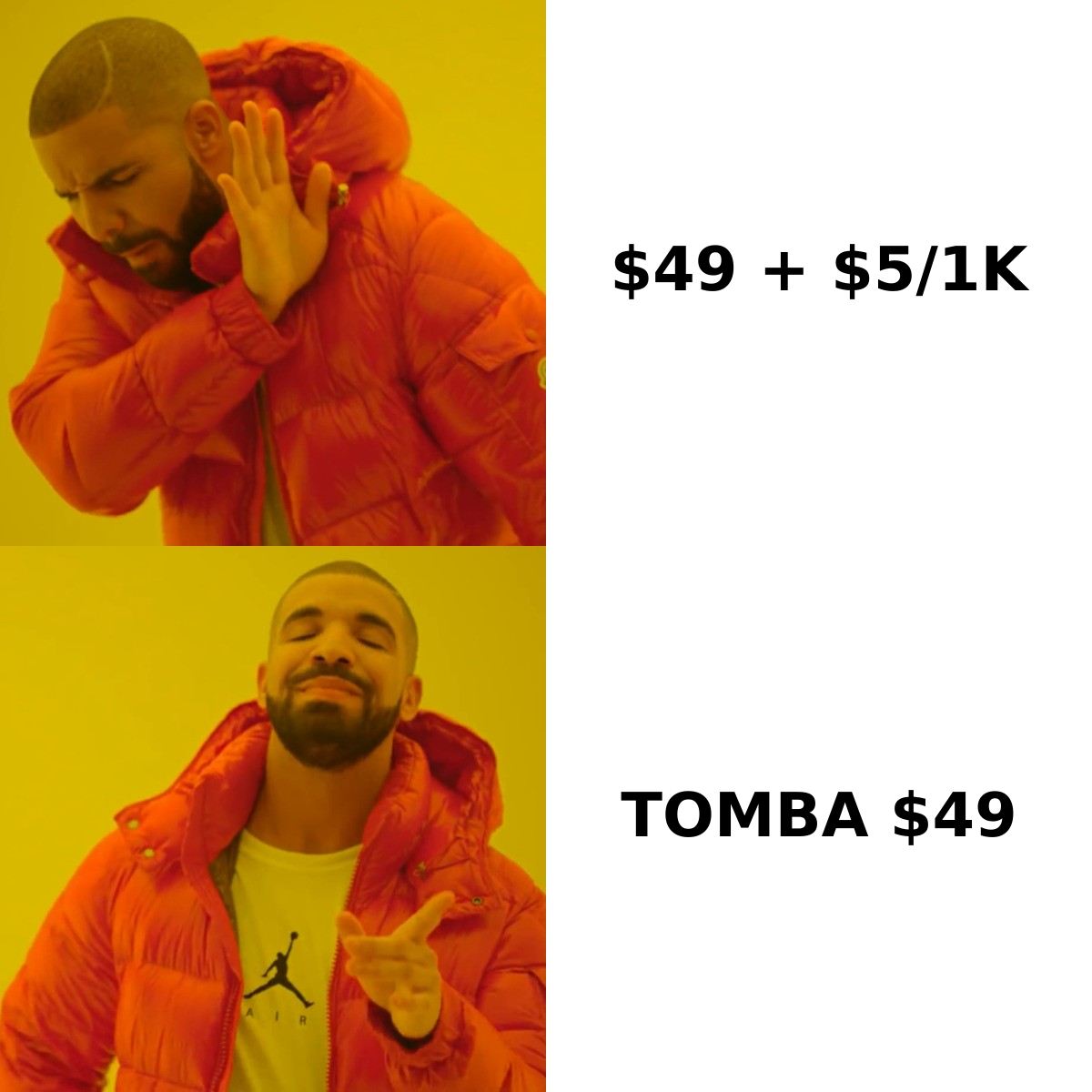
Here is the head-to-head on the attributes that actually change your decision. Tomba is included as a third column because it is the category where the two overlap — finder plus verifier on one bill.
| Capability | FindThatLead | Kickbox | Tomba |
|---|---|---|---|
| Find email by name + domain | Yes (core feature) | No | Yes (core feature) |
| Domain / company-wide search | Yes | No | Yes |
| Standalone email verification | Basic (syntax + SMTP) | Yes (specialist grade) | Yes |
| Catch-all domain handling | Flagged, limited resolution | Flagged as "risky" | Dedicated catch-all verifier |
| Bulk CSV processing | Yes | Yes | Yes |
| Public API | Yes | Yes (well documented) | Yes |
| Chrome extension | Yes | No | Yes |
| Phone numbers | No | No | Yes |
| Cold email sending | Yes (Sender module) | No | No (integrates instead) |
| Inbox placement / blacklist tools | No | Yes | Partial (free checkers) |
| Free tier | Limited monthly credits | 100 free verifications | 25 searches/mo |
| Best for | Solo prospecting in EU/SMB | Cleaning large existing lists | Finding + verifying on one plan |
Two things jump out of that grid. First, the only row where FindThatLead and Kickbox genuinely overlap is verification — and Kickbox is clearly better at it. Second, if you need both columns' capabilities, you are looking at two subscriptions, two APIs, and two credit systems to reconcile at month end.
How much do FindThatLead and Kickbox cost in 2026?#
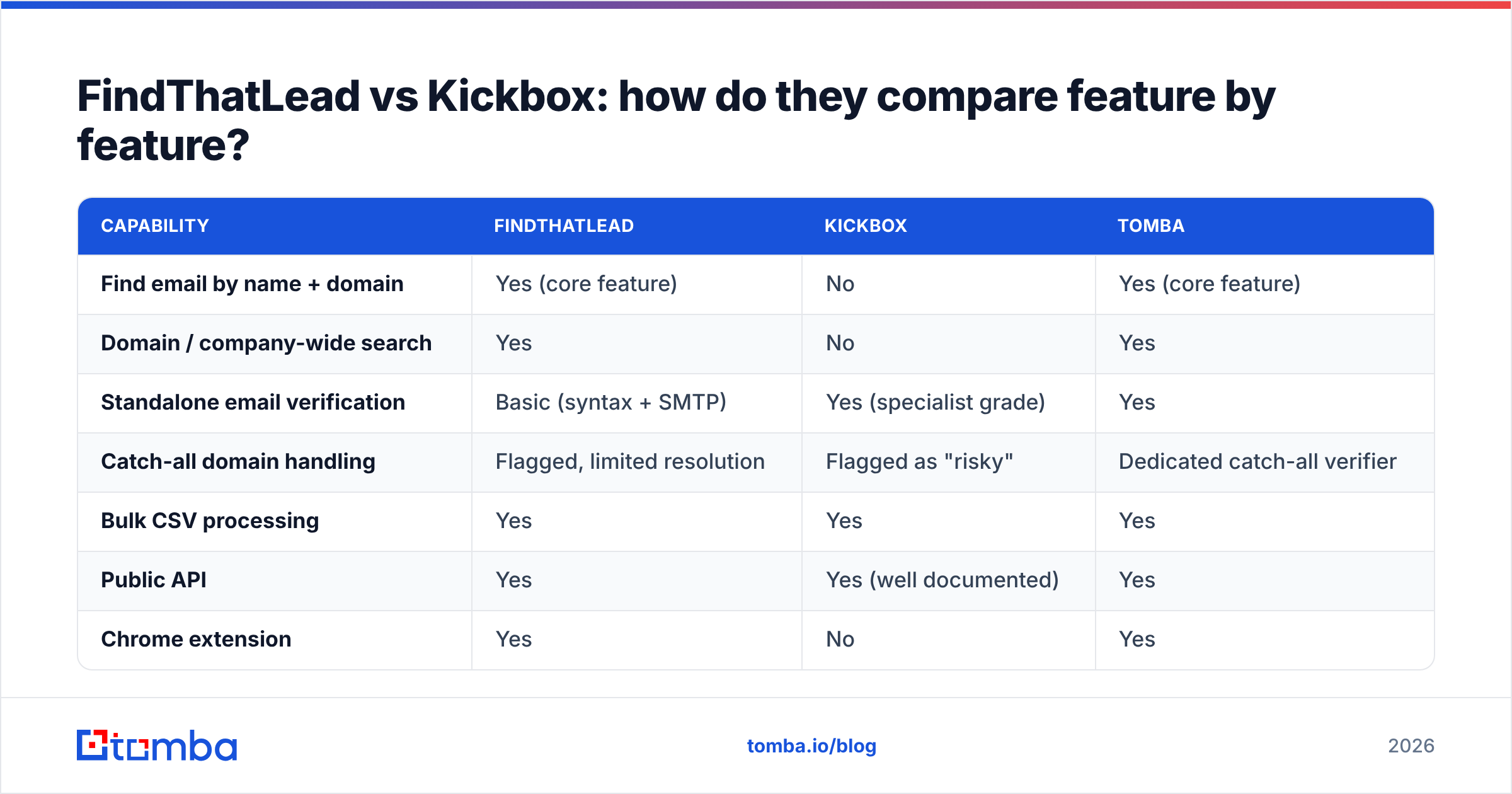
Pricing models differ enough that a straight per-month comparison is misleading. FindThatLead sells monthly credit bundles. Kickbox sells verification volume, usually pay-as-you-go, with the per-email rate dropping as volume climbs. Always confirm current numbers on each vendor's page before you commit — these move.
| Plan tier | FindThatLead | Kickbox | Tomba |
|---|---|---|---|
| Free | ~10 credits/mo | 100 verifications (one time) | 25 searches/mo |
| Entry paid | ~$49/mo (Growth, ~5,000 credits) | ~$5 per 1,000 verifications | $49/mo (Starter) |
| Mid tier | ~$150/mo (Startup, ~18,000 credits) | Rate drops with volume tiers | $99/mo (Growth) |
| High tier | ~$399/mo (Suite) | Volume + deliverability add-ons | $249/mo (Pro) |
| Enterprise | Custom | Custom | Custom |
| Billing model | Monthly subscription, credits reset | Pay-as-you-go credits, no reset | Monthly subscription |
| Credits roll over | No | Yes (purchased credits persist) | Plan-dependent |
The rollover row matters more than people expect. Kickbox credits you buy stay bought — useful if you clean a list quarterly rather than continuously. Subscription credits on FindThatLead expire monthly, so an inconsistent prospecting month is money burned.
If you want to model the blended cost, run the numbers on Tomba pricing against a FindThatLead subscription plus a Kickbox credit pack at your real monthly volume. For most teams doing 3,000–8,000 contacts a month, the two-vendor route lands 40–70% higher once you include the verification spend.
Which one should you buy for your situation?#
Skip the feature grid and match your actual state to one of these five:
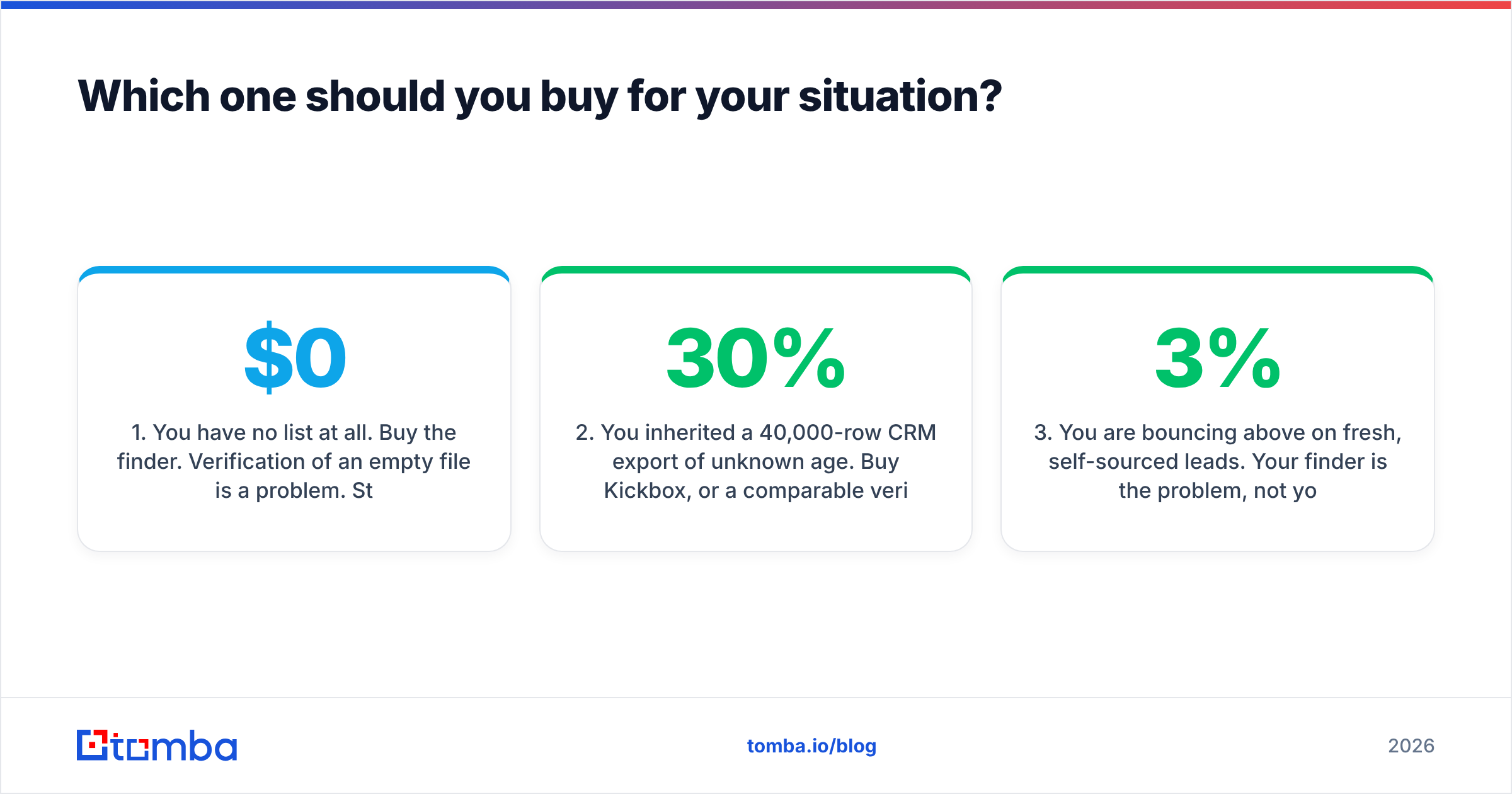
- You have no list at all. Buy the finder. Verification of an empty file is a $0 problem. Start with FindThatLead or any email finder that covers your target geography, and only add a verifier once you have volume flowing.
- You inherited a 40,000-row CRM export of unknown age. Buy Kickbox, or a comparable verifier, before you send anything. A list older than 12 months typically carries 20–30% decay, and sending into that will torch your domain. This is exactly the job Kickbox is built for.
- You are bouncing above 3% on fresh, self-sourced leads. Your finder is the problem, not your verifier. Either its data is stale or it is guessing patterns without confirming them. Switch finders or add a real email verifier to the same workflow.
- You sell to European SMBs and want one login. FindThatLead's bundled Sender and Scrab.in modules genuinely save setup time at that scale, and its EU coverage is a legitimate strength. Accept that each module is a 7/10.
- You need both halves and hate reconciling two bills. Pick a platform where finding and verification draw from one credit pool and one API key. That is the case where a consolidated tool wins on operations, not just price.

How accurate is each tool, and how would you even know?#
Accuracy means different things on each side of the fence, which is why vendor-published percentages are close to useless when you compare across categories.
For a finder, accuracy is the share of returned addresses that are real and reachable — and, just as important, the coverage rate, meaning how often it returns anything at all. A tool that finds 40% of your list at 98% accuracy is often worse than one that finds 75% at 94%. FindThatLead does not publish a rigorous, audited accuracy figure; independent user reports on G2 put its hit rate in a fairly normal mid-range band for the category, stronger on EU domains than US ones.
For a verifier, accuracy is the share of verdicts that turn out to be correct after you send. Kickbox's advantage here is its handling of edge cases: role accounts, disposable domains, and grey-area mailboxes get distinct signals rather than a single pass/fail. Its "unknown" bucket is honest rather than padded, which some buyers dislike and experienced senders appreciate.
The only accuracy test that counts is your own. Take 200 contacts from your actual ICP, run them through each tool, send a real campaign, and measure the hard bounce rate. Do that before you commit to an annual plan, not after.
What happens with catch-all domains?#
Catch-all domains — servers configured to accept mail at any address — are where most finder/verifier comparisons quietly fall apart. Both FindThatLead and Kickbox will flag a catch-all address as risky or unknown. Neither will confidently tell you whether the specific mailbox exists.
That is not a criticism; it is a hard technical limit at the SMTP layer. The differentiator is what a tool does next. Some platforms stop at the flag. Others layer additional signals — pattern confirmation from other verified mailboxes on the domain, third-party activity data, or a dedicated catch-all verifier — to resolve a portion of that bucket into sendable addresses.
If a meaningful chunk of your ICP runs Microsoft 365 with catch-all enabled (common in mid-market and enterprise), ask each vendor directly what percentage of catch-alls they resolve versus flag. The answers vary far more than the marketing pages suggest, and it is the single biggest driver of usable list size in enterprise outbound.
Do you actually need both tools, or will one platform do?#
Run the two-vendor stack when you have a specialist need on one side: very high verification volume where Kickbox's per-thousand rate beats a bundled plan, a compliance requirement for a named verification provider, or an active deliverability crisis that needs inbox-placement testing and blacklist monitoring.
Run one platform when finding and verifying are the same workflow — which for most outbound teams, they are. You find an address, you verify it in the same call, you push it to your sequencer. Splitting that across two APIs adds latency, a second failure mode, and a monthly reconciliation nobody enjoys. A consolidated bulk email finder that verifies in the same pass removes an entire integration from your stack.
The middle path is worth naming too: use a consolidated tool as the daily driver, and keep a small pay-as-you-go Kickbox balance for the occasional bulk clean of an inherited or purchased list. Kickbox credits do not expire, so that safety net costs you nothing while it sits idle.
What is the verdict on FindThatLead vs Kickbox?#
Neither tool loses, because they were never in the same race.
Choose Kickbox if you already have contacts and your problem is bounce rate, sender reputation, or inbox placement. It is a well-built, transparently priced specialist, and the non-expiring credits suit irregular cleaning cycles.
Choose FindThatLead if you are sourcing from scratch on a small budget, sell primarily into European SMBs, and value having prospecting plus a basic sender under one login more than you value depth in any single module.
Choose neither if your honest answer is "both, ideally on one bill." That is the common case, and it is what consolidated platforms exist for.
Whatever you pick, benchmark it on your own ICP before the annual discount tempts you. Two hundred contacts and one real campaign will tell you more than every comparison table on the internet — including this one.
Ready to stop paying two vendors for one workflow? The Tomba Email Finder finds work emails by name, domain, or company and verifies them in the same request, so the address that lands in your sequencer is already checked. Start on the free tier with 25 searches a month, or move to Starter at $49/mo when your volume justifies it — no separate verification invoice required.
Related guides#
Ready to find emails that actually work?
Join 150,000+ professionals who stopped guessing and started sending. Free credits on signup — no credit card required.
Get the Tomba newsletter
Practical outbound tactics and product updates — once every two weeks.
About the author