FindThatLead vs Kipplo (2026): Which Email Finder Wins?
FindThatLead and Kipplo both promise verified B2B emails at startup prices. We compared match rates, bounce risk, pricing and API depth to show which one actually fits your outbound stack in 2026.
TL;DR
- FindThatLead is the older, broader tool: email finder, LinkedIn extraction, and a built-in cold email sender, priced from roughly $49/mo. Best if you want prospecting and sending in one login.
- Kipplo is the newer, leaner challenger: bulk lookups, a simpler credit model, and aggressive entry pricing. Best if you only need contact data and already own a sequencer.
- Neither publishes an independently audited accuracy figure. In practice you should assume 60–80% match on mid-market domains and budget for a separate verification pass.
- Cost per verified email — not cost per credit — is the number that decides this. A cheap credit that returns an unverifiable address costs you sender reputation, not just money.
- If your workflow is API-first or you need catch-all resolution, both tools get thin fast. That is where a data-first platform like Tomba fits better.
What are FindThatLead and Kipplo?#
Both tools solve the same first-mile problem: you have a company or a LinkedIn profile, and you need a work email you can actually send to.
Think of them as two different kitchen setups. FindThatLead is a full kitchen — knives, stove, and a dining room attached. It finds emails by domain or name, scrapes LinkedIn lists through its Prospector, and then lets you send campaigns from the same dashboard. Kipplo is a sharp knife in a drawer. It does lookups and bulk enrichment, hands you a CSV, and expects your sequencer to take it from there.
That architectural difference explains almost every practical trade-off below. All-in-one platforms spread engineering effort across finding, verifying, and sending. Specialist tools concentrate it on one layer. Neither is automatically better — it depends on what you already own.
One caveat before the comparison: Kipplo is a much younger product with a smaller public footprint than FindThatLead. Verify current limits and pricing on the vendor's own site before you commit budget, because newer tools change plans faster than established ones.
How do FindThatLead and Kipplo compare on features and price?#
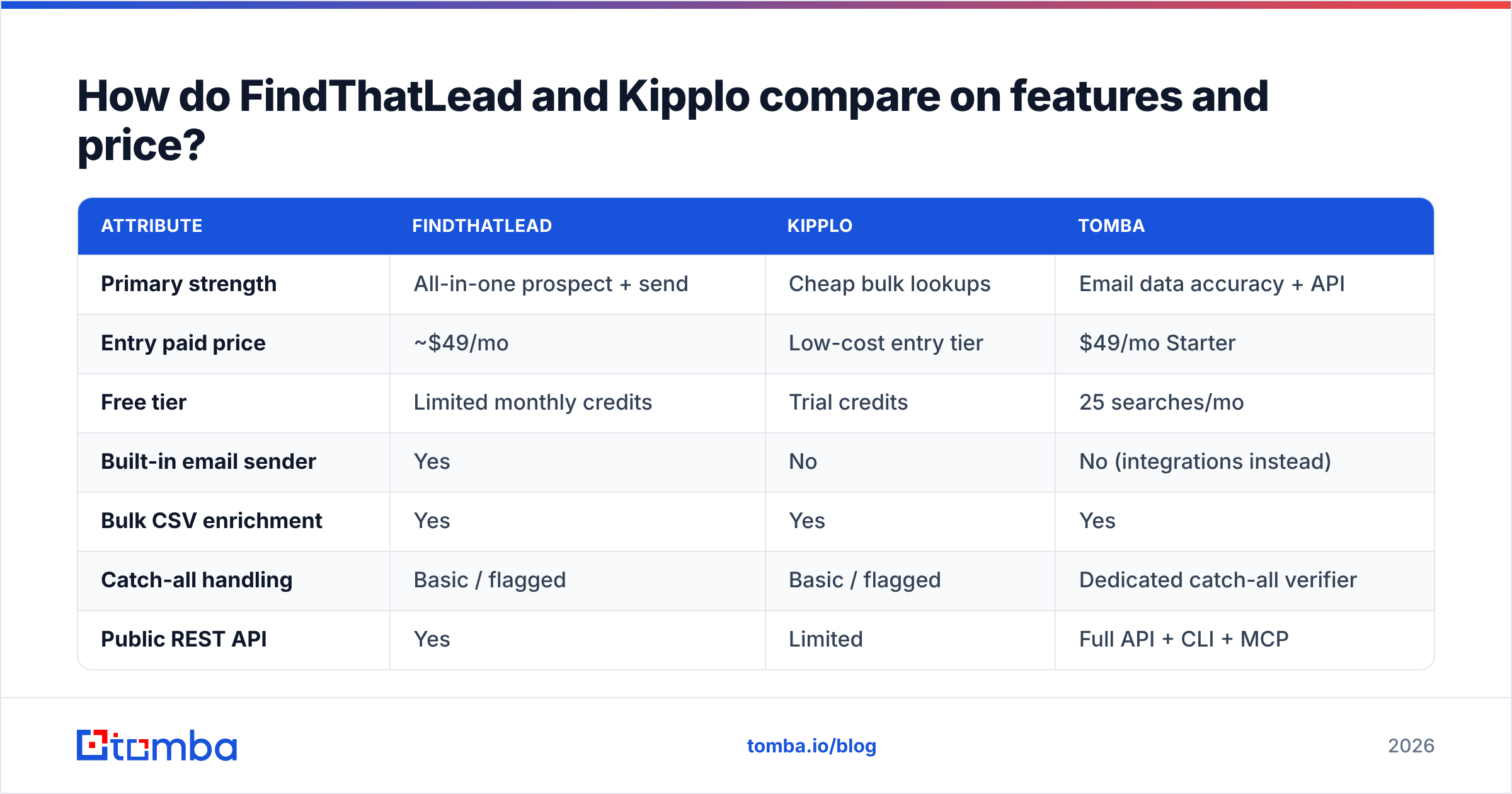
Here is the head-to-head, with Tomba included as a data-first reference point so you can see where a specialist sits on the same axes.
| Attribute | FindThatLead | Kipplo | Tomba |
|---|---|---|---|
| Primary strength | All-in-one prospect + send | Cheap bulk lookups | Email data accuracy + API |
| Entry paid price | ~$49/mo | Low-cost entry tier | $49/mo Starter |
| Free tier | Limited monthly credits | Trial credits | 25 searches/mo |
| Built-in email sender | Yes | No | No (integrations instead) |
| Bulk CSV enrichment | Yes | Yes | Yes |
| Catch-all handling | Basic / flagged | Basic / flagged | Dedicated catch-all verifier |
| Public REST API | Yes | Limited | Full API + CLI + MCP |
| Verification included | Basic | Basic | Dedicated verifier |
| Chrome extension | Yes | Yes | Yes |
| Best fit | Solo founders, small teams | Budget list builders | RevOps + dev-led workflows |
Two things stand out.
First, FindThatLead's sender is a genuine differentiator if you are a one-person GTM team. Fewer tools, fewer Zapier hops, one invoice. The counter-argument is that its sending layer is not competitive with a dedicated platform on deliverability tooling — no serious inbox rotation strategy, thinner warmup, weaker reply detection. You are trading depth for convenience.
Second, Kipplo's pitch is price per credit. That is the right pitch for a budget list builder and the wrong pitch for anyone running volume, because unverifiable credits still get charged.
Which one finds more emails?#
Neither vendor publishes an audited match rate, so treat any marketing percentage as a claim, not a fact. What you can do is run your own bake-off — and you should, because match rate varies more by your target segment than by vendor.
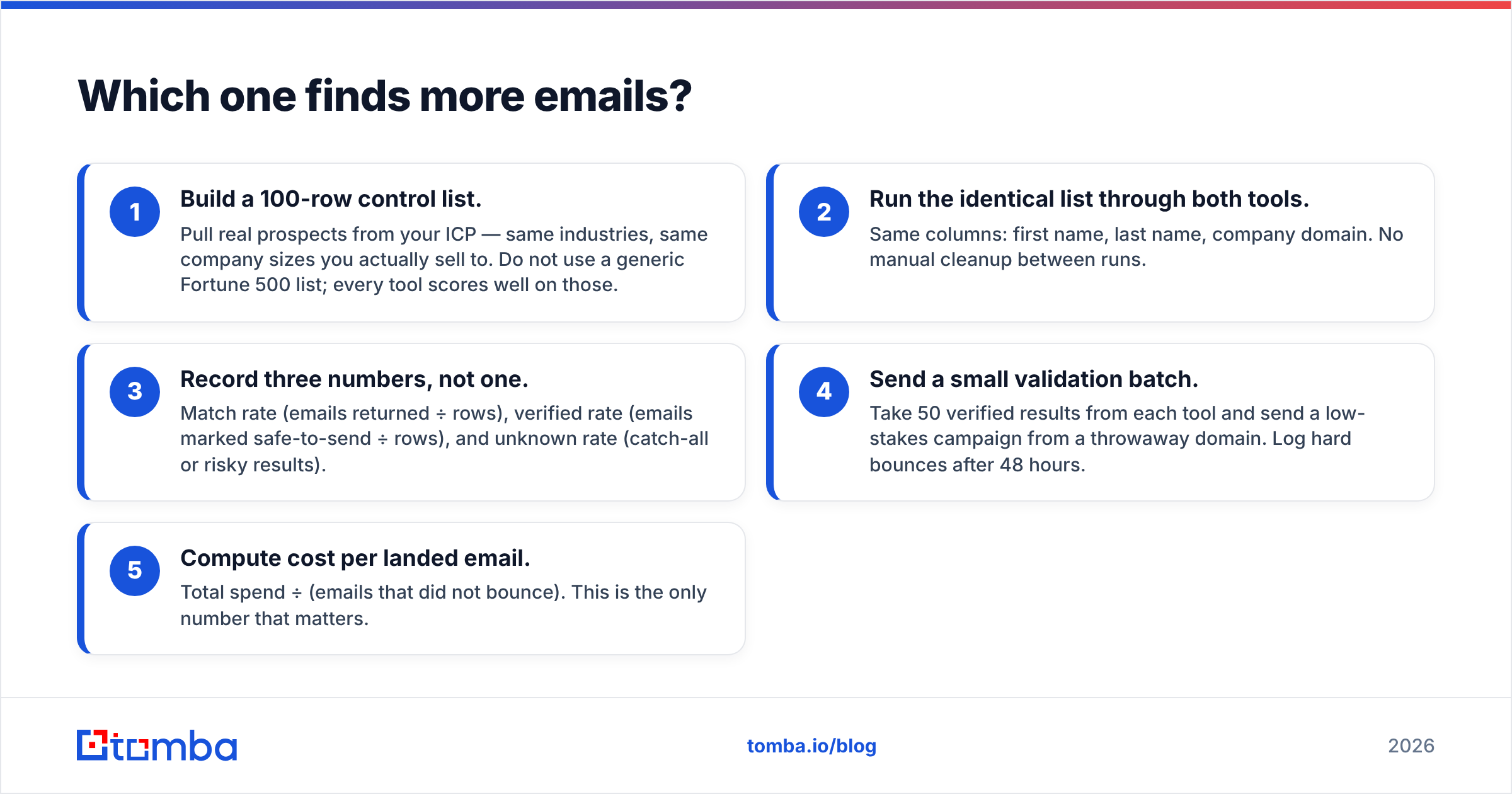
Here is a test protocol that takes about an hour:
- Build a 100-row control list. Pull real prospects from your ICP — same industries, same company sizes you actually sell to. Do not use a generic Fortune 500 list; every tool scores well on those.
- Run the identical list through both tools. Same columns: first name, last name, company domain. No manual cleanup between runs.
- Record three numbers, not one. Match rate (emails returned ÷ rows), verified rate (emails marked safe-to-send ÷ rows), and unknown rate (catch-all or risky results).
- Send a small validation batch. Take 50 verified results from each tool and send a low-stakes campaign from a throwaway domain. Log hard bounces after 48 hours.
- Compute cost per landed email. Total spend ÷ (emails that did not bounce). This is the only number that matters.
Most teams that run this discover the ranking flips between step 2 and step 5. The tool with the highest raw match rate often has the highest bounce rate too, because it is returning pattern-guessed addresses without confirming them. A guessed firstname.lastname@ is not data — it is a coin flip with your domain reputation as the stake.
The unknown-rate column is where both FindThatLead and Kipplo tend to lose ground. Catch-all domains — servers that accept mail for every address, valid or not — make up a large slice of B2B targets, and generic SMTP checks cannot resolve them. If a tool dumps those into a vague "risky" bucket, you either discard real prospects or gamble on bounces. A dedicated catch-all verifier resolves a meaningful share of that bucket instead of shrugging at it.
Is the pricing actually comparable?#
Not directly, and this is where most comparison posts get lazy.
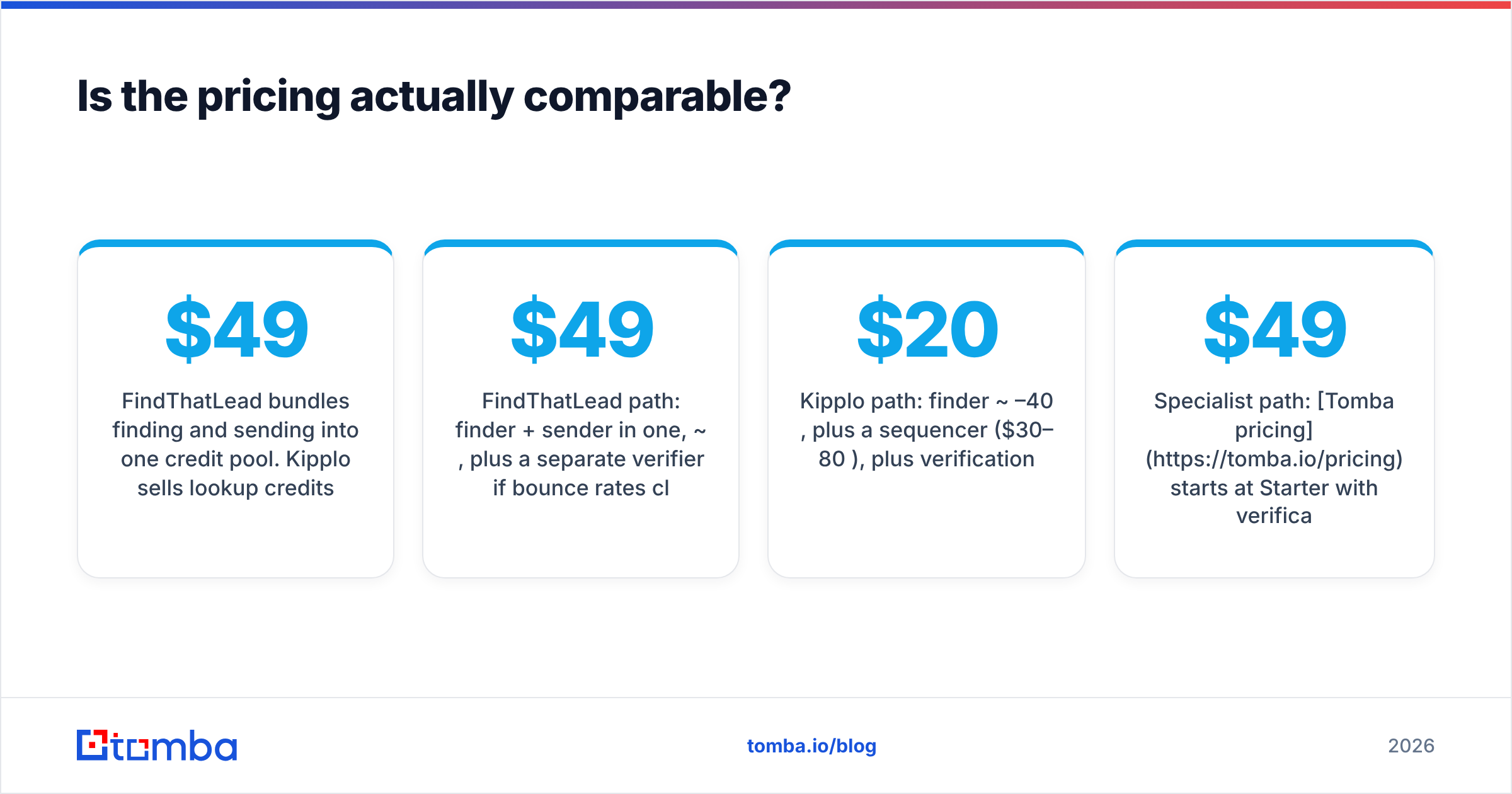
FindThatLead bundles finding and sending into one credit pool. Kipplo sells lookup credits only. So a $49 FindThatLead plan and a $49 Kipplo plan buy structurally different things — one includes an outbound channel, the other does not. If you already pay for a sequencer, FindThatLead's bundled sending is dead weight; if you do not, Kipplo's price excludes a cost you still have to pay somewhere.
Run the math on total stack cost, not line-item cost:
- FindThatLead path: finder + sender in one, ~$49/mo, plus a separate verifier if bounce rates climb.
- Kipplo path: finder ~$20–40/mo, plus a sequencer ($30–80/mo), plus verification.
- Specialist path: Tomba pricing starts at $49/mo Starter with verification built into the same platform, $99/mo Growth, $249/mo Pro, plus whichever sequencer you already run.
The second variable is credit burn. Some vendors charge for a search that returns nothing; others do not. Ask before you buy — a 30% no-result rate on a charged-credit model quietly inflates your effective price by nearly half. G2 and Capterra reviews are useful here because users complain loudly about credit policies; check G2's email finder category for recent, dated feedback rather than relying on the vendor's own testimonials.

What about API access and automation?#
If you are building anything programmatic — enriching signups in real time, hydrating a CRM on record creation, running an agent that researches accounts — API depth stops being a nice-to-have.
FindThatLead exposes a REST API with the usual find-by-name and find-by-domain endpoints. It works, but the documentation and SDK coverage lag behind data-first vendors, and rate limits on lower tiers are tight enough to make bulk backfills painful.
Kipplo's programmatic surface is thinner still. For a young product that is expected, but it means you should not architect a pipeline around it yet unless you have confirmed current endpoint coverage directly with the vendor.
This is the clearest gap in the comparison. A data-first platform ships the API as the product, not as an afterthought: documented endpoints for finding, verifying, and enriching, plus a Tomba CLI for scripting and an MCP server so AI agents can call the data layer directly. If your team writes code, that difference compounds every sprint.

Automation also means integrations. Check that whichever tool you pick writes into the systems you already run — HubSpot, Salesforce, Pipedrive, or a spreadsheet via a Google Sheets add-on. A finder that forces manual CSV shuttling burns more analyst hours than the license costs.
Who should pick which tool?#
Pick FindThatLead if:
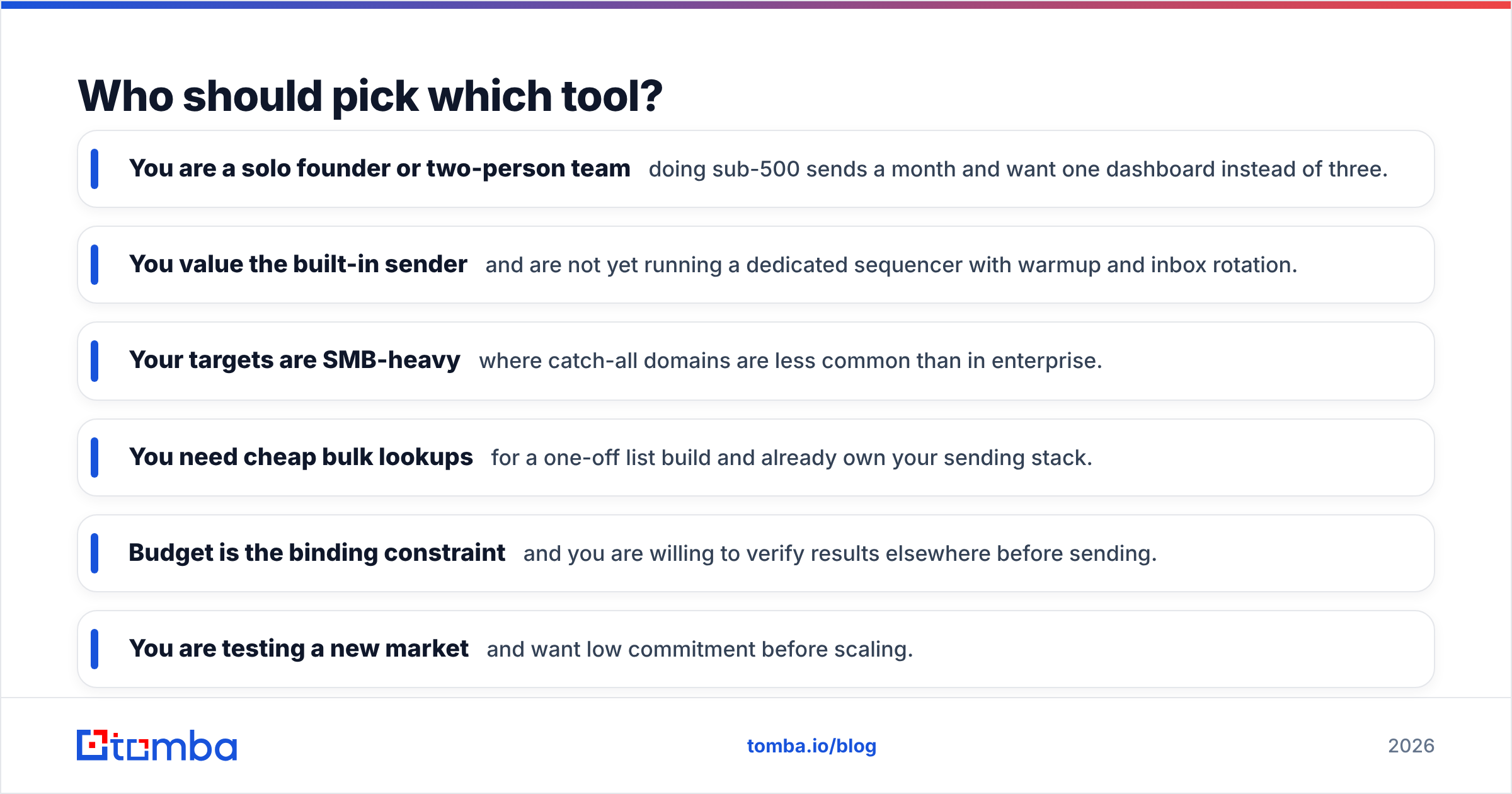
- You are a solo founder or two-person team doing sub-500 sends a month and want one dashboard instead of three.
- You value the built-in sender and are not yet running a dedicated sequencer with warmup and inbox rotation.
- Your targets are SMB-heavy where catch-all domains are less common than in enterprise.
Pick Kipplo if:
- You need cheap bulk lookups for a one-off list build and already own your sending stack.
- Budget is the binding constraint and you are willing to verify results elsewhere before sending.
- You are testing a new market and want low commitment before scaling.
Pick a data-first specialist if:
- Bounce rate is a board-level metric. Deliverability damage costs more than any license.
- You need catch-all resolution because your ICP skews mid-market or enterprise.
- You are building on an API or wiring data into agents, CRMs, and internal tools.
- Your team runs bulk enrichment on tens of thousands of rows where per-credit efficiency compounds.
There is no shame in the first two answers. Plenty of good outbound programs started on an all-in-one and graduated later. The mistake is picking the cheap credit and then blaming your copy when reply rates crater — the copy was fine, the list was not.
How do you protect deliverability whichever you choose?#
Your finder is only the first link. Three habits matter more than vendor choice:
- Verify before every send, not once at import. B2B contact data decays roughly 2–3% per month as people change jobs. A list verified in January is measurably worse by March. Run a fresh email verifier pass on anything older than 30 days.
- Suppress unknowns until you have a reason. If a result comes back catch-all or risky and you cannot resolve it, park it in a separate segment. Send to it from a secondary domain, or not at all.
- Watch your bounce rate weekly, per-domain. Anything above 2–3% is a signal to stop and clean, not to push harder. Google and Microsoft both tightened bulk sender requirements, and their guidance on authentication and complaint rates is worth reading straight from the source at Google's sender guidelines.
None of this is exotic. It is the difference between a list that produces meetings and a list that produces a domain reputation problem you spend a quarter unwinding.
What is the verdict on FindThatLead vs Kipplo?#
FindThatLead wins on breadth; Kipplo wins on entry price; neither wins on data depth.
If you are choosing strictly between the two, the honest answer is that it depends on whether you already own a sequencer. Own one? Kipplo's leaner model wastes less. Don't own one? FindThatLead's bundle is simpler and probably cheaper all-in.
But if you got here because your bounce rate is climbing or your enrichment pipeline keeps stalling on unknowns, the real answer is that this is the wrong bracket. Both tools are built for teams whose main constraint is convenience or budget. Once your constraint becomes data quality at volume, you want a platform where finding, verifying, catch-all resolution, and enrichment are the whole product rather than one tab among several.
Worth noting: this category is wider than these two names. Database-first providers like BookYourData take a different approach again — prebuilt verified lists rather than on-demand lookup — which suits teams that want volume without running their own discovery process. Match the model to how you actually build lists.
Try the data-first alternative#
If you want to see where your current tool is leaking, run the same 100-row control list through the Tomba Email Finder. The free tier gives you 25 searches a month — enough to sanity-check a segment before you spend anything — and Starter runs $49/mo with verification, domain search, and full API access in the same plan. Compare the verified rate, not the raw match rate, and let the bounce numbers decide.
Related guides#
Ready to find emails that actually work?
Join 150,000+ professionals who stopped guessing and started sending. Free credits on signup — no credit card required.
Get the Tomba newsletter
Practical outbound tactics and product updates — once every two weeks.
About the author