FindThatLead vs Labnify: Which Outbound Tool Wins in 2026?
FindThatLead finds and enriches leads. Labnify sends mail at volume. They are not the same product, and picking the wrong one costs you a quarter. Here is the honest breakdown, plus where each one breaks.
TL;DR
- They are not direct competitors. FindThatLead is a prospecting and lead-data tool. Labnify is a bulk email sending platform. Buying one expecting the other's job is the most common mistake in this comparison.
- FindThatLead gives you domain search, LinkedIn-based lead search, verification, and a light sending layer. Its published Growth plan sits around $49/mo with credit-based limits.
- Labnify is built around volume sending — SMTP relay, list handling, campaign blasts — and competes with Mailgun, Sendgrid, and Gmail-based mailers far more than with an email finder.
- The realistic stack is finder + verifier + sender, not one tool pretending to be all three. Whichever you pick, verify before you send.
- If your bottleneck is data accuracy, a dedicated email finder with a hard-verification step will beat the finder module bundled inside a sending tool nearly every time.
What is FindThatLead, exactly?#
FindThatLead is a Spain-built B2B prospecting platform that has been around since 2015. Its core job is turning a company domain, a name, or a LinkedIn profile into a working business email address, then pushing that list somewhere you can act on it.
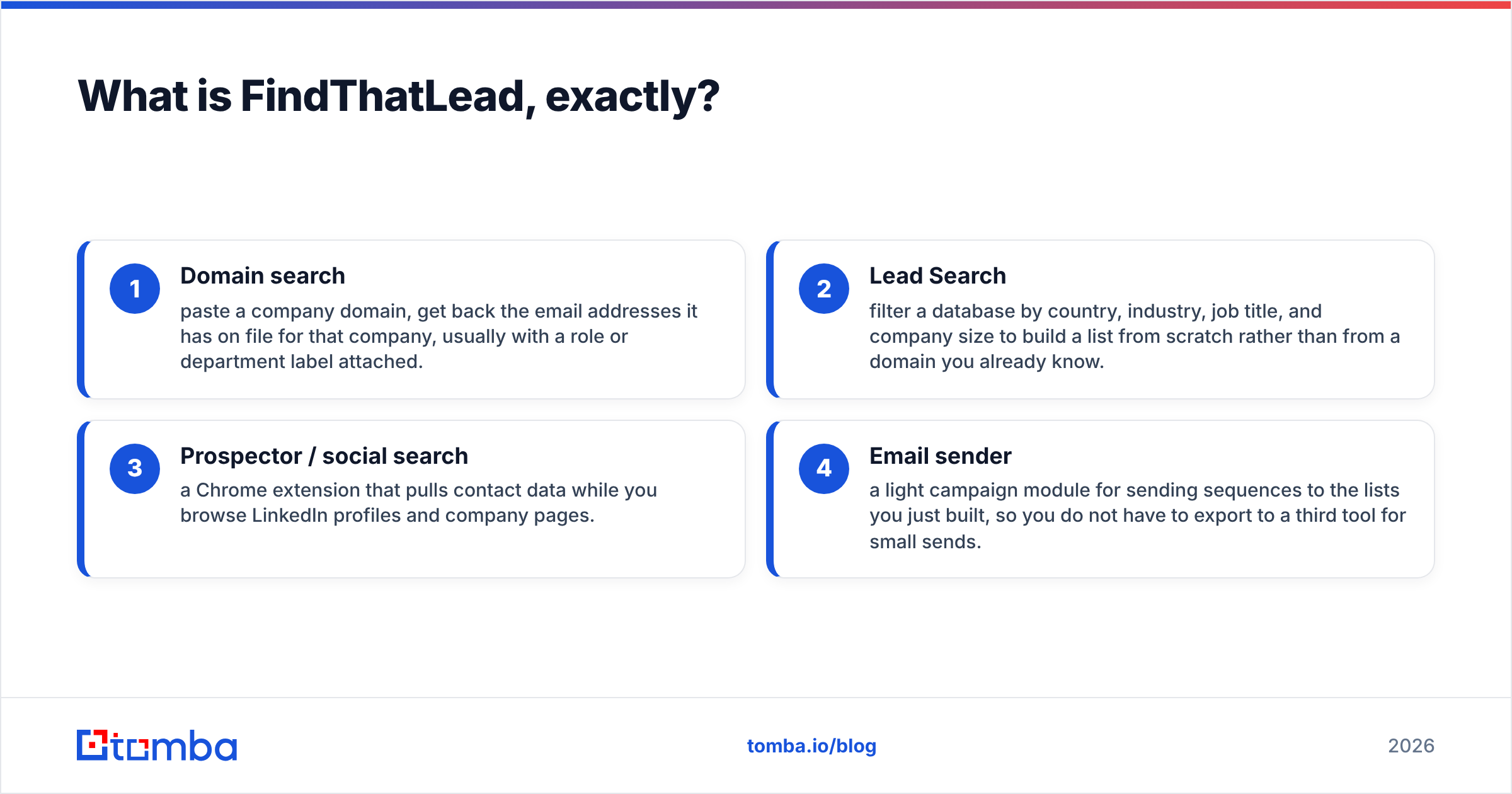
The feature set breaks down into four buckets:
- Domain search — paste a company domain, get back the email addresses it has on file for that company, usually with a role or department label attached.
- Lead Search — filter a database by country, industry, job title, and company size to build a list from scratch rather than from a domain you already know.
- Prospector / social search — a Chrome extension that pulls contact data while you browse LinkedIn profiles and company pages.
- Email sender — a light campaign module for sending sequences to the lists you just built, so you do not have to export to a third tool for small sends.
That last bucket matters for this comparison. FindThatLead's sender exists, but it is a convenience feature bolted onto a data product. It is not a deliverability platform, and the vendor does not really market it as one. Check the current feature list on findthatlead.com before you assume a specific capability is included on your tier — the packaging has shifted more than once.
What is Labnify, and why does it get compared to FindThatLead?#
Labnify is a mailer. Its pitch centers on sending large volumes of email cheaply — a relay plus campaign layer aimed at people who found bulk sending through Mailchimp, Sendgrid, or Amazon SES too expensive or too restrictive at scale.
So why does anyone search "FindThatLead vs Labnify"? Two reasons:
- Both show up in the same "cold email tools" listicles, which flatten very different products into one category.
- Both are positioned as budget-friendly alternatives to the enterprise stack, so they attract the same buyer: a founder or small sales team trying to run outbound for a few hundred dollars a month.
The honest framing is that FindThatLead answers "who do I email?" and Labnify answers "how do I send 50,000 emails without going bankrupt?" Those are sequential problems, not competing ones. If you compare them head to head on a single scorecard, you will end up rating a hammer against a saw.

How do FindThatLead and Labnify compare feature by feature?#
Here is the side-by-side, with a dedicated email-finding tool included as a reference point so you can see where each product's real strength sits.
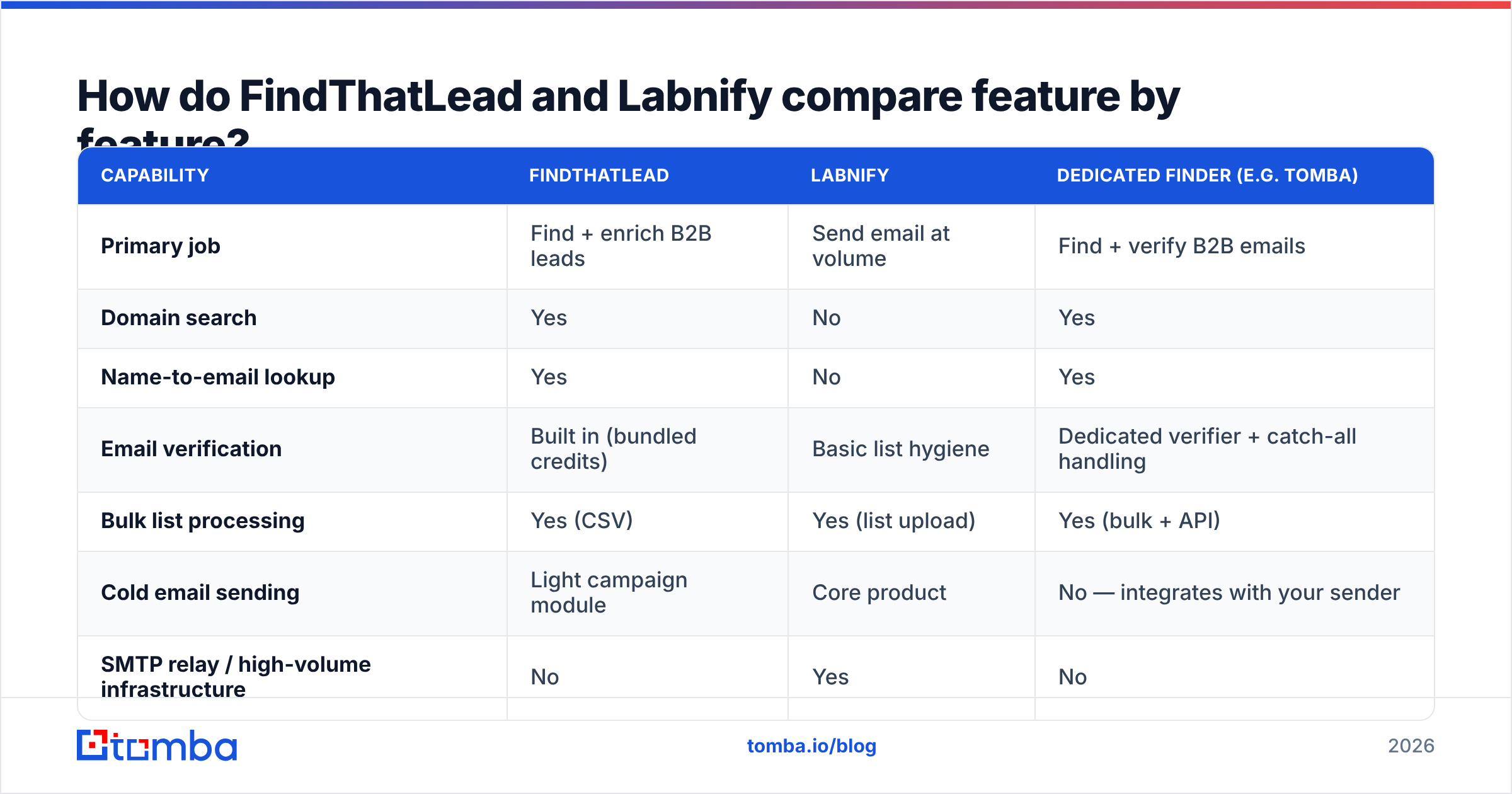
| Capability | FindThatLead | Labnify | Dedicated finder (e.g. Tomba) |
|---|---|---|---|
| Primary job | Find + enrich B2B leads | Send email at volume | Find + verify B2B emails |
| Domain search | Yes | No | Yes |
| Name-to-email lookup | Yes | No | Yes |
| Email verification | Built in (bundled credits) | Basic list hygiene | Dedicated verifier + catch-all handling |
| Bulk list processing | Yes (CSV) | Yes (list upload) | Yes (bulk + API) |
| Cold email sending | Light campaign module | Core product | No — integrates with your sender |
| SMTP relay / high-volume infrastructure | No | Yes | No |
| Chrome extension | Yes | No | Yes |
| Public API | Yes | Yes (sending) | Yes (find, verify, enrich) |
| Best fit | Building the list | Delivering the list | Making the list accurate |
The pattern is clear once you lay it out. There is essentially one row where these two overlap — sending — and it is the row where each is weakest against a real specialist.
What does each one cost in 2026?#
Pricing on both products moves, and both run promotional and lifetime-deal pricing periodically, so treat the table below as a shape rather than a quote. Confirm on the vendor pages before you buy.
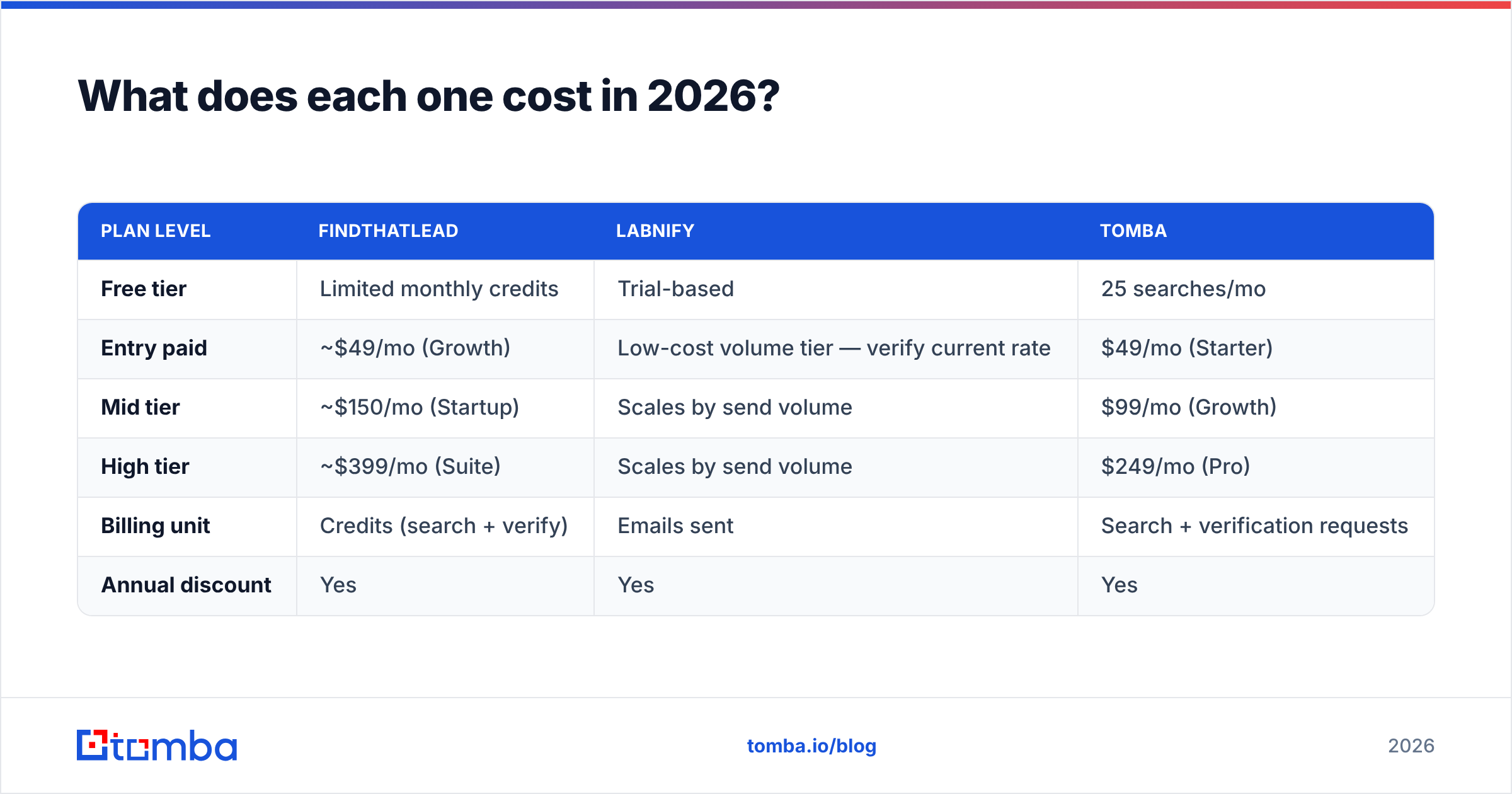
| Plan level | FindThatLead | Labnify | Tomba |
|---|---|---|---|
| Free tier | Limited monthly credits | Trial-based | 25 searches/mo |
| Entry paid | ~$49/mo (Growth) | Low-cost volume tier — verify current rate | $49/mo (Starter) |
| Mid tier | ~$150/mo (Startup) | Scales by send volume | $99/mo (Growth) |
| High tier | ~$399/mo (Suite) | Scales by send volume | $249/mo (Pro) |
| Billing unit | Credits (search + verify) | Emails sent | Search + verification requests |
| Annual discount | Yes | Yes | Yes |
Two things to notice.
First, the billing units are incompatible. FindThatLead charges you for looking things up. Labnify charges you for pushing things out. A "credit" in one product has no relationship to a "credit" in the other, which makes any raw price-per-unit comparison between them meaningless. Compare FindThatLead's credit cost to other finders and Labnify's per-thousand-send cost to other relays.
Second, credit burn is the hidden cost in any finder. If a tool consumes a credit on a failed lookup, your effective cost per usable contact can be double the sticker price. Before committing to an annual plan, run 100 known-good domains through the trial and count how many usable, verified addresses come back. That number — not the headline price — is what you are actually buying. You can compare that math against Tomba pricing using the same 100-domain test.
Which one has better data quality?#
This question only applies to FindThatLead, because Labnify does not sell contact data. But it is the question that decides whether the whole comparison matters, so it is worth breaking down properly.
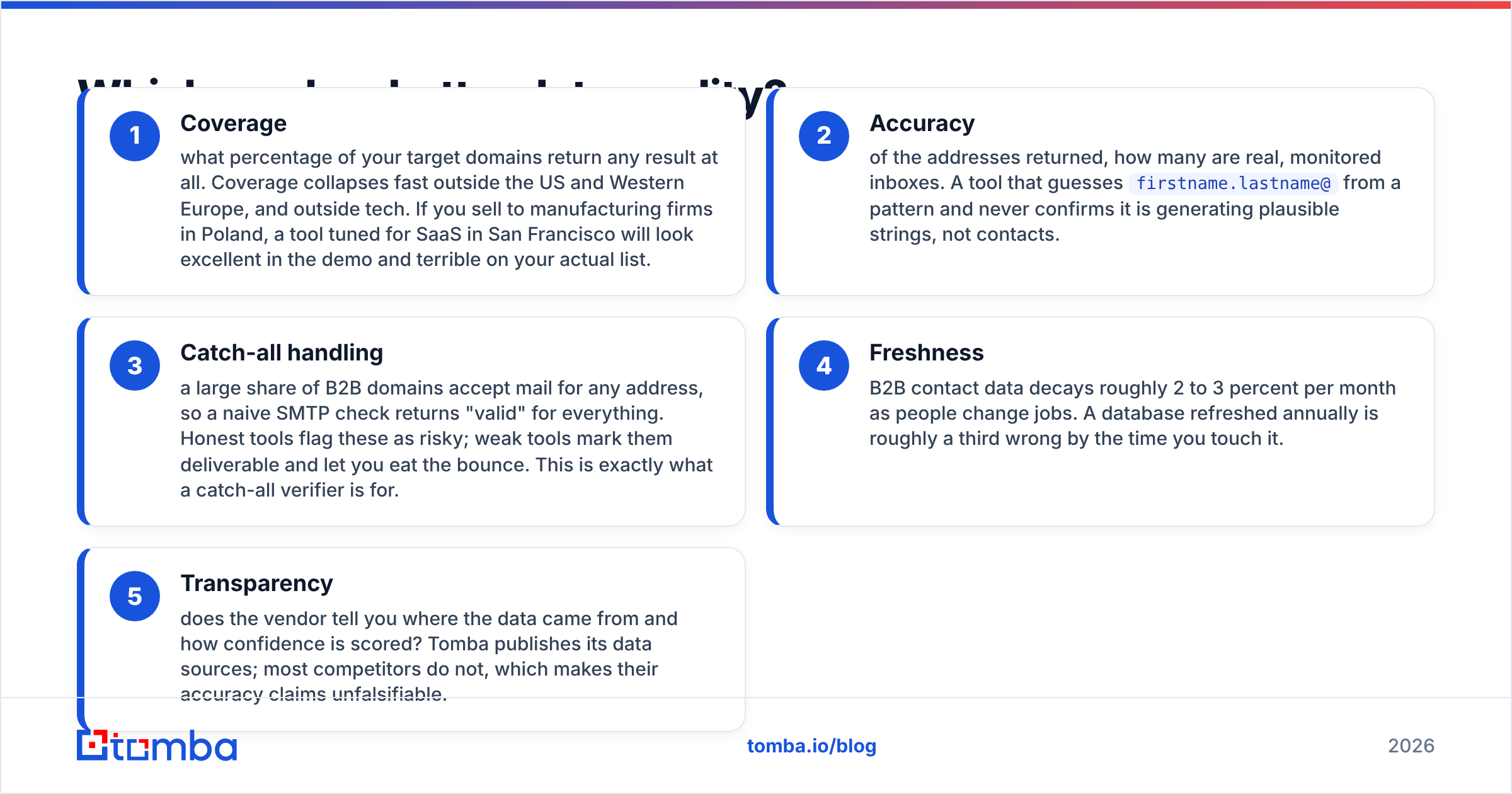
Judge any lead-data source on five axes:
- Coverage — what percentage of your target domains return any result at all. Coverage collapses fast outside the US and Western Europe, and outside tech. If you sell to manufacturing firms in Poland, a tool tuned for SaaS in San Francisco will look excellent in the demo and terrible on your actual list.
- Accuracy — of the addresses returned, how many are real, monitored inboxes. A tool that guesses
firstname.lastname@from a pattern and never confirms it is generating plausible strings, not contacts. - Catch-all handling — a large share of B2B domains accept mail for any address, so a naive SMTP check returns "valid" for everything. Honest tools flag these as risky; weak tools mark them deliverable and let you eat the bounce. This is exactly what a catch-all verifier is for.
- Freshness — B2B contact data decays roughly 2 to 3 percent per month as people change jobs. A database refreshed annually is roughly a third wrong by the time you touch it.
- Transparency — does the vendor tell you where the data came from and how confidence is scored? Tomba publishes its data sources; most competitors do not, which makes their accuracy claims unfalsifiable.
FindThatLead scores respectably on coverage for common Western B2B domains and includes verification credits so you are not forced to buy a second tool immediately. Where users most often report friction is on catch-all domains and on smaller or non-English companies, where the pattern-guessing fallback starts producing addresses that look right and bounce anyway. Read recent user reviews on G2 rather than the vendor's own testimonials page — the complaint patterns there are more useful than the star rating.

Which is better for cold email deliverability?#
Neither, honestly — and that is not a dodge, it is the most important sentence in this post.
Volume sending and cold outreach are different disciplines. Labnify is optimized for throughput: get a lot of mail out, cheaply, through a relay. That is genuinely useful for transactional mail, newsletters, and permission-based campaigns. Applied to cold outreach on a domain you care about, throughput without discipline is how you burn a sending domain in three weeks.
Cold email deliverability depends on things neither product controls for you:
- Authentication. SPF, DKIM, and DMARC configured correctly on the sending domain. Google and Yahoo's bulk-sender requirements made DMARC effectively mandatory, and misconfigured records are still the single most common cause of "my emails vanish."
- Warmup. New domains and new mailboxes need weeks of gradual ramp. Sending 5,000 messages from a two-week-old domain is a spam-folder guarantee regardless of which platform pushes the button.
- List hygiene. Bounce rate above roughly 2 to 3 percent tells mailbox providers you scraped a stale list. This is where the finder and the sender connect: bad data at the top of the funnel destroys deliverability at the bottom.
- Volume per mailbox. Cold sequencing tools cap per-inbox daily sends deliberately. A relay built for volume does not, which is a feature for newsletters and a liability for cold outreach.
- Content and reply rate. Engagement signals matter more than any header trick. A relay cannot fix a bad first line.
If cold outreach is the actual goal, the sensible architecture is a finder for data, a verifier as a gate, and a purpose-built sequencer with per-mailbox throttling and warmup. Labnify slots in when you have graduated to genuinely large, permission-based volume — not as your cold-outbound sender.
Who should choose FindThatLead, and who should choose Labnify?#
Choose FindThatLead if:
- You need to build lists from scratch and do not already have a target account list.
- Your ICP sits in US or Western European tech, where its coverage is strongest.
- You want lead search, enrichment, and light sending in one subscription and can live with each being good rather than best in class.
- You work primarily inside LinkedIn and want a browser extension in that workflow.
Choose Labnify if:
- You already have a clean, permissioned list and your bottleneck is send cost at volume.
- You are moving off Sendgrid, Mailgun, or SES for pricing reasons.
- You have in-house control of authentication, warmup, and suppression lists.
- Your mail is newsletters, product updates, or transactional — not cold prospecting.
Choose neither as your single tool if:
- Bounce rate is your current pain. That is a verification problem, not a finding problem or a sending problem.
- You need API-level access to plug lookups into your own enrichment pipeline or CRM sync.
- Your list is international, and coverage outside the core markets is what is failing you.
Where does a dedicated email finder fit in this stack?#
Between the two. The reason "FindThatLead vs Labnify" is an awkward comparison is that the thing most outbound teams actually need sits between them: an accurate, verified contact record, delivered through an API, that any sender can consume.
That is the specialist layer. A dedicated finder does not try to own your campaigns or your relay — it owns the accuracy of the record, then hands off. Concretely, that looks like:
- Domain search to pull every known address on a target company, with roles and confidence scores attached.
- Name-to-email lookup for the specific decision-maker you identified, rather than a generic
info@. - Email verification as a hard gate before anything enters a sequence, with explicit catch-all and role-account flags instead of a single misleading "valid."
- Bulk processing and an API so the whole loop runs inside your own pipeline instead of a series of CSV exports.
Run that layer well and both of the tools in this comparison get better. FindThatLead's sender stops bouncing. Labnify's volume actually reaches inboxes. The list is the constraint; everything downstream inherits its quality.
What is the verdict on FindThatLead vs Labnify?#
If you are choosing between them for the same job, you have misdiagnosed the job. FindThatLead is the better buy when you need contact data and light outreach in one place. Labnify is the better buy when you need cheap, high-volume delivery for mail people asked for. Neither is a complete cold-outbound stack on its own, and neither should be evaluated on the other's home turf.
Test both against your real list, not a demo list. Pull 100 target domains you know well, run them through FindThatLead, and count verified, usable addresses — not raw results. Then decide whether your problem is finding, verifying, or sending. In most audits, it turns out to be verifying.
Ready to fix the data layer first? Start with the Tomba Email Finder — 25 free searches a month, no card required, with verification and catch-all detection built into the same lookup. Test it against the same 100 domains you used for FindThatLead and compare verified-contact counts side by side. If the numbers do not improve, you have lost nothing but an afternoon. If they do, you have found the leak that was quietly capping every campaign downstream.
Related guides#
Ready to find emails that actually work?
Join 150,000+ professionals who stopped guessing and started sending. Free credits on signup — no credit card required.
Get the Tomba newsletter
Practical outbound tactics and product updates — once every two weeks.
About the author