FindThatLead vs LeadFuze (2026): Which Lead Tool Wins?
FindThatLead and LeadFuze both promise prospect lists on tap, but they solve different problems at very different prices. Here is the honest breakdown of accuracy, credits, and total cost before you commit.
TL;DR
- FindThatLead is an email finder with a light outreach layer bolted on. You bring the target list, it returns addresses.
- LeadFuze is a lead database with search filters and automated list building. You describe an ICP, it builds the list for you.
- LeadFuze costs roughly 3x more per month at entry level, and its credits burn on every record returned — not every record you actually use.
- Neither ships a serious verification engine, so you will pay a third tool to clean the output either way.
- If your bottleneck is "I have the companies, I need the people," a dedicated email finder with built-in verification covers the same job for less.
What is FindThatLead and what is LeadFuze?#
They get compared constantly, and they shouldn't be. They're two different product categories wearing similar marketing.
FindThatLead is a Spanish-built prospecting tool that started as a Chrome extension for pulling emails off LinkedIn profiles and company sites. Its core loop: give it a domain, a first/last name, or a LinkedIn URL, and it returns a best-guess business email. Over the years it added a bulk uploader, a small sender called Scrab.in for LinkedIn automation, and a basic drip email tool.
LeadFuze is a lead database. You don't feed it names — you feed it filters: industry, headcount, revenue range, technology installed, role, location, even "hiring for sales roles right now." It returns whole lists of contacts matching that profile, complete with emails and sometimes phone numbers. Its signature feature, Fuzebot, keeps building the list on autopilot and adds new matches as they appear.
The practical difference in one line: FindThatLead answers "what is this person's email?" LeadFuze answers "who should I be emailing?"
That distinction decides almost everything downstream — pricing model, credit burn, data quality complaints, and which one is a waste of money for your team.
How do FindThatLead and LeadFuze compare head to head?#
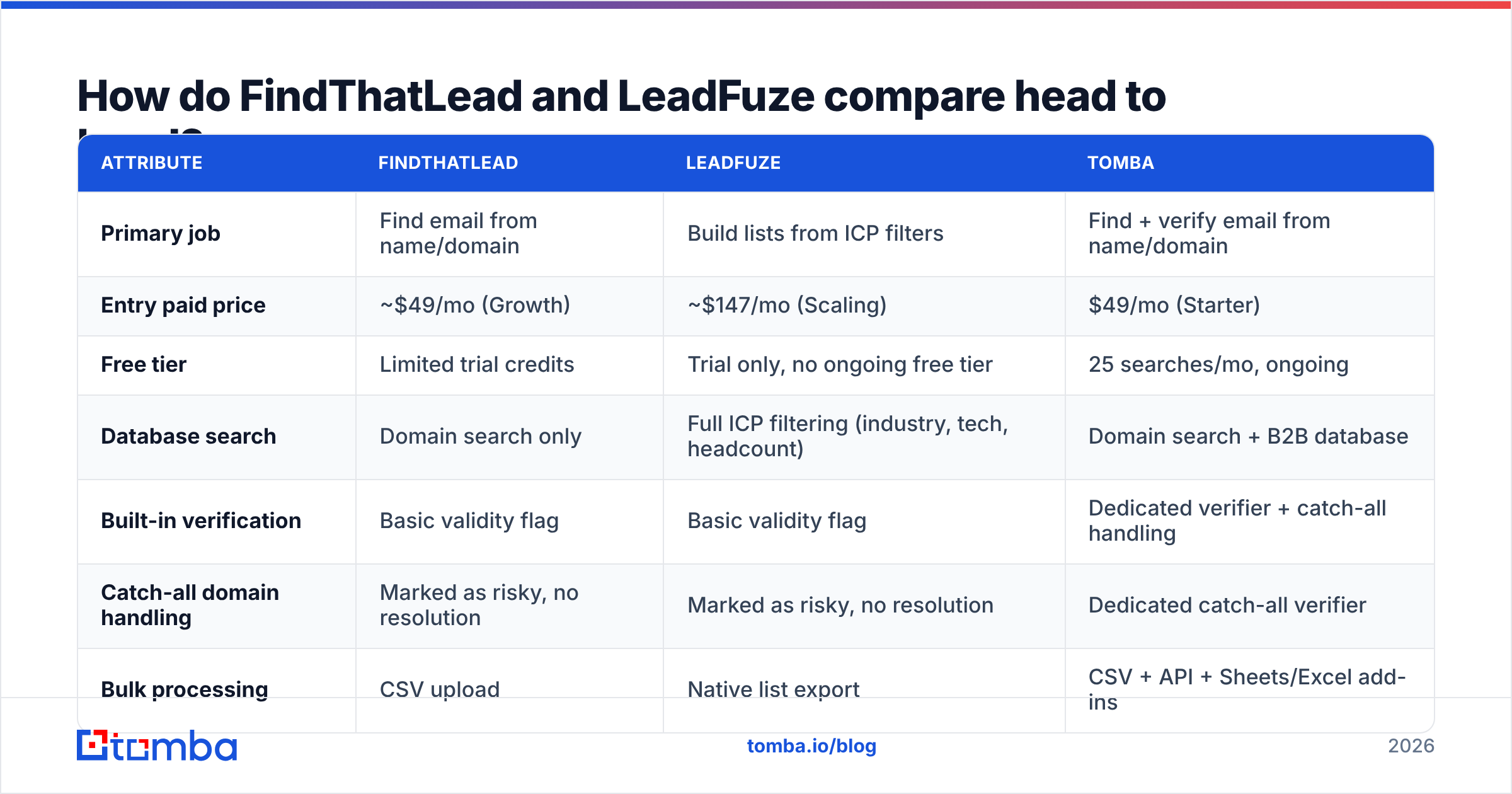
Here's the side-by-side on the attributes that actually change your workflow. Published pricing shifts, so treat these as directional and check the vendor pages before you buy.
| Attribute | FindThatLead | LeadFuze | Tomba |
|---|---|---|---|
| Primary job | Find email from name/domain | Build lists from ICP filters | Find + verify email from name/domain |
| Entry paid price | ~$49/mo (Growth) | ~$147/mo (Scaling) | $49/mo (Starter) |
| Free tier | Limited trial credits | Trial only, no ongoing free tier | 25 searches/mo, ongoing |
| Database search | Domain search only | Full ICP filtering (industry, tech, headcount) | Domain search + B2B database |
| Built-in verification | Basic validity flag | Basic validity flag | Dedicated verifier + catch-all handling |
| Catch-all domain handling | Marked as risky, no resolution | Marked as risky, no resolution | Dedicated catch-all verifier |
| Bulk processing | CSV upload | Native list export | CSV + API + Sheets/Excel add-ins |
| API access | Yes, higher tiers | Yes, higher tiers | Yes, all paid tiers |
| LinkedIn workflow | Chrome extension + Scrab.in | No native extension | Chrome extension + LinkedIn finder |
| Phone numbers | No | Limited | Yes, via phone finder |
| Best for | SMB teams with a target list | Agencies needing volume discovery | Teams that need accurate, verified sends |
Which one actually finds more valid emails?#
This is where most comparison posts hand-wave, so let's be precise about what "accuracy" means, because the two tools fail differently.
FindThatLead is a pattern-and-verify tool. It guesses the likely format for a domain (first.last@, f.last@, firstlast@), then runs an SMTP-level check to see whether the mailbox appears to exist. When the domain publishes clean MX records and rejects unknown recipients, this works well. When the domain is a catch-all — accepting mail to any address so it can't tell you which mailbox is real — you get a shrug labelled "risky" and you're on your own.
LeadFuze is a database-first tool. Records come from aggregated sources and are stamped with a validity status at the time they entered the index. That means freshness is the failure mode, not guessing. A contact who changed jobs eight months ago may still sit in the list looking perfectly valid. Users on G2 consistently flag stale roles and job-change drift as the main complaint — which is the structural weakness of any static database, not a LeadFuze-specific flaw.

The four things that actually move accuracy, in order of impact:
- Verification depth. A tool that only checks syntax and MX records will pass addresses that bounce. Real verification does an SMTP handshake and interprets the response codes properly.
- Catch-all resolution. Roughly a fifth of B2B domains are catch-all. A tool that dumps them into "unknown" is handing you a coin flip on a fifth of your list. A catch-all verifier that reasons about historical patterns on the domain is the difference between sending and guessing.
- Recency of the underlying record. Job changes run 15-25% annually in B2B sales and marketing roles. A database refreshed quarterly is wrong about one in twenty contacts before you even export.
- Role vs personal address bias. info@ and sales@ inflate hit-rate stats and destroy reply rates. Check whether the "found" count includes generic mailboxes.
- Bounce-rate honesty. Any vendor quoting a hit rate without quoting a bounce rate is quoting the wrong number. Ask for both.
Neither FindThatLead nor LeadFuze markets a standalone verification product, which is why most teams running either one end up paying a separate email verifier to scrub exports before they touch a sending domain. That extra line item belongs in your cost comparison.
What do FindThatLead and LeadFuze really cost?#
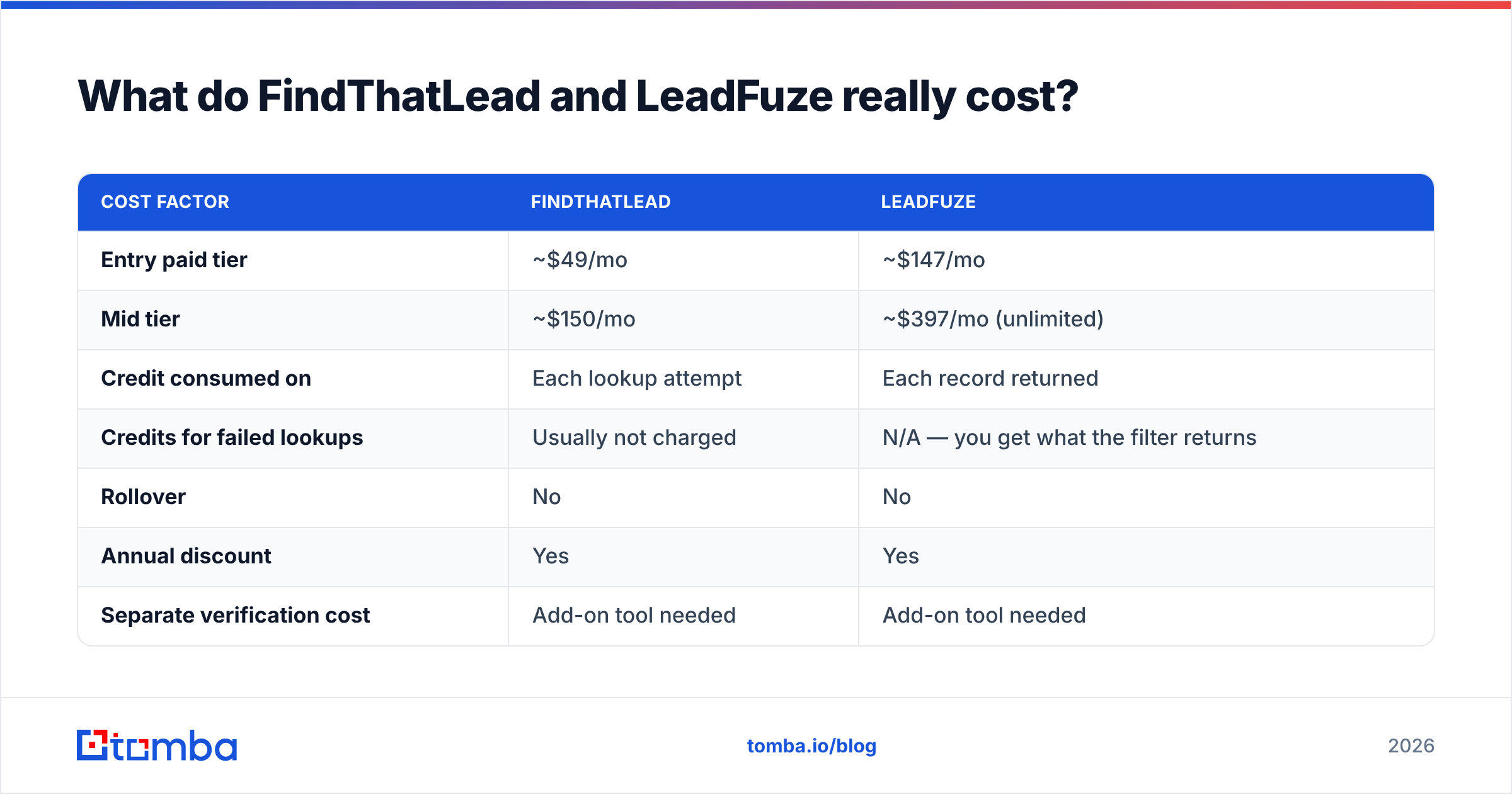
Sticker price is the least interesting number. Credit semantics matter more.
| Cost factor | FindThatLead | LeadFuze |
|---|---|---|
| Entry paid tier | ~$49/mo | ~$147/mo |
| Mid tier | ~$150/mo | ~$397/mo (unlimited) |
| Credit consumed on | Each lookup attempt | Each record returned |
| Credits for failed lookups | Usually not charged | N/A — you get what the filter returns |
| Rollover | No | No |
| Annual discount | Yes | Yes |
| Separate verification cost | Add-on tool needed | Add-on tool needed |
| Realistic all-in monthly | $49 + verifier | $147 + verifier |
The LeadFuze model punishes imprecise targeting. If your filter is loose and it returns 500 records, you paid for 500 records — including the 300 that were never a fit. Tight ICP definition isn't a nice-to-have there, it's a budget control.
FindThatLead's model punishes low-quality input. Feed it a messy name list scraped from an event page and you'll burn lookups on people whose names are formatted wrong. Clean input first.
For reference, Tomba pricing sits at Free (25 searches/mo), Starter $49/mo, Growth $99/mo, Pro $249/mo, with Enterprise custom — and verification is part of the same account rather than a second subscription. That single-vendor consolidation is usually worth more than the headline discount.
Is LeadFuze worth 3x the price of FindThatLead?#
Sometimes. Here's the honest test.
LeadFuze earns the premium when discovery is your bottleneck. If you're an agency onboarding a new client every month, and each one needs a fresh list built from scratch against a new ICP, the filtering engine and Fuzebot automation save real human hours. Paying a researcher to assemble that list manually costs far more than $147.
LeadFuze is overkill when you already know your accounts. If your team works a named-account list, or your SDRs pull targets from LinkedIn Sales Navigator, or your ICP is "companies using Shopify in DACH" and you already have the domain list — you're paying for a discovery engine you'll never turn on. In that case you need lookups, not search, and FindThatLead or a comparable domain search tool covers it at a third of the cost.

One more consideration people miss: LeadFuze's value decays if you don't consume the list. Unused credits don't roll over. A team that exports 1,000 contacts and only works 200 of them is paying full price for 20% utilization. Measure your actual monthly worked contact count, not your ambition.
What about deliverability and list hygiene?#
This is the part that quietly decides whether either tool pays for itself.
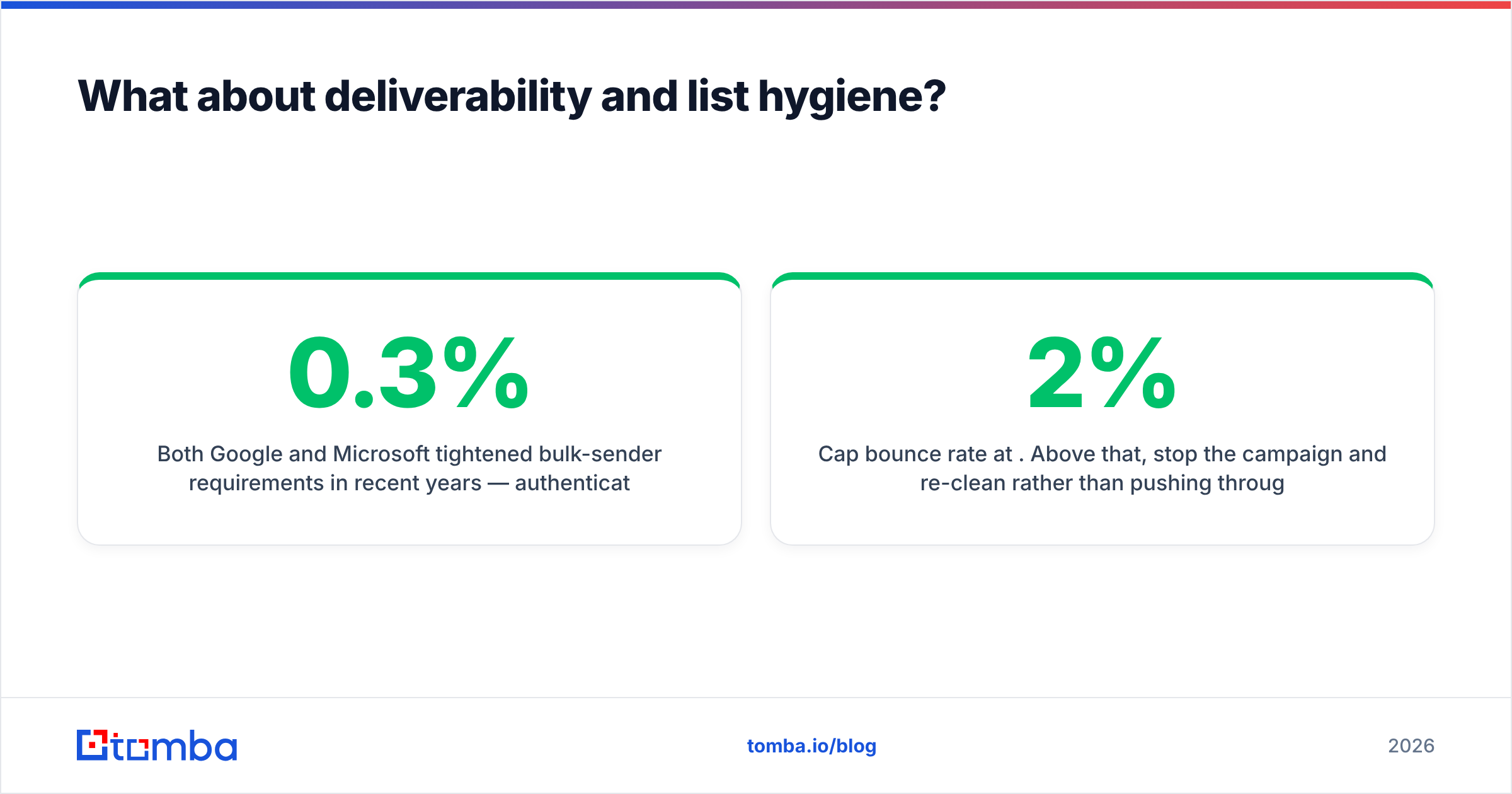
Both Google and Microsoft tightened bulk-sender requirements in recent years — authenticated sending, one-click unsubscribe, and a spam-complaint rate held under 0.3%. Neither threshold cares where you got the address. If you export 2,000 contacts from a database and 12% bounce, your sender reputation absorbs the damage immediately, and recovering it takes weeks.
The workflow that survives contact with reality:
- Never send straight from an export. Not from LeadFuze, not from FindThatLead, not from anywhere. Run the list through verification first.
- Split by confidence tier. Send to confirmed-valid addresses on your primary domain. Route catch-all and risky addresses to a secondary domain, or drop them entirely.
- Cap bounce rate at 2%. Above that, stop the campaign and re-clean rather than pushing through.
- Re-verify anything older than 90 days. Database records rot. A contact verified in Q1 is a guess by Q3.
- Watch complaint rate, not just bounces. A valid address that didn't want your email is worse than a bounce.

If you're running high volume, doing this at scale matters more than the per-contact price. A bulk verify pass on a 10,000-row export before launch costs far less than the recovery effort after a deliverability incident.
Which should you pick in 2026?#
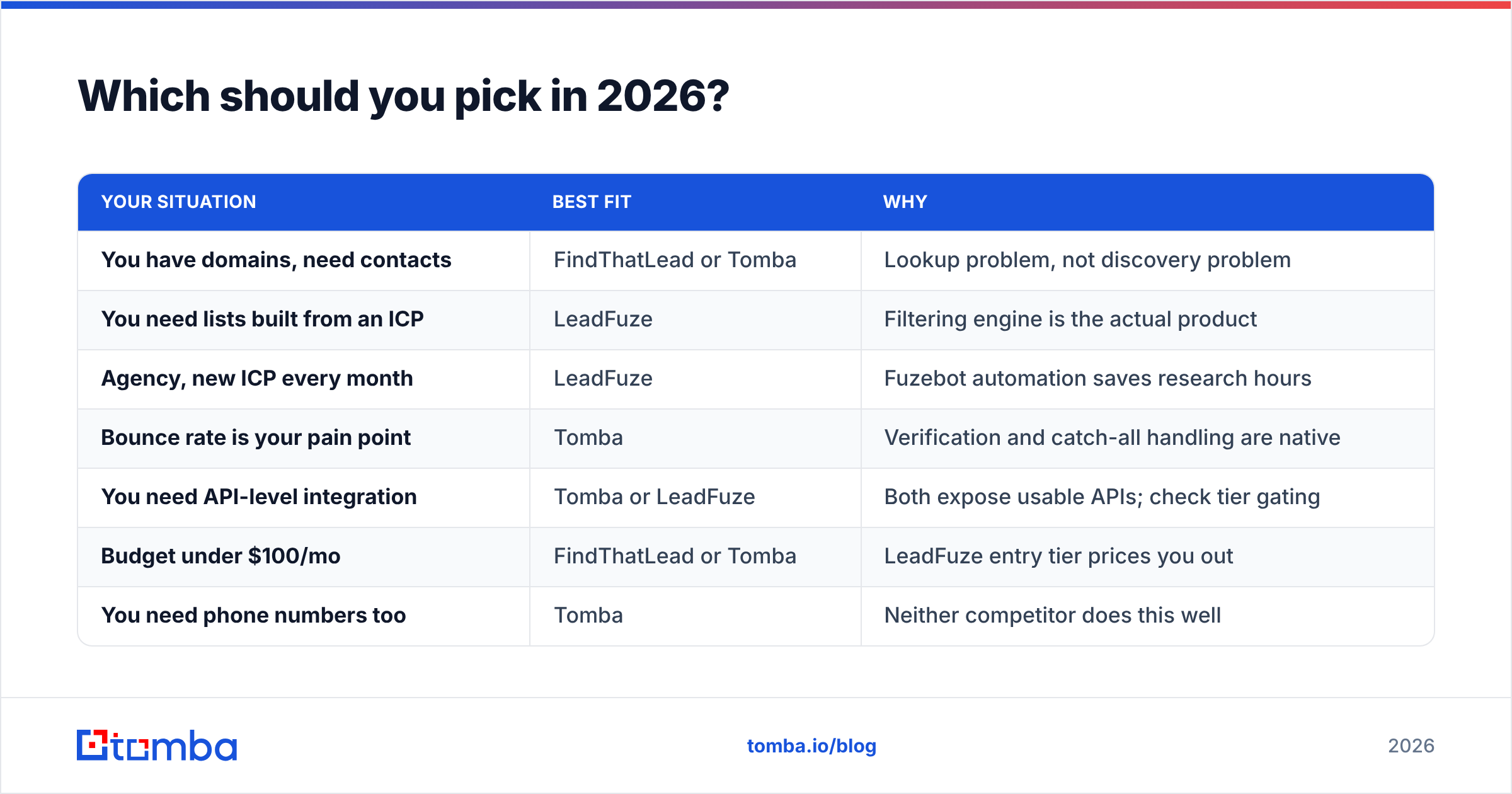
Short version: pick by bottleneck, not by feature count.
| Your situation | Best fit | Why |
|---|---|---|
| You have domains, need contacts | FindThatLead or Tomba | Lookup problem, not discovery problem |
| You need lists built from an ICP | LeadFuze | Filtering engine is the actual product |
| Agency, new ICP every month | LeadFuze | Fuzebot automation saves research hours |
| Bounce rate is your pain point | Tomba | Verification and catch-all handling are native |
| You need API-level integration | Tomba or LeadFuze | Both expose usable APIs; check tier gating |
| Budget under $100/mo | FindThatLead or Tomba | LeadFuze entry tier prices you out |
| You need phone numbers too | Tomba | Neither competitor does this well |
The honest read on FindThatLead: it's a competent, affordable finder with a UI that shows its age and an outreach layer that most teams end up replacing with a dedicated sequencer anyway. Buy it for the finder, not the bundle.
The honest read on LeadFuze: the search filtering is genuinely good, and the technology-installed and hiring-signal filters are legitimately hard to replicate cheaply. But you are buying a snapshot of a database, and snapshots age. Budget for verification, and be ruthless about tight filters so you don't burn credits on records you'll never work.
And the read most vendors won't give you: for a large share of B2B teams, the entire discovery layer is redundant. You already know your target accounts. You got them from an event list, a Sales Navigator search, a partner referral, or your own CRM. What you're missing is the contact, verified, at the right person — which is a $49/mo problem, not a $147/mo one.
How do you test either tool properly before paying?#
Run the same benchmark on both. It takes an hour and saves months of regret.
- Build a 50-contact ground-truth list. Use people whose email you already know — customers, partners, past contacts. Never use a random sample you can't grade.
- Run it through each tool. Record found/not-found, and the confidence label each tool applies.
- Score three numbers separately. Coverage (what % returned an address), precision (what % of returned addresses were correct), and catch-all rate (what % came back unresolved).
- Send a real test batch. Take 100 unknown contacts per tool, verify them, send a plain, low-risk email, and log the actual bounce rate. This is the only number that matters.
- Price the full stack. Tool cost plus verification cost plus the hours someone spends cleaning exports. Compare totals, not sticker prices.
Most teams discover their real gap in step 3. Coverage looks great, precision looks fine, and then 18% of the list comes back as catch-all with no way to resolve it — which is a fifth of your pipeline sitting in limbo.
Ready to stop paying twice for finding and verifying?#
If you already know which companies you're targeting and just need accurate, verified contacts at the right people, the Tomba Email Finder handles both halves in one account — pattern detection, SMTP verification, catch-all resolution, and bulk processing without a second subscription. Start on the free tier with 25 searches a month, run it against your own ground-truth list, and compare the bounce rate to whatever you're using now. If it doesn't beat your current stack on verified-contact cost, you'll have the data to say so.
Try the Tomba Email Finder and benchmark it against your current list this week.
Related guides#
Ready to find emails that actually work?
Join 150,000+ professionals who stopped guessing and started sending. Free credits on signup — no credit card required.
Get the Tomba newsletter
Practical outbound tactics and product updates — once every two weeks.
About the author