FindThatLead vs LeadMine: Which Email Finder Wins in 2026?
FindThatLead and LeadMine both promise verified B2B emails without enterprise pricing. We break down accuracy, credit math, catch-all handling, and which one actually deserves your budget in 2026.
TL;DR
- FindThatLead is a prospecting suite: email finder, lead search, Chrome extension, and a built-in cold email sender. Best if you want one tool to find and send.
- LeadMine is a leaner lookup tool: a searchable B2B contact database plus an email finder with a claimed verification step. Best if you only want contacts and will send elsewhere.
- Accuracy is close on clean, mid-market domains. Both degrade on catch-all domains, small companies, and non-English markets — which is where most of your bounce rate actually comes from.
- Credit math matters more than headline price. FindThatLead consumes credits on searches that return nothing useful; LeadMine's database queries are cheaper but shallower outside the US.
- If neither wins outright for you, a dedicated finder + verifier stack (Tomba, or a database-first option like BookYourData) usually beats bolting a mediocre sender onto a mediocre finder.
What are FindThatLead and LeadMine?#
Both tools solve the same first-mile problem in outbound: you know who you want to reach, and you need a working email address.
FindThatLead launched out of Barcelona and grew into a full prospecting suite. You get an email finder (name + domain), a domain-level "Prospector" that pulls contacts by role and location, a Chrome extension for LinkedIn, a bulk CSV processor, and Scrab.in / Sender modules for outreach. It is deliberately positioned as the all-in-one for solo founders and small agencies who don't want to buy three subscriptions.
LeadMine is narrower and quieter. Its core is a B2B contact database you query by job title, industry, location, and company size, plus an email finder API that returns a confidence score. There's a Chrome extension too, but there is no sending layer — LeadMine hands you the data and expects your sequencer to do the rest.
That difference in scope is the whole comparison. You're not really choosing between two email finders. You're choosing between a suite that does several things adequately and a tool that does one thing and stops.
How do FindThatLead and LeadMine compare at a glance?#
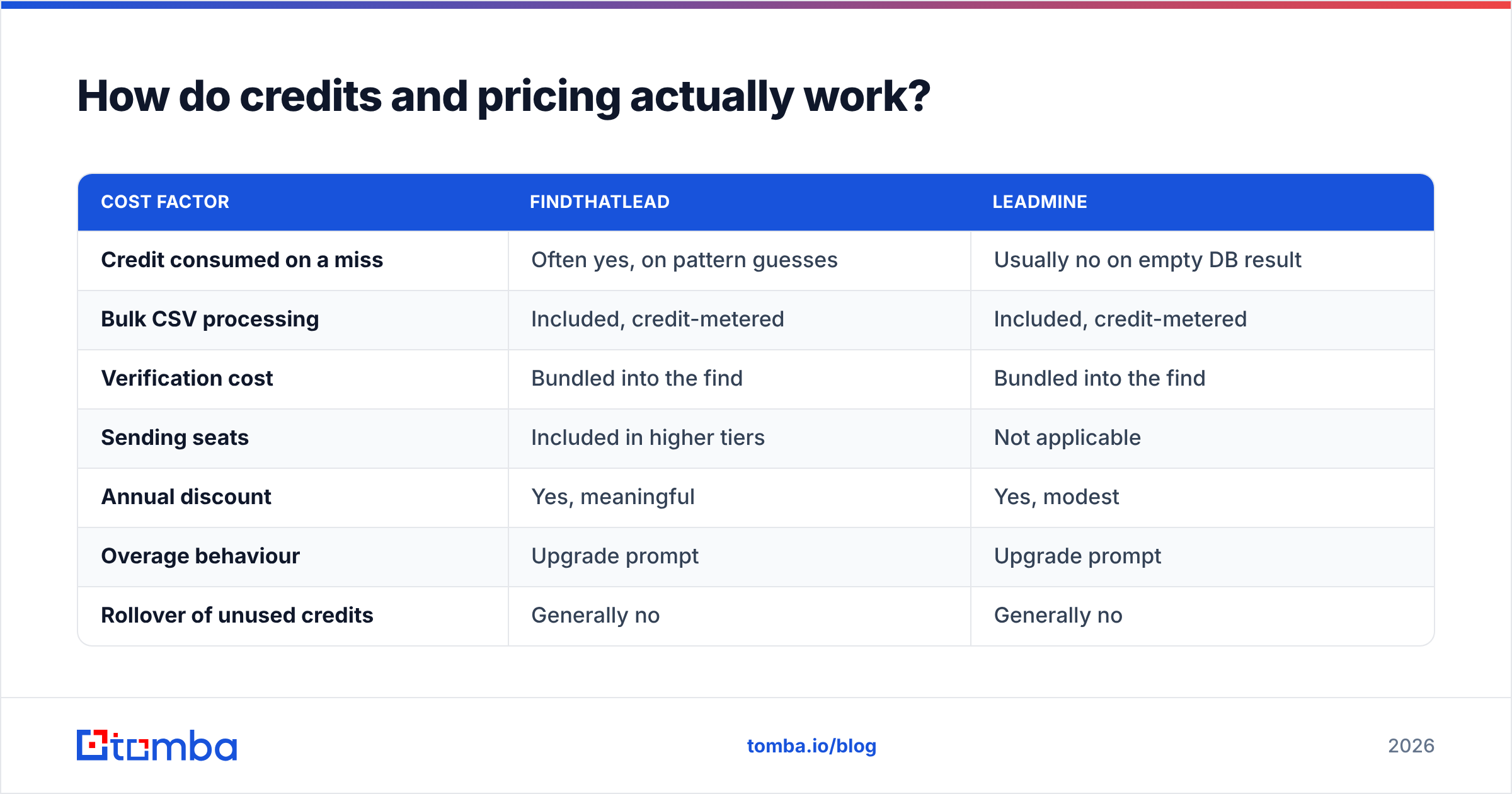
| Attribute | FindThatLead | LeadMine |
|---|---|---|
| Primary strength | All-in-one prospect + send | Searchable B2B database |
| Email finder (name + domain) | Yes | Yes |
| Domain / bulk search | Yes (Prospector + CSV) | Yes (database filters) |
| Built-in verification | Basic, bundled | Confidence score per result |
| Catch-all handling | Marked as "risky", no deep check | Flagged, no deep check |
| Cold email sending | Yes (Sender module) | No |
| LinkedIn extension | Yes (Scrab.in) | Yes |
| Public API | Limited | Yes |
| Free tier | Small monthly credit grant | Small trial credit grant |
| Typical entry price | Roughly $49–$60/mo published list | Roughly $49/mo published list |
| Best for | Solo founders, small agencies | Analysts, list builders, devs |
Prices and limits change; check both vendors' pricing pages before you commit to an annual plan. What doesn't change is the shape of each product.
Which one finds more valid emails?#
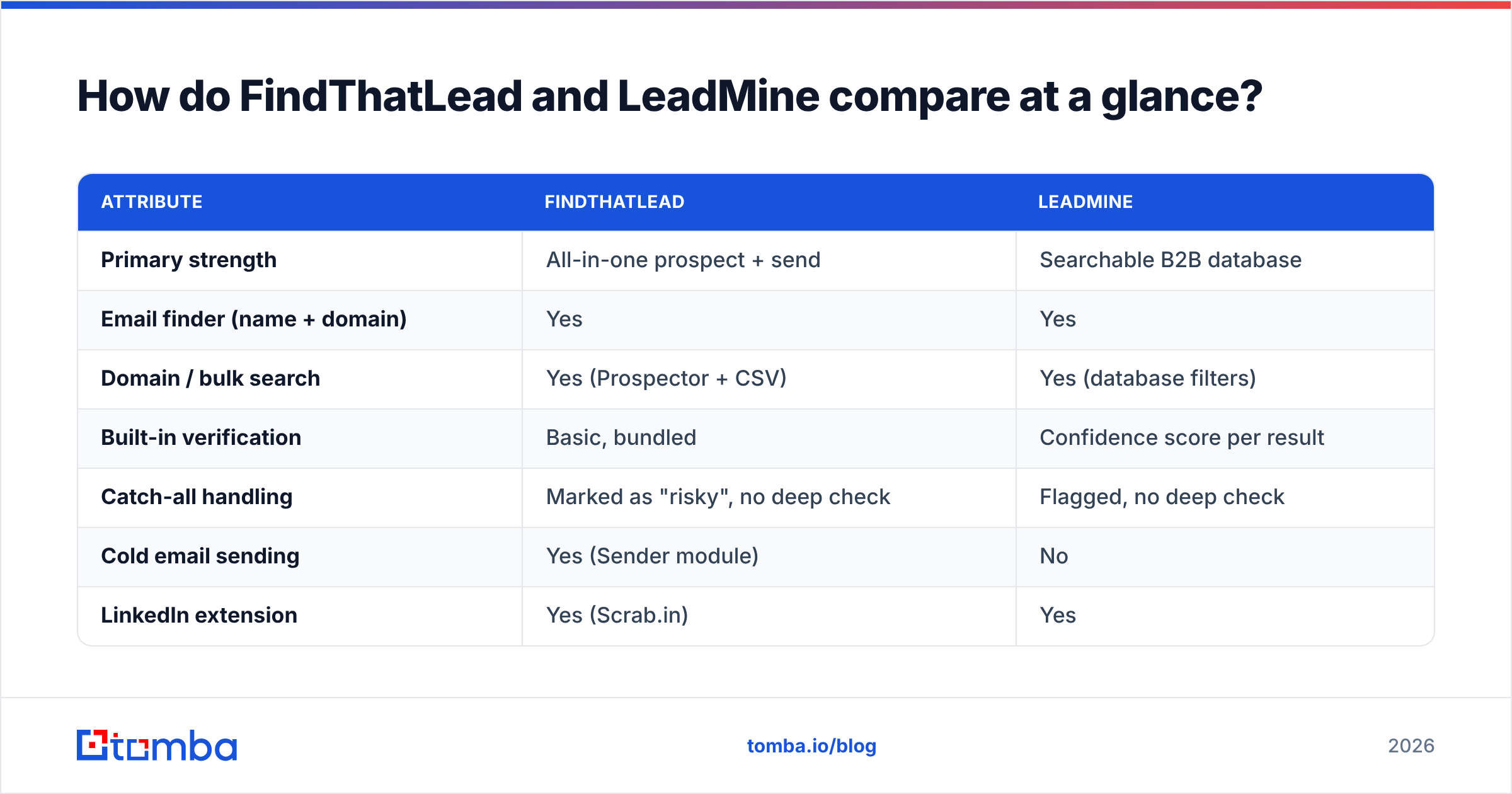
Neither vendor publishes an independently audited hit rate, so treat any "98% accurate" claim on either homepage as marketing until you test it on your list. That test takes twenty minutes and is the only number that matters.
Here's the method that actually separates these tools:
- Build a 200-row control list from your real ICP — not the Fortune 500. Mix company sizes, include at least 30% non-US domains.
- Run the same list through both tools without any manual cleanup. Record hits, misses, and "risky/unknown" results separately.
- Send the results to a third-party verifier you don't own. Both tools grade their own homework; an outside email verifier will not.
- Count real bounces on a small send of 50 addresses per tool. Hard bounce rate is the ground truth.
- Divide credits spent by verified-deliverable emails returned. That's your true cost per usable contact — usually 2–4x the sticker price per credit.

In practice, testers report a consistent pattern. FindThatLead returns more results, including a fatter tail of guessed patterns it labels as unverified. LeadMine returns fewer results but leans on its database, so what it does return skews toward previously-seen, previously-confirmed addresses. If you optimise for raw coverage, FindThatLead looks better. If you optimise for bounce rate, LeadMine often looks better — because it simply declines to guess as often.
Both share the same blind spot: companies under 20 employees with no public email footprint, and domains outside the US/UK/EU core. If your ICP lives there, neither tool alone will get you above a usable hit rate, and you'll need a finder that runs live pattern discovery per domain rather than a static index.

How do credits and pricing actually work?#
This is where most buyers get burned, and it has nothing to do with the number on the pricing page.
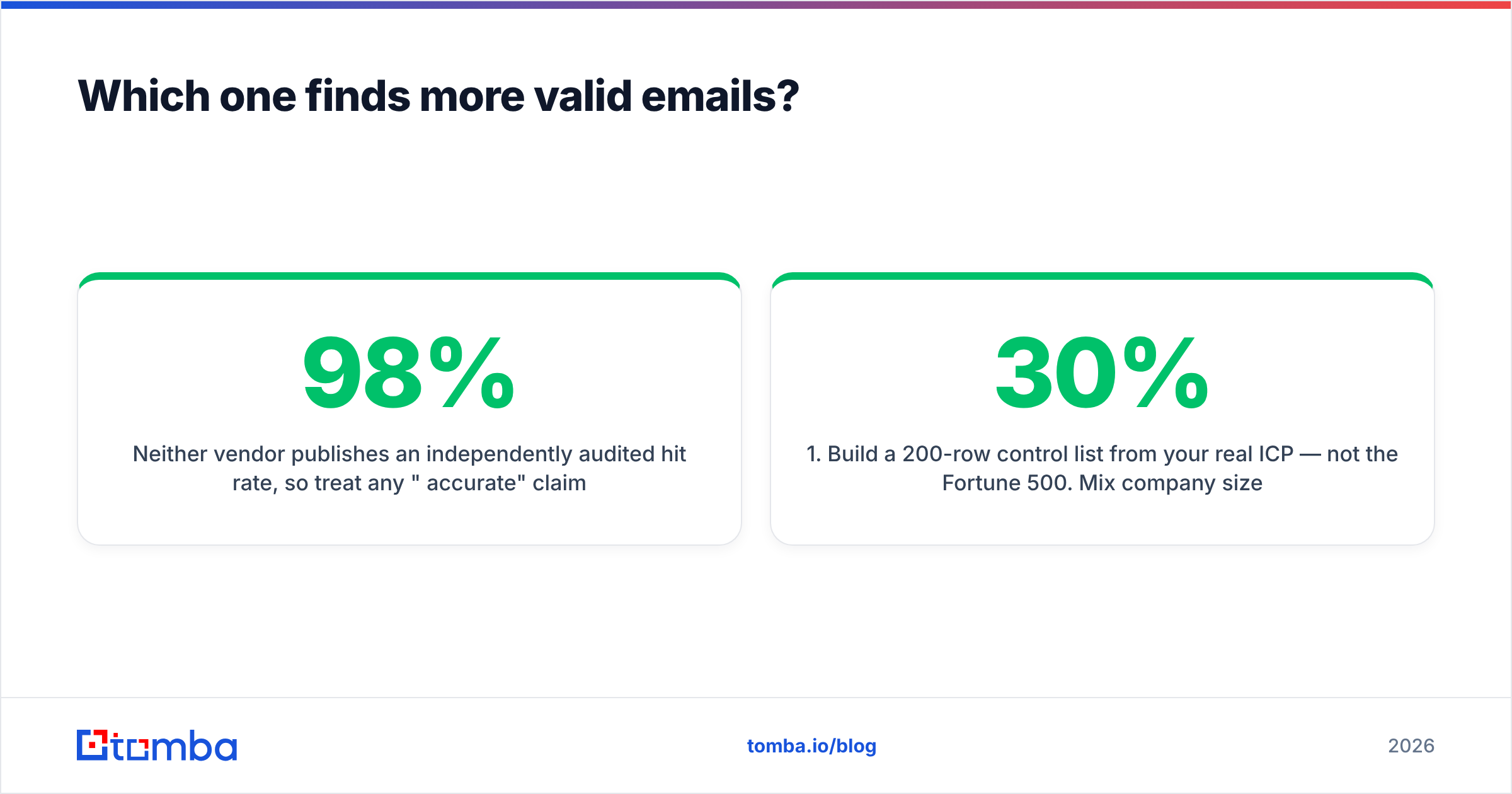
| Cost factor | FindThatLead | LeadMine |
|---|---|---|
| Credit consumed on a miss | Often yes, on pattern guesses | Usually no on empty DB result |
| Bulk CSV processing | Included, credit-metered | Included, credit-metered |
| Verification cost | Bundled into the find | Bundled into the find |
| Sending seats | Included in higher tiers | Not applicable |
| Annual discount | Yes, meaningful | Yes, modest |
| Overage behaviour | Upgrade prompt | Upgrade prompt |
| Rollover of unused credits | Generally no | Generally no |
Two rules for reading either pricing page honestly:
- A credit that returns a "risky" address is not a free credit. If 25% of your results are unusable, your effective price per contact is 33% higher than advertised.
- Bundled sending is only a saving if you'd have paid for it. If you already run Instantly, Smartlead, or Lemlist, FindThatLead's Sender module is a feature you're financing and not using. At that point you're comparing FindThatLead's finder alone against LeadMine's finder alone — and the value case narrows sharply.
For a straight reference point on what unbundled finder pricing looks like, Tomba lists a free tier at 25 searches a month, then $49/mo Starter, $99/mo Growth, and $249/mo Pro on its Tomba pricing page. The useful exercise is not "which is cheapest" but "what does 1,000 verified, deliverable contacts cost me on each platform."

What happens on catch-all domains?#
Catch-all domains — servers configured to accept mail at any address — are the single biggest source of silent list rot in B2B. Roughly a fifth to a quarter of business domains are catch-all, and standard SMTP verification cannot tell you whether sarah.chen@ exists or whether the server just says yes to everything.
Neither FindThatLead nor LeadMine solves this properly. Both flag catch-all results and hand the decision back to you. That's honest, but it isn't help. You're left with three bad options: send anyway and eat the bounce risk, discard them and lose 20% of your addressable market, or pay for a separate tool.
The third option is the only rational one at scale. A dedicated catch-all verifier uses signal beyond SMTP — historical engagement, pattern confidence across the domain, and provider-specific behaviour — to grade catch-all addresses instead of shrugging at them. If catch-all domains are more than 15% of your list, this single gap will cost you more than the difference between FindThatLead's and LeadMine's monthly fees.
Which fits your workflow better?#
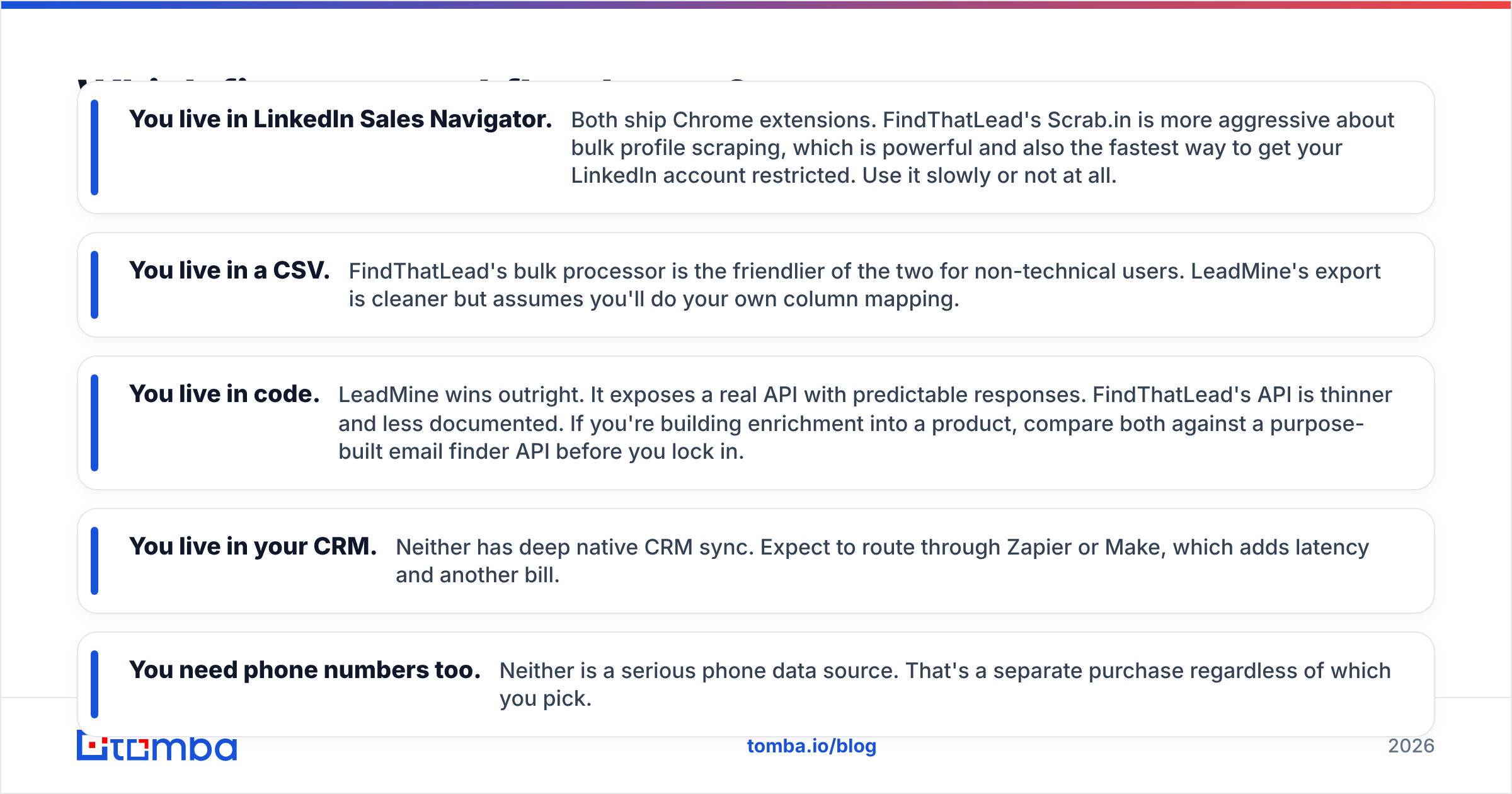
Pick based on where the data has to land, not on feature counts.
- You live in LinkedIn Sales Navigator. Both ship Chrome extensions. FindThatLead's Scrab.in is more aggressive about bulk profile scraping, which is powerful and also the fastest way to get your LinkedIn account restricted. Use it slowly or not at all.
- You live in a CSV. FindThatLead's bulk processor is the friendlier of the two for non-technical users. LeadMine's export is cleaner but assumes you'll do your own column mapping.
- You live in code. LeadMine wins outright. It exposes a real API with predictable responses. FindThatLead's API is thinner and less documented. If you're building enrichment into a product, compare both against a purpose-built email finder API before you lock in.
- You live in your CRM. Neither has deep native CRM sync. Expect to route through Zapier or Make, which adds latency and another bill.
- You need phone numbers too. Neither is a serious phone data source. That's a separate purchase regardless of which you pick.
Who should pick FindThatLead?#
Choose FindThatLead if you are a solo founder or a two-person agency running your first structured outbound motion, you have no existing sending infrastructure, and your ICP is concentrated in Europe or North America among companies with 20+ employees.
The pitch is real: one login, one bill, prospect-to-send in an afternoon. For someone whose alternative is a spreadsheet and a Gmail account, that's a genuine step change. The consolidated workflow also means fewer places for data to get lost between finding an address and actually mailing it.
The tradeoff is that every module is good enough rather than best in class. The sender lacks the deliverability tooling of a dedicated platform — no meaningful warmup orchestration, limited inbox rotation, thinner reporting. Verified reviews on G2 consistently praise the breadth and flag the depth.
Who should pick LeadMine?#
Choose LeadMine if you already have a sequencer you like, you want contacts and nothing else, and you value a lower "risky result" rate over raw volume.
It's also the better pick for anyone doing list-building as a discipline: search by title and industry, export, enrich, hand to SDRs. The database-first model means you're browsing known contacts rather than gambling credits on pattern guesses, which makes budget forecasting far easier.
The tradeoff is coverage. A curated database is only as good as its refresh cycle, and B2B contact data decays at roughly 25–30% annually as people change jobs. When LeadMine doesn't have someone, it doesn't have them — there's no fallback discovery layer that goes and figures out the company's pattern live from public sources.
Where do both tools fall short?#
Three gaps show up in almost every head-to-head:
Data freshness. Neither publishes a refresh cadence or a transparent source breakdown. If you're subject to GDPR or CCPA scrutiny, "where did this address come from" is a question you'll eventually have to answer. Vendors that document their data sources make that audit survivable.
Verification depth. Both bundle a verification step that is essentially syntax plus MX plus SMTP. That catches obvious garbage. It does not catch catch-alls, role accounts that nobody reads, spam traps, or addresses that were valid nine months ago.
Scale economics. Past a few thousand contacts a month, both tools' credit models get expensive relative to purpose-built alternatives. This is the point where teams typically split the stack: a database vendor like BookYourData for bulk, verified list purchases where coverage is strong, plus a live finder and verifier for the long tail of accounts a static database will never contain.
What's the verdict for FindThatLead vs LeadMine in 2026?#
LeadMine is the better email finder. FindThatLead is the better starter kit.
If the only job is "give me correct addresses," LeadMine's lower guess rate and cleaner API make it the more defensible choice, especially for developers and dedicated list builders. If the job is "get me from zero to a running cold email campaign this week with one subscription," FindThatLead's bundle wins on convenience even though no single module would win on its own.
But run the credits-to-verified-contacts math before you sign anything annual. Most teams that do this discover the real answer is neither: they need one tool that finds addresses accurately across long-tail domains, one that verifies them properly including catch-alls, and a sending platform chosen entirely on deliverability. Bundling those three decisions into a single vendor is how you end up compromising on all of them.
How should you test both before buying?#
Give yourself a one-week trial window and a fixed protocol. Take 200 real target contacts. Run them through FindThatLead, LeadMine, and one control tool. Verify all three outputs with an independent verifier. Send 50 from each and log hard bounces. Then compute cost per contact that actually landed in an inbox.
The tool that wins that test is the one to buy — not the one with the better landing page.
Ready to see what a dedicated finder returns on your list? The Tomba Email Finder runs live pattern discovery per domain instead of relying on a static index, grades every result with a confidence score, and pairs with a catch-all-aware verifier so "risky" doesn't mean "your problem now." Start on the free tier with 25 searches a month, run it head-to-head against whichever of FindThatLead or LeadMine you're leaning toward, and let the bounce rate pick the winner.
Related guides#
Ready to find emails that actually work?
Join 150,000+ professionals who stopped guessing and started sending. Free credits on signup — no credit card required.
Get the Tomba newsletter
Practical outbound tactics and product updates — once every two weeks.
About the author