FindThatLead vs LeadsRush: Which Email Finder Wins in 2026?
FindThatLead and LeadsRush both promise verified B2B emails at low cost, but they solve different problems. Here is how they compare on accuracy, credits, bulk workflows, and pricing — plus where a third option beats both.
TL;DR
- FindThatLead is the more mature, more documented product: prospector search, domain search, verification, a Chrome extension, an API, and a built-in cold email sender. It is a full lead-gen suite, priced like one.
- LeadsRush competes on price and simplicity — bulk list pulls and credit packs rather than a workflow suite. It publishes far less third-party validation, so treat its accuracy claims as untested until you run your own sample.
- Neither tool wins on raw email accuracy by a margin big enough to decide for you. The real difference is cost per valid, verified email after bounces — which is where cheap credits stop looking cheap.
- If you only need finding plus verification (no sequencer, no CRM-lite), a focused tool like Tomba usually lands cheaper: free tier at 25 searches/month, Starter at $49/mo, and verification bundled instead of billed separately.
- Run the 200-contact test in the last section before you buy anything. It takes an afternoon and it settles the argument with data instead of vendor copy.
What are FindThatLead and LeadsRush?#
They occupy the same shelf but they are not the same category of product.
FindThatLead launched out of Barcelona around 2015 and has grown into a lead-generation suite. You can search for an email by first name, last name, and domain; pull every public address on a company domain; use the Prospector to build lists filtered by role, industry, and location; verify what you found; and then send a cold sequence from inside the same tool. There is a Chrome extension and a documented API. Check the current feature set on the official FindThatLead site before you commit — the packaging changes.
LeadsRush sits at the lighter end. Its pitch is speed and price: pull B2B contacts in bulk, pay per credit, export, done. That is a legitimate model — plenty of teams do not want a sequencer bolted onto their data vendor — but it also means you are buying a database and a lookup engine, not a workflow. LeadsRush has a much thinner review footprint on G2 than FindThatLead does, so you have less independent signal to lean on.
The honest framing: FindThatLead vs LeadsRush is a suite-versus-utility decision more than a data-quality shootout. Decide which shape you need first, then argue about credits.

How do FindThatLead and LeadsRush compare on features?#
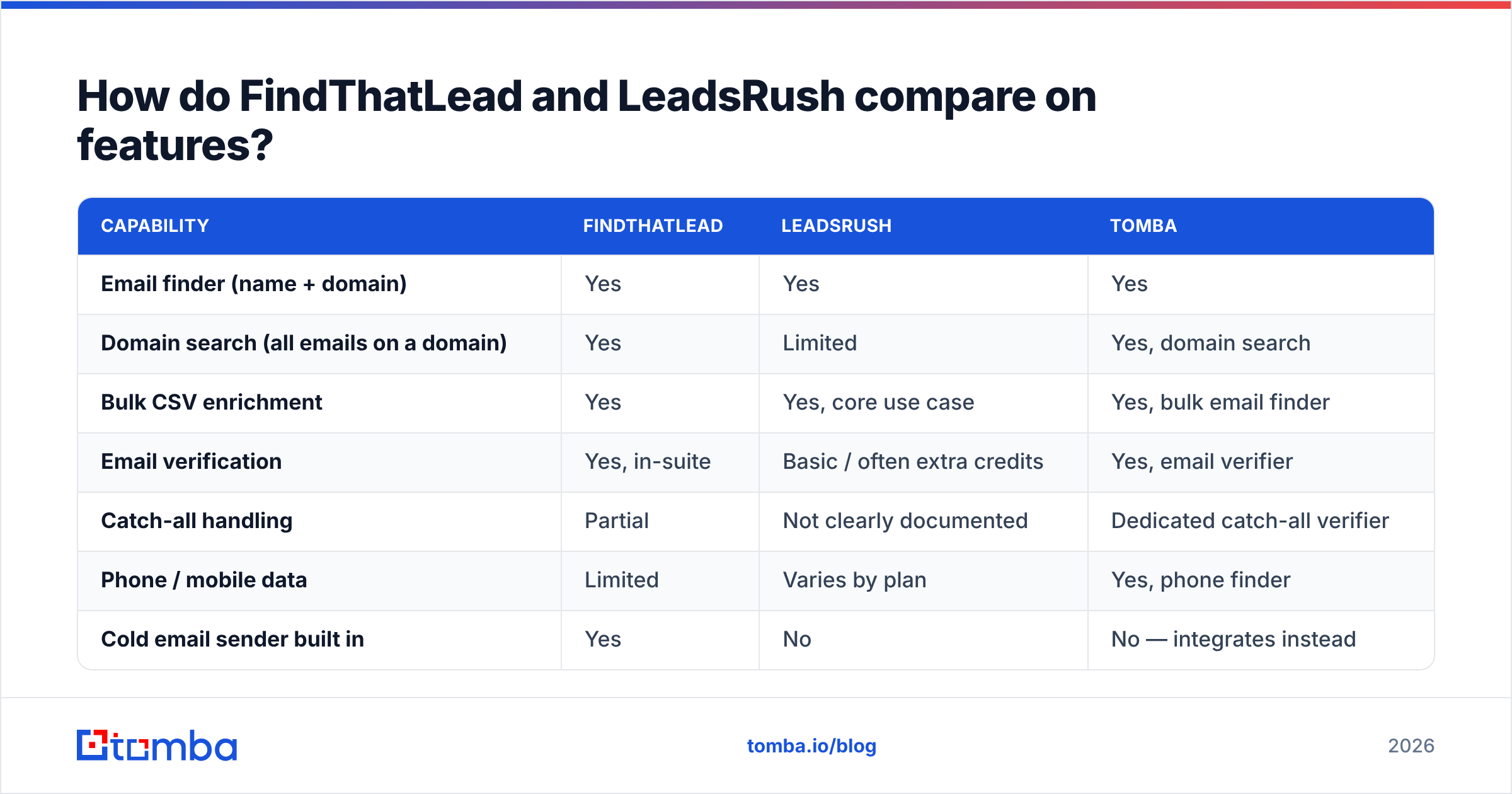
Here is the side-by-side, with Tomba included as the focused-utility reference point.
| Capability | FindThatLead | LeadsRush | Tomba |
|---|---|---|---|
| Email finder (name + domain) | Yes | Yes | Yes |
| Domain search (all emails on a domain) | Yes | Limited | Yes, domain search |
| Bulk CSV enrichment | Yes | Yes, core use case | Yes, bulk email finder |
| Email verification | Yes, in-suite | Basic / often extra credits | Yes, email verifier |
| Catch-all handling | Partial | Not clearly documented | Dedicated catch-all verifier |
| Phone / mobile data | Limited | Varies by plan | Yes, phone finder |
| Cold email sender built in | Yes | No | No — integrates instead |
| Chrome extension | Yes | Varies | Yes |
| Public API + docs | Yes | Thin | Yes, Tomba API |
| Free tier | Small trial credits | Trial credits | 25 searches/month, no card |
Two rows deserve emphasis.
The sender. FindThatLead's built-in cold email tool is genuinely useful if you are a solo founder or a two-person agency and want one login. It is also the single biggest reason its price sits above pure data tools. If you already pay for Instantly, Smartlead, Lemlist, or HubSpot sequences, you are buying a sender twice.
Catch-all handling. This is the quiet accuracy killer. Roughly a third of mid-market domains are configured to accept mail at any address, which means a naive verifier returns "valid" for addresses that do not exist. A tool that flags catch-alls honestly will show you a lower "valid" percentage and cost you fewer bounces. A tool that quietly marks them deliverable will show you a beautiful dashboard and a wrecked sender reputation.
Which tool actually finds more valid emails?#
Neither vendor will hand you a number you can trust, because every published accuracy stat is measured on a sample the vendor chose.

What consistently holds across email-finder benchmarks:
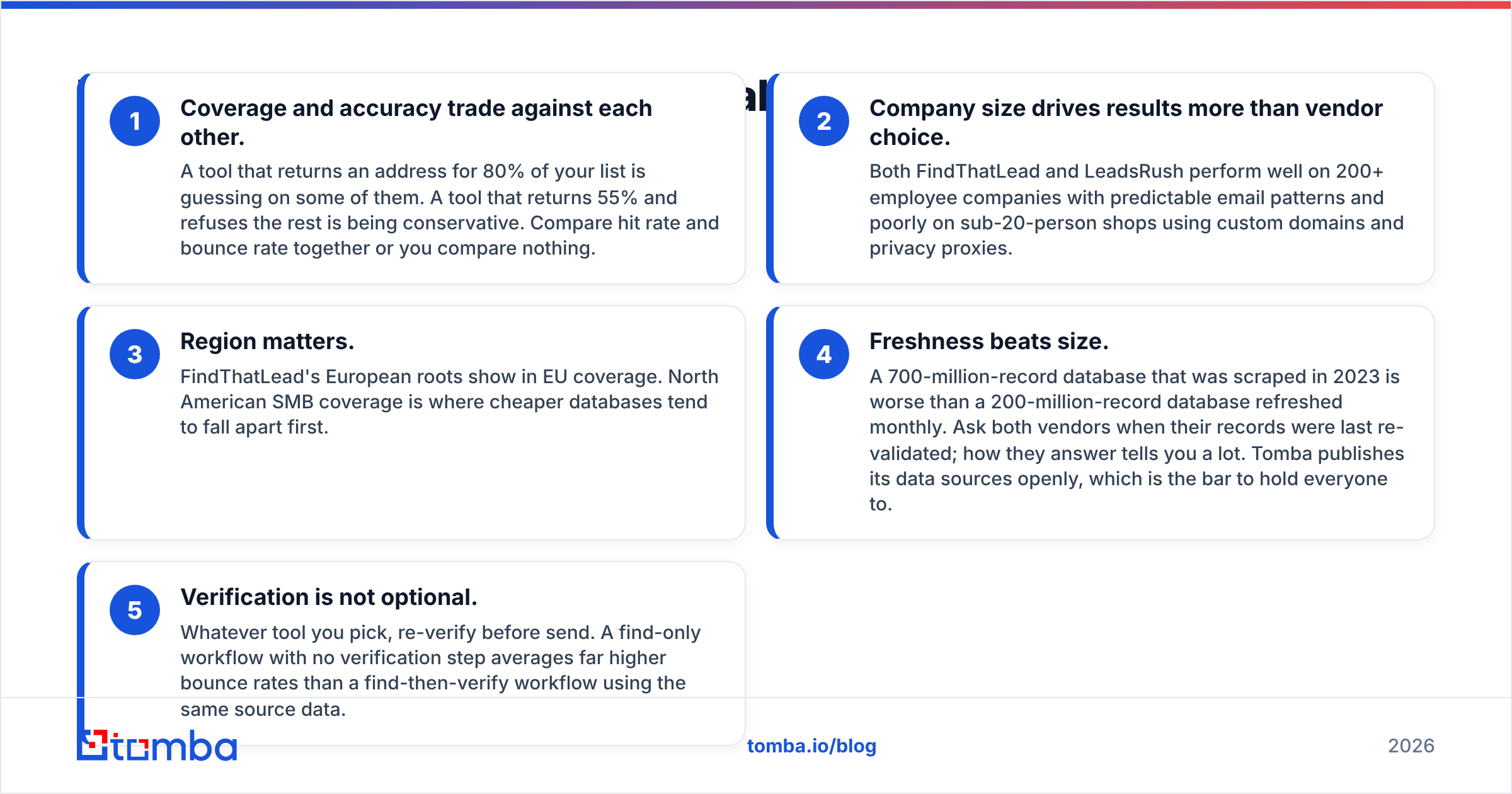
- Coverage and accuracy trade against each other. A tool that returns an address for 80% of your list is guessing on some of them. A tool that returns 55% and refuses the rest is being conservative. Compare hit rate and bounce rate together or you compare nothing.
- Company size drives results more than vendor choice. Both FindThatLead and LeadsRush perform well on 200+ employee companies with predictable email patterns and poorly on sub-20-person shops using custom domains and privacy proxies.
- Region matters. FindThatLead's European roots show in EU coverage. North American SMB coverage is where cheaper databases tend to fall apart first.
- Freshness beats size. A 700-million-record database that was scraped in 2023 is worse than a 200-million-record database refreshed monthly. Ask both vendors when their records were last re-validated; how they answer tells you a lot. Tomba publishes its data sources openly, which is the bar to hold everyone to.
- Verification is not optional. Whatever tool you pick, re-verify before send. A find-only workflow with no verification step averages far higher bounce rates than a find-then-verify workflow using the same source data.
The practical read: assume both tools land in the same band on a mixed list, then let bounce rate and support responsiveness break the tie.
What do FindThatLead and LeadsRush cost in 2026?#
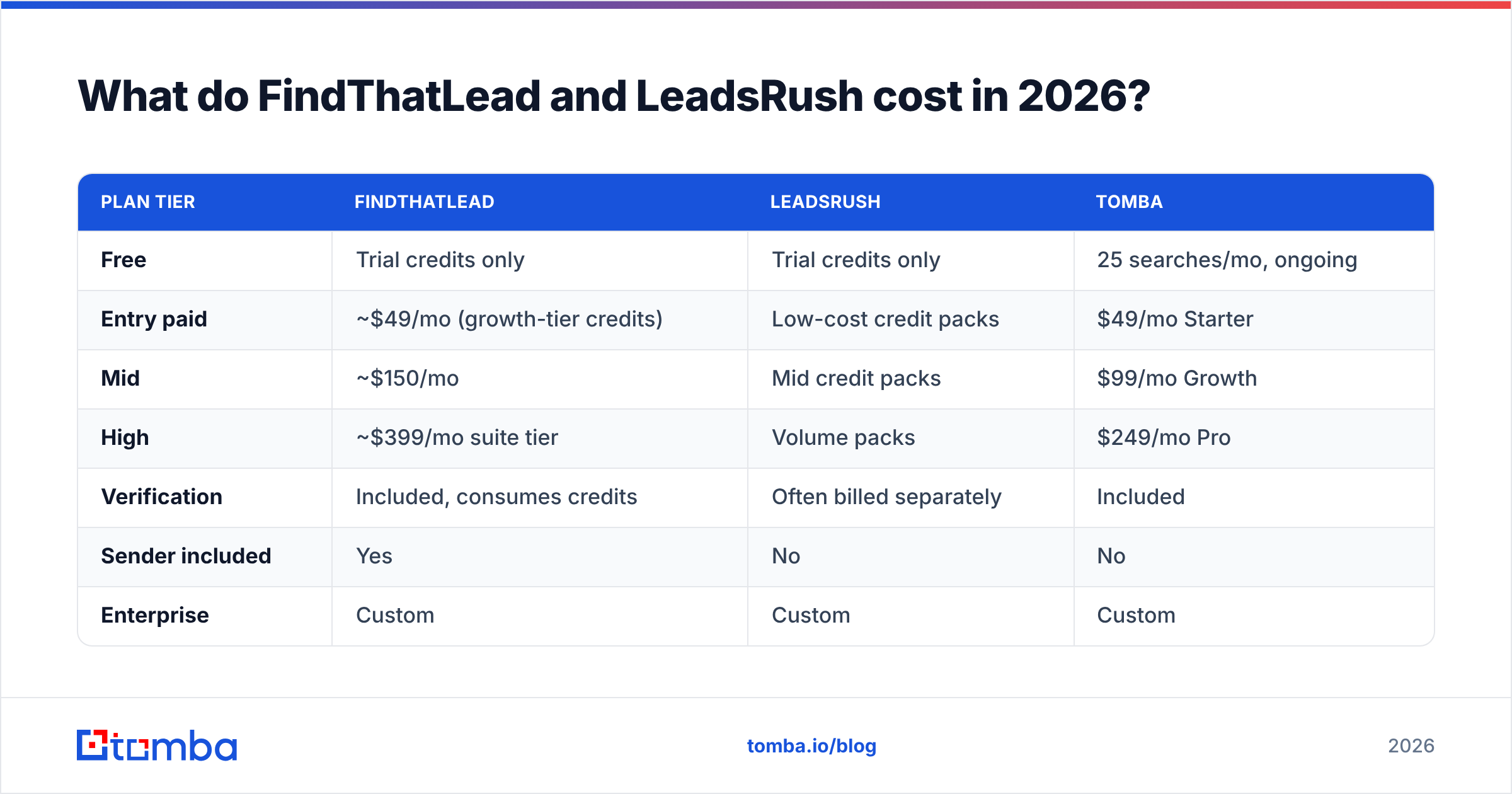
Pricing on both tools has moved more than once, so verify on the vendor sites before you budget. The shape of the pricing, though, has been stable.
| Plan tier | FindThatLead | LeadsRush | Tomba |
|---|---|---|---|
| Free | Trial credits only | Trial credits only | 25 searches/mo, ongoing |
| Entry paid | ~$49/mo (growth-tier credits) | Low-cost credit packs | $49/mo Starter |
| Mid | ~$150/mo | Mid credit packs | $99/mo Growth |
| High | ~$399/mo suite tier | Volume packs | $249/mo Pro |
| Verification | Included, consumes credits | Often billed separately | Included |
| Sender included | Yes | No | No |
| Enterprise | Custom | Custom | Custom |

Three cost traps to price in before you sign:
Credits are not contacts. On most platforms, a failed lookup, a verification, and an enrichment each consume credits. A "5,000 credit" plan can produce 2,000 usable, verified contacts once you account for misses and double-charging on verify. Ask each vendor to write down exactly which operations burn credits.
Rollover and expiry. Monthly credits that expire punish lumpy prospecting. If you build lists in two-week sprints, unused credits are pure waste. Annual plans sometimes fix this; sometimes they just lock you in longer.
The sender you already own. If FindThatLead's higher tier is justified by its sequencer and you already run a dedicated sending stack, you are paying a premium for a duplicate. That is the single most common overspend in this comparison. Compare it against a data-only line item such as Tomba pricing and the delta is usually obvious.
Who should choose FindThatLead?#
Pick FindThatLead when:
- You want one tool, one bill, one login. Solo founders and small agencies who do not want to wire together a finder, a verifier, and a sender get real value from the suite.
- Your ICP skews European. Coverage strength follows a vendor's origin more often than vendors admit.
- You value maturity. More years of operation means more documentation, more reviews, more integration guides, and fewer surprises at 11pm before a campaign launch.
- You prospect by persona, not by account list. The Prospector-style search is the feature that justifies the suite price for many teams.
Skip it when your outbound stack is already assembled and you only need the data layer. You will be paying for a sequencer you will never open.
Who should choose LeadsRush?#
Pick LeadsRush when:
- Budget is the binding constraint. If the choice is a cheap credit pack or nothing, cheap credits beat nothing.
- You need one-off bulk pulls. Occasional list building, no ongoing workflow, no integration requirements.
- You already own a verifier. If you run a separate verification vendor, you can absorb a weaker in-tool verifier without much pain.
Be cautious when you need auditable data provenance, GDPR documentation, a real API, or a support team that answers within a business day. Thin public review coverage means you are the one running the diligence. That is not a knock on the product — it is a reflection of how much independent evidence exists. Verify before you scale spend.

Where does Tomba fit in this comparison?#
Tomba is the third option worth pricing because it answers a different question: what if you only need the data layer, done properly?
The email finder handles name-plus-domain and domain-wide lookups. Verification, catch-all checking, phone lookup, and enrichment sit alongside it rather than behind a higher tier. There is a free tier at 25 searches per month with no card, Starter at $49/mo, Growth at $99/mo, Pro at $249/mo, and custom enterprise pricing. No sequencer — which is the point. You keep whatever sender you already trust and plug the data in through Zapier, HubSpot, Sheets, or the API.
Where that matters concretely:
- You already pay for a sending tool. Tomba does not charge you a second time for one.
- Catch-all domains are hurting you. A dedicated catch-all verifier changes the bounce math on mid-market lists.
- You want the data in your stack, not in a vendor's UI. A documented API, a CLI, an Excel add-in, and a Google Sheets add-on beat a CSV export button.
That is not a claim that Tomba beats FindThatLead at everything. FindThatLead's suite is genuinely more complete if you want the suite. It is a claim that most teams comparing these two are buying more product than they need.
How do you test FindThatLead vs LeadsRush in one afternoon?#
Do not trust this article, or either vendor's landing page. Run the test.
- Build a 200-row control list. Real prospects from your actual ICP. Mix company sizes: 70 enterprise, 70 mid-market, 60 under 50 employees. Include some non-US domains.
- Run the identical list through every tool on free or trial credits. Same columns in, same columns out. Do not clean between runs.
- Record three numbers per tool: hit rate (addresses returned ÷ 200), verified-valid rate (passed verification ÷ addresses returned), and unique finds (addresses only that tool found).
- Send a 50-address seed campaign per tool from a warmed domain you can afford to test with. Measure hard bounces at 48 hours. This is the only accuracy number that pays your bills.
- Compute cost per valid delivered contact. Plan price ÷ (addresses that did not bounce). Divide, do not eyeball. The cheapest per-credit tool frequently loses this calculation.
- Email support with a real question during the trial. Time the response. You are buying a relationship, not a database dump.
Whichever tool wins step 5 is your answer, regardless of what any comparison post — including this one — concluded.
The bottom line#
FindThatLead is the safer pick if you want an all-in-one suite with real documentation and a built-in sender, and you can justify the premium. LeadsRush is the pick if you need cheap bulk pulls and already own verification. Both are defensible; neither is a category winner.
If your honest requirement is "find accurate B2B emails, verify them properly, and get them into the stack I already run," you are buying the wrong shape of product from both. Start with the Tomba Email Finder free tier — 25 searches a month, no card — run it against the same 200-row control list you use to test the other two, and compare cost per valid delivered contact. That number, not a feature grid, is what should decide this.
Related guides#
Ready to find emails that actually work?
Join 150,000+ professionals who stopped guessing and started sending. Free credits on signup — no credit card required.
Get the Tomba newsletter
Practical outbound tactics and product updates — once every two weeks.
About the author