FindThatLead vs LetsExtract: Which Email Tool Wins in 2026?
FindThatLead is a cloud prospecting suite. LetsExtract is a desktop scraper with a one-time license. They solve different problems badly for the wrong buyer — here's how to pick, with pricing, accuracy and compliance side by side.
TL;DR
- FindThatLead is a cloud-based prospecting suite (email finder + verifier + a light cold-email sender) on a monthly subscription. LetsExtract is Windows desktop software that scrapes and extracts emails from web pages, search engines, and local files, sold mostly as a one-time license.
- They are not really the same category. FindThatLead sells you verified B2B contacts; LetsExtract sells you a harvesting engine that produces raw addresses you must clean yourself.
- If you run outbound to named companies and titles, FindThatLead is the closer fit. If you need to pull addresses out of a niche directory nobody's database covers, LetsExtract does something no SaaS will do for you.
- Cost math flips depending on volume: LetsExtract's one-time license looks cheap until you add verification, proxies, and the hours you spend babysitting a desktop app.
- Neither one is the best accuracy-per-dollar option in 2026. A dedicated finder with a real verification layer — Tomba starts free at 25 searches and $49/mo on Starter — usually beats both on deliverable-contacts-per-dollar.
What is FindThatLead and who is it for?#
FindThatLead is a Spanish-built, cloud-hosted lead generation platform. You give it a domain, a name, or a LinkedIn URL, and it returns a business email address with a confidence score. Around that core it has stacked a prospector (search by role, industry, location), a bulk CSV enrichment tool, a Chrome extension, and "Scrapper" — a LinkedIn-adjacent list builder — plus a basic cold email sender for drip campaigns.
The buyer profile is a small sales team or a solo founder who wants one login that goes from "I know the company" to "the email is sent." You can see the current lineup on the FindThatLead site.
Its strengths and weaknesses both come from that all-in-one framing:
- Everything in one place — find, verify, and send without exporting to a third tool. Convenient, and the reason people tolerate the rest.
- Credit-based pricing — a search and a verification both consume credits, so heavy verification quietly eats your finding budget.
- Coverage skews Western/EU SMB — decent on European tech companies, thinner on APAC, LATAM, and non-tech verticals.
- The sender is a bonus, not a product — no meaningful warmup, inbox rotation, or deliverability tooling compared to a dedicated sequencer.
- No serious API story — there is an API, but it's not what the product is built around, so engineering-led workflows feel bolted on.
What is LetsExtract and how is it different?#
LetsExtract Email Studio is desktop software. You install it on Windows, point it at a source — a list of URLs, a search engine query, a local folder of documents, an IMAP mailbox — and it crawls, pattern-matches, and dumps every string that looks like an email address into a list. It also ships a bulk verifier and a mail sender module.
The mental model matters here. FindThatLead queries a curated database and infers a specific person's address. LetsExtract is a net: it drags whatever the source contains, indiscriminately. You can read the vendor's own description at letsextract.com.
That means:
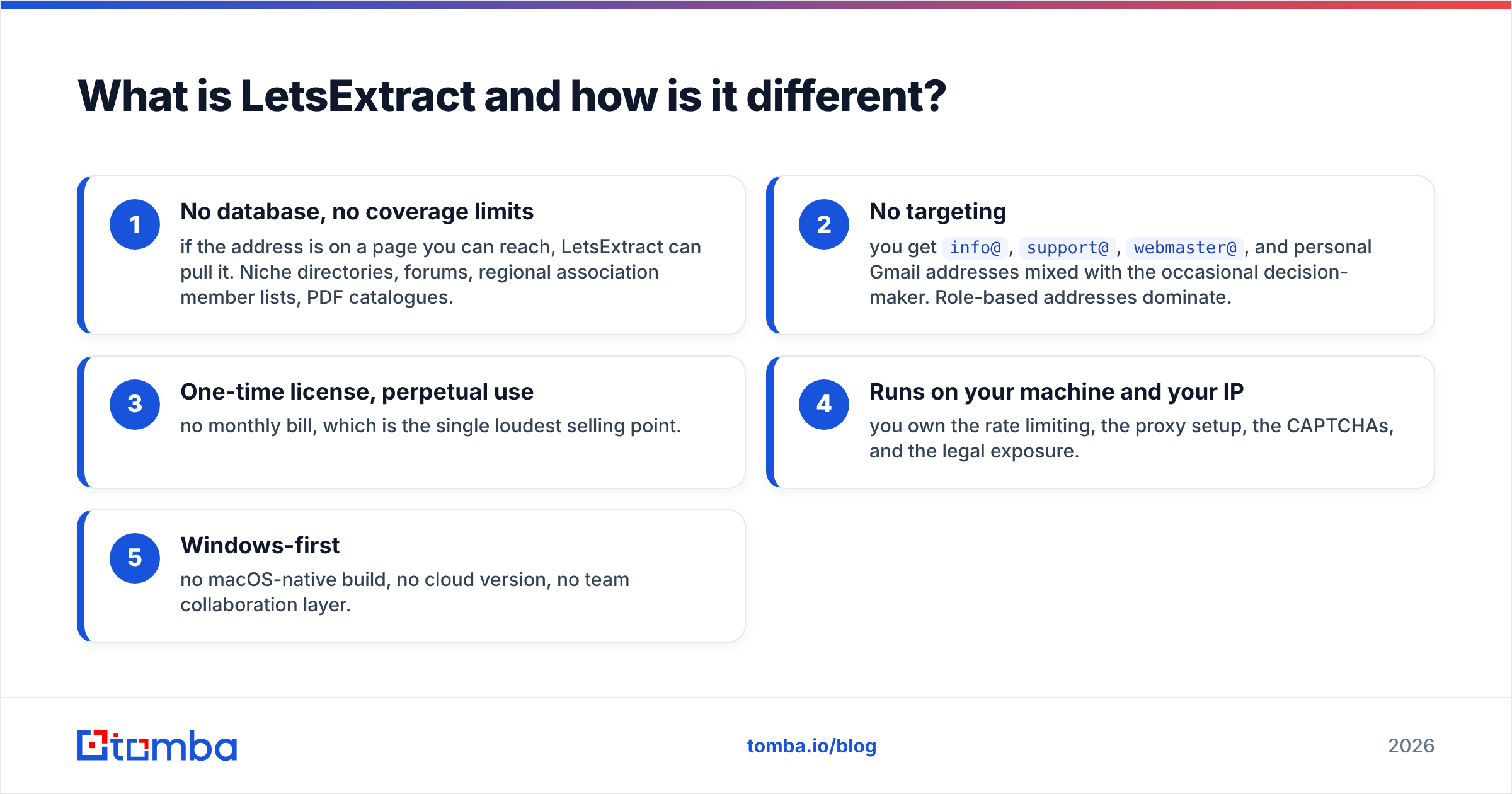
- No database, no coverage limits — if the address is on a page you can reach, LetsExtract can pull it. Niche directories, forums, regional association member lists, PDF catalogues.
- No targeting — you get
info@,support@,webmaster@, and personal Gmail addresses mixed with the occasional decision-maker. Role-based addresses dominate. - One-time license, perpetual use — no monthly bill, which is the single loudest selling point.
- Runs on your machine and your IP — you own the rate limiting, the proxy setup, the CAPTCHAs, and the legal exposure.
- Windows-first — no macOS-native build, no cloud version, no team collaboration layer.
Correction to the image syntax — here it is properly:

FindThatLead vs LetsExtract: how do they compare head to head?#
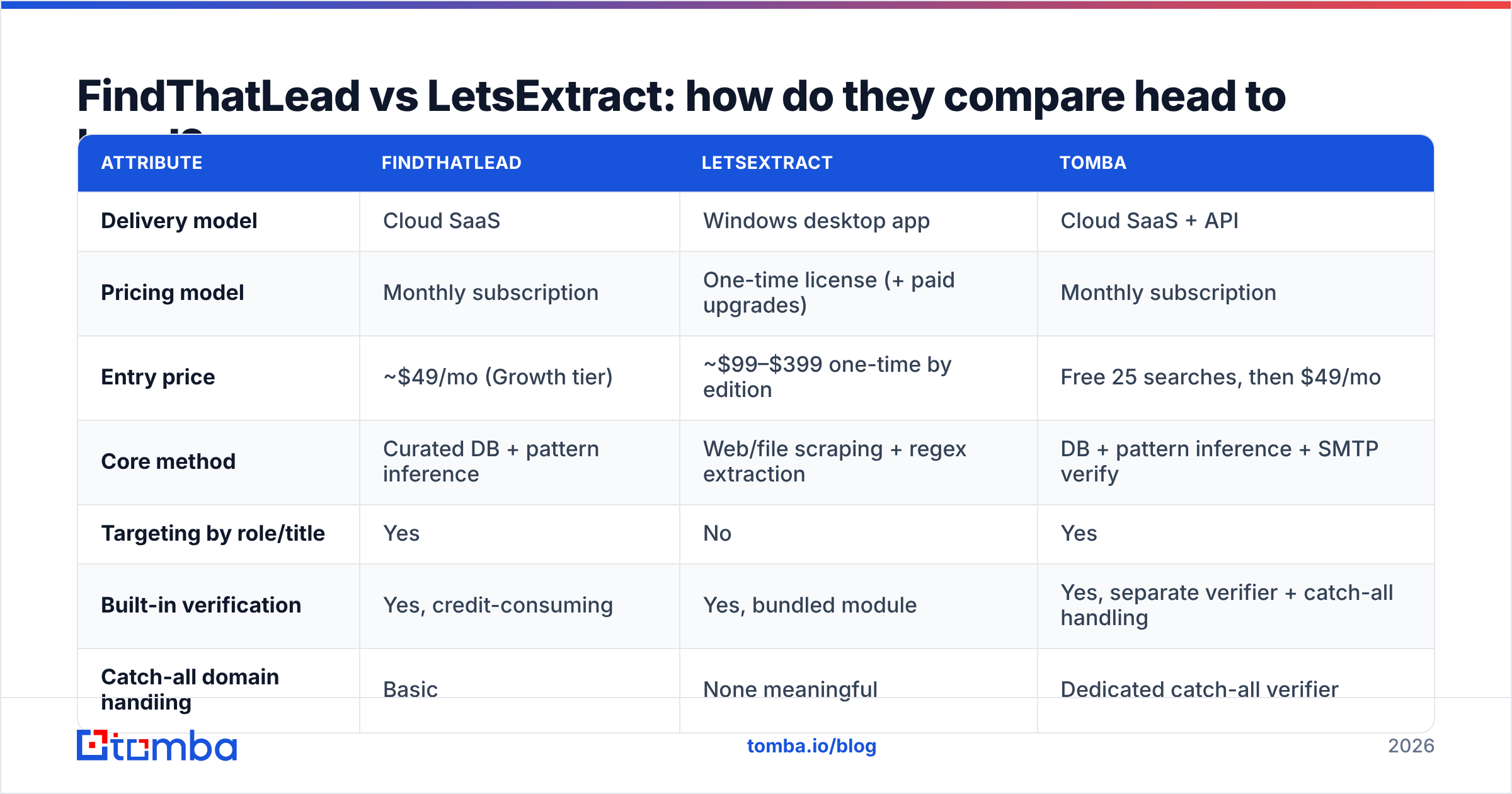
| Attribute | FindThatLead | LetsExtract | Tomba |
|---|---|---|---|
| Delivery model | Cloud SaaS | Windows desktop app | Cloud SaaS + API |
| Pricing model | Monthly subscription | One-time license (+ paid upgrades) | Monthly subscription |
| Entry price | ~$49/mo (Growth tier) | ~$99–$399 one-time by edition | Free 25 searches, then $49/mo |
| Core method | Curated DB + pattern inference | Web/file scraping + regex extraction | DB + pattern inference + SMTP verify |
| Targeting by role/title | Yes | No | Yes |
| Built-in verification | Yes, credit-consuming | Yes, bundled module | Yes, separate verifier + catch-all handling |
| Catch-all domain handling | Basic | None meaningful | Dedicated catch-all verifier |
| API access | Limited | None | Full REST API, CLI, MCP server |
| Team seats | Yes | Per-machine license | Yes |
| Typical output quality | Named contacts, mixed accuracy | High volume, low precision | Named contacts, verification-gated |
| GDPR/compliance posture | Vendor-managed, DPA available | You are the data controller | Vendor-managed, documented sources |
| Best for | SMB outbound teams | Niche source harvesting | Accuracy-sensitive outbound + dev workflows |
Read that table as three different jobs, not three competitors for one job. The question is not "which is better" but "which failure mode can you afford."
Which one is more accurate?#
Accuracy means two different things here, and conflating them is how people waste money.
FindThatLead's accuracy question is: when it returns an address for Jane Doe at acme.com, is that actually Jane's address? In practice, cloud finders in this tier land somewhere in the 70–90% verified-deliverable range depending on the vertical. European SMB tech: good. US enterprise or Japanese manufacturing: noticeably worse. Independent user reviews on G2 reflect that spread — praise for speed, recurring complaints about bounce rates on harder segments.
LetsExtract's accuracy question is completely different: of the 40,000 strings it pulled, how many are real, current, and belong to a human who could buy from you? Extraction accuracy — did it correctly identify text as an email — is near perfect, because regex is easy. Business usefulness is the problem. A scrape of an industry directory routinely returns 50–70% role-based inboxes, a chunk of dead addresses from pages last updated in 2019, and personal freemail accounts that will mark you as spam.
That's why the verification layer matters more than the finding layer for scraped data. If you go the LetsExtract route, budget for running everything through a real email verifier before it touches a sending domain, and use a catch-all verifier for the domains that accept everything and confirm nothing. Skipping this step is how a one-time license turns into a burned domain.
One more accuracy trap: neither tool tells you why it believes an address. Provenance matters when a prospect asks where you got their details. Vendors that publish their data sources give you an answer; a scraper gives you "the internet."
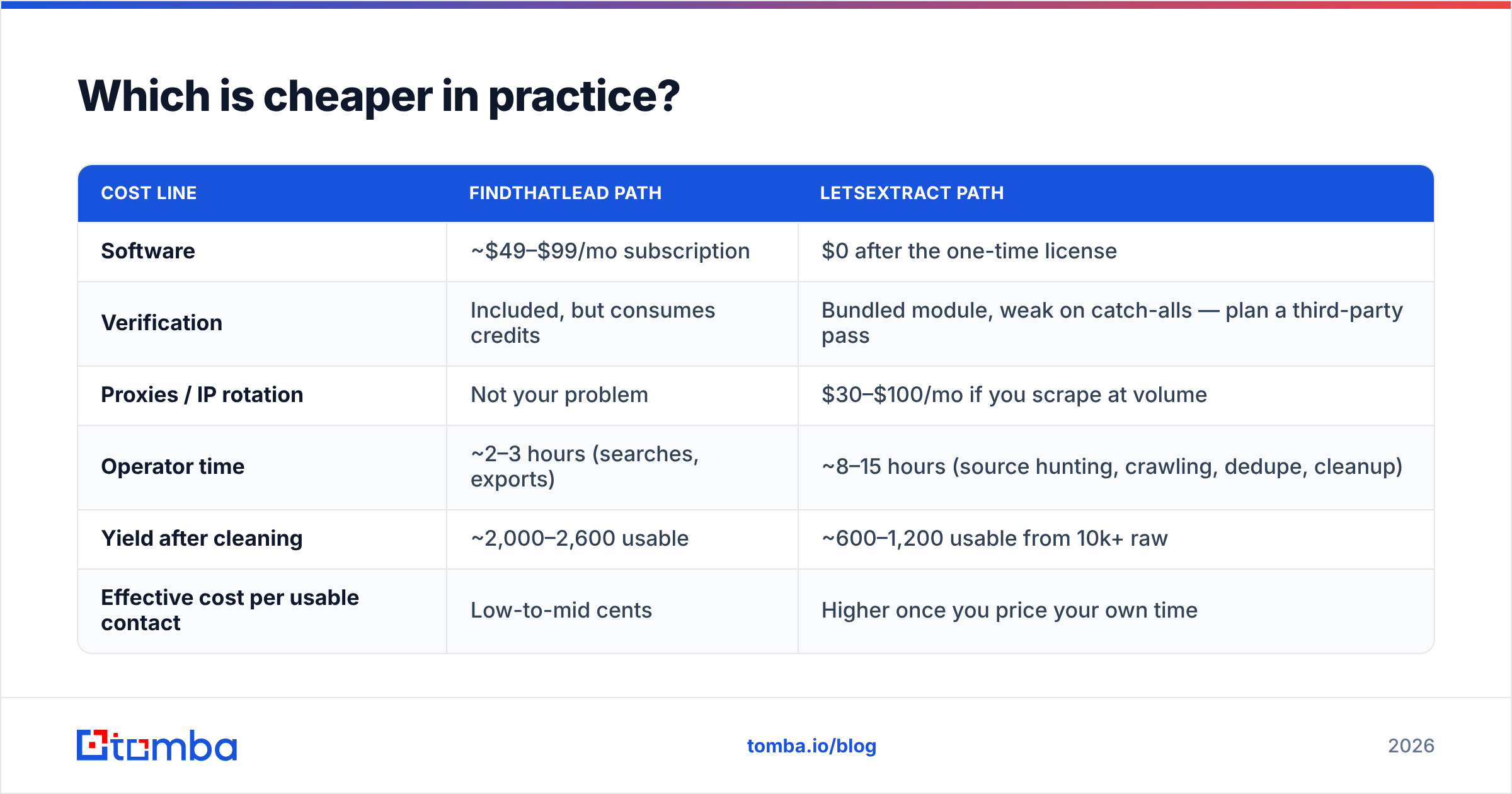
Which is cheaper in practice?#
Sticker price says LetsExtract, obviously — one payment versus a recurring subscription. Total cost of ownership says something less obvious.
Model a realistic month: you want 3,000 deliverable, role-targeted B2B contacts.
| Cost line | FindThatLead path | LetsExtract path |
|---|---|---|
| Software | ~$49–$99/mo subscription | $0 after the one-time license |
| Verification | Included, but consumes credits | Bundled module, weak on catch-alls — plan a third-party pass |
| Proxies / IP rotation | Not your problem | $30–$100/mo if you scrape at volume |
| Operator time | ~2–3 hours (searches, exports) | ~8–15 hours (source hunting, crawling, dedupe, cleanup) |
| Yield after cleaning | ~2,000–2,600 usable | ~600–1,200 usable from 10k+ raw |
| Effective cost per usable contact | Low-to-mid cents | Higher once you price your own time |
The scraper only wins on cost when your time is free and your target list lives somewhere no database indexes. That's a real scenario — regional trade associations, non-English directories, niche marketplaces — but it's not most people's scenario.
For bulk work where you already have company domains or names, running a bulk email finder against a clean CSV skips the crawling stage entirely. You pay per lookup instead of paying in hours.
Corrected:
Is scraping with LetsExtract legally safe?#
Short answer: it shifts the legal risk onto you, and most buyers don't price that in.
Under GDPR, the moment you collect personal data — and a work email tied to a named person is personal data — you become a data controller with obligations: a lawful basis, a privacy notice, honoring deletion requests. A cloud vendor with a DPA takes on part of that chain and can tell you where a record came from. A desktop scraper cannot; you pointed it at a page and pressed go. The ICO's guidance on legitimate interests is the practical reference here, and it hinges on being able to justify and document your collection.
There's also the terms-of-service layer. Scraping search engine result pages and most professional networks violates those platforms' terms outright. Whether that's enforced against a small operator is a separate question from whether it's permitted.
And a purely operational point: scraped lists have no opt-out history and no engagement signal. Sending cold volume to them is the fastest known way to torch sender reputation. If you do it anyway, at minimum suppress role-based addresses, throttle hard, and keep the first sends off your primary domain.
When should you choose each tool?#
Choose FindThatLead if:
- You sell to European or US SMBs and want targeting by role, industry, and location.
- You want find + verify + send under one subscription and can live with a mediocre sender.
- Your volume is moderate (a few thousand lookups a month) and predictable.
- You have no engineering resource and need a Chrome extension plus a web UI.
Choose LetsExtract if:
- Your prospects live in sources no B2B database covers — regional directories, forums, PDF member lists, association rosters.
- You're extracting from data you already own, like a decade of IMAP archives or a folder of documents. This is genuinely its best use case and carries none of the scraping risk.
- You're on Windows, comfortable with proxies, and treat the output as raw material for a separate cleaning pipeline.
- You need a one-time cost for accounting reasons more than you need precision.
Choose neither if:
- Accuracy per dollar is your actual metric. Both tools are compromises: one on coverage and API depth, the other on precision and compliance.
- You need programmatic access — an email finder API, CLI, or MCP server wired into your own enrichment jobs.
- You're dealing with catch-all domains at scale, which is now the majority of mid-market B2B and the thing that silently destroys bounce rates.
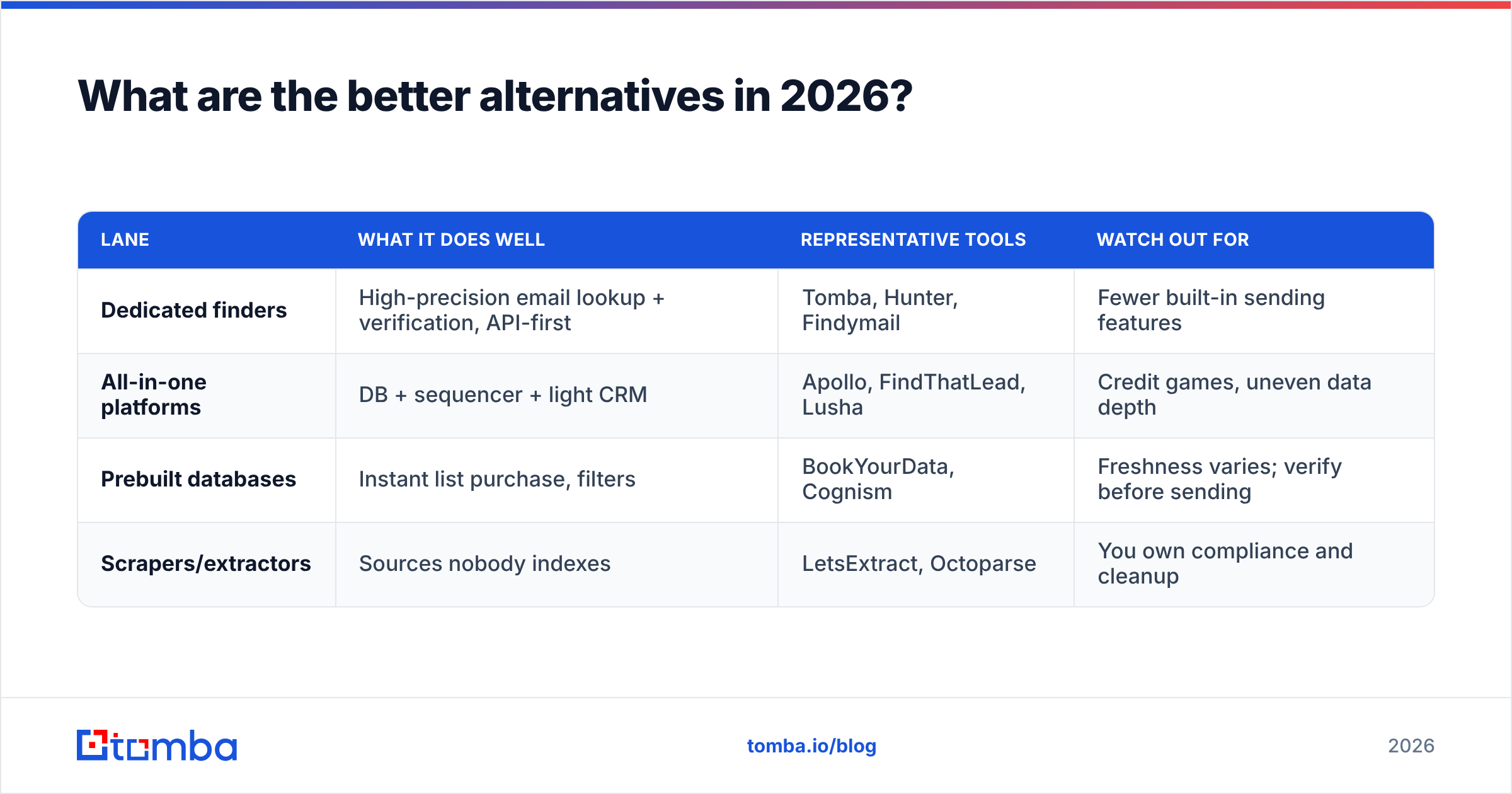
What are the better alternatives in 2026?#
The market has split into three lanes, and picking the right lane matters more than picking the right vendor inside it.
| Lane | What it does well | Representative tools | Watch out for |
|---|---|---|---|
| Dedicated finders | High-precision email lookup + verification, API-first | Tomba, Hunter, Findymail | Fewer built-in sending features |
| All-in-one platforms | DB + sequencer + light CRM | Apollo, FindThatLead, Lusha | Credit games, uneven data depth |
| Prebuilt databases | Instant list purchase, filters | BookYourData, Cognism | Freshness varies; verify before sending |
| Scrapers/extractors | Sources nobody indexes | LetsExtract, Octoparse | You own compliance and cleanup |
BookYourData sits in the database lane and is a solid pick when you want a filtered list delivered rather than built — different job, worth knowing about if your buying committee wants volume on day one.
If you're currently evaluating FindThatLead specifically, it's also worth looking at the Findymail alternative and Apollo alternative comparisons, since most FindThatLead shortlists end up including at least one of those.
Where Tomba fits: it's a dedicated finder, not a suite. You get domain search to map a company's entire contactable surface, single and bulk lookup, a verifier that handles catch-alls properly, phone data, and a real API with CLI and MCP integrations for teams that want to script their pipeline. Pricing is transparent — free at 25 searches/month, $49/mo Starter, $99/mo Growth, $249/mo Pro, custom Enterprise — with no credit gymnastics between finding and verifying. Full Tomba pricing is public.
How should you run a test before committing?#
Don't take anyone's benchmark, including this one. Run a 100-contact bake-off.
- Build a control list. Pick 100 real prospects you can verify independently — companies you know, people you can confirm on their own site or a public bio.
- Run the same list through each tool. For FindThatLead, use name + domain. For LetsExtract, scrape the company sites directly. Record hit rate.
- Verify everything with a neutral third-party verifier. Don't let a tool grade its own homework.
- Send a low-volume test. 50 addresses from each source, same copy, same domain, spaced out. Measure hard bounces and spam complaints, not opens.
- Price the labor. Log the minutes you actually spent per source. That number, not the invoice, is your real cost.
- Score cost per replied-to contact. The only metric that survives contact with a quota.
Most teams that run this honestly find the scraper produces the biggest raw list and the smallest pipeline, and the all-in-one suite produces adequate data at a price that stops making sense above ~5,000 lookups a month.
The verdict#
FindThatLead wins if you need targeted contacts and one subscription. LetsExtract wins in the narrow band where your data lives in sources no database has indexed — or where you're extracting from archives you already own, which is its cleanest and most defensible use.
But framing it as a two-horse race is the mistake. Both tools ask you to accept a structural compromise: FindThatLead bundles a weak sender and meters your verification against your finding budget; LetsExtract hands you volume and hands you the compliance bill. In 2026, with catch-all domains dominating mid-market B2B and inbox providers tightening on complaint rates, the thing that actually moves reply rates is verification depth and data provenance — not how many features fit behind one login.
Start with a clean, accurate finder and add sending on top of it. That order is cheaper to fix when something breaks.
Try it against your own list. Take 25 prospects you already tried to reach and run them through the Tomba Email Finder — free, no card, 25 searches a month. Compare the hit rate and the bounce rate to whatever you're using now, then decide with your own numbers instead of a comparison table.
Related guides#
Ready to find emails that actually work?
Join 150,000+ professionals who stopped guessing and started sending. Free credits on signup — no credit card required.
Get the Tomba newsletter
Practical outbound tactics and product updates — once every two weeks.
About the author