FindThatLead vs LFBBD Lead for Business: 2026 Compared
One of these lead tools has a decade of public track record and third-party reviews. The other has almost no verifiable footprint. Here is how FindThatLead and LFBBD Lead for Business actually stack up in 2026 — and what to check before you trust either with your pipeline.
FindThatLead vs LFBBD Lead for Business comes down to one thing: what you can actually check. One tool publishes its pricing and has years of public reviews. The other leaves almost no trail. Here is how the two compare in 2026.
TL;DR
- FindThatLead is an established Spanish lead-gen platform: email finder, domain search, LinkedIn extension, and a built-in cold-email sender. It has public pricing, a real G2 review base, and years of operating history.
- LFBBD Lead for Business has almost no public footprint: no indexed pricing page, no real third-party reviews, no data-sourcing policy. That is the key fact here.
- On verifiable evidence, FindThatLead wins by default. That is less a compliment to FindThatLead than a disqualification of an unauditable vendor.
- The better question is what a 2026 email finder should give you: verified emails, catch-all handling, a documented API, and costs you can model.
- Run a 50-contact bake-off on your own ICP before you sign an annual plan. Your bounce rate beats any accuracy claim on a marketing page.
What are FindThatLead and LFBBD Lead for Business?#
FindThatLead is a B2B prospecting suite built around an email finder. You give it a first name, last name, and domain, and it returns a likely work email with a confidence signal. Around that core it stacks a domain search (all indexed emails at a company), a Chrome extension for LinkedIn, a lead-search database filtered by role and location, and "Scrab.in" style automation plus a native cold-email sender. Its pitch is consolidation: find, verify, and send from one dashboard. You can see the current feature set and plan structure on the FindThatLead homepage.
LFBBD Lead for Business is where honesty matters more than SEO. As of early 2026, there is no substantial public record for this product. There is no widely cited pricing page, no documented API reference, no measurable presence on G2, and no published statement about where its contact data comes from. It may be a small regional tool, a rebranded reseller of someone else's database, or a very new entrant. All three are possible. None of them can be confirmed from the outside, and that is the problem.
This is not a hit piece. Plenty of good software starts obscure. But an email database is not a to-do app. When you buy contact data, you inherit someone else's compliance posture, refresh cadence, and bounce rate. All of it lands on your sending domain. "I could not verify who they are" is a legitimate, disqualifying finding.

FindThatLead vs LFBBD: how do features and pricing compare?#
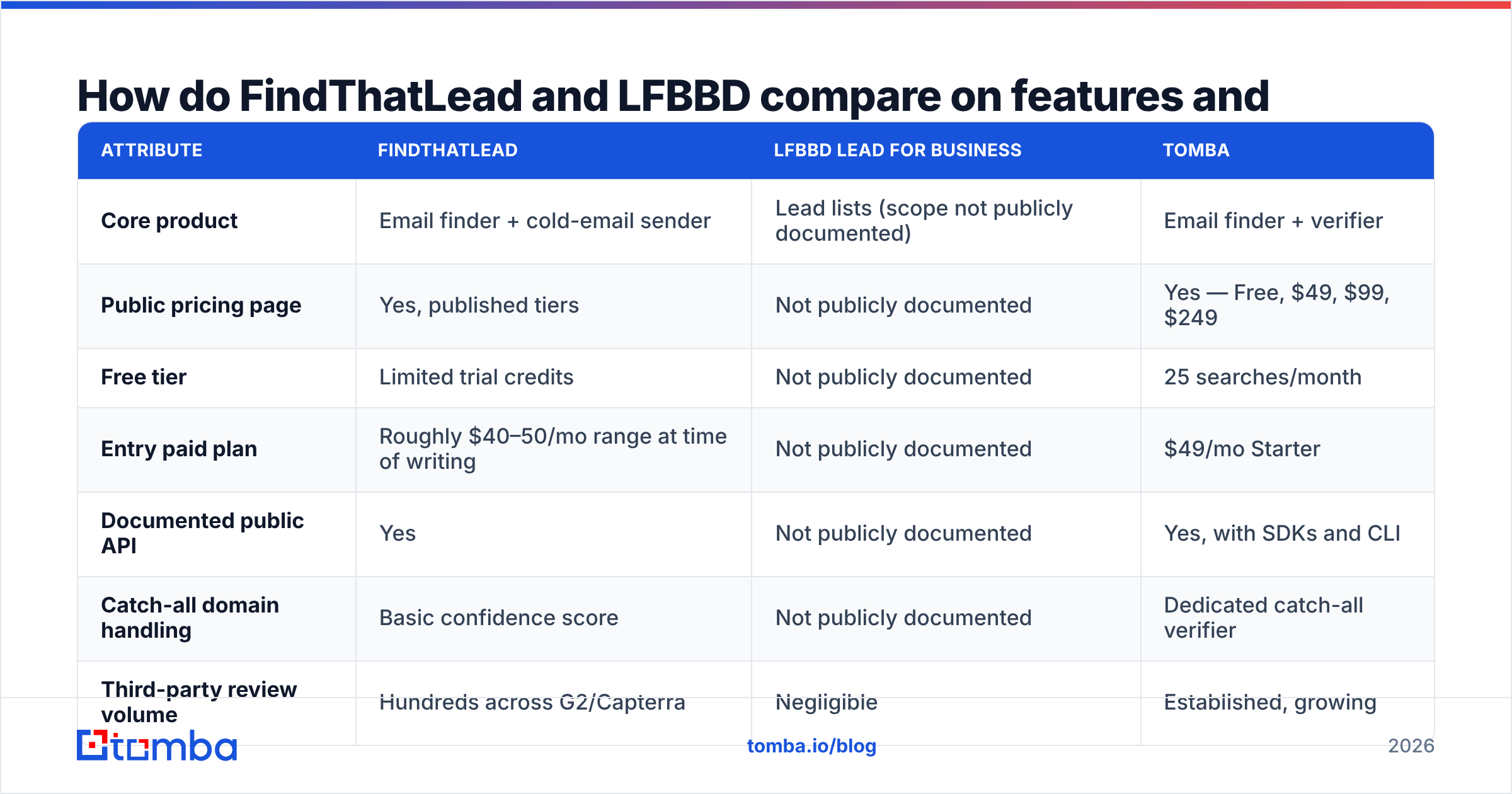
Here is the head-to-head on the attributes that actually change your outcomes. Where a cell says "not publicly documented," that is the finding — not a gap in this research.
| Attribute | FindThatLead | LFBBD Lead for Business | Tomba |
|---|---|---|---|
| Core product | Email finder + cold-email sender | Lead lists (scope not publicly documented) | Email finder + verifier |
| Public pricing page | Yes, published tiers | Not publicly documented | Yes — Free, $49, $99, $249 |
| Free tier | Limited trial credits | Not publicly documented | 25 searches/month |
| Entry paid plan | Roughly $40–50/mo range at time of writing | Not publicly documented | $49/mo Starter |
| Documented public API | Yes | Not publicly documented | Yes, with SDKs and CLI |
| Catch-all domain handling | Basic confidence score | Not publicly documented | Dedicated catch-all verifier |
| Third-party review volume | Hundreds across G2/Capterra | Negligible | Established, growing |
| Bulk enrichment | Yes, CSV upload | Not publicly documented | Yes, bulk finder + verifier |
| Built-in email sending | Yes | Not publicly documented | No — integrates instead |

Two things jump out of that table.
First, FindThatLead's differentiator is bundling. If you want one login that finds the contact and sends the sequence, it is a coherent package for a solo founder or a two-person SDR team. The tradeoff is that bundled senders rarely match a dedicated sending platform on deliverability tooling, and bundled finders rarely match a dedicated data vendor on match rate. You are trading peak quality for fewer invoices.
Second, an entire column of "not publicly documented" is a procurement answer, not a shrug. You cannot forecast cost per contact against a price you cannot see. You cannot integrate a tool whose API you cannot read.
Which tool actually finds more valid emails?#
Match rate is the number vendors advertise. Bounce rate is the number that decides whether your domain survives the quarter. They are not the same metric, and the gap between them is where money disappears.
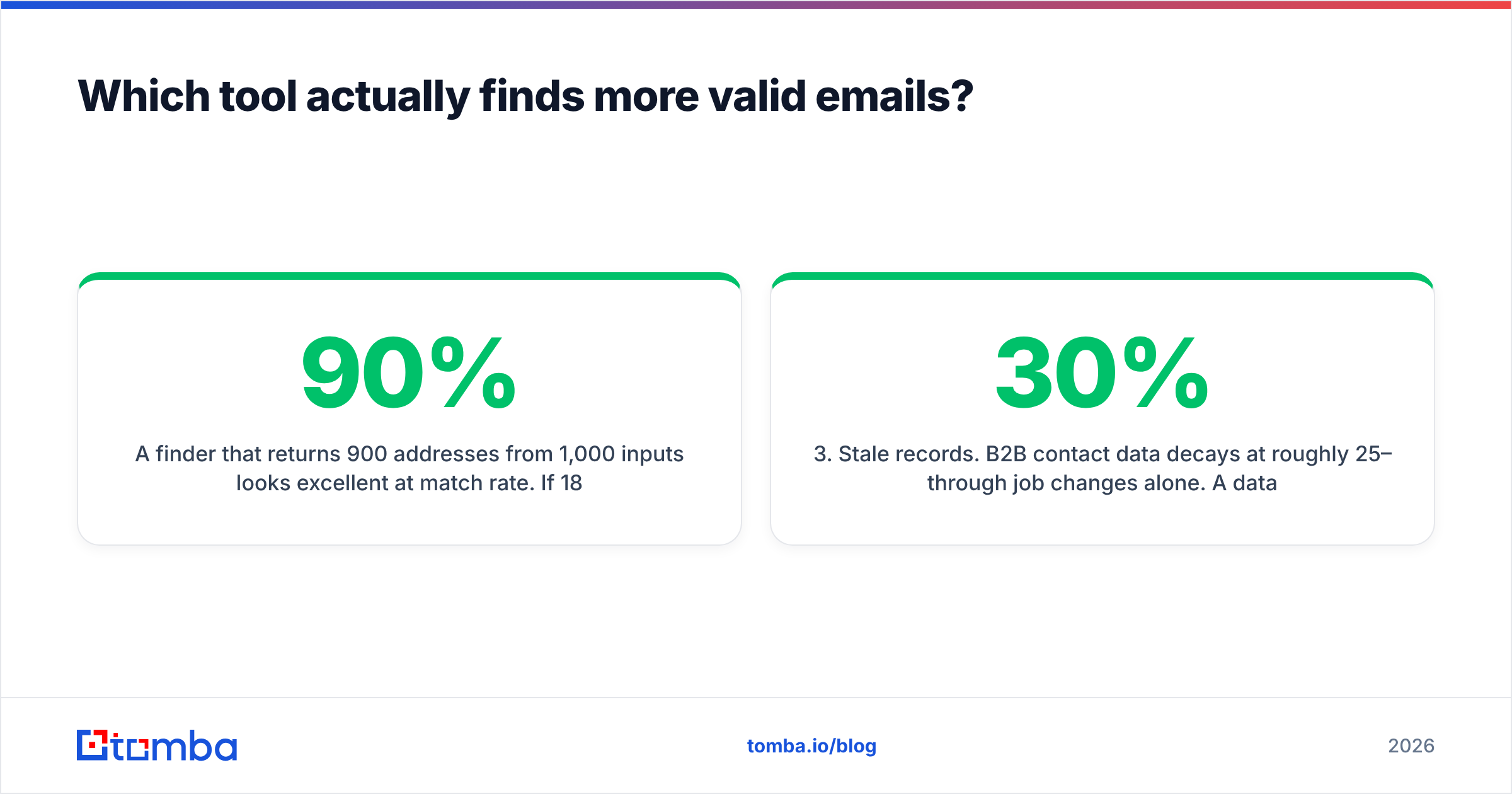
A finder that returns 900 addresses from 1,000 inputs looks excellent at 90% match rate. If 18% of those bounce, you have shipped roughly 162 hard bounces into a mailbox provider that is watching you. Google and Microsoft treat sustained bounce rates above the 2% band as a reputation signal. Recovery takes weeks, not hours. A finder that returns 700 addresses with a 1% bounce rate is the better tool despite the worse headline number.

This is why the verification layer matters more than the finding layer. Every credible finder builds addresses from the same raw ingredients: crawled public sources, pattern inference, and SMTP-level validation. SMTP is the protocol that accepts or rejects the recipient. The difference between vendors is what they do with an ambiguous result.
Three ambiguous cases separate serious tools from list brokers:
- Catch-all domains. The server accepts every address, so SMTP validation proves nothing. Weak tools mark these "valid" and let you eat the bounce. Serious tools flag them separately and apply pattern confidence — which is exactly what a dedicated catch-all verifier is for.
- Role accounts.
info@,sales@,support@are deliverable and nearly useless for one-to-one outbound. They inflate match rates while depressing reply rates. - Stale records. B2B contact data decays at roughly 25–30% per year through job changes alone. A database refreshed once a year is a third wrong before you open it.
On FindThatLead vs LFBBD, the first case splits them cleanly. FindThatLead handles it with a confidence score rather than an explicit catch-all verdict, which is workable but blunt. For LFBBD, the handling of all three is undocumented. The only way to learn it is to send real email and read your own bounce log. That is an expensive way to run a vendor evaluation.
What does each tool actually cost per usable contact?#
Sticker price is the wrong unit. Model cost per usable contact instead:
(monthly price ÷ credits) ÷ (match rate × deliverable rate)
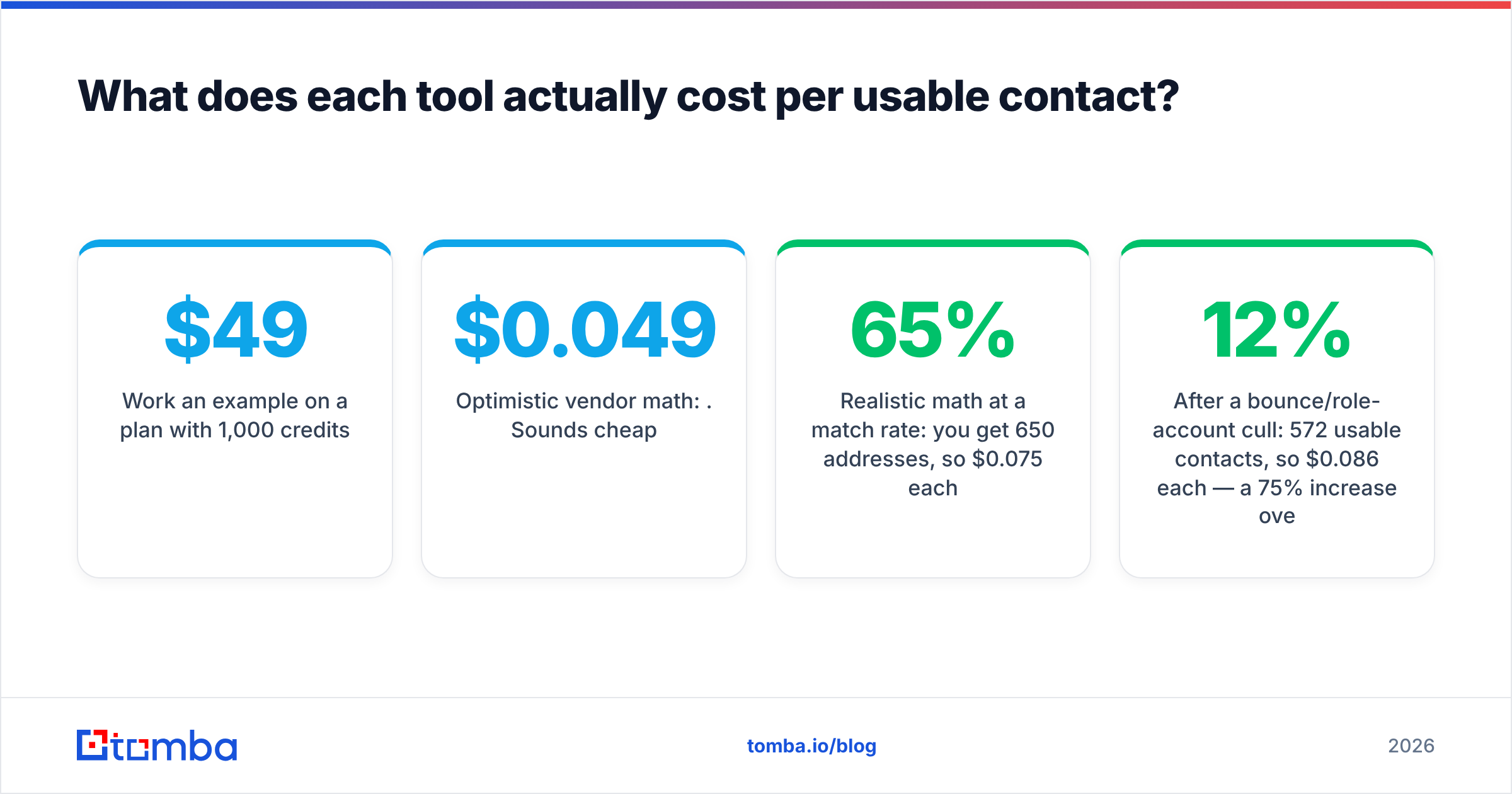
Work an example on a $49/month plan with 1,000 credits.
- Optimistic vendor math: $0.049 per credit. Sounds cheap.
- Realistic math at a 65% match rate: you get 650 addresses, so $0.075 each.
- After a 12% bounce/role-account cull: 572 usable contacts, so $0.086 each — a 75% increase over the sticker rate.
Now change one variable. Drop the bounce/role cull to 3% and you are at $0.078 per usable contact, plus you keep your sender reputation. Verification quality is not a line item you add to the invoice. It is a multiplier on everything you already paid for.
Two more cost traps to watch on either vendor:
- Credits burned on failed searches. Some tools charge for a lookup that returns nothing. Check the policy before you buy — it can move effective cost by 20%.
- Annual lock-in on unverified data. Never sign twelve months to a vendor you have not bounce-tested. Monthly first, always.
For reference, Tomba pricing runs a free tier at 25 searches/month, Starter at $49/mo, Growth at $99/mo, Pro at $249/mo, and custom Enterprise. Verification is part of the workflow rather than a separate upsell, so the per-usable-contact math stays close to the sticker math.
Is LFBBD Lead for Business safe to build a pipeline on?#
Treat any low-footprint data vendor as a due-diligence exercise, not a purchase decision. Here is the checklist to run before you send it money. It works for LFBBD, for a new tool your competitor mentioned on LinkedIn, and for anything else with a thin public trail.
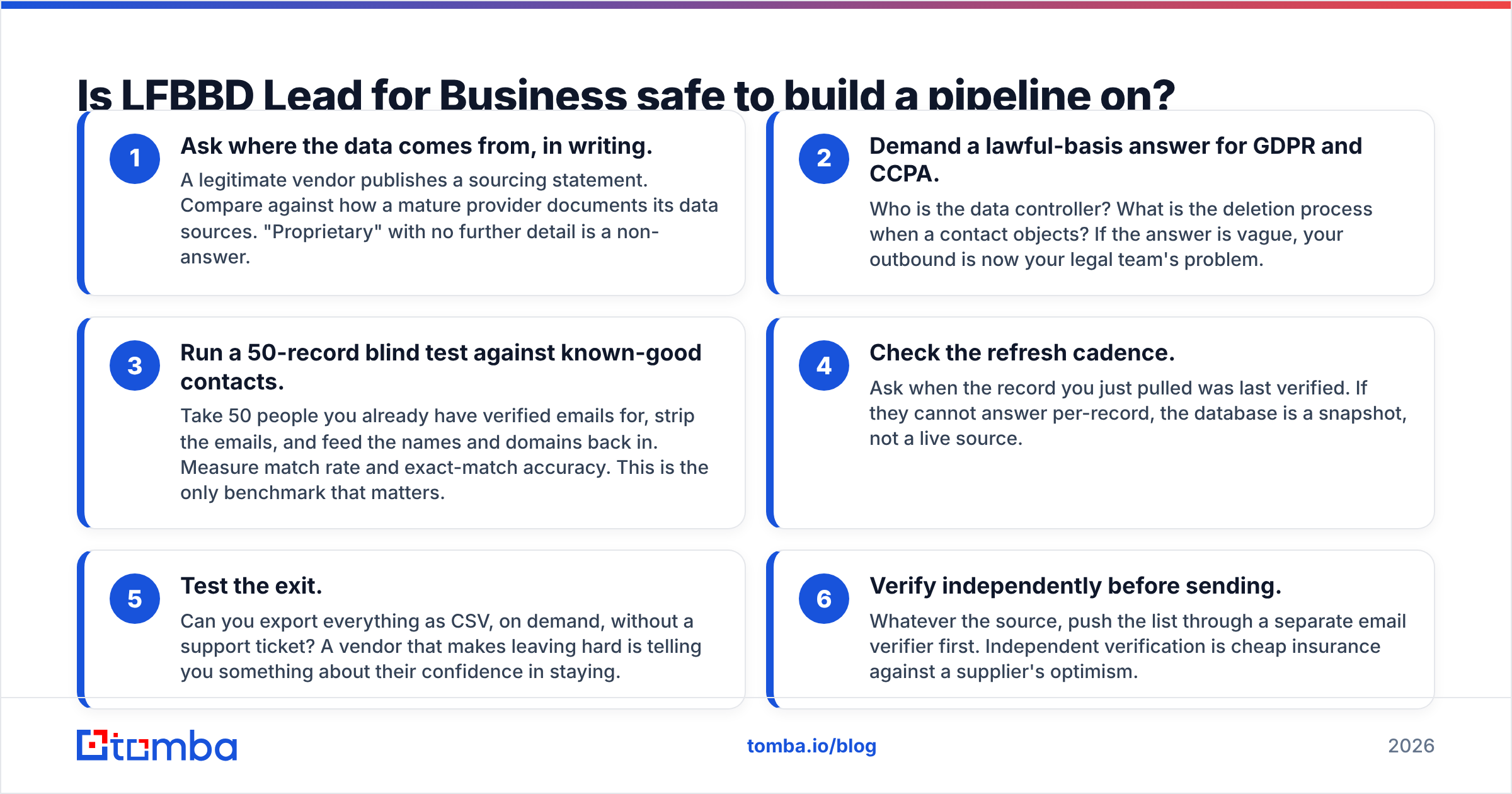
- Ask where the data comes from, in writing. A legitimate vendor publishes a sourcing statement. Compare against how a mature provider documents its data sources. "Proprietary" with no further detail is a non-answer.
- Demand a lawful-basis answer for GDPR and CCPA. Who is the data controller? What is the deletion process when a contact objects? If the answer is vague, your outbound is now your legal team's problem.
- Run a 50-record blind test against known-good contacts. Take 50 people you already have verified emails for, strip the emails, and feed the names and domains back in. Measure match rate and exact-match accuracy. This is the only benchmark that matters.
Those three tell you who the vendor is and whether the data works. The next three tell you what happens after you have paid.
- Check the refresh cadence. Ask when the record you just pulled was last verified. If they cannot answer per-record, the database is a snapshot, not a live source.
- Test the exit. Can you export everything as CSV, on demand, without a support ticket? A vendor that makes leaving hard is telling you something about their confidence in staying.
- Verify independently before sending. Whatever the source, push the list through a separate email verifier first. Independent verification is cheap insurance against a supplier's optimism.
If a vendor clears all six, obscurity stops being a red flag. If they cannot clear items one and two, the price is irrelevant.

What should you use instead if neither fits?#
Most teams comparing these two are really asking a different question: what is the minimum reliable stack for finding B2B contacts in 2026?
If you want an all-in-one for a small team, FindThatLead is defensible. Finder plus sender in one seat suits a founder doing 200 emails a week who does not want to wire two tools together. Accept that neither half is best-in-class.
If deliverability is your bottleneck, unbundle. Use a dedicated data source, verify independently, and send from a platform built for inbox placement. The teams with the healthiest sender reputations almost never run a bundled finder-sender.
If you are building on top of the data, the API is the deciding factor. A documented email finder API with rate limits you can read, SDKs in your language, and predictable response schemas is worth more than a slicker dashboard. You will spend far more hours in code than in the UI.
If your workflow starts on LinkedIn, look at how each tool handles profile-to-email resolution rather than domain-wide scraping. A LinkedIn finder that resolves a single profile cleanly beats a bulk extractor that returns 400 addresses of which half bounce.
If you buy lists, keep a second opinion in the loop. Providers like BookYourData serve the pre-built-list use case well, and pairing any list purchase with independent verification is simply good hygiene regardless of the source.
FindThatLead vs LFBBD: which one actually wins?#
On verifiable evidence, FindThatLead. It has published pricing, a documented API, a real review base, and a feature set you can evaluate before paying. LFBBD Lead for Business cannot be responsibly recommended over it. Not because the product is proven bad, but because nothing about it is proven at all. Unproven is the wrong risk profile for the asset your whole outbound program rests on.
The honest caveat: winning this particular matchup is a low bar. FindThatLead's tradeoffs are real — bundled sending that trails dedicated platforms, catch-all handling that resolves to a confidence score rather than a verdict, and credit economics that reward you for reading the fine print. If your outbound volume is meaningful, benchmark it against a dedicated finder-plus-verifier stack before you settle.
What to do this week: pick 50 accounts in your ICP, run them through two tools in parallel, send to both segments from separate subdomains, and compare bounce rate and reply rate after ten days. Two weeks of real data will beat two months of reading comparison posts — including this one.
Ready to run that bake-off with a source that publishes its accuracy, its pricing, and its data policy? Start with the Tomba Email Finder — 25 free searches a month, no card required, with verification built into the same workflow so your bounce rate stays where mailbox providers want it. Feed it your 50 hardest accounts and let your own bounce log pick the winner.
Related guides#
Ready to find emails that actually work?
Join 150,000+ professionals who stopped guessing and started sending. Free credits on signup — no credit card required.
Get the Tomba newsletter
Practical outbound tactics and product updates — once every two weeks.
About the author