FindThatLead vs ListMint (2026): Which Email Finder Wins?
FindThatLead and ListMint both promise verified B2B emails at a low price. We break down coverage, accuracy, credit math, and bulk workflows so you know which one actually fits your outbound motion in 2026.
FindThatLead vs ListMint is really a question of scope. One tool finds emails and sends them for you. The other just builds a clean list and stays out of your way. Here is how the two compare on coverage, credit math, and bulk work in 2026.
TL;DR
- FindThatLead is the older, broader product. You get an email finder, a domain scraper, a LinkedIn extension, and a built-in cold email sender. It's a "prospect and send from one tab" tool.
- ListMint is leaner and cheaper. Buy credits, pull a list, export it. Less sending machinery, less lock-in, fewer moving parts.
- On coverage, FindThatLead is stronger for European SMB domains. On cost per usable email, the winner hangs on one thing: whether unverified results burn your credits.
- Neither vendor publishes an audited accuracy number. Run a 200-row bake-off on your own ICP before you sign an annual plan. The method is at the bottom of this post.
- Want an API-first finder that handles catch-all domains and holds its price on renewal? Put a third option like Tomba's email finder in the same test.
FindThatLead vs ListMint: what does each tool do?#
FindThatLead launched out of Barcelona and has sold prospecting tools for about ten years. It bundles four things. There's an email finder (name + domain → email). There's a domain search that pulls every address it knows for a company. There's a Chrome extension that works over LinkedIn search results. And there's "Scrab.in"-style sending, so you can push a list into a sequence without exporting it.
ListMint is the newer, narrower tool. The pitch is simplicity: pick your filters or paste your domains, get a list, export it. There's no sequencer to learn and no seat-based sales motion. That suits solo founders and small agencies who already own an email platform and just need rows.
The strategy gap matters more than any feature checkbox. FindThatLead wants to be your outbound stack. ListMint wants to be one part of someone else's stack. Which one is "better" depends on whether you already have a sender you like.
One caution first. Both vendors change prices and credit rules more often than they update their marketing pages. Everything below reflects published terms at the time of writing. Check the vendor's own billing page before you put a card down.
FindThatLead vs ListMint: how the features compare#
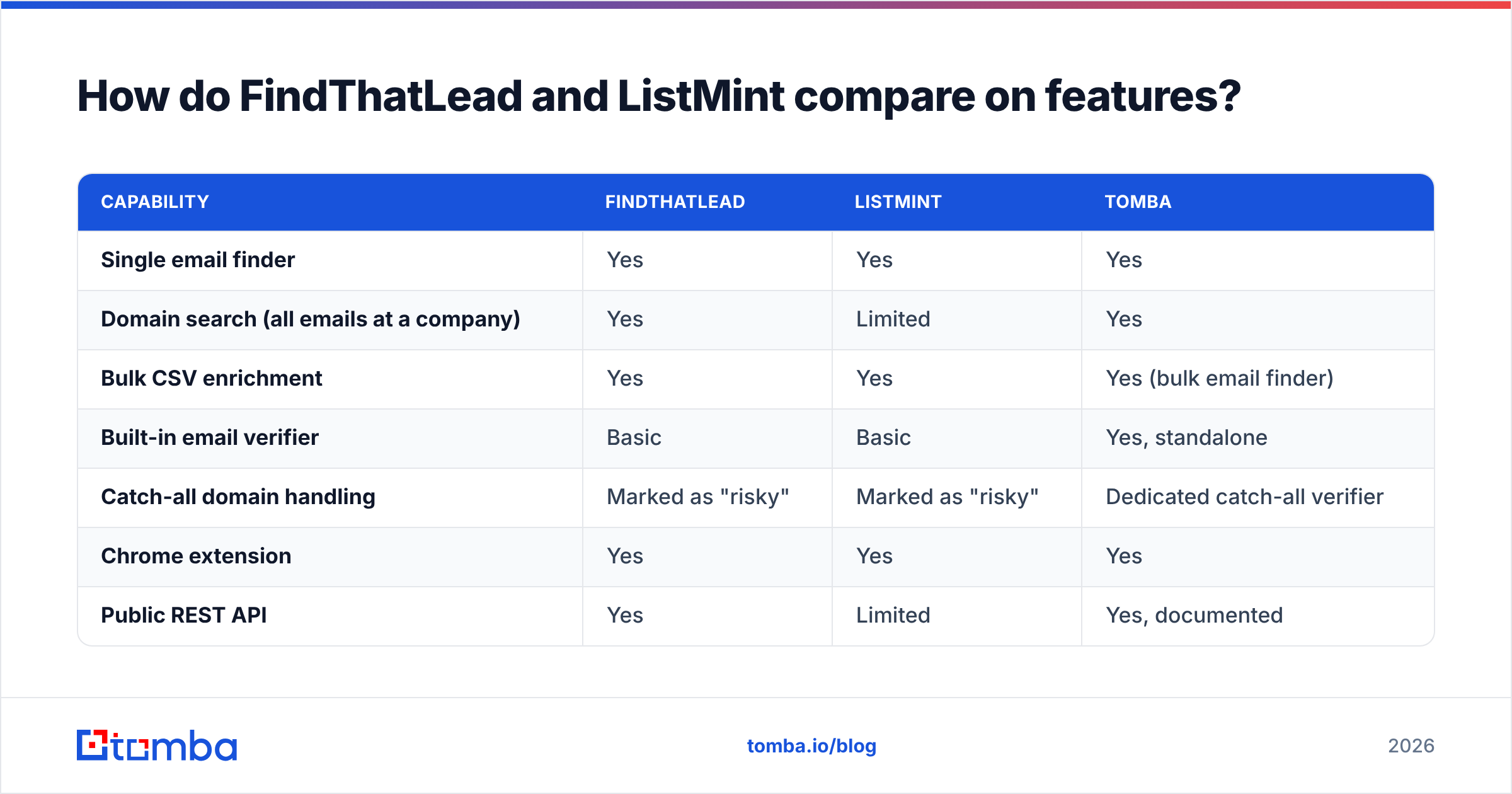
| Capability | FindThatLead | ListMint | Tomba |
|---|---|---|---|
| Single email finder | Yes | Yes | Yes |
| Domain search (all emails at a company) | Yes | Limited | Yes |
| Bulk CSV enrichment | Yes | Yes | Yes (bulk email finder) |
| Built-in email verifier | Basic | Basic | Yes, standalone |
| Catch-all domain handling | Marked as "risky" | Marked as "risky" | Dedicated catch-all verifier |
| Chrome extension | Yes | Yes | Yes |
| Public REST API | Yes | Limited | Yes, documented |
| Built-in cold email sending | Yes | No | No |
| Phone numbers | Limited | No | Yes |
| Free tier | Trial credits | Trial credits | 25 searches/mo |
Read that table as three philosophies, not a scoreboard. FindThatLead's sending feature is useful if you're a one-person shop. It saves you a separate Instantly or Smartlead bill. It is also the piece most likely to be the weakest part of your stack a year from now. Sending tools ship inbox fixes much faster than finders do.
ListMint's narrow scope is a feature. Fewer surfaces mean fewer things that break, and export-first tools rarely hold your data hostage.

Which tool actually finds more valid emails?#
This is the only question that matters. Both vendors answer it with marketing numbers.
Here's the honest framing. Every email finder does some mix of four jobs. It crawls public web pages for posted addresses. It guesses the company pattern (first.last@, finitial+last@) and builds candidates from it. It buys or licenses third-party data. And it runs SMTP checks to see if the mailbox is real. Hit rates then differ for two reasons: how much crawled data a vendor holds for your segment, and how freely it hands back guesses.
That second reason is where the numbers get slippery. A tool can return a guess, label it "found," and post a lovely hit rate with an awful bounce rate. A tool that hides anything it can't confirm looks worse on paper and sends much cleaner. So headline hit rates from vendors with different confidence bars tell you nothing.

What we see over and over in side-by-side tests:
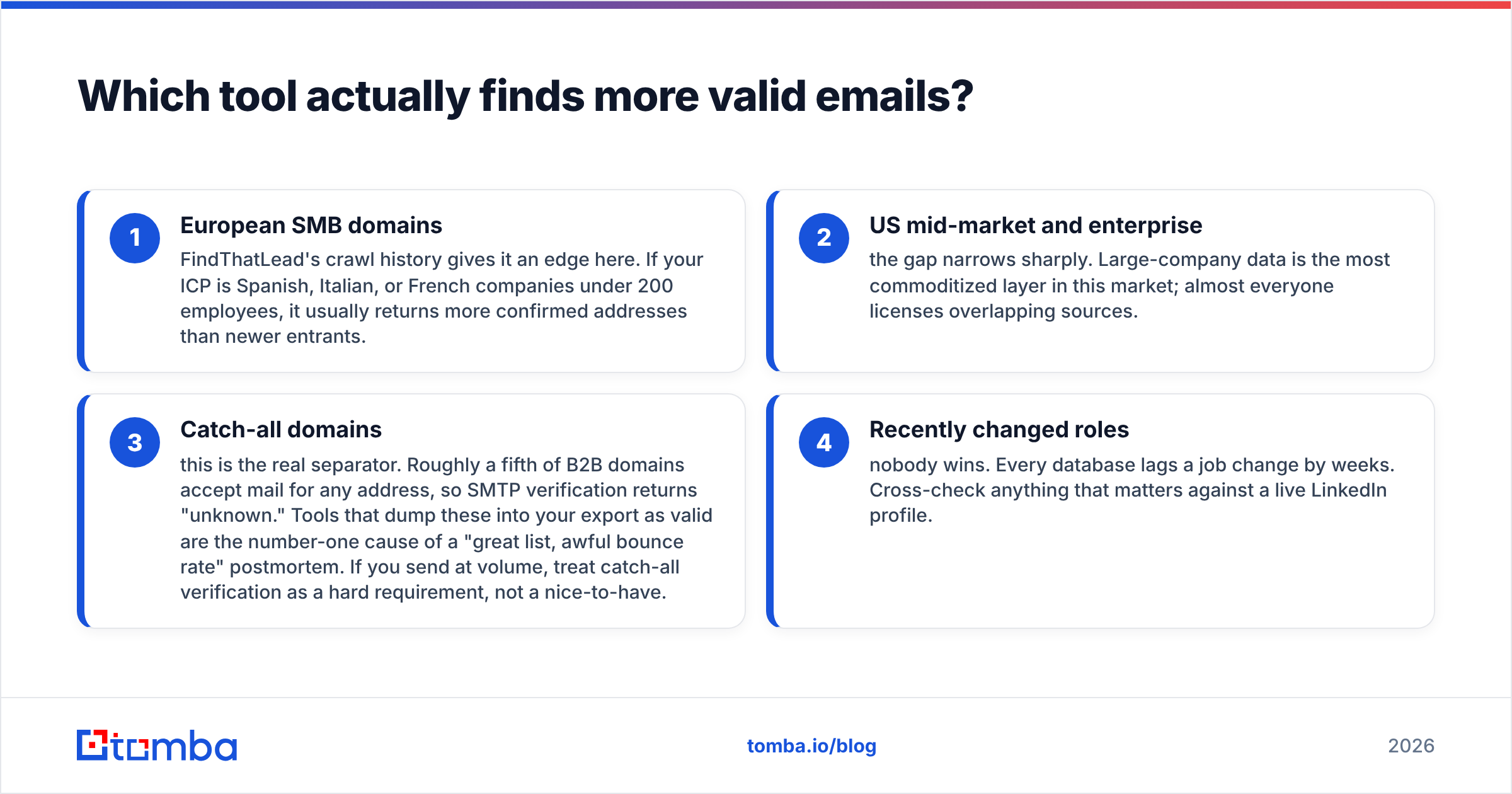
- European SMB domains — FindThatLead's crawl history gives it an edge. If your ICP is Spanish, Italian, or French firms under 200 staff, it tends to return more confirmed addresses than newer tools.
- US mid-market and enterprise — the gap closes fast. Big-company data is the most traded layer in this market, and almost everyone licenses the same sources.
- Catch-all domains — this is the real split. About a fifth of B2B domains accept mail at any address, so an SMTP check returns "unknown." Tools that dump those rows into your export as valid cause most "great list, awful bounce rate" postmortems. If you send at volume, treat catch-all verification as a hard requirement.
- Recently changed roles — nobody wins. Every database lags a job change by weeks. Cross-check anything that matters against a live LinkedIn profile.
The takeaway: judge on cost per confirmed, non-catch-all email in your CRM. Not on the number next to the word "found."
FindThatLead vs ListMint pricing: where do credits leak?#
Both vendors sell credits. Each defines a credit a bit differently, and that is where budgets quietly die.
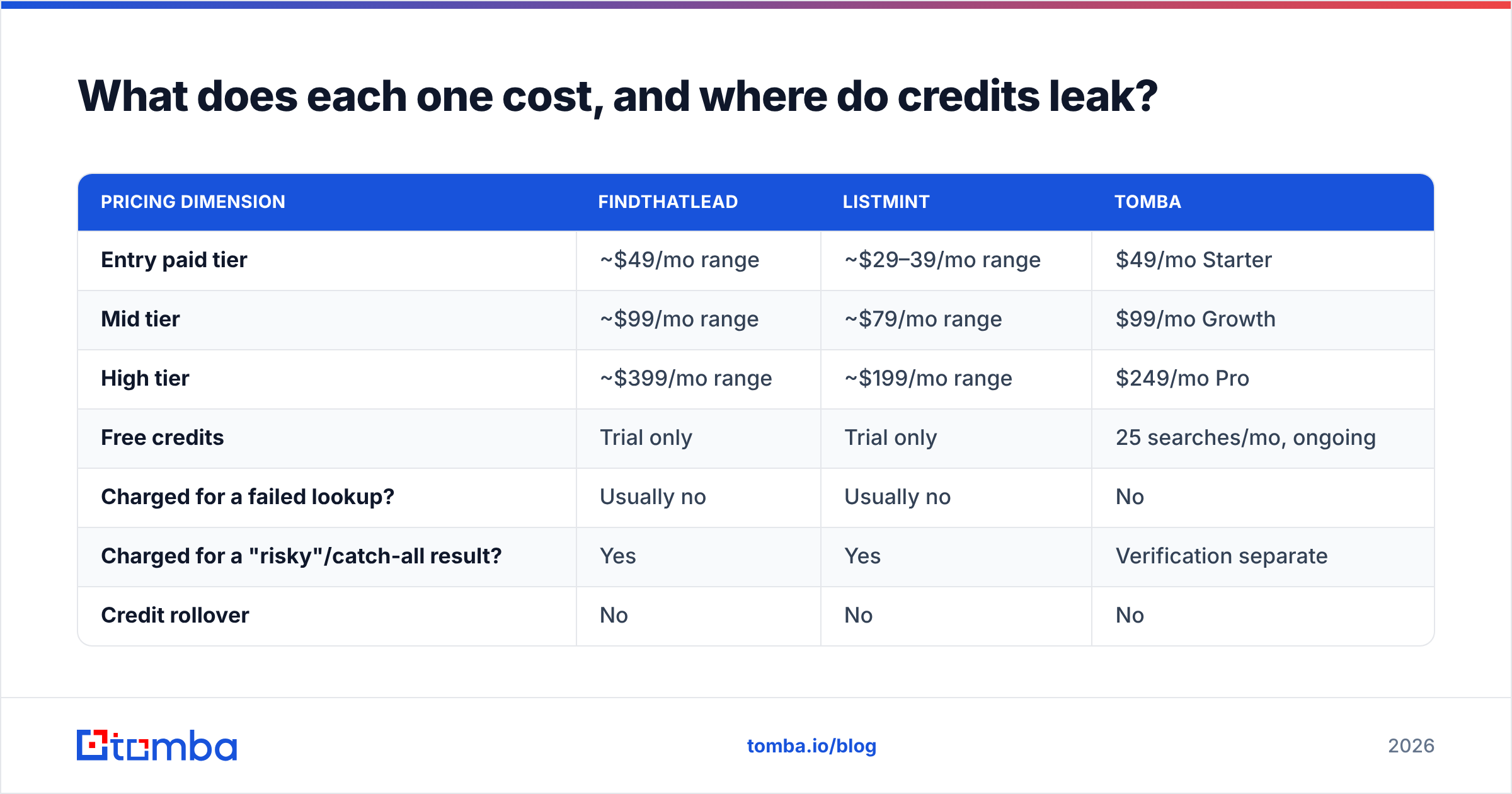
| Pricing dimension | FindThatLead | ListMint | Tomba |
|---|---|---|---|
| Entry paid tier | ~$49/mo range | ~$29–39/mo range | $49/mo Starter |
| Mid tier | ~$99/mo range | ~$79/mo range | $99/mo Growth |
| High tier | ~$399/mo range | ~$199/mo range | $249/mo Pro |
| Free credits | Trial only | Trial only | 25 searches/mo, ongoing |
| Charged for a failed lookup? | Usually no | Usually no | No |
| Charged for a "risky"/catch-all result? | Yes | Yes | Verification separate |
| Credit rollover | No | No | No |
| Annual discount | Yes | Yes | Yes |
Three cost traps to check before you buy, whichever tool you pick:
- Does a catch-all result eat a credit? If it does, and a fifth of your list is catch-all, your real price per usable email is 25% above the sticker.
- Do finding and verifying share one credit pool? Some tools make you pay twice for the same contact: once to find it, once to confirm it. Compare Tomba pricing or any vendor on that basis, not on the monthly headline.
- What happens on overage? A hard stop mid-campaign, or a silent auto-top-up? Both are bad in their own way. Only one shows up on your card.

Worth noting: the cheapest price per credit rarely comes from a finder plan at all. Say you need tens of thousands of contacts in one industry and region. A licensed database vendor like BookYourData can beat any pay-per-lookup tool on price per row, because you buy static records instead of live lookups. Different product, different failure modes. But it belongs in your review if volume is the real constraint.
Is FindThatLead's built-in sender worth the premium?#
Sometimes. Here's the decision rule.
Take the bundle if: you're a solo founder or a two-person agency. You send under ~1,000 emails a month from one or two mailboxes, and you value one login over best-in-class. The bundled sender removes a whole integration, and integrations are where small teams lose their weekends.
Skip the bundle if: you send at volume, run several sending domains, or care about inbox placement. Dedicated sending tools work on warmup, per-mailbox throttling, domain rotation, and reply detection every week. A finder that also ships a sender will always trail them on email deliverability, because sending is not its main product. Read peer reviews on G2's lead intelligence category with that lens. You'll see the same pattern in the complaints.
The bundle also builds in switching cost. Once your sequences, templates, and reply history live inside the finder, changing data vendors means rebuilding your outbound motion. Export-first tools like ListMint don't have that problem, which is a real (if dull) advantage.

Where does Tomba fit in this comparison?#
Full disclosure — this is the Tomba blog. Treat the next two paragraphs with due skepticism and go run the test yourself.
Tomba sits closer to ListMint: it's a data layer, not an outbound suite. There's no sequencer, and there won't be. What it adds over both tools is depth on the checking side. You get a standalone email verifier, a dedicated catch-all check, and domain search that returns patterns next to addresses. The documented Tomba API adds CLI, Sheets, Excel, and Airtable surfaces on top of the same credit pool.
Where Tomba is not the right answer: if you want prospecting and sending on one bill, FindThatLead is genuinely more convenient. If you just need the lowest price for a one-off list of 500 rows, a cheap credit pack beats a $49/mo Starter plan on pure math. Pick the tool that matches the job.
The free tier (25 searches a month, not a 7-day trial) exists so you can run the bake-off below without paying anyone first.
How to run a fair FindThatLead vs ListMint bake-off#
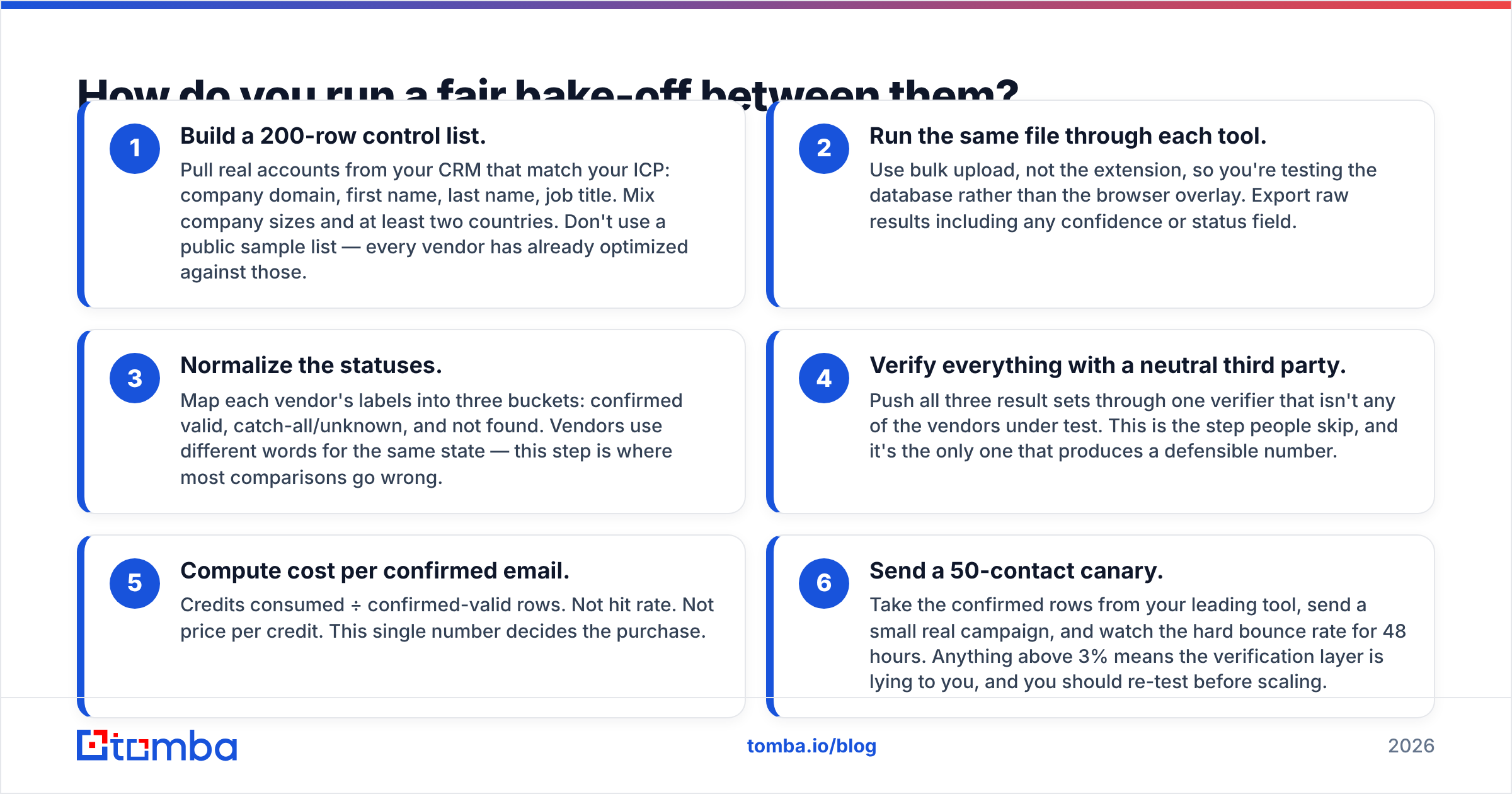
Don't trust anyone's published accuracy chart — including the one in this post. Run your own test instead. It takes about 90 minutes.
First, build the test and pull the data:
- Build a 200-row control list. Pull real accounts from your CRM that match your ICP: company domain, first name, last name, job title. Mix company sizes and at least two countries. Don't use a public sample list — every vendor has already tuned against those.
- Run the same file through each tool. Use bulk upload, not the extension, so you test the database rather than the browser overlay. Export raw results, including any confidence or status field.
- Normalize the statuses. Map each vendor's labels into three buckets: confirmed valid, catch-all or unknown, and not found. Vendors use different words for the same state. This step is where most comparisons go wrong.
Then score the results and pick a winner:
- Verify everything with a neutral third party. Push all three result sets through one verifier that isn't in the test. People skip this step, and it's the only one that produces a defensible number.
- Compute cost per confirmed email. Credits spent ÷ confirmed-valid rows. Not hit rate. Not price per credit. This single number decides the purchase.
- Send a 50-contact canary. Take the confirmed rows from your leading tool and send a small real campaign. Watch the hard bounce rate for 48 hours. Anything above 3% means the verify layer is lying to you, so re-test before you scale.
Log the results in a shared sheet. Re-run the test every six to nine months, because data quality in this category moves. The winner in 2026 may not be the winner in 2027. For a broader vendor list in round two, Capterra's lead capture directory is a fair starting inventory.
So which should you choose?#
- Choose FindThatLead if you're a small European-focused team that wants finding and sending on one bill, and you'll accept a merely adequate sender to get it.
- Choose ListMint if you already own a sending platform, want the cheapest clean export, and value a tool that stays out of your way.
- Choose a verification-first finder if bounce rate is the metric your team is judged on, if you need an API rather than a UI, or if catch-all domains are a big slice of your market.
There's no universal winner in FindThatLead vs ListMint. Any post that crowns one without testing on your ICP is guessing. The 200-row bake-off costs you an afternoon. It saves you an annual contract you regret in month three.
Ready to add a third data point to your test? Run your control list through the Tomba Email Finder — 25 free searches a month, no trial clock, no card. Upload the same 200-row CSV you sent to FindThatLead and ListMint. Export the results with confidence statuses intact, then compare cost per confirmed email side by side. If Tomba doesn't win on your data, you'll have learned something useful anyway.
Related guides#
Ready to find emails that actually work?
Join 150,000+ professionals who stopped guessing and started sending. Free credits on signup — no credit card required.
Get the Tomba newsletter
Practical outbound tactics and product updates — once every two weeks.
About the author