FindThatLead vs LogValid: Full 2026 Comparison Guide
One tool finds prospects, the other cleans your list — and most teams buy the wrong one first. Here is how FindThatLead and LogValid actually compare on accuracy, pricing, and workflow fit in 2026.
FindThatLead vs LogValid is an odd match-up. One tool finds emails. The other checks them. This guide covers what each one does, what it costs, and which one you actually need.
TL;DR
- FindThatLead and LogValid are not real rivals. FindThatLead is a prospecting suite that finds email addresses. LogValid is a verification service. It tells you whether the addresses you already hold will bounce.
- No list? A verifier alone is useless. Scraped or bought list? A finder alone will not save your sender reputation.
- FindThatLead plans start near $49/mo and climb fast for extra seats and credits. LogValid uses the normal verifier model: cheap credits per address, no discovery.
- Buy both and you get two logins, two credit pools, two APIs, and two support queues. All for one job: get a valid address into your sequence.
- One platform — Tomba, or a peer like BookYourData if you want ready-made lists — usually wins on both cost and hassle.
What are FindThatLead and LogValid, actually?#
FindThatLead is a B2B prospecting platform from Spain. It has been around since about 2015. Its core job is email discovery. Give it a company domain, or a name plus a domain, and it returns a likely work address with a confidence score. Over the years it added a lead search database, a Chrome extension, a “Prospector” filter tool, Scrab.in-style LinkedIn automation, and a basic cold-email sender. You can check the current feature set on the official FindThatLead site.
LogValid sits at the other end of the pipeline. It is an email validation service. You upload a list or call the API. It then runs syntax checks, MX lookups, disposable-domain detection, role-account flags, and SMTP mailbox probes. Each address comes back with a status: valid, invalid, risky, unknown, or catch-all. It does not source addresses. It grades them.
That split matters more than any spec sheet. Keep it in mind for the rest of this guide: one tool creates data, the other audits it.
The mix-up is easy to make. Both categories use the same words — “accuracy,” “verified,” “deliverability,” “bounce rate.” Both bill in credits. Both promise fewer bounces. But you cannot verify your way into a pipeline. And you cannot find your way out of a dirty database.
FindThatLead vs LogValid: how do they compare head-to-head?#
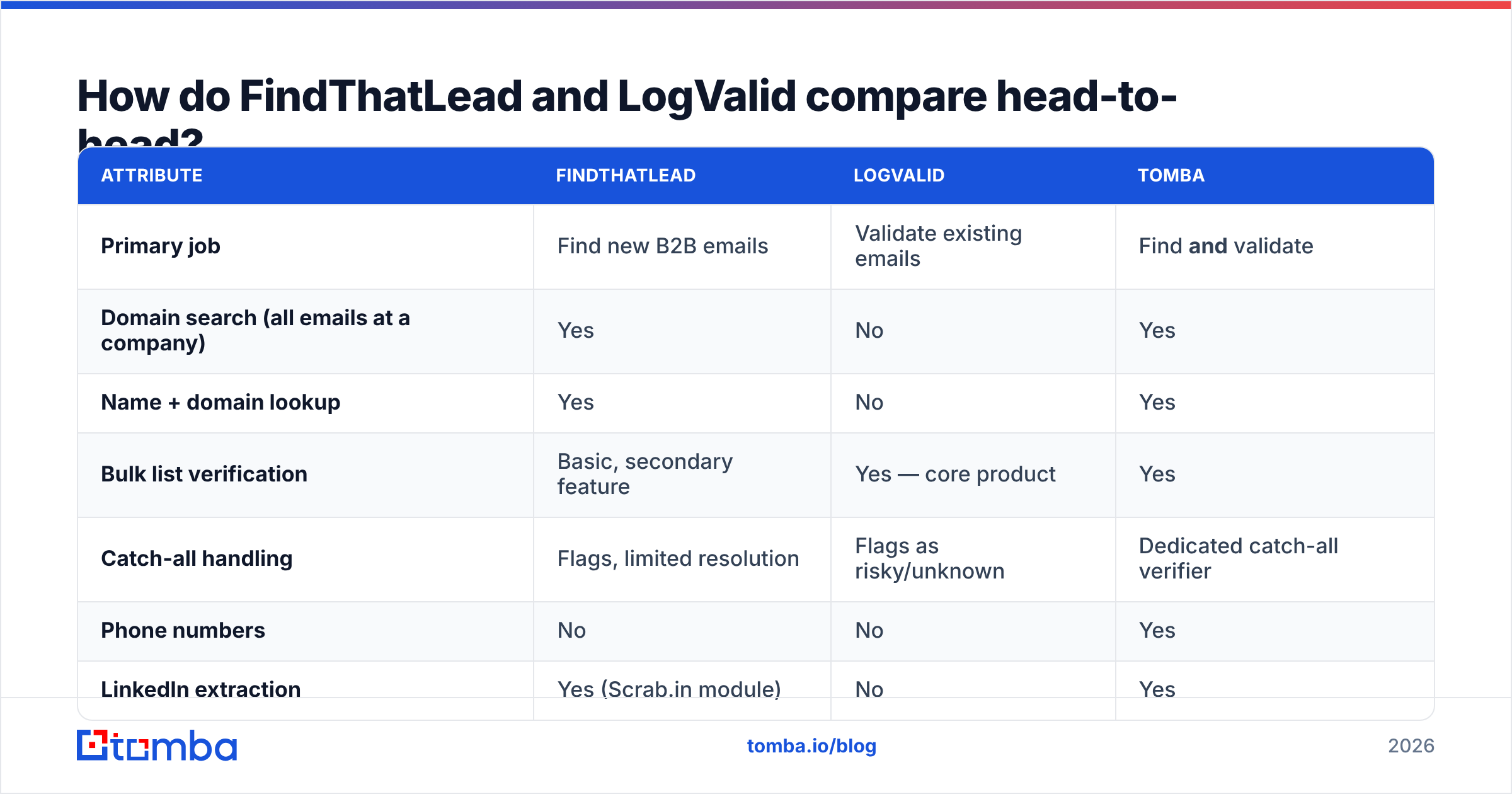
Here is the honest side-by-side. Where a vendor does not publish a hard number, this table says so. Always confirm on the vendor's own pricing page before you buy.
| Attribute | FindThatLead | LogValid | Tomba |
|---|---|---|---|
| Primary job | Find new B2B emails | Validate existing emails | Find and validate |
| Domain search (all emails at a company) | Yes | No | Yes |
| Name + domain lookup | Yes | No | Yes |
| Bulk list verification | Basic, secondary feature | Yes — core product | Yes |
| Catch-all handling | Flags, limited resolution | Flags as risky/unknown | Dedicated catch-all verifier |
| Phone numbers | No | No | Yes |
| LinkedIn extraction | Yes (Scrab.in module) | No | Yes |
| Built-in cold email sender | Yes, lightweight | No | No — integrates instead |
| Public API | Yes | Yes | Yes, documented |
| Entry price (verify at vendor) | ~$49/mo tier | Credit packs, pay-as-you-go | $49/mo Starter |
| Free tier | Limited trial credits | Small trial allocation | 25 searches/mo, no card |
| Best for | Solo founders doing discovery | Ops teams cleaning CRM data | Teams that need one pipeline |
Two things stand out. First, the overlap is almost zero. The two tools sit on different rows. Second, running both means two bills for one workflow. A single email finder with built-in checks does the same job in one API call.

Which one actually protects your bounce rate?#
Neither one, on its own. That is the blunt answer.
FindThatLead returns addresses with a confidence score. A score is a guess. It says how likely a pattern-based address is to be real. It is not a live mailbox check. Send 1,000 guessed addresses into a sequence and you will see bounces. Company patterns change, staff leave, and aliases get retired.
LogValid gives you a fresh verdict on addresses you already hold. That guards your deliverability. But it only covers the list you brought. It cannot tell you that the CFO you want is missing from that list.

Most outbound teams land on the same rule:
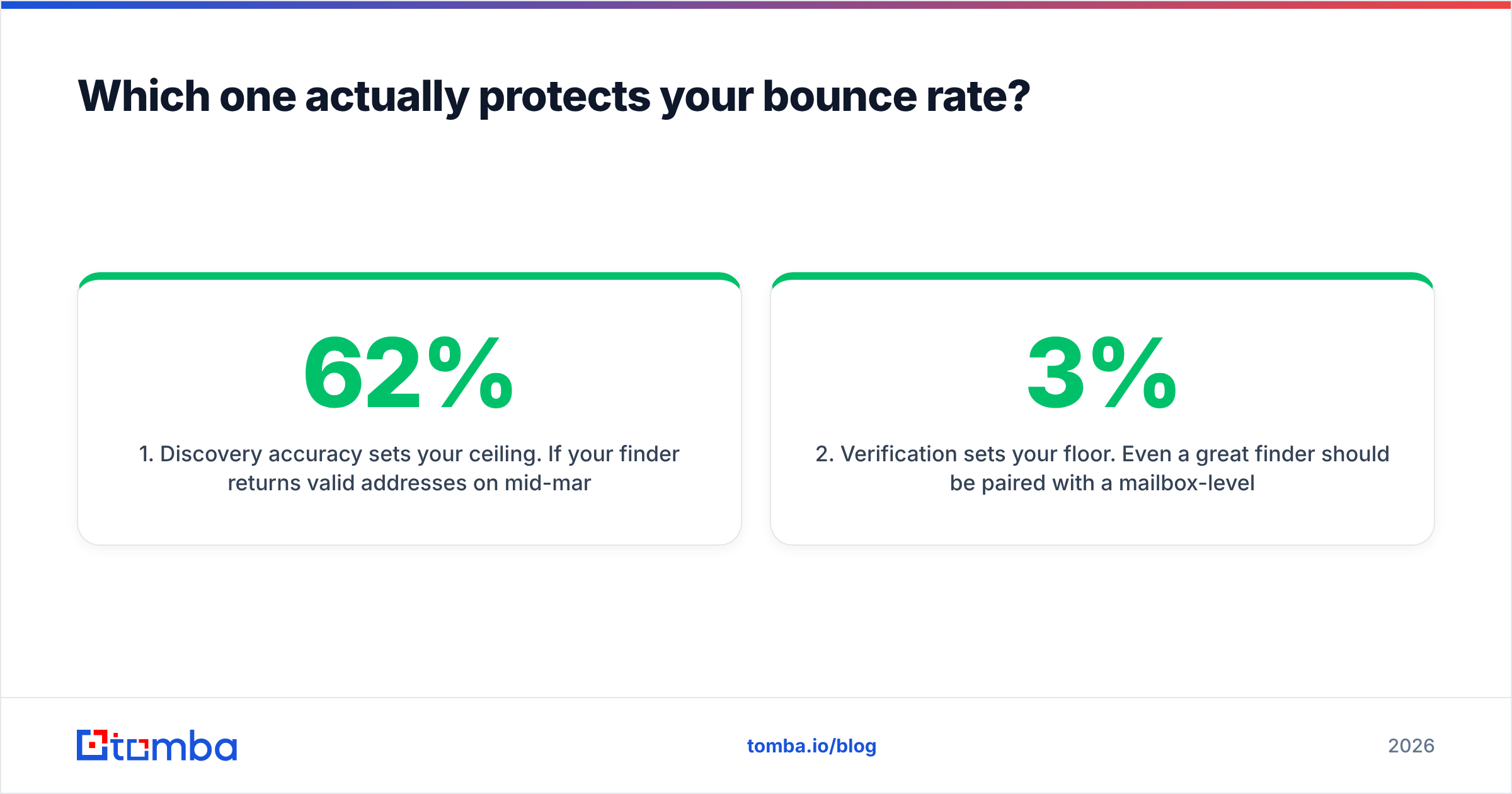
Discovery accuracy sets your ceiling. Say your finder returns 62% valid addresses on mid-market SaaS domains. No verifier recovers the other 38%. Those addresses never existed. The verifier just deletes them, after you paid for them.
Verification sets your floor. Even a good finder needs a mailbox check before send day. B2B data decays by roughly 2–3% each month.
Catch-all domains are the real battleground. Most verifiers, LogValid included, return “unknown” or “risky” on catch-all servers. The choice lands back on you. That is where a dedicated catch-all verifier earns its keep.
Credit accounting compounds. You pay a finder credit for a contact. Then you pay a verify credit for the same contact. Then you bin it as invalid. You paid twice for nothing.

Want outside opinions instead of vendor claims? G2's email-finder category is a fair sanity check. Read the one-star reviews first. That is where credit burn and accuracy complaints show up.
What does each one cost in 2026?#
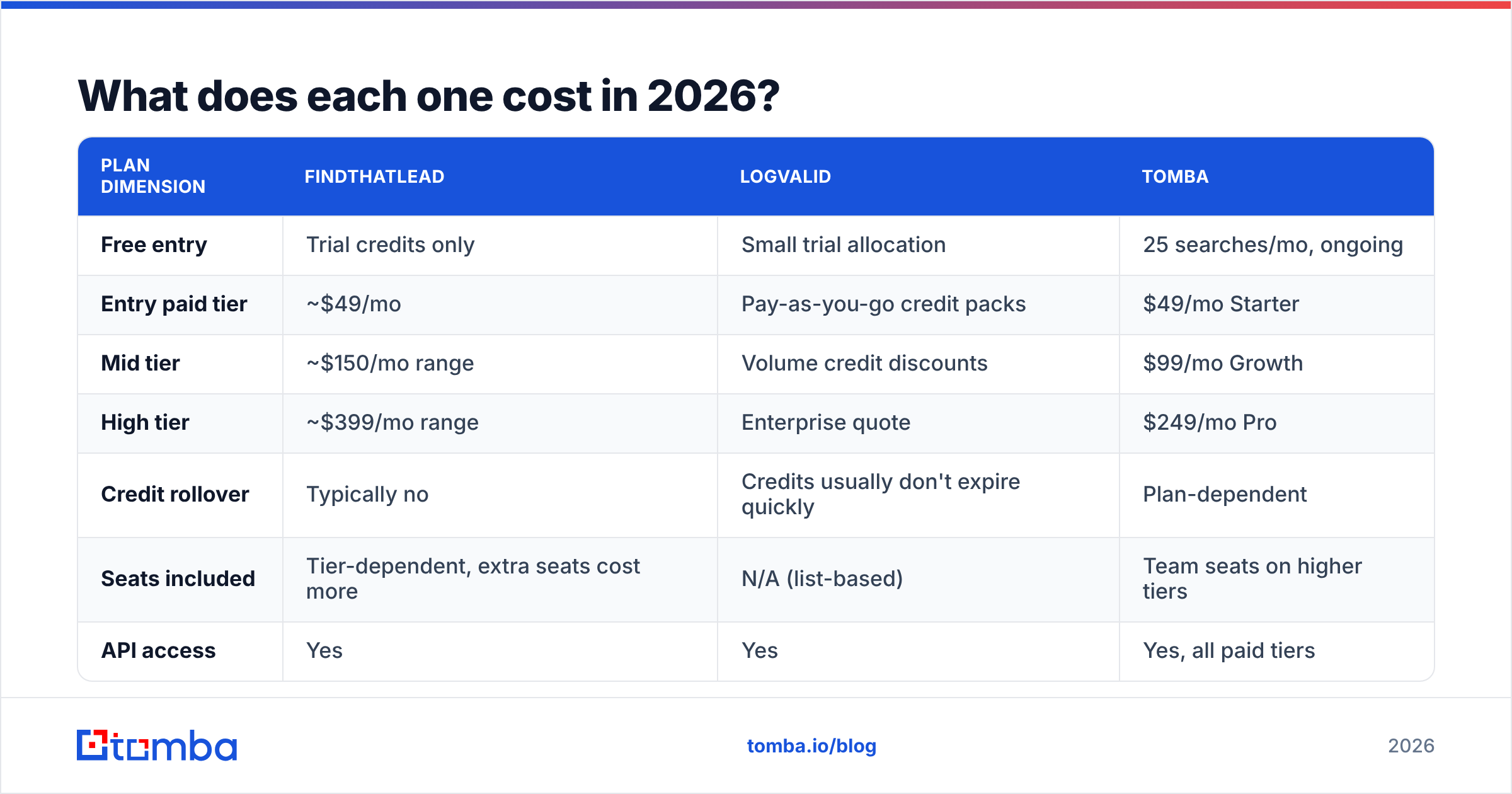
Prices in this market move every quarter. Treat these as directional and confirm on the vendor pages.
| Plan dimension | FindThatLead | LogValid | Tomba |
|---|---|---|---|
| Free entry | Trial credits only | Small trial allocation | 25 searches/mo, ongoing |
| Entry paid tier | ~$49/mo | Pay-as-you-go credit packs | $49/mo Starter |
| Mid tier | ~$150/mo range | Volume credit discounts | $99/mo Growth |
| High tier | ~$399/mo range | Enterprise quote | $249/mo Pro |
| Credit rollover | Typically no | Credits usually don't expire quickly | Plan-dependent |
| Seats included | Tier-dependent, extra seats cost more | N/A (list-based) | Team seats on higher tiers |
| API access | Yes | Yes | Yes, all paid tiers |
LogValid's pay-as-you-go model is genuinely good in one case. You inherit a 40,000-row CRM export of unknown quality. You need it graded once. You do not want a monthly bill. Buy a credit pack, run the list, move on.
FindThatLead's subscription fits the opposite case: steady prospecting, every week, forever. If you only prospect in bursts, you pay for idle months.
The math gets ugly when you run both. Say discovery costs $49/mo and verify credits cost another $30–40/mo. That is about $90/mo. You also get two dashboards and two credit balances that expire on different dates. And there is no single record of when a contact was found and when it was verified. Tomba pricing puts both jobs in one $49/mo Starter plan, or $99/mo on Growth if you need more volume.
Which workflow does each tool fit?#
Match the tool to how you actually work, not to the feature list:
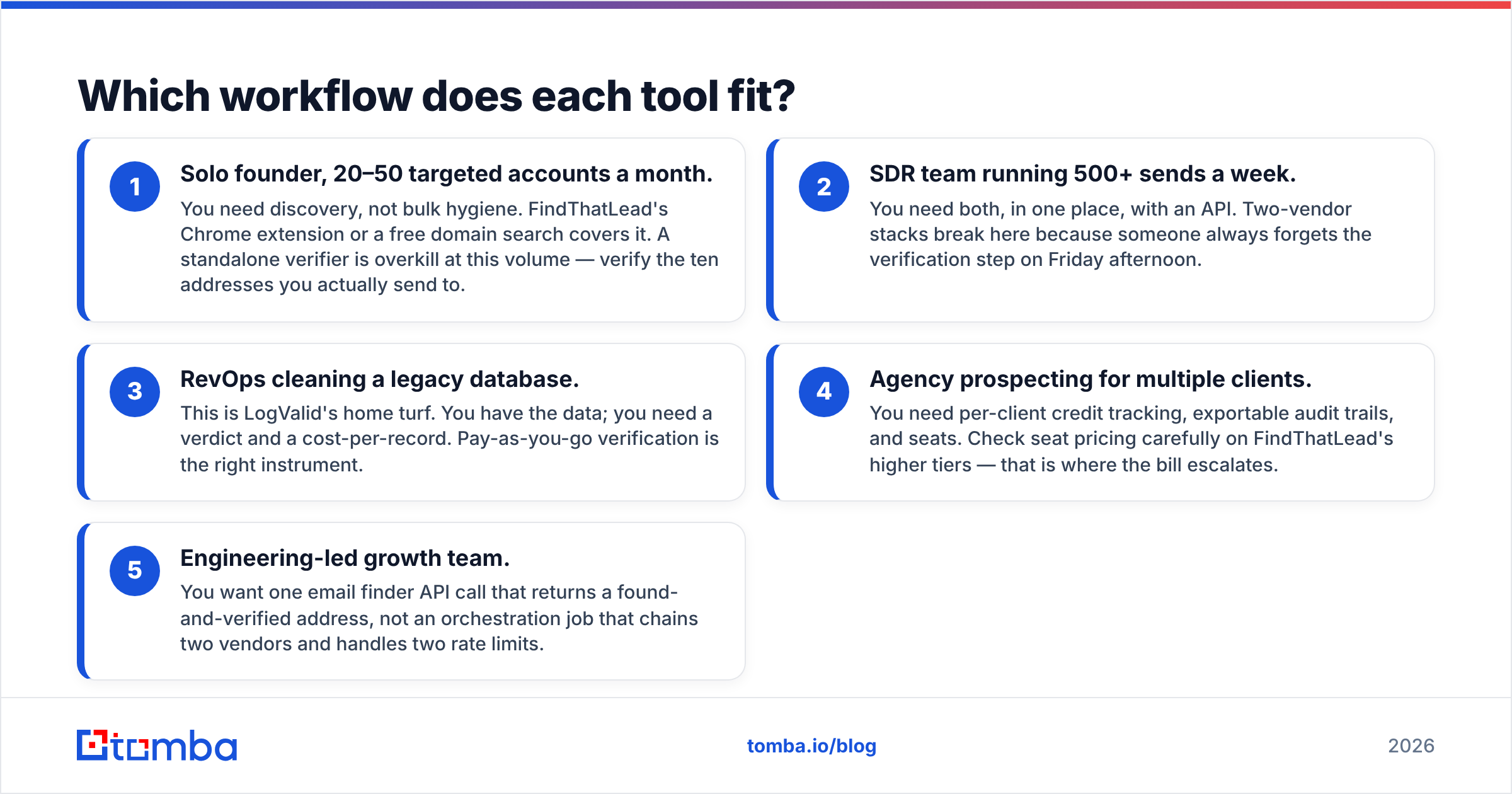
Solo founder, 20–50 target accounts a month. You need discovery, not bulk cleaning. FindThatLead's Chrome extension works. So does a free domain search. A standalone verifier is overkill here. Just verify the ten addresses you really send to.
SDR team sending 500+ emails a week. You need both jobs in one place, with an API. Two-vendor stacks break here. Someone always skips the verify step on Friday afternoon.
RevOps cleaning a legacy database. This is LogValid's home turf. You have the data. You need a verdict and a cost per record. Pay-as-you-go verification is the right instrument.
Agency prospecting for many clients. You need per-client credit tracking, exportable audit trails, and seats. Check seat pricing on FindThatLead's higher tiers. That is where the bill climbs.
Engineering-led growth team. You want one email finder API call that returns a found and verified address. You do not want a job that chains two vendors and juggles two rate limits.
Where does each tool fall short?#
FindThatLead's weak points. The built-in sending layer is thin next to dedicated cold-email platforms. Most teams export to Instantly, Smartlead, or Lemlist anyway. So the “all-in-one” pitch does not quite land. Coverage leans toward European and startup domains. Enterprise North American coverage is patchier. The LinkedIn module also carries the usual account-risk caveat that comes with browser automation.
LogValid's weak points. It does one job. That is a strength for focus and a weakness for stack sprawl. Catch-all domains are a large and growing share of B2B mail servers, and they come back inconclusive. You are left guessing. There is also no enrichment. A verified address with no job title, company size, or phone number still needs another vendor to become a usable lead record.
The shared weak point. Neither tool gives you a full contact record. If your sequences use titles, seniority, headcount, or tech stack, you need data enrichment on top of whichever one you pick. That is a third line item.
Do you need both, or something else entirely?#
Ask three questions, in order:
Do you have a list? No → you need a finder. FindThatLead fits. So does Tomba, at the same $49 entry price, with verification included.
Is the list old or bought? Yes → verify it before you send. LogValid fits. So does a bundled email verifier, with no second bill.
Will you do this every week? Yes → consolidate. Two-vendor stacks are fine for a one-off cleanup. They get expensive as a permanent setup.
There is a fourth path worth naming. Skip discovery and buy a ready-made, verified list from a solid data vendor. BookYourData is a good option in that lane. You trade some control over targeting for speed and a known cost per record. That suits teams who know their ICP segment and do not want to build a prospecting motion from scratch.
What's the verdict?#
FindThatLead wins if your bottleneck is finding people. It is a mature product with a real database, a handy extension, and a price that suits solo operators and small teams. It is strongest in European and startup markets.
LogValid wins if your bottleneck is a dirty list. Pay-as-you-go credits, a tight feature set, and no recurring commitment make it a clean fit for one-off CRM hygiene projects.
Neither wins if your bottleneck is both — and for most outbound teams, it is. In the FindThatLead vs LogValid debate, the honest answer is often “neither, alone.” Two vendors means two bills, two credit systems, two integrations, and one more step to skip. The case for one tool is not about features. It is about the number of hops between “I found a prospect” and “the email landed.”
Start with the Tomba Email Finder if you want discovery and verification behind one API and one credit pool. The free tier gives you 25 searches a month with no card. That is enough to run your own accuracy test. Pull 25 addresses from domains you know well, check the hit rate, and let the numbers decide instead of the marketing copy.
Related guides#
Ready to find emails that actually work?
Join 150,000+ professionals who stopped guessing and started sending. Free credits on signup — no credit card required.
Get the Tomba newsletter
Practical outbound tactics and product updates — once every two weeks.
About the author