FindThatLead vs Mail Merge for Gmail: Which Wins in 2026?
One tool finds the leads, the other just presses send. Here's an honest breakdown of FindThatLead vs mail merge for Gmail — pricing, deliverability, data quality, and the stack that actually beats both.
TL;DR
- FindThatLead and mail merge for Gmail are not really competitors — one builds the list, the other sends to it. Comparing them head-to-head only makes sense if you're deciding where your outreach budget goes first.
- FindThatLead bundles prospecting, email finding, and a basic sender. Mail merge tools (Gmail's native multi-send, YAMM, GMass) bundle nothing — they personalize and send from your own inbox, and expect you to bring the data.
- Mail merge wins on deliverability at low volume because you're sending from a real Gmail account with real reputation. FindThatLead wins on speed-to-list because you can go from a LinkedIn search to a CSV in minutes.
- The failure mode is identical for both: unverified addresses. A 12% bounce rate will torch your domain regardless of which button you press.
- The strongest low-cost stack in 2026 is usually a dedicated finder + verifier feeding a Gmail mail merge — which is where a tool like Tomba Email Finder plus YAMM or GMass outperforms an all-in-one suite on both cost and accuracy.
What Are You Actually Comparing Here?#
Start by naming the categories honestly, because most "FindThatLead vs Mail Merge" searches come from people who haven't yet split the two jobs in their head.
Cold outreach has four jobs. Find (get the contact), verify (confirm the address is deliverable), send (deliver the message at scale with personalization), and track (opens, replies, follow-ups). FindThatLead sells you jobs 1, 2, and a light version of 3 and 4. Mail merge for Gmail sells you jobs 3 and 4 only, and does them from inside an inbox you already own.
Think of it like a restaurant. FindThatLead is a meal-kit box — ingredients and a recipe card in one delivery. A Gmail mail merge is your own kitchen: excellent equipment, zero groceries. Neither is "better." The question is which half of the problem you currently can't solve.
That framing matters for budget. If you already have 4,000 clean contacts sitting in a CRM export, buying a prospecting suite is waste. If you have a great Gmail sending setup and no leads, buying another sender is waste.
What Is FindThatLead and What Does It Do Well?#
FindThatLead is a Spanish-built B2B prospecting platform that's been around since 2015. Its core loop: search a domain or a LinkedIn profile, get a business email back, push those contacts into a list, then run a basic drip campaign from the same dashboard.
What it genuinely does well:
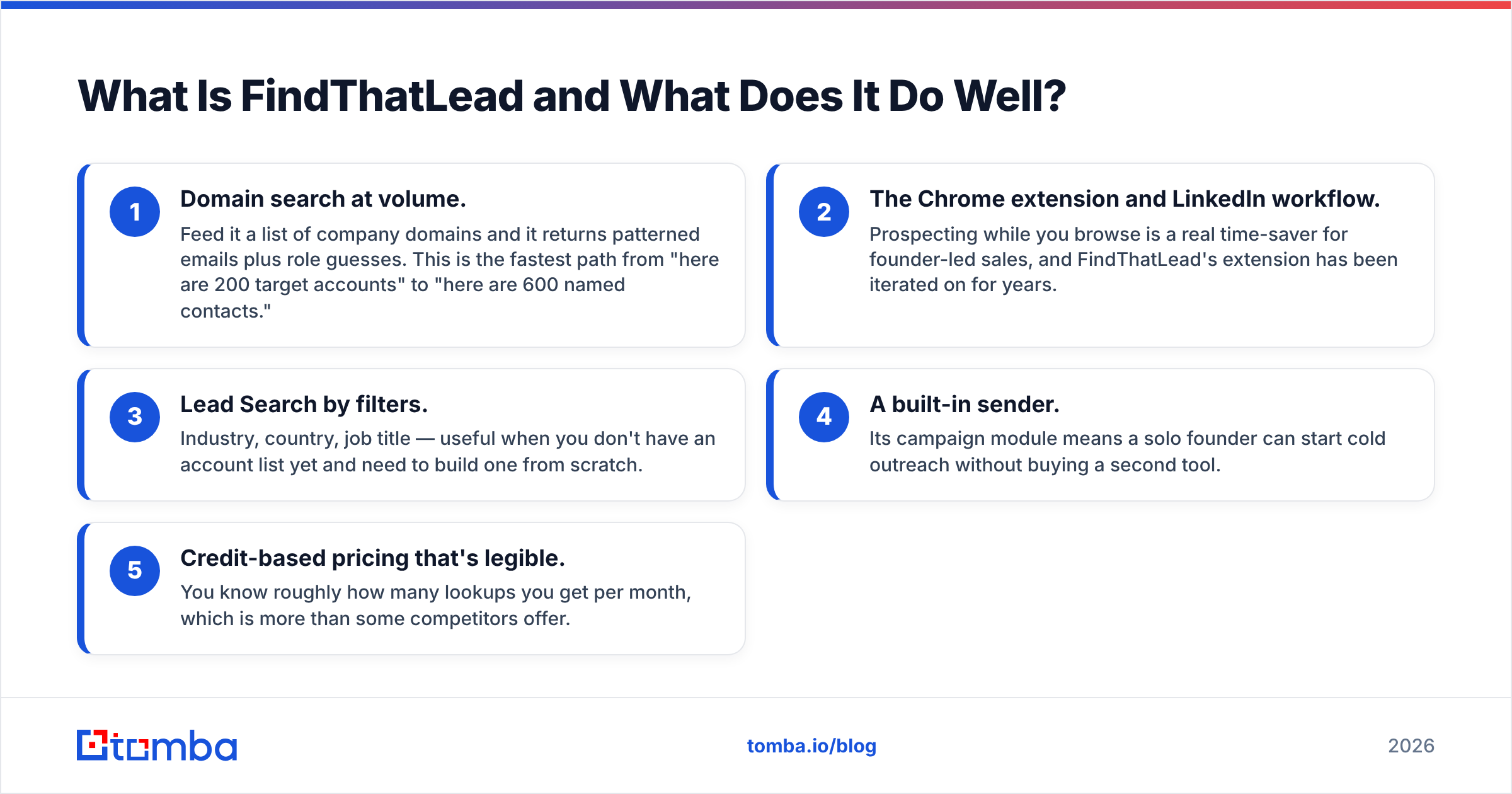
- Domain search at volume. Feed it a list of company domains and it returns patterned emails plus role guesses. This is the fastest path from "here are 200 target accounts" to "here are 600 named contacts."
- The Chrome extension and LinkedIn workflow. Prospecting while you browse is a real time-saver for founder-led sales, and FindThatLead's extension has been iterated on for years.
- Lead Search by filters. Industry, country, job title — useful when you don't have an account list yet and need to build one from scratch.
- A built-in sender. Its campaign module means a solo founder can start cold outreach without buying a second tool.
- Credit-based pricing that's legible. You know roughly how many lookups you get per month, which is more than some competitors offer.
Where it gets criticised in reviews on G2 and elsewhere is consistent across most all-in-one suites: accuracy varies sharply by region and company size, the built-in sender is thinner than a dedicated sequencer, and credits get consumed by searches that return nothing usable.

What Is "Mail Merge for Gmail" in 2026?#
"Mail merge for Gmail" is a category, not a product. Three distinct things live under that name, and they behave very differently.
Google's native multi-send. Built into Gmail for paid Google Workspace tiers. You compose once, add recipients, and Gmail sends individual copies with an automatic unsubscribe footer. It's free with your seat, dead simple, and deliberately limited — no follow-up sequences, no open tracking, and a hard daily recipient ceiling that Google adjusts over time. Check your admin console for the current cap rather than trusting a blog number.
Sheets-driven add-ons (Yet Another Mail Merge and similar). Your list lives in a Google Sheet, merge tags pull from column headers, and the add-on sends through your Gmail account. Tracking columns write back into the sheet. Cheap, transparent, and genuinely good for 50–500 recipient campaigns.
Gmail-native sending platforms (GMass and peers). These sit inside Gmail but add sequences, auto follow-ups, throttling, list-cleaning, and analytics. Functionally they're cold email platforms wearing a Gmail costume.
The shared advantage across all three: mail is sent from your actual mailbox, over your actual authenticated domain. There's no shared IP pool, no third-party sending domain, and replies land in your normal thread view. For low-volume, high-value outreach, that's a real email deliverability edge.
The shared limitation is equally simple. None of them find a single email address for you.
How Do FindThatLead and Gmail Mail Merge Compare Feature by Feature?#
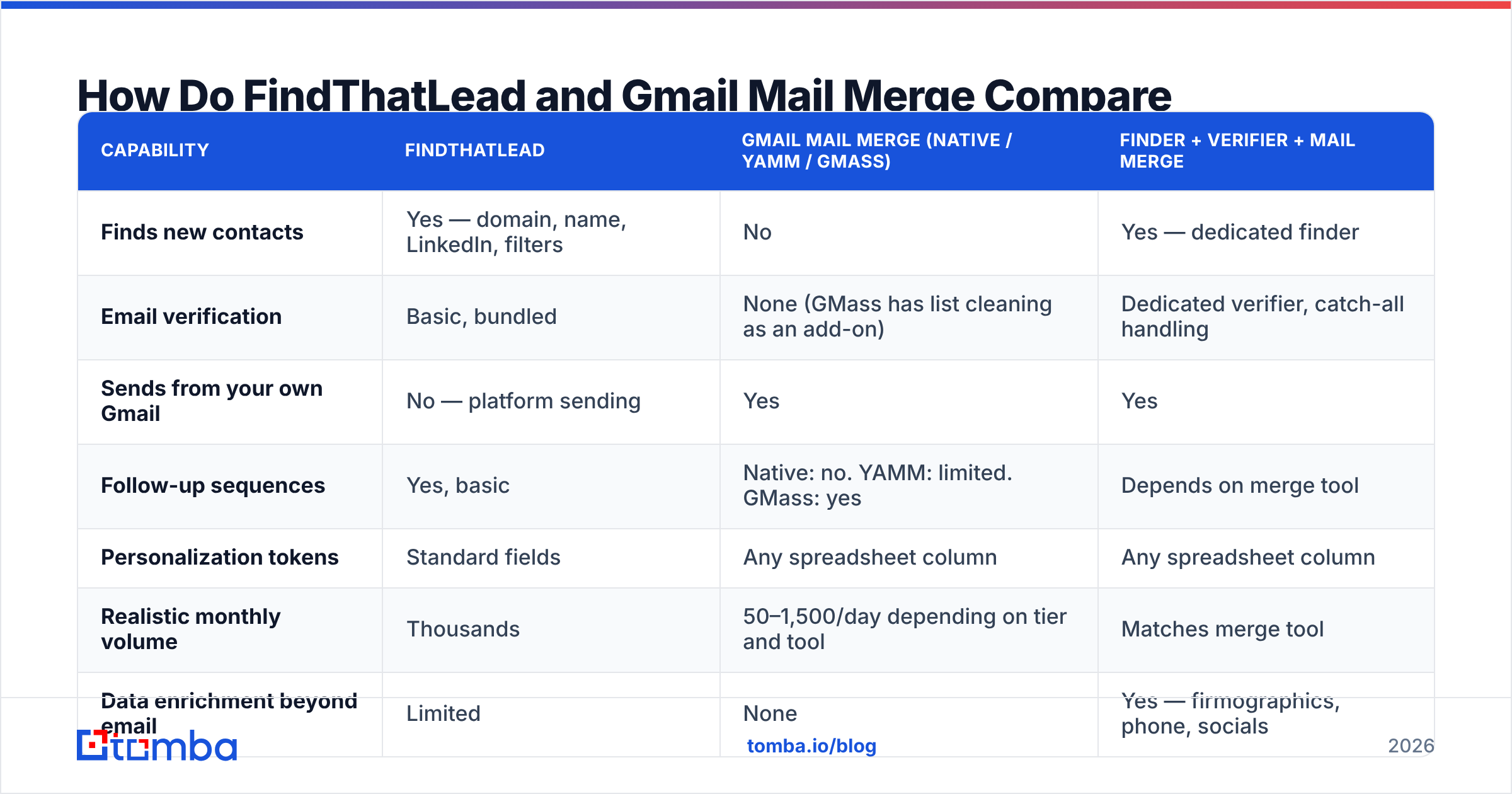
| Capability | FindThatLead | Gmail mail merge (native / YAMM / GMass) | Finder + verifier + mail merge |
|---|---|---|---|
| Finds new contacts | Yes — domain, name, LinkedIn, filters | No | Yes — dedicated finder |
| Email verification | Basic, bundled | None (GMass has list cleaning as an add-on) | Dedicated verifier, catch-all handling |
| Sends from your own Gmail | No — platform sending | Yes | Yes |
| Follow-up sequences | Yes, basic | Native: no. YAMM: limited. GMass: yes | Depends on merge tool |
| Personalization tokens | Standard fields | Any spreadsheet column | Any spreadsheet column |
| Realistic monthly volume | Thousands | 50–1,500/day depending on tier and tool | Matches merge tool |
| Data enrichment beyond email | Limited | None | Yes — firmographics, phone, socials |
| API access | Yes | Rare (GMass has one) | Yes |
| Learning curve | Medium | Very low | Low–medium |
| Best for | Solo founders wanting one bill | Warm-ish lists you already own | Teams who care about bounce rate |
Read that last column carefully. It's not a vendor pitch — it's the configuration most experienced outbound teams land on after they've burned a domain once.
What Does Each Option Actually Cost?#
List prices move, so treat this as a shape rather than a quote, and confirm on each vendor's own pricing page before you buy.
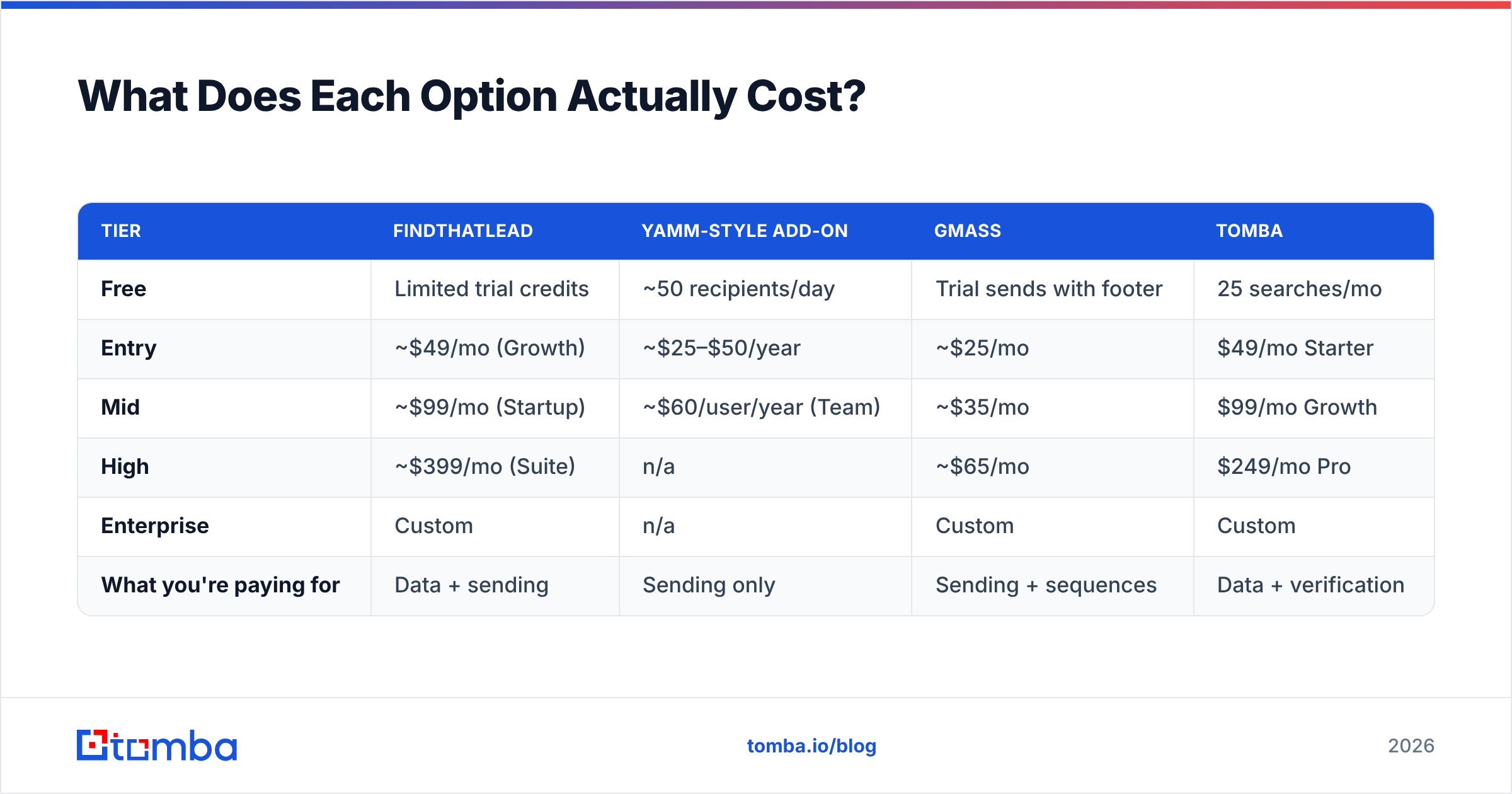
| Tier | FindThatLead | YAMM-style add-on | GMass | Tomba |
|---|---|---|---|---|
| Free | Limited trial credits | ~50 recipients/day | Trial sends with footer | 25 searches/mo |
| Entry | ~$49/mo (Growth) | ~$25–$50/year | ~$25/mo | $49/mo Starter |
| Mid | ~$99/mo (Startup) | ~$60/user/year (Team) | ~$35/mo | $99/mo Growth |
| High | ~$399/mo (Suite) | n/a | ~$65/mo | $249/mo Pro |
| Enterprise | Custom | n/a | Custom | Custom |
| What you're paying for | Data + sending | Sending only | Sending + sequences | Data + verification |
The math that matters: a mail merge add-on is often cheaper per year than a prospecting suite is per month, because it does one job and does it from infrastructure you already pay Google for. Which means the real spending decision isn't "FindThatLead or mail merge" — it's "how much am I willing to spend on data quality?" You can see how that lands on Tomba pricing versus a bundled suite: the same $49 buys a lot more verified lookups when sending isn't baked into the bill.
Which One Should You Pick for Your Use Case?#
- You have zero list and no time. FindThatLead, or a finder plus a merge tool. If you value one login above all else, the suite wins. If you value hit rate, split the stack.
- You have a conference attendee list, a CRM export, or newsletter signups. Mail merge for Gmail. You do not need a prospecting platform to email people you already identified — you need clean sending and a verify emails pass before the first send.
- You send fewer than 300 emails a week to high-value targets. Mail merge, every time. Sending from your own authenticated Gmail beats platform sending at that volume, and personalization matters more than throughput.
- You send 2,000+ emails a month across multiple inboxes. Neither, alone. You want a dedicated finder feeding a dedicated sequencer, with inbox rotation and warmup. A Gmail add-on will hit ceilings; a bundled suite's sender will feel thin.
- You're an agency running outreach for clients. Split the stack for margin control. Data costs scale with clients; sending seats scale with inboxes. Bundling them makes per-client accounting painful.
- You need contacts in Sheets anyway. Use a Sheets email finder so the list is built where the merge tool already reads from. Fewer CSV round-trips, fewer sync bugs.
Where Does Each Option Break Down?#
FindThatLead's weak point is verification depth. Pattern-guessed emails look identical to confirmed ones in a CSV. If a suite returns firstname.lastname@company.com because that's the dominant pattern, but that specific person left in March, you've bought a bounce. Any bundled finder has an incentive problem here — credits are consumed on the search, not on whether the result was correct.
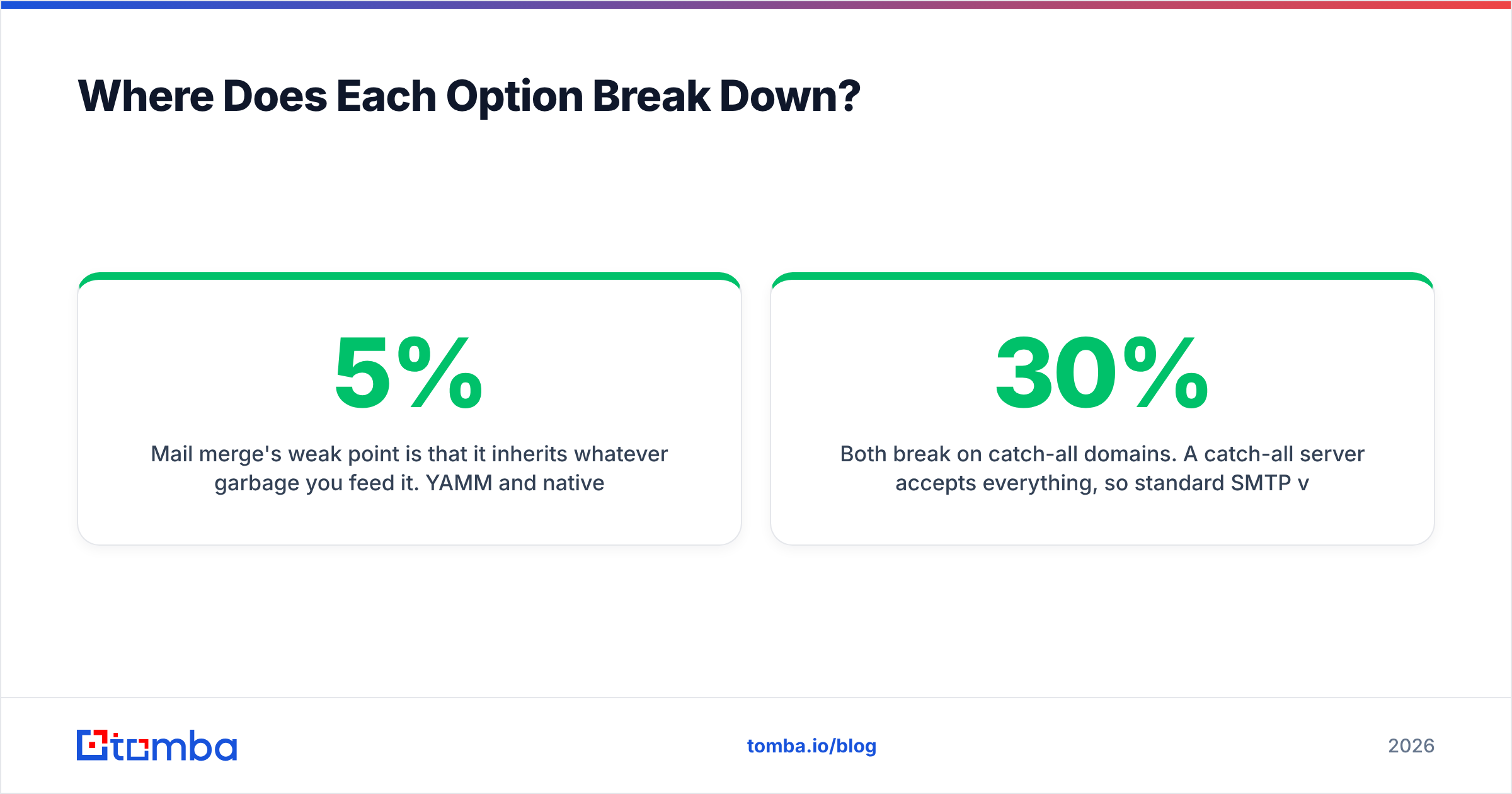
Mail merge's weak point is that it inherits whatever garbage you feed it. YAMM and native multi-send will happily send to 400 dead addresses and let Gmail record 400 hard bounces against your domain. Google's spam thresholds have only tightened; a bounce rate above roughly 3–5% is where reputation damage starts, and above 10% you're in trouble. Neither tool warns you.
Both break on catch-all domains. A catch-all server accepts everything, so standard SMTP verification returns "valid" for addresses that don't exist. This is where a dedicated catch-all verifier earns its keep — it applies additional signals rather than shrugging and marking the row green. On a list heavy in enterprise or agency domains, catch-alls can be 20–30% of your rows.
Volume ceilings are real on the Gmail side. Free Gmail accounts sit far below Workspace limits, and multi-send caps are separate from ordinary sending caps. Plan campaigns around the tier you actually pay for, not the number a 2022 tutorial quoted.
Reply handling degrades at scale on both. A merge tool dumps replies into one inbox with no lead status; a light suite sequencer has status fields but weak inbox ergonomics. Past a few hundred conversations, you want a CRM.
Can You Combine Both — and Should You?#
Yes, and for most teams under 10 people it's the correct answer.
The combined stack looks like this. Build the account list, run a domain search to pull named contacts per company, verify the results and drop anything below your confidence threshold, push the survivors into a Google Sheet, then let YAMM or GMass merge and send from the inbox that already has domain reputation. Follow-ups run from the same thread, so replies read like a human conversation instead of a sequence.
Two rules make it work:
- Verify after finding, not before sending. Verification is cheap; a burned domain is not. Run the check the moment the list is built, while you still remember the source and can re-source the gaps.
- Keep daily volume under your merge tool's comfortable limit, not its hard limit. If the ceiling is 1,500, send 300. Warm inboxes reward patience, and reply rates on 300 well-researched sends beat 1,500 sprayed ones almost every time.
If you're running this at any real scale, do the enrichment through an email finder API call inside your own script rather than clicking through a dashboard — it turns a two-hour list build into a cron job.
So Which One Wins?#
For pure list-building convenience in a single subscription, FindThatLead wins. It's a legitimate tool with a decade of iteration behind it, and for a founder who wants one bill and one login, the bundling is worth something real.
For sending, mail merge for Gmail wins, and it isn't close at low-to-mid volume. Your own authenticated mailbox, your own reputation, native threading, and a price that's often annual instead of monthly.
For the outcome you actually care about — replies — the winner is neither in isolation. It's accurate data plus a sender your recipients' spam filters already trust. Every deliverability problem traced back far enough turns out to be a data problem wearing a sending costume.
If you're rebuilding this stack, start with the half that's failing. Broke domains come from bad lists; empty pipelines come from no lists. Fix that first, then pick whichever sender fits your volume.
Ready to fix the data half? Tomba Email Finder gives you verified B2B addresses by domain, name, or company, with catch-all handling and confidence scores built in — 25 free searches a month to test against your own known-good contacts, then $49/mo when you're ready to scale. Export straight to Sheets, hand it to YAMM or GMass, and let your Gmail reputation do what it's good at.
Related guides#
Ready to find emails that actually work?
Join 150,000+ professionals who stopped guessing and started sending. Free credits on signup — no credit card required.
Get the Tomba newsletter
Practical outbound tactics and product updates — once every two weeks.
About the author