FindThatLead vs Mailead: Which Cold Email Tool Wins in 2026?
FindThatLead finds and sends. Mailead sends at scale. They overlap less than the marketing suggests — here's the honest breakdown of data quality, pricing, deliverability, and which one belongs in your 2026 stack.
TL;DR
- FindThatLead and Mailead are not really the same product. FindThatLead is a prospecting suite built around finding contacts; Mailead is a cold email sending platform built around volume and inbox rotation.
- If your bottleneck is "I don't have enough good contacts," FindThatLead is the closer match. If your bottleneck is "I have 40,000 contacts and can't send to them," Mailead is.
- Neither tool is best-in-class at the other's job. FindThatLead's sending is basic next to purpose-built senders; Mailead's built-in data is thin next to dedicated finders.
- The most common 2026 stack is a specialist finder + verifier feeding a specialist sender — not one tool doing both badly.
- Budget reality: both sit in the sub-$100/month starting range, but per-credit and per-inbox costs diverge fast once you scale past a few thousand contacts a month.
What are FindThatLead and Mailead, exactly?#
FindThatLead is a Spain-based B2B prospecting platform that has been around since 2015. Its core is an email finder: give it a name and a domain, or a domain alone, and it returns likely business email addresses. Around that core it has bolted on a Chrome extension, a "Prospector" for building lists by role and location, a LinkedIn extractor, and a lightweight cold email sender it calls Scrab.in / Campaigns depending on which part of the suite you're in. You can see the current lineup on findthatlead.com.
Mailead comes at outbound from the other end. It is a cold email sending platform: connect many mailboxes, rotate sends across them, warm them up, run sequences, and track replies. The pitch is unlimited (or very generous) email account connections for a flat fee, which is the same pitch Instantly and Smartlead made popular. Data is an add-on concern, not the product's spine.
So the honest framing of FindThatLead vs Mailead is not "which is better." It's "which half of the outbound problem are you solving this quarter?"
That distinction matters more than any feature checklist, because the two failure modes look identical from the outside. A campaign that gets no replies because the list is garbage looks exactly like a campaign that gets no replies because the mail is landing in spam. Buying the wrong tool means you spend three months fixing the wrong half.
How do FindThatLead and Mailead compare feature by feature?#
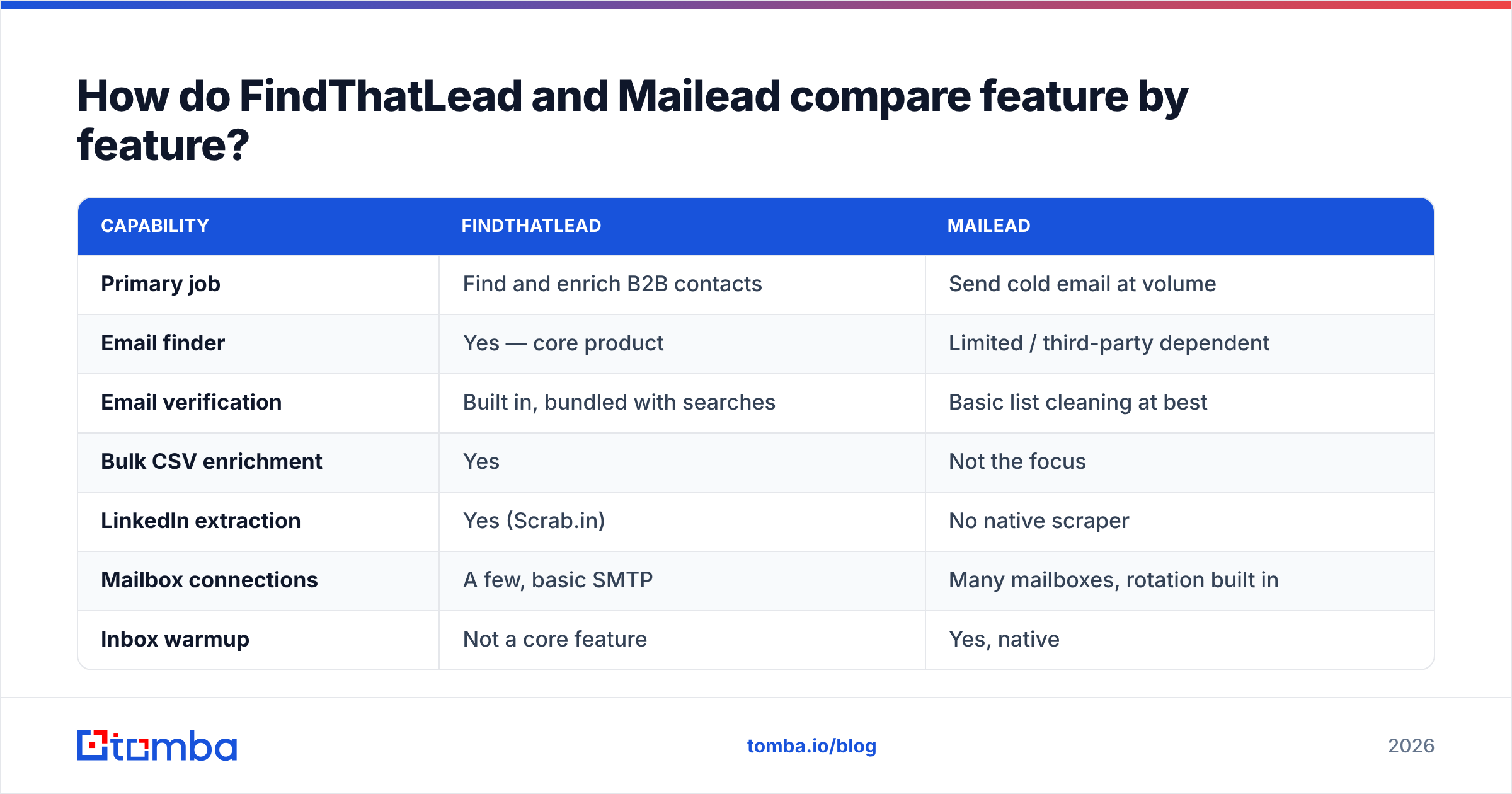
| Capability | FindThatLead | Mailead |
|---|---|---|
| Primary job | Find and enrich B2B contacts | Send cold email at volume |
| Email finder | Yes — core product | Limited / third-party dependent |
| Email verification | Built in, bundled with searches | Basic list cleaning at best |
| Bulk CSV enrichment | Yes | Not the focus |
| LinkedIn extraction | Yes (Scrab.in) | No native scraper |
| Mailbox connections | A few, basic SMTP | Many mailboxes, rotation built in |
| Inbox warmup | Not a core feature | Yes, native |
| Sequences / follow-ups | Basic multi-step | Full sequence builder with conditions |
| Unified inbox | No | Yes |
| API access | Yes | Sending-focused |
| Best for | List building, enrichment, small campaigns | High-volume sending, agencies, multi-domain setups |
Read that table twice. The overlap is one row — sequences — and both are mediocre there compared to a dedicated sequencer. Everything else is complementary.
What actually determines cold email results in 2026?#
Before you compare price tags, get the causality straight. Reply rate is a product of four things, roughly in this order of leverage:
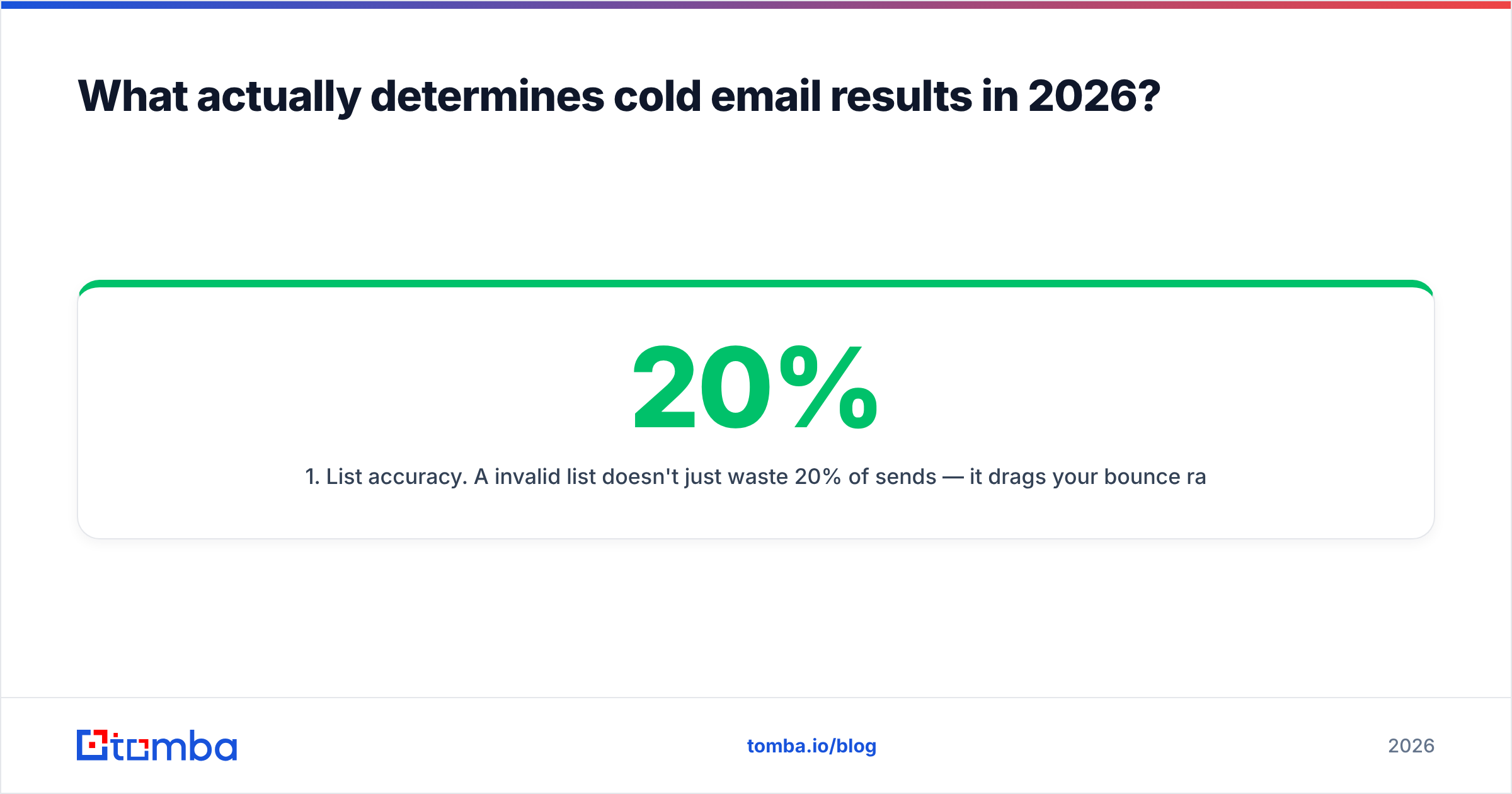
- List accuracy. A 20% invalid list doesn't just waste 20% of sends — it drags your bounce rate over the threshold that mailbox providers use to throttle you, which suppresses the other 80%. This is where a real email verifier earns its keep.
- Targeting fit. The right person at the wrong company still ignores you. Role plus firmographic filters beat raw volume every time.
- Infrastructure health. SPF, DKIM, DMARC, warmed mailboxes, sane daily caps per inbox. Google and Yahoo's bulk sender requirements made this non-optional; the Google guidelines are the reference document.
- Message relevance. Personalization that uses a real fact, not a merge tag with the company name in it.
- Follow-up discipline. Most replies land on touch two through four, and most teams stop at touch one.
Notice that items 1 and 2 are data problems (FindThatLead's territory) and items 3 and 5 are sending problems (Mailead's territory). Item 4 is on you regardless of vendor.

Which tool has better data quality?#
FindThatLead wins this one by default, because Mailead isn't seriously competing for it. But "wins by default" is not the same as "good enough on its own."
Independent testing across email finders consistently shows the same pattern: hit rate (did the tool return anything?) and accuracy (was what it returned real?) trade against each other. Tools that return an address for 90% of your input list usually do it by pattern-guessing — first.last@domain.com — and pattern guesses bounce. Tools with conservative hit rates return fewer addresses but almost all of them land.
FindThatLead sits in the middle of that spectrum. Users on review sites like G2 consistently praise the price-to-volume ratio and flag inconsistency on smaller companies and non-US domains. That's a fair read of most mid-market finders, not a knock specific to FindThatLead.
Three practical checks before you commit to any finder:
- Test on domains you already know. Take 100 contacts whose emails you've verified through actual replies. Run them through the tool. Measure real accuracy, not the vendor's marketing number.
- Check catch-all handling. Roughly a third of B2B domains accept all mail, which makes standard SMTP verification useless. Ask what the tool does with them. A catch-all verifier that scores confidence beats one that just shrugs and marks everything "accept-all."
- Look at coverage outside the US. If you sell into Europe, LATAM, or APAC, US-heavy databases will quietly fail you.
- Confirm credits aren't burned on failures. Some vendors charge for a search that returns nothing. Over a year that's real money.
If you want a second opinion on the data layer, running your FindThatLead exports through an independent email verifier before they hit any sender is cheap insurance. It catches the pattern-guessed addresses that would otherwise become bounces on your sending domain.
How does FindThatLead vs Mailead pricing compare?#
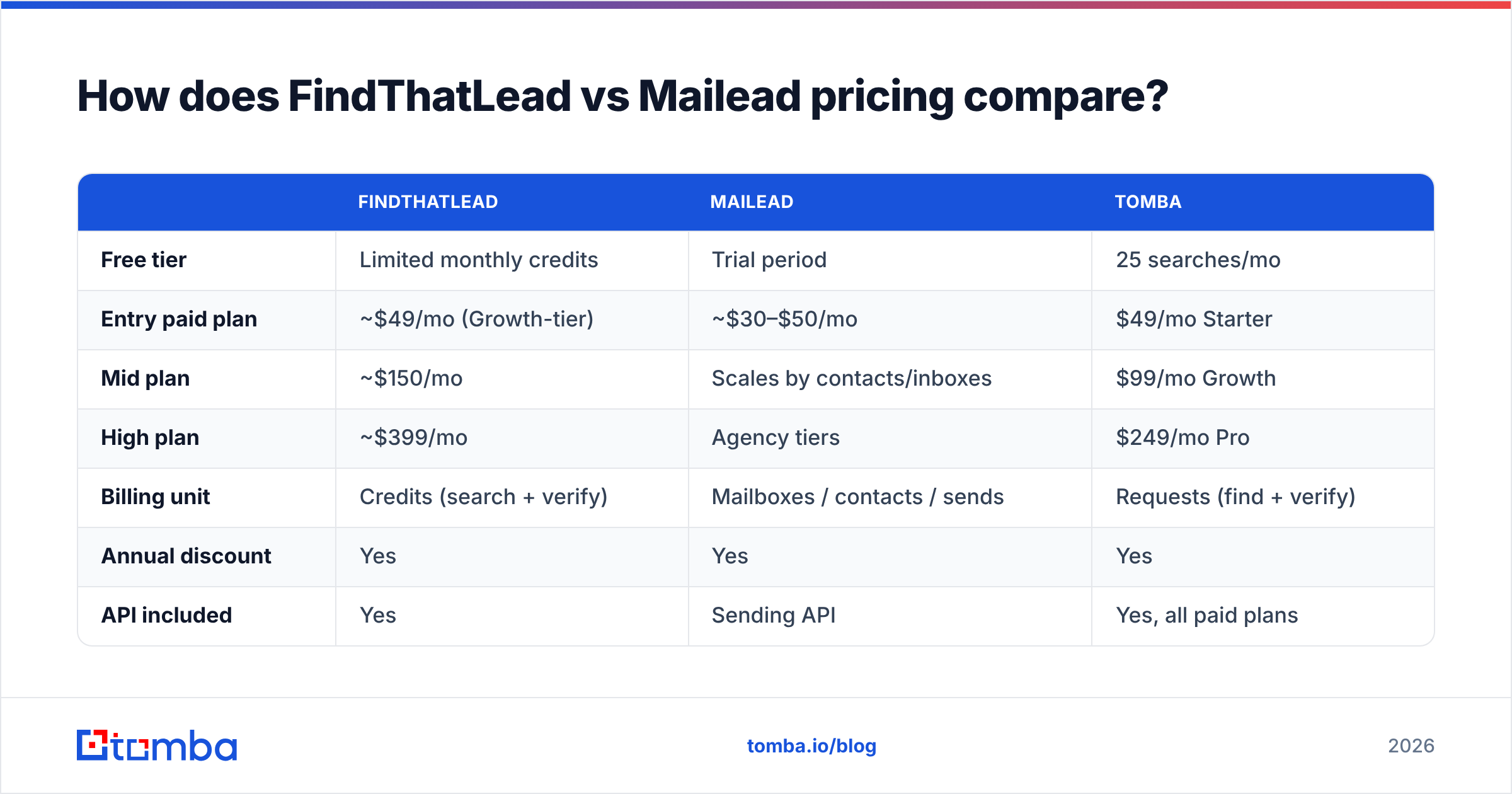
Both vendors change pricing regularly, so treat these as directional and confirm on their sites before you buy.
| FindThatLead | Mailead | Tomba | |
|---|---|---|---|
| Free tier | Limited monthly credits | Trial period | 25 searches/mo |
| Entry paid plan | ~$49/mo (Growth-tier) | ~$30–$50/mo | $49/mo Starter |
| Mid plan | ~$150/mo | Scales by contacts/inboxes | $99/mo Growth |
| High plan | ~$399/mo | Agency tiers | $249/mo Pro |
| Billing unit | Credits (search + verify) | Mailboxes / contacts / sends | Requests (find + verify) |
| Annual discount | Yes | Yes | Yes |
| API included | Yes | Sending API | Yes, all paid plans |
The structural difference matters more than the numbers. FindThatLead bills you for discovery — every search and verification consumes credits, so your cost scales with how many contacts you look up. Mailead bills you for capacity — mailboxes, contacts stored, or monthly sends — so your cost scales with how loud you are.
That means the two cost curves cross. A team doing deep research on 300 accounts a month pays more to FindThatLead than to Mailead. A team blasting 50,000 sends a month off a static list pays more to Mailead. Model your own volume before you assume the cheaper sticker price is the cheaper tool.
One more line item people forget: domains and mailboxes. If Mailead lets you connect unlimited inboxes, you still have to buy and warm those inboxes. Ten secondary domains with three mailboxes each is a real recurring cost that sits outside the software subscription entirely.
Is Mailead better for deliverability than FindThatLead?#
Yes — and it isn't close, because deliverability is Mailead's whole reason to exist.
Mailead's rotation logic spreads volume across mailboxes so no single inbox trips a provider's rate limit. Its warmup keeps dormant mailboxes generating positive engagement signals. Its unified inbox means replies get answered fast, which is itself a positive signal. FindThatLead's sending exists so you can run a campaign without leaving the tool; it is not engineered to protect a 40-mailbox estate.
But here's the part vendors on both sides underplay: sending infrastructure cannot rescue a bad list. Email deliverability is downstream of data quality. If 18% of your addresses are invalid, warmup and rotation just distribute the damage across more mailboxes instead of concentrating it in one. You burn ten domains instead of one.
The correct order of operations is:
- Build the list with a finder.
- Verify it independently — including catch-all scoring.
- Suppress anything below your confidence threshold.
- Then hand the survivors to the sending platform.
Teams that skip step 2 because "the finder already verifies" are the ones filing support tickets about sender reputation three weeks later.
Which one should you actually buy?#
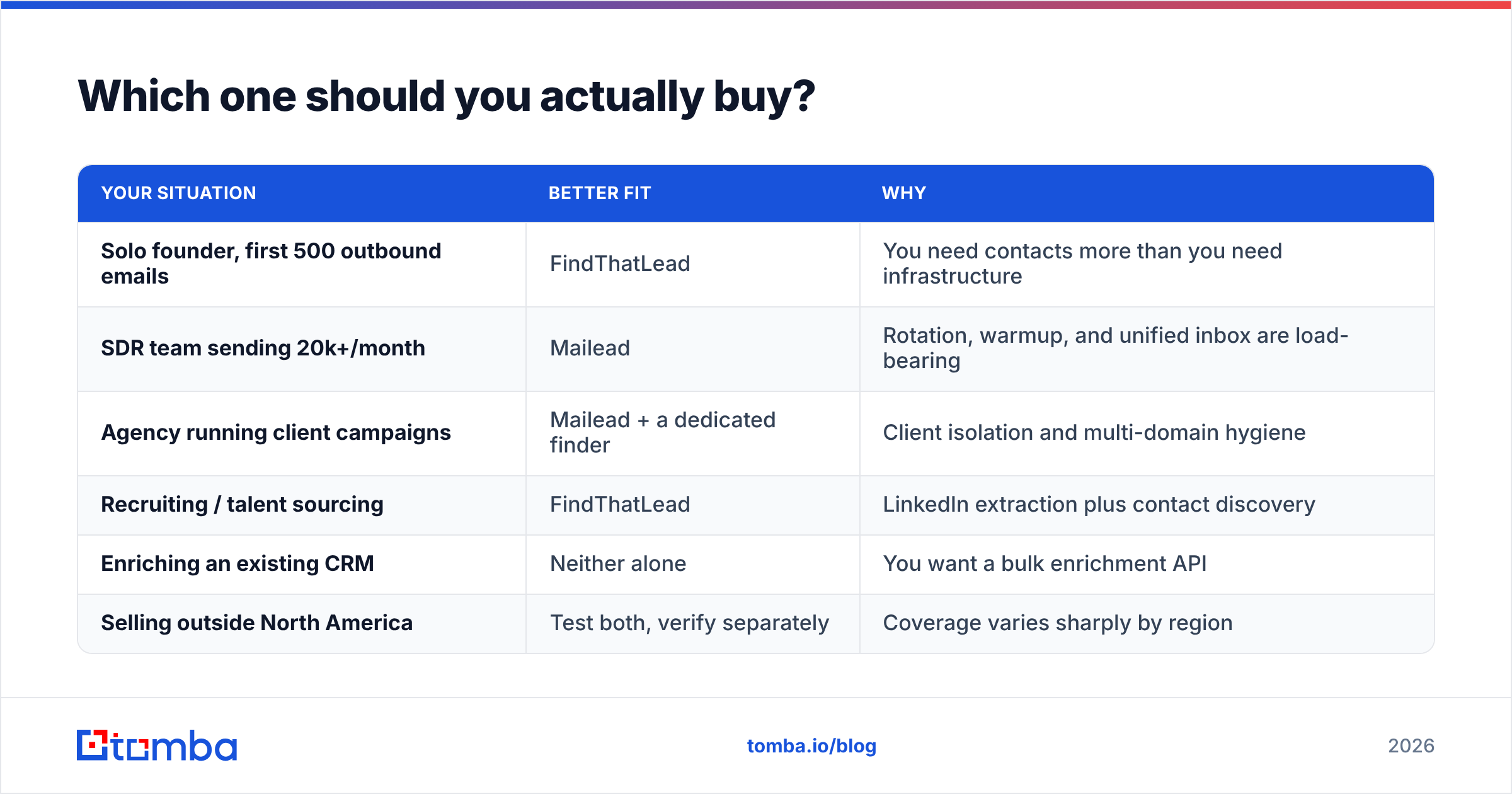
| Your situation | Better fit | Why |
|---|---|---|
| Solo founder, first 500 outbound emails | FindThatLead | You need contacts more than you need infrastructure |
| SDR team sending 20k+/month | Mailead | Rotation, warmup, and unified inbox are load-bearing |
| Agency running client campaigns | Mailead + a dedicated finder | Client isolation and multi-domain hygiene |
| Recruiting / talent sourcing | FindThatLead | LinkedIn extraction plus contact discovery |
| Enriching an existing CRM | Neither alone | You want a bulk enrichment API |
| Selling outside North America | Test both, verify separately | Coverage varies sharply by region |
The honest recommendation for most teams past the experimentation phase: don't pick one. Use a specialist finder for the data layer, an independent verifier as the gate, and a purpose-built sender for delivery. The all-in-one convenience premium is real, but it's usually paid in reply rate.
Where does Tomba fit in this comparison?#
Tomba is a direct alternative to FindThatLead's half of the equation — the data layer — and a complement to Mailead's half.
If FindThatLead's credit model or regional coverage is your friction point, the Tomba Email Finder covers the same jobs: find by name and domain, run domain search to map every public address at a company, extract from LinkedIn, and enrich in bulk. Verification is built in rather than bolted on, catch-all domains get confidence scoring instead of a shrug, and the Tomba API is a first-class product rather than an afterthought — which matters when you want enrichment to fire automatically from your CRM instead of from a CSV upload.
Tomba pricing runs from a free tier at 25 searches a month, to Starter at $49/mo, Growth at $99/mo, Pro at $249/mo, and custom Enterprise. That maps closely to FindThatLead's entry and mid tiers, so a head-to-head test on your own 100-contact control list is a cheap way to settle the accuracy question with your data instead of anyone's marketing page.
What Tomba deliberately does not do is send your campaigns. That's a feature, not a gap. Feed verified contacts into Mailead, Instantly, Smartlead, or whatever sender your team already trusts, and each layer stays best-in-class.
What's the verdict on FindThatLead vs Mailead?#
FindThatLead is the better buy if your pipeline is starved for contacts and you want discovery, enrichment, and light sending under one login. Mailead is the better buy if you already have volume and your problem is landing in the primary tab across dozens of mailboxes. Comparing them head-to-head as competitors mostly reveals that they were built for different bottlenecks.
Diagnose your bottleneck first. Count last month's bounce rate and last month's contacts-added number. If bounces are over 3%, you have a data problem and a sending tool won't fix it. If bounces are clean but volume is flat, you have an infrastructure problem and more contacts won't fix it.
Ready to fix the data half properly? Start with the Tomba Email Finder — 25 free searches a month, no card required, built-in verification and catch-all scoring, and an API that plugs straight into whichever sending platform you land on. Run it against the same 100 contacts you'd test FindThatLead with and let the accuracy numbers pick the winner for you.
Related guides#
Ready to find emails that actually work?
Join 150,000+ professionals who stopped guessing and started sending. Free credits on signup — no credit card required.
Get the Tomba newsletter
Practical outbound tactics and product updates — once every two weeks.
About the author