FindThatLead vs MailsHunt (2026): Which Email Finder Wins?
FindThatLead and MailsHunt both promise cheap verified B2B emails, but they win at very different jobs. Here is the honest breakdown on accuracy, credits, bulk limits and who each tool actually suits.
FindThatLead vs MailsHunt is a choice between breadth and price. One tool tries to run your whole outbound stack. The other just finds an email and gets out of the way. Here is the short version.
TL;DR
- FindThatLead is the bigger product. You get lead search, a Chrome extension, and a cold email sender in one plan. It fits solo founders and small agencies.
- MailsHunt is cheaper and lighter, and it often sells through lifetime deals. It fits occasional lookups, not daily prospecting.
- Neither vendor proves its accuracy number. Both say "verified". Run your own 100-contact bounce test first.
- Credits drive the real cost, not the sticker price. A $49 plan that charges for failed lookups can cost more per usable email than a $99 plan that does not.
- Need an API, catch-all handling, or confidence scores? Both tools are thin next to Tomba Email Finder.
What are FindThatLead and MailsHunt?#
Both tools solve one narrow problem. You know a person's name and their company. You need a working email address for them.
FindThatLead launched in Barcelona in 2015, and it now does much more than lookups. It bundles four things: an email finder, a "Prospector" search that filters companies by location, industry and size, a Chrome extension for LinkedIn, and a sender for cold sequences. That bundle is the whole pitch. You find, check, and send from one dashboard.
MailsHunt is the smaller, newer tool. It sells itself as a cheap email finder plus verifier, and it spreads through lifetime-deal sites. That channel shapes the product. The typical buyer is a freelancer or a one-person agency who wants one flat fee, not a monthly seat.
That gap decides most of the choice. FindThatLead wants to be your outbound stack. MailsHunt wants to be a line item you forget about.

FindThatLead vs MailsHunt: how do they compare head-to-head?#
Here is the side-by-side. Treat vendor figures as a guide only. Both firms change plans often, so check their pricing pages before you buy.
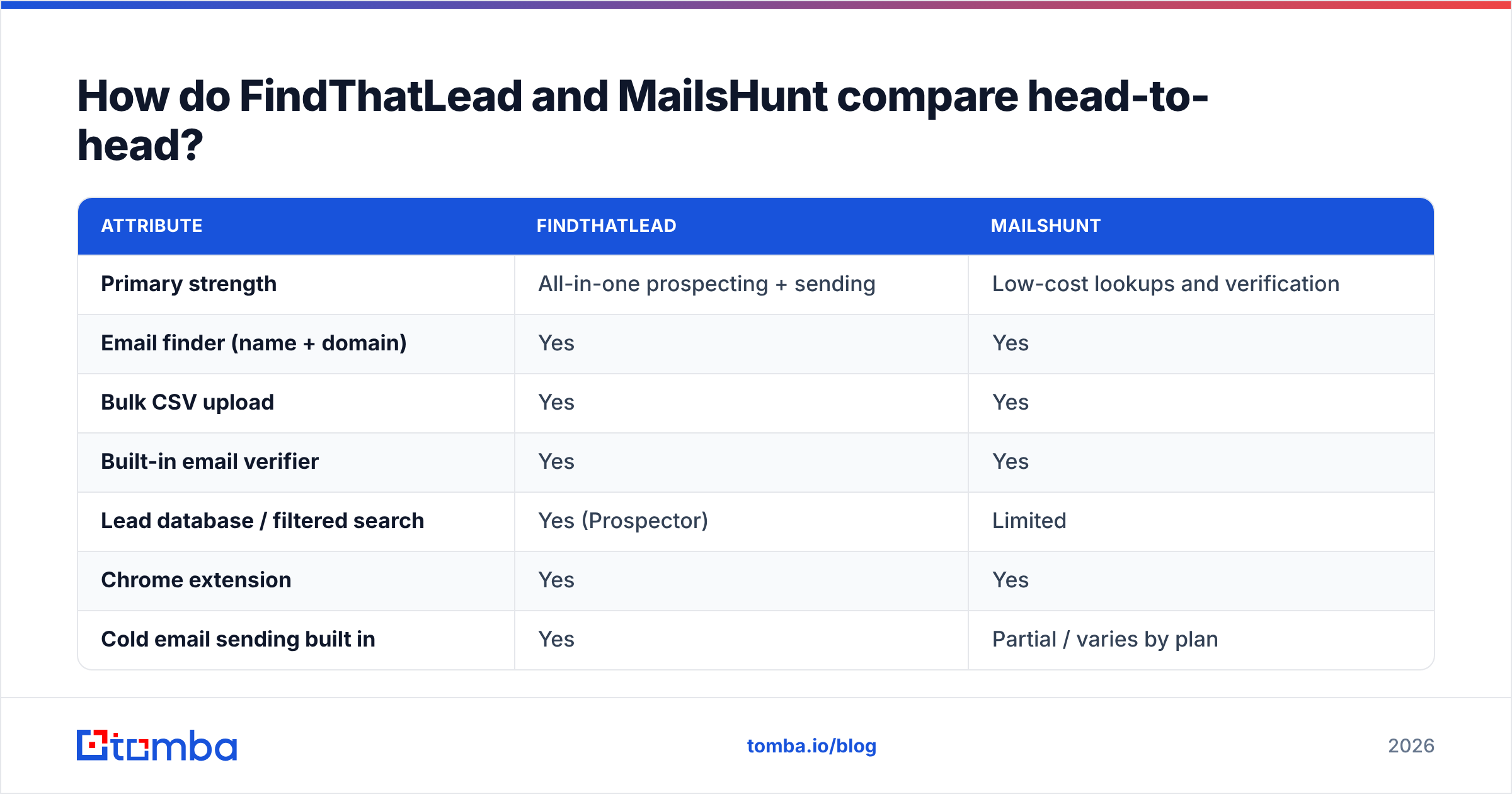
| Attribute | FindThatLead | MailsHunt |
|---|---|---|
| Primary strength | All-in-one prospecting + sending | Low-cost lookups and verification |
| Email finder (name + domain) | Yes | Yes |
| Bulk CSV upload | Yes | Yes |
| Built-in email verifier | Yes | Yes |
| Lead database / filtered search | Yes (Prospector) | Limited |
| Chrome extension | Yes | Yes |
| Cold email sending built in | Yes | Partial / varies by plan |
| Public REST API | Yes, on higher tiers | Limited documentation |
| Entry pricing (published) | ~$49/mo for the entry tier | Lifetime/low-cost deals common |
| Credit model | Credits shared across find + verify | Credits per lookup |
| Best for | Agencies running full outbound | Freelancers doing occasional lookups |
Three things stand out.
First, FindThatLead wins on breadth. Want to build a list from scratch? Filter by industry, pull companies, find contacts, then mail them, all in one flow. MailsHunt assumes you already have the names and just need addresses.
Second, MailsHunt wins on entry cost, above all on a lifetime deal. A consultant who runs 200 lookups a quarter cannot justify $49 every month.
Third, neither is strong for developers. Say you wire email lookups into a product, a CRM sync, or an internal job. You want clear, versioned endpoints with sane rate limits. That is where an email finder API built for the job pulls ahead.
Which one actually finds more valid emails?#
This is the only question that matters. It is also the one neither vendor answers straight.
Every email finder quotes a headline accuracy number. Those numbers come from the vendor's own kind sample: big US tech domains where the pattern is easy to guess. Run the same test on 500 mid-market makers in Europe and the score falls apart.

Here is how to test both tools yourself in about 40 minutes.
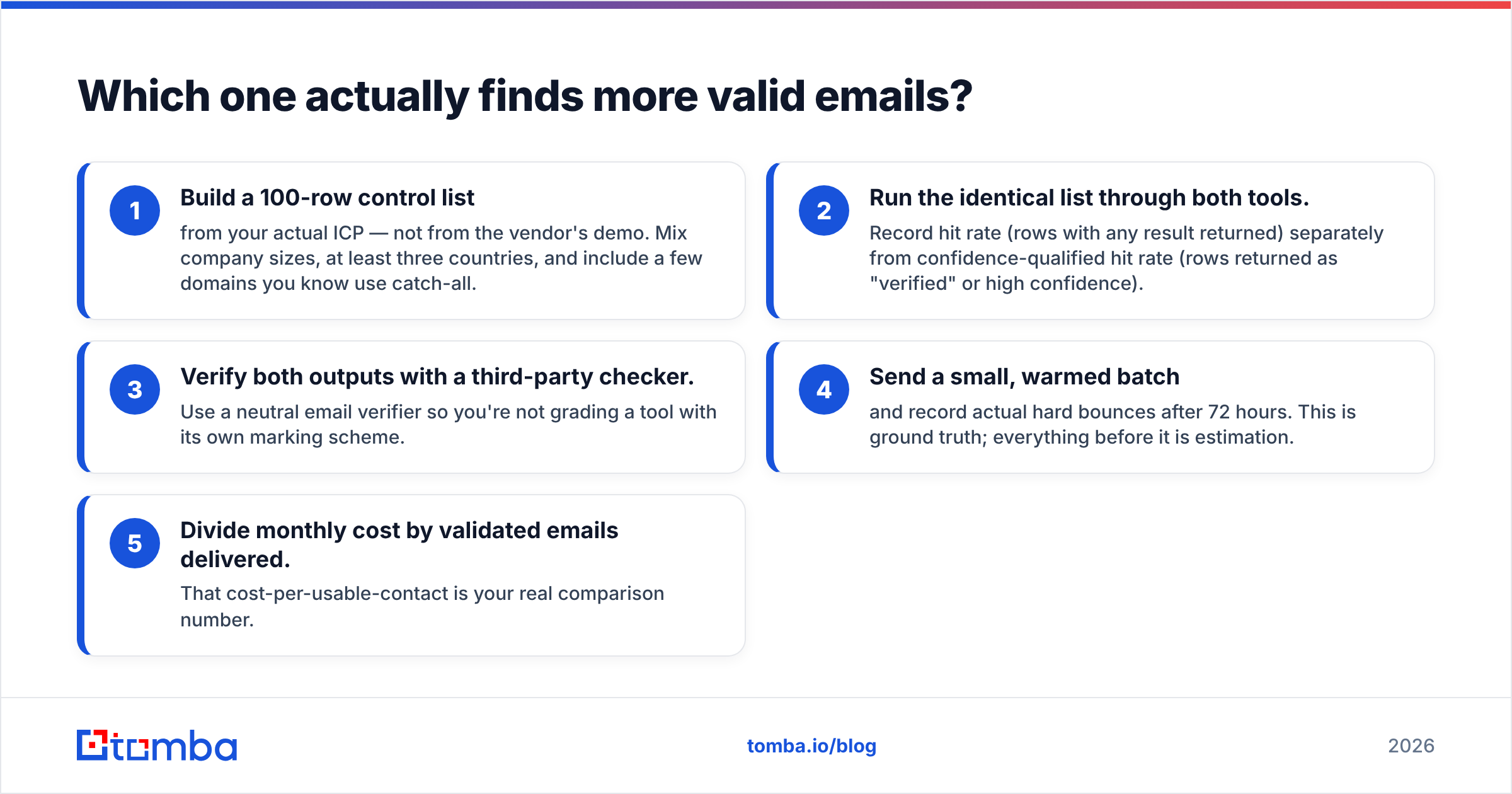
- Build a 100-row control list from your real target market, not from the demo. Mix company sizes and at least three countries. Add a few catch-all domains you know.
- Run the same list through both tools. Record the raw hit rate. Then record the high-confidence hit rate on its own.
- Check both outputs with a third party. Use a neutral email verifier so no tool grades its own homework.
- Send a small, warmed batch. Count hard bounces after 72 hours. That is ground truth. Everything before it is a guess.
- Divide monthly cost by valid emails delivered. That number is your real answer.
Most teams hit the same awkward result. The tool with the higher raw hit rate often costs more per usable contact. Many of those extra "found" addresses are pattern guesses that no mail server ever confirmed.
FindThatLead tends to return more results, because it crawls wider and guesses harder. MailsHunt returns fewer and guesses less. Which trade suits you depends on how many bounces you can absorb. If you care about your sending domain, that number is close to zero.
What do FindThatLead and MailsHunt actually cost?#
Sticker price misleads. What counts is cost per valid contact. Three things drive it, and the pricing page rarely spells them out.
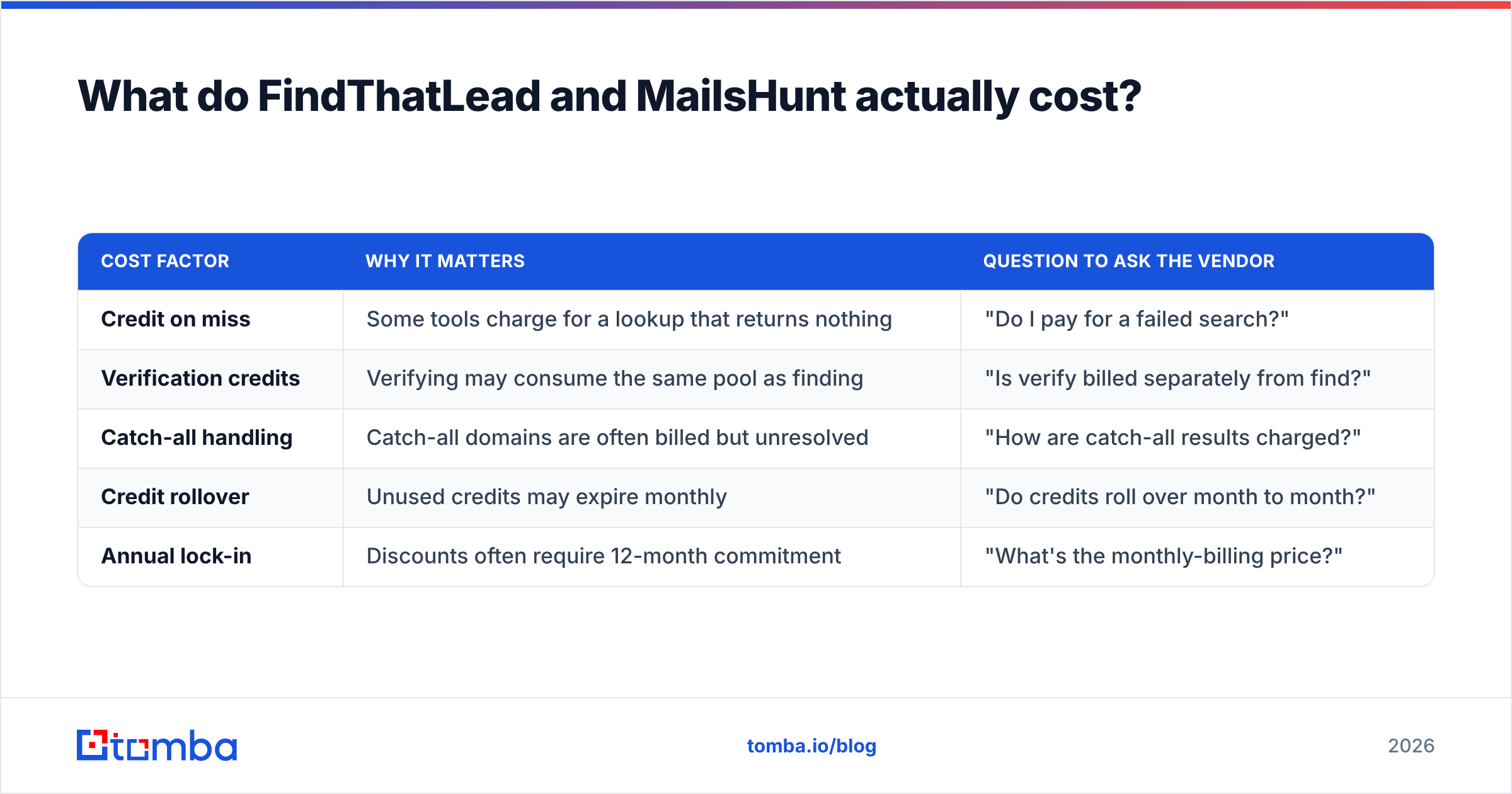
| Cost factor | Why it matters | Question to ask the vendor |
|---|---|---|
| Credit on miss | Some tools charge for a lookup that returns nothing | "Do I pay for a failed search?" |
| Verification credits | Verifying may consume the same pool as finding | "Is verify billed separately from find?" |
| Catch-all handling | Catch-all domains are often billed but unresolved | "How are catch-all results charged?" |
| Credit rollover | Unused credits may expire monthly | "Do credits roll over month to month?" |
| Annual lock-in | Discounts often require 12-month commitment | "What's the monthly-billing price?" |
Do the math before you sign. A $49 plan with 5,000 credits looks like $0.0098 per lookup. Now say 35% of lookups miss and still bill you. Another 15% return catch-all addresses you cannot mail safely. Your real rate is about $0.0196 per usable contact, double the advertised figure.
MailsHunt's lifetime deals dodge that math for now, which is a genuine draw. The risk sits on the other side. A lifetime deal is a cash-flow move, while data costs the seller every month. Ask how often the data is refreshed. A stale database is worth nothing, whatever you paid.
For reference, Tomba pricing starts free with 25 searches a month. Starter is $49/month, Growth is $99/month, and Pro is $249/month, with an enterprise tier above that. The free tier exists so you can run the 100-row control test for nothing.
Which tool should you pick for your situation?#
There is no single winner. Match the tool to the job.
- Solo founder, 50-200 lookups a month — MailsHunt or a free tier. A full platform is overkill, and you will waste most of your credits.
- Agency running outbound for 5+ clients — FindThatLead. Prospector plus built-in sending cuts tool sprawl, and per-client campaigns stay tidy in one system.
- SDR team with a sequencer already — Neither, most likely. Outreach, Instantly, or Salesloft already sends for you. You need a sharper finder with strong data enrichment and CRM sync.
- Developer embedding lookups in a product — Neither. You want clear endpoints, steady rate limits, webhooks, and a score per result. Judge the API docs first and the price second.
- RevOps cleaning an old database — Buy the verifier, not the finder. Bulk speed, catch-all handling, and a clear valid/risky/invalid split matter more than new contacts.
Where do both tools leave gaps?#
Reviews of both products on G2 point to the same three gaps.
Catch-all domains. A catch-all server accepts mail sent to any address at the domain. Standard checks then return "valid" for addresses that do not exist. Both tools flag these as unclear and hand the problem back to you. A dedicated catch-all verifier settles many of them using other signals. That matters, because catch-all domains are common in the mid-market that most B2B teams chase.
Confidence transparency. "Verified" is a yes/no label that hides real doubt. You want a score and the sources behind it. Then a RevOps lead can set a bar — mail only results above 90 — instead of trusting a green tick.
Data provenance. Where does the data come from? Crawled web pages, user uploads, bought lists, or partner feeds? That drives both accuracy and your GDPR risk. Ask outright, and treat a vague reply as an answer. Tomba publishes its data sources for that reason.
How does Tomba compare to FindThatLead and MailsHunt?#
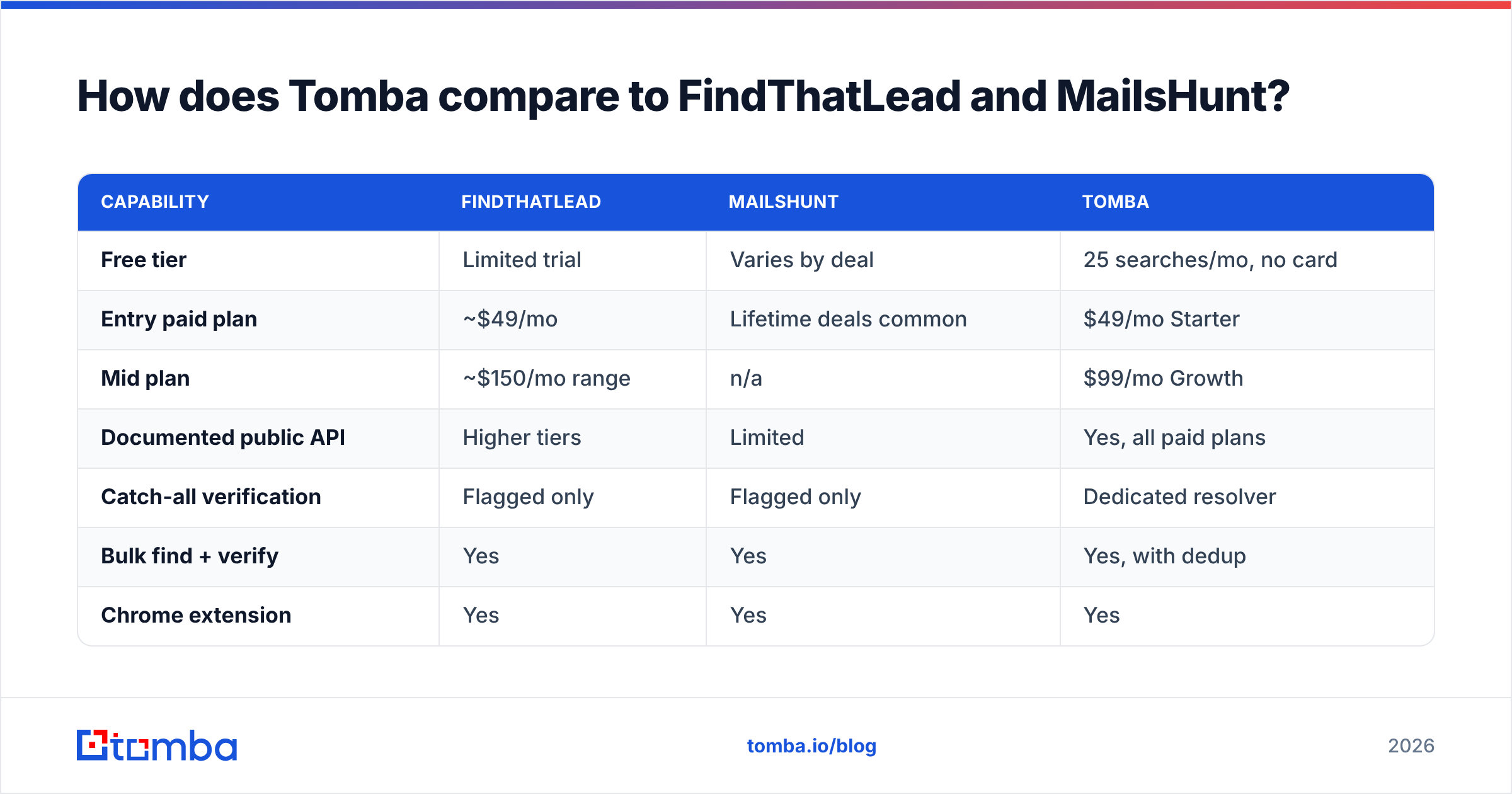
Straight answer: Tomba is not an all-in-one outbound suite. If you need cold email sending in the same tool, FindThatLead covers ground Tomba leaves alone.
Tomba is stronger at the find-and-verify layer itself.

| Capability | FindThatLead | MailsHunt | Tomba |
|---|---|---|---|
| Free tier | Limited trial | Varies by deal | 25 searches/mo, no card |
| Entry paid plan | ~$49/mo | Lifetime deals common | $49/mo Starter |
| Mid plan | ~$150/mo range | n/a | $99/mo Growth |
| Documented public API | Higher tiers | Limited | Yes, all paid plans |
| Catch-all verification | Flagged only | Flagged only | Dedicated resolver |
| Bulk find + verify | Yes | Yes | Yes, with dedup |
| Chrome extension | Yes | Yes | Yes |
| Sheets / Excel add-ons | Partial | No | Yes |
| Built-in cold email sender | Yes | Partial | No |
| Phone number lookup | No | No | Yes |
The pattern is clear. FindThatLead sells breadth. MailsHunt sells price. Tomba sells depth on find and verify. If your sequences work but your bounce rate is 6%, depth is what you lack. If you have no sequencer at all, breadth is what you lack.
One practical note. Already on Apollo, Clearbit, or RocketReach and just want cheaper coverage? Then this is not your comparison. Read the Apollo alternative breakdown instead, since those platforms overlap FindThatLead more than MailsHunt does.
What should you do next?#
Trust no one on accuracy, this post included. The 100-row control test takes one afternoon. It settles FindThatLead vs MailsHunt for your own market, which is the only market that counts.
Run your list through both tools on free or trial access. Then run the same list through a third finder as a control. Compare cost per valid, non-bouncing contact. Not raw hit rate. Not sticker price.
If the test shows your gap is data quality, start with the Tomba Email Finder. The free tier gives you 25 searches a month with no card. That is enough to grade a sample list against your current tool. If the numbers do not beat it, you lost an hour. If they do, Starter at $49/month adds the API, bulk runs, and catch-all handling that turn a list of names into a pipeline you can mail.
Related guides#
Ready to find emails that actually work?
Join 150,000+ professionals who stopped guessing and started sending. Free credits on signup — no credit card required.
Get the Tomba newsletter
Practical outbound tactics and product updates — once every two weeks.
About the author