FindThatLead vs Mailstand: Which One Fits Your Outreach?
FindThatLead finds and sends. Mailstand merges inboxes and sends at volume. They only look like competitors until you map them against your actual bottleneck — data, or delivery capacity.
TL;DR
- FindThatLead is primarily a prospecting tool — lead search, email finding, verification, plus a lightweight sender bolted on. Mailstand is primarily a sending tool — it connects many mailboxes into one campaign so you can push volume without torching one domain.
- They compete only at the thin overlap where both claim to "do cold email." Underneath, they solve opposite bottlenecks.
- If your problem is "I don't have enough good contacts," FindThatLead is the closer match. If your problem is "I have 40,000 contacts and one inbox," Mailstand is.
- Neither is a best-in-class data provider. Both stacks improve when you feed them verified contacts from a dedicated finder instead of relying on the bundled database.
- The realistic 2026 setup for most teams: dedicated data source → dedicated sender → CRM. Bundles save money at low volume and cost you deals at high volume.
What are FindThatLead and Mailstand, exactly?#
FindThatLead is a Barcelona-based prospecting platform that has been around since roughly 2015. Its core loop is: search for companies or people, pull their business email addresses, verify them, then optionally drop them into a built-in campaign sender. It also ships a Chrome extension and a LinkedIn automation companion (Scrab.in) that most of its power users treat as the real draw.
Mailstand attacks a different problem. Cold email volume in 2026 is capped not by how many contacts you have but by how much a single mailbox can safely send — realistically 20–40 emails a day per inbox if you want to stay out of spam. Mailstand's pitch is inbox consolidation: connect many Gmail, Outlook, or SMTP mailboxes, rotate sends across all of them, and manage the replies from one shared place. It is closer in spirit to Instantly or Smartlead than to an email finder.
So the honest framing of FindThatLead vs Mailstand is not "which tool is better." It's "which half of the cold outreach machine are you currently missing."
How do FindThatLead and Mailstand compare feature by feature?#
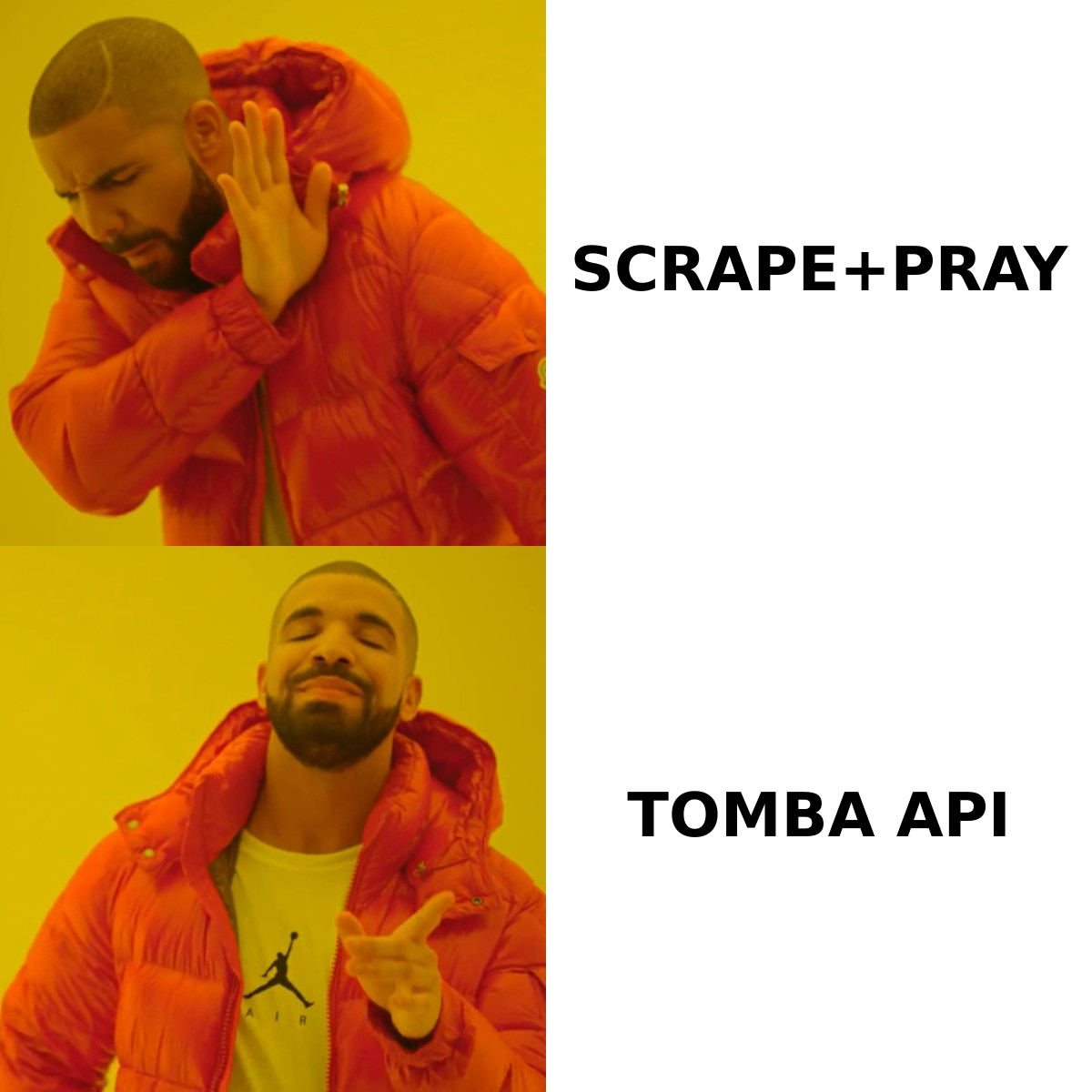
Here is the head-to-head on the attributes that actually change your day.
| Capability | FindThatLead | Mailstand |
|---|---|---|
| Primary job | Find + verify B2B contacts | Send from many inboxes at scale |
| Built-in contact database | Yes (search by role, industry, geo) | No — you bring the list |
| Email finder | Yes, core feature | No |
| Email verification | Yes, included | Basic / relies on your list hygiene |
| Multi-inbox rotation | Limited | Yes — the headline feature |
| Unified reply inbox | Basic | Yes |
| LinkedIn automation | Yes, via Scrab.in companion | No |
| Warmup | Not a focus | Inbox-health features included |
| API access | Yes, on higher tiers | Limited |
| Best for | Solo founders, agencies building lists | Teams sending 10k+/month |
Two things fall out of that table immediately.
First, FindThatLead's sender is a convenience, not a competitive weapon. It exists so you don't have to leave the tool after building a list. If you send serious volume, you will outgrow it — the deliverability controls simply aren't as deep as a purpose-built sender.
Second, Mailstand has no answer to "where do the contacts come from." That's by design. It assumes you already solved data. If you haven't, buying Mailstand is like buying a bigger fuel tank for a car with no engine.
Which one gives you better data quality?#
Only one of them is genuinely in the data business, so this section is really about FindThatLead — and about the trap of using any all-in-one's bundled database as your only source.
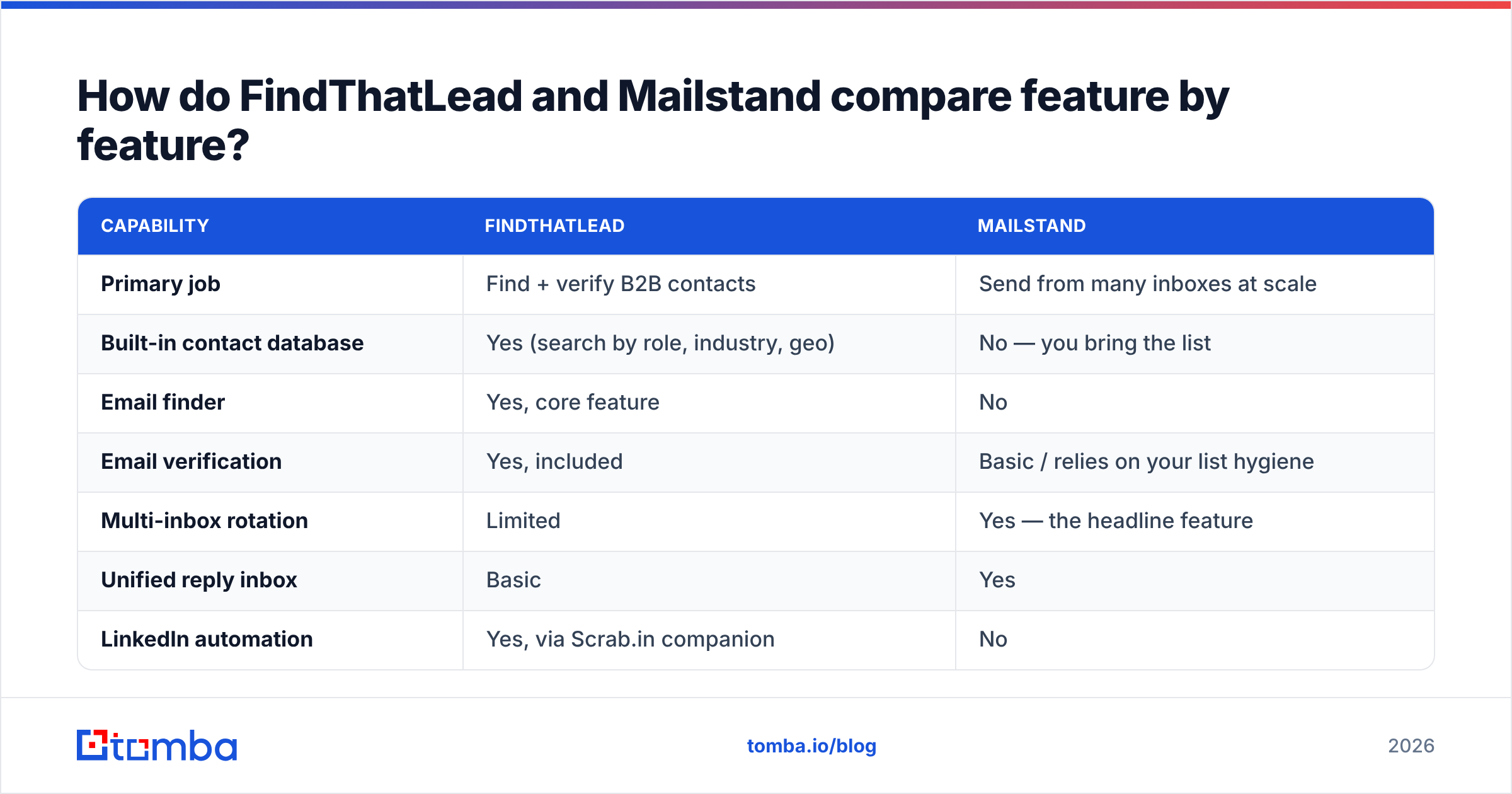
Here's what to actually check before you trust a bundled B2B database:
- Bounce rate on a live send, not on the vendor's dashboard. Vendors report "verified." Your ESP reports reality. Run 500 contacts and compare. Anything over 5% hard bounces is a sender-reputation problem, not a rounding error.
- Catch-all handling. A huge share of enterprise domains accept everything at the SMTP layer, so naive verifiers mark them "valid" and you find out later. A dedicated catch-all verifier applies pattern confidence and secondary signals instead of shrugging.
- Recency of the record. B2B contact data decays roughly 25–30% a year through job changes alone. A database that hasn't re-crawled a company in 14 months is selling you 2024.
- Coverage outside the US mid-market. Most bundled databases are strong on US SaaS and thin on EMEA, LATAM, and sub-200-employee firms. Test on your ICP domains, not on Salesforce.com.
- Pattern transparency. Good tools tell you why they think an address is right (confidence score, sources, observed pattern). Black-box "valid" flags are unauditable.
- Bulk throughput and API. If you can't enrich 5,000 rows without a support ticket, the tool won't survive your Q3 push.
FindThatLead performs respectably on 1 and 5 for well-known domains. Where teams commonly report friction is 3 and 4 — long-tail and non-US coverage. Mailstand doesn't play here at all, which is fine, but it means the data question doesn't disappear; it just moves upstream to whatever finder you pair with it.
This is where a dedicated email finder earns its place in the stack. Not because bundles are bad, but because data is the one layer where "good enough" compounds into a burned domain three months later. Running your list through a standalone email verifier before it ever touches a sender is the cheapest insurance in outbound.
How does pricing compare?#
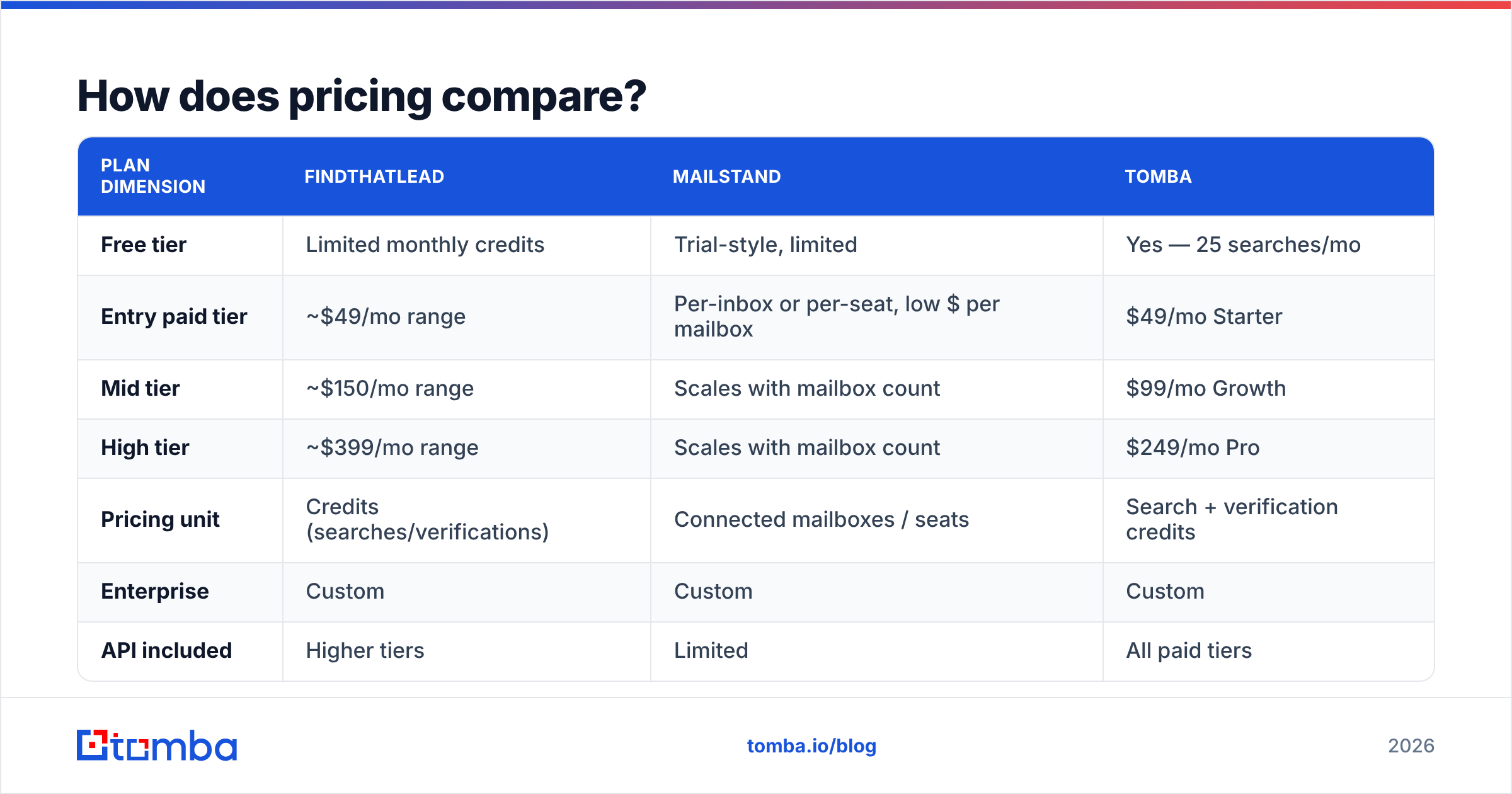
Both vendors adjust plans frequently, so treat these as shape-of-the-curve rather than a quote — check the live pricing pages before you buy.
| Plan dimension | FindThatLead | Mailstand | Tomba |
|---|---|---|---|
| Free tier | Limited monthly credits | Trial-style, limited | Yes — 25 searches/mo |
| Entry paid tier | ~$49/mo range | Per-inbox or per-seat, low $ per mailbox | $49/mo Starter |
| Mid tier | ~$150/mo range | Scales with mailbox count | $99/mo Growth |
| High tier | ~$399/mo range | Scales with mailbox count | $249/mo Pro |
| Pricing unit | Credits (searches/verifications) | Connected mailboxes / seats | Search + verification credits |
| Enterprise | Custom | Custom | Custom |
| API included | Higher tiers | Limited | All paid tiers |
The structural difference matters more than the numbers. FindThatLead bills you for information — every lookup and verification burns a credit, so your cost scales with list building. Mailstand bills you for capacity — your cost scales with how many mailboxes you run, regardless of how many contacts you've got.
That has a practical consequence people miss: if you buy Mailstand and your list is bad, you pay the same monthly bill to send bounces. Sending capacity is a fixed cost; data quality is what determines whether that fixed cost produces meetings. Compare that against transparent Tomba pricing, where the credit maps directly to a verified contact and the API is available from the entry tier rather than gated three plans up.

Is FindThatLead better than Mailstand for cold outreach?#
For the whole job, FindThatLead covers more of the workflow — but covers it shallowly at the sending end. For the sending job specifically, Mailstand is clearly stronger.
Break it down by where deals actually die:
- List is too small → FindThatLead wins. Mailstand contributes nothing.
- List is big but dirty → Neither wins. You need standalone verification before either tool touches it.
- You can only send 40 emails/day from one domain → Mailstand wins outright. This is the exact constraint it was built for.
- Replies are scattered across five mailboxes → Mailstand wins. Unified inbox is a real time saver at 5+ mailboxes.
- You need contacts inside a CRM automatically → Neither is great. Look at an email finder API plus a native CRM integration.
- You're doing LinkedIn + email multichannel → FindThatLead, via its Scrab.in companion.
Cross-referencing user reviews on G2 shows a consistent split in the qualitative feedback: FindThatLead reviewers praise speed of list building and complain about data accuracy on niche domains; sender-tool reviewers praise deliverability control and complain that they still had to buy a separate data source. Both complaints point to the same missing piece.
What does a complete 2026 outbound stack actually look like?#
Stop thinking "which tool" and start thinking "which layer." A working stack has four, and no single vendor is excellent at all four:
- Layer 1 — Targeting. Define the ICP and build the company list. Filters, firmographics, technographics, intent if you have budget.
- Layer 2 — Data. Turn companies and names into verified, deliverable contacts. This is where the finder and verifier live, and where errors are most expensive.
- Layer 3 — Delivery. Warmed domains, mailbox rotation, throttling, reply routing. This is Mailstand's territory.
- Layer 4 — Revenue ops. CRM sync, attribution, sequencing rules, handoff to reps.
FindThatLead spans Layers 1–2 with a thin toe in Layer 3. Mailstand owns Layer 3 and ignores 1–2. Buying either alone leaves a hole; buying both leaves you paying twice for a mediocre Layer 2, because FindThatLead's database is the weakest link in that combination.
The cheaper and more durable configuration is: a dedicated data layer feeding a dedicated sender. Practically, that means running a bulk email finder against your target account list, verifying the output, then pushing only deliverable contacts into whichever sender you prefer — Mailstand, Instantly, Smartlead, or your ESP. Your sender bill stays flat while your reply rate goes up, because you stopped paying capacity costs to deliver mail to addresses that never existed.
Which should you choose?#
Choose FindThatLead if: you're a solo founder or small agency, your volume is under a few thousand emails a month, you want list building and sending in one login, and LinkedIn automation is part of your motion. The bundled convenience genuinely saves setup time at that scale.
Choose Mailstand if: you already have a reliable contact source, you're sending five figures a month, and your constraint is mailbox capacity and reply management. Don't buy it before you've fixed data — you'll just industrialize your bounce rate.
Choose neither as a single answer if: you're building an outbound function you expect to still be running in two years. Split the stack. Own your data layer separately so you can swap senders without re-sourcing every contact, and swap data providers without rebuilding every sequence.
A note on switching costs: senders are easy to leave — your sequences are text. Data providers are hard to leave if your CRM is full of records you can't re-verify. Pick the data layer with that asymmetry in mind, and prefer one with an open API and clear data sources over one whose database only exists inside its own UI.
Where does Tomba fit in this comparison?#
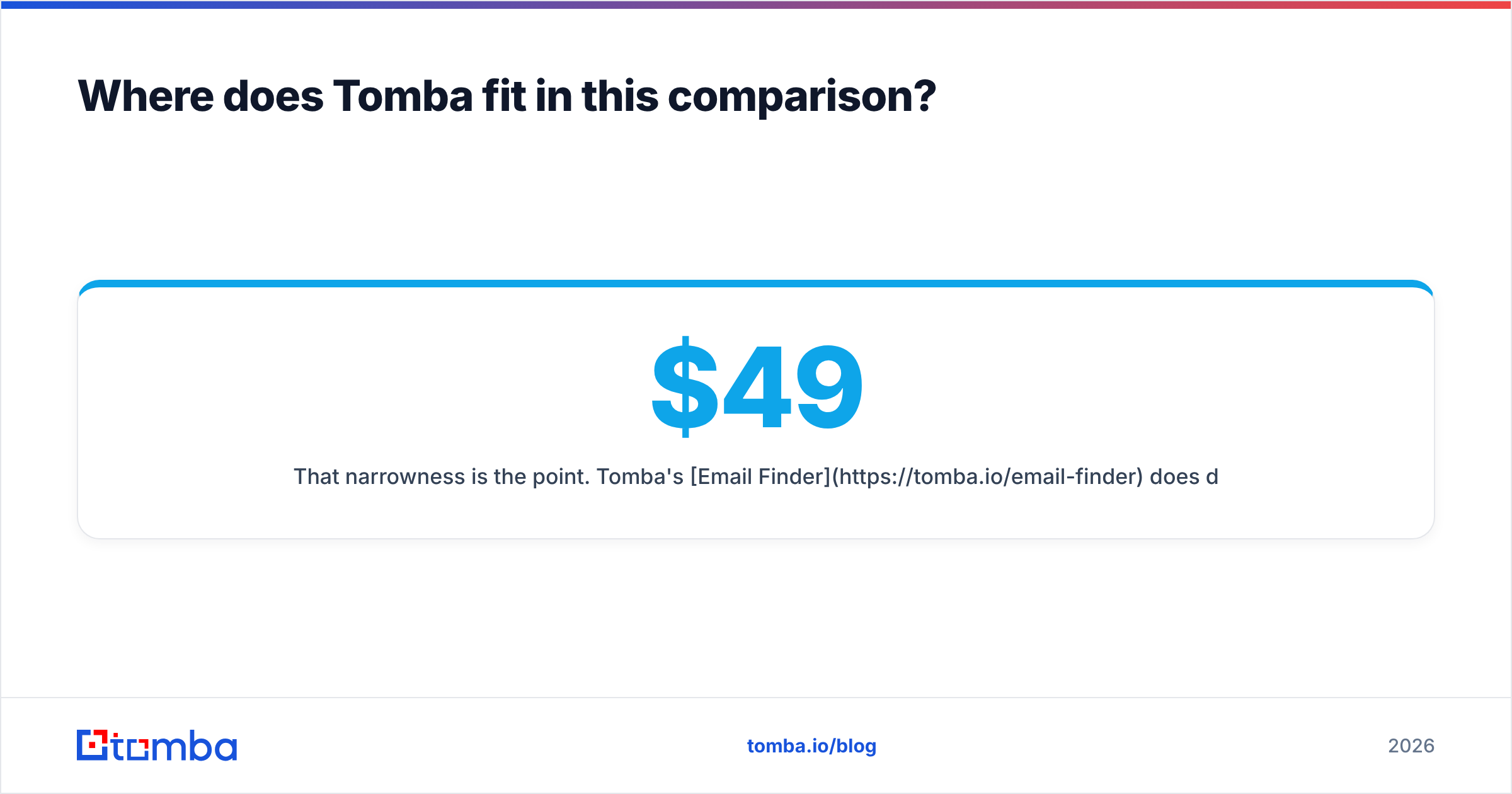
Tomba doesn't compete with Mailstand — it feeds it. And it competes directly with FindThatLead on exactly one axis: turning a domain, name, or company into a verified, deliverable business email.
That narrowness is the point. Tomba's Email Finder does domain search, individual lookup, catch-all verification, and bulk enrichment, with an API available on every paid plan rather than reserved for enterprise tiers. Pricing starts free at 25 searches a month, then $49/mo Starter, $99/mo Growth, and $249/mo Pro — so you can validate accuracy on your own ICP domains before committing a cent.
The test that settles the FindThatLead vs Mailstand debate for your team is boring and takes an afternoon: take 200 real target accounts, run them through each option's finder, send to the results from a throwaway subdomain, and compare hard-bounce rates. Whichever layer is leaking, that's the one to buy first.
Start with the data layer. Run your next 25 target accounts through the Tomba Email Finder free — no card, no credit burn on invalid results — and see what your real coverage and bounce rate look like before you sign an annual contract with anyone.
Related guides#
Ready to find emails that actually work?
Join 150,000+ professionals who stopped guessing and started sending. Free credits on signup — no credit card required.
Get the Tomba newsletter
Practical outbound tactics and product updates — once every two weeks.
About the author