FindThatLead vs Mailtester Ninja: Which Wins in 2026?
FindThatLead sells prospecting volume. Mailtester Ninja sells cheap verification. We compare accuracy, pricing, credits, and API depth to show which one actually belongs in your stack in 2026.
FindThatLead vs Mailtester Ninja is the wrong fight, and the price tags show why. One tool finds email addresses. The other checks them. Here is what each does well, what each costs, and when one tool that does both jobs is the cheaper answer.
TL;DR
- FindThatLead is a prospecting tool — it finds and exports leads in bulk, then sends cold email. Mailtester Ninja is a verification tool — it checks whether an address is deliverable, very cheaply.
- They are not true competitors. Most teams comparing them are really asking: "do I need a finder, a verifier, or one platform that does both?"
- Mailtester Ninja wins on raw cost-per-verification. FindThatLead wins on breadth (finder + sender + Chrome extension). Neither is strong at both jobs.
- If you run both, you pay twice, match up two credit systems, and still stitch data by hand. A combined finder + verifier like Tomba covers both from one credit pool starting at $49/mo.
- Read the section on catch-all domains before you buy either. That one detail decides which tool is right for roughly a third of B2B lists.
FindThatLead vs Mailtester Ninja: what does each tool do?#
Different products solving adjacent problems.
FindThatLead (findthatlead.com) is a Spanish-built B2B prospecting suite. You give it a domain, a name, or a LinkedIn URL, and it returns work email addresses. It bundles four things: a lead search database, a Chrome extension, a bulk CSV processor, and a cold-email sender. It sells itself as an all-in-one growth stack for small sales teams and solo founders.
Mailtester Ninja (mailtester.ninja) is a much narrower product: an email verification API and bulk checker. It runs SMTP-level checks, syntax validation, MX record lookups, and role-account detection, then returns a status. Its main selling point is price. It undercuts nearly every established verifier on cost-per-check. That is why it shows up so often in cold-email Slack groups and agency stacks.
So the honest framing is simple. FindThatLead is upstream: it gets the addresses. Mailtester Ninja is downstream: it confirms they are real. A head-to-head only makes sense if you are deciding where your budget goes first.

FindThatLead vs Mailtester Ninja: features and pricing compared#
Here is the practical breakdown. Pricing tiers move, so always check the vendors' own pages before you commit.
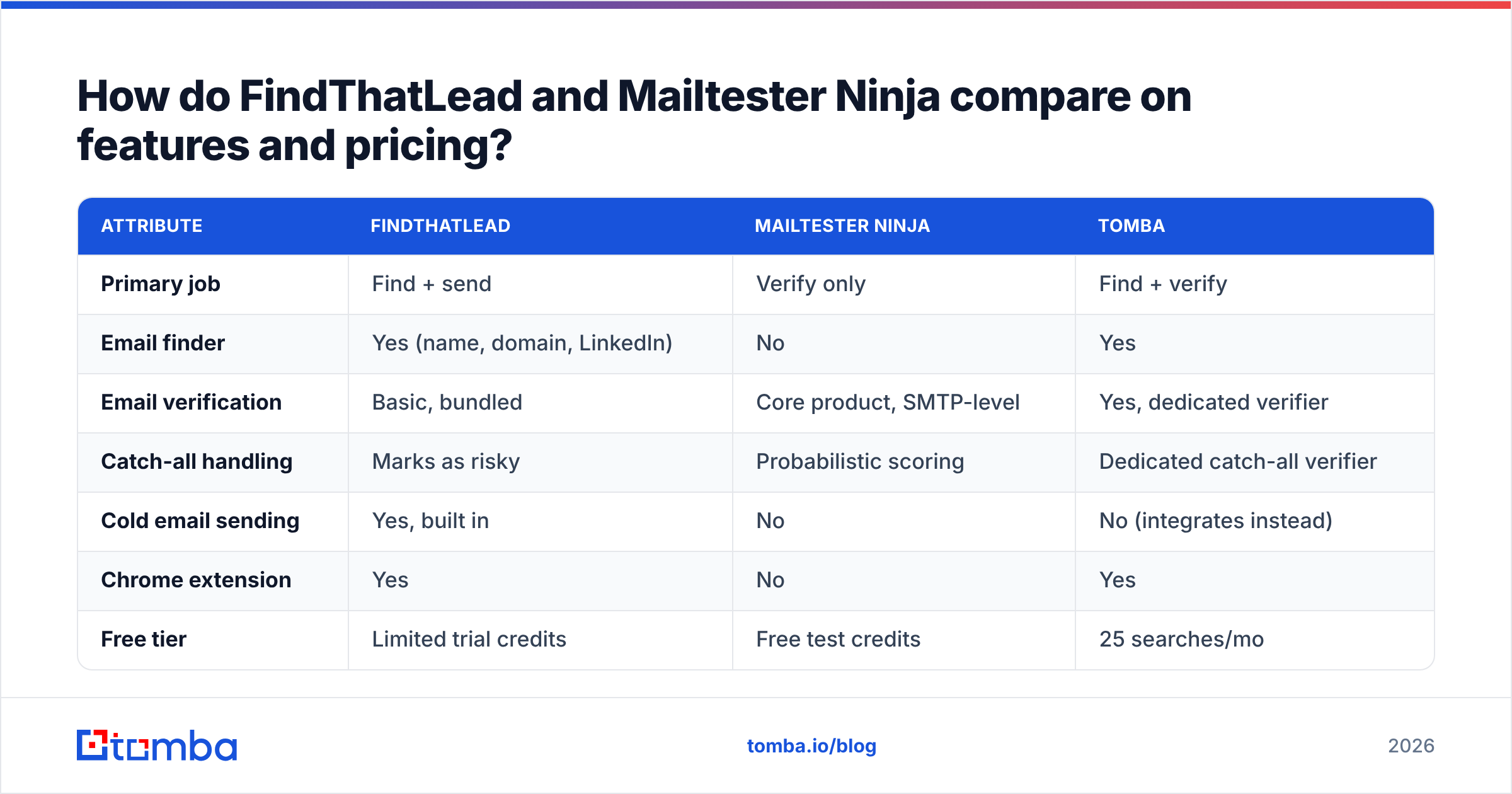
| Attribute | FindThatLead | Mailtester Ninja | Tomba |
|---|---|---|---|
| Primary job | Find + send | Verify only | Find + verify |
| Email finder | Yes (name, domain, LinkedIn) | No | Yes |
| Email verification | Basic, bundled | Core product, SMTP-level | Yes, dedicated verifier |
| Catch-all handling | Marks as risky | Confidence scoring | Dedicated catch-all verifier |
| Cold email sending | Yes, built in | No | No (integrates instead) |
| Chrome extension | Yes | No | Yes |
| Free tier | Limited trial credits | Free test credits | 25 searches/mo |
| Entry paid plan | ~$49/mo (Growth) | Pay-as-you-go, very low CPM | $49/mo Starter |
| API access | Yes, on paid plans | Yes, the main interface | Yes, full REST API |
| Bulk CSV processing | Yes | Yes | Yes |
| Best for | Solo founders wanting one tool | Agencies verifying huge lists cheaply | Teams needing accurate finding + verifying together |
Three things stand out from that table.
First, Mailtester Ninja has no finder. If you pick it, you still need a source of addresses — a database, a scraper, or an email finder. Its low price is only cheap because it does one thing.
Second, FindThatLead's verification is a bundled feature, not a product. It filters obvious junk. But agencies routinely re-check FindThatLead exports through a dedicated verifier before sending. That's two bills.
Third, the sending layer is the real differentiator for FindThatLead. If you genuinely want find-and-send in one login, that has value. If you already run Instantly, Smartlead, or Lemlist, you're paying for a sender you'll never open.
Which tool is more accurate?#
Accuracy means two different things here. Mixing them up is the most common buying mistake.
For a finder, accuracy is: of the addresses returned, what share actually deliver? For a verifier, accuracy is: of the verdicts returned, what share are correct — including the hard cases?
FindThatLead's finder is solid on well-known domains with predictable patterns (first.last@, f.last@). It gets weaker on smaller companies, non-US domains, and firms that don't publish contact data. That's the same curve every pattern-plus-database finder follows: strong on the easy 60%, thin on the tail.
Mailtester Ninja's verifier performs well on standard SMTP-responsive domains. Catch-all servers are where it struggles — and so does every other verifier. A catch-all accepts mail for any address at the domain. So it returns "valid" even for asdkjh@company.com. Vendors handle this differently. Some return "unknown," some return "risky," some apply a confidence score. Mailtester Ninja leans on scoring. That is faster, but it means you trust a number rather than a verdict.
That matters because catch-all domains are common in enterprise B2B. Say a big share of your list is catch-all. A scoring model that guesses wrong sends you straight into bounce territory, and email deliverability damage piles up fast. This is exactly why a dedicated catch-all verifier exists as a separate step in serious workflows.
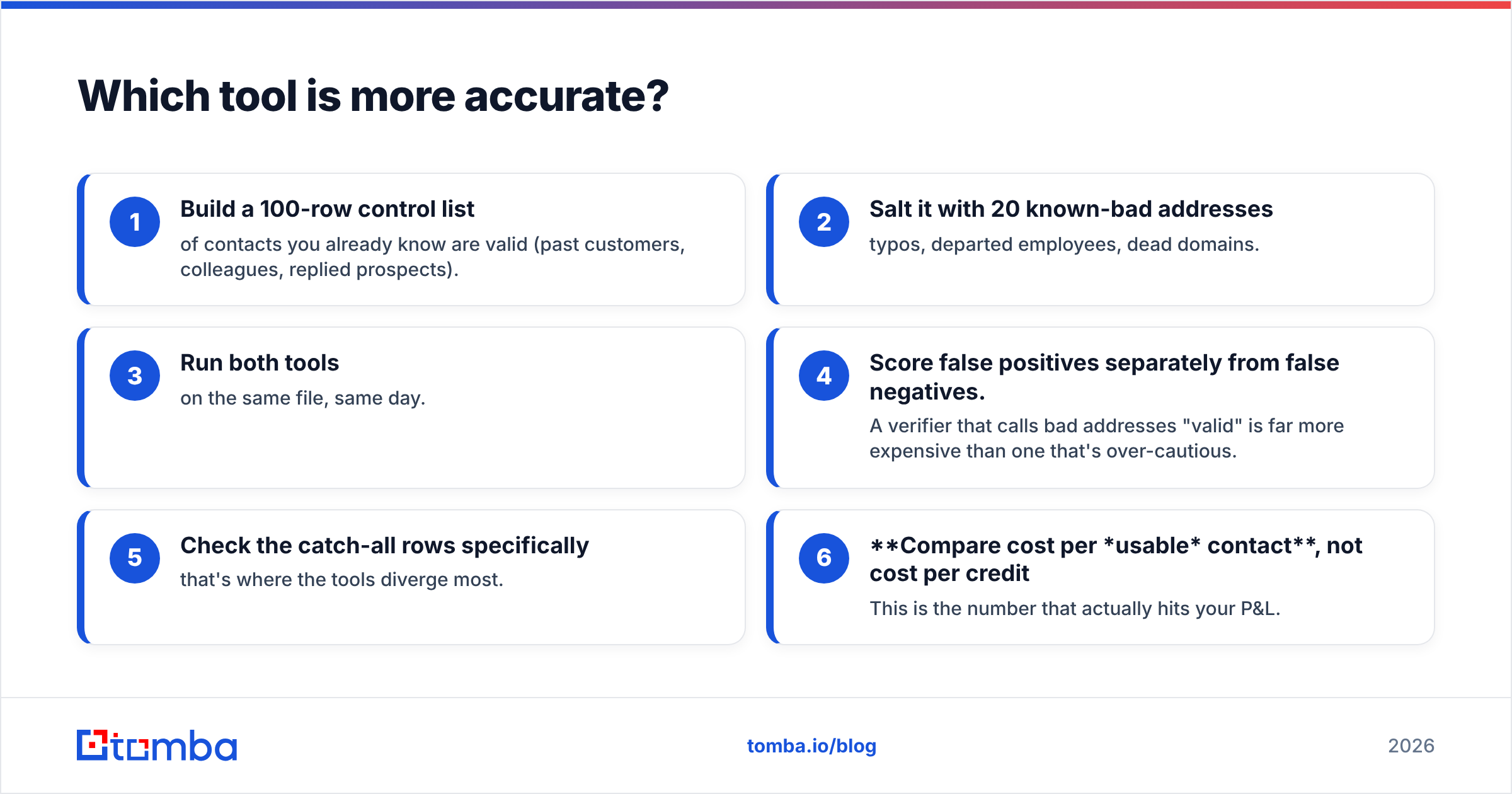
The practical accuracy test, which takes twenty minutes:
- Build a 100-row control list of contacts you already know are valid (past customers, colleagues, replied prospects).
- Salt it with 20 known-bad addresses — typos, departed employees, dead domains.
- Run both tools on the same file, same day.
- Score false positives separately from false negatives. A verifier that calls bad addresses "valid" is far more expensive than one that's over-cautious.
- Check the catch-all rows specifically — that's where the tools split apart most.
- Compare cost per usable contact, not cost per credit. This is the number that actually hits your P&L.
Should you buy a finder, a verifier, or both?#
Answer: it depends on where your addresses come from.
Buy a verifier only if you already have a large address source — an exported CRM, a purchased list, a scraping pipeline, a partner database. Your problem is hygiene, not discovery. Mailtester Ninja is a reasonable pick here. So are established players like ZeroBounce or Bouncer if you need enterprise reporting and compliance paperwork.
Buy a finder only if you have clean targeting but no contact data. You know the 500 companies and the 3 roles you want, and you need the addresses. FindThatLead fits, though so do several stronger finders.
Buy both jobs from one vendor if you're a normal outbound team doing normal outbound. This is where the two-tool stack quietly bleeds money:
- Two credit systems. Finder credits and verification credits expire on different cycles, and you always run out of the wrong one first.
- Two data models. Field names don't match, so someone keeps a mapping spreadsheet alive.
- Two support queues. When a contact bounces, neither vendor owns the failure.
- Double-charging on the same record. You pay to find an address, then pay again to confirm the address you just paid for.
- Latency in automation. Every Zapier or Make step between tools is another failure point in your enrichment pipeline.
What are the strongest alternatives to both?#
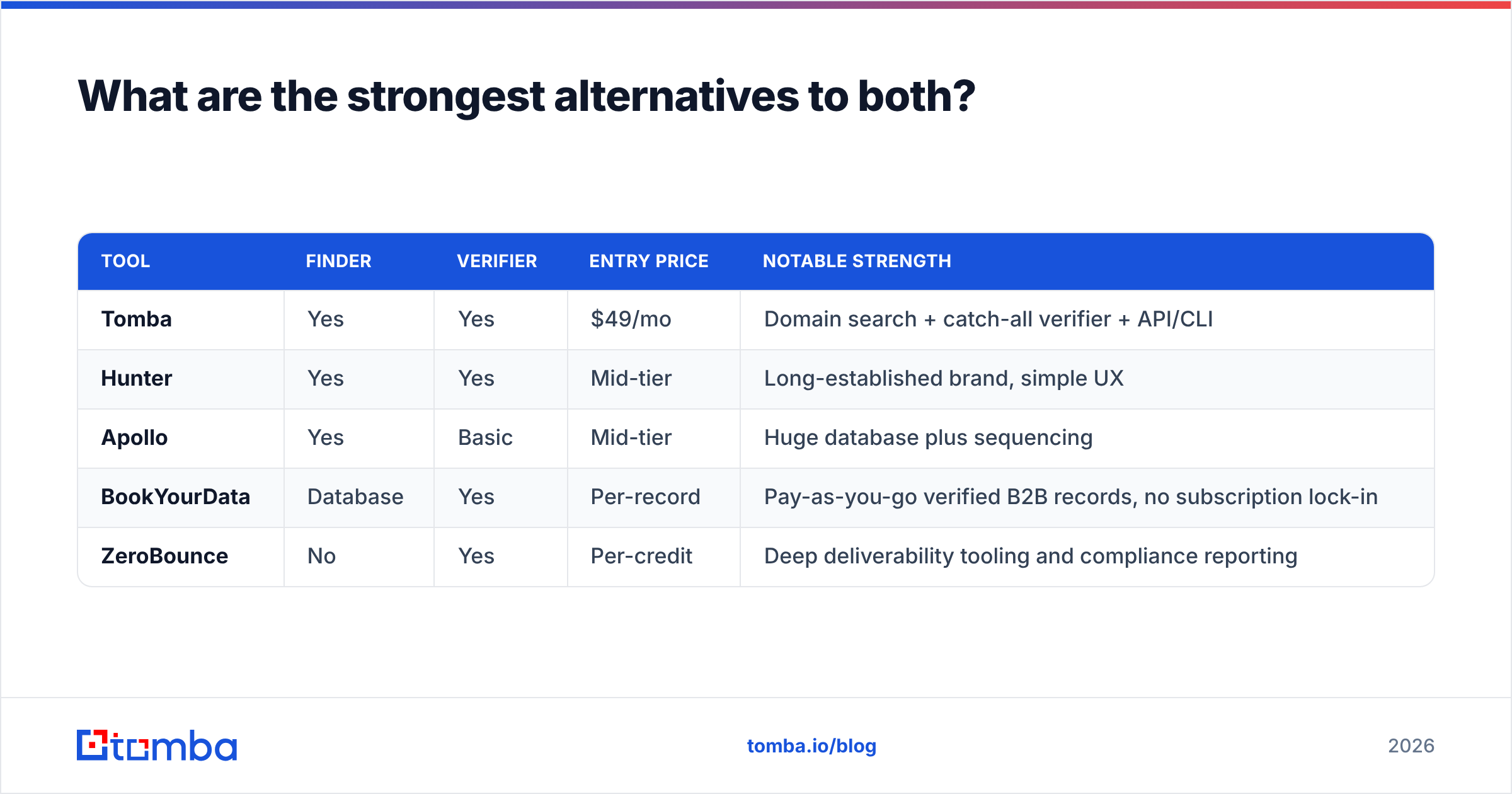
The market has moved to platforms that find and verify in one pass. The two jobs belong together. You should verify at the moment of discovery, not weeks later in a batch job.
| Tool | Finder | Verifier | Entry price | Notable strength |
|---|---|---|---|---|
| Tomba | Yes | Yes | $49/mo | Domain search + catch-all verifier + API/CLI |
| Hunter | Yes | Yes | Mid-tier | Long-established brand, simple UX |
| Apollo | Yes | Basic | Mid-tier | Huge database plus sequencing |
| BookYourData | Database | Yes | Per-record | Pay-as-you-go verified B2B records, no subscription lock-in |
| ZeroBounce | No | Yes | Per-credit | Deep deliverability tooling and compliance reporting |
A few notes on fit:
BookYourData deserves a mention for teams that hate subscriptions. You buy verified records outright rather than renting credits monthly. That suits campaign-based or seasonal outbound, where a monthly bill sits idle half the year.
Apollo wins if you want database + sequencer in one and can live with uneven data quality on smaller companies. Teams that outgrow its data accuracy usually keep the sequencer and swap the data layer — see the Apollo alternative breakdown for how that move typically goes.
Tomba is the direct answer to the FindThatLead-plus-Mailtester-Ninja stack. The email finder and email verifier draw from the same credit pool. Domain search pulls every published address at a company in one call. The catch-all verifier handles the exact case where cheap verifiers guess. Plans run Free (25 searches/mo), Starter $49/mo, Growth $99/mo, and Pro $249/mo. Full Tomba pricing is public, with no sales call required.
How do these tools handle bulk work and API access?#
Bulk is where the difference gets expensive.
FindThatLead takes CSV uploads and runs them against its finder. Throughput is fine for hundreds to low thousands of rows. The API exists on paid plans, but it is thinner than what dedicated data vendors offer. It is enough for a Zapier-grade integration, not enough to build a product on.
Mailtester Ninja is API-first by design. That's its shape: you send addresses, you get statuses back, cheaply and at volume. If you're an agency verifying millions of rows a month, per-check price beats every other concern and it competes hard.
Where both fall short is the combined job — "find every address at these 2,000 domains, verify each one, return only the deliverable ones." That's one job. Running it across two vendors means writing glue code, handling two rate limits, and matching up two error formats.
A bulk email finder that finds and verifies in the same pass removes that whole integration layer. Same for the Tomba API if you're embedding lookups in your own product: one auth token, one rate limit, one billing meter.
For teams living in spreadsheets rather than code, check whether the tool has a native Google Sheets add-on before you commit. Half of real enrichment work happens in a sheet, and a native add-on beats a Zapier chain on both cost and reliability.
Which should you choose in 2026?#
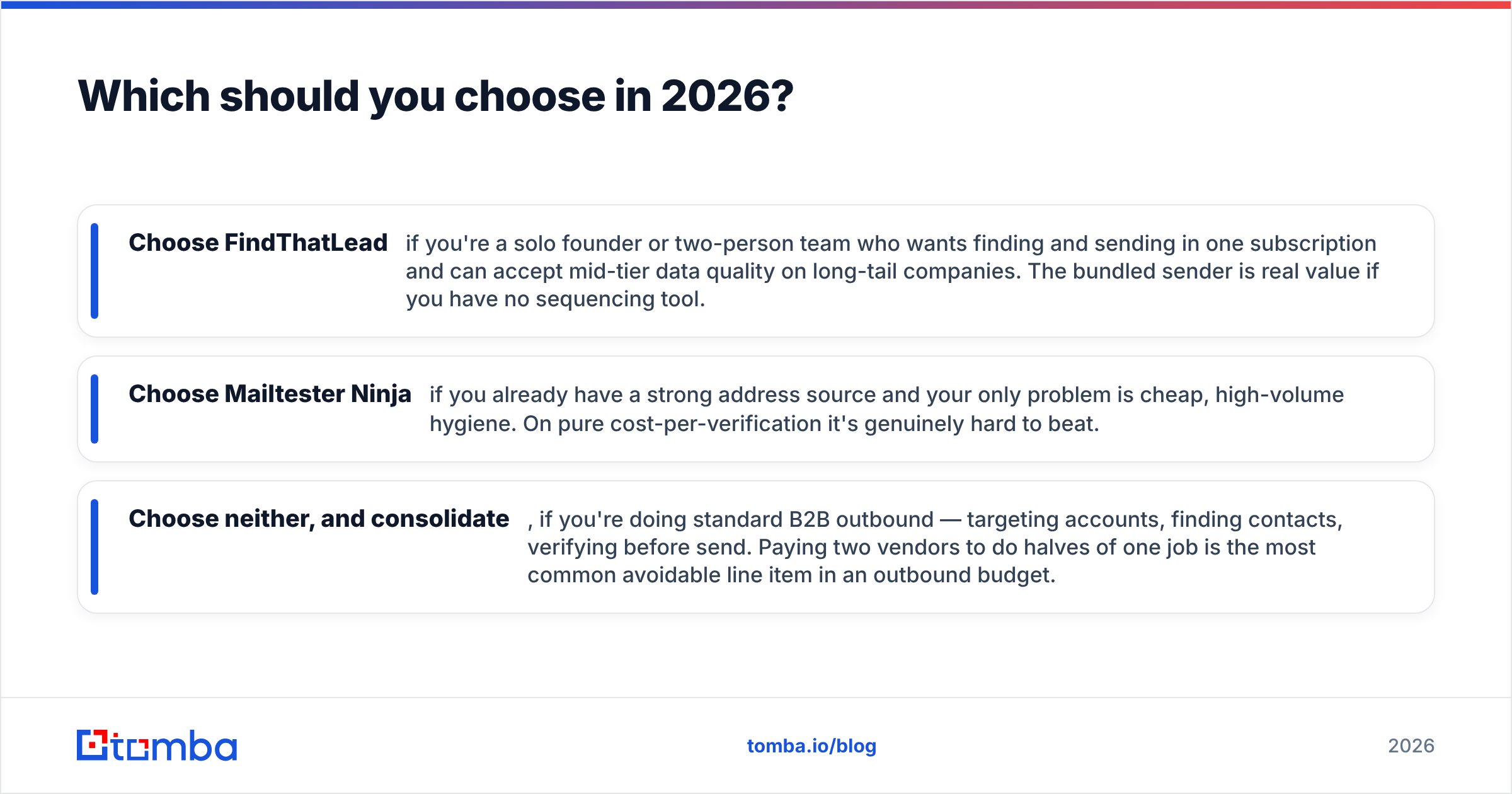
The FindThatLead vs Mailtester Ninja choice comes down to which half of the job you have already solved. Straight verdicts:
- Choose FindThatLead if you're a solo founder or two-person team who wants finding and sending in one subscription. You do have to accept mid-tier data quality on long-tail companies. The bundled sender is real value if you have no sequencing tool.
- Choose Mailtester Ninja if you already have a strong address source and your only problem is cheap, high-volume hygiene. On pure cost-per-verification it's genuinely hard to beat.
- Choose neither, and consolidate, if you're doing standard B2B outbound — targeting accounts, finding contacts, verifying before send. Paying two vendors to do halves of one job is the most common avoidable line item in an outbound budget.
Before you sign anything, run the twenty-minute control-list test above. Both tools offer free credits. Test on your target accounts, not on Fortune 500 domains where every vendor looks accurate. The tail of your ICP is where the difference lives.
One more check most buyers skip: look at what happens when a tool doesn't know. A vendor that confidently returns a wrong "valid" costs you sender reputation. One that honestly returns "unknown" costs you a little manual review. The second failure mode is much cheaper. So read the vendor's own docs on how they class catch-all and unknown results, and treat vague answers as a red flag. G2 reviews also help you spot where users complain about bounce rates after a tool cleared a list.
Ready to stop paying two vendors for one job?#
If your workflow is "find the contact, confirm it's real, send," you're buying one outcome. It shouldn't need two subscriptions, two credit balances, and a mapping spreadsheet.
Start with the Tomba Email Finder. The free tier gives you 25 searches a month with no card. That's enough to run the control-list test against your real target accounts and see the accuracy yourself. If the numbers hold up, Starter is $49/mo. Finding, verification, domain search, and catch-all checks all draw from the same pool, so you never discover mid-campaign that you ran out of the wrong kind of credit.
Sources worth reading before you decide: FindThatLead, Mailtester Ninja, and G2's email verification category.
Related guides#
Ready to find emails that actually work?
Join 150,000+ professionals who stopped guessing and started sending. Free credits on signup — no credit card required.
Get the Tomba newsletter
Practical outbound tactics and product updates — once every two weeks.
About the author