FindThatLead vs Minelead: Which Email Finder Wins in 2026?
FindThatLead and Minelead both promise verified B2B emails at a low price. We compare hit rates, credit math, catch-all handling, and APIs to show which one actually holds up in 2026.
TL;DR
- FindThatLead is a prospecting suite: email finder, lead search by criteria, and a built-in cold email sender. You pay for the workflow, not just the data.
- Minelead is a lean lookup tool: domain search, single email finder, Chrome extension, and a developer-friendly API with a genuinely usable free tier.
- Credits are not comparable across the two. FindThatLead charges credits for searches that return nothing useful; Minelead's domain search returns many addresses per call, which flatters its per-credit math.
- Neither is strong on catch-all domains. Both will hand you "accept-all" results without telling you the risk, and that is where most bounce damage comes from.
- Pick FindThatLead if you want find-and-send in one tab. Pick Minelead if you want cheap programmatic lookups. Pick a dedicated finder + verifier stack if bounce rate is the metric your boss actually watches.
What are FindThatLead and Minelead?#
FindThatLead is a Barcelona-built prospecting platform that has been around since roughly 2015. Its pitch is end-to-end: search for companies or people, pull their business emails, push them into a sequence, and send — without leaving the product. It also bundles a Chrome extension and a "Prospector" that lets you filter by role, industry, and location.
Minelead takes the opposite approach. It is a focused email-lookup service: give it a domain and it returns the addresses it knows for that domain; give it a name plus a domain and it guesses and checks a pattern. It ships a Chrome extension, a bulk domain uploader, and a REST API that developers tend to like because it is simple and cheap to call.
That difference in scope is the whole comparison. One is a suite with a finder inside it. The other is a finder with almost nothing around it. If you compare them purely on "does it return an email," you will miss the part that determines cost.
How do FindThatLead and Minelead compare head-to-head?#
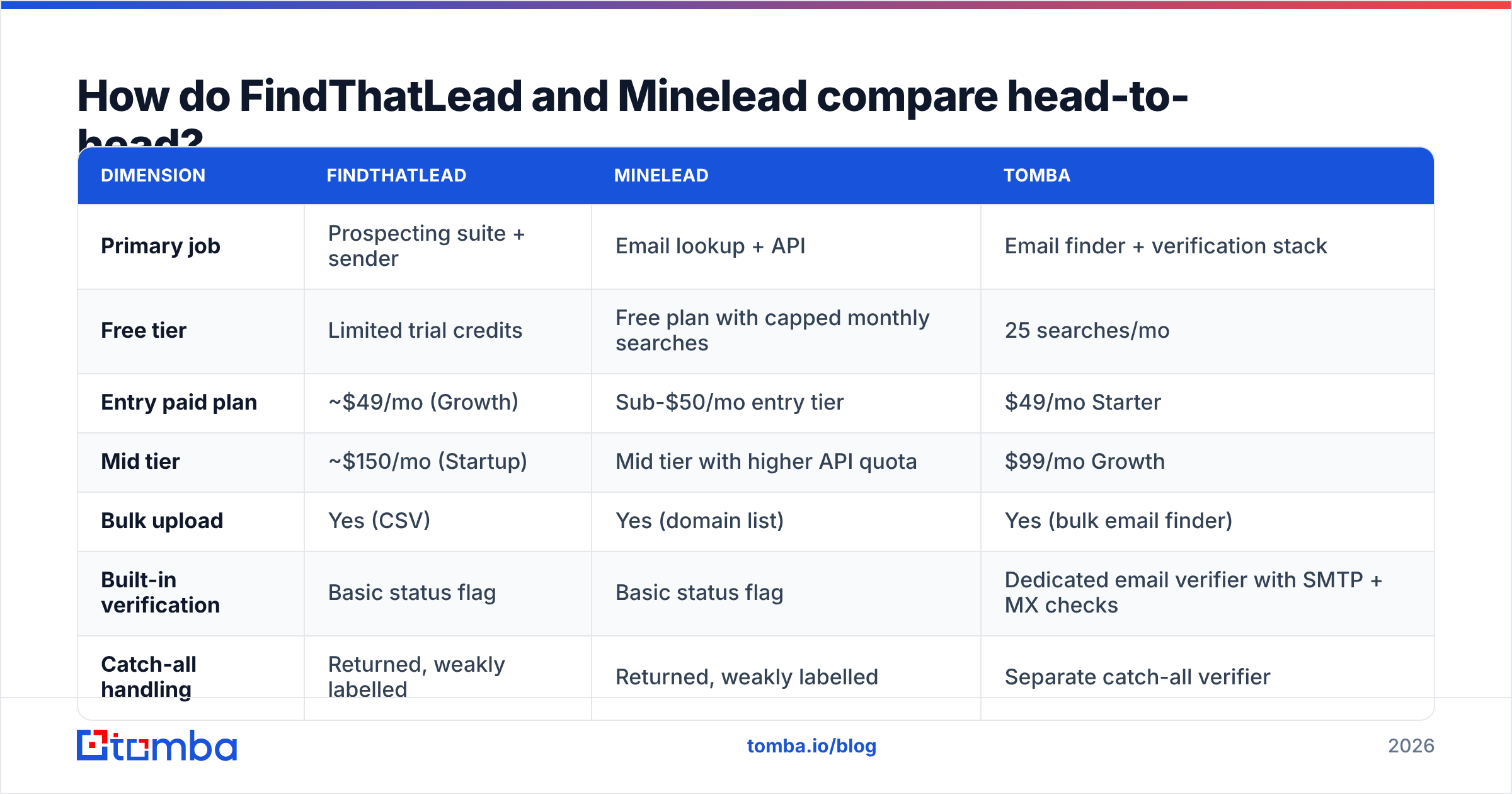
Here is the practical side-by-side. Pricing reflects each vendor's published list plans at the time of writing — both change tiers regularly, so confirm on their own pricing pages before you commit to an annual plan.
| Dimension | FindThatLead | Minelead | Tomba |
|---|---|---|---|
| Primary job | Prospecting suite + sender | Email lookup + API | Email finder + verification stack |
| Free tier | Limited trial credits | Free plan with capped monthly searches | 25 searches/mo |
| Entry paid plan | ~$49/mo (Growth) | Sub-$50/mo entry tier | $49/mo Starter |
| Mid tier | ~$150/mo (Startup) | Mid tier with higher API quota | $99/mo Growth |
| Bulk upload | Yes (CSV) | Yes (domain list) | Yes (bulk email finder) |
| Built-in verification | Basic status flag | Basic status flag | Dedicated email verifier with SMTP + MX checks |
| Catch-all handling | Returned, weakly labelled | Returned, weakly labelled | Separate catch-all verifier |
| Cold email sending | Yes, native | No | No — integrates with your sender |
| API | Yes | Yes, developer-first | Yes, documented REST + CLI + MCP |
| Best for | Solo founders who want one tab | Devs and scrapers on a budget | Teams where bounce rate is a KPI |
Two things jump out. First, FindThatLead is the only one of the three that will actually send the email — that is real value if you are a one-person outbound motion and do not want to pay for a separate sequencer. Second, neither FindThatLead nor Minelead treats verification as a first-class product. It is a status string attached to a result, not a separate engine you can point at a list you got somewhere else.

Which one finds more valid emails?#
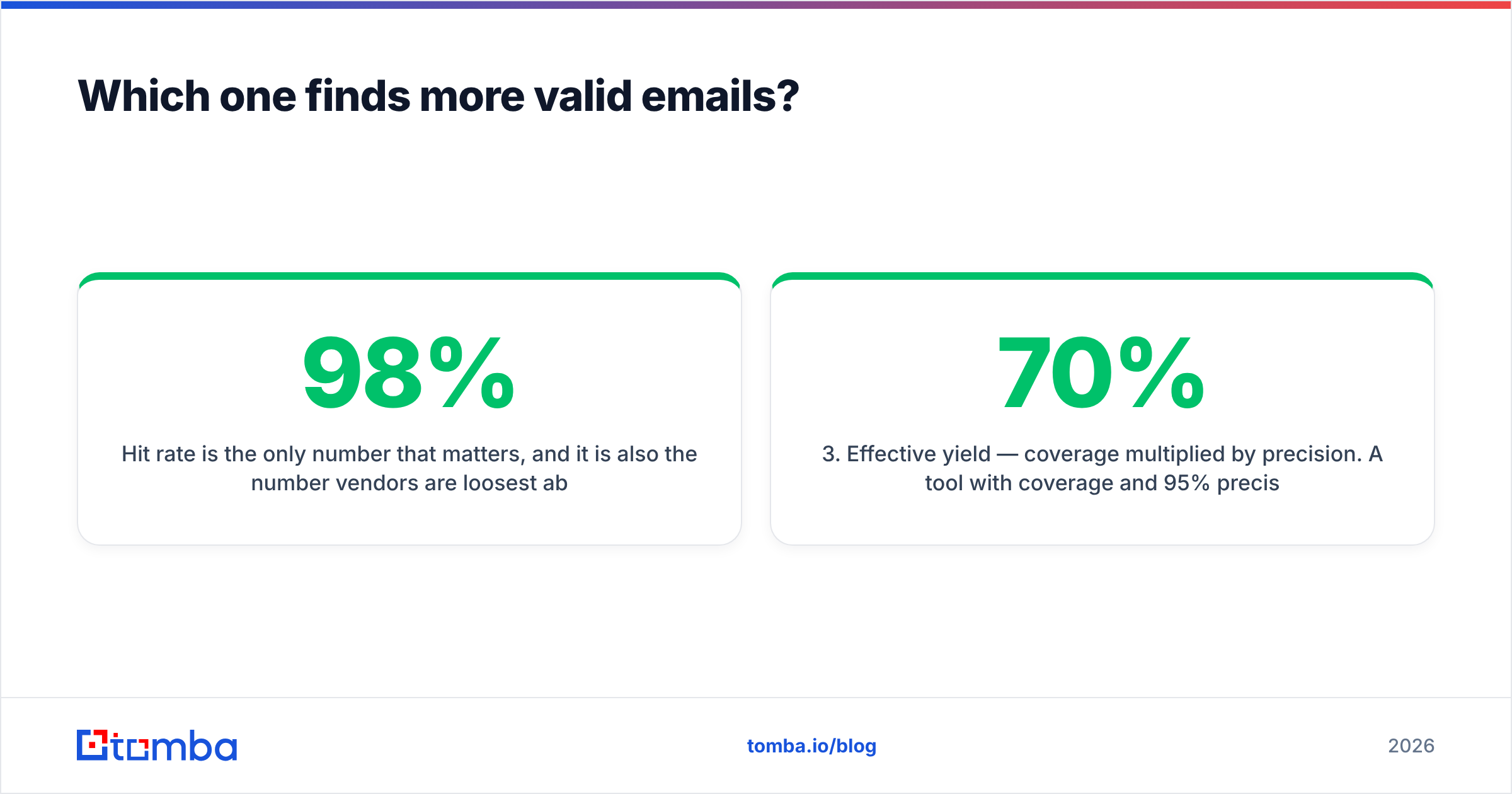
Hit rate is the only number that matters, and it is also the number vendors are loosest about. "98% accuracy" on a vendor homepage usually means "98% of the emails we chose to return passed our own check" — not "98% of the contacts you asked for came back correct."
There are two separate metrics, and you need both:
- Coverage (hit rate) — of 1,000 prospects you submit, how many come back with any address at all? This is where big-database tools win.
- Precision (validity) — of the addresses returned, how many actually accept mail? This is where verification-first tools win.
- Effective yield — coverage multiplied by precision. A tool with 70% coverage and 95% precision (66 usable per 100) beats one with 90% coverage and 65% precision (58 usable per 100), and it costs you far less reputation damage.
- Bounce cost — every invalid send erodes sender reputation, and mailbox providers now punish that faster than they did two years ago.

In practice, when people benchmark these two on the same list, the pattern is consistent rather than dramatic: FindThatLead tends to return more rows because it leans on pattern generation across a wide company index, while Minelead tends to return fewer but slightly cleaner rows on domains it already has crawled. Neither gap is large enough to be the deciding factor. What differs meaningfully is how honest each one is about the results it is unsure of.
Run your own test before you buy either. Take 100 contacts you already have confirmed emails for, strip the emails, feed the names and domains into each tool's free tier, and score coverage and precision separately. It takes an hour and it beats every review you will read, including this one.
How do the credit models actually differ?#
This is where the sticker price lies to you.
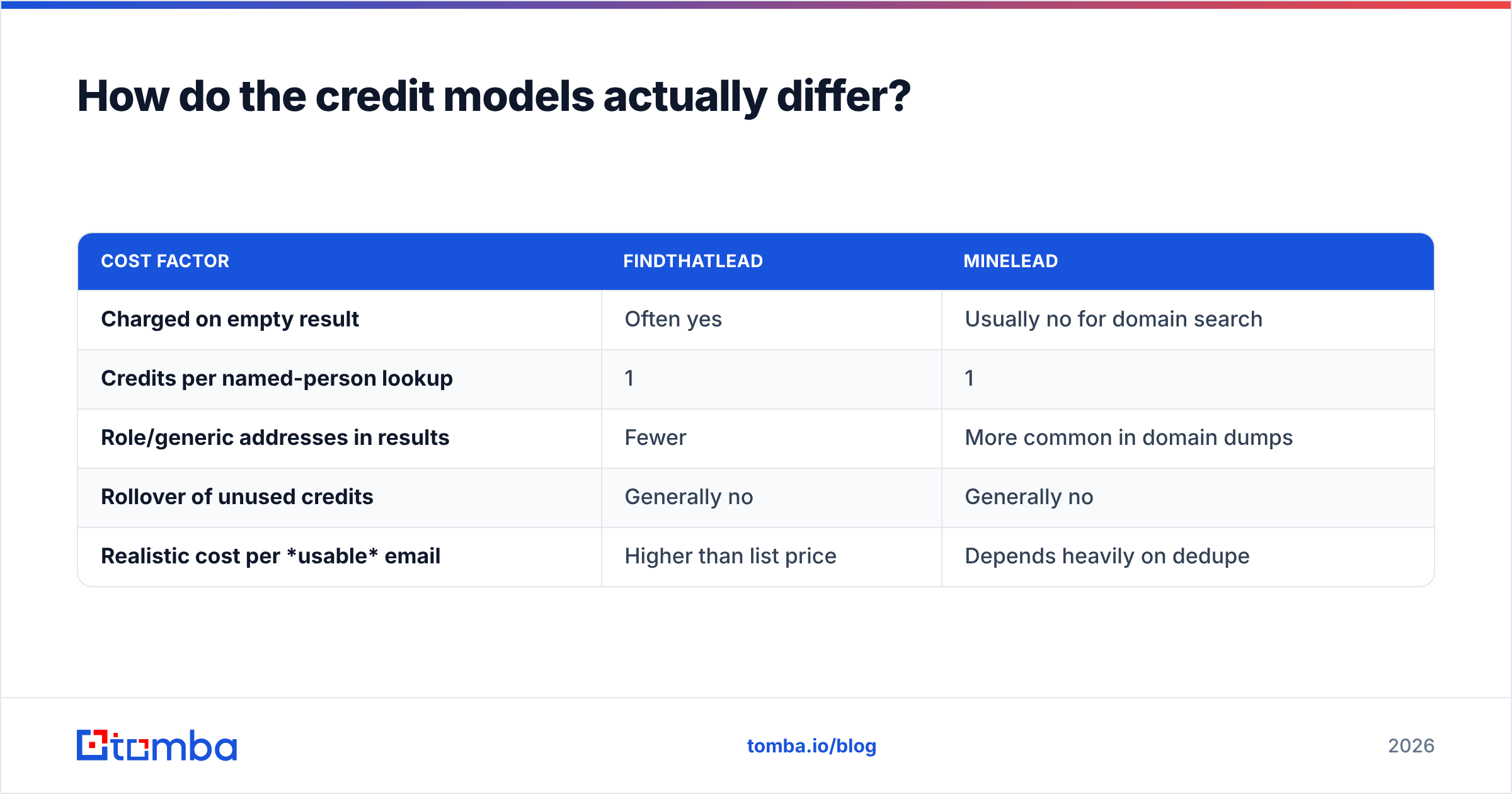
FindThatLead charges a credit per lookup attempt in most flows. If you search a name at a domain and it returns nothing, you have still spent the credit in many cases. On a list with lots of small companies, freelancers, or non-standard domains, your effective cost per usable email can drift to two or three times the advertised rate.
Minelead's domain search works differently: one call against stripe.com can return a batch of addresses. That looks fantastic on a spreadsheet — dozens of emails for a single credit. The catch is relevance. You did not ask for press@, careers@, and invoices@, and generic role addresses convert badly and complain quickly. Counting them as "leads found" inflates the win.
| Cost factor | FindThatLead | Minelead |
|---|---|---|
| Charged on empty result | Often yes | Usually no for domain search |
| Credits per named-person lookup | 1 | 1 |
| Role/generic addresses in results | Fewer | More common in domain dumps |
| Rollover of unused credits | Generally no | Generally no |
| Realistic cost per usable email | Higher than list price | Depends heavily on dedupe |
The fix in both cases is the same: dedupe and filter before you count. Strip role accounts, strip duplicates, then divide your monthly spend by what is left. That is your real cost per contact. Do it once and the comparison between any two vendors — including Tomba pricing — becomes a five-minute decision instead of a debate.
Which has the better API and automation story?#
Minelead, clearly, if you are a developer. Its API is small, the docs are readable, the free tier lets you build against it before paying, and the response shape is predictable. For a scraper, an enrichment worker, or an internal tool, that is often all you need.
FindThatLead has an API too, but the product's centre of gravity is the UI. The suite assumes you will search, review, and send inside FindThatLead. If your workflow lives in your own stack, you are paying for a sender and a prospector you never open.
Where both fall short is the surrounding surface. Modern outbound teams do not want one endpoint — they want the finder wired into the CRM, the spreadsheet, and increasingly the AI agent that is doing the research. That is why Tomba ships a Tomba API alongside a CLI, an MCP server, a Chrome extension, and native connectors for HubSpot, Pipedrive, Salesforce, Sheets, and Airtable. The lookup is commodity; the plumbing is not.
A quick sanity check before you commit to any API: read the rate limits, not the marketing. A tool that allows 60 requests per minute on a $49 plan and one that allows 600 are not the same product, no matter how similar the pricing page looks.
What happens on catch-all domains?#
This is the failure mode that quietly costs the most, and both tools handle it the same way: not very well.
A catch-all (or accept-all) domain accepts mail to every address at the SMTP layer, including addresses that do not exist. So a standard verification check returns "valid" for notarealperson@company.com. Roughly a fifth to a third of B2B domains behave this way, and the share is rising as more companies sit behind gateways.
Both FindThatLead and Minelead will hand you those addresses. Neither gives you a strong, separate signal that says "this passed only because the domain accepts everything." If you push that list straight into a sequencer, your bounce rate spikes two days later and you spend a week wondering what broke.
Three ways to handle it:
- Segment catch-alls into their own list. Do not mix them with confirmed-valid addresses in the same send.
- Warm into them slowly. Send low volume first and watch bounce behaviour before scaling.
- Use a dedicated catch-all check. Tomba's catch-all verifier exists specifically because the standard SMTP handshake cannot answer this question on its own.

Which one should you actually pick?#
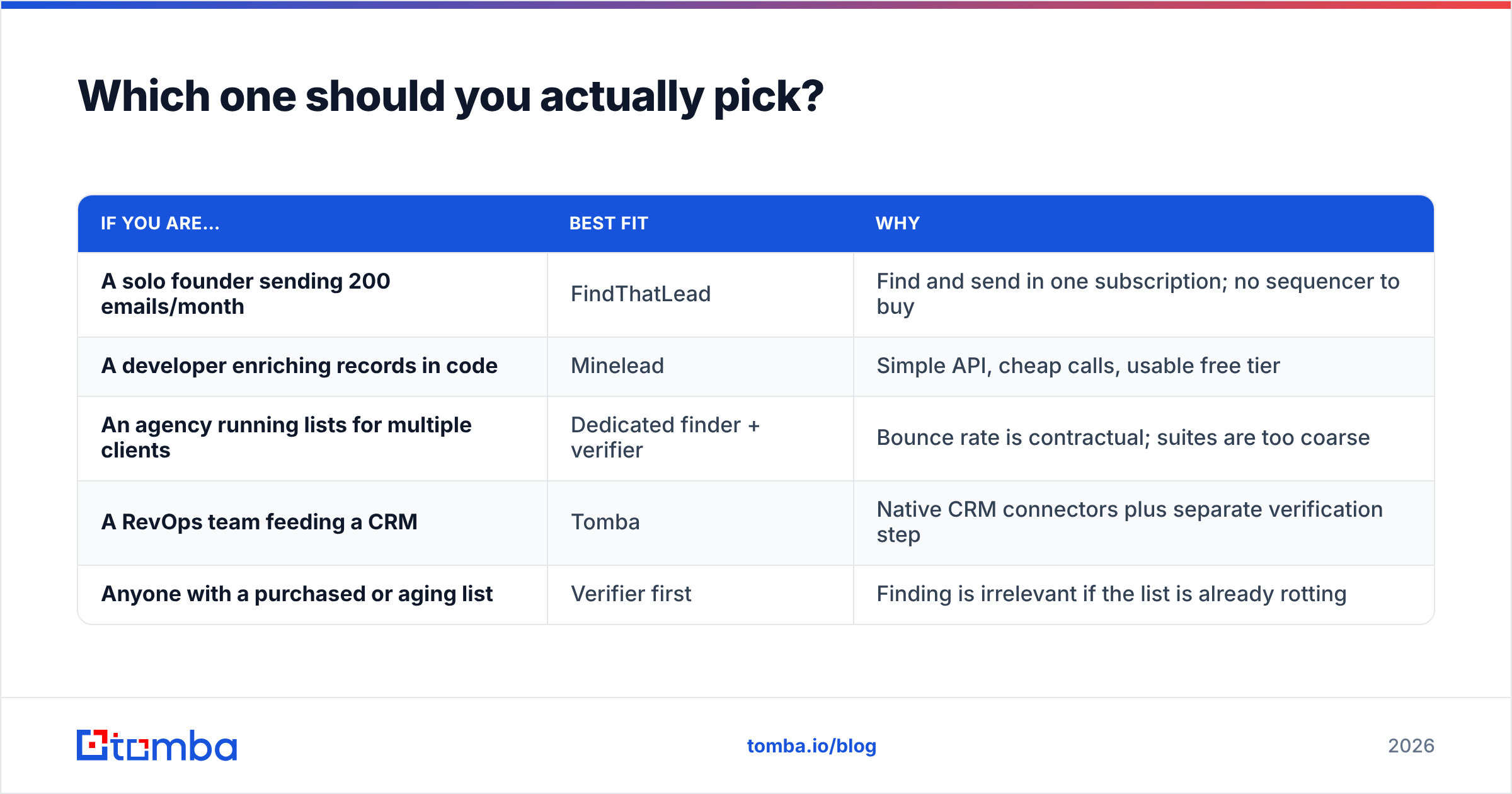
Match the tool to the shape of your motion, not to the feature grid.

| If you are… | Best fit | Why |
|---|---|---|
| A solo founder sending 200 emails/month | FindThatLead | Find and send in one subscription; no sequencer to buy |
| A developer enriching records in code | Minelead | Simple API, cheap calls, usable free tier |
| An agency running lists for multiple clients | Dedicated finder + verifier | Bounce rate is contractual; suites are too coarse |
| A RevOps team feeding a CRM | Tomba | Native CRM connectors plus separate verification step |
| Anyone with a purchased or aging list | Verifier first | Finding is irrelevant if the list is already rotting |
The honest summary of FindThatLead vs Minelead: FindThatLead wins on breadth, Minelead wins on developer ergonomics and price per call, and neither wins on data hygiene. If you have ever had a domain get throttled, the hygiene gap is the one that will cost you the most money.
Also worth noting: both tools are reviewed publicly on G2, and the review pattern is instructive. Complaints about either rarely concern the interface. They concern credits burned on empty results and bounces on addresses the tool called valid. That is the category's real weak spot, not UI polish.
What does a better stack look like?#
Split the job into two steps instead of one.
Step one: find. Use a finder with a wide index and a per-result confidence score, not just a binary. Feed it names plus domains where you have them, and use domain search where you only have the company. Score every result.
Step two: verify. Run every address — including the ones the finder called valid — through a real verification pass with MX, SMTP, disposable-domain, and catch-all detection. Then split the output into three buckets: send now, send carefully, do not send.
That second step is what neither FindThatLead nor Minelead is built to do properly, and it is the step that protects your email deliverability. Skipping it does not save you money; it moves the cost from your software bill to your domain reputation, where it is much harder to undo.
Frequently asked questions#
Is FindThatLead or Minelead cheaper? On list price, they land in a similar band at entry level. On cost per usable email after deduping role addresses and removing invalids, results vary enormously by list. Run the 100-contact test.
Does either one have a real free tier? Minelead's free plan is the more usable of the two for evaluation. FindThatLead's free allowance is closer to a trial. Tomba's free tier gives you 25 searches per month with no card required.
Can I use both? Yes, and some teams do — Minelead for programmatic lookups, FindThatLead for the send. It is not elegant, but it works. Just make sure verification happens once, centrally, before anything gets sent.
Do these tools guarantee deliverability? No tool can. They influence one input — list quality. Authentication, warmup, sending volume, and copy do the rest.
Get the data layer right first#
If you take one thing from this comparison: the finder is only half the job. Coverage gets you rows; verification gets you replies. Pick whichever of these two fits your workflow, but do not let either one be the last thing that touches your list before you hit send.
If you want both halves in one place — wide coverage, per-result confidence scoring, real SMTP and catch-all verification, and connectors into the tools you already run — start with the Tomba Email Finder. The free tier gives you 25 searches a month to benchmark it against whatever you are using today, and paid plans start at $49/mo. Run your own 100-contact test, compare effective yield rather than list price, and let the numbers pick the winner.
Related guides#
Ready to find emails that actually work?
Join 150,000+ professionals who stopped guessing and started sending. Free credits on signup — no credit card required.
Get the Tomba newsletter
Practical outbound tactics and product updates — once every two weeks.
About the author