FindThatLead vs MorphyMail (2026): Which Email Finder Wins?
Two very different email finders: one bundles prospecting and sending, the other keeps it lean and cheap. Here is how FindThatLead and MorphyMail actually compare on accuracy, credits, verification and bulk work in 2026.
TL;DR
- FindThatLead is a prospecting suite, MorphyMail is a utility. FindThatLead bundles lead search, email finding and a cold-email sender; MorphyMail focuses on cheap finding and verification without the sending layer.
- If you already own a sequencer (Instantly, Smartlead, Lemlist, HubSpot), FindThatLead's sender is dead weight you still pay for.
- Accuracy is the deciding factor, not the feature list. A 60% hit rate at $0.01 per credit costs you more in burned domain reputation than a 90% hit rate at $0.03.
- Neither tool has a strong catch-all story, which is where most B2B lists (Google Workspace, Microsoft 365 with catch-all on) quietly leak bounces.
- Our pick: FindThatLead for solo founders who want one tool for everything; MorphyMail for cheap bulk lookups; a dedicated finder like Tomba when accuracy, verification depth and API access matter more than bundling.
What are FindThatLead and MorphyMail?#
Think of it like buying kitchen equipment. FindThatLead is the all-in-one food processor — it slices, blends and kneads, but none of those functions beats a dedicated tool. MorphyMail is a good knife: one job, low price, no bundled software you'll never open.
FindThatLead launched out of Barcelona and has been in the market since 2015. It sells four things under one login: a domain/company search that returns emails at a target company, a "Lead Search" prospector that filters by role and location, a Chrome extension (Scrab.in) for LinkedIn, and an email-sending module for running cold sequences. It is aimed at founders and small agencies who don't want to stitch a stack together. You can see the current lineup on the FindThatLead site.
MorphyMail takes the opposite approach. It is a lean email finder and verifier — you feed it names and domains, it returns addresses and a validity status. There is a bulk uploader and an API. There is no sequencer, no LinkedIn automation, no CRM. Pricing sits at the budget end of the market, which is exactly the point. Check the MorphyMail homepage for the current plan list.
Here's the honest framing for a findthatlead vs morphymail decision: these tools are not really competing for the same buyer. One is competing with Apollo and Lusha. The other is competing with per-credit lookup APIs. You're picking a category before you pick a vendor.
How do FindThatLead and MorphyMail compare feature by feature?#
The table below is the fastest way to see where the two diverge. Treat pricing as directional — both vendors revise plans, so confirm on their pricing pages before you buy.
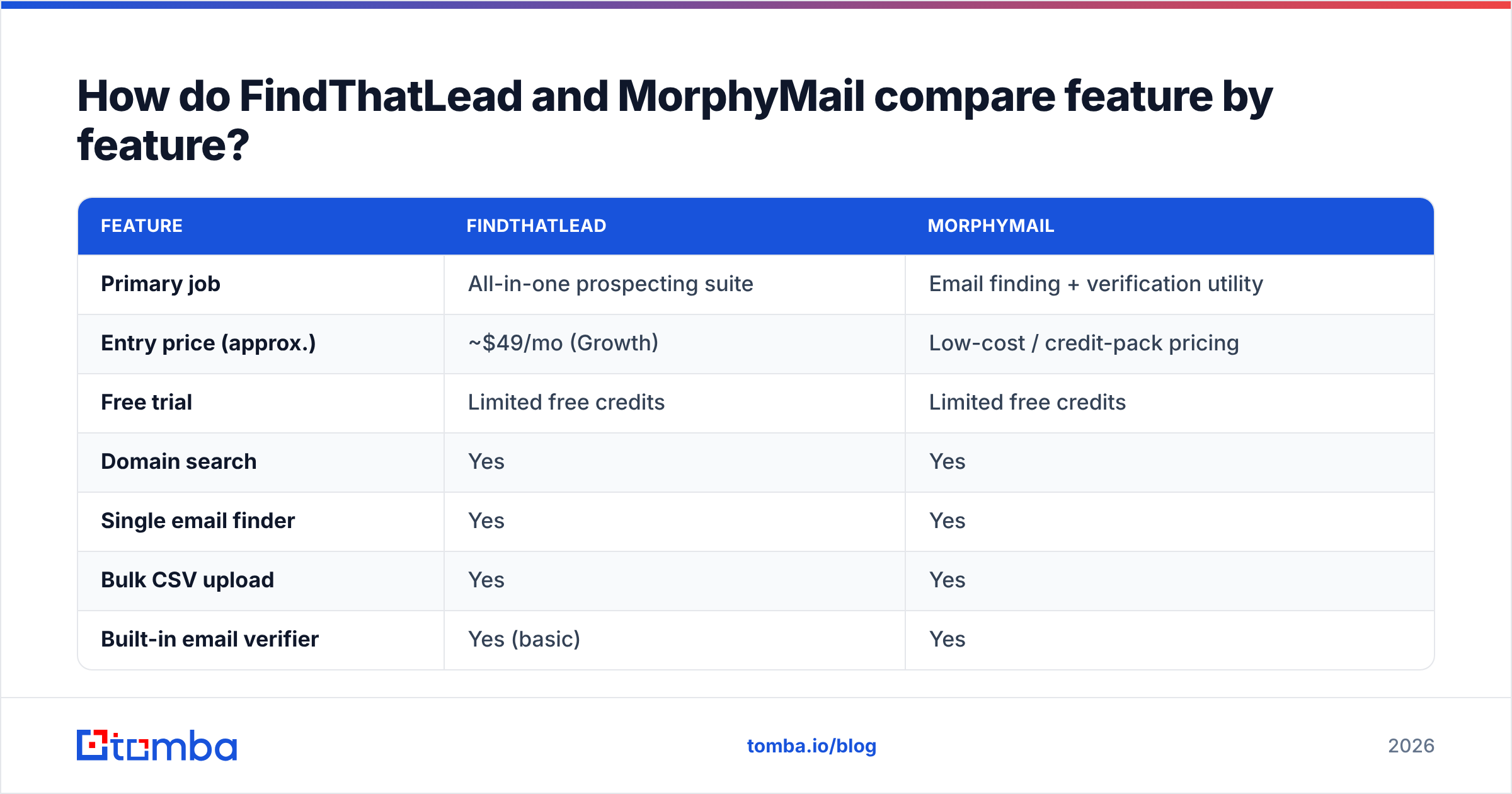
| Feature | FindThatLead | MorphyMail |
|---|---|---|
| Primary job | All-in-one prospecting suite | Email finding + verification utility |
| Entry price (approx.) | ~$49/mo (Growth) | Low-cost / credit-pack pricing |
| Free trial | Limited free credits | Limited free credits |
| Domain search | Yes | Yes |
| Single email finder | Yes | Yes |
| Bulk CSV upload | Yes | Yes |
| Built-in email verifier | Yes (basic) | Yes |
| Catch-all handling | Weak — flagged as "risky" | Weak — flagged as unknown |
| Cold email sender | Yes (built-in sequences) | No |
| LinkedIn extension | Yes (Scrab.in) | No |
| Public API | Yes | Yes |
| Native CRM integrations | HubSpot, Zapier, Salesforce via connectors | Mostly API/Zapier |
| Phone number data | No | No |
| Best fit | Solo founder wanting one login | Teams that already own a sequencer |
Two things jump out.
First, FindThatLead charges you for a sequencer you may already have. If your outbound already runs through Instantly or Smartlead, you're paying a bundle premium for a module that sits idle. That's the classic all-in-one tax.
Second, neither tool solves catch-all domains. Both will hand you an "unknown" or "risky" verdict and let you decide. On a typical mid-market B2B list, 20–30% of domains are catch-all, so "we'll let you decide" means you're either discarding a quarter of your TAM or gambling with your sender reputation. A dedicated catch-all verifier is the missing piece in both stacks.
Which tool actually finds more valid emails?#
Hit rate and accuracy are two different numbers, and vendors love to blur them.
- Hit rate = of 1,000 first name + last name + domain inputs, how many addresses came back at all.
- Accuracy = of those returned addresses, how many were actually deliverable.
- Effective yield = hit rate × accuracy. This is the only number that matters.
- Cost per valid contact = plan price ÷ effective yield. Not price per credit.
- Bounce cost = the reputation damage of every invalid address that slipped through, which no pricing page shows you.
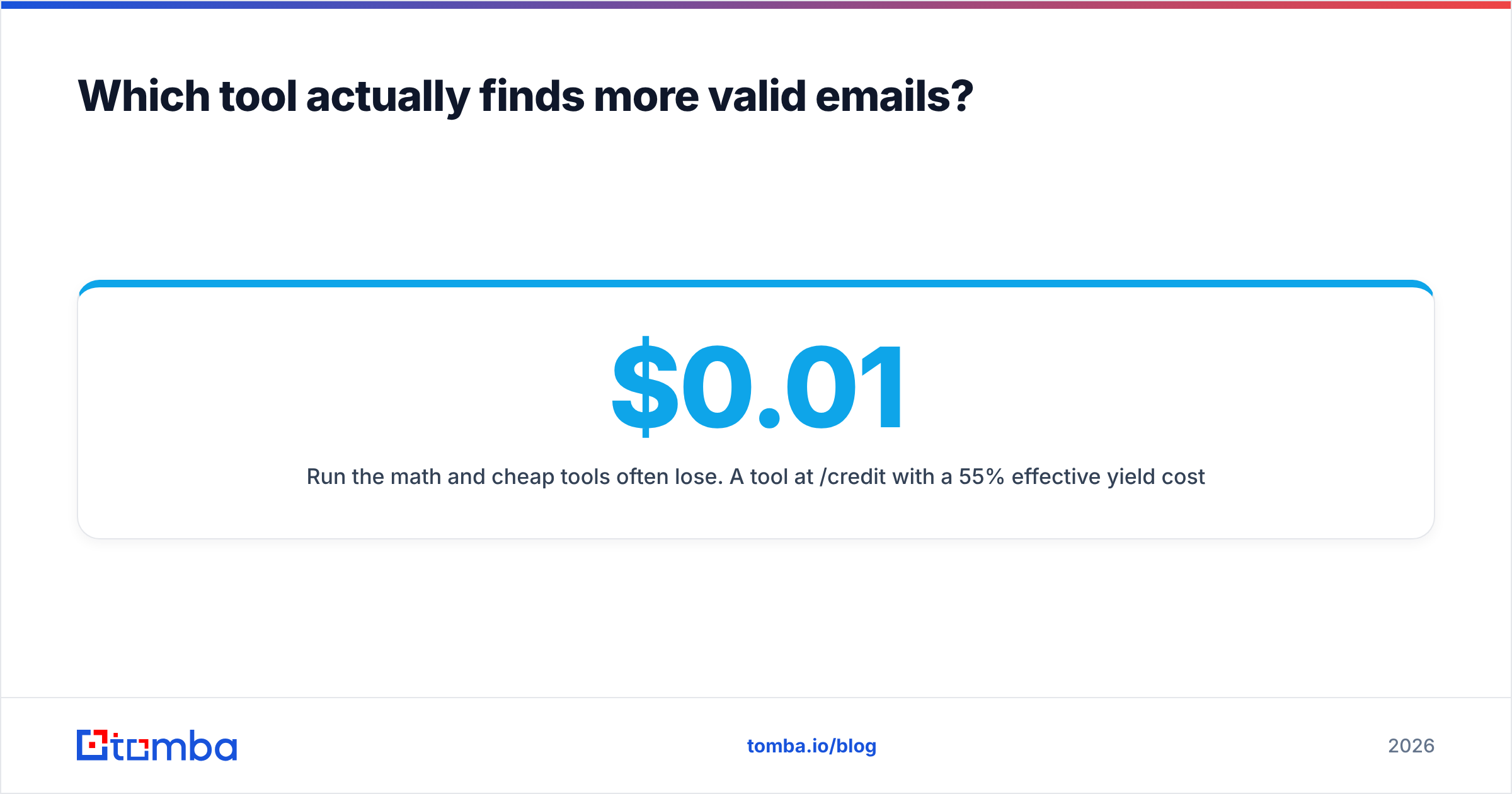
Run the math and cheap tools often lose. A tool at $0.01/credit with a 55% effective yield costs $0.018 per valid contact and burns your domain. A tool at $0.03/credit with a 92% effective yield costs $0.033 per valid contact and keeps your inbox placement intact. The second one is cheaper once you price in the deliverability hit — and much cheaper once you price in a burned sending domain.

In our own testing patterns across enterprise domains, both FindThatLead and MorphyMail perform respectably on large, well-indexed companies — the Salesforces and Shopifys of the world, where email patterns are public and widely scraped. Both degrade on companies under ~50 employees, on non-English domains, and on recently-changed corporate domains after a rebrand or acquisition. That degradation curve is where finders separate.
A practical test before you commit to either: take 100 contacts you have already confirmed as valid (from closed-won deals or your CRM), strip the emails, feed the names and domains into each tool's free tier, and score the results against the known-good list. Two hours of work saves you a year of a bad contract. If you want a neutral second read, cross-check what buyers say on G2's lead intelligence category rather than trusting any vendor's own case studies.
How does pricing compare between FindThatLead and MorphyMail?#
FindThatLead's plans historically start around $49/mo for the entry Growth tier and scale steeply into the low hundreds for the Startup and Suite plans, with credits shared across finding, verifying and sending. MorphyMail sits meaningfully lower per credit because it isn't funding a sending infrastructure.
But per-credit pricing hides three things:
- Credit burn on failures. Some tools charge a credit even when no email is returned. Ask this question explicitly before buying — it can double your real cost.
- Verification double-charging. If finding costs one credit and verifying the same address costs another, your effective price per usable contact is 2×.
- Annual lock-in. Discounted annual plans are only a discount if the tool still works for you in month 8.
Here is a comparison framed the way a buyer should look at it:
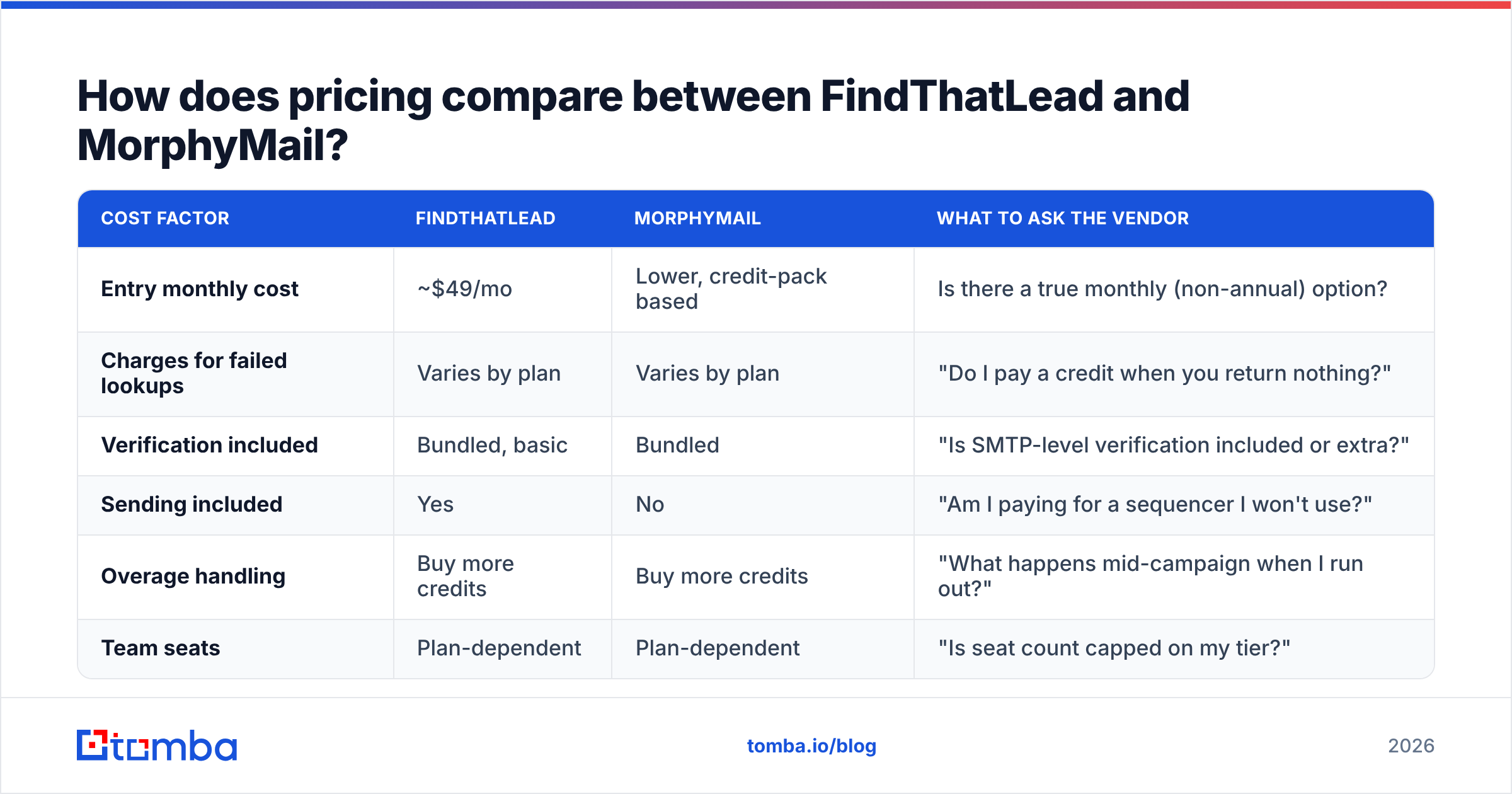
| Cost factor | FindThatLead | MorphyMail | What to ask the vendor |
|---|---|---|---|
| Entry monthly cost | ~$49/mo | Lower, credit-pack based | Is there a true monthly (non-annual) option? |
| Charges for failed lookups | Varies by plan | Varies by plan | "Do I pay a credit when you return nothing?" |
| Verification included | Bundled, basic | Bundled | "Is SMTP-level verification included or extra?" |
| Sending included | Yes | No | "Am I paying for a sequencer I won't use?" |
| Overage handling | Buy more credits | Buy more credits | "What happens mid-campaign when I run out?" |
| Team seats | Plan-dependent | Plan-dependent | "Is seat count capped on my tier?" |

For reference, Tomba pricing runs a free tier at 25 searches/mo, Starter at $49/mo, Growth at $99/mo and Pro at $249/mo, with Enterprise on request — which puts it head-to-head with FindThatLead's entry tier while unbundling the sequencer you probably already pay for elsewhere.
Which tool fits which use case?#
Pick FindThatLead if:
- You're a solo founder or two-person team with no existing outbound stack.
- You want lead sourcing, finding and sending under one invoice and one login.
- Your ICP is mid-to-large companies with predictable email patterns.
- You value the LinkedIn extension workflow and will actually use it daily.
Pick MorphyMail if:
- You already run sequences in a dedicated sender and only need addresses.
- Your volume is high and your budget is tight.
- You're comfortable adding your own verification layer on top.
- You mostly need bulk CSV enrichment rather than one-off lookups.
Pick a dedicated finder like Tomba if:
- Accuracy and low bounce rate are the constraint, not tool count.
- You need real API access for a product feature, not just a Zapier hop — see the Tomba API docs for the shape of that.
- Catch-all domains are a meaningful share of your target list.
- You want finding and email verification as one workflow rather than two purchases.
What happens to your deliverability if you skip verification?#
This is where the cheap-tool trap closes. Every mailbox provider tracks how many of your sends hit non-existent addresses. Cross a threshold and your mail starts landing in spam — not just for that campaign, but for every email from that domain, including replies to warm prospects.
The working rule most outbound teams settle on:
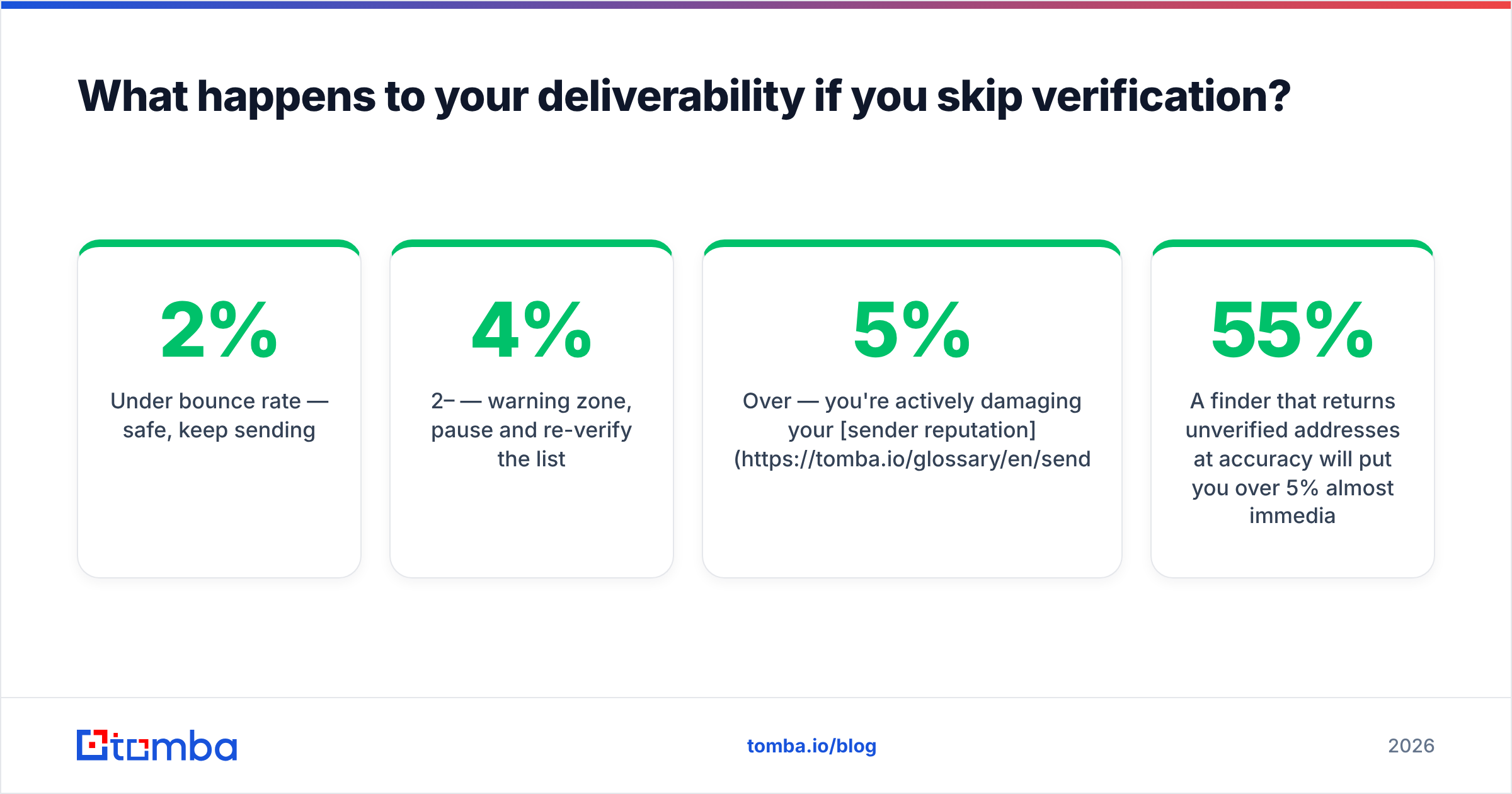
- Under 2% bounce rate — safe, keep sending.
- 2–4% — warning zone, pause and re-verify the list.
- Over 5% — you're actively damaging your sender reputation and should stop.
A finder that returns unverified addresses at 55% accuracy will put you over 5% almost immediately. This is the single biggest reason "cheapest per credit" is the wrong buying criterion for an email finder. HubSpot's own email deliverability guidance makes the same point from the sender side: list quality upstream determines inbox placement downstream.
Run every list through a verification pass before it touches your sequencer, regardless of which finder produced it. If you're processing lists in volume, a bulk email finder that finds and verifies in one pass removes the double-handling step entirely.
What do most buyers get wrong in this comparison?#
Mistake 1: Comparing feature counts. FindThatLead has more modules. That is not the same as being better at finding emails. More surface area often means less depth on the one function you actually bought the tool for.
Mistake 2: Testing on famous companies. Everyone's email finder works on Google, Stripe and Shopify. Test on the 40-person companies in your real pipeline. That's where the difference shows up.
Mistake 3: Ignoring the API when you'll need it in six months. If your enrichment eventually moves into your product or a workflow automation, an API that only exists as a Zapier connector becomes a hard ceiling.
Mistake 4: Treating "verified" as a single standard. Syntax check, MX record check, and SMTP handshake are three different levels of verification. Ask which one you're getting. Most budget tools stop at the second.
Mistake 5: Not counting the credits you waste. If 40% of lookups return nothing and you're charged anyway, your headline price is a fiction.
FAQ#
Is FindThatLead better than MorphyMail? For an all-in-one workflow, yes. For pure email-finding cost efficiency, MorphyMail is often the leaner buy. Neither is definitively more accurate across all segments — run a 100-contact test on your own ICP before committing.
Can I use both? You can, but you shouldn't. Overlapping credits across two finders is the most common source of quiet SaaS waste in small sales stacks. Pick one finder, one verifier (or one tool doing both), and one sequencer.
Do either of them provide phone numbers? Neither is a phone data provider in any serious sense. If direct dials matter to your motion, that's a separate purchase — a dedicated phone finder or a contact-data vendor.
What about catch-all domains? Both flag them and hand the risk back to you. If catch-all domains are more than 15% of your list, budget for a dedicated catch-all verification step or accept a materially higher bounce rate.
The bottom line#
FindThatLead wins if you want one tool and one bill and you'll genuinely use the sending module. MorphyMail wins if you want cheap lookups and already own your sequencer. Both lose to a dedicated finder the moment accuracy — not price per credit — becomes your binding constraint.
If your problem is "I need addresses that actually deliver, at a price that doesn't scale into the thousands," start with the Tomba Email Finder. The free tier gives you 25 searches a month to run the same head-to-head test we described above against your own known-good contact list, with verification built into the same workflow rather than sold as a second product. Test all three on your real ICP, score the results, and let the effective yield number pick the winner — not the feature grid.
Related guides#
Ready to find emails that actually work?
Join 150,000+ professionals who stopped guessing and started sending. Free credits on signup — no credit card required.
Get the Tomba newsletter
Practical outbound tactics and product updates — once every two weeks.
About the author