FindThatLead vs MyEmailVerifier: Which One Do You Need?
FindThatLead finds email addresses. MyEmailVerifier cleans them. They are not really competitors — but most teams only budget for one. Here's how to pick, what each actually costs, and when a single combined platform beats running both.
TL;DR
- FindThatLead and MyEmailVerifier are not head-to-head competitors. FindThatLead is a prospecting and email-finding platform; MyEmailVerifier is a dedicated bulk verification engine. Comparing them is comparing a well drill to a water filter.
- If your bottleneck is "I don't have contacts," you need a finder. If it's "my bounce rate is 9% and Google is throttling me," you need a verifier.
- FindThatLead adds lead search, LinkedIn scraping, and a built-in cold email sender. MyEmailVerifier adds catch-all handling, greylisting detection, and pay-as-you-go credits that never expire.
- Running both means two subscriptions, two credit pools, and CSV shuffling between them. A combined finder + verifier (Tomba, Hunter, Apollo) usually costs less than the pair.
- Verdict: pick MyEmailVerifier if you already have lists and only need hygiene. Pick FindThatLead if you want an all-in-one prospect-and-send tool. Pick a unified data platform if you want find, verify, and enrich under one API.
What is FindThatLead and what does it actually do?#
FindThatLead is a Spanish-built B2B prospecting suite that has been around since 2015. Its core job is turning a company domain, a person's name, or a LinkedIn profile into a working business email address. Around that core it stacks a lead search database, a Chrome extension, a "Prospector" filter tool for building lists by industry, location, and role, and a cold email sender called Scrab.in-adjacent Email Sender.
The pitch is single-vendor simplicity: find the lead, validate it, load it into a sequence, send. For a solo founder or a two-person agency that never wants to touch a CSV, that consolidation is genuinely valuable.
The tradeoffs show up at scale. FindThatLead's credit system charges for searches whether or not they return a usable address, and its built-in verification is a lightweight pass, not a forensic one. Reviewers on G2 consistently flag two things: data coverage that's stronger in Europe and Latin America than in North America, and a UI that feels older than the 2026 competition. You can see the current plan structure on the FindThatLead site directly.
What is MyEmailVerifier and who is it for?#
MyEmailVerifier does one thing: it takes a list of email addresses you already have and tells you which ones will bounce. No prospecting, no sequences, no database. Upload a CSV or hit the API, get back a categorized list.
Its differentiators are unglamorous but matter operationally:
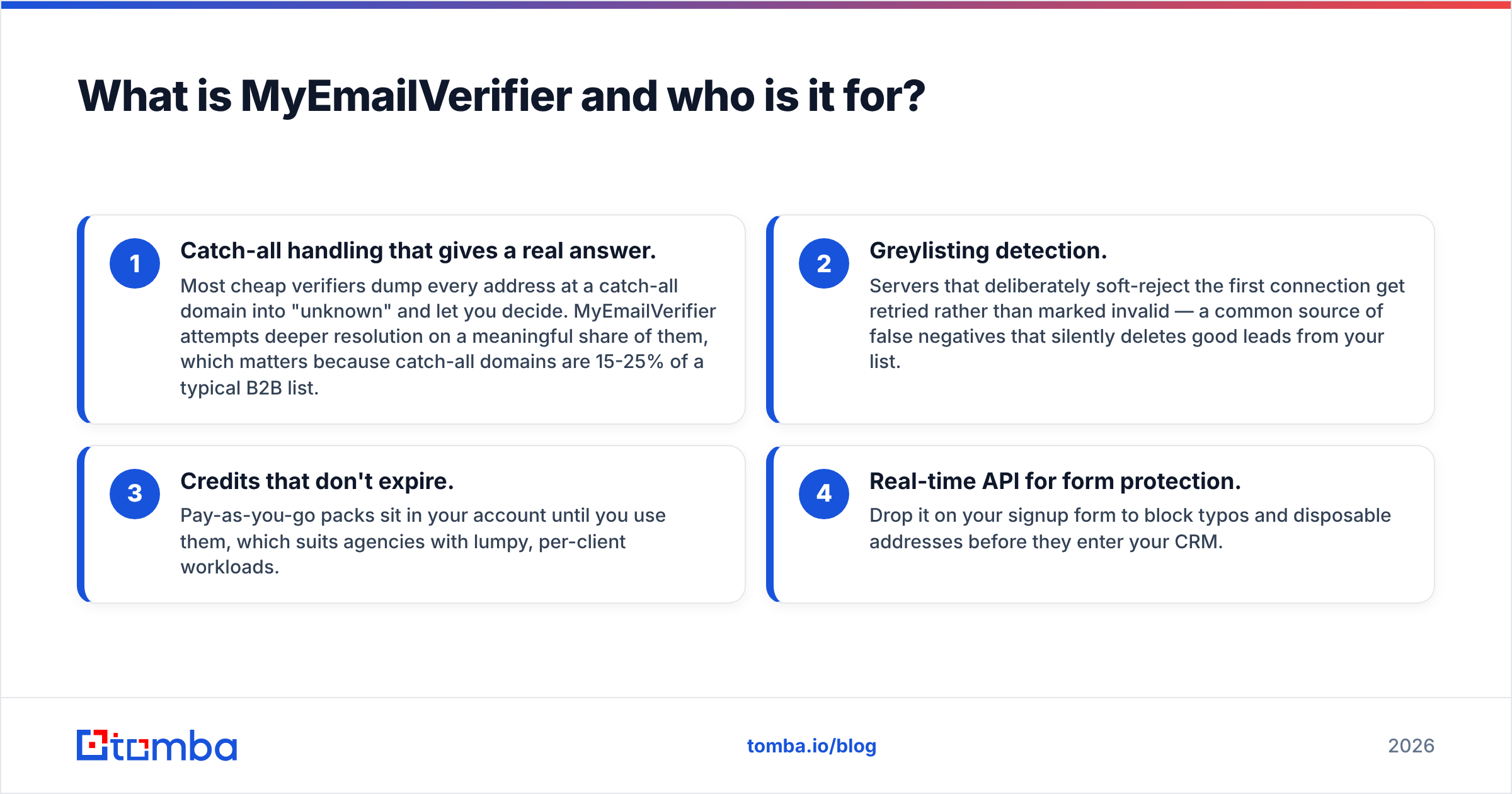
- Catch-all handling that gives a real answer. Most cheap verifiers dump every address at a catch-all domain into "unknown" and let you decide. MyEmailVerifier attempts deeper resolution on a meaningful share of them, which matters because catch-all domains are 15-25% of a typical B2B list.
- Greylisting detection. Servers that deliberately soft-reject the first connection get retried rather than marked invalid — a common source of false negatives that silently deletes good leads from your list.
- Credits that don't expire. Pay-as-you-go packs sit in your account until you use them, which suits agencies with lumpy, per-client workloads.
- Real-time API for form protection. Drop it on your signup form to block typos and disposable addresses before they enter your CRM.
What it will never do is find you a contact. That's the whole comparison in one sentence.

FindThatLead vs MyEmailVerifier: how do they compare feature by feature?#
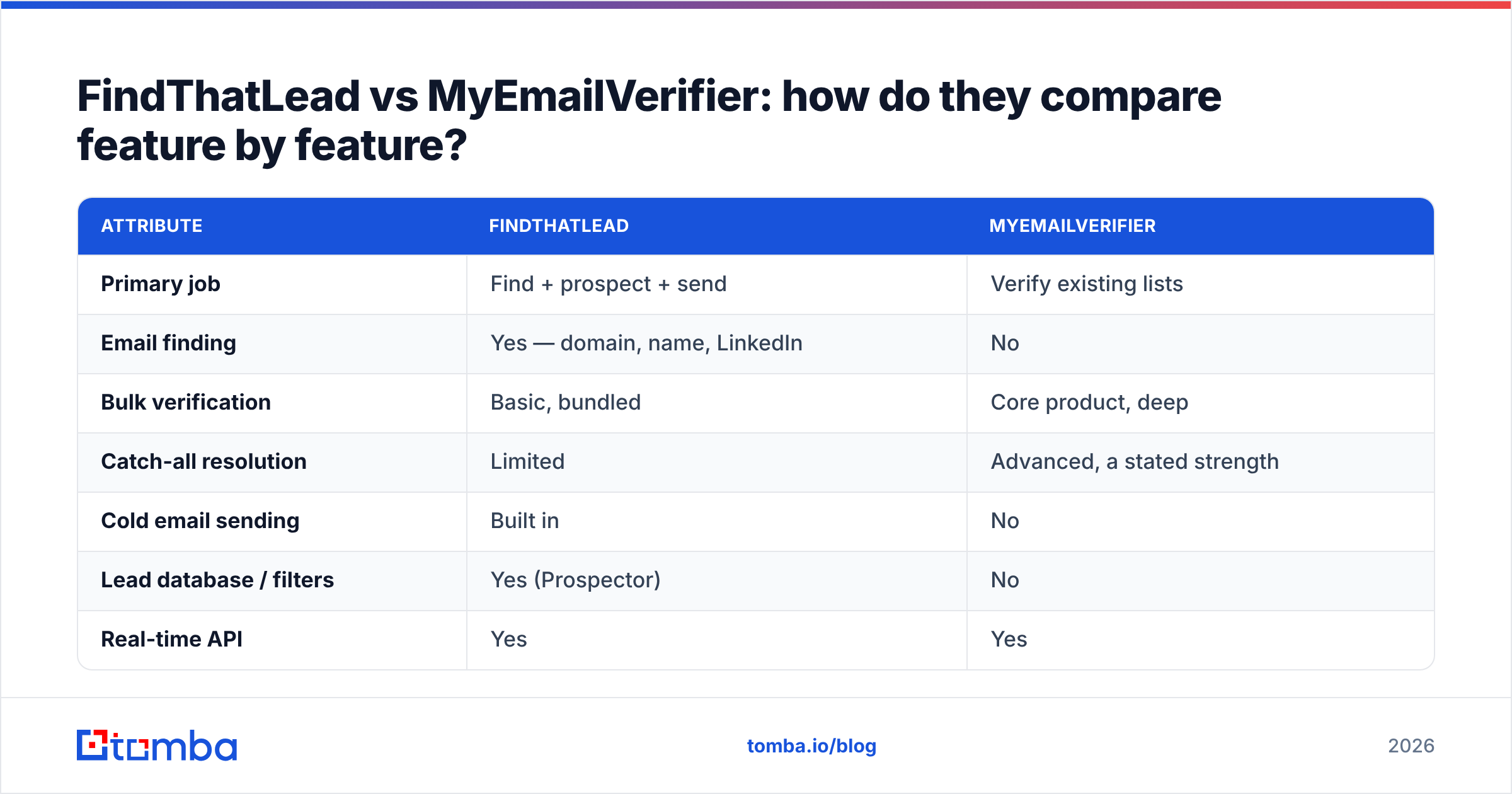
Here is the honest side-by-side. Note that pricing on both platforms shifts; treat these as directional and confirm on the vendors' own pages before you buy.
| Attribute | FindThatLead | MyEmailVerifier |
|---|---|---|
| Primary job | Find + prospect + send | Verify existing lists |
| Email finding | Yes — domain, name, LinkedIn | No |
| Bulk verification | Basic, bundled | Core product, deep |
| Catch-all resolution | Limited | Advanced, a stated strength |
| Cold email sending | Built in | No |
| Lead database / filters | Yes (Prospector) | No |
| Real-time API | Yes | Yes |
| Free tier | Limited trial credits | ~100 free verification credits |
| Entry paid tier | Roughly $49/mo (credit-based) | Pay-as-you-go from ~$7 per 1,000 |
| Credit expiry | Monthly reset | PAYG credits do not expire |
| Best for | Founders wanting one tool end to end | Teams with lists that already bounce |
The pricing rows are where most buying decisions actually get made. FindThatLead is a subscription: you pay monthly whether or not you prospect that month. MyEmailVerifier's pay-as-you-go model means a quarterly list clean costs you $40 once, not $49 every month. If you clean lists four times a year, that's a $588 versus $160 difference on comparable volume.

Which one is more accurate?#
They're measuring different things, so the fair question is: which one loses you fewer good leads?
For finding, accuracy means hit rate (what percentage of searches return an address) and validity (what percentage of returned addresses actually deliver). FindThatLead's hit rate is respectable on European SMBs and weaker on US enterprise and on newer domains. Pattern-guessing without SMTP confirmation is the usual culprit: a tool infers first.last@domain.com from one known contact and ships it as "found" even when the company uses flast@. Always test a sample of 50 before trusting a list of 5,000.
For verifying, accuracy means the false-positive rate (addresses marked valid that bounce) and the false-negative rate (good addresses marked invalid). MyEmailVerifier performs well here, particularly on the false-negative side thanks to greylisting retries. The industry benchmark to beat is a sub-3% bounce rate on a cleaned list — anything above 5% puts your domain reputation at risk, and Google and Microsoft both tightened bulk-sender enforcement well before 2026.
One nuance most comparison posts skip: a verifier cannot rescue a bad finder. If your finder guesses patterns and your verifier marks catch-all domains as "unknown," you end up with a large gray bucket of addresses that are neither confirmed nor discarded. That gray bucket is where cold email campaigns quietly die. A dedicated catch-all verifier that returns a real verdict instead of a shrug is worth more than a second finder.
Do you actually need both tools?#
Probably not, and this is the part vendors don't volunteer.
Run through this quickly:
- You have zero contacts and need volume. You need a finder. A verifier is useless against an empty spreadsheet.
- You bought or inherited a list. You need a verifier first, and only a verifier. Clean before you send, always.
- You scrape LinkedIn or events weekly. You need both — but that's exactly the case where a single platform that does both wins on cost and friction.
- You send under 500 emails a month. A free tier plus a manual sample check will carry you. Don't buy anything yet.
- You send over 20,000 a month. You need API-level integration, not CSV uploads, and you should be evaluating on API reliability and per-credit cost, not UI polish.
The CSV shuffle deserves special mention. Running two tools means: export from finder → reformat columns → upload to verifier → wait → download → filter by status → re-import to sequencer. That's 20 minutes per cycle and at least two opportunities to send a campaign to the wrong file. Teams that do this weekly lose more hours to file handling than they'd spend on the price difference.
What are the alternatives that do both?#
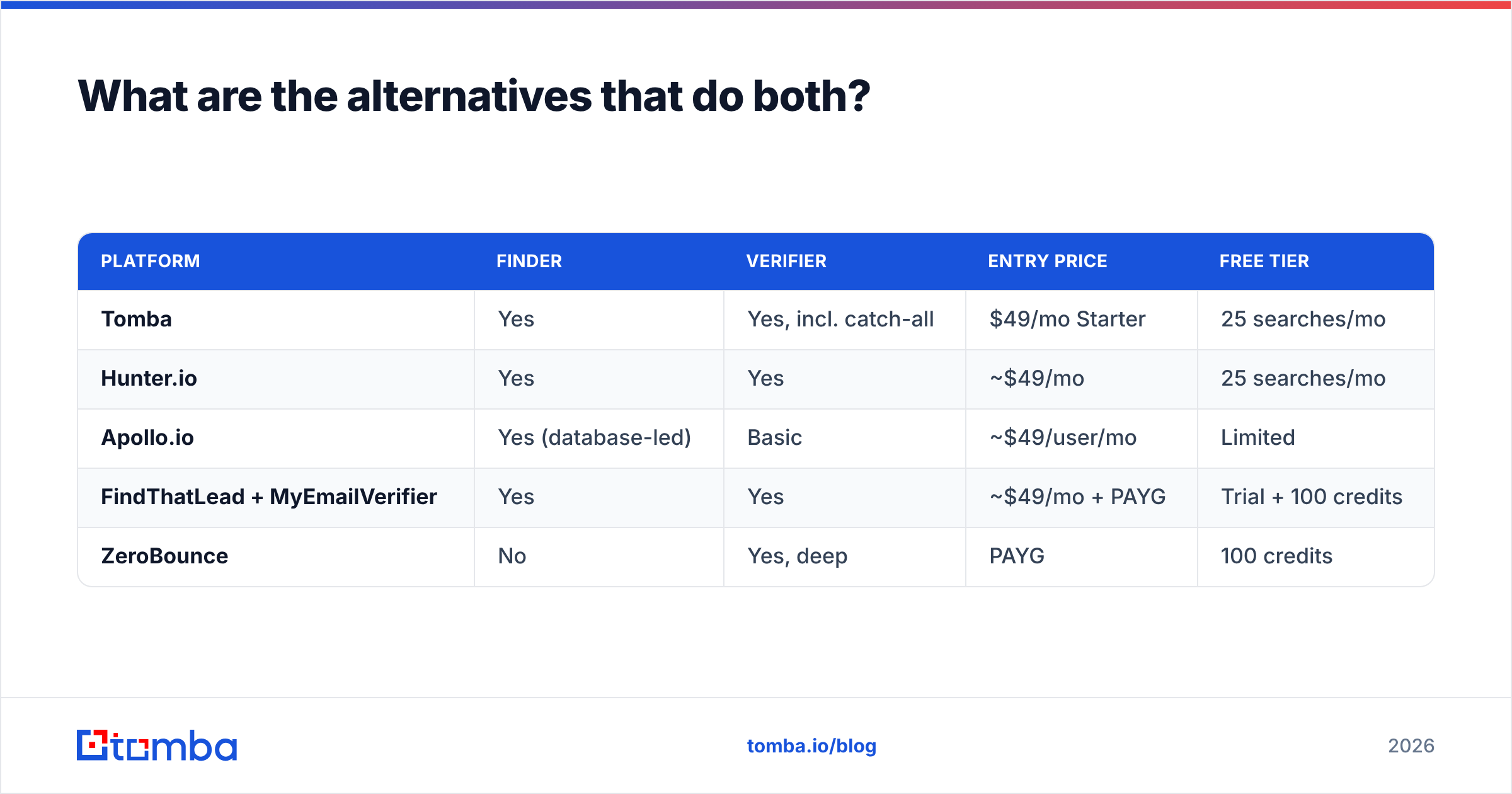
If the two-tool workflow above sounds tedious, the alternative is a platform where finding and verifying share the same credit pool and the same API call.
| Platform | Finder | Verifier | Entry price | Free tier |
|---|---|---|---|---|
| Tomba | Yes | Yes, incl. catch-all | $49/mo Starter | 25 searches/mo |
| Hunter.io | Yes | Yes | ~$49/mo | 25 searches/mo |
| Apollo.io | Yes (database-led) | Basic | ~$49/user/mo | Limited |
| FindThatLead + MyEmailVerifier | Yes | Yes | ~$49/mo + PAYG | Trial + 100 credits |
| ZeroBounce | No | Yes, deep | PAYG | 100 credits |
Tomba sits in the combined column deliberately: the email finder, email verifier, domain search, and enrichment run off one account and one API. Pricing runs Free (25 searches/month), Starter $49/mo, Growth $99/mo, Pro $249/mo, and Enterprise custom — see Tomba pricing for exact credit allocations. The practical benefit isn't the headline price, it's that a found address is verified in the same response, so there's no export step and no gray bucket.
Hunter is the closest like-for-like and a solid pick, particularly if you're already in its ecosystem. Apollo is a different animal — a database-first platform where email finding is a feature of a much larger sales-engagement product, and where per-seat pricing gets expensive fast for small teams.

How should you run a test before committing?#
Don't buy on a comparison table, including this one. Run a 30-minute bake-off:
- Build a 50-row control set. Pull contacts you can independently confirm — your own customers, people who've replied to you, LinkedIn connections whose email you already have. You need ground truth.
- Run the finders on the 50 names. Measure hit rate (how many returned anything) and precision (how many returned the correct address, not just a plausible one). Precision is the number that matters.
- Poison the verifier test deliberately. Take 100 known-good addresses, add 20 known-dead ones (former employees, defunct domains) and 20 catch-all addresses. A good verifier flags all 20 dead, keeps all 100 good, and gives you a real answer on most of the catch-alls.
- Time the workflow, not just the results. Count the clicks and file handoffs from "I have a company list" to "my sequencer is loaded." That number predicts whether you'll actually use the tool in month three.
- Check the API docs before you sign. Rate limits, response schema, and bulk endpoint behavior are easier to evaluate now than after you've built against them.
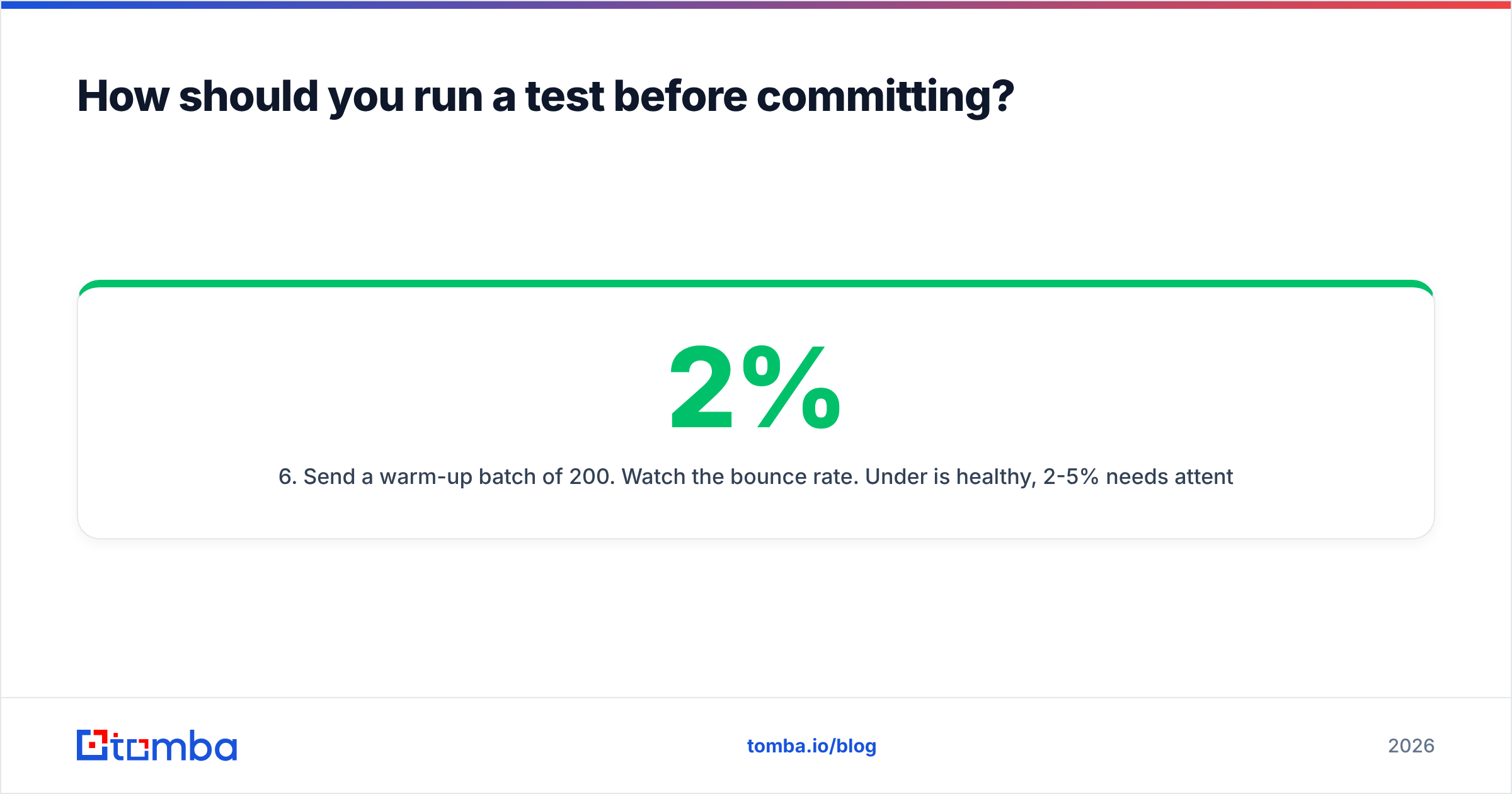
- Send a warm-up batch of 200. Watch the bounce rate. Under 2% is healthy, 2-5% needs attention, above 5% means the data source is wrong for your market.
If you're operating at any real volume, also run your cleaned list through a free email checker on a random sample as an independent second opinion. Verifiers disagree with each other more than you'd expect, and knowing the size of that disagreement tells you how much margin to leave.
What's the verdict?#
Choose MyEmailVerifier if list hygiene is your only problem. It's focused, the pay-as-you-go pricing is honest, and it handles catch-alls and greylisting better than most bundled verifiers. Don't pay for a prospecting suite you won't open.
Choose FindThatLead if you're a small team that wants find-and-send in one login, your market skews European, and you'd rather accept slightly softer data than manage a stack. The bundled sender is a real cost saving against a separate sequencer.
Choose neither, and go combined, if you're doing this weekly, you care about catch-all domains, or you want the whole thing behind an API instead of a browser tab. Two subscriptions plus a CSV workflow is the most expensive way to solve a problem that one platform handles in a single call.
The failure mode to avoid is buying a finder, skipping verification because "it says it verifies," and burning your sending domain in week two. Whatever you pick, verify before you send. Every time.
Ready to collapse the two-tool workflow into one? Start with the Tomba Email Finder — search by domain, name, or company, get a verification status returned with every result, and test it on 25 free searches a month before you spend anything. If it holds up on your control set, the Starter plan at $49/mo replaces both sides of this comparison.
Related guides#
Ready to find emails that actually work?
Join 150,000+ professionals who stopped guessing and started sending. Free credits on signup — no credit card required.
Get the Tomba newsletter
Practical outbound tactics and product updates — once every two weeks.
About the author