FindThatLead vs No2Bounce (2026): Which Tool Do You Need?
FindThatLead finds and emails leads. No2Bounce cleans lists so they don't bounce. They are not really rivals — here's the pricing, accuracy and workflow breakdown that shows which one your outbound actually needs in 2026.
TL;DR
- They solve different problems. FindThatLead builds and emails lead lists (finder, domain search, Chrome extension, cold email sender). No2Bounce is a dedicated bulk email verifier that tells you whether an address will bounce.
- Pricing models are opposites. FindThatLead sells monthly subscriptions with credits that reset (Growth listed at $49/mo for ~5,000 credits). No2Bounce sells pay-as-you-go credits — around $30 for 25,000 verifications — that don't expire.
- Accuracy is measured differently. A finder is judged on hit rate plus bounce rate on the addresses it returns. A verifier is judged on how few false "valid" results it lets through, especially on catch-all domains.
- Running both means two logins, two credit pools, and a CSV shuttle between them. That's fine at low volume and annoying at scale.
- If you want one system, a platform that finds, verifies, and enriches in the same API — like Tomba — removes the export/import step entirely.
What are FindThatLead and No2Bounce, actually?#
Short answer: FindThatLead is a prospecting suite; No2Bounce is a list-hygiene utility. Comparing them head-to-head is a bit like comparing a fishing rod to a fish scaler — you probably need both functions, but only one of them catches anything.
FindThatLead launched out of Barcelona and has been in the email-finding market since 2015. It bundles four things: a search engine for finding professional emails by domain or by name, a Chrome extension for pulling contacts off LinkedIn and company sites, a "Prospector" that builds lists by role and location, and a built-in cold email sender with campaign scheduling. The pitch is one login from "I need leads in fintech in Madrid" to "the sequence is sending."
No2Bounce is narrower and makes no apology for it. You upload a list — CSV, integration, or API — and it runs syntax checks, MX and DNS lookups, SMTP handshakes, disposable-domain detection, role-account flagging, and catch-all handling. It returns a verdict per address: valid, invalid, catch-all/accept-all, or unknown. The company markets 99%+ accuracy on its bulk verifier and gives 100 free credits to test the claim before you pay anything.
So the honest framing of "FindThatLead vs No2Bounce" is: do you have a sourcing problem or a bounce problem? If your CRM has 40,000 stale contacts and your bounce rate crossed 4%, No2Bounce is the relevant purchase. If your rep opens Monday with an empty list, FindThatLead is.

How does the pricing compare?#
This is where the two tools diverge most sharply, and it matters more than the feature checklists.
FindThatLead uses classic SaaS subscriptions. Public plans have sat around Growth at $49/mo (1 user, roughly 5,000 credits, campaign sending capped in the low hundreds of emails per day), Startup at $150/mo (more seats, ~18,000 credits), and Suite at $399/mo for larger teams. The catch that shows up in reviews on Capterra and G2 is credit expiry: unused monthly credits don't roll over. If your outbound is seasonal or campaign-driven, you pay for capacity you never touch.
No2Bounce runs the opposite model: buy credits, keep them until you use them. Roughly $30 for 25,000 verifications works out near $0.0012 per email, with no monthly minimum and no expiry date. For a team that cleans a big list twice a year, that structure is dramatically cheaper than a subscription.
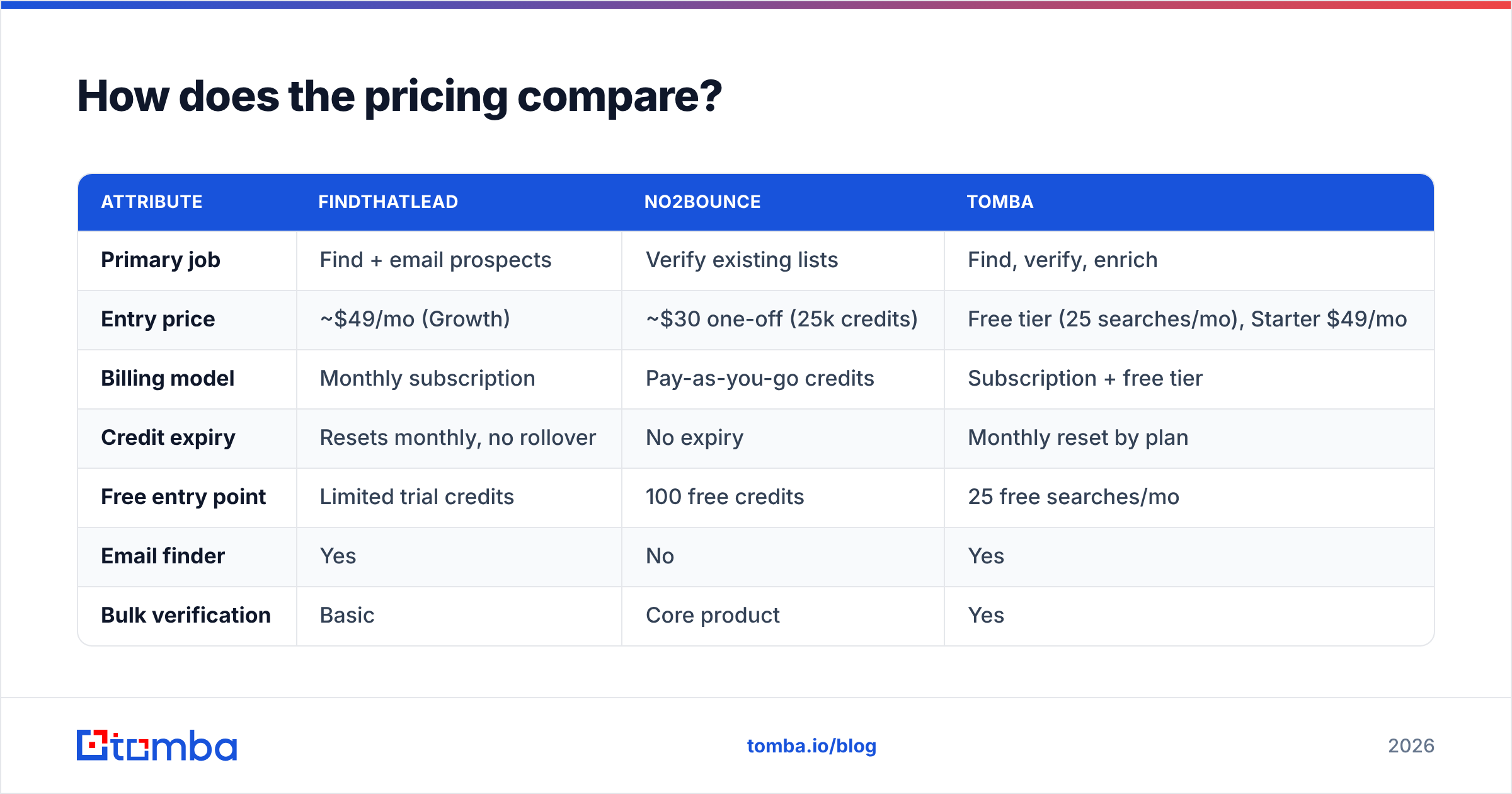
| Attribute | FindThatLead | No2Bounce | Tomba |
|---|---|---|---|
| Primary job | Find + email prospects | Verify existing lists | Find, verify, enrich |
| Entry price | ~$49/mo (Growth) | ~$30 one-off (25k credits) | Free tier (25 searches/mo), Starter $49/mo |
| Billing model | Monthly subscription | Pay-as-you-go credits | Subscription + free tier |
| Credit expiry | Resets monthly, no rollover | No expiry | Monthly reset by plan |
| Free entry point | Limited trial credits | 100 free credits | 25 free searches/mo |
| Email finder | Yes | No | Yes |
| Bulk verification | Basic | Core product | Yes |
| Catch-all handling | Limited | Dedicated logic | Dedicated catch-all verifier |
| Cold email sending | Built in | No | No (integrations instead) |
| Phone / mobile data | Limited credits | No | Yes (phone finder) |
| API access | Yes | Yes | Yes, full REST API |
Two numbers worth internalizing before you pick: a verification credit is roughly a tenth of a cent, while a find credit — from any vendor — costs meaningfully more because discovering an address is harder than testing one. Any workflow that burns finder credits on contacts you'll later delete is wasting the expensive resource to feed the cheap one. Check Tomba pricing against both if you want a single credit pool covering discovery and validation.
Which one is more accurate — and accurate at what?#
Accuracy means two unrelated things here, and vendors exploit the ambiguity.
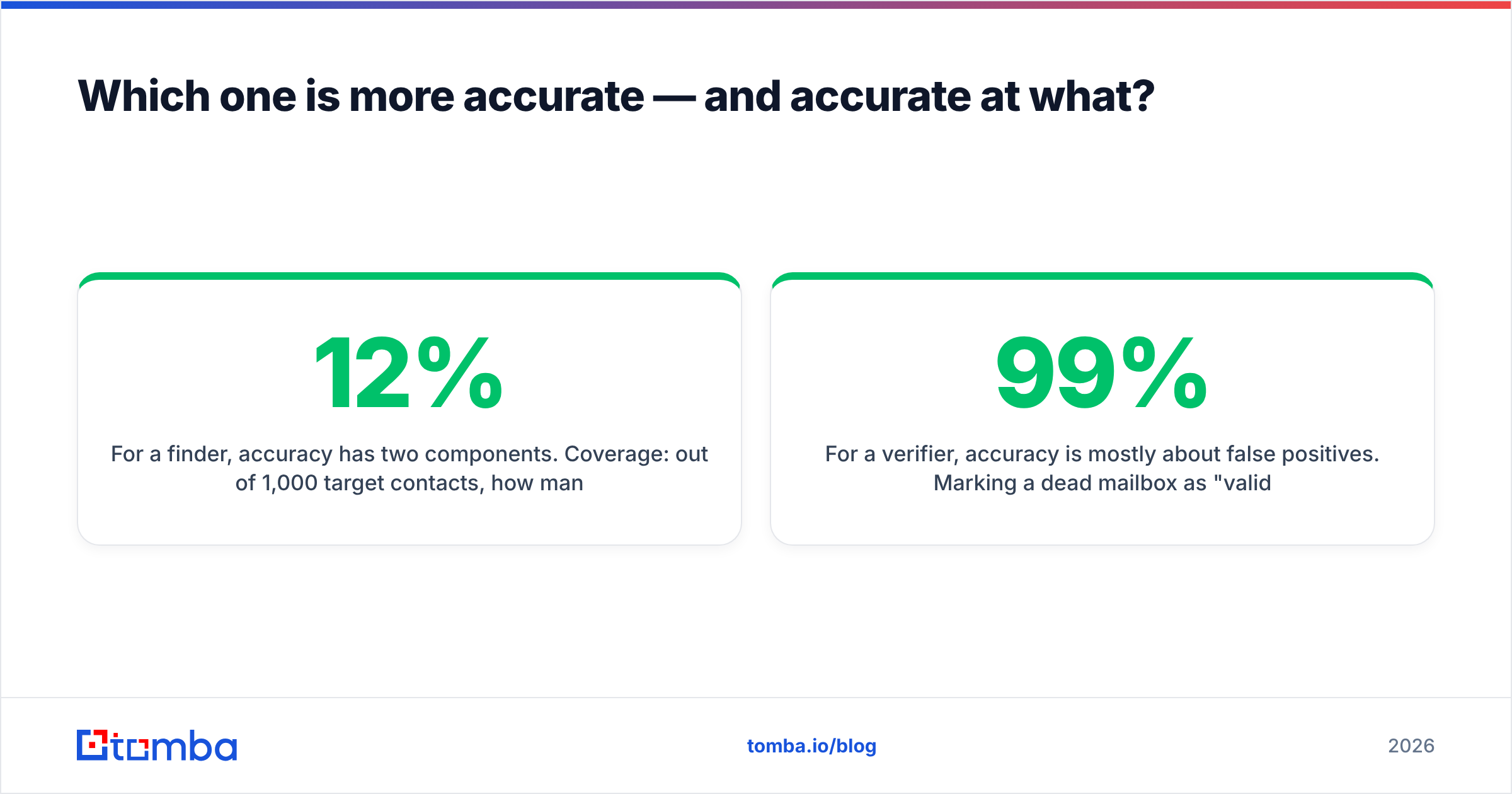
For a finder, accuracy has two components. Coverage: out of 1,000 target contacts, how many addresses does it return at all? And precision: of the addresses returned, how many actually deliver? A tool that returns 900 addresses with a 12% bounce rate is worse than one returning 700 with a 2% bounce rate, because bounces damage your domain reputation and cost more than a blank cell does.
For a verifier, accuracy is mostly about false positives. Marking a dead mailbox as "valid" is the expensive error — it puts a bounce in your send. Marking a good mailbox "invalid" is cheaper but silently shrinks your addressable market. No2Bounce's published 99%+ figure refers to this: verdicts that hold up against real sends.

The stress test for both categories is the catch-all domain. Roughly a fifth of business domains accept every address at the SMTP layer, so the handshake tells you nothing. Weak tools return "valid" on all of them and you find out the truth from your bounce report. Better tools mark them "accept-all" and apply pattern confidence, historical send data, and secondary signals. FindThatLead's verification is serviceable for the addresses it just found but isn't designed as a standalone hygiene engine. No2Bounce treats catch-alls as a named problem. If a big share of your ICP sits on Microsoft 365 tenants with catch-all enabled, test both against a known-good sample — or look at a purpose-built catch-all verifier that scores those domains rather than shrugging at them.
One honest caveat about every accuracy claim in this category, including Tomba's: vendors benchmark on their own sample sets. The only number that matters is the bounce rate on your list, against your ICP. Run 500 contacts through each and compare, ideally on the free tiers before you spend anything.
What does the full head-to-head look like?#
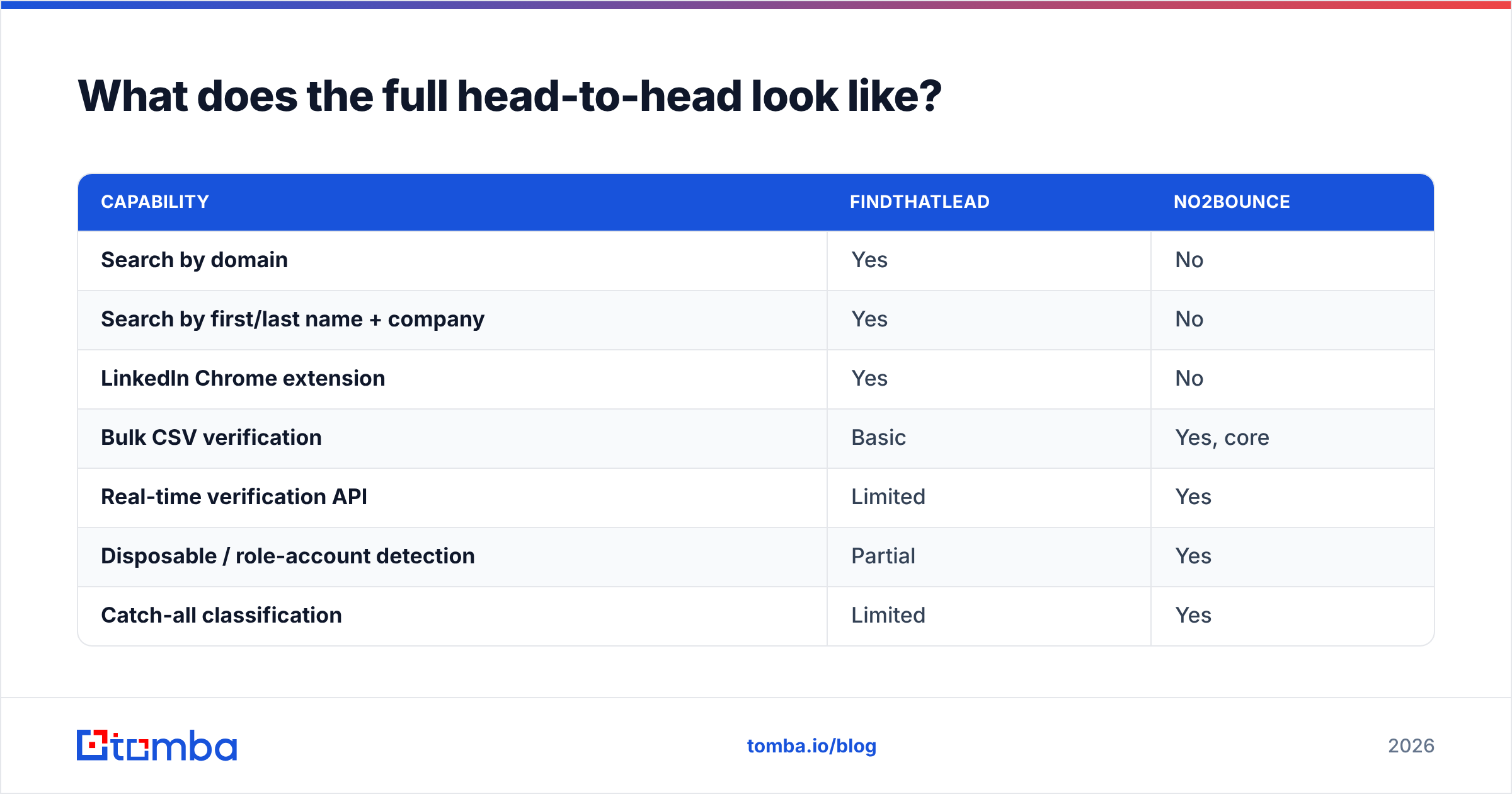
Feature-by-feature, the two tools barely overlap:
| Capability | FindThatLead | No2Bounce |
|---|---|---|
| Search by domain | Yes | No |
| Search by first/last name + company | Yes | No |
| LinkedIn Chrome extension | Yes | No |
| Bulk CSV verification | Basic | Yes, core |
| Real-time verification API | Limited | Yes |
| Disposable / role-account detection | Partial | Yes |
| Catch-all classification | Limited | Yes |
| Cold email campaigns | Yes | No |
| Deliverability reporting | Campaign-level | List-level |
| Best for | Building lists from scratch | Cleaning lists you already have |

Read that table as a job description, not a scoreboard. If your question is "who wins," the answer depends entirely on the gap in your stack. Neither tool is trying to be the other.
Who should choose FindThatLead?#
Pick FindThatLead when all of these are true:
- You need list building and sending in one place. A two-person startup that doesn't want a separate sequencer gets real value from the bundled campaign tool.
- Your volume is steady month to month. Non-rolling credits are only wasteful if your usage is lumpy. If you burn 5,000 credits every month, the subscription is fine.
- You prospect from LinkedIn. The Chrome extension is a daily-driver workflow for SDRs living in Sales Navigator.
- You want Spanish- and European-market coverage. FindThatLead's roots show in its data density across Spain, LATAM, and southern Europe compared to some US-centric competitors.
- You don't already own a sending tool. If you're paying for Instantly, Smartlead, or Lemlist, you're buying the sender twice.
Who should choose No2Bounce?#
Pick No2Bounce when the problem is downstream:
- Your bounce rate is over 3%. That's the threshold where mailbox providers start throttling; Google and Microsoft both treat sustained hard bounces as a spam signal against your domain.
- You have a big dormant database. B2B email data decays roughly 22–30% a year as people change jobs. A CRM untouched for 18 months is half rot.
- You buy lists or scrape. Any externally sourced list needs verification before it touches your sending domain — no exceptions.
- Your spending is bursty. Non-expiring credits mean an annual cleanup costs you $30-ish rather than twelve months of subscription.
- You need an API for signup forms. Real-time verification at the point of capture stops junk entering the database in the first place, which is cheaper than cleaning it later.

Do you actually need both — or one platform?#
Running FindThatLead plus No2Bounce is a legitimate stack. It's also two subscriptions, two credit balances, two support queues, and a CSV export-import step between them every time you build a list. At 500 leads a month, that's a minor chore. At 20,000, it's a person's job.
The consolidation argument is straightforward:
- One credit pool. No stranded balance in the tool you used less this quarter.
- Verification happens before the credit is spent. When find and verify share a pipeline, invalid addresses get filtered at discovery instead of being paid for twice.
- One API contract. Your RevOps engineer writes one integration, not two plus glue code. See the Tomba API for what a combined find-verify-enrich endpoint looks like.
- Consistent confidence scoring. When the finder and the verifier are the same system, the score means something end to end rather than being two vendors' opinions stapled together.
- Fewer places for data to go stale. Enrichment, phone lookup, and re-verification run on the same record instead of on three copies of it.
This is where a broader platform fits: Tomba's email finder covers the sourcing job FindThatLead does, while the email verifier and catch-all logic cover No2Bounce's, plus data enrichment and phone lookup that neither tool offers. Pricing starts free with 25 searches a month, then $49/mo Starter, $99/mo Growth, and $249/mo Pro. Tomba doesn't send campaigns — that's a deliberate choice, and it means you keep whichever sequencer you already like.
What does a clean 2026 workflow look like?#
Regardless of vendor, the sequence that keeps bounce rates under 2% is the same:
- Define the ICP before touching a tool. Role, company size, region, tech stack. Vague targeting wastes finder credits faster than any pricing decision.
- Find addresses in bulk, not one at a time. Domain search on target accounts is cheaper per contact than name-by-name lookups.
- Verify everything, including addresses a finder just returned. Different vendors, different source dates. Trust nothing unverified.
- Segment catch-alls into their own bucket. Send to them separately with a warmed secondary domain so a spike in soft failures doesn't contaminate your main sending reputation.
- Re-verify every 90 days. Job changes are the single biggest source of decay in B2B data.
- Watch bounce rate per campaign, not per quarter. A single bad list can undo six weeks of careful email deliverability work.
Skip step 3 and the best finder in the market won't save your domain. Skip step 1 and the cheapest verification credits in the market are still money burned on the wrong people.
The verdict#
FindThatLead wins if you need to create pipeline and want sending bundled in. No2Bounce wins if you need to protect a domain from a list you already have, and its pay-as-you-go credits are genuinely hard to beat for occasional cleanups. Neither replaces the other, and any review that declares a single winner is comparing tools that don't compete.
If your real conclusion is "I need both jobs done without babysitting two tools," start with the Tomba Email Finder. Find addresses by domain, name, or company, get verification built into the same result, and keep your sequencer of choice. The free tier gives you 25 searches a month — enough to benchmark hit rate and bounce rate against whatever you're running today before you move a single dollar of budget.
Related guides#
Ready to find emails that actually work?
Join 150,000+ professionals who stopped guessing and started sending. Free credits on signup — no credit card required.
Get the Tomba newsletter
Practical outbound tactics and product updates — once every two weeks.
About the author