FindThatLead vs OutreachBin (2026): Which Tool Should You Pick?
FindThatLead finds the leads. OutreachBin sends to them. We break down pricing, data quality, deliverability features and the stack that actually books meetings in 2026.
TL;DR
- These two tools are not really competitors. FindThatLead is a prospecting and lead-sourcing platform; OutreachBin is a cold email sending, warmup and inbox-rotation platform. Comparing them head-to-head is comparing a drill to a hammer.
- If your bottleneck is "I don't have enough good contacts," FindThatLead is the closer fit. If your bottleneck is "my emails land in spam or I can't sequence at volume," OutreachBin is the closer fit.
- FindThatLead bundles a light sender (Scrab.in / campaign features) and OutreachBin bundles light list handling — both bundles are thinner than the specialist versions.
- Data quality is where most FindThatLead-style tools lose money for you. Verify before you send, whichever platform you pick.
- The stack most teams end up with in 2026: a dedicated finder + verifier for data, a dedicated sender for volume. That's the recommendation at the end of this post.
What are FindThatLead and OutreachBin, exactly?#
FindThatLead is a Spanish lead-generation suite built around email discovery. You give it a domain, a name, or a LinkedIn profile and it returns a business email address. Around that core it stacks a prospector (search by role, location, industry), a bulk CSV enrichment mode, a Chrome extension, a LinkedIn automation companion (Scrab.in), and a basic email sender so you can act on the list without exporting it.
OutreachBin sits at the other end of the same funnel. It's a cold email execution platform: connect your mailboxes, warm them up with automated inbox rotation and reply simulation, build multi-step sequences with conditional follow-ups, and track opens, clicks and replies. Its headline feature has always been deliverability — the warmup engine and "un-spam" mechanics — rather than data.
So the honest framing of FindThatLead vs OutreachBin is not "which is better." It's "which half of the outbound problem are you solving this quarter?"
Here's the split in plain terms:
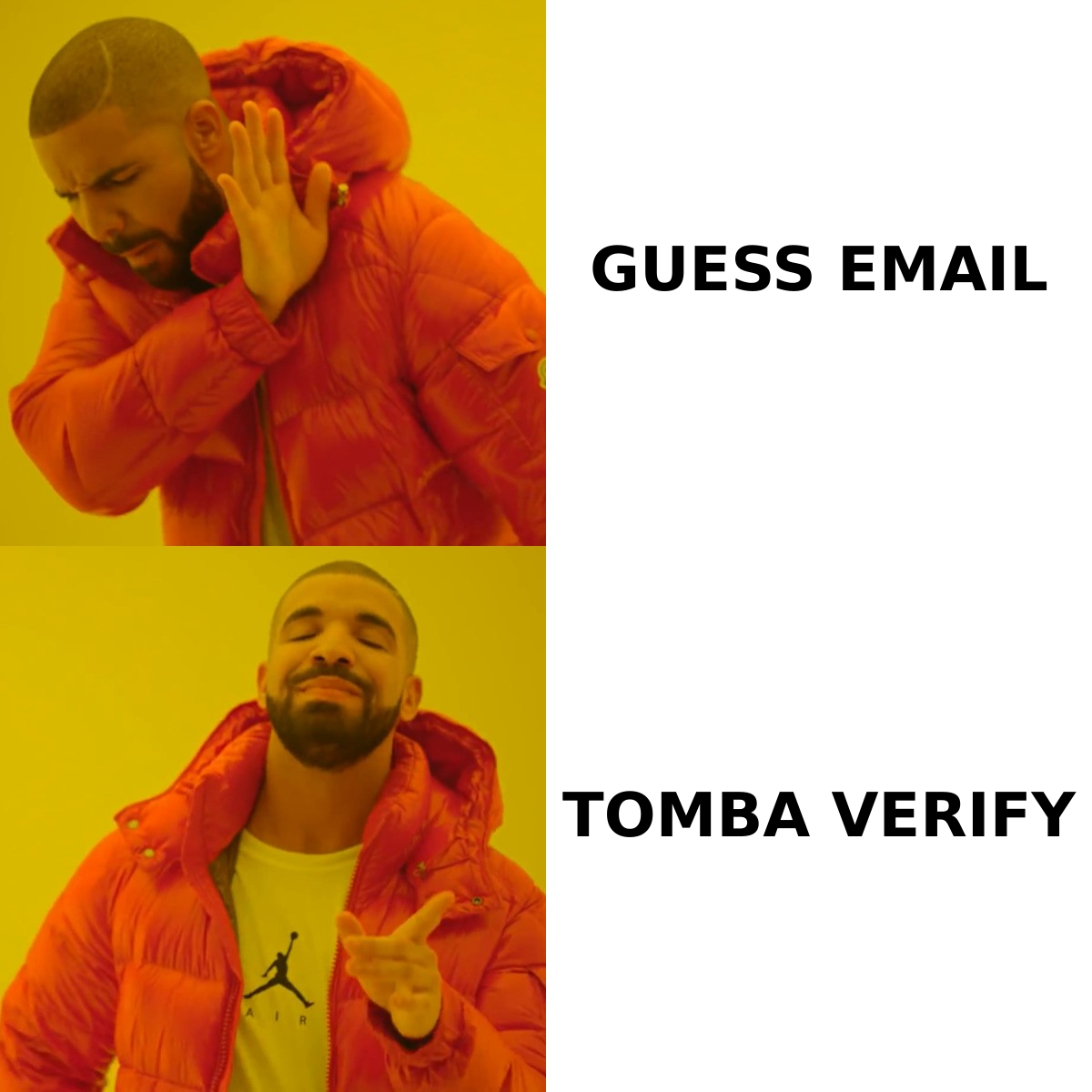
- Sourcing — deciding who to contact and getting a valid address for them. FindThatLead's home turf.
- Verification — proving the address exists before you burn domain reputation on it. Neither tool's strongest area.
- Sending infrastructure — mailboxes, SPF/DKIM/DMARC, warmup, rotation, throttling. OutreachBin's home turf.
- Sequencing — the multi-touch cadence, conditional branches, reply detection. OutreachBin wins clearly.
- Reporting and iteration — which segment replied, which subject line died. Both do a serviceable job; neither is a revenue-attribution product.
How do FindThatLead and OutreachBin compare feature by feature?#
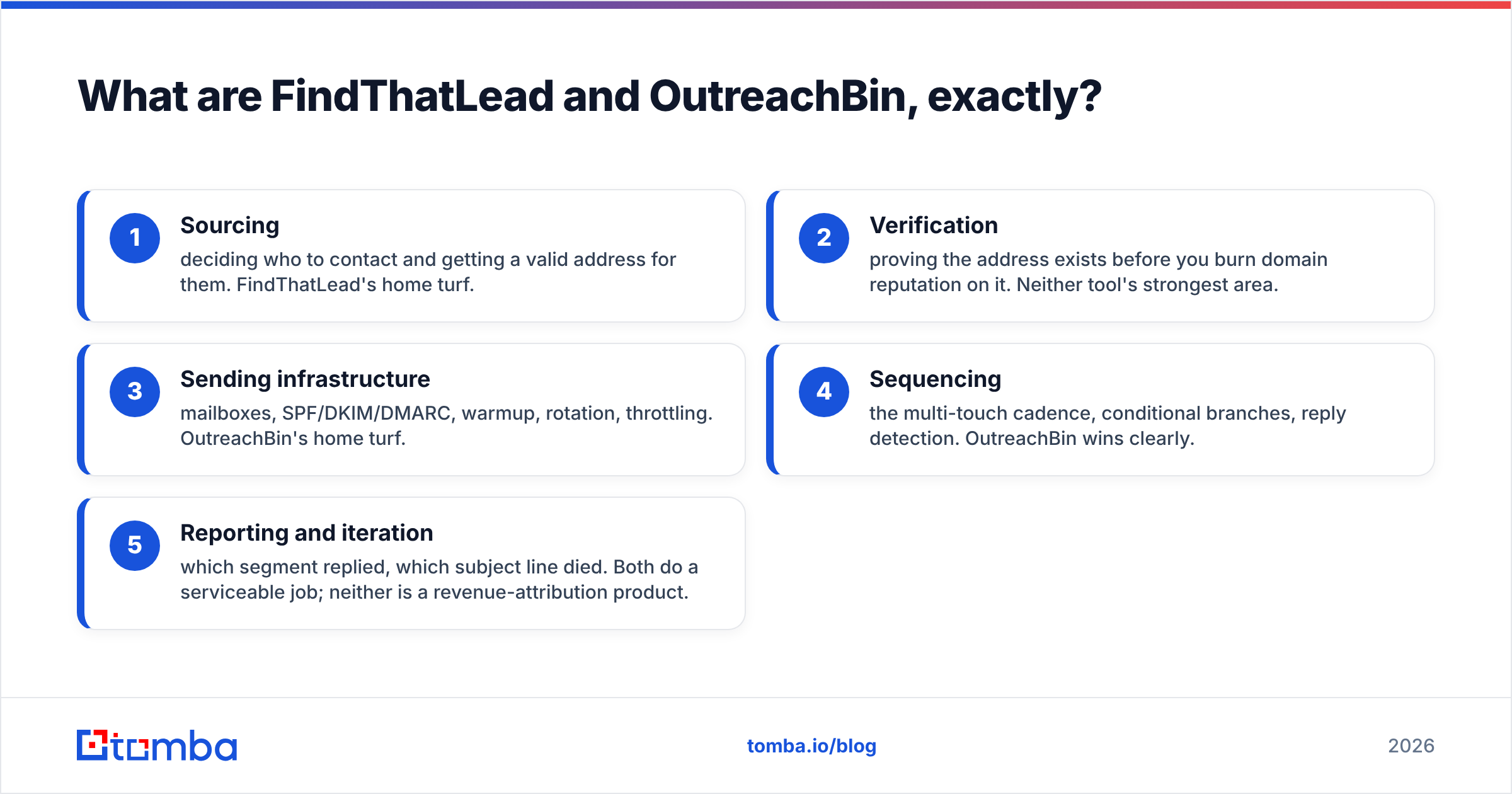
| Capability | FindThatLead | OutreachBin | What it means for you |
|---|---|---|---|
| Primary job | Find and enrich B2B contacts | Send and warm cold email | Pick by bottleneck, not by brand |
| Email finding by domain/name | Core feature | Not offered | FindThatLead only |
| Bulk CSV enrichment | Yes, credit-based | No | FindThatLead only |
| LinkedIn prospecting | Yes, via Scrab.in companion | No | FindThatLead only |
| Email verification | Basic, bundled | Basic list cleaning | Neither replaces a dedicated verifier |
| Mailbox warmup | No | Core feature | OutreachBin only |
| Inbox rotation / multi-mailbox | No | Yes | OutreachBin only |
| Multi-step sequences | Light campaign sender | Full conditional sequences | OutreachBin for real cadences |
| Reply detection & auto-pause | Limited | Yes | OutreachBin only |
| API access | Yes | Limited | FindThatLead for automation |
| Free entry point | Limited free credits | Trial | Test both before paying |
| Best for | SDRs building lists | SDRs running volume | Most teams need both jobs done |
The table makes the pattern obvious: there are only two rows where both columns are meaningfully filled in — verification and reporting — and those are exactly the rows where both products are "good enough, not great."
Which one has better data quality?#
FindThatLead, by default, because OutreachBin isn't in the data business. But "better than a tool that doesn't do it" is a low bar, so the real question is whether FindThatLead's data is good enough to send on unedited.
Pattern-based email finders — and most of the category works this way — infer an address from a company's known format (first.last@, f.last@, first@) and then check whether the mailbox accepts mail. Two failure modes follow:
- Pattern drift. A company migrates from
first.last@tofirstinitiallast@after an acquisition and the cached pattern is stale for months. You get a syntactically perfect address that bounces. - Catch-all domains. The server accepts everything, so verification returns "valid" for an address that goes nowhere. On some enterprise domains this is the majority of results, and it quietly inflates the accuracy number in every vendor's marketing.
Independent user reviews on G2 for tools in this category consistently flag the same thing: strong coverage on SMB and startup domains, thinner and more error-prone results on large enterprises and non-English-speaking markets. Treat any vendor's headline accuracy claim as a ceiling measured on their easiest sample, not a floor you'll hit on your ICP.
Practical rule: whatever finder you use, run the export through a second, independent email verifier before it touches a sending tool. A 4% bounce rate is survivable. A 9% bounce rate on a fresh domain is how you get filtered into spam for a quarter, and no warmup engine — OutreachBin's included — fully undoes that.
If catch-all domains are a big share of your list, handle them explicitly rather than deleting them. A catch-all verifier will separate "probably real, send with care" from "unknowable, park it," which is far more useful than a binary valid/invalid flag.
How does pricing compare in 2026?#
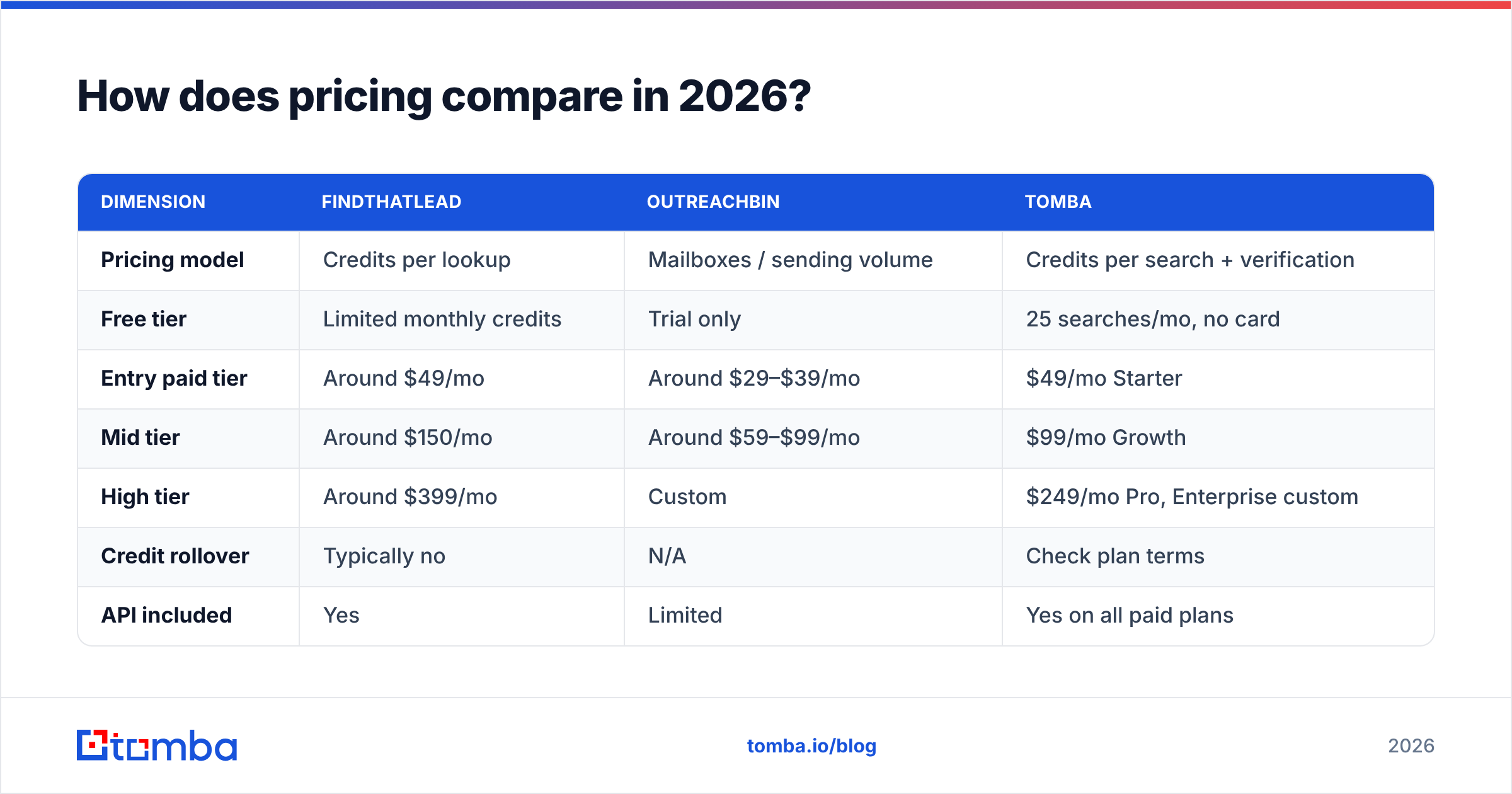
Both vendors change pricing regularly, so treat these as directional and confirm on the live pricing pages before you buy. The structural difference matters more than the exact numbers: FindThatLead charges for credits (each lookup or enrichment consumes one), while OutreachBin charges for sending capacity (mailboxes, contacts, emails per month).
| Dimension | FindThatLead | OutreachBin | Tomba |
|---|---|---|---|
| Pricing model | Credits per lookup | Mailboxes / sending volume | Credits per search + verification |
| Free tier | Limited monthly credits | Trial only | 25 searches/mo, no card |
| Entry paid tier | Around $49/mo | Around $29–$39/mo | $49/mo Starter |
| Mid tier | Around $150/mo | Around $59–$99/mo | $99/mo Growth |
| High tier | Around $399/mo | Custom | $249/mo Pro, Enterprise custom |
| Credit rollover | Typically no | N/A | Check plan terms |
| API included | Yes | Limited | Yes on all paid plans |
| Bulk processing | Yes | Import only | Yes |
Two budgeting traps show up repeatedly:
- Credit burn on failed lookups. Ask any finder vendor, in writing, whether a search that returns nothing still costs a credit. The answer changes your effective cost per usable contact by 20–40%.
- Per-mailbox creep on senders. Sending platforms look cheap at one mailbox and expensive at fifteen. If your plan is domain rotation across ten inboxes, price that scenario, not the starting one.
For reference, Tomba pricing runs a free tier at 25 searches/mo, Starter at $49/mo, Growth at $99/mo and Pro at $249/mo, with the API available on every paid plan — which matters if you intend to enrich inside your own workflow rather than through someone's UI.
Who should choose FindThatLead?#
Pick FindThatLead if these describe you:
- You're list-starved, not send-starved. You already have a sequencer you like (Instantly, Smartlead, Lemlist, HubSpot) and you just need names and addresses flowing into it.
- LinkedIn is your primary sourcing surface. The Scrab.in companion is a genuine differentiator if your ICP research happens on LinkedIn rather than in a database UI.
- You run Spanish- or European-market outbound. Coverage in those regions has historically been a relative strength versus US-centric databases.
- You want one tool, not two, and you can accept a basic sender. The bundled campaign feature will handle a 500-contact, two-touch sequence. It will not handle ten rotating mailboxes at 3,000 sends a week.
Where it will frustrate you: bulk jobs on enterprise domains, catch-all handling, and credit economics on low-hit-rate segments.
Who should choose OutreachBin?#
Pick OutreachBin if these describe you:
- Your emails aren't landing. You have a list you trust and open rates fell off a cliff. Warmup, rotation and throttling are the actual fix, and that's the product.
- You need real sequence logic. Conditional branches, reply-triggered pauses, per-step timing — the light senders bundled into finder tools don't do this well.
- You're running multiple domains and mailboxes. Rotation is a first-class feature here, not an afterthought.
- You already buy data elsewhere. If your list comes from a database subscription, a scraper, or an events-and-referrals motion, you don't need FindThatLead's core feature at all.
Where it will frustrate you: it will not build your list. Import quality is entirely on you, and a sending platform's warmup engine cannot rescue a list that's 12% invalid.

Do you actually have to choose between them?#
No — and most teams that get outbound working don't. The pattern that holds up in 2026 is three specialist layers, not one bundle:
- A finder with an API. Something that turns a company domain and a person's name into a deliverable address at scale, and that you can call from a script, a CRM workflow, or a spreadsheet. Bundled finders inside sending tools are consistently the weakest link.
- An independent verifier. Run it after the finder, ideally from a different vendor so you're not grading your own homework. This is the single highest-ROI step in the chain and the one most teams skip.
- A dedicated sender with warmup. OutreachBin, or any of its peers. Its job is infrastructure: authentication, rotation, pacing, reply handling.
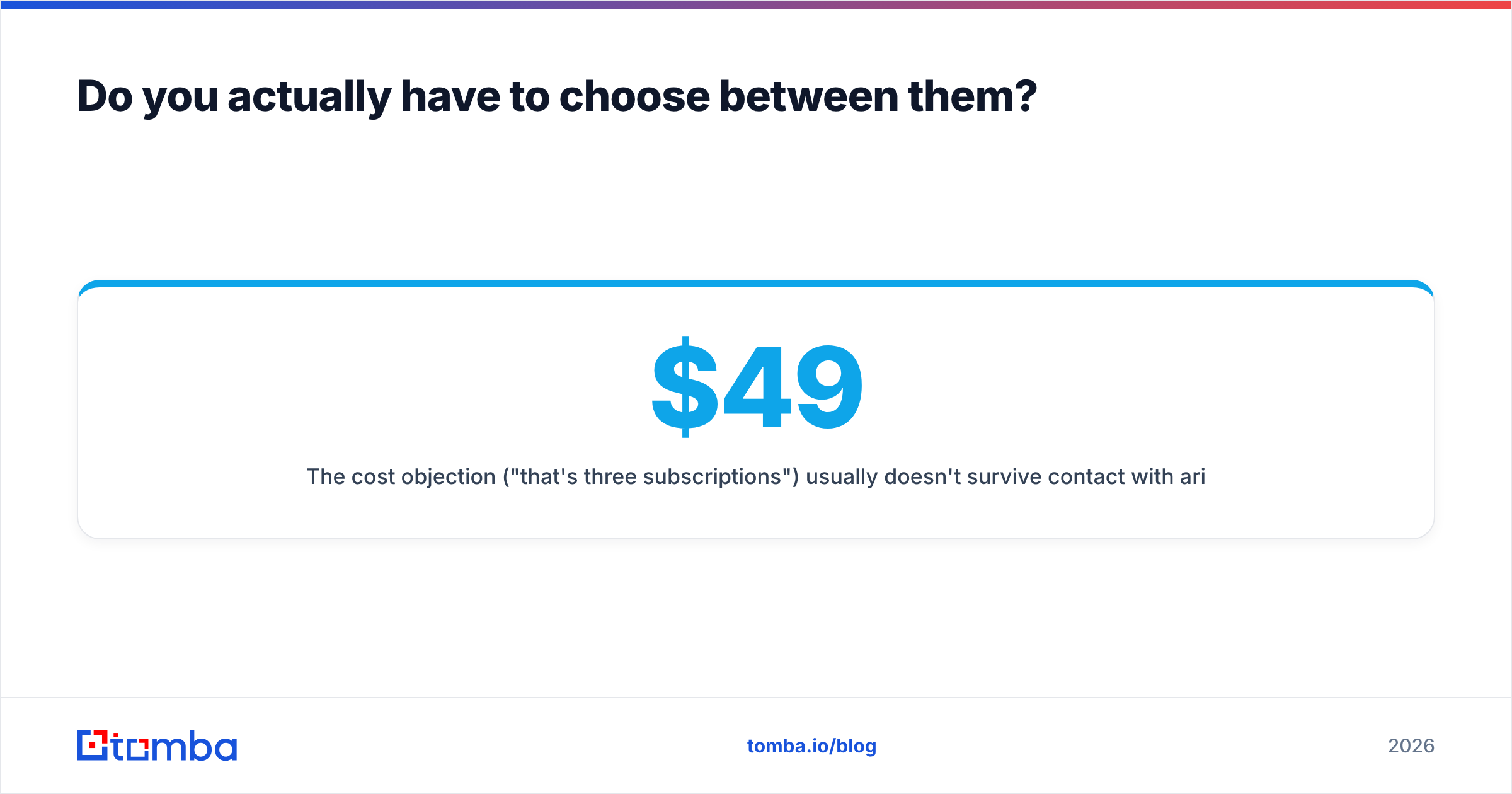
The cost objection ("that's three subscriptions") usually doesn't survive contact with arithmetic. A finder at $49/mo plus a sender at $39/mo is under $90/mo. A single blacklisted sending domain costs you a month of pipeline and a new domain warmup cycle. The insurance is cheaper than the incident.
If you want to compress steps 1 and 2, use a platform where finding and verification share the same pipeline — a bulk email finder that returns a confidence score alongside each address means you're not re-uploading CSVs between vendors, and it makes the "which rows do I actually send to" decision a filter rather than a judgment call.
How do you test both in one week without wasting credits?#
Run a controlled bake-off instead of trusting anyone's landing page — including this one.
- Day 1 — Build the control set. Take 100 contacts you already know are real: current customers, past deals, people who replied last quarter. This is your ground truth.
- Day 2 — Test the finder. Run those 100 names and domains through FindThatLead. Score hit rate (how many returned anything) and accuracy (how many matched the address you already had). Anything below 70% hit rate on your ICP is a problem, not a fluke.
- Day 3 — Test a second finder on the same 100. Same file, same day. This is the only way to know whether a mediocre result is the tool or your ICP.
- Day 4 — Verify both outputs independently. Note how many "valid" results from each finder fail an external check, and how many land in catch-all limbo.
- Day 5–7 — Test the sender. Load 200 verified contacts into OutreachBin on a warmed domain and measure inbox placement, not open rate. Seed a few of your own mailboxes across Gmail, Outlook and a Google Workspace domain to see where mail actually lands.
Document the numbers. In six months, when someone asks why the stack looks the way it does, that spreadsheet is the answer.
What's the verdict on FindThatLead vs OutreachBin?#
FindThatLead wins on data; OutreachBin wins on delivery; neither wins outright, because they're solving different problems. If someone forced a single pick, the tiebreaker is your funnel stage: pre-list, take the finder; post-list, take the sender.
The more useful conclusion is that the bundled halves are the weak halves. FindThatLead's sender is not a warmup platform. OutreachBin's list handling is not a data provider. Buying either as an all-in-one means accepting a materially worse version of one job.
And whichever you pick, the verification step in the middle is non-negotiable. Deliverability problems almost never start in the sending tool — they start three weeks earlier, in a CSV nobody checked.
If sourcing is your bottleneck, start with the Tomba Email Finder. You get 25 free searches a month with no card, verification built into the same pipeline instead of bolted on afterward, and an API on every paid plan so you can wire it into whatever sender you land on — OutreachBin included. Run it against your own 100-contact control set this week and compare the numbers to whatever you're paying for now.
Related guides#
Ready to find emails that actually work?
Join 150,000+ professionals who stopped guessing and started sending. Free credits on signup — no credit card required.
Get the Tomba newsletter
Practical outbound tactics and product updates — once every two weeks.
About the author