FindThatLead vs Pitchbox: Which Outreach Tool Wins in 2026?
FindThatLead finds contacts. Pitchbox runs outreach campaigns at scale. They are not the same product, and picking the wrong one wastes a year of budget. Here is the honest breakdown.
TL;DR
- FindThatLead is a prospecting and email-finding tool with a light sending layer bolted on. Pitchbox is a heavyweight outreach and relationship-management platform built for SEO link building and PR at agency scale.
- They overlap for maybe 20% of what you do. If you compare them purely on price you will draw the wrong conclusion, because they solve different halves of the same workflow.
- FindThatLead is cheaper and faster to start (roughly $49/mo entry). Pitchbox is quote-based and lands in the mid-hundreds to low-thousands per month once you add seats.
- Pick FindThatLead if your bottleneck is finding contacts. Pick Pitchbox if your bottleneck is managing hundreds of concurrent conversations across a team.
- The most cost-effective setup for many teams in 2026 is neither: a dedicated data source feeding a sending tool you already own.
What is FindThatLead, and who is it for?#
FindThatLead is a Spanish-built B2B prospecting suite. Its core job is turning a name plus a domain into a work email address, plus a handful of adjacent features: a Chrome extension, a domain-level search that returns every contact it knows at a company, a lead-search filter by role and location, and a basic cold-email sender called Scrab.in-adjacent "Email Sender."
The typical FindThatLead user is a founder, solo SDR, or two-person growth team. You have a target account list, you need contact details, and you do not want to sign a $12,000 annual contract to get them. You export a CSV, you clean it, and you push it into whatever sequencer you already use.
Where it gets thin: the sending layer is functional but not competitive with dedicated sequencers. There is no meaningful reply-classification, no shared team inbox worth the name, and reporting is shallow. FindThatLead knows this — it positions itself as a data tool first.
What is Pitchbox, and who is it for?#
Pitchbox is a different animal entirely. It was built for link building and digital PR, and it shows in every design decision. You start with a prospecting step that pulls candidate sites from search engines and SEO data providers (it integrates with Moz, Majestic, Ahrefs, and Semrush), then it scrapes contact details off those sites, then it runs multi-step personalized outreach with automated follow-ups, then it tracks the relationship long after the first campaign ends.
The typical Pitchbox user is an SEO agency running outreach for fifteen clients simultaneously, or an in-house content team that publishes forty pieces a quarter and needs every one of them promoted. Workflows, approval steps, per-client workspaces, and white-label reporting are the actual product.
Where it gets expensive: seats. Pitchbox prices per user with a quote-based model, and outreach teams have a lot of users. It is also over-engineered for straight B2B sales outreach — you are paying for domain-authority filtering and blogger CRM features that a SaaS SDR will never touch.
Wait — that renders wrong. Here it is properly:

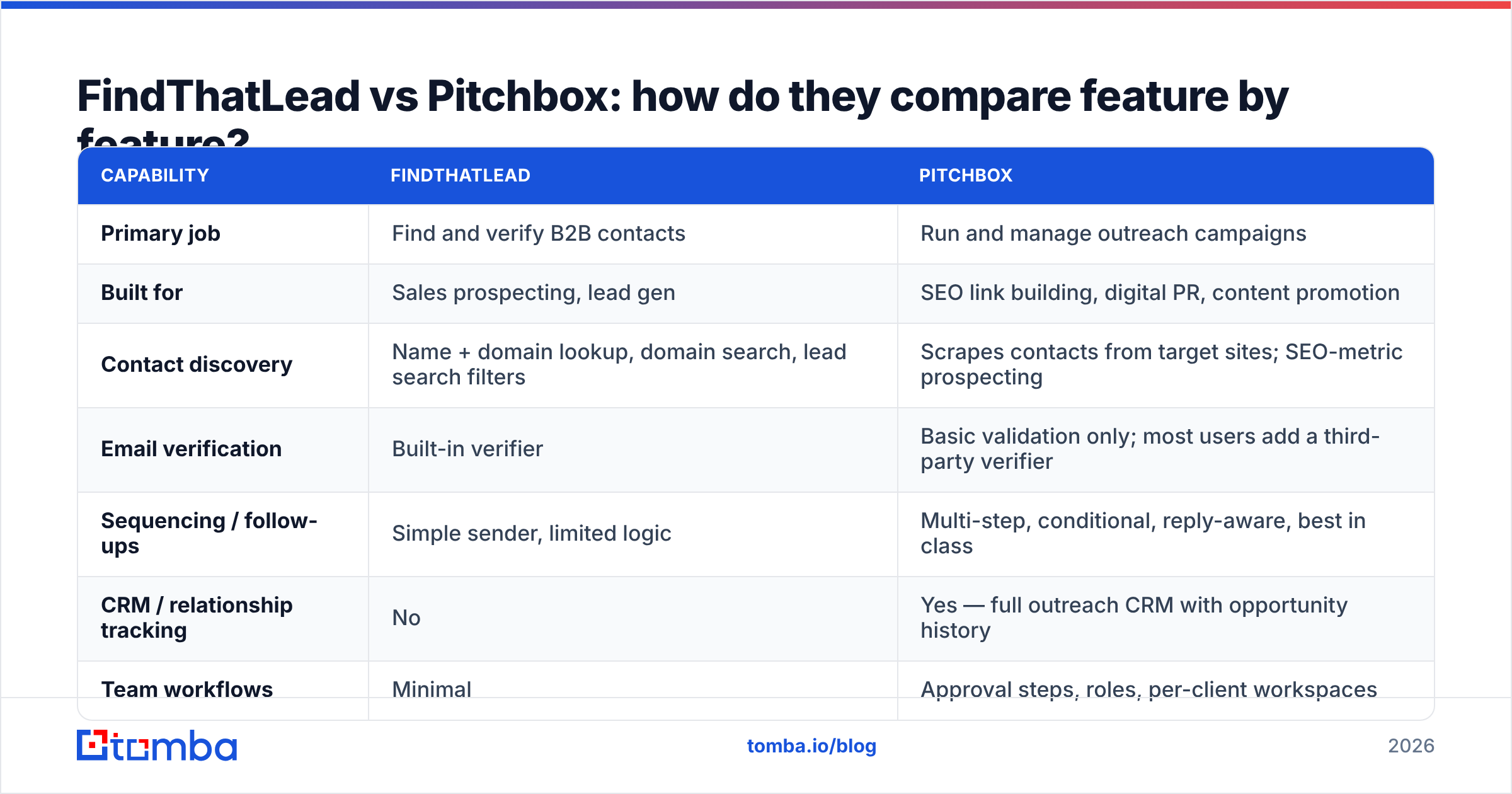
FindThatLead vs Pitchbox: how do they compare feature by feature?#
This is the table most comparison posts skip, because the honest answer is "these products barely overlap." That is exactly why you need it.
| Capability | FindThatLead | Pitchbox |
|---|---|---|
| Primary job | Find and verify B2B contacts | Run and manage outreach campaigns |
| Built for | Sales prospecting, lead gen | SEO link building, digital PR, content promotion |
| Contact discovery | Name + domain lookup, domain search, lead search filters | Scrapes contacts from target sites; SEO-metric prospecting |
| Email verification | Built-in verifier | Basic validation only; most users add a third-party verifier |
| Sequencing / follow-ups | Simple sender, limited logic | Multi-step, conditional, reply-aware, best in class |
| CRM / relationship tracking | No | Yes — full outreach CRM with opportunity history |
| Team workflows | Minimal | Approval steps, roles, per-client workspaces |
| SEO tool integrations | None | Moz, Majestic, Ahrefs, Semrush |
| Chrome extension | Yes | No (works from within the platform) |
| API access | Yes, on higher tiers | Yes, enterprise-oriented |
| Best-fit team size | 1–5 | 5–50+ |
| Learning curve | An afternoon | One to two weeks |
Read that table as a diagnosis, not a scoreboard. If more than half the "Pitchbox" rows describe problems you do not have, you are not the buyer.
How do the pricing models actually differ?#
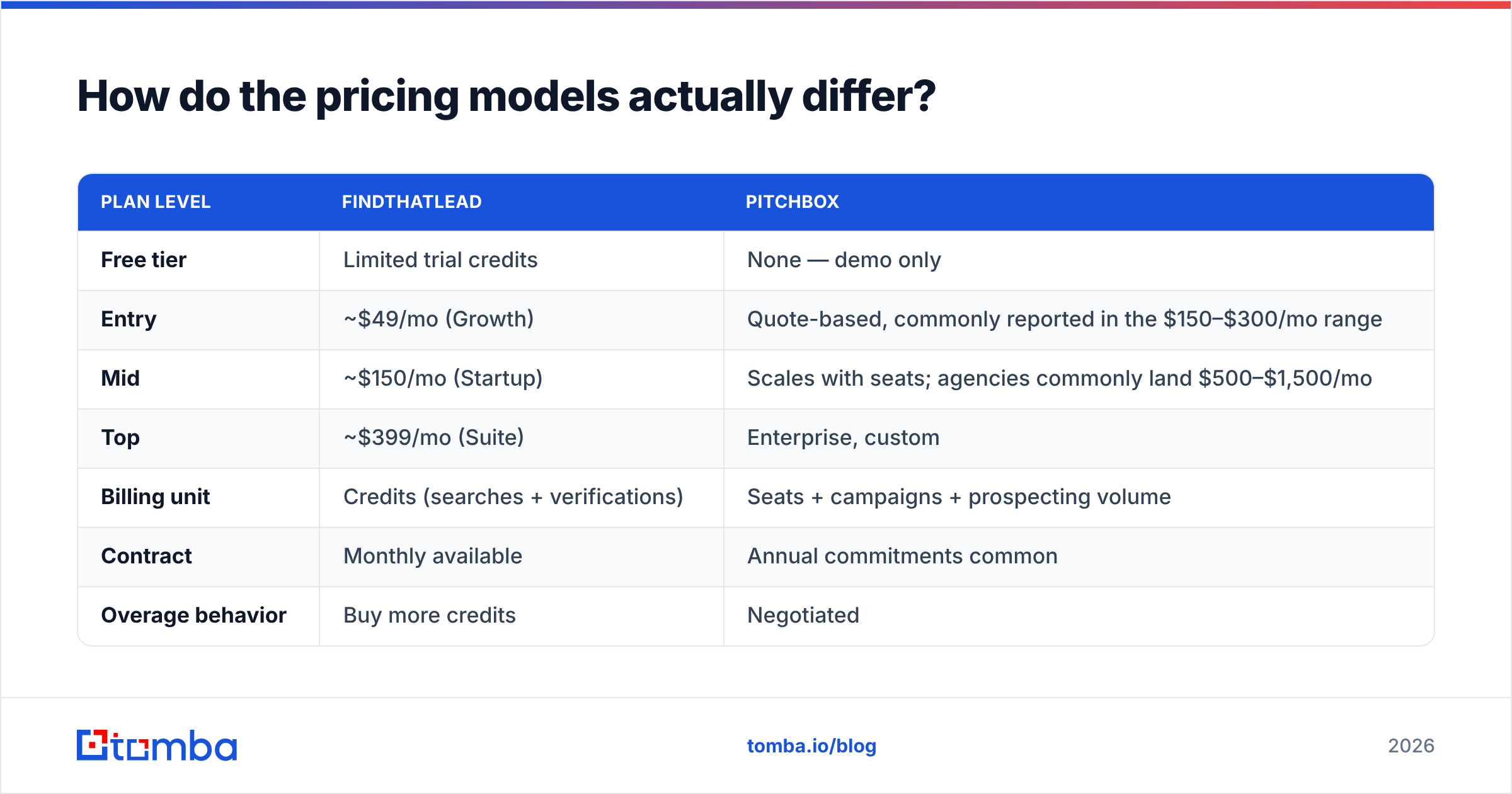
Pricing is where the comparison gets muddy, because the two vendors publish at completely different levels of transparency. FindThatLead lists plans openly. Pitchbox routes you to a sales conversation and quotes on seats plus volume. Numbers below reflect publicly reported figures at the time of writing — always confirm on the vendor's own page before you budget.
| Plan level | FindThatLead | Pitchbox |
|---|---|---|
| Free tier | Limited trial credits | None — demo only |
| Entry | ~$49/mo (Growth) | Quote-based, commonly reported in the $150–$300/mo range |
| Mid | ~$150/mo (Startup) | Scales with seats; agencies commonly land $500–$1,500/mo |
| Top | ~$399/mo (Suite) | Enterprise, custom |
| Billing unit | Credits (searches + verifications) | Seats + campaigns + prospecting volume |
| Contract | Monthly available | Annual commitments common |
| Overage behavior | Buy more credits | Negotiated |
The structural difference matters more than the sticker price. FindThatLead charges you for records. Pitchbox charges you for people using the software. That means FindThatLead costs scale with your list size and Pitchbox costs scale with your headcount — and those two curves diverge fast. A three-person team pulling 50,000 contacts a year will find FindThatLead's model punishing. A fifteen-person agency touching 5,000 carefully chosen sites will find Pitchbox's model reasonable.
Cross-check both against real user reports on G2 before you sign anything. Quote-based pricing has a way of drifting between the demo call and the invoice.
Which one gives you better contact data?#
Neither vendor makes data quality its headline claim, and that should tell you something.
FindThatLead's finder is decent on well-indexed Western SaaS domains and noticeably weaker on small businesses, non-English domains, and companies with catch-all mail servers. Users report bounce rates that are workable but not tight — enough to matter if you are sending at volume into inboxes that punish bad hygiene.
Pitchbox's contact discovery is a scraper, not a database. It pulls whatever is publicly visible on the target site — a contact@, an author byline, a form. For link building that is often fine, because generic addresses still get read at small publishers. For B2B sales it is close to useless: you cannot run a named-persona campaign on info@company.com.
Three practical consequences:
- If you sell to named personas, Pitchbox's discovery will not carry you. You need a real finder feeding it.
- If you do outreach to publishers, you still want a proper author finder to get past generic inboxes to the person who actually commissions content — response rates roughly double when you name the right editor.
- Either way, verify before you send. Both tools leave enough invalid addresses in the output that an independent email verifier pays for itself in protected sender reputation within the first month.
This is the quiet cost that comparison charts miss: whichever tool you pick, you are probably buying a second one to patch the gap.
Do you actually need both — or neither?#
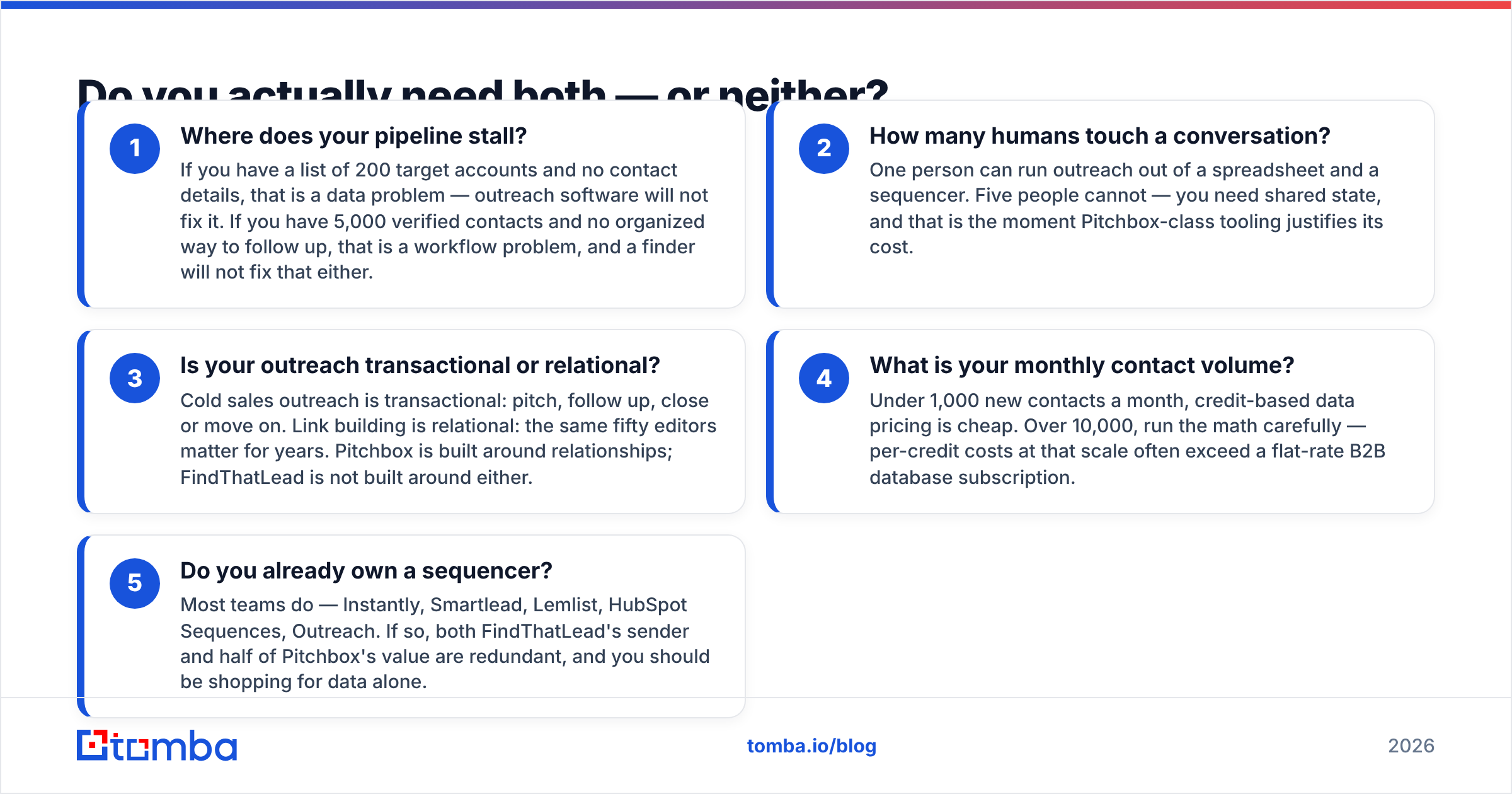
Run your own workflow against these five checks before you spend anything.
- Where does your pipeline stall? If you have a list of 200 target accounts and no contact details, that is a data problem — outreach software will not fix it. If you have 5,000 verified contacts and no organized way to follow up, that is a workflow problem, and a finder will not fix that either.
- How many humans touch a conversation? One person can run outreach out of a spreadsheet and a sequencer. Five people cannot — you need shared state, and that is the moment Pitchbox-class tooling justifies its cost.
- Is your outreach transactional or relational? Cold sales outreach is transactional: pitch, follow up, close or move on. Link building is relational: the same fifty editors matter for years. Pitchbox is built around relationships; FindThatLead is not built around either.
- What is your monthly contact volume? Under 1,000 new contacts a month, credit-based data pricing is cheap. Over 10,000, run the math carefully — per-credit costs at that scale often exceed a flat-rate B2B database subscription.
- Do you already own a sequencer? Most teams do — Instantly, Smartlead, Lemlist, HubSpot Sequences, Outreach. If so, both FindThatLead's sender and half of Pitchbox's value are redundant, and you should be shopping for data alone.
Is there a better third option in 2026?#
Yes, for a large slice of buyers: unbundle.
The all-in-one pitch — find, verify, send, track, all in one login — sounded good in 2019. In 2026 it mostly means paying a premium for a mediocre version of each layer. The teams getting the best cost-per-meeting numbers do the opposite: they buy the best data source they can, verify hard, and pump it into a sending tool they already trust.
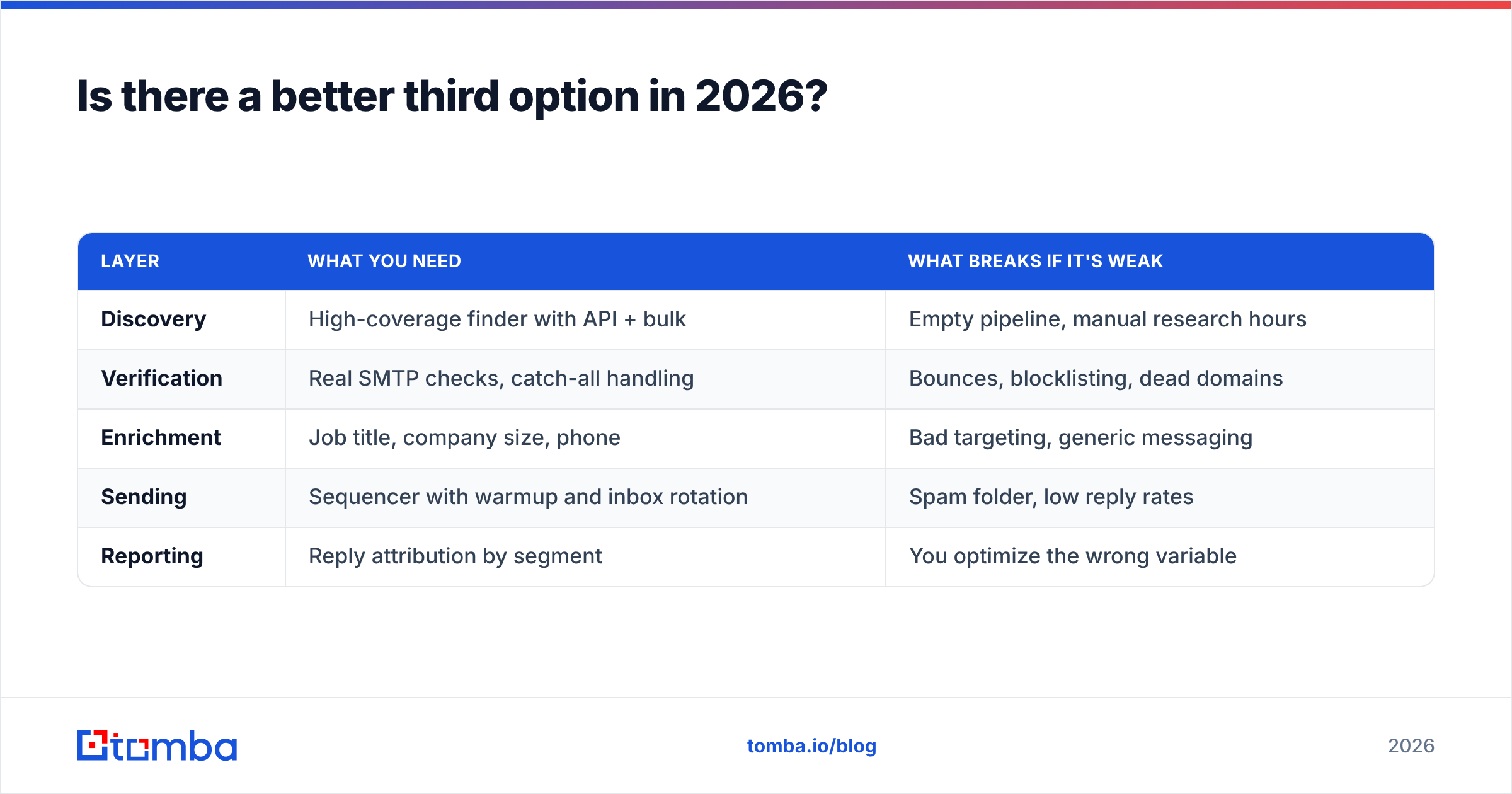
That decomposition looks like this:
| Layer | What you need | What breaks if it's weak |
|---|---|---|
| Discovery | High-coverage finder with API + bulk | Empty pipeline, manual research hours |
| Verification | Real SMTP checks, catch-all handling | Bounces, blocklisting, dead domains |
| Enrichment | Job title, company size, phone | Bad targeting, generic messaging |
| Sending | Sequencer with warmup and inbox rotation | Spam folder, low reply rates |
| Reporting | Reply attribution by segment | You optimize the wrong variable |
Tomba slots into the first three layers. The email finder handles name-plus-domain lookups and domain-wide searches, verification runs on real mailbox checks including catch-all domains, and enrichment adds the firmographic context your messaging needs. Tomba pricing starts free at 25 searches a month, then $49/mo for Starter, $99/mo for Growth, and $249/mo for Pro — with an API, CLI, Chrome extension, and Sheets add-on so the data lands wherever your workflow already lives.
Then you keep the sequencer you like. If that is Pitchbox because you run link-building campaigns for a dozen clients, great — feed it better contacts and its reply rates go up. If you are a two-person sales team, a $30/mo sequencer plus solid data will beat either platform on cost-per-meeting.
What's the verdict on FindThatLead vs Pitchbox?#
Choose FindThatLead if you are a small sales team, your problem is contact discovery, you want to start today without a demo call, and your sending needs are simple. It is honest, affordable software that does one main thing acceptably well.
Choose Pitchbox if you run SEO link building or digital PR at agency scale, you have five or more people touching outreach, you need approval workflows and per-client reporting, and the seat-based cost is a rounding error against client retainers. Nothing on this list has a serious substitute at that scale.
Choose neither if your real gap is data quality. Both tools will happily sell you a workflow wrapped around contacts that bounce, and no amount of sequencing logic saves a campaign aimed at addresses that do not exist. Fix the input first.
One last note on evaluation method: do not judge either tool on a ten-record trial of companies you already know. Test on 200 records drawn from your actual ICP, including the awkward ones — small firms, non-US domains, catch-all servers. Measure hit rate, then measure bounce rate after sending. That single exercise tells you more than every review site combined.
Ready to fix the data layer first?#
Whichever campaign tool you land on, it only performs as well as the contacts you feed it. Start with the Tomba Email Finder — free for your first 25 searches, no card required — and run it against the same 200-record test list you would use to evaluate FindThatLead or Pitchbox. Compare hit rate and bounce rate side by side, then decide where the rest of your outbound budget should go.
Related guides#
Ready to find emails that actually work?
Join 150,000+ professionals who stopped guessing and started sending. Free credits on signup — no credit card required.
Get the Tomba newsletter
Practical outbound tactics and product updates — once every two weeks.
About the author