FindThatLead vs SafetyMails: Which Tool Wins in 2026?
FindThatLead finds emails. SafetyMails verifies them. We compare pricing, accuracy, credit models, and API depth to show which one belongs in your stack — and when neither is enough.
FindThatLead vs SafetyMails is an odd matchup. One tool finds emails. The other checks them. Here is how to pick the one your outbound stack needs first.
TL;DR
- FindThatLead is a prospecting tool. It finds emails from names, domains, and LinkedIn URLs. It also bolts on a basic cold-email sender.
- SafetyMails is a verification tool. It cleans lists you already own. So FindThatLead vs SafetyMails is not a true head-to-head.
- No list yet? Buy the finder. A 200k-record CRM going stale? Buy the verifier.
- FindThatLead burns a credit on every lookup, even when the result is junk. SafetyMails charges per checked address, and its higher packs never expire.
- SafetyMails is better than most people expect at catch-all and disposable checks. FindThatLead's data is strongest in Spain and LATAM, where it was built.
- Running both costs about $70–$100 a month at entry level. One platform that finds and verifies — like Tomba at $49/mo — often covers both jobs for less.
FindThatLead vs SafetyMails: what does each tool do?#
They fix two halves of one problem. The names do nothing to make that clear.
FindThatLead is a Spanish B2B prospecting platform. Give it a first name, last name, and company domain. It returns a best-guess work email. It also runs bulk domain search: feed it stripe.com and get a list of staff. You get a Chrome extension for LinkedIn, a lead database, and "Scrab.in" for LinkedIn automation. It added a cold-email sender a few years back. That puts it near Apollo or Lemlist, just smaller.
SafetyMails is a Brazilian email hygiene service. It finds nothing. You upload a list as CSV, XLSX, or through the API. It returns a verdict per address: valid, invalid, risky, disposable, role-based, or spam-trap suspect. It also has a real-time API for signup forms, plus a filter that blocks throwaway domains.
So the honest frame for FindThatLead vs SafetyMails is simple. One buys you contacts. The other keeps them clean. A head-to-head only makes sense when your budget covers just one tool.
FindThatLead vs SafetyMails: features and price#
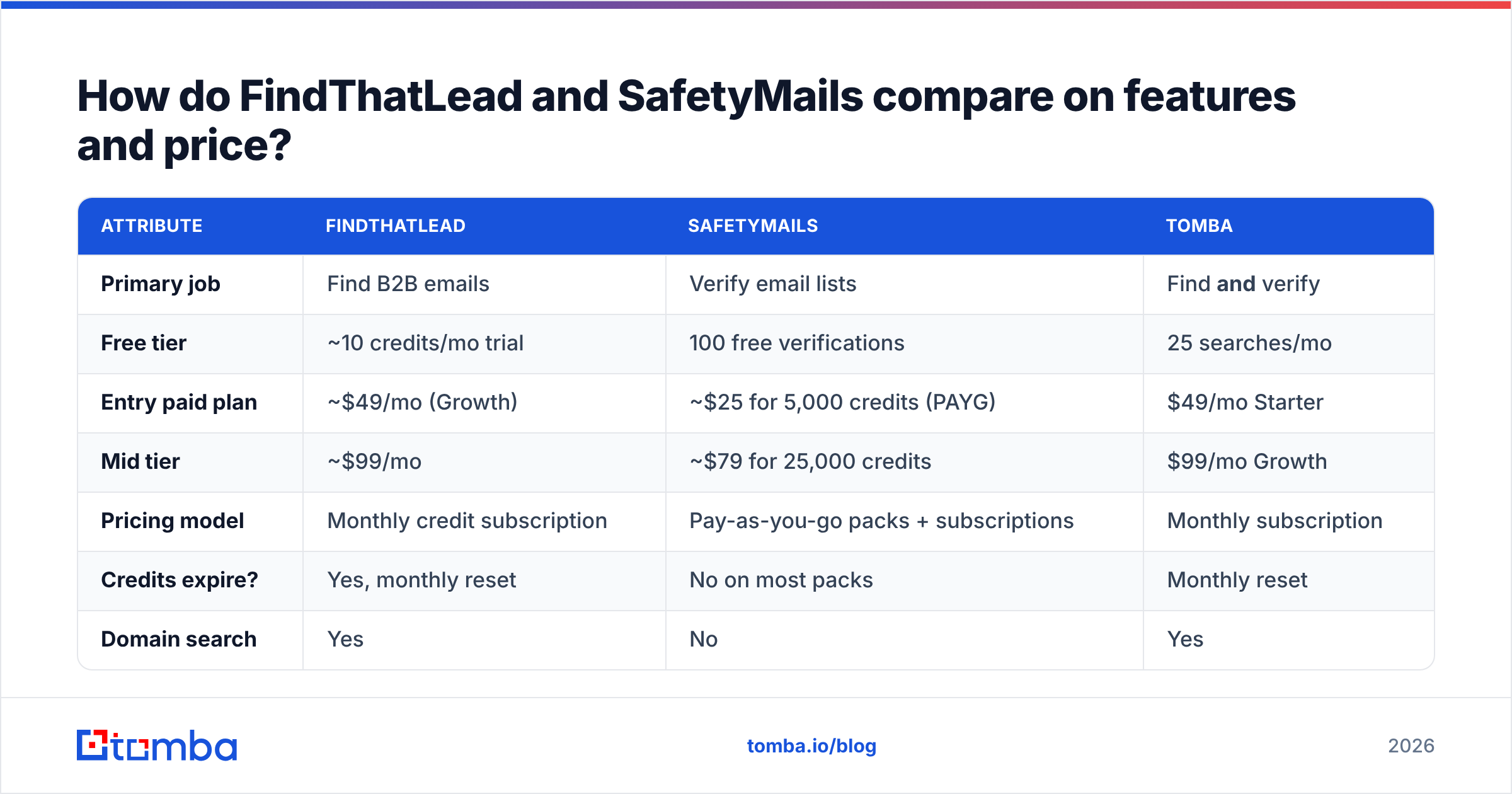
Here is the side-by-side. Prices are entry-level rates from early 2026, and they move. Check both vendors before you pay.
| Attribute | FindThatLead | SafetyMails | Tomba |
|---|---|---|---|
| Primary job | Find B2B emails | Verify email lists | Find and verify |
| Free tier | ~10 credits/mo trial | 100 free verifications | 25 searches/mo |
| Entry paid plan | ~$49/mo (Growth) | ~$25 for 5,000 credits (PAYG) | $49/mo Starter |
| Mid tier | ~$99/mo | ~$79 for 25,000 credits | $99/mo Growth |
| Pricing model | Monthly credit subscription | Pay-as-you-go packs + subscriptions | Monthly subscription |
| Credits expire? | Yes, monthly reset | No on most packs | Monthly reset |
| Domain search | Yes | No | Yes |
| Single email verification | Basic, bundled | Core product | Yes, standalone |
| Catch-all handling | Marks as "risky", limited | Dedicated catch-all logic | Dedicated catch-all verifier |
| Disposable detection | Basic | Strong — core feature | Yes |
| LinkedIn extension | Yes (+ Scrab.in) | No | Yes |
| Phone numbers | No | No | Yes |
| Cold email sending | Yes, basic | No | No (integrates instead) |
| Public API | Yes | Yes, well documented | Yes, plus CLI and MCP |
| Best for | SMB prospecting, LATAM/EU SMB | List hygiene at scale | Teams that need both |
Most teams learn the pattern the hard way. FindThatLead alone means you mail unchecked guesses. SafetyMails alone means you have nothing to clean.

Is FindThatLead accurate enough for cold outreach?#
It depends on who you sell to. Vendor accuracy claims are marketing, not proof.
FindThatLead claims "up to 95%". Every finder in this class prints that number. User reports on G2 and Capterra tell a wider story. Hit rates look strong on Spanish, Portuguese, and European SMB domains. That fits where the company was built and where its data comes from.
Results drop on US enterprise targets. They also drop on firms under 20 staff with thin websites, and on domains registered in the last year.
The credit model is the bigger issue. In most setups, FindThatLead bills you for the attempt, not the result. Run 1,000 lookups on a thin segment and get 480 emails back, and you still pay for 1,000. Some rivals charge only for hits, such as Findymail and Tomba's finder tiers. That gap changes your real cost per contact, even when sticker prices match.
There is one more trap. A returned address is not proof that it still works today. Pattern guesses like first.last@domain.com look perfect for staff who left 14 months ago. That gap is why verifiers exist, and why so many teams run a finder plus a verifier.
Is SafetyMails a good email verifier in 2026?#
Yes — with one caveat about scope.
SafetyMails does the dull work of list hygiene, and it does it well:
- Disposable domain checks — it tracks throwaway providers and updates that list often. If
mailinator-style signups flood your forms, this is the feature you pay for. - Role-based flags — it splits
info@,sales@, andcontact@from real people. You then choose whether to mail them. - Catch-all sorting — catch-all domains accept every address at the SMTP layer. A naive checker calls them all valid. SafetyMails scores them instead, which is the right call.
- Spam-trap risk scores — the method is heuristic, like everyone else's. But it is there, and the report shows it clearly.
- Real-time API — sub-second checks on a single address. Drop it in a signup form and block bad emails at the door.
Now the caveat. SafetyMails is a clean-up layer, not a data source. It cannot tell you that j.smith@acme.com is the VP of Engineering. It cannot add a job title or a phone number. It cannot build a list from a domain.
Is your sender reputation slipping, with bounces near 9%? Then it is the right buy. Do you have 40 target accounts and zero contacts? Then it does nothing for you.
For a like-for-like on verifiers, read our ZeroBounce alternative breakdown. It covers the same accuracy points across the main tools.
FindThatLead vs SafetyMails: which one do you buy first?#
Buy for the problem you have now, not for the nicer landing page.
Buy a finder first if: you have target accounts but no contacts. Or your reps hunt by hand on LinkedIn. Or your database holds under ~5,000 records. At that size your bounce problem is small and your pipeline problem is large.
Buy a verifier first if: your bounce rate is over 3%. Or you inherited a CRM that no one has cleaned in 18 months. Or Google Postmaster shows your domain slipping. Or you are about to switch ESP and do not want to import rot. B2B data decays 22–30% a year through job changes alone. Any list older than a year is dirty.
Buy both if: you send more than 10k emails a month. At that point a blocked sending domain costs far more than the tools. Most funded teams land here.
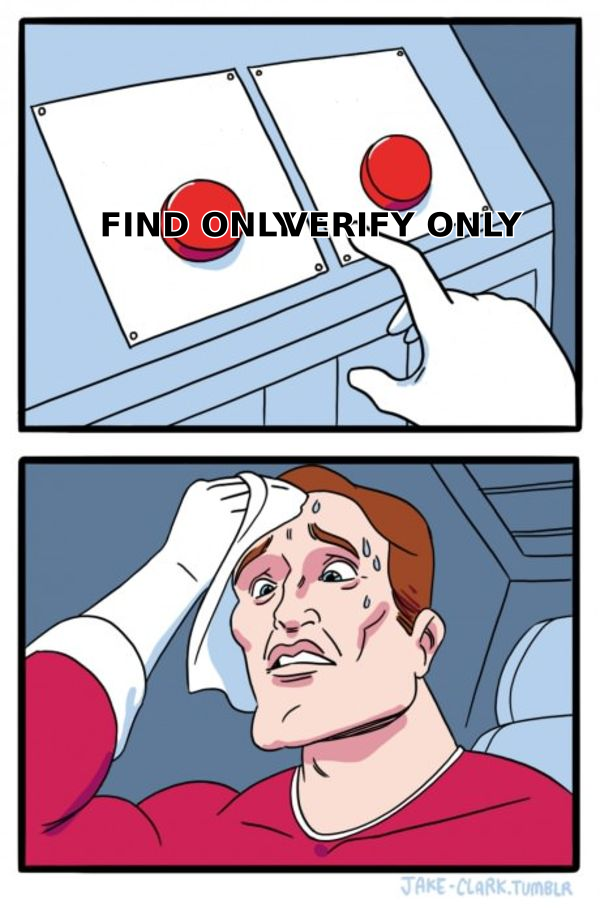
There is a third option. If you would pay two vendors ~$50 each, check whether one platform does both jobs for one price. That is the real choice behind FindThatLead vs SafetyMails.
What does the combined stack actually cost?#
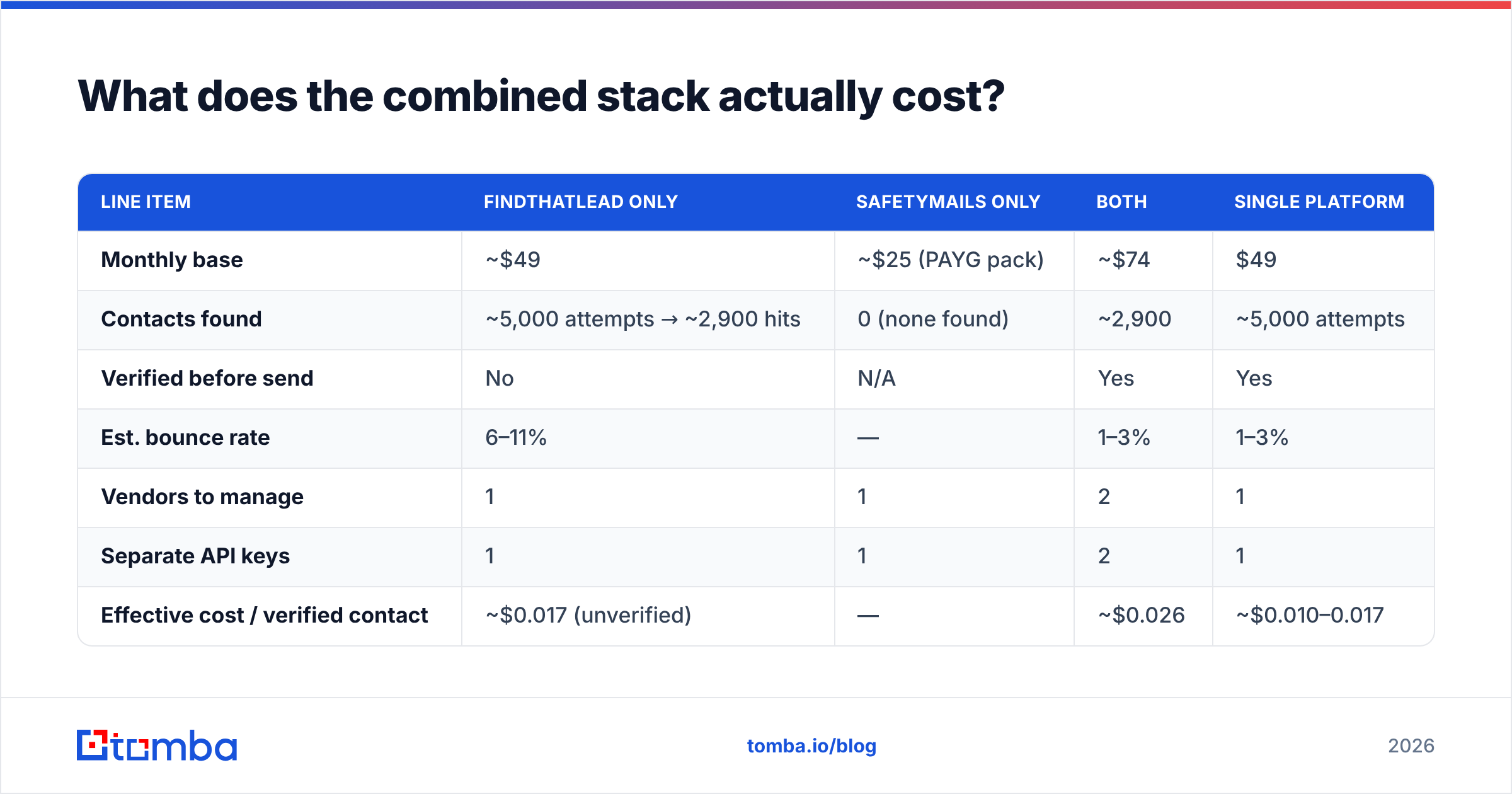
Run the math on cost per usable contact, not cost per month. Here is a 5,000-contact month.
| Line item | FindThatLead only | SafetyMails only | Both | Single platform |
|---|---|---|---|---|
| Monthly base | ~$49 | ~$25 (PAYG pack) | ~$74 | $49 |
| Contacts found | ~5,000 attempts → ~2,900 hits | 0 (none found) | ~2,900 | ~5,000 attempts |
| Verified before send | No | N/A | Yes | Yes |
| Est. bounce rate | 6–11% | — | 1–3% | 1–3% |
| Vendors to manage | 1 | 1 | 2 | 1 |
| Separate API keys | 1 | 1 | 2 | 1 |
| Effective cost / verified contact | ~$0.017 (unverified) | — | ~$0.026 | ~$0.010–0.017 |
Two things stand out. First, the two-vendor stack is not that pricey. The overhead costs more than the invoice: two dashboards, two credit balances, two rate limits, and a CSV shuttle in between. Second, unchecked contacts carry a hidden cost. A 9% bounce rate can push a sending domain into spam filters within weeks. Winning back email deliverability takes far longer than losing it.
Want a quick sanity check first? Run a sample through a free email checker. If more than 5% comes back shaky, hygiene is your bottleneck. If you cannot even build a sample, prospecting is.
Where does Tomba fit in this comparison?#
Tomba folds both jobs into one tool. That is why it shows up in a FindThatLead vs SafetyMails comparison at all.
The email finder does the FindThatLead job. Name plus domain in, verified work email out. Domain search handles the bulk version. Feed it a company domain and get contacts with detected patterns and confidence scores. The email verifier does the SafetyMails job. That includes a catch-all verifier for domains that break naive SMTP checks.
It also goes further than either tool. Phone finder gets direct dials. Data enrichment adds titles and company data. The Tomba API ships with a CLI and an MCP server, so you can script the whole flow. Plans run free (25 searches/mo), $49/mo Starter, $99/mo Growth, and $249/mo Pro, with custom Enterprise deals. See Tomba pricing for credits per tier.
One honest caveat: Tomba does not send cold email. FindThatLead does. If you want finding and sending on one screen, and a basic sequencer is fine, that bundle has a real case. But most teams already run Instantly, Smartlead, or Lemlist. If you do, the FindThatLead sender is a feature you pay for and never open.
What should you check before you sign up for either?#
Five things, in order, before you enter a card:
- Test on your real ICP, not the demo. Take 50 real target contacts. Run them through both free tiers. Count usable results, not returned rows. A tool that scores 92% on the Fortune 500 and 40% on 15-person agencies is no use if you sell to agencies.
- Read the credit policy line by line. Does a failed lookup cost a credit? Do spare credits roll over? Does a catch-all count as a hit? Those three answers can swing your real price by 2–3x.
- Check the API before you need it. Look at rate limits, the response schema, and whether bulk jobs run async. Wiring an email verification API into your CRM after you buy is how projects stall.
- Confirm compliance for your region. GDPR matters if you mail the EU. Both vendors publish policies. Read the data-sourcing part, not the badge on the homepage.
- Check the exit path. Can you export everything as CSV, verdicts included, with no downgrade penalty? If not, you are renting your own data.
For the wider market, Findymail alternative and Clearout alternative cover the finder and verifier sides. Both use the same test criteria.
The verdict on FindThatLead vs SafetyMails#
There is no winner here, because the two tools play different sports. FindThatLead is a fair SMB prospecting tool. It is strongest in Europe and LATAM, and its credit rules need a close read. SafetyMails is a solid, focused verifier. It handles disposable and catch-all checks well. Its non-expiring packs beat subscription-only rivals for teams that clean lists each quarter.
Pick FindThatLead if your bottleneck is too few contacts. Pick SafetyMails if your bottleneck is contacts you cannot trust. Pick one platform if the honest answer is both, as it is for most outbound teams. One credit balance beats two.
Tired of paying two vendors for half a workflow each? Tomba's Email Finder returns verified work emails in one step. Domain search, catch-all handling, and enrichment sit on the same credit balance. Start free with 25 searches a month, no card needed. Then run your own 50-contact test against your current tool. That is the only benchmark that counts.
Related guides#
Ready to find emails that actually work?
Join 150,000+ professionals who stopped guessing and started sending. Free credits on signup — no credit card required.
Get the Tomba newsletter
Practical outbound tactics and product updates — once every two weeks.
About the author