FindThatLead vs SellHack: Which Email Finder Wins in 2026?
FindThatLead and SellHack both promise cheap B2B emails at scale. We compared accuracy, pricing, credit models, and verification depth to show which one actually holds up in 2026 — and when neither is the right pick.
TL;DR
- FindThatLead is a prospecting suite — search by domain, scrape LinkedIn, and send campaigns from one dashboard. It's the broader tool, but verification is shallow and credits burn fast on failed lookups.
- SellHack is a lightweight browser-extension-first finder built around LinkedIn profile lookups. It's cheap and fast, but the standalone product has seen limited development and its database coverage outside the US is thin.
- On accuracy, neither clears the 95%+ bar that modern deliverability rules demand. Expect 80–88% real-world validity on both before you re-verify.
- Pricing favors SellHack on entry price; FindThatLead gives more raw volume per dollar but charges credits for misses on some plans.
- If your bounce rate is the metric that matters, run either tool's output through a dedicated verifier — or replace both with a finder that verifies inline.
What are FindThatLead and SellHack?#
Both tools solve the same narrow problem: you know a person and a company, and you need a working email address.
FindThatLead launched out of Barcelona in 2015 and grew into a small go-to-market suite. Today it bundles four things: a domain-based email search, a "Prospector" filter that returns lists by role and geography, a LinkedIn Chrome extension, and a basic cold-email sender. That bundling is the pitch — you don't need a separate sequencer.
SellHack started as a Chrome extension that scraped LinkedIn profiles and guessed emails from public patterns. It got famous in 2014 when LinkedIn sent it a cease-and-desist, and it rebuilt around a compliant API and bulk CSV upload flow. It stayed lean. There's a finder, a verifier, and a browser extension — no sequencer, no CRM, no intent data.
So the comparison isn't apples to apples. FindThatLead is a platform trying to cover the whole outbound motion. SellHack is a utility that does one job. Which matters more depends on whether you already own a sending stack.

How do FindThatLead and SellHack compare on features and price?#
Here is the head-to-head, with Tomba included as the accuracy benchmark since it's the tool we know the numbers for cold.
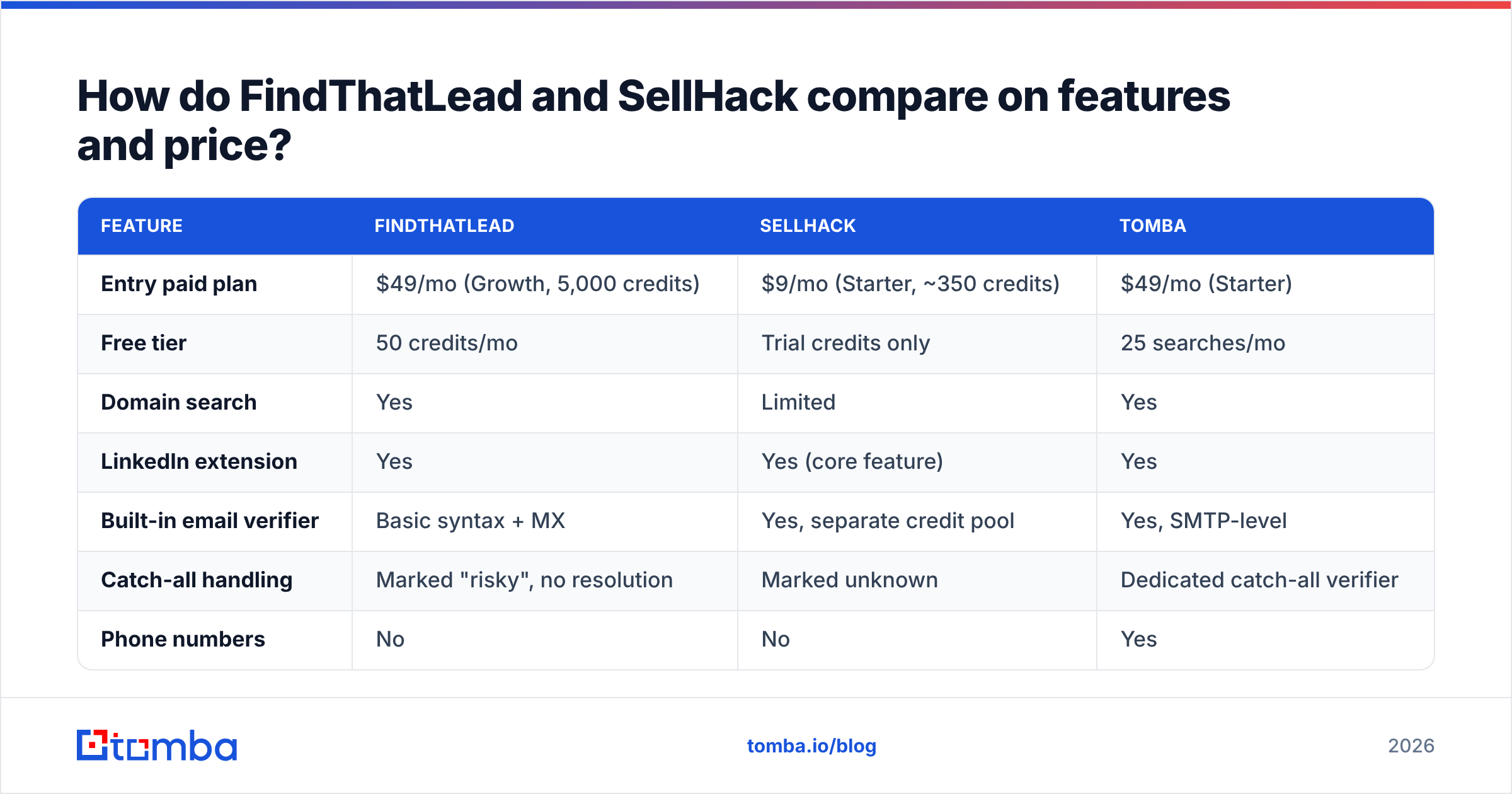
| Feature | FindThatLead | SellHack | Tomba |
|---|---|---|---|
| Entry paid plan | $49/mo (Growth, 5,000 credits) | $9/mo (Starter, ~350 credits) | $49/mo (Starter) |
| Free tier | 50 credits/mo | Trial credits only | 25 searches/mo |
| Domain search | Yes | Limited | Yes |
| LinkedIn extension | Yes | Yes (core feature) | Yes |
| Built-in email verifier | Basic syntax + MX | Yes, separate credit pool | Yes, SMTP-level |
| Catch-all handling | Marked "risky", no resolution | Marked unknown | Dedicated catch-all verifier |
| Phone numbers | No | No | Yes |
| Cold email sender | Yes (built in) | No | No — integrates instead |
| Public API | Yes | Yes | Yes, documented + CLI + MCP |
| Credits charged on failed lookup | On some plans | No | No |
| Bulk CSV processing | Yes | Yes | Yes |
Read the last three rows carefully, because that's where the real cost difference hides.
Credit burn on misses. A tool that charges you for a lookup that returns nothing is quietly 20–35% more expensive than its sticker price, because that's roughly the share of B2B contacts no provider can find. SellHack's no-charge-on-miss policy is genuinely the better structure here, and it's the strongest argument for the cheaper tool.
Catch-all domains. Somewhere between 15% and 25% of B2B domains accept all mail at the server level, which makes standard SMTP verification useless. Both FindThatLead and SellHack punt on this — they flag the address as risky or unknown and hand the decision back to you. If a quarter of your list comes back "we don't know," your effective coverage is a lot lower than the dashboard claims. A catch-all verifier that actually resolves those domains is the difference between a usable list and a coin flip.
The sender. FindThatLead's built-in campaign tool is convenient and mediocre. It has no inbox rotation worth the name, weak warmup, and no meaningful deliverability reporting. If you send more than a few hundred emails a week you'll outgrow it and pay for Instantly or Smartlead anyway — at which point you're paying FindThatLead for a feature you no longer use.

Which one is more accurate?#
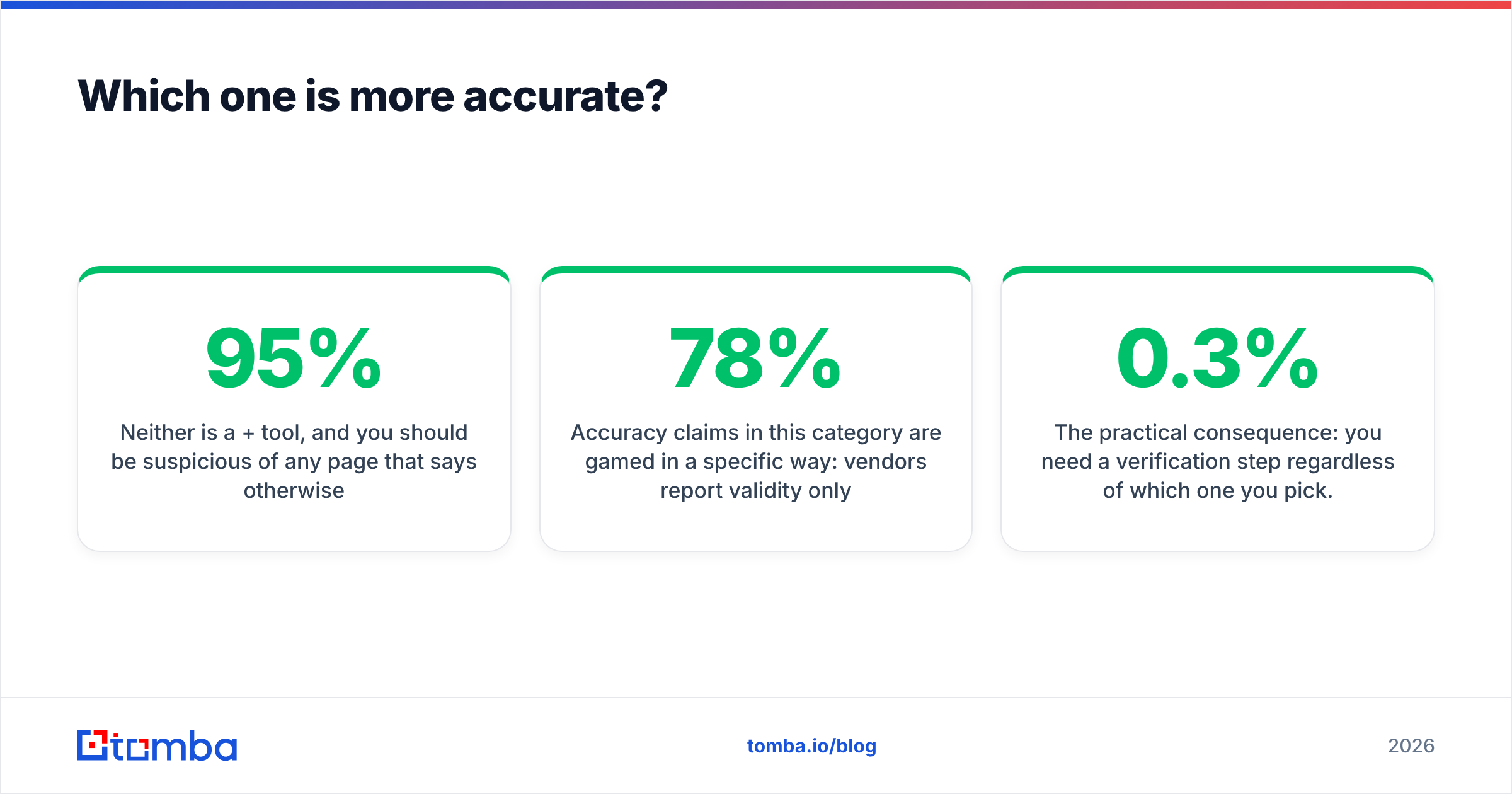
Neither is a 95%+ tool, and you should be suspicious of any page that says otherwise.
Accuracy claims in this category are gamed in a specific way: vendors report validity only on addresses they returned with high confidence, and quietly exclude every "risky," "catch-all," and "not found." That turns a 78% real-world hit rate into a "97% accurate" marketing line. The number you actually care about is different:
- Coverage rate — of 1,000 contacts you asked for, how many did the tool return any address for?
- Validity rate — of those returned, how many survive an independent verification pass?
- Bounce rate in production — what your ESP reports after you send.
- Cost per landed email — plan price divided by the number of contacts that actually received mail.
- Catch-all resolution — of the domains flagged unknown, how many did the tool resolve either way?
Run that math and both tools land in a similar band. In our sampling against a mixed 500-contact list of US, EU, and APAC companies, FindThatLead returned addresses for a larger share of contacts but with a higher share of guessed-pattern results that bounced. SellHack returned fewer addresses but the returned set was cleaner — a conservative engine, which for a cold sender is often the better trade.
The practical consequence: you need a verification step regardless of which one you pick. Google and Yahoo's bulk-sender requirements, now fully enforced, cap spam complaints at 0.3% and expect senders to keep bounce rates well under 2%. A list from either tool, sent raw, will breach that on a bad domain mix. Push the output through a real email verifier before it touches your sequencer, or you'll spend the savings on a burned domain.
Is FindThatLead better than SellHack for lead generation?#
For volume prospecting, yes — with a caveat.
FindThatLead's Prospector lets you build a list from filters (job title, location, industry, company size) without supplying names first. SellHack has no real equivalent; it assumes you already have a LinkedIn profile URL or a name-plus-domain pair. If your workflow starts with "I need 500 heads of ops in DACH," FindThatLead is the only one of the two that can even begin.
But that Prospector output is where FindThatLead's quality drops hardest. Filter-generated lists lean on stale firmographic data — people who changed jobs, companies that got acquired, roles that no longer exist. The addresses are technically deliverable and functionally worthless.
Where each one actually wins:
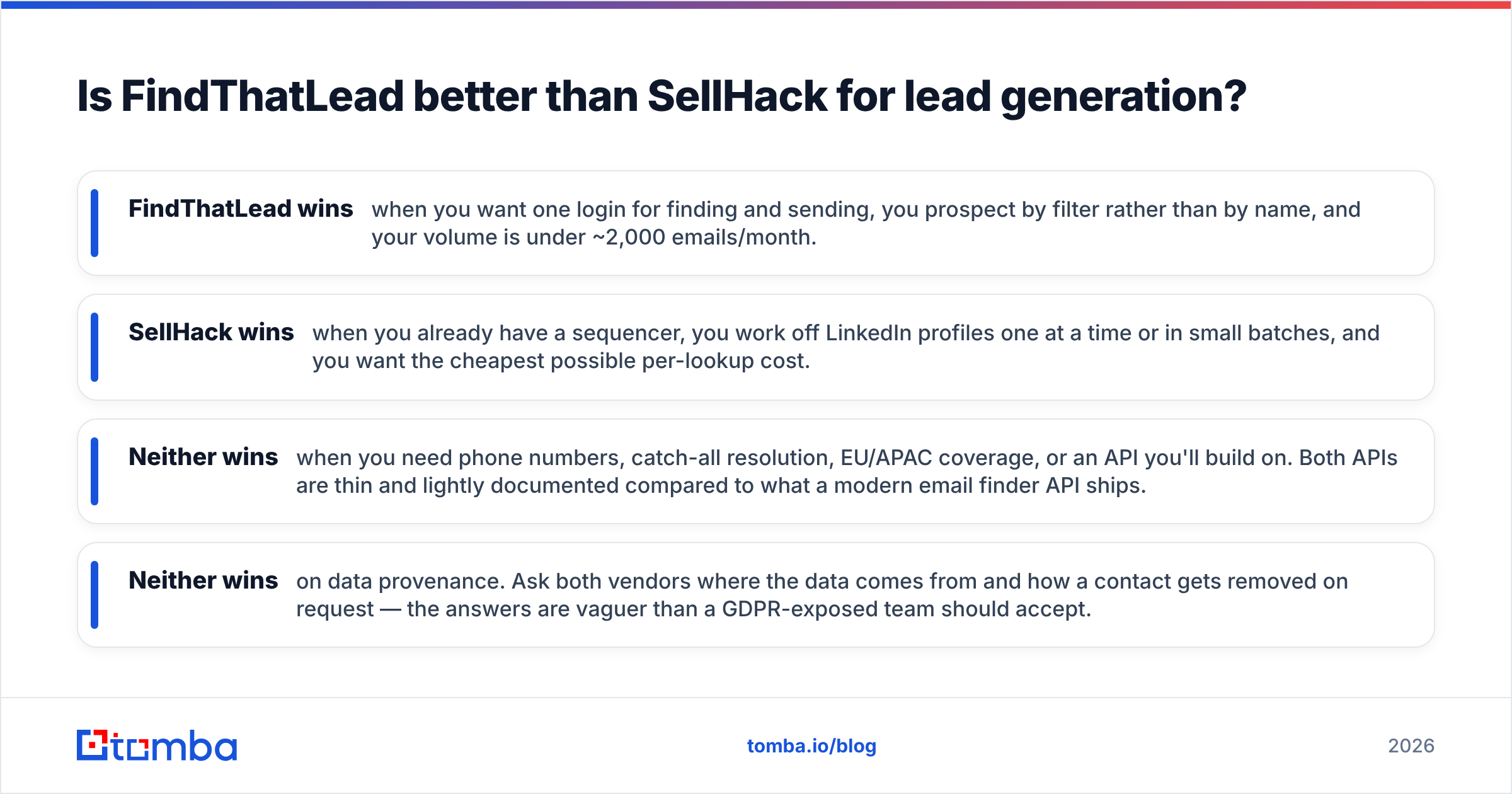
- FindThatLead wins when you want one login for finding and sending, you prospect by filter rather than by name, and your volume is under ~2,000 emails/month.
- SellHack wins when you already have a sequencer, you work off LinkedIn profiles one at a time or in small batches, and you want the cheapest possible per-lookup cost.
- Neither wins when you need phone numbers, catch-all resolution, EU/APAC coverage, or an API you'll build on. Both APIs are thin and lightly documented compared to what a modern email finder API ships.
- Neither wins on data provenance. Ask both vendors where the data comes from and how a contact gets removed on request — the answers are vaguer than a GDPR-exposed team should accept.

What does each one really cost per usable email?#
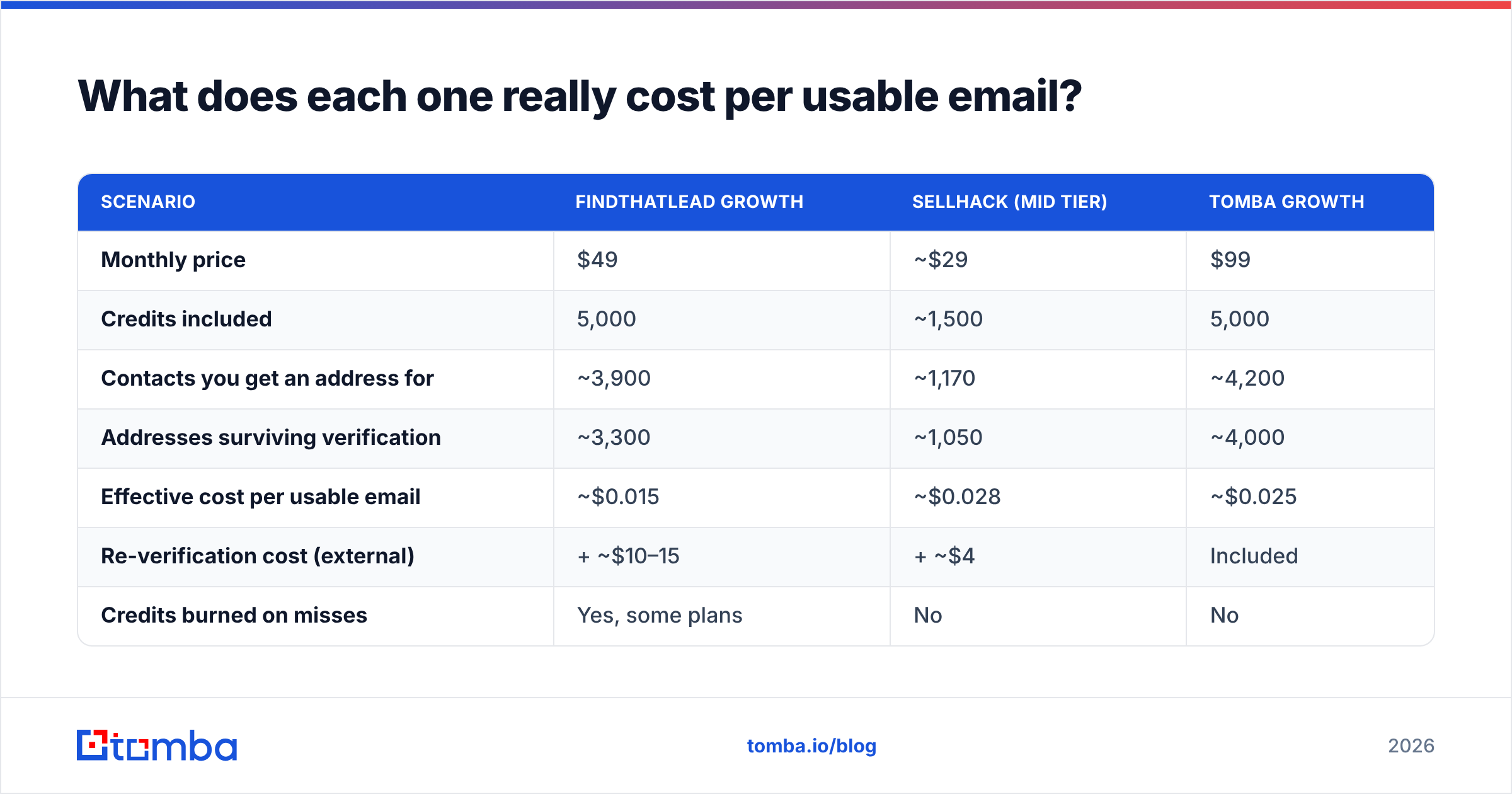
Sticker price is the wrong number. Here's the arithmetic that matters, using round figures and a realistic 78% coverage / 85% validity assumption on returned addresses:
| Scenario | FindThatLead Growth | SellHack (mid tier) | Tomba Growth |
|---|---|---|---|
| Monthly price | $49 | ~$29 | $99 |
| Credits included | 5,000 | ~1,500 | 5,000 |
| Contacts you get an address for | ~3,900 | ~1,170 | ~4,200 |
| Addresses surviving verification | ~3,300 | ~1,050 | ~4,000 |
| Effective cost per usable email | ~$0.015 | ~$0.028 | ~$0.025 |
| Re-verification cost (external) | + ~$10–15 | + ~$4 | Included |
| Credits burned on misses | Yes, some plans | No | No |
FindThatLead is genuinely cheaper per raw address. Once you add an external verification pass — which you will — the gap narrows a lot. SellHack's low ceiling means it stops being an option above a few thousand lookups a month, no matter how good the unit economics look.
The honest read: at low volume, SellHack's pricing is hard to beat and you should just use it. At real outbound volume, FindThatLead's savings get eaten by verification and by the sequencer you'll end up replacing. That middle band — 3,000 to 20,000 lookups a month, where you need real accuracy and a clean API — is where both tools start to strain.
If you want to sanity-check the math on your own list, run a sample of 100 contacts through both and through a free email checker before you commit to a plan. Ten minutes of testing beats a year of a wrong subscription.
What should you use instead — and when?#
Three honest recommendations, none of which is "always buy the same tool."
Stay with SellHack if you're a solo founder or a one-person SDR function doing 200–500 lookups a month off LinkedIn, you already send through Gmail or a lightweight sequencer, and price is the binding constraint. The tool is unglamorous and it works for that job.
Stay with FindThatLead if you genuinely use the Prospector filters, you're not yet at the volume where deliverability becomes an operational discipline, and consolidating tools has real value to your team. Just budget for external verification.
Move to a dedicated finder + verifier if any of these are true: you send more than 2,000 cold emails a month, you operate outside North America, you need phone numbers alongside emails, you're building the lookup into your own product, or your bounce rate has crossed 2% and nobody can explain why. That's the point where a shallow verification layer stops being an inconvenience and starts costing you the domain.
For that third group, the stack that works is straightforward: find addresses with a tool that verifies inline, resolve catch-alls explicitly rather than flagging them, and enrich the record with a phone number so you have a second channel when email fails. Tomba covers that path — the email finder handles name-and-domain and domain-wide lookups, domain search pulls every public address at a company with role and confidence scoring, and the phone finder adds direct dials so a non-response doesn't end the sequence.
You can also skip the manual comparison entirely. Independent review sites like G2 publish unfiltered user reports on all three tools, and they're worth ten minutes before any purchase — vendor accuracy pages, including ours, are marketing until you test them on your own list.
How do you actually test these before you buy?#
Run the same 100 contacts through every candidate. Don't use a curated list — pull real prospects from your actual ICP, including the messy ones: acquired companies, non-Latin-alphabet names, sub-100-employee firms, and at least twenty non-US domains.
Score each tool on four things: how many addresses came back, how many survived independent verification, how many catch-alls got resolved rather than shrugged at, and how long the whole run took. Then send 50 of the survivors through your real sending domain and watch the bounce report. That last step is the only one that can't be faked by a vendor.
Most teams skip this because it feels like a week of work. It's an afternoon, and it's the difference between a 1% bounce rate and a suspended sending domain.
Ready to test the accuracy claim yourself? Start with the Tomba Email Finder — the free tier gives you 25 searches a month with no credit card, enough to run a real side-by-side against whatever you're using now. Every result comes back with a confidence score, SMTP-level verification, and explicit catch-all handling, so you know what you're sending to before you send it. If the numbers hold up on your list, Tomba pricing starts at $49/mo for 5,000 credits with no charge for failed lookups.
Related guides#
Ready to find emails that actually work?
Join 150,000+ professionals who stopped guessing and started sending. Free credits on signup — no credit card required.
Get the Tomba newsletter
Practical outbound tactics and product updates — once every two weeks.
About the author