FindThatLead vs Sendigram: Which Cold Email Tool Wins?
FindThatLead finds and emails leads from one dashboard. Sendigram sells the sending infrastructure underneath. Here is where each one actually wins, what breaks, and the stack most teams end up running instead.
TL;DR
- These two tools are not really competitors. FindThatLead is a lead-sourcing and campaign platform (find emails, then send them). Sendigram is cold email sending infrastructure — mailboxes, domains, warmup, and sending capacity.
- If you have no leads, Sendigram gives you nothing to send. If you have no inbox capacity, FindThatLead's campaigns land in spam. Most teams that pick "one or the other" end up unhappy.
- FindThatLead's weak spot is data freshness and verification depth on smaller or non-US domains. Sendigram's weak spot is that it assumes you already solved data.
- The cheapest working stack for most B2B teams is: dedicated data provider + dedicated sending infrastructure + one sequencer — not a single all-in-one.
- Budget reality check: expect $50–$150/mo for data, $3–$5 per mailbox per month for infrastructure, and a sequencer on top. Verify current pricing on each vendor's page before you commit.
You searched for FindThatLead vs Sendigram, which usually means one of two things: you are shopping for an all-in-one outbound tool, or your current campaigns are bouncing and you are trying to work out which layer to fix. Those are different problems, and the honest answer changes depending on which one you have.
This post breaks both tools down by what they actually do, where they overlap (barely), and what a working 2026 outbound stack looks like once you stop trying to buy it in one purchase.
What is FindThatLead and who is it for?#
FindThatLead is a Barcelona-built B2B prospecting platform that has been around since roughly 2015. Its pitch is end-to-end: search for prospects by domain or by criteria, pull their business emails, verify them, then push them into a built-in cold email sender.
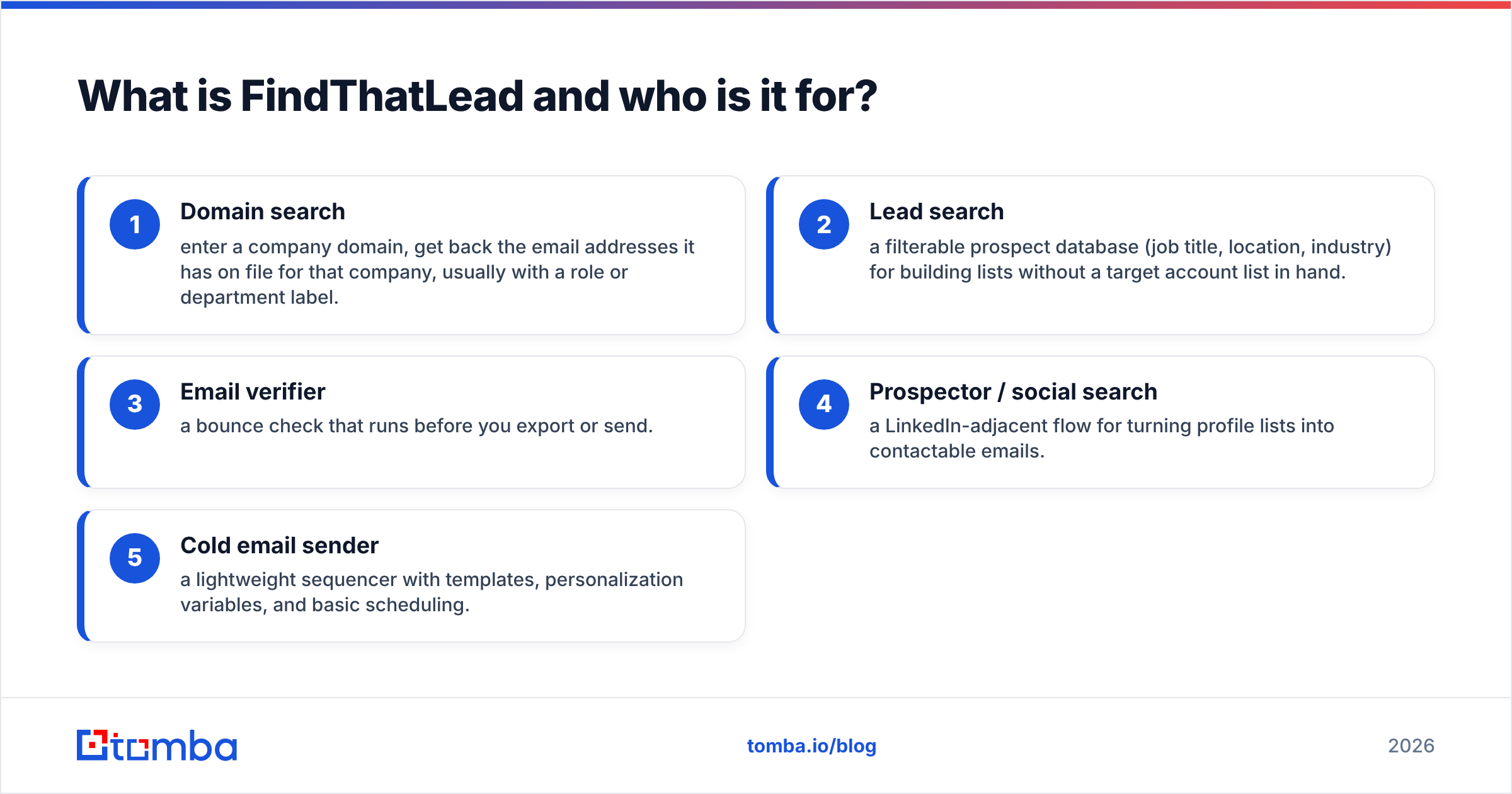
The core modules are:
- Domain search — enter a company domain, get back the email addresses it has on file for that company, usually with a role or department label.
- Lead search — a filterable prospect database (job title, location, industry) for building lists without a target account list in hand.
- Email verifier — a bounce check that runs before you export or send.
- Prospector / social search — a LinkedIn-adjacent flow for turning profile lists into contactable emails.
- Cold email sender — a lightweight sequencer with templates, personalization variables, and basic scheduling.
The appeal is obvious for a solo founder or a two-person SDR team: one login, one bill, list to inbox in an afternoon. The trade-off is equally obvious. Every module is decent, none is best-in-class, and the sending module in particular carries the same structural limit every all-in-one has — you are sending through a small number of connected mailboxes with no real infrastructure layer beneath them.
Data quality is the other thing to test rather than assume. FindThatLead performs reasonably on large US and Western European tech companies where email patterns are well documented and public. It thins out fast on companies under ~50 employees, on non-Latin-alphabet domains, and on catch-all domains where SMTP verification returns nothing conclusive. That is not unique to FindThatLead — it is the hard part of the category — but it means your list needs a second verification pass before it touches a paid sending seat.
What is Sendigram and what problem does it solve?#
Sendigram sits one layer below. It is cold email sending infrastructure: provisioned mailboxes (typically on Google Workspace or Microsoft 365), secondary domains, DNS records configured for you, and automated warmup so those mailboxes build sender reputation before you point a campaign at them.
You do not prospect in Sendigram. You do not build a list in Sendigram. What you get is capacity — a pool of inboxes on domains that are not your primary company domain, so that if a campaign gets flagged, your main domain's email deliverability does not take the hit.
This category exists because of a specific shift. Since Google and Yahoo tightened bulk sender requirements (authentication, low spam-complaint thresholds, one-click unsubscribe), sending meaningful cold volume from a single company mailbox stopped working. The fix the market landed on was: many mailboxes, low volume per mailbox, separate domains, continuous warmup. Sendigram productizes that.
What Sendigram does not solve:
- List quality. It will happily send your bad list to 10,000 dead addresses and burn every domain you bought.
- Copy. Infrastructure does not fix a message nobody wants.
- Sequencing. Most infrastructure vendors expect you to connect the mailboxes to a sequencer (Instantly, Smartlead, Reply, or similar) via SMTP/IMAP or API.
So if your question is "FindThatLead vs Sendigram," the honest framing is: FindThatLead answers who do I email, Sendigram answers how do I email them at volume without getting blocked.
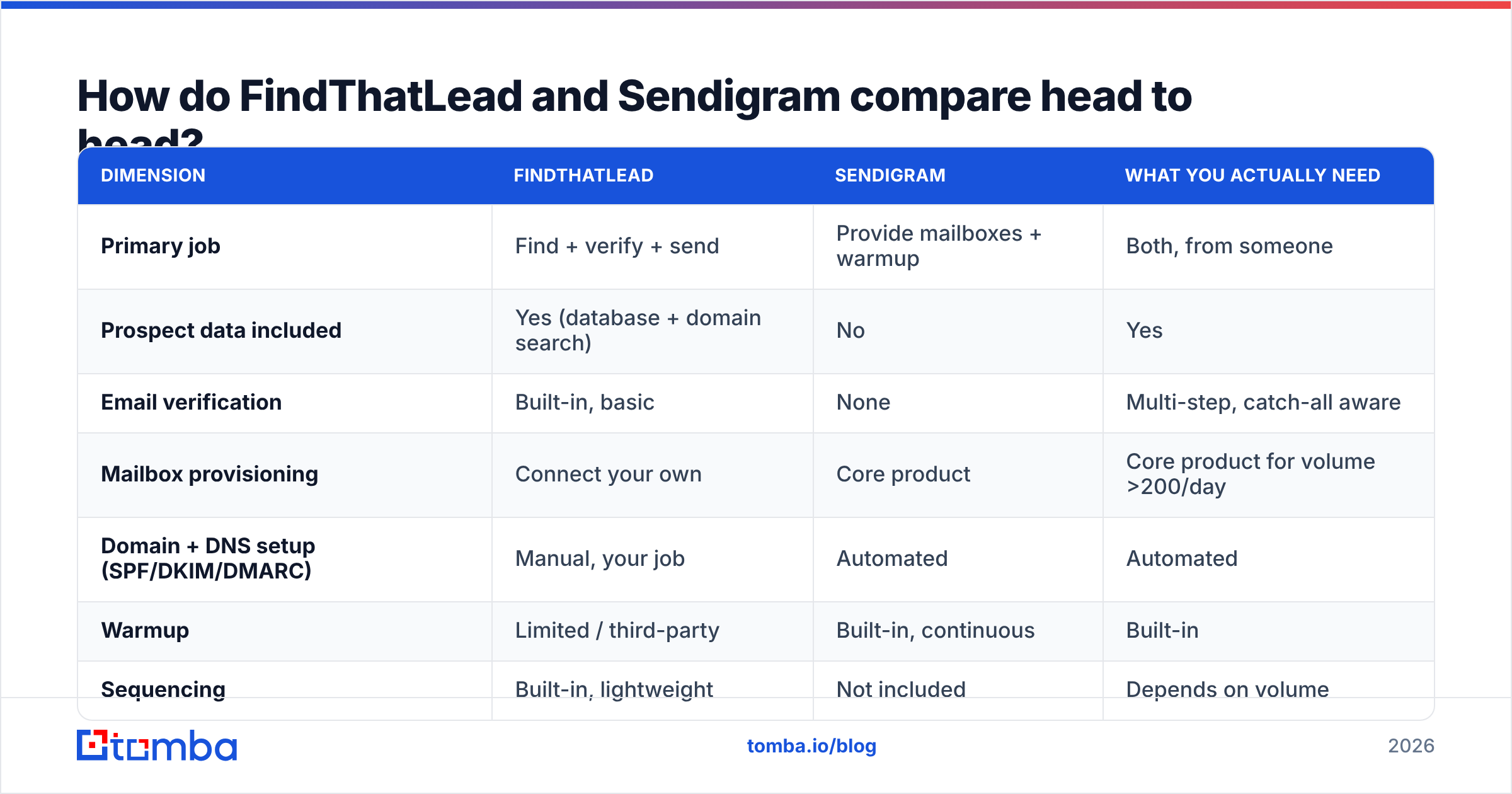
How do FindThatLead and Sendigram compare head to head?#
| Dimension | FindThatLead | Sendigram | What you actually need |
|---|---|---|---|
| Primary job | Find + verify + send | Provide mailboxes + warmup | Both, from someone |
| Prospect data included | Yes (database + domain search) | No | Yes |
| Email verification | Built-in, basic | None | Multi-step, catch-all aware |
| Mailbox provisioning | Connect your own | Core product | Core product for volume >200/day |
| Domain + DNS setup (SPF/DKIM/DMARC) | Manual, your job | Automated | Automated |
| Warmup | Limited / third-party | Built-in, continuous | Built-in |
| Sequencing | Built-in, lightweight | Not included | Depends on volume |
| API access | Yes | Limited (infra-focused) | Yes if you have RevOps |
| Typical entry cost | ~$49–$99/mo tier range | Per-mailbox, low single digits/mo | $150–$400/mo all-in |
| Best fit | Solo founder, small team, low volume | Agency or team sending 1k+/day | — |
Two caveats on that table. First, pricing on both sides moves; treat those as ranges to verify on the vendor pages, not quotes. Second, "built-in verification" and "verification that actually prevents bounces" are different claims — see the next section.
Is an all-in-one like FindThatLead good enough in 2026?#
For under ~500 emails a month, yes, probably. Below that volume you are not stressing any deliverability limit, your primary domain can absorb the sending, and the convenience of one tool beats the marginal quality gain of three.
Above that, the all-in-one model starts to fail in a predictable order:
- Bounce rate creeps past 3%. All-in-one verifiers tend to be single-pass SMTP checks. They mark catch-all domains as "accept-all" and let you send anyway. Roughly 20–25% of B2B domains are catch-all, so that is a large blind spot.
- Reply rates fall without the open rate changing. Classic sign you are landing in Promotions or spam rather than being ignored.
- You hit the mailbox ceiling. One connected Google account safely handles maybe 30–50 cold sends a day after warmup. Ten times that volume needs ten times the mailboxes, which the all-in-one does not sell you.
- Your main domain gets flagged. This is the expensive failure. Your invoices, support replies, and renewal notices start going to spam because outbound burned the domain reputation.
That failure sequence is exactly why the infrastructure category exists and why Sendigram has customers who already own a perfectly good prospecting tool.

Which one should you pick for your situation?#
Pick by constraint, not by feature count.
- You have no list and send fewer than 500 emails/month. FindThatLead alone. Do not buy infrastructure you cannot fill.
- You have a list and send 1,000+ emails/month. Sendigram (or a peer) plus a sequencer. Your bottleneck is capacity, not data.
- You have neither and plan to scale. Buy data and infrastructure separately from day one. Migrating later means re-verifying every record and re-warming every mailbox.
- You are an agency running multiple clients. Infrastructure per client, shared data provider, one sequencer with workspaces. Never share mailboxes across clients — one client's complaint rate becomes everyone's problem.
- You are RevOps at a company with a CRM. Skip the all-in-one entirely. You want an API you can call from your enrichment pipeline, not another dashboard your reps will not log into.
That last case is where a dedicated data layer earns its money. A bulk email finder that runs against your existing account list, writes back to your CRM, and re-verifies on a schedule does more for pipeline hygiene than any all-in-one dashboard, because it keeps working when nobody is looking at it.
What does a data layer need to do that neither tool fully covers?#
Here is the checklist to run against any provider you are evaluating — FindThatLead, Sendigram's ecosystem partners, or anyone else. Verification is where most stacks quietly leak money.
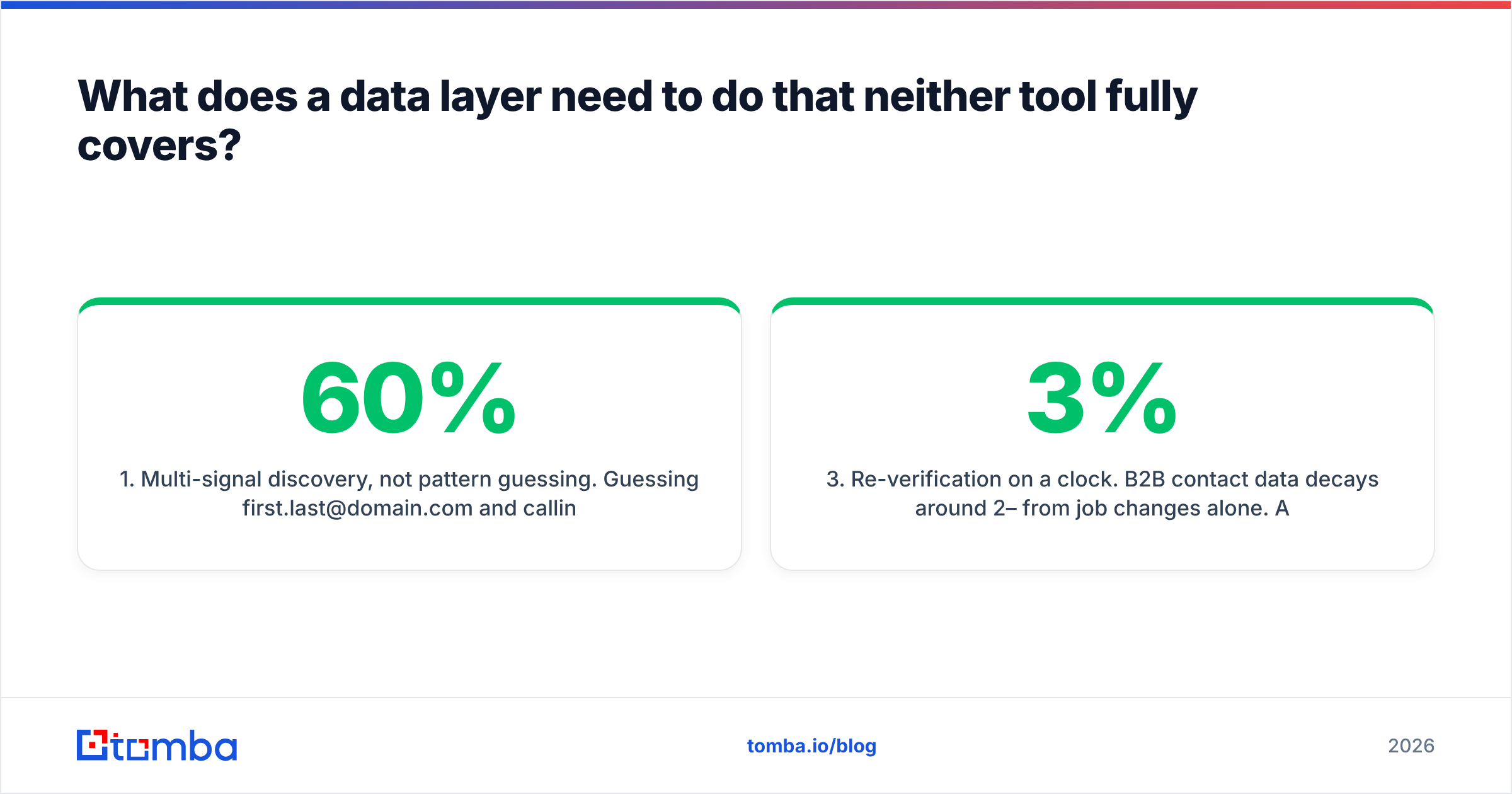
- Multi-signal discovery, not pattern guessing. Guessing
first.last@domain.comand calling it "found" produces a list that is 40–60% accurate. Real discovery cross-references public sources, crawled pages, and observed sending patterns. Check whether the vendor publishes its data sources. - Catch-all handling that is honest. The right answer for a catch-all domain is a confidence score plus a documented method, not a green checkmark. A dedicated catch-all verifier tells you whether the mailbox behind an accept-all MX actually exists.
- Re-verification on a clock. B2B contact data decays around 2–3% per month from job changes alone. A list verified in January is meaningfully wrong by June. Your data layer should support re-running email verification on stored records, not just on new lookups.
- API-first access. If enrichment only happens when a human clicks a button, it stops happening in week three. Look for a documented REST API, a CSV/bulk endpoint, and native writes into your CRM.
- Transparent credit accounting. Ask specifically: are you charged for failed lookups? For verification separately from discovery? For re-verifying a record you already own? The answers vary wildly and change the effective cost per usable contact by 2–3x.
Run those five against your current tool before you buy a second one. Half the time the fix is "verify properly," not "buy infrastructure."
What does a realistic 2026 outbound stack cost?#
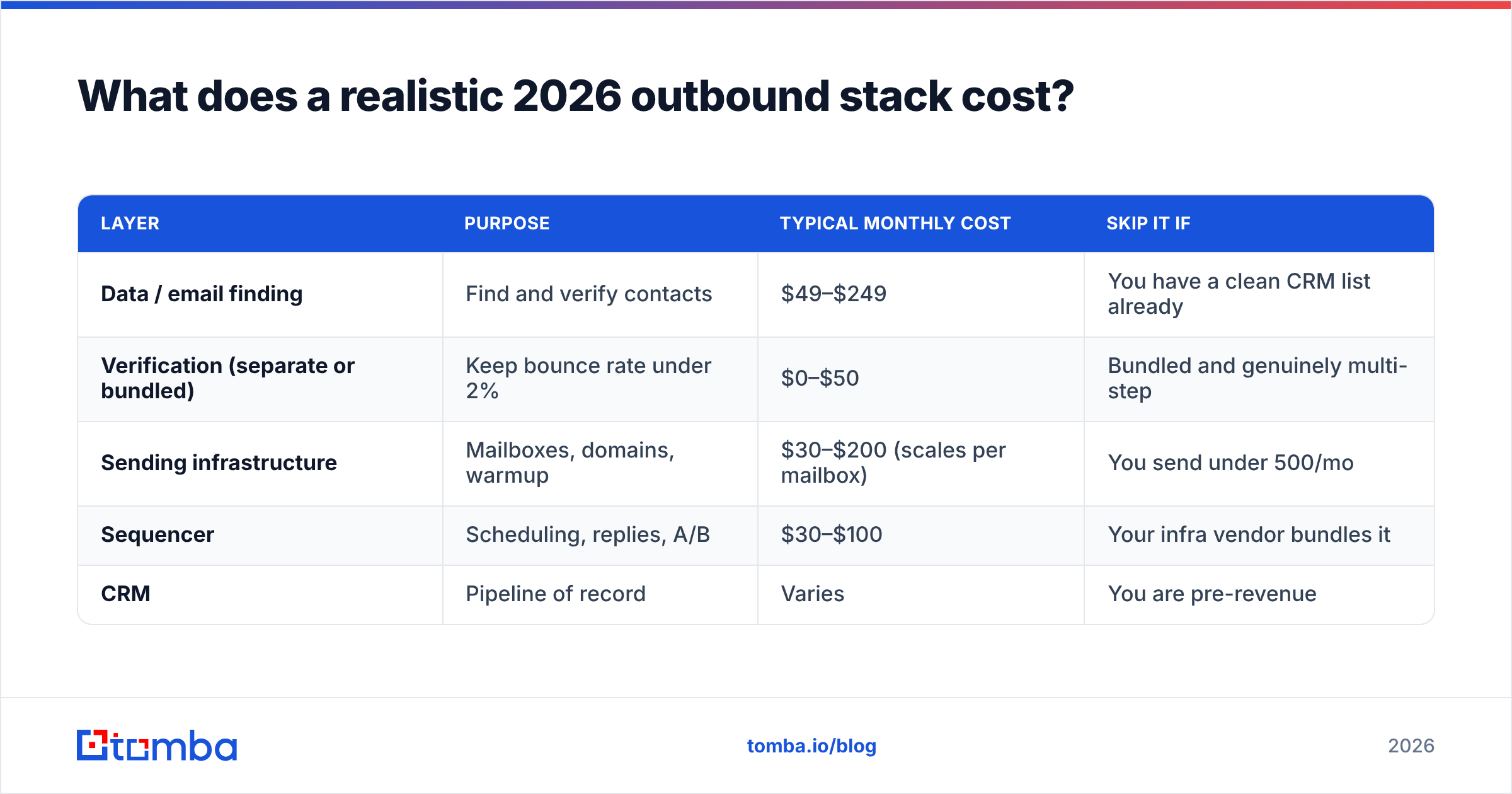
| Layer | Purpose | Typical monthly cost | Skip it if |
|---|---|---|---|
| Data / email finding | Find and verify contacts | $49–$249 | You have a clean CRM list already |
| Verification (separate or bundled) | Keep bounce rate under 2% | $0–$50 | Bundled and genuinely multi-step |
| Sending infrastructure | Mailboxes, domains, warmup | $30–$200 (scales per mailbox) | You send under 500/mo |
| Sequencer | Scheduling, replies, A/B | $30–$100 | Your infra vendor bundles it |
| CRM | Pipeline of record | Varies | You are pre-revenue |
Total for a functioning small-team stack: roughly $150–$400/month. An all-in-one at $99 looks cheaper until you count the domains you burn and the meetings you never booked because 18% of your list bounced.
On the data layer specifically, Tomba pricing runs a free tier at 25 searches/month, Starter at $49/mo, Growth at $99/mo, and Pro at $249/mo, with enrichment, verification, and domain search included rather than sold as separate SKUs. Compare that against how FindThatLead and any bundled verifier meter credits — the sticker prices are similar; the effective cost per usable contact often is not.
How do you actually test these tools before buying?#
Do not evaluate on features. Evaluate on a sample.
Take 100 contacts you already know are real — current customers, people you have emailed successfully, contacts from a recent event. Strip the emails out, leaving only name and company domain. Then run that list through each candidate tool.
Measure three numbers:
- Coverage: what percentage came back with any email at all?
- Accuracy: of those, what percentage matched the address you know is correct?
- False confidence: how many wrong addresses were returned as "verified" or "valid"?
That third number is the one nobody publishes and the one that predicts your bounce rate. A tool with 60% coverage and near-zero false positives beats a tool with 85% coverage that is confidently wrong a fifth of the time — because bad sends damage the sending domain you are paying Sendigram to protect.
Do the same on the infrastructure side: buy the minimum mailbox package, warm for the full recommended window (usually 2–3 weeks, not 3 days), then send 200 emails and check placement with a seed-list test before scaling. Vendor comparison sites like G2 are useful for spotting recurring complaints in reviews, but they will not tell you how a tool performs on your ICP's domains. Only the sample test does.
The verdict#
FindThatLead vs Sendigram is not a fair fight because they are not fighting. FindThatLead is a reasonable entry-level choice if you need lists and sends in one place and your volume is genuinely small. Sendigram is the right answer when your problem is capacity and domain risk, and it assumes you have already solved data elsewhere.
The pattern that holds up at scale: buy your data from a specialist, buy your sending capacity from a specialist, and connect them with a sequencer you can leave. That way a bad vendor in one layer costs you a migration, not your domain reputation.
If the layer you are fixing is data, start there. The Tomba Email Finder covers domain search, single and bulk lookups, catch-all-aware verification, and an API you can wire straight into your enrichment pipeline — free for the first 25 searches a month, $49/mo from there. Run your 100-contact sample against it before you renew anything else, and let the accuracy numbers decide the stack.
Related guides#
Ready to find emails that actually work?
Join 150,000+ professionals who stopped guessing and started sending. Free credits on signup — no credit card required.
Get the Tomba newsletter
Practical outbound tactics and product updates — once every two weeks.
About the author