FindThatLead vs SignalHire: Which Lead Tool Wins in 2026?
FindThatLead and SignalHire both promise verified B2B contacts, but they solve different problems. Here is an honest breakdown of accuracy, credits, phone data and real cost per usable lead in 2026.
TL;DR
- FindThatLead is a bulk-first prospecting tool: domain scraping, lead search, and a built-in cold email sender. Good when you want volume and a single dashboard.
- SignalHire is a person-first sourcing tool: a browser extension that reveals emails and direct dials from a LinkedIn or GitHub profile. Good for recruiters and sales reps working one profile at a time.
- Accuracy is close on common corporate domains. The gap opens on catch-all domains, non-US companies, and job titles that changed in the last 12 months.
- Credit models differ more than headline prices: SignalHire charges more per contact when you want phone numbers, FindThatLead burns credits on searches that return nothing usable.
- If your bottleneck is verified email at scale rather than phone numbers or a built-in sender, a dedicated finder-plus-verifier stack (Tomba, Findymail, Prospeo) usually costs less per usable lead.
What are FindThatLead and SignalHire?#
FindThatLead started as a Spanish-built email finder and grew into a small outbound suite. You give it a domain, a name plus company, or a set of search filters, and it returns business emails. It bundles a "Scrab.in" LinkedIn automation companion and an email sender so you can go from list to campaign without leaving the product.
SignalHire approaches the same problem from the opposite end. Its core artifact is the contact card: open a LinkedIn, GitHub, Xing, or Facebook profile, click the extension, and SignalHire reveals emails, personal emails, and — this is the differentiator — direct phone numbers. It also ships an ATS-lite pipeline, which tells you a lot about who buys it: recruiters.
That difference in origin explains almost every disagreement between the two tools.
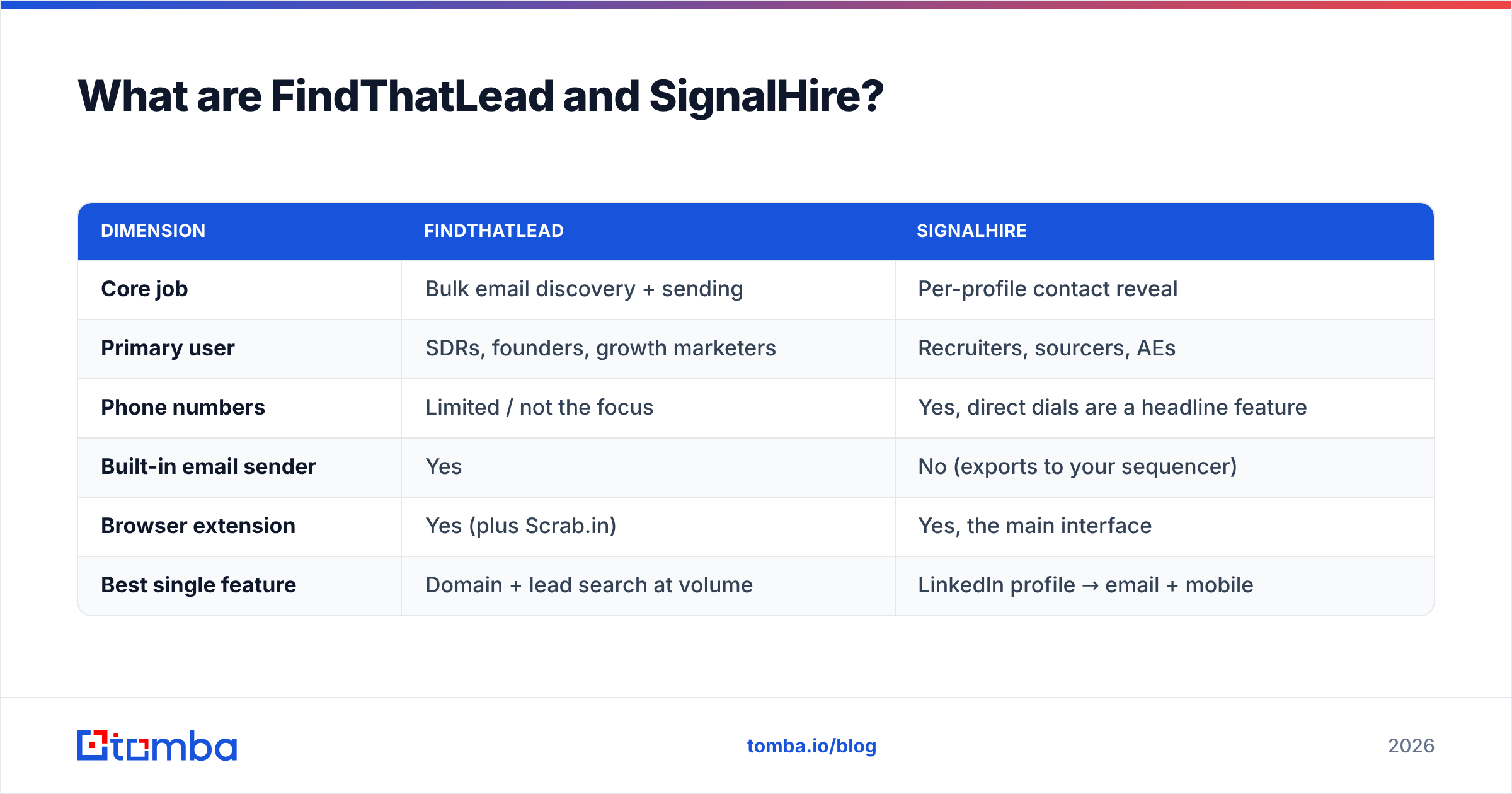
| Dimension | FindThatLead | SignalHire |
|---|---|---|
| Core job | Bulk email discovery + sending | Per-profile contact reveal |
| Primary user | SDRs, founders, growth marketers | Recruiters, sourcers, AEs |
| Phone numbers | Limited / not the focus | Yes, direct dials are a headline feature |
| Built-in email sender | Yes | No (exports to your sequencer) |
| Browser extension | Yes (plus Scrab.in) | Yes, the main interface |
| Best single feature | Domain + lead search at volume | LinkedIn profile → email + mobile |
How do FindThatLead and SignalHire compare head-to-head?#
Here is the practical comparison most buyers actually need. Prices below reflect publicly listed plans at the time of writing; both vendors change packaging often, so confirm on their pricing pages before you commit.
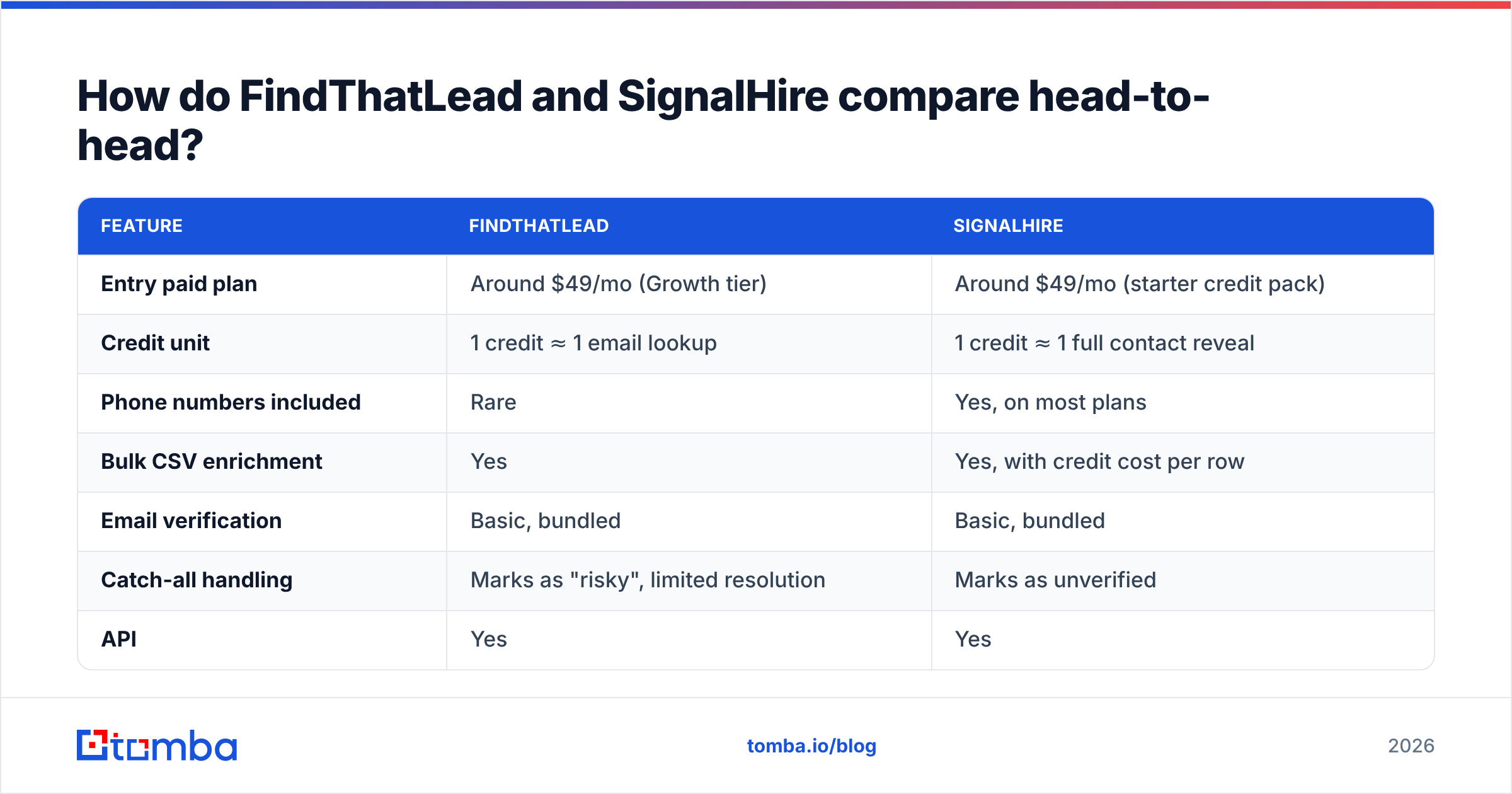
| Feature | FindThatLead | SignalHire |
|---|---|---|
| Entry paid plan | Around $49/mo (Growth tier) | Around $49/mo (starter credit pack) |
| Credit unit | 1 credit ≈ 1 email lookup | 1 credit ≈ 1 full contact reveal |
| Phone numbers included | Rare | Yes, on most plans |
| Bulk CSV enrichment | Yes | Yes, with credit cost per row |
| Email verification | Basic, bundled | Basic, bundled |
| Catch-all handling | Marks as "risky", limited resolution | Marks as unverified |
| API | Yes | Yes |
| Free tier | Small trial credits | Small trial credits |
| Native sender/sequencer | Yes | No |
| Team seats | Included on higher tiers | Per-seat pricing on team plans |
Read that table twice, because it contains the actual decision. If a row in your CRM is worthless without a mobile number, SignalHire wins before the conversation starts. If you are running 3,000-contact email campaigns and phone is a nice-to-have, FindThatLead's credit math is friendlier.
Which tool finds more valid emails?#
Accuracy is where vendor marketing goes soft and buyer disappointment goes hard. Both tools claim high accuracy. Both are measuring different things.

Three numbers matter, and you should demand all three from any vendor:
- Hit rate — of 100 contacts you asked for, how many returned an address at all? FindThatLead tends to score well here because it will guess patterns aggressively.
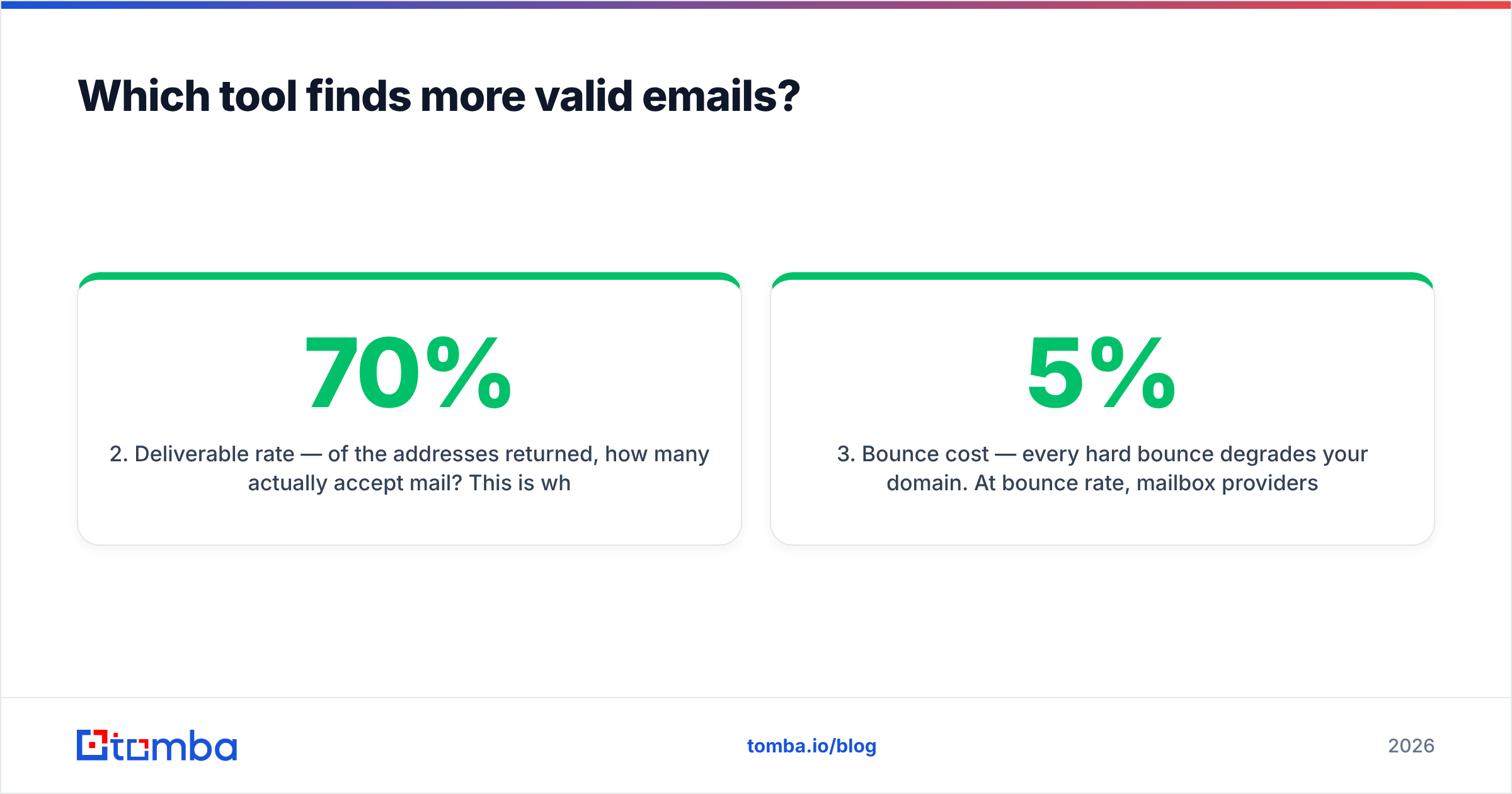
- Deliverable rate — of the addresses returned, how many actually accept mail? This is where aggressive pattern-guessing punishes you. A tool that returns 90 addresses with a 70% deliverable rate gives you 63 usable leads. A tool that returns 72 addresses at 95% gives you 68 — and a healthier sender reputation.
- Bounce cost — every hard bounce degrades your domain. At 5% bounce rate, mailbox providers start throttling. At 8%, you are in trouble.
In practical testing across mixed lists, both tools perform respectably on large US and Western European corporate domains with predictable patterns (first.last@). The divergence shows up in three places:
- Catch-all domains. Many mid-market companies accept all mail at the MX layer, so SMTP verification returns "unknown". Neither FindThatLead nor SignalHire resolves these confidently. This is exactly why a dedicated catch-all verifier exists as a separate product category.
- Small companies and agencies. Sub-50-employee firms with Google Workspace and no public email footprint are the hardest class. Hit rates drop sharply for everyone here.
- Stale titles. SignalHire's LinkedIn-anchored data reflects whatever the profile says today; FindThatLead's database can lag when someone moves companies.
Whatever you pick, run the output through an independent email verifier before it touches a sequencer. Trusting a finder's own verification badge is like letting a student grade their own exam.

Who wins on phone numbers and contact depth?#
SignalHire, clearly, and it is not close.
Direct dials are a genuinely hard data problem. They come from a mix of user contributions, opt-in networks, licensed data, and public records, and coverage varies wildly by geography — strong in the US, thinner in the EU where privacy rules bite harder. SignalHire has invested in this for years, and its contact card typically returns work email, personal email, and one or more phone numbers in a single credit.
FindThatLead was not built for this. If your outbound motion is email-plus-call, SignalHire or a dedicated phone finder is the right layer, and you should not expect FindThatLead to close that gap.
One caveat worth stating plainly: phone data ages faster than email data. A work email survives a role change inside the same company; a desk line does not survive a move to remote work. Validate before you dial — both for connect rates and for compliance with DNC rules in your target markets.
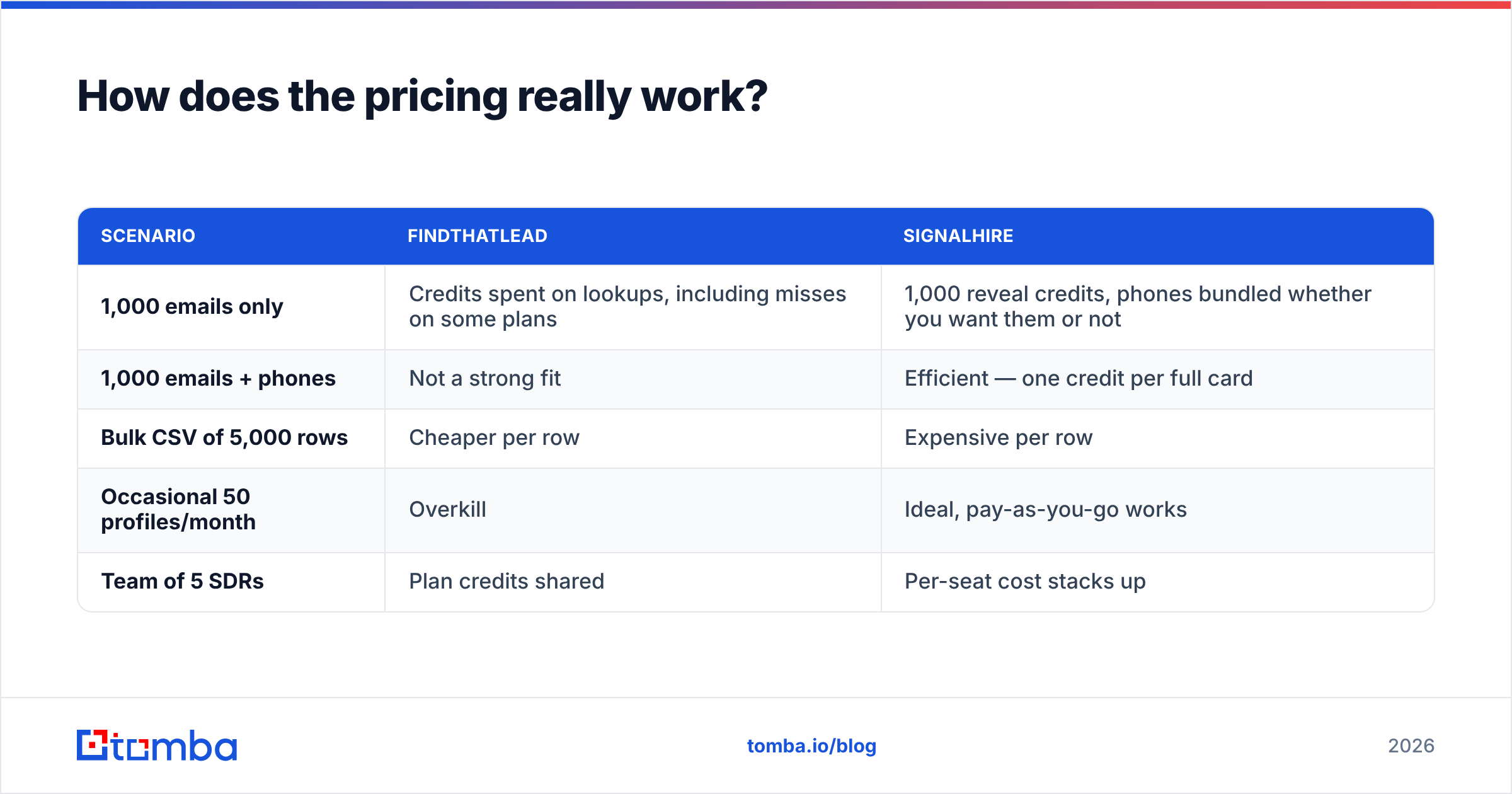
How does the pricing really work?#
Headline prices mislead because the two tools count credits differently.
| Scenario | FindThatLead | SignalHire |
|---|---|---|
| 1,000 emails only | Credits spent on lookups, including misses on some plans | 1,000 reveal credits, phones bundled whether you want them or not |
| 1,000 emails + phones | Not a strong fit | Efficient — one credit per full card |
| Bulk CSV of 5,000 rows | Cheaper per row | Expensive per row |
| Occasional 50 profiles/month | Overkill | Ideal, pay-as-you-go works |
| Team of 5 SDRs | Plan credits shared | Per-seat cost stacks up |
The metric to compute is cost per usable lead, not cost per credit. Take your monthly fee, divide by the number of contacts that were (a) returned, (b) verified deliverable, and (c) actually matched your ICP. A $49 plan that yields 200 usable contacts costs $0.245 each. A $99 plan yielding 900 usable contacts costs $0.11 each. The cheaper plan is the more expensive tool.
Also budget for the hidden line items:
- Verification — if the bundled verification is weak, you will pay a second vendor.
- Wasted credits — searches returning generic info@ addresses still cost you.
- Deliverability damage — bounces are not billed, but they cost you an entire sending domain if you ignore them. Check your sender reputation before and after a new data source goes into production.
Which fits your workflow better?#
Match the tool to how the work actually enters your day.
- You prospect from LinkedIn, one person at a time. SignalHire. The extension is the workflow, and the phone number closes the loop.
- You build lists from firmographic filters and blast sequences. FindThatLead. Search, export, send, all in one place.
- You enrich an existing CRM export of 10,000 rows. Neither is ideal. Use a bulk-first stack: a bulk email finder plus verification, or an API you can call from your own pipeline.
- You are a recruiter working reqs, not campaigns. SignalHire, with its pipeline feature doing light ATS duty.
- You are a developer wiring enrichment into a product. Compare API docs, rate limits, and response schemas — not dashboards. The email finder API matters far more than the UI you will never open.
- You need EU-heavy coverage with GDPR documentation. Ask both vendors for their lawful-basis documentation in writing. Do not accept a marketing page as an answer.
What are the honest weaknesses of each?#
FindThatLead's weak spots: the interface shows its age in places, support responsiveness varies by plan, and the bundled sender is functional rather than best-in-class — if you already run Instantly, Smartlead, or Lemlist, you are paying for a feature you will not use. Its aggressive pattern-guessing helps hit rate but hurts deliverability if you skip verification.
SignalHire's weak spots: cost scales badly with volume, per-seat pricing punishes growing teams, and there is no native sending — you are exporting to another tool regardless. Coverage outside North America and Western Europe thins out, and phone data quality varies enough that you should sample-test before buying a large pack.
Shared weakness: neither is a database-first product. If you want to discover companies matching an ICP rather than enrich a list you already have, you will end up adding a B2B database or an intent tool anyway. Cross-check both vendors' current review distributions on G2 rather than relying on any single comparison post — including this one.
Where does Tomba fit in this comparison?#
Fair disclosure: this blog is published by Tomba, so treat the next two paragraphs as an interested party's argument rather than a neutral verdict, and test it yourself.

Tomba sits deliberately in the middle of the two positions above: finder, verifier, domain search, catch-all resolution, phone lookup, and enrichment as separate composable tools behind one API, with no bundled sequencer you are forced to pay for. Tomba pricing runs a free tier at 25 searches/month, Starter at $49/mo, Growth at $99/mo, Pro at $249/mo, and custom Enterprise — the same entry point as both tools here, with the verification layer included rather than sold as an afterthought.
Where Tomba does not win: if direct dials are the primary deliverable of your workflow, SignalHire's phone coverage is more mature. If you want list-building and sending in one subscription with no other tools in the stack, FindThatLead's bundle is simpler. Buy for the bottleneck you actually have.

What is the verdict for 2026?#
Pick SignalHire if you source individual people, need phone numbers, and work in recruiting or a call-heavy sales motion. Accept that per-contact cost will be higher and that you will export to a separate sequencer.
Pick FindThatLead if you want list-building and cold email in one subscription, your targets are mid-market companies with predictable email patterns, and phone data is optional. Budget for external verification.
Pick neither if your real problem is volume email discovery with verified deliverability and an API you can automate against. That is a different product category, and both tools are competing at a disadvantage in it.
Run the same 100-contact test list through every candidate. Measure hit rate, deliverable rate after independent verification, and cost per usable lead. Whichever tool wins that test on your ICP wins the purchase, regardless of what any comparison table says.
Ready to benchmark? Start with the free tier of the Tomba Email Finder — 25 searches a month, no card, verification included — and compare its output line-for-line against whichever tool you are evaluating. The list that bounces least wins.
Related guides#
Ready to find emails that actually work?
Join 150,000+ professionals who stopped guessing and started sending. Free credits on signup — no credit card required.
Get the Tomba newsletter
Practical outbound tactics and product updates — once every two weeks.
About the author