FindThatLead vs Soleadify: Which Lead Tool Wins in 2026?
FindThatLead finds emails for people you already know about. Soleadify finds businesses you didn't know existed. Here's which one actually fits your outbound motion in 2026 — and where both leave gaps.
TL;DR
- They solve different problems. FindThatLead is a name-and-domain email finder with a built-in cold email sender. Soleadify is a company database built to discover small and local businesses you've never heard of.
- Pick Soleadify if your ICP is SMB/local (dentists, plumbers, restaurants, agencies) and your bottleneck is finding accounts, not contacts.
- Pick FindThatLead if you already have a target list — from LinkedIn, a conference, a scrape — and your bottleneck is turning names into working inboxes.
- Neither is a strong verification engine. Both hand you addresses; only one of them treats catch-all domains as a first-class problem, and neither does it as aggressively as a dedicated verifier.
- The honest answer for most teams: use a discovery source for accounts, then run every contact through a dedicated finder + verifier before it touches your sequencer.
What are FindThatLead and Soleadify, actually?#
FindThatLead is a Spanish-built prospecting suite that's been around since 2015. Its core is a classic email finder: give it a first name, last name, and company domain, and it returns a likely business email with a confidence score. Around that core it stacks a Chrome extension, a domain search ("give me everyone at stripe.com"), a lead search by role and location, a "Prospector" bulk mode, and — the part that differentiates it — a built-in cold email sender called Scrab.in/Sender. You can go from search to sequence without leaving the tool.
Soleadify is a different animal. It's a B2B company database that indexes tens of millions of businesses by crawling their websites, and its explicit specialty is the long tail: the 4-person dental practice, the regional HVAC contractor, the boutique law firm. Where most databases go deep on tech companies and enterprise headcount, Soleadify goes wide on local and SMB. You search by what a business does — the services listed on its site, the software it runs, the categories it advertises — and get back companies plus contacts attached to them.
That difference in origin explains almost every practical difference downstream. FindThatLead assumes you know who you're targeting. Soleadify assumes you don't yet.
How do FindThatLead and Soleadify compare head-to-head?#
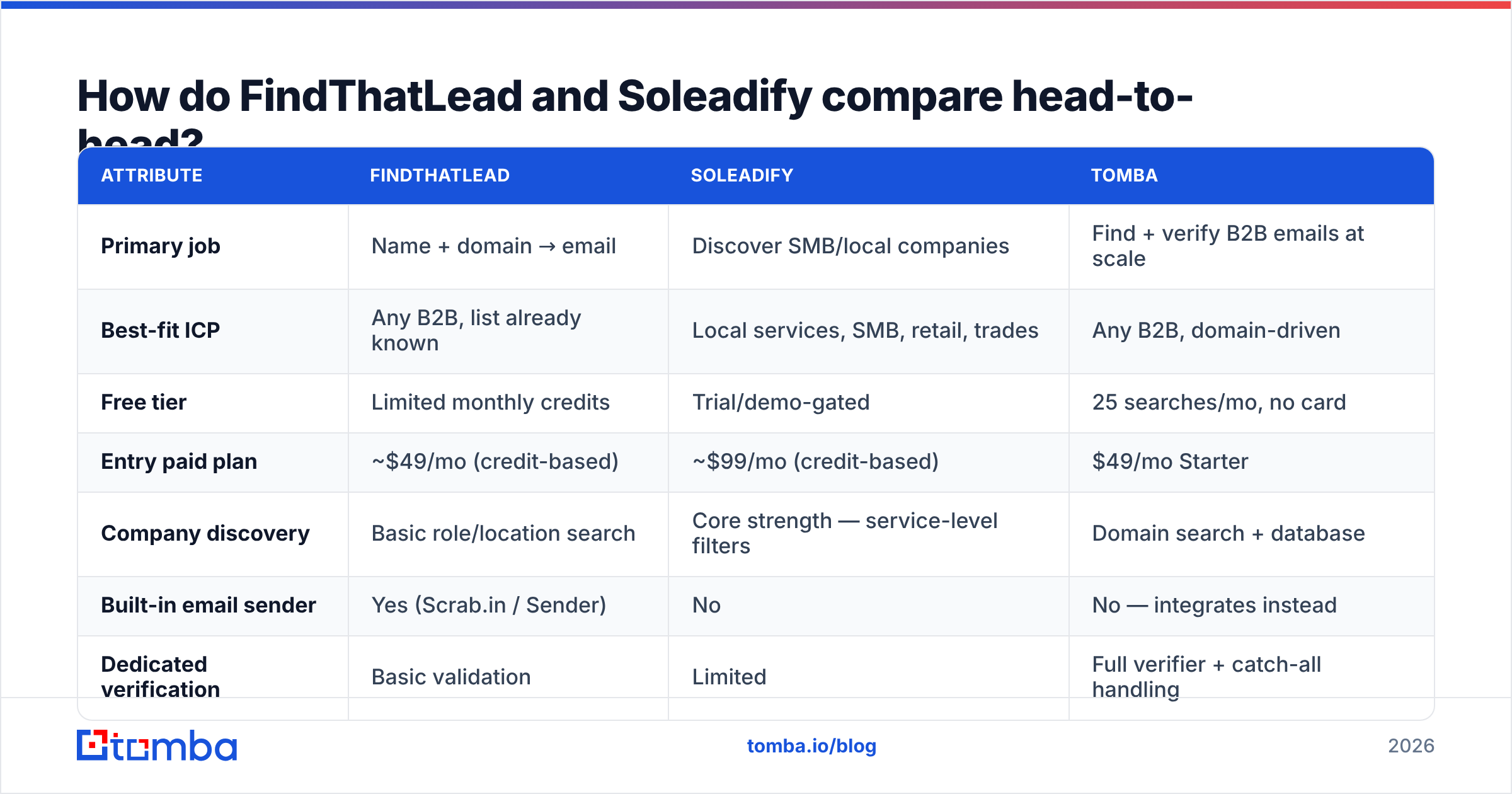
Here's the practical breakdown. Pricing moves — always confirm on the vendor's page before you buy — but the shape of each offer has been stable through 2026.
| Attribute | FindThatLead | Soleadify | Tomba |
|---|---|---|---|
| Primary job | Name + domain → email | Discover SMB/local companies | Find + verify B2B emails at scale |
| Best-fit ICP | Any B2B, list already known | Local services, SMB, retail, trades | Any B2B, domain-driven |
| Free tier | Limited monthly credits | Trial/demo-gated | 25 searches/mo, no card |
| Entry paid plan | ~$49/mo (credit-based) | ~$99/mo (credit-based) | $49/mo Starter |
| Company discovery | Basic role/location search | Core strength — service-level filters | Domain search + database |
| Built-in email sender | Yes (Scrab.in / Sender) | No | No — integrates instead |
| Dedicated verification | Basic validation | Limited | Full verifier + catch-all handling |
| Bulk enrichment | CSV upload | CSV + API | CSV, API, CLI, Sheets, Excel |
| API access | Yes, on higher tiers | Yes | Yes, on all paid tiers |
| Phone numbers | No | Yes (business lines) | Yes, via phone finder |
The table makes the real decision obvious: these two tools barely overlap in the middle. They overlap only at the edges — both can hand you an email address — and that's the least differentiated part of either product.

Which one has better data coverage?#
It depends entirely on who you sell to, and the honest framing is coverage shape, not coverage size.
Soleadify wins on breadth of business types. If your ICP is "chiropractors in Texas with more than three locations" or "e-commerce stores running Shopify Plus and selling supplements," Soleadify's crawl-first model surfaces companies that don't appear in tech-centric databases at all. These businesses often have no LinkedIn presence, no funding round, no press coverage — the signals most B2B databases depend on. Soleadify sees them because it reads their websites.
FindThatLead wins on the classic corporate motion. Feed it a list of 500 SaaS marketing managers you pulled from Sales Navigator, and it will resolve a solid share of them into work emails. Its pattern engine handles the common corporate formats well, and the domain search is a fast way to map an org.
Where both get thin is at the intersection: senior decision-makers at small companies. The owner of a 12-person agency often uses a generic info@ on their site and a personal Gmail everywhere else. Soleadify may give you the info@. FindThatLead may guess firstname@domain and mark it low-confidence. Neither is wrong; neither gets you a reply.
That gap is exactly why a separate email finder step matters. Pattern coverage varies by provider, and a second source on the same name-plus-domain input routinely lifts hit rate by double digits. Running discovery in one tool and resolution in another isn't redundancy — it's how you avoid inheriting a single vendor's blind spots.

Accuracy varies far more by ICP segment than by vendor marketing copy. Always benchmark on your own list before committing budget.
Is FindThatLead's accuracy good enough for cold email?#
Conditionally. FindThatLead returns a confidence score, and the high-confidence tier holds up reasonably well on established corporate domains where email patterns are consistent and public. The problem is the tail.
Two failure modes show up repeatedly in real campaigns:
- Catch-all domains. A catch-all mail server accepts every address at the domain, so an SMTP check returns "valid" for
asdfgh@company.comjust as readily as for the real one. Most finders mark these as "accept-all" or "risky" and pass the decision to you. If you send to them blind, you're gambling with your sender reputation. - Stale patterns. A company migrates from
first.last@toflast@after an acquisition, and pattern-based inference keeps returning the old format for months. The address bounces, and you've spent a credit plus a bounce.
FindThatLead has basic validation, but it's not a verification product — and it doesn't pretend to be. If you're sending at volume, you need a real email verifier in the chain. A dedicated verifier does SMTP handshake checks, MX record validation, disposable-domain detection, role-account flagging, and — critically — a catch-all verifier step that tries to distinguish real mailboxes on accept-all domains rather than shrugging.
The math is unforgiving. At a 4% bounce rate you're in the danger zone with most inbox providers; past 5% you start seeing deliverability degrade across your whole domain. Verification costs a fraction of a cent per record. A burned sending domain costs weeks.
Is Soleadify worth the higher price?#
If your ICP is local and SMB, yes — and it's not close. There is no cheap substitute for Soleadify's core capability.
Try building a list of "independent bike shops in the UK that offer repair services and have an online booking system" using a conventional B2B database. You'll spend a week stitching together Google Maps scrapes, Yelp exports, and manual site checks. Soleadify returns it as a search. That's the value, and for teams whose entire GTM depends on that segment, the higher entry price amortizes fast.
If your ICP is not local/SMB, Soleadify is expensive for what you'll actually use. You'd be paying a premium for long-tail coverage while working in the fat head of the market, where a dozen cheaper tools have equivalent or better data.
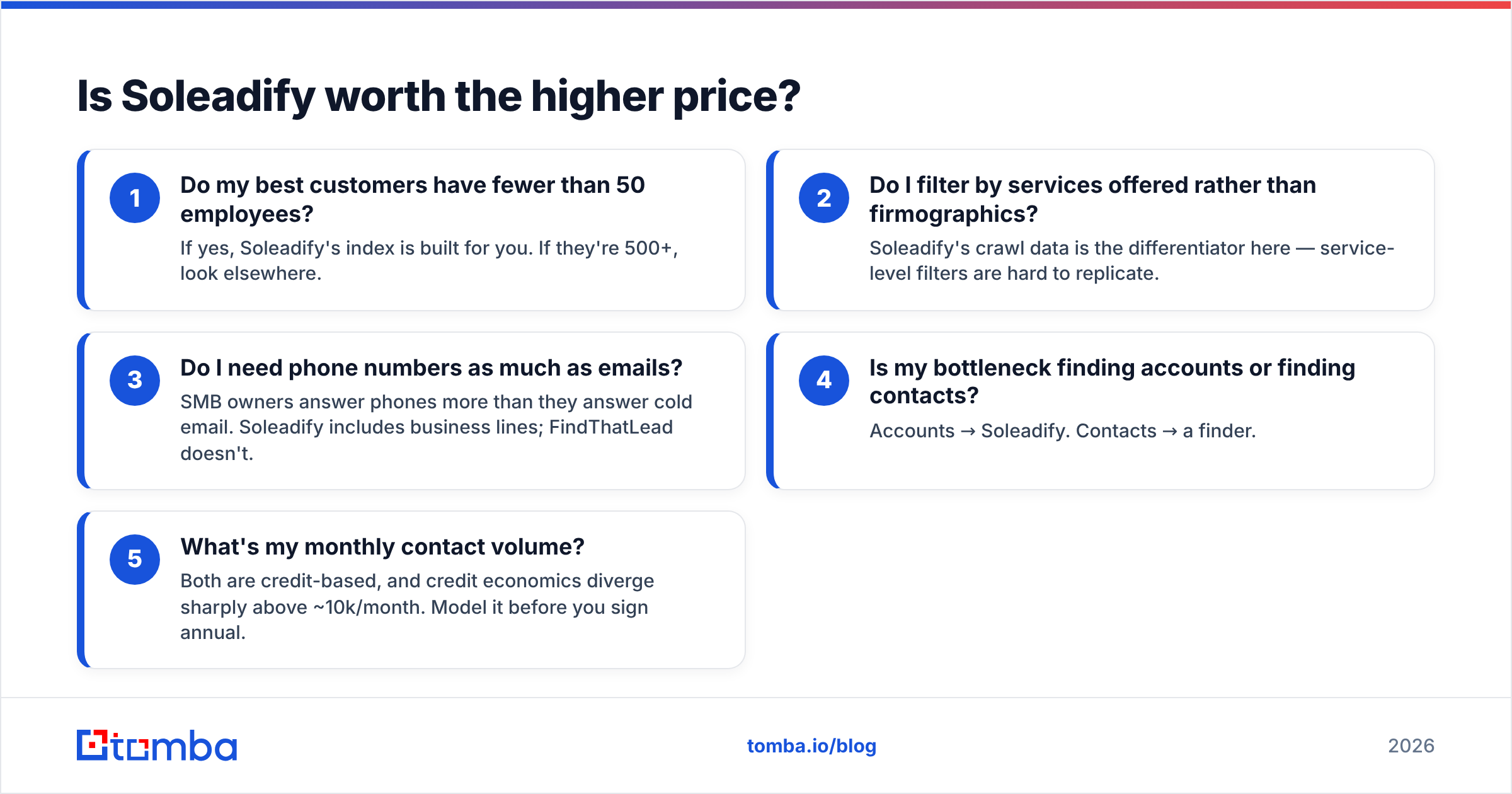
Ask yourself these five questions before committing:
- Do my best customers have fewer than 50 employees? If yes, Soleadify's index is built for you. If they're 500+, look elsewhere.
- Do I filter by services offered rather than firmographics? Soleadify's crawl data is the differentiator here — service-level filters are hard to replicate.
- Do I need phone numbers as much as emails? SMB owners answer phones more than they answer cold email. Soleadify includes business lines; FindThatLead doesn't.
- Is my bottleneck finding accounts or finding contacts? Accounts → Soleadify. Contacts → a finder.
- What's my monthly contact volume? Both are credit-based, and credit economics diverge sharply above ~10k/month. Model it before you sign annual.
What does each tool cost in practice?#
Credit-based pricing hides real cost in three places, and both vendors are guilty in different ways.
Failed searches. Some providers charge a credit whether or not they return a result. Others only charge on success. Ask directly and get it in writing — a 55% hit rate on a charge-on-attempt model nearly doubles your effective per-contact cost.
Credit rollover. Unused credits expiring monthly is standard and rarely negotiable on self-serve tiers. If your outbound is bursty — heavy list-building in January, light in February — you're pre-paying for capacity you'll never use.
Seat and API gating. FindThatLead's sender features and higher API limits sit on upper tiers. Soleadify's export limits and CRM sync typically do too. The plan you price out on the landing page is rarely the plan you end up on by month three.
For reference, Tomba pricing runs a free tier at 25 searches/month, Starter at $49/mo, Growth at $99/mo, and Pro at $249/mo, with API access included on every paid tier rather than gated behind an enterprise conversation. That last detail matters more than the headline number if you plan to enrich inside your own workflow rather than exporting CSVs by hand.

Can you use both together?#
Yes, and for a specific kind of team it's the strongest setup.
The pattern looks like this. Soleadify handles account discovery — it tells you which 3,000 businesses match your ICP, including the ones no other database knows exist. You export the company list with domains. Then a dedicated finder handles contact resolution — you run domain search against each domain to map who works there, pick the right roles, and resolve verified emails. Finally a verifier handles hygiene before anything enters your sequencer.
The reason to split these stages across tools rather than buying one all-in-one is simple: discovery and resolution have completely different accuracy profiles, and no vendor is best-in-class at both. A discovery tool's contact data is a bonus feature. A finder's discovery is a bonus feature. Buying the bonus feature of either one and treating it as your primary is how teams end up with 15% bounce rates and no idea why.
If you're processing lists in the thousands, do this stage-splitting with a bulk email finder or through the API rather than manual CSV round-trips. Manual exports are where data goes stale and where duplicate records multiply.
Which should you choose in 2026?#
Choose Soleadify if you sell to local or small businesses and account discovery is your real constraint. Nothing else on the market indexes the long tail the same way, and paying more for the only tool that solves your problem is rational.
Choose FindThatLead if you're a solo founder or small team that wants finding and sending in one subscription, your targets are conventional B2B companies, and you value simplicity over depth. The all-in-one convenience is genuine, and the entry price is fair for what you get.
Choose neither as your only tool if you're running outbound at volume. Both are good at one stage of the pipeline and adequate at the rest. Adequate at the verification stage is how deliverability dies.
For most teams the practical stack is: one discovery source matched to your ICP, one high-accuracy finder with real verification behind it, and one sequencer. Three tools, three jobs, no overlap. Independent reviews on G2 are useful for spotting where each vendor's users complain — read the 3-star reviews, not the 5-star ones, and pay attention to what people say about credit burn and support response times.
Ready to fix the contact-data layer?#
If your accounts are already sorted and what's breaking is the email layer — low hit rates, bounces you can't explain, catch-all domains you're guessing on — start there. Tomba Email Finder resolves names and domains into verified business emails, flags catch-all and role addresses instead of hiding them, and exposes the whole thing through an API on every paid plan so you can wire it into the workflow you already have. The free tier gives you 25 searches a month with no card, which is enough to benchmark it against whatever you're using now on your own list — which is the only benchmark that means anything.
Related guides#
Ready to find emails that actually work?
Join 150,000+ professionals who stopped guessing and started sending. Free credits on signup — no credit card required.
Get the Tomba newsletter
Practical outbound tactics and product updates — once every two weeks.
About the author