FindThatLead vs Startup Tracker: Honest 2026 Comparison
One tool finds emails at scale, the other tracks freshly funded startups. Here is how FindThatLead and Startup Tracker compare on accuracy, pricing, and the workflows they actually fit.
TL;DR
- FindThatLead is a general-purpose email finder and cold-email sender: domain search, name-to-email lookup, a Chrome extension, and a built-in campaign tool.
- Startup Tracker is a signal database, not an email finder. Its value is knowing which startups just raised money, hired, or launched — contact data is a secondary layer.
- They are not really substitutes. If you compare them head to head on "emails found per 1,000 rows," FindThatLead wins on volume and Startup Tracker wins on timing.
- The gap both leave is verification depth. Neither is built as a verification-first stack, which is where a dedicated email verifier earns its keep.
- Practical setup for most teams in 2026: use a signal source for who to contact, a finder for how to reach them, and a verifier before anything touches your sending domain.
What are FindThatLead and Startup Tracker?#
FindThatLead is a Spanish-built B2B prospecting suite that has been around since 2015. Its core loop is simple: give it a domain and it returns the email patterns and contacts it knows about; give it a first name, last name, and company, and it guesses plus checks a likely address. On top of that sits Scrab.in (a LinkedIn automation companion), a bulk CSV processor, and a lightweight cold-email sender so you can go from list to sequence inside one tab.
Startup Tracker solves a different problem. It monitors funding rounds, company launches, hiring spikes, and product releases across a startup universe, then lets you filter by round size, stage, geography, and industry. The pitch is timing: a Series A that closed eleven days ago has budget, headcount pressure, and no incumbent vendor lock-in. Contact details are attached to those companies, but the database exists to answer who just became a buyer, not what is this specific person's email.
That distinction shapes everything below. Comparing them is like comparing a fishing rod to a sonar. One tells you where the fish are; the other actually gets them out of the water.
How do FindThatLead and Startup Tracker actually differ?#
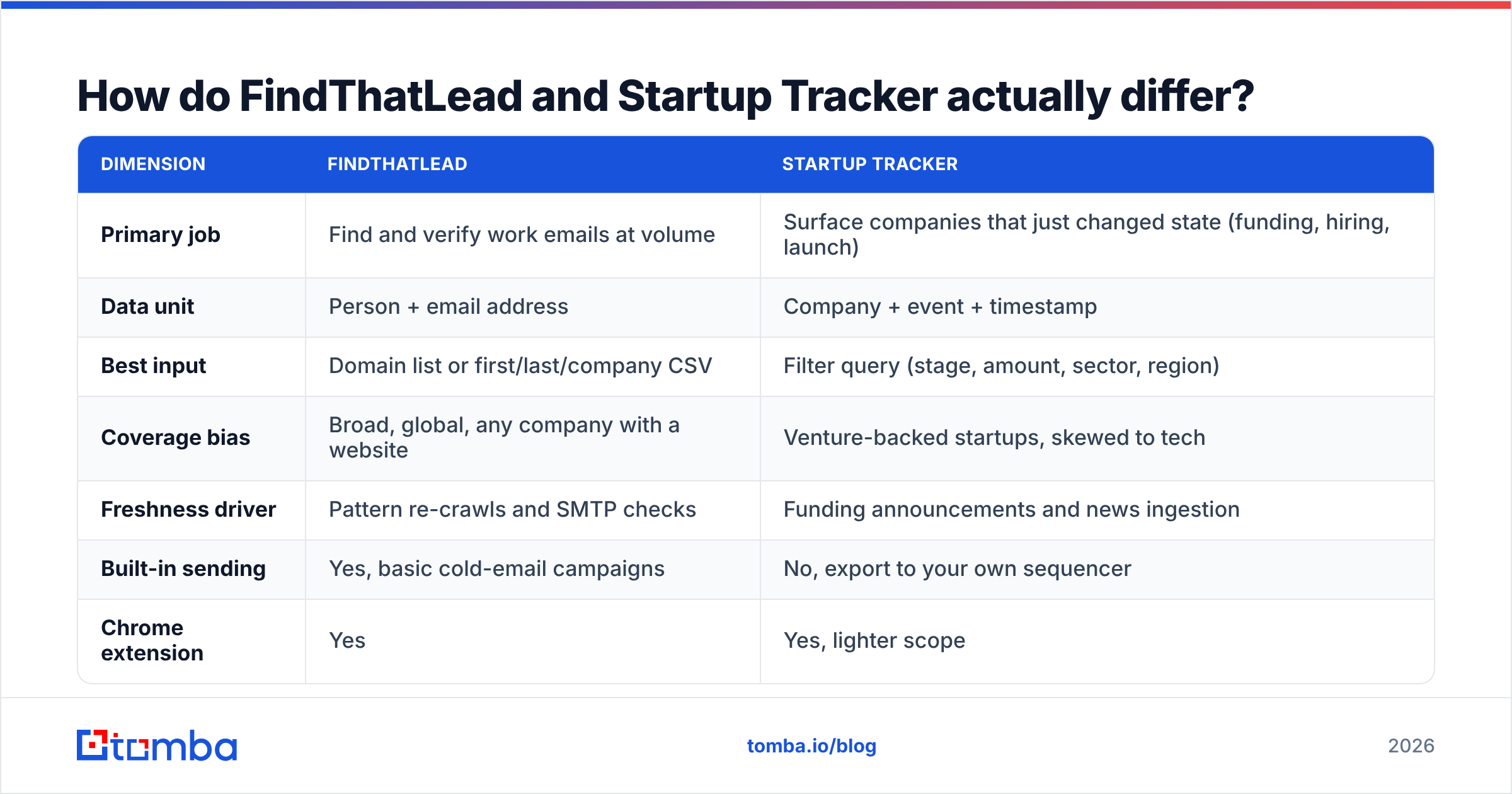
Here is the structural comparison before we get to numbers:
| Dimension | FindThatLead | Startup Tracker |
|---|---|---|
| Primary job | Find and verify work emails at volume | Surface companies that just changed state (funding, hiring, launch) |
| Data unit | Person + email address | Company + event + timestamp |
| Best input | Domain list or first/last/company CSV | Filter query (stage, amount, sector, region) |
| Coverage bias | Broad, global, any company with a website | Venture-backed startups, skewed to tech |
| Freshness driver | Pattern re-crawls and SMTP checks | Funding announcements and news ingestion |
| Built-in sending | Yes, basic cold-email campaigns | No, export to your own sequencer |
| Chrome extension | Yes | Yes, lighter scope |
| API access | Available on paid tiers | Available, mostly for company/event data |
Read that table twice before you buy either. Teams waste money by purchasing a signal tool expecting inbox-ready contacts, or an email finder expecting it to tell them which accounts are in-market.
Four practical differences that decide most evaluations:
- List construction is inverted. With FindThatLead you start with a company list you already have. With Startup Tracker the list is the product — you filter your way into accounts you had never heard of.
- Decay works differently. An email address decays slowly (people change jobs at roughly 20–25% per year). A funding signal decays fast — a round is a hot signal for maybe six weeks, then it is just a fact on a Crunchbase page.
- Enrichment depth. FindThatLead returns contact-level fields. Startup Tracker returns firmographic and event-level fields, so you usually still need a contact layer on top.
- Sending risk. FindThatLead lets you send from inside the tool, which is convenient and dangerous in equal measure. An unverified list plus a native sender is the fastest way to torch a domain.
Which tool finds more valid email addresses?#
If your only metric is "valid emails per 1,000 target contacts," FindThatLead is the stronger of the two — that is its actual product. Startup Tracker will hand you decision-maker names and often a company email, but the coverage on individual mailboxes is thinner and biased toward founders and C-level at small teams. That is fine if founders are your buyer. It falls apart if you sell to a VP of Engineering at a 300-person Series C.
The harder question is what "valid" means. Every finder in this category reports a confidence score, and every vendor computes it differently. A 95% confidence score on a pattern-guessed address at a catch-all domain is not the same thing as a 95% score on an address confirmed by SMTP handshake plus a corroborating public source.

Three things move real-world accuracy far more than the vendor you pick:
- Catch-all handling. Roughly a fifth of B2B domains accept everything at the MX layer. If your tool marks those "valid," your bounce rate lies to you until the campaign runs. A dedicated catch-all verifier resolves them properly instead of shrugging.
- Role-account filtering. info@, sales@, and hello@ inflate "found" counts and depress reply rates. Check whether your export is padded with them.
- Re-verification cadence. A list verified in January and mailed in April is a different list. Verify at send time, not at build time.
Independent user reviews on G2 put both tools in the same broad band that most mid-market prospecting tools occupy: good enough on well-known domains, patchy on small businesses, non-English markets, and companies using privacy-forward mail providers. Do not take any vendor's headline accuracy number at face value — including ours. Run 200 of your own known-good contacts through a trial and count the bounces yourself.
How do FindThatLead and Startup Tracker pricing compare?#
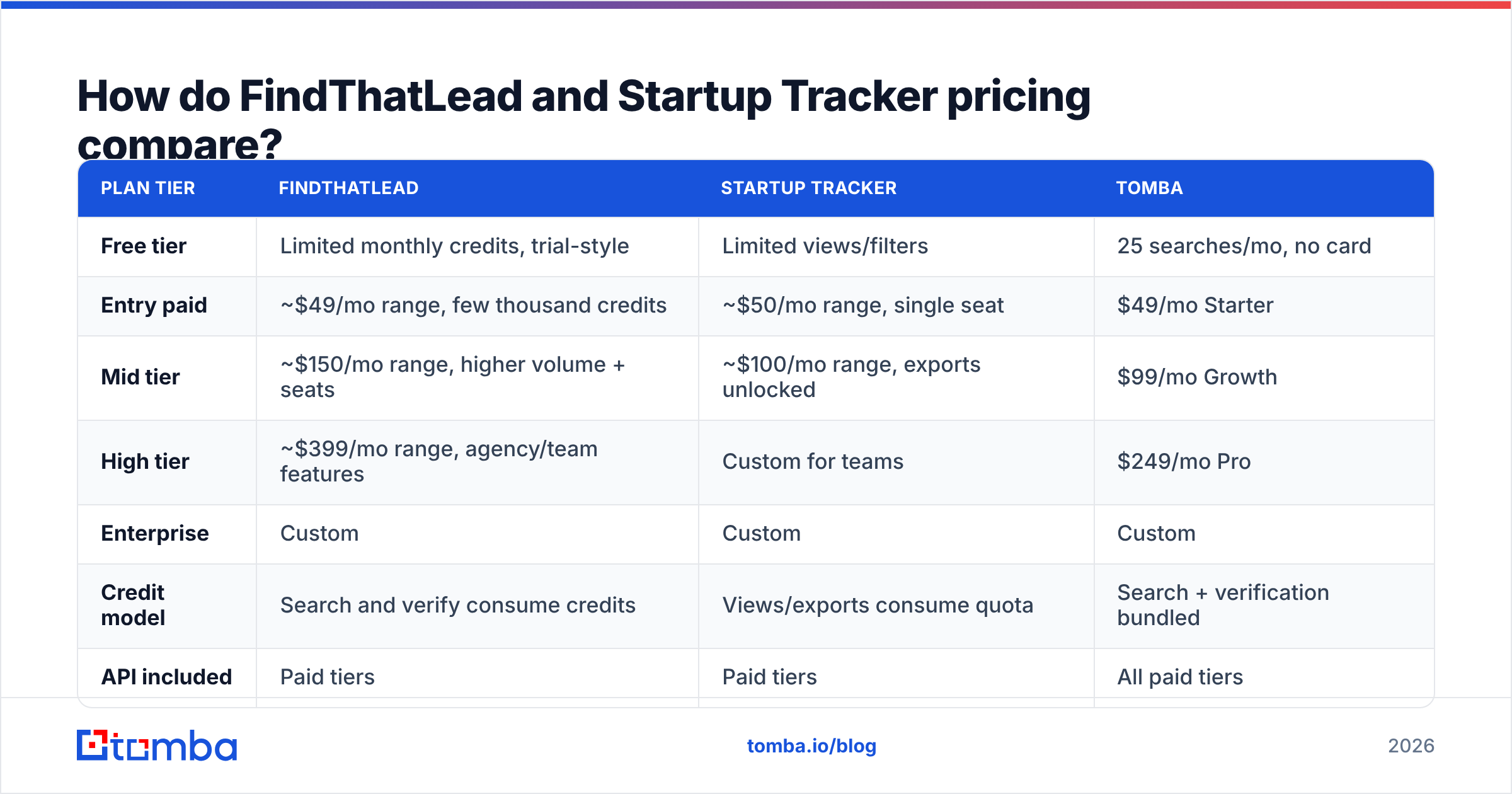
Both vendors have repriced more than once, so treat the figures below as a shape rather than a quote, and confirm on their live pricing pages before you sign anything.
| Plan tier | FindThatLead | Startup Tracker | Tomba |
|---|---|---|---|
| Free tier | Limited monthly credits, trial-style | Limited views/filters | 25 searches/mo, no card |
| Entry paid | ~$49/mo range, few thousand credits | ~$50/mo range, single seat | $49/mo Starter |
| Mid tier | ~$150/mo range, higher volume + seats | ~$100/mo range, exports unlocked | $99/mo Growth |
| High tier | ~$399/mo range, agency/team features | Custom for teams | $249/mo Pro |
| Enterprise | Custom | Custom | Custom |
| Credit model | Search and verify consume credits | Views/exports consume quota | Search + verification bundled |
| API included | Paid tiers | Paid tiers | All paid tiers |

The line item that ambushes people is the credit model. Ask three questions of any vendor here:
- Does a failed search burn a credit? Some tools charge for the attempt, not the result.
- Is verification billed separately from finding? If yes, your effective cost per usable contact can be double the sticker price.
- Do unused credits roll over, and do they expire on downgrade?
On Tomba pricing, verification is bundled with finding rather than sold as a second meter, which is the main reason cost-per-verified-contact tends to land lower than cost-per-search comparisons suggest. That is a structural difference, not a discount — and it matters most at volume, where a 2x hidden multiplier turns a $99 plan into a $200 one.
Which one should you buy for your use case?#
Match the tool to the motion, not to the feature list.
- You sell to freshly funded startups. Startup Tracker is the right first purchase. Filter to rounds closed in the last 30 days at your target stage, then run those domains through a domain search to build the contact layer. Signal first, contacts second.
- You have a defined ICP and a company list already. Skip the signal tool. You need bulk finding and verification — FindThatLead or a bulk email finder does this work, and the deciding factor is cost per verified row, not features.
- You are a solo founder doing 30 touches a week. Use the free tiers of both and a Chrome extension. Nothing here justifies a $150/mo line item at that volume.
- You are an agency running lists for clients. You need API access and predictable per-row costs. Native senders are a liability across multiple client domains — keep finding, verifying, and sending in separate systems so one client's bad list cannot damage another's reputation.
- You run a RevOps or data team. Buy the layer you cannot rebuild. Signals and verification are hard to replicate in-house; a name-to-email permutator is not.

Does either tool protect your sender reputation?#
Not by itself, and this is where a lot of comparisons stop too early.
FindThatLead's built-in sender is a genuine convenience for small teams — one login, list to campaign in ten minutes. It is also the exact workflow that produces 8% bounce rates, because nothing in the chain forces you to verify before the first send. Google and Microsoft both tightened bulk sender requirements in recent years, and a spam complaint rate above 0.3% now has visible consequences on inbox placement rather than theoretical ones.
Startup Tracker sidesteps the issue entirely by not sending. You export, you own the consequences.
The defensive layer is the same in both cases:
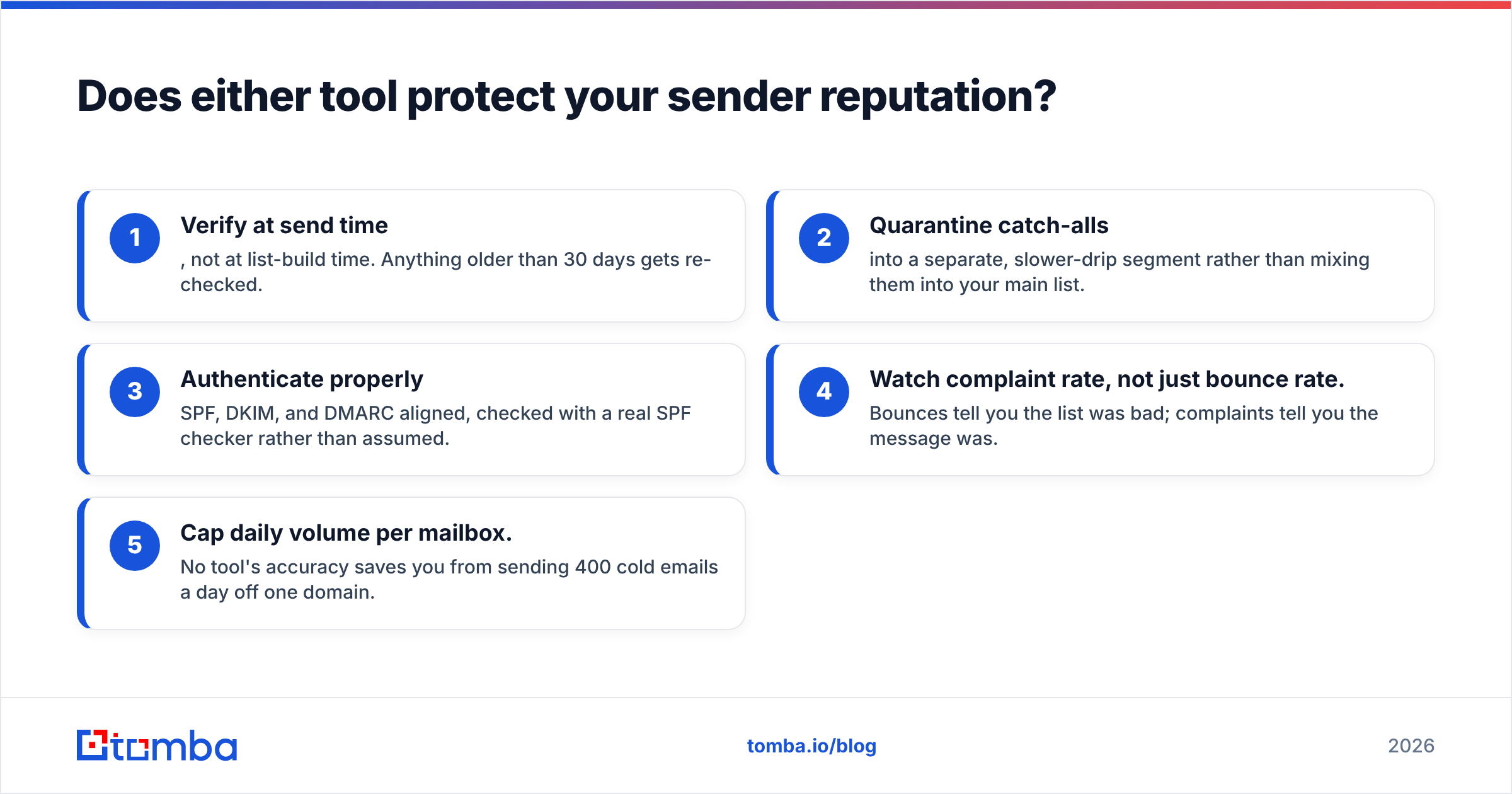
- Verify at send time, not at list-build time. Anything older than 30 days gets re-checked.
- Quarantine catch-alls into a separate, slower-drip segment rather than mixing them into your main list.
- Authenticate properly — SPF, DKIM, and DMARC aligned, checked with a real SPF checker rather than assumed.
- Watch complaint rate, not just bounce rate. Bounces tell you the list was bad; complaints tell you the message was.
- Cap daily volume per mailbox. No tool's accuracy saves you from sending 400 cold emails a day off one domain.
On the compliance side, both vendors operate under GDPR obligations for EU-sourced data, and both put the legitimate-interest determination on you. Neither one is a legal shield. If you sell into the EU, document your basis before you import anything.
What does a complete stack look like in 2026?#
The honest answer to "FindThatLead vs Startup Tracker" is that most teams running serious outbound end up with three layers, and these two tools sit in different ones:
| Layer | Job | Tools that fit |
|---|---|---|
| Signal | Decide which accounts are in-market now | Startup Tracker, job-change alerts, intent data |
| Contact | Turn accounts into verified reachable people | FindThatLead, Tomba, LinkedIn-based finders |
| Delivery | Send without destroying your domain | Dedicated sequencer + warmup + monitoring |
Trying to collapse all three into one vendor is where the money leaks. A signal tool with mediocre contact data forces manual lookups. A finder with a bolted-on sender encourages skipping verification. A sequencer with a built-in database usually has the weakest data of the three.
Where Tomba fits is squarely in the contact layer, with verification folded in rather than sold as an upsell. The email finder handles name-and-domain lookups, domain search maps entire companies, and the Tomba API lets you wire the whole thing into whatever signal source you chose — including a Startup Tracker export. If you already pay for a signal database, adding a verification-first contact layer is usually cheaper than upgrading that database to a tier it was never designed to serve.
Frequently asked questions#
Is Startup Tracker a FindThatLead alternative? No. They overlap only at the edges. If you cancel FindThatLead and replace it with Startup Tracker, you lose your email-finding capability and gain funding alerts. Evaluate them as complements or as replacements within their own category.
Which has better data for non-US companies? FindThatLead has European roots and reasonable EU coverage. Startup Tracker's coverage follows venture activity, so it is dense in the US, UK, Germany, France, and the Nordics, and thin elsewhere. Test your specific geography before committing.
Can I use either without a separate verifier? You can, but your bounce rate will decide whether that was a good idea. Any list you did not verify within the last 30 days should be treated as unverified.
Do they integrate with a CRM? Both offer exports and API access, and both connect through automation platforms. Check whether native HubSpot or Salesforce sync is on your tier or only on the top one — that detail moves more often than pricing does.
The bottom line#
FindThatLead and Startup Tracker answer different questions, and the teams that get value from either one know which question they are actually asking. If your bottleneck is who to contact, buy the signal database. If your bottleneck is how to reach them, buy the finder — and budget for verification either way, because that is the line item that decides whether your campaign lands in an inbox or a spam folder.
If verification is where your current stack leaks, start with the Tomba Email Finder. The free tier gives you 25 searches a month with no card, which is enough to run your own bounce test against whichever tool you are considering — and that test will tell you more than any comparison post, including this one.
Related guides#
Ready to find emails that actually work?
Join 150,000+ professionals who stopped guessing and started sending. Free credits on signup — no credit card required.
Get the Tomba newsletter
Practical outbound tactics and product updates — once every two weeks.
About the author