FindThatLead vs TailorMails: Which Outbound Tool Wins in 2026?
One tool finds the contacts, the other writes the message. We break down FindThatLead vs TailorMails on data quality, personalization depth, pricing, and where each one quietly falls apart.
TL;DR
- FindThatLead and TailorMails are not really competitors — FindThatLead is a lead sourcing tool (find emails, verify, blast), TailorMails is a lead messaging tool (AI research and personalized copy at scale).
- If your bottleneck is "I don't have enough contacts," FindThatLead is the closer fit. If it's "I have 4,000 contacts and 0.8% reply rate," TailorMails is the closer fit.
- Both are weak where the other is strong. Running only one usually means duct-taping a spreadsheet in the middle.
- FindThatLead's verification is bundled but shallow on catch-all domains; TailorMails assumes your list is already clean and does nothing to protect you if it isn't.
- The stack most teams actually end up with: a dedicated finder/verifier feeding a personalization layer feeding a sender. Pick each layer on merit, not on who bundled what.
What are FindThatLead and TailorMails?#
Short version: they solve two different halves of the same problem.
FindThatLead is a Spain-built B2B prospecting platform that has been around since roughly 2015. It does domain search, single and bulk email finding, a LinkedIn Chrome extension, basic email verification, and a lightweight sending module called Scrab.in-adjacent "Sender." Its pitch is breadth: one login, from "I know the company" to "the email is sent."
TailorMails sits at the other end. It is an AI personalization layer — you feed it a list of prospects, it scrapes public signals (site copy, LinkedIn activity, funding news, job posts) and writes a first line, a paragraph, or a full sequence tuned to each contact. It does not meaningfully source contacts for you. It assumes you arrived with a CSV.
So "FindThatLead vs TailorMails" is less a cage match and more a question about where your pipeline is actually leaking.
Where is your outbound actually breaking?#
Before comparing feature grids, diagnose. Four failure modes cover almost every underperforming outbound motion:
- Volume famine — you can only find 30–50 valid contacts a week, so nothing downstream matters. This is a sourcing problem. FindThatLead helps. TailorMails does nothing.
- Bounce bleed — you send 1,000 emails and 90 hard-bounce. Your domain reputation tanks within two weeks. This is a verification problem. Both tools are inadequate here on their own.
- Relevance collapse — deliverability is fine, opens are fine, replies are 0.6%. Your copy reads like a template because it is one. This is a messaging problem. TailorMails helps. FindThatLead does not.
- Targeting drift — you're reaching real people at real companies who will never buy. No tool fixes this. Fix your ICP.
If you can't confidently name which one you have, you're going to buy the wrong tool. Most teams assume #3 when they actually have #2, because bounce dashboards are boring and copy is fun to blame.

How do FindThatLead and TailorMails compare head-to-head?#
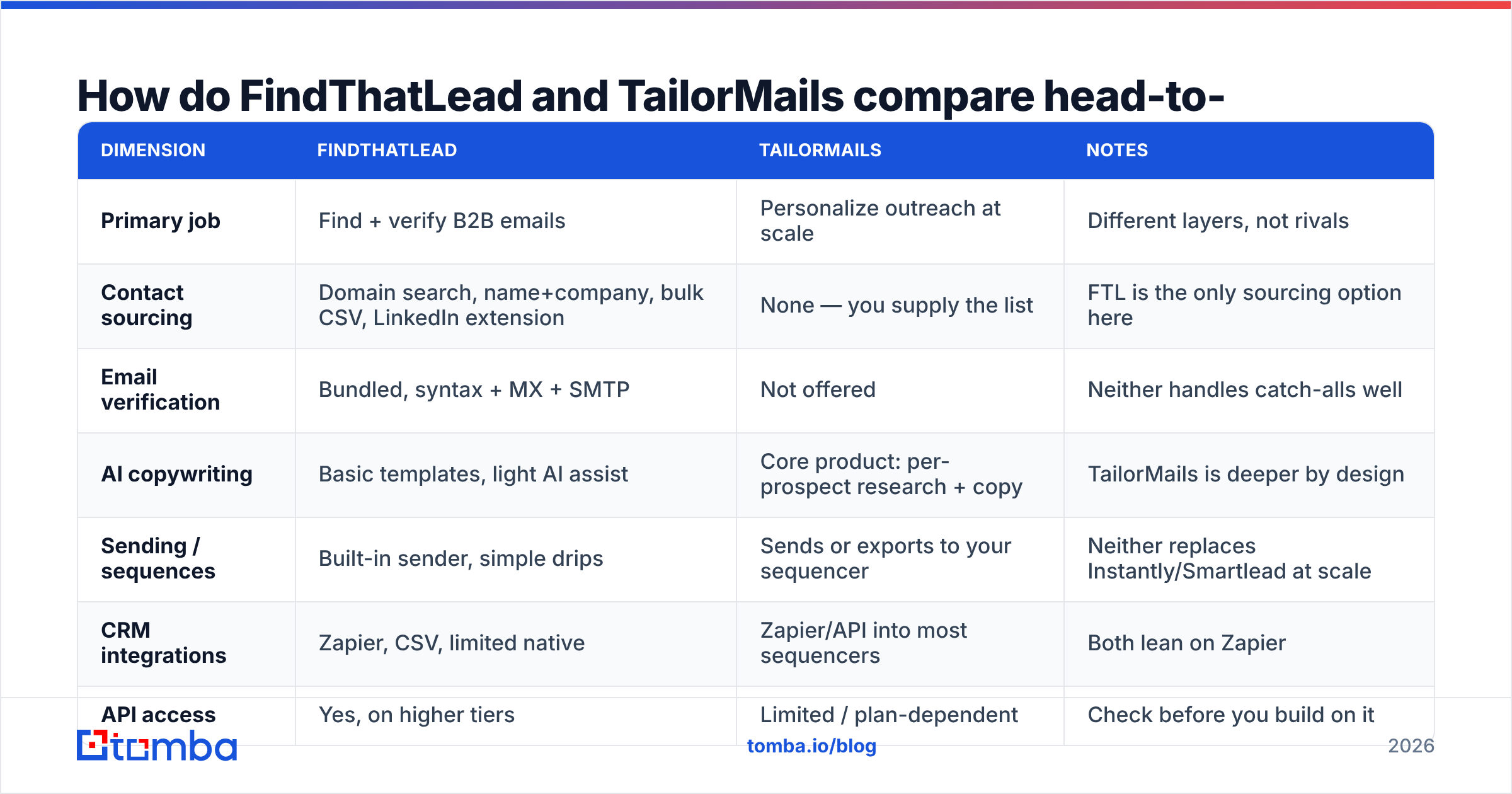
| Dimension | FindThatLead | TailorMails | Notes |
|---|---|---|---|
| Primary job | Find + verify B2B emails | Personalize outreach at scale | Different layers, not rivals |
| Contact sourcing | Domain search, name+company, bulk CSV, LinkedIn extension | None — you supply the list | FTL is the only sourcing option here |
| Email verification | Bundled, syntax + MX + SMTP | Not offered | Neither handles catch-alls well |
| AI copywriting | Basic templates, light AI assist | Core product: per-prospect research + copy | TailorMails is deeper by design |
| Sending / sequences | Built-in sender, simple drips | Sends or exports to your sequencer | Neither replaces Instantly/Smartlead at scale |
| CRM integrations | Zapier, CSV, limited native | Zapier/API into most sequencers | Both lean on Zapier |
| API access | Yes, on higher tiers | Limited / plan-dependent | Check before you build on it |
| Best for | SMB teams needing lists fast | Teams with lists and bad reply rates | |
| Weakest at | Deep personalization, catch-all accuracy | Anything before the message exists |
The table makes the honest answer obvious: neither tool is a complete outbound stack. FindThatLead gives you a list and a mediocre message. TailorMails gives you a great message and no list. Buying one and expecting a pipeline is how people end up paying for both by month three anyway.
Which one has better data accuracy?#
This is a category error, but it's the question everyone types into Google, so let's answer it properly: TailorMails has no email data of its own, so it cannot be more or less accurate than FindThatLead. It inherits whatever accuracy your source gave it. Garbage in, beautifully personalized garbage out.
That makes FindThatLead's accuracy the only number that matters in this pairing — and it's a mixed picture.
FindThatLead performs respectably on pattern-predictable domains: mid-market companies on Google Workspace or Microsoft 365 with a consistent first.last@ convention. Where it degrades, like most bundled finders, is on:
- Catch-all domains. A catch-all accepts every address at SMTP time, so a naive verifier marks everything "valid." You then send to
jsmith@when the real address isjohn.s@, and it silently disappears into a junk mailbox — or worse, a spam trap. A proper catch-all verifier uses pattern confidence and secondary signals instead of trusting the SMTP handshake. - Sub-50-employee companies, where crawl coverage thins out and pattern inference has fewer confirmed examples to learn from.
- Role accounts.
info@,sales@,hello@are technically deliverable and practically worthless. Count how many of your "found" contacts are role addresses before you celebrate a 90% hit rate.
If you are running FindThatLead into TailorMails, insert a real verification step between them. Not optional. A dedicated email verifier run on the list before personalization credits get spent is the single cheapest quality upgrade in this whole stack — you avoid paying an AI tool to research contacts who don't exist.
How do pricing and credits actually compare?#
Both vendors adjust pricing regularly, so treat the shape as more reliable than the exact figure and confirm on their own pages before you buy.
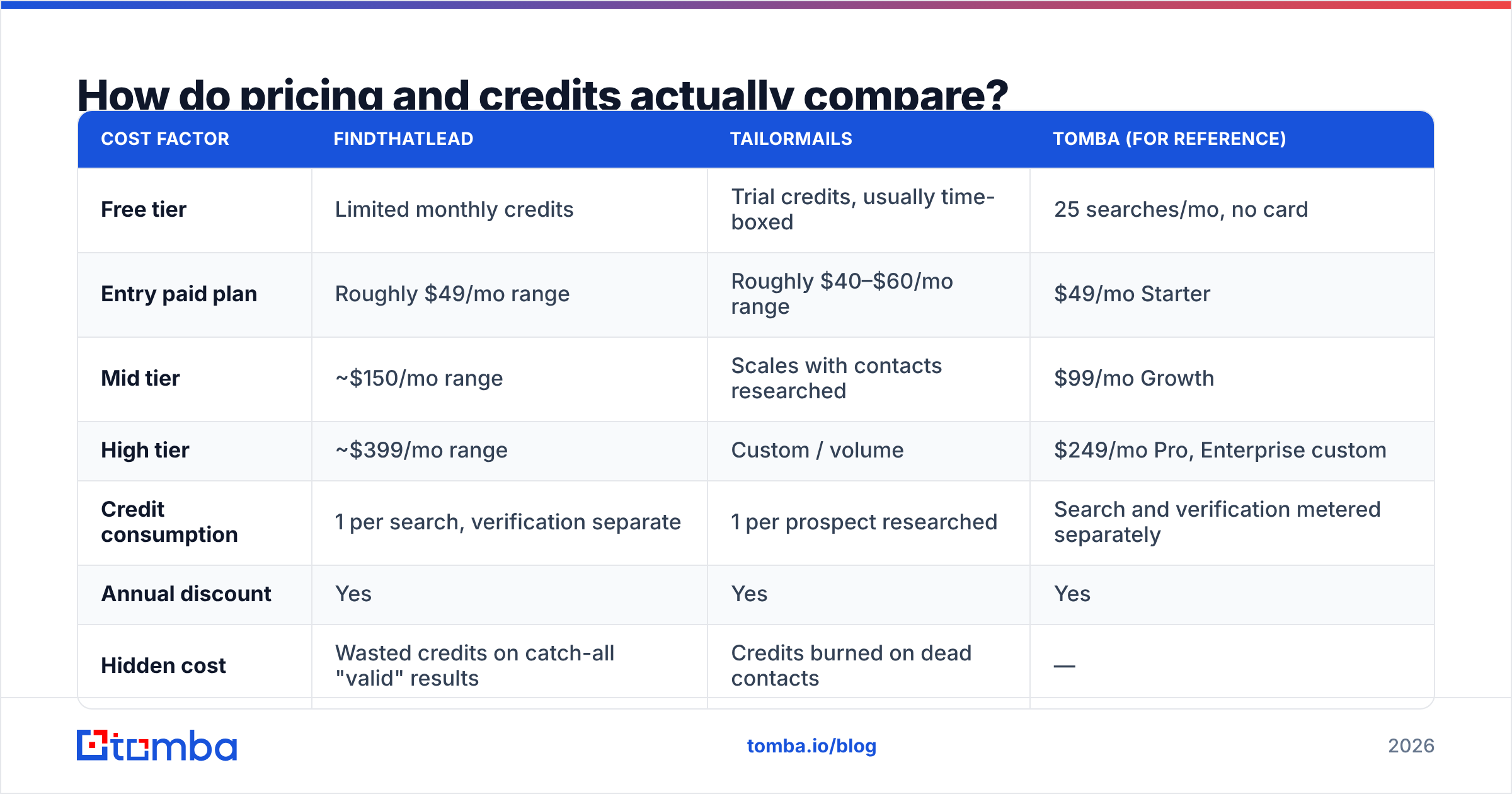
| Cost factor | FindThatLead | TailorMails | Tomba (for reference) |
|---|---|---|---|
| Free tier | Limited monthly credits | Trial credits, usually time-boxed | 25 searches/mo, no card |
| Entry paid plan | Roughly $49/mo range | Roughly $40–$60/mo range | $49/mo Starter |
| Mid tier | ~$150/mo range | Scales with contacts researched | $99/mo Growth |
| High tier | ~$399/mo range | Custom / volume | $249/mo Pro, Enterprise custom |
| Credit consumption | 1 per search, verification separate | 1 per prospect researched | Search and verification metered separately |
| Annual discount | Yes | Yes | Yes |
| Hidden cost | Wasted credits on catch-all "valid" results | Credits burned on dead contacts | — |
The hidden-cost row is the one to read twice. TailorMails charges per prospect researched, not per prospect who is reachable. A 22% invalid list means roughly a fifth of your personalization budget is spent writing bespoke paragraphs to nobody. That's a bigger real-world cost than any $10/mo difference on the sticker price. Compare Tomba pricing if you want a like-for-like on the sourcing layer.
Is TailorMails' personalization worth the credits?#
Sometimes. The honest framing is that AI personalization has a ceiling, and it's lower than the demos suggest.
What it does well:
- First-line generation from public signals. Referencing a recent funding round, a specific job posting, or a product page is genuinely better than "I came across your website."
- Volume of research. A human SDR can deeply research maybe 15 accounts a day. A tool doing shallow research on 500 beats deep research on 15 for top-of-funnel testing.
- Consistency. Your worst rep's emails get lifted to the team average.
What it does not do:
- Understand why someone would buy. It can tell you a company hired three backend engineers. It cannot tell you that means their data pipeline is breaking. That inference is your job, and it's the part that actually earns replies.
- Fix a bad offer. Personalized irrelevance is still irrelevance, and prospects have gotten good at spotting "AI noticed your blog post" openers.
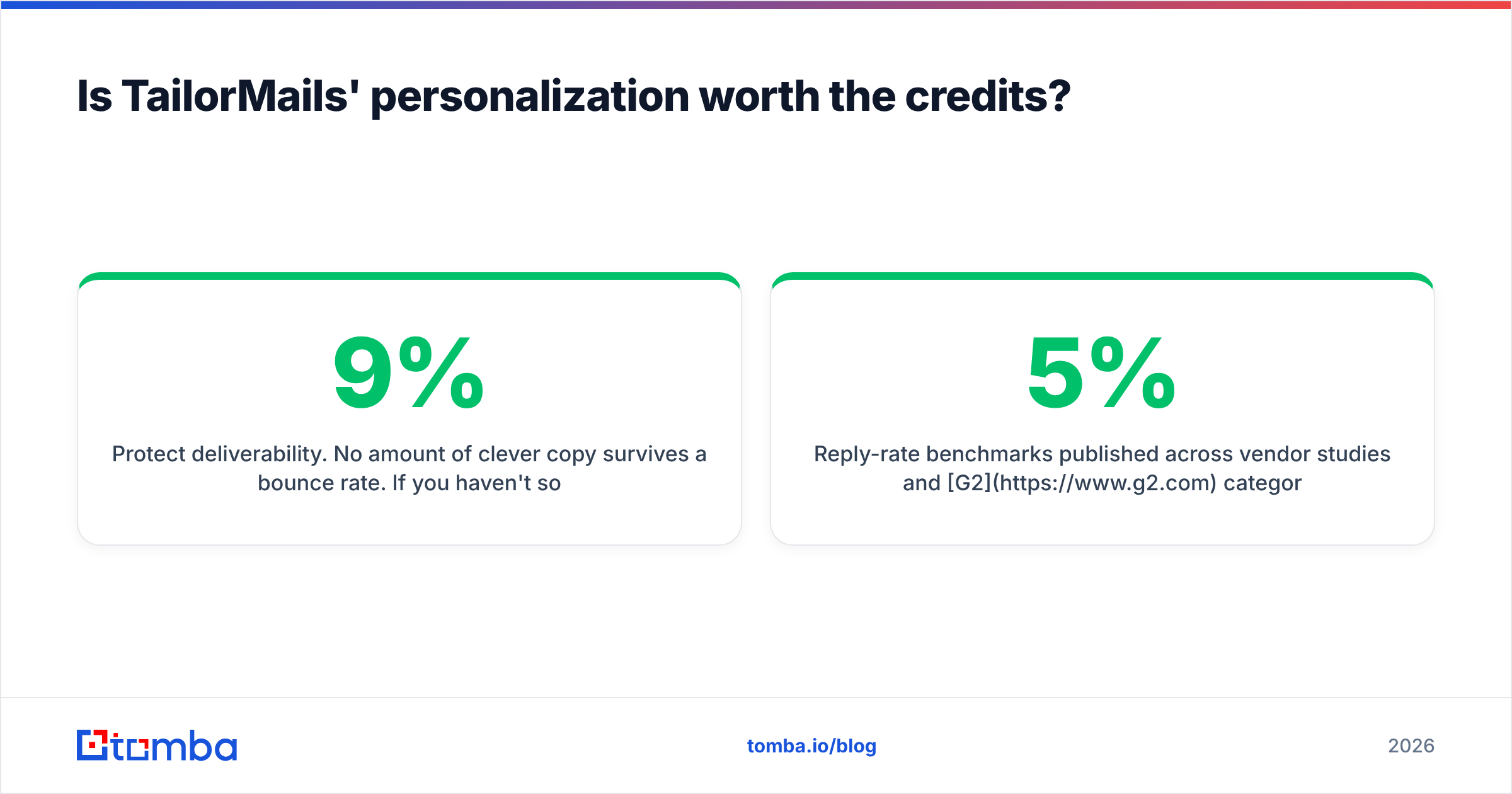
- Protect deliverability. No amount of clever copy survives a 9% bounce rate. If you haven't sorted email deliverability fundamentals — SPF, DKIM, DMARC, warmed domains, sane daily volume — personalization is decorating a sinking boat.
Reply-rate benchmarks published across vendor studies and G2 category reviews cluster cold outbound in the 1–5% range. Good AI personalization moves you within that band. It does not move you outside it. Set expectations accordingly and you'll be happy with the tool; expect 15% and you'll churn in six weeks.

Which should you pick for your use case?#
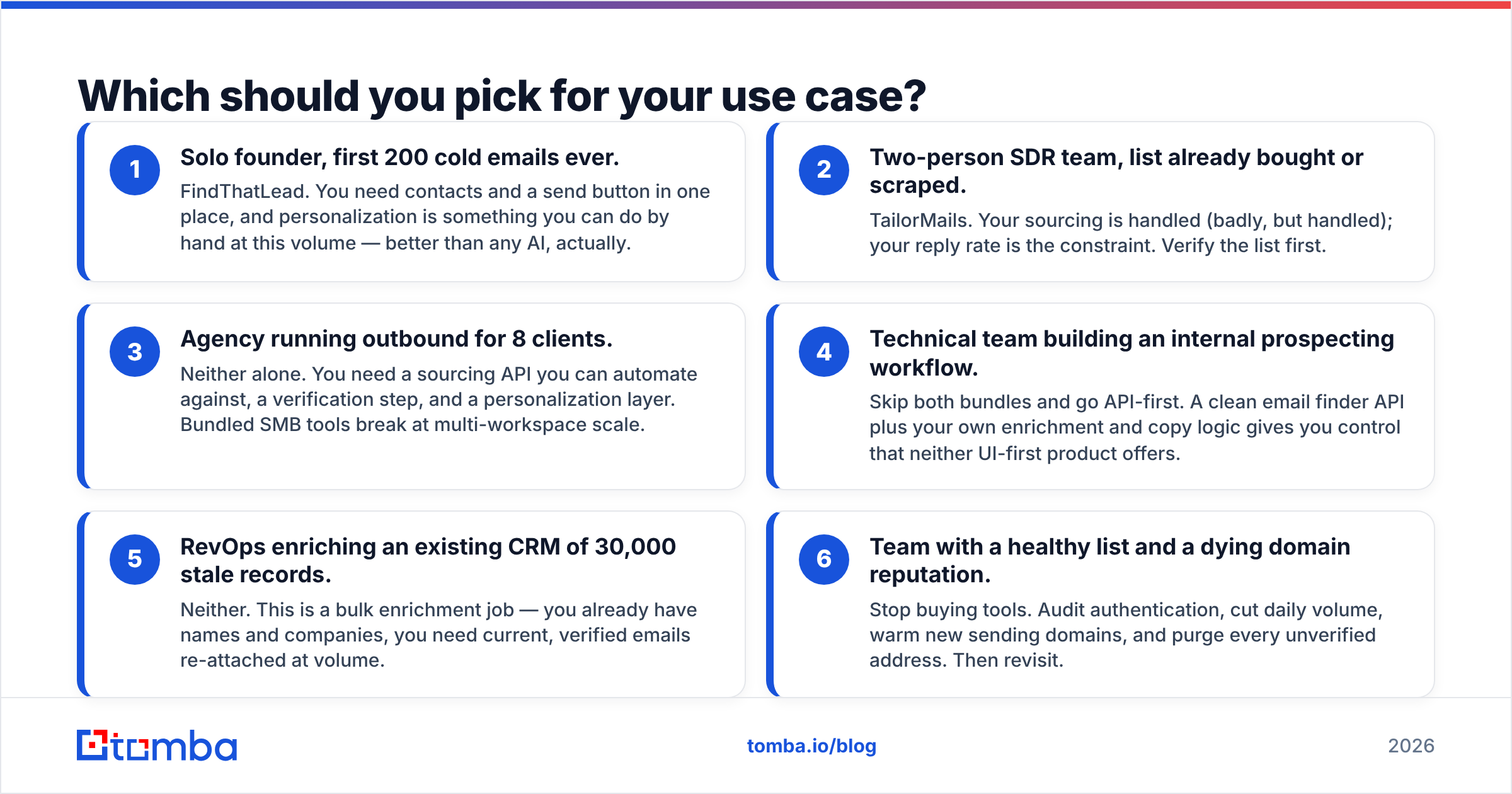
Six situations, six honest calls:
- Solo founder, first 200 cold emails ever. FindThatLead. You need contacts and a send button in one place, and personalization is something you can do by hand at this volume — better than any AI, actually.
- Two-person SDR team, list already bought or scraped. TailorMails. Your sourcing is handled (badly, but handled); your reply rate is the constraint. Verify the list first.
- Agency running outbound for 8 clients. Neither alone. You need a sourcing API you can automate against, a verification step, and a personalization layer. Bundled SMB tools break at multi-workspace scale.
- Technical team building an internal prospecting workflow. Skip both bundles and go API-first. A clean email finder API plus your own enrichment and copy logic gives you control that neither UI-first product offers.
- RevOps enriching an existing CRM of 30,000 stale records. Neither. This is a bulk enrichment job — you already have names and companies, you need current, verified emails re-attached at volume.
- Team with a healthy list and a dying domain reputation. Stop buying tools. Audit authentication, cut daily volume, warm new sending domains, and purge every unverified address. Then revisit.
What does a sane 2026 outbound stack look like?#
Three layers, chosen independently:
Layer 1 — Sourcing and verification. This is where accuracy compounds, so it's the wrong place to accept "good enough because it's bundled." You want per-result confidence scores, honest catch-all handling, and metered verification you can run before anything downstream spends money. A domain search that returns every discoverable address at a company with its pattern and confidence beats one-off lookups for account-based work.
Layer 2 — Personalization. This is where TailorMails genuinely earns its place, assuming Layer 1 handed it clean input. Judge it on research signal quality, not on how good the sample emails look — sample emails are always cherry-picked.
Layer 3 — Sending and sequencing. Dedicated senders with inbox rotation, warmup, and reply detection outperform the sender modules bundled into finder tools by a wide margin. FindThatLead's sender is fine for a few hundred emails a month and painful past that.
The mistake is buying a tool that covers 1.5 of these layers and then discovering the half-covered one is the one that determines whether you book meetings. As the broader email marketing discipline learned a decade ago, list hygiene and sender reputation dominate creative every single time.
Frequently asked questions#
Can FindThatLead replace TailorMails? Not for personalization depth. FindThatLead has templating and light AI assistance; TailorMails does per-prospect research. If personalization is your bottleneck, FindThatLead won't fix it.
Can TailorMails replace FindThatLead? No. TailorMails does not source contacts. You will still need a finder or a database.
Do I need a separate verifier if FindThatLead verifies? On catch-all-heavy lists, yes. Bundled SMTP checks mark catch-alls as valid and you inherit the bounce risk. Run a dedicated verification pass before you spend sending or personalization credits.
What about free options? Free tiers are for evaluating accuracy on domains you already know the answer for, not for running a campaign. Test 20 contacts where you can verify the truth manually, then compare hit rates honestly.
The practical recommendation#
Diagnose first, buy second. If your problem is that you cannot find enough valid contacts, fix the sourcing layer before you spend a cent on AI copy — a beautifully personalized email to a dead address is worth exactly zero.
That's where Tomba Email Finder fits into this comparison: it's the Layer 1 piece, built to hand a clean, confidence-scored list to whatever personalization and sending tools you prefer. Start on the free tier with 25 searches a month, test it against domains where you already know the correct addresses, and only scale up ($49/mo Starter, $99/mo Growth) once the hit rate holds on your actual ICP. Then let TailorMails — or your own writing — do what it's genuinely good at, on contacts that actually exist.
Related guides#
Ready to find emails that actually work?
Join 150,000+ professionals who stopped guessing and started sending. Free credits on signup — no credit card required.
Get the Tomba newsletter
Practical outbound tactics and product updates — once every two weeks.
About the author