FindThatLead vs Thomson Data: Which B2B Data Tool Wins in 2026?
One sells you a self-serve email finder, the other sells you a custom-built list with a quote attached. Here's how FindThatLead and Thomson Data actually compare on accuracy, pricing, and bounce risk in 2026.
TL;DR
- FindThatLead is a self-serve prospecting suite: search by domain, name, or LinkedIn URL, verify, then send cold email from the same dashboard. You control the workflow, you pay a flat monthly fee.
- Thomson Data is a list vendor: you describe an audience, a sales rep scopes it, and you receive a custom file (often with phone, firmographic, and technographic fields attached). Pricing is quote-based, not published.
- These are not the same product category. Comparing them is really comparing build-your-list-live against buy-a-list-once — and the failure modes are completely different.
- Static purchased files decay fast: B2B contact data goes stale at roughly 22–30% per year, so a file that was accurate on delivery day may not be accurate 90 days later.
- If you want fresh, per-contact data with verification on the same call, an API-first finder like Tomba Email Finder covers both jobs from $49/mo.
What is FindThatLead and who is it for?#
FindThatLead is a Barcelona-based prospecting platform built around a simple loop: find email addresses, verify them, and send a sequence. Its main modules are a lead search (name + company domain → email), a domain search that returns every address it knows for a company, a Prospector that filters by role and location, a bulk CSV processor, a Chrome extension, and a built-in cold-email sender.
The target user is obvious once you use it: a founder, a solo SDR, or a small agency that wants one subscription instead of four. You are doing the work yourself — building queries, exporting lists, cleaning them, launching campaigns. Nobody is going to scope an audience for you.
Its practical limits are just as clear. Coverage skews toward SMB and European tech companies. Enterprise-level firmographic filtering (revenue bands, install base, intent) is thin compared to a dedicated database. And the send-from-the-same-tool convenience is a double-edged sword — deliverability control is coarser than a purpose-built sending platform.
What is Thomson Data and how does it actually sell?#
Thomson Data is a US-headquartered B2B data provider that sells built-to-order contact lists. You don't log into a self-serve dashboard and pull 200 rows. You submit a request — "IT decision-makers at healthcare companies with 200+ employees in the Midwest, with Salesforce installed" — and a rep comes back with a count and a price.
That model has genuine advantages:
- Breadth of attributes. Beyond email, you can typically request direct dial, mailing address, SIC/NAICS code, employee count, revenue band, and technology install data. A finder tool won't hand you a full firmographic profile.
- Niche coverage. Healthcare, manufacturing, education, and government segments are hard to assemble from web-crawled sources. List vendors have been buying and licensing these files for years.
- Volume in one transaction. Need 40,000 records for a direct mail plus email campaign? That's one purchase order, not 40,000 API calls.
- Human scoping. A rep who understands your ICP can catch a bad filter before you pay for it.
And the real trade-offs:
- Quote-based pricing. No public price page means no budgeting until you've talked to sales. Expect minimum order sizes.
- Static delivery. The file is a snapshot. It does not update when a contact changes jobs next month.
- Accuracy guarantees are contractual, not live. Vendors commonly promise a deliverability floor (85–90% is a typical industry claim) with credits for overage. Credits do not repair your sender reputation after the damage is done.
- You share the file with other buyers unless you've paid for exclusivity — meaning your "cold" prospect may have received four similar emails that quarter.
FindThatLead vs Thomson Data: how do they compare feature by feature?#
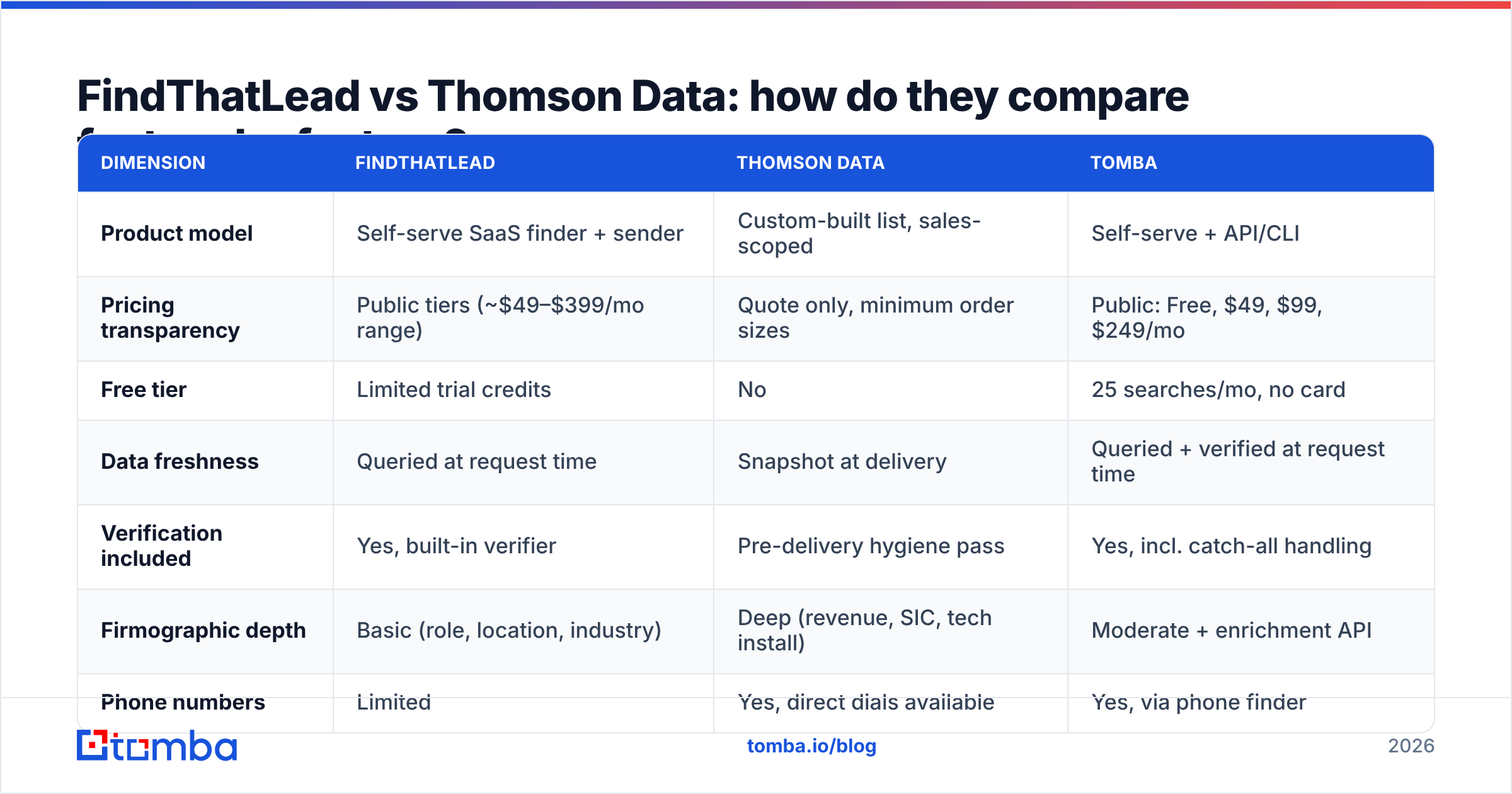
Here's the honest side-by-side. Prices for FindThatLead reflect publicly listed plans at the time of writing — check findthatlead.com before you buy, since vendors adjust tiers frequently. Thomson Data does not publish rates, so those cells reflect the model, not a number.
| Dimension | FindThatLead | Thomson Data | Tomba |
|---|---|---|---|
| Product model | Self-serve SaaS finder + sender | Custom-built list, sales-scoped | Self-serve + API/CLI |
| Pricing transparency | Public tiers (~$49–$399/mo range) | Quote only, minimum order sizes | Public: Free, $49, $99, $249/mo |
| Free tier | Limited trial credits | No | 25 searches/mo, no card |
| Data freshness | Queried at request time | Snapshot at delivery | Queried + verified at request time |
| Verification included | Yes, built-in verifier | Pre-delivery hygiene pass | Yes, incl. catch-all handling |
| Firmographic depth | Basic (role, location, industry) | Deep (revenue, SIC, tech install) | Moderate + enrichment API |
| Phone numbers | Limited | Yes, direct dials available | Yes, via phone finder |
| API access | Yes | Not the primary delivery method | Yes, first-class REST API |
| Built-in email sending | Yes | No | No (integrates with your sender) |
| Best fit | Solo founders, small agencies | Enterprise multi-channel campaigns | Dev-led teams, ongoing prospecting |
Notice what the table exposes: there is no head-to-head on most rows. FindThatLead wins on speed, price clarity, and iteration. Thomson Data wins on attribute depth and one-shot volume. The decision is about your motion, not about which vendor is "better."
Which one has more accurate data?#
Wrong question. The right question is when the data was accurate.
A finder tool resolves an address at the moment you ask. It checks MX records, runs SMTP-level validation where the server allows it, and returns a confidence score. If the contact left the company last week, a good finder either fails to return an address or flags it as risky.
A purchased list was accurate on the day it was compiled. The industry's own numbers on decay are brutal: contact records rot at roughly 22–30% per year, driven by job changes, company renames, acquisitions, and domain migrations. Buy 20,000 records in January, mail the tail of the file in September, and you're working with data that is meaningfully worse than what you paid for — even if the vendor delivered exactly what it promised.

Three practical rules regardless of which vendor you pick:
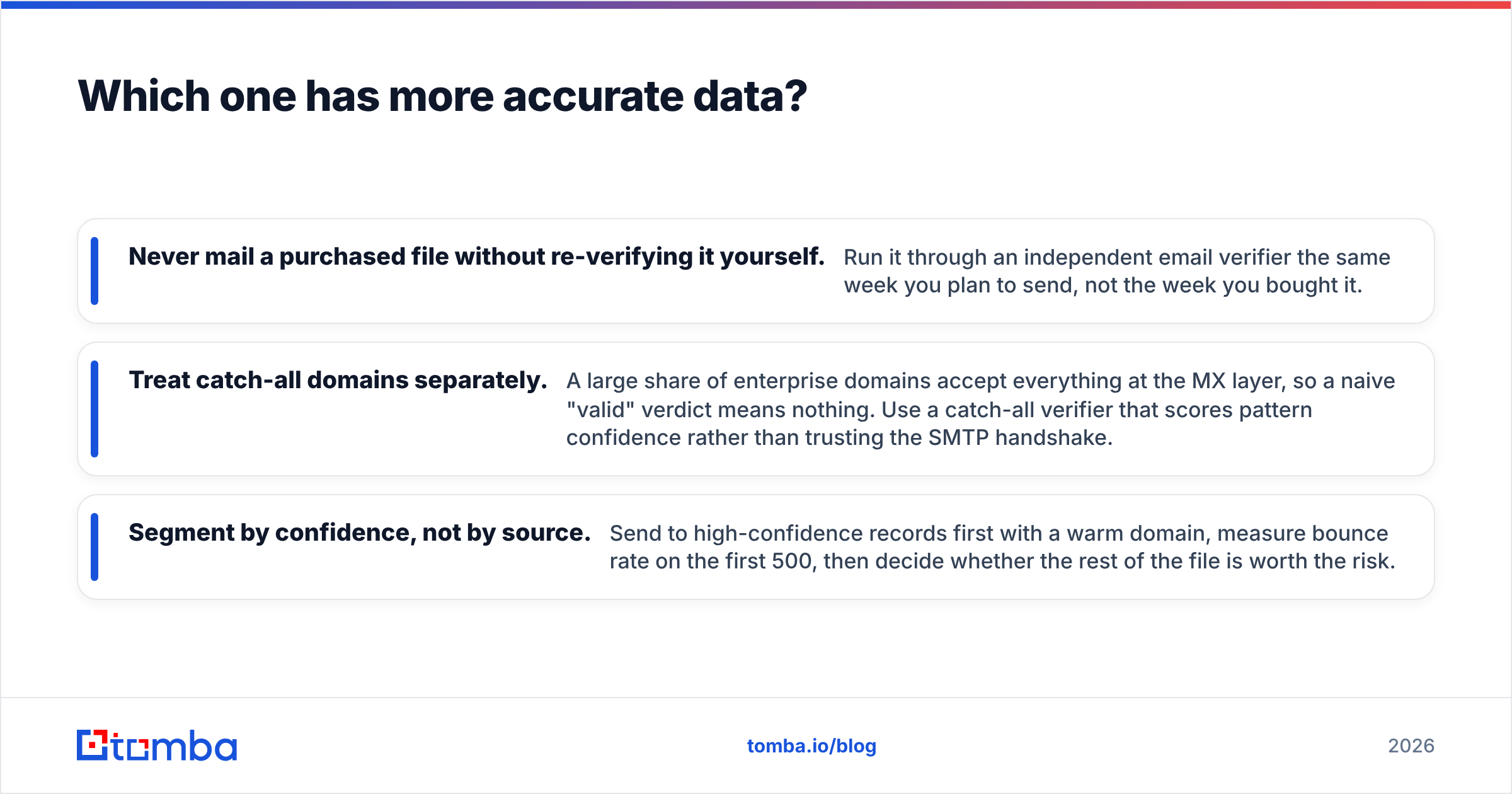
- Never mail a purchased file without re-verifying it yourself. Run it through an independent email verifier the same week you plan to send, not the week you bought it.
- Treat catch-all domains separately. A large share of enterprise domains accept everything at the MX layer, so a naive "valid" verdict means nothing. Use a catch-all verifier that scores pattern confidence rather than trusting the SMTP handshake.
- Segment by confidence, not by source. Send to high-confidence records first with a warm domain, measure bounce rate on the first 500, then decide whether the rest of the file is worth the risk.

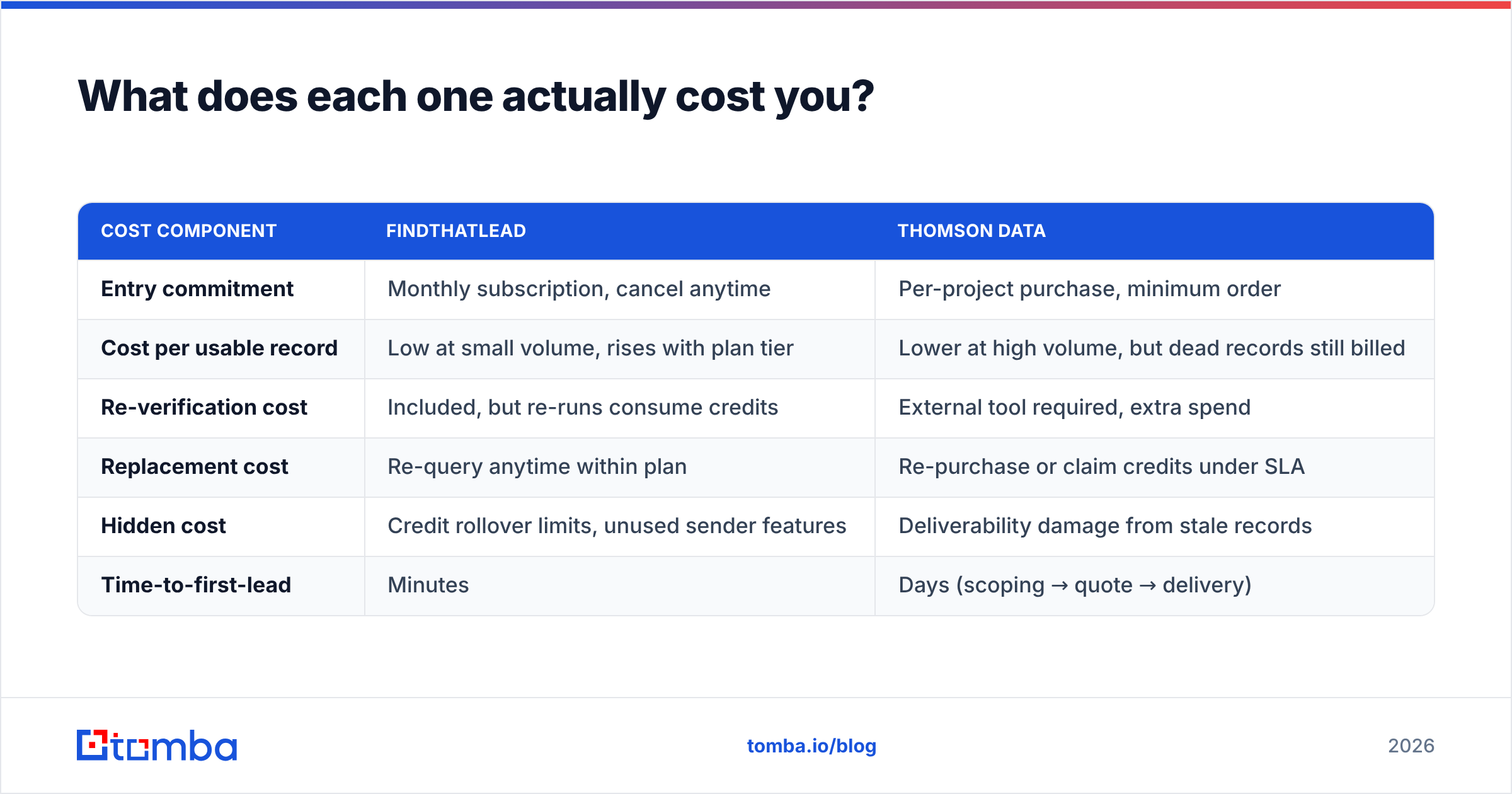
What does each one actually cost you?#
Compare total cost of ownership, not sticker price.
| Cost component | FindThatLead | Thomson Data |
|---|---|---|
| Entry commitment | Monthly subscription, cancel anytime | Per-project purchase, minimum order |
| Cost per usable record | Low at small volume, rises with plan tier | Lower at high volume, but dead records still billed |
| Re-verification cost | Included, but re-runs consume credits | External tool required, extra spend |
| Replacement cost | Re-query anytime within plan | Re-purchase or claim credits under SLA |
| Hidden cost | Credit rollover limits, unused sender features | Deliverability damage from stale records |
| Time-to-first-lead | Minutes | Days (scoping → quote → delivery) |
The line that gets underestimated is cost per usable record. If a 10,000-record file arrives with 88% deliverability, you paid full price for 1,200 rows that will never convert — and worse, those rows will drag your bounce rate over the 2% threshold that most inbox providers treat as a warning sign. Bounces don't just waste money; they cost you sender reputation, which is far more expensive to rebuild than to protect.
For context on transparent, published pricing, Tomba pricing runs Free (25 searches/month), Starter $49/mo, Growth $99/mo, Pro $249/mo, and custom Enterprise — no quote call to find out whether it fits your budget.
When should you buy a list instead of finding emails yourself?#
Buying makes sense in a narrow but real set of cases:
- Multi-channel campaigns. If you're running direct mail plus phone plus email against the same audience, you need postal addresses and direct dials that finder tools generally don't carry.
- Hard-to-crawl verticals. Healthcare practitioners, K-12 administrators, and industrial buyers often have almost no public web footprint. Licensed data beats crawling here.
- Technographic targeting at scale. "Every company running a specific ERP" is a list-vendor query, not a finder query.
- One-off market entry. You need 25,000 records once, and you'd rather not build tooling.
Finding beats buying when:
- Your ICP is discoverable online. SaaS, agencies, e-commerce, professional services — all well covered by web-sourced data.
- You prospect continuously. A subscription that returns fresh data every week beats a snapshot that decays.
- You want to enrich records you already own. Data enrichment against your CRM is a per-record operation, not a bulk purchase.
- You need programmatic access. If your RevOps team wants lookups inside a workflow, an email finder API is the only sane path.
Worth noting: not every list vendor operates identically. Providers like BookYourData sell self-serve, pay-as-you-go B2B lists with published per-record pricing and filtering you run yourself — a middle ground between the quote-based enterprise model and a pure finder tool. If the objection to Thomson Data is "I don't want a sales call," that middle ground is worth a look before you rule out purchased data entirely.
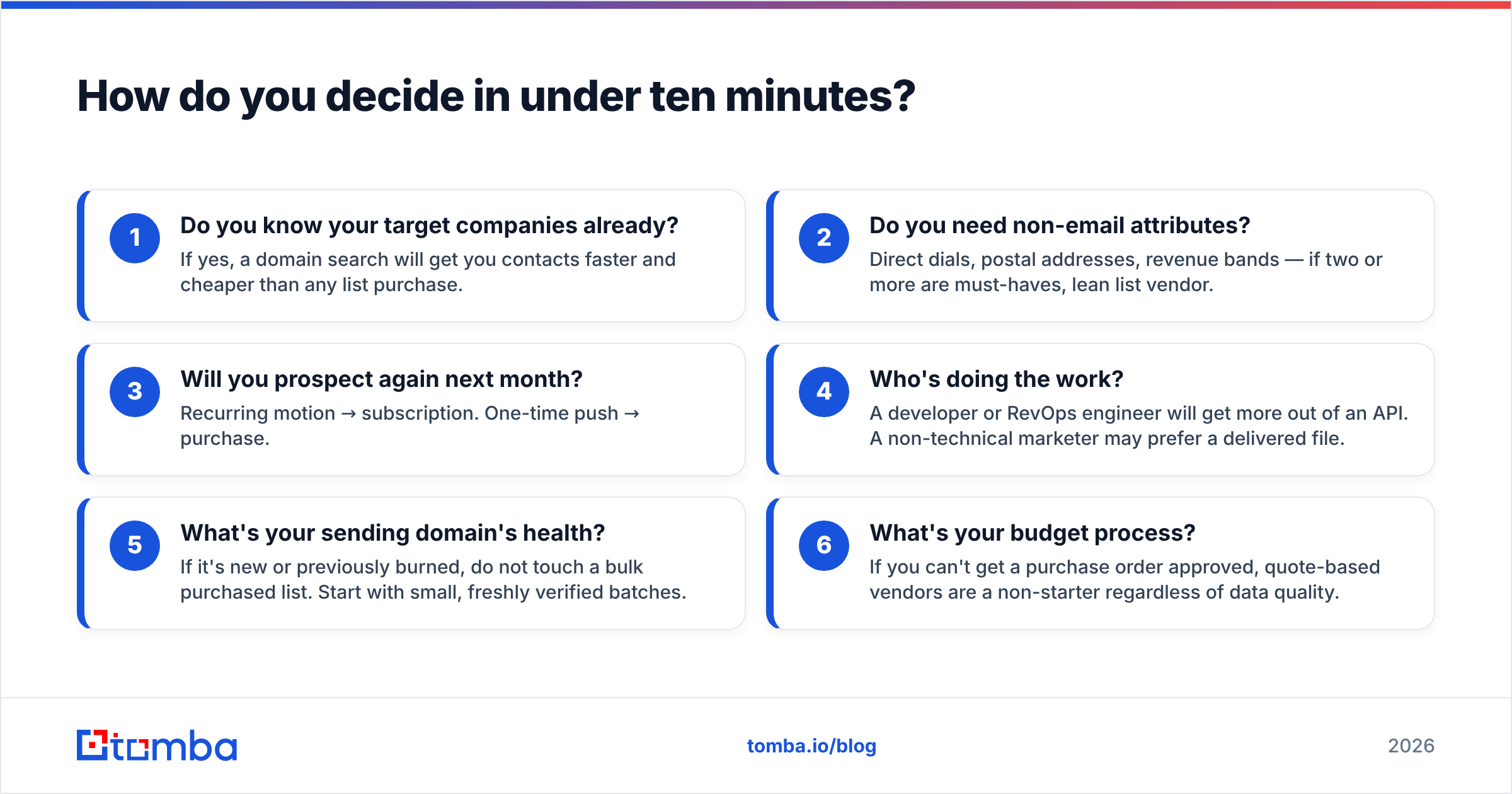
How do you decide in under ten minutes?#
Run this checklist against your own situation:
- Do you know your target companies already? If yes, a domain search will get you contacts faster and cheaper than any list purchase.
- Do you need non-email attributes? Direct dials, postal addresses, revenue bands — if two or more are must-haves, lean list vendor.
- Will you prospect again next month? Recurring motion → subscription. One-time push → purchase.
- Who's doing the work? A developer or RevOps engineer will get more out of an API. A non-technical marketer may prefer a delivered file.
- What's your sending domain's health? If it's new or previously burned, do not touch a bulk purchased list. Start with small, freshly verified batches.
- What's your budget process? If you can't get a purchase order approved, quote-based vendors are a non-starter regardless of data quality.
If you land on "recurring, email-first, technical team, needs published pricing," neither FindThatLead nor Thomson Data is the obvious answer — that profile points at an API-first finder.

Is there a third option worth considering?#
Yes, and it's the one most teams end up at after burning a purchased file.
The structural problem with the buy-a-list model is that data quality is a point-in-time property, while outbound is a continuous process. The structural problem with all-in-one prospecting suites is that they bundle a mediocre sender with a decent finder and charge you for both. The fix is to separate concerns: use a dedicated data layer for finding and verifying, then plug it into whatever sending or CRM stack you already trust.
That's the shape Tomba takes. Find addresses by domain, name, or LinkedIn profile; verify them including catch-all domains; enrich with company data; pull phone numbers where available; and do all of it through a browser extension, Google Sheets, a CLI, or a REST API. Pricing is published. The free tier lets you test accuracy on your own ICP before spending anything — which is the only accuracy benchmark that actually matters. For deeper background on sourcing, see where Tomba gets data and independent user reviews on G2.
The bottom line#
FindThatLead and Thomson Data solve different problems for different buyers. FindThatLead is the faster, cheaper, more iterative choice for small teams doing email-first outbound on discoverable ICPs. Thomson Data is the right call when you need deep firmographics, direct dials, and hard-to-crawl verticals delivered in bulk — and you have the budget process and the verification discipline to handle a static file responsibly.
If neither profile fits — if you want fresh, verified, per-contact data on demand with transparent pricing and an API your team can build on — start with the Tomba Email Finder. The free tier gives you 25 searches a month with no card, which is enough to test hit rate and bounce rate against your own target accounts before you commit a dollar. Test it on 50 real prospects from your pipeline, compare the results to whatever you're using today, and let the bounce rate decide.
Related guides#
Ready to find emails that actually work?
Join 150,000+ professionals who stopped guessing and started sending. Free credits on signup — no credit card required.
Get the Tomba newsletter
Practical outbound tactics and product updates — once every two weeks.
About the author